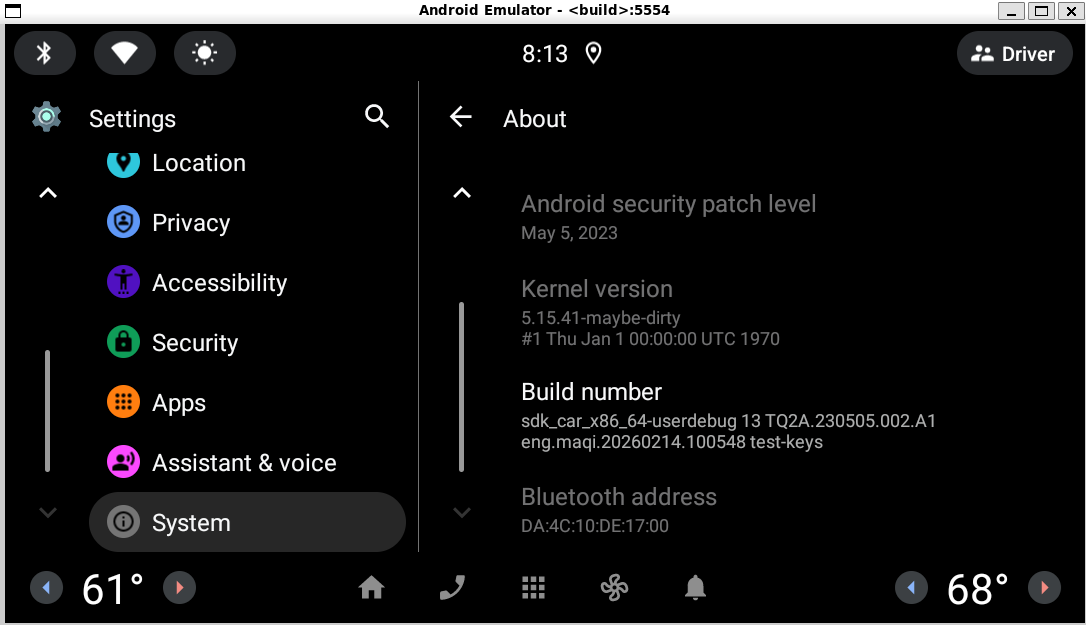
SOC侧编译模拟器源码
bash
cd /home/maqi/android13-r44
source build/envsetup.sh
lunch sdk_car_x86_64-userdebug
make
默认模拟器的内核版本
bash
adb shell cat /proc/version
adb shell uname -a

Linux version 5.15.41-android13-8-00029-g24d27dff64c4-ab9178016
版本选择
shell
https://source.android.com/docs/setup/reference/bazel-support?hl=zh-cn

1. 版本对齐:你的内核版本号前缀是 5.15,且运行在 Android 13 环境下。
2. 在 Android 内核的命名规范中 common-android13-5.15 正是官方为 Android 13 系统配套的 Linux 5.15
   长期支持版本。
   官方文档支撑:查看你提供的 内核分支及其构建系统
   文档表格,对于"虚拟设备(x86_64、arm64)"这一行,common-android13-5.15 是明确列出的支持分支。
下载 repo 工具
深度为1 大概20G 左右
bash
cd ~

mkdir -p ~/bin
curl https://storage.googleapis.com/git-repo-downloads/repo > ~/bin/repo
chmod a+x ~/bin/repo
export PATH=~/bin:$PATH

# 2. 创建目录并初始化
mkdir android-kernel-official && cd android-kernel-official

# 3. 使用 Google 官方地址初始化
# 这里的 -b 指定分支,与之前确认的一致
repo init -u https://android.googlesource.com/kernel/manifest \
     -b common-android13-5.15 --depth=1 --no-repo-verify
repo sync -c -j$(nproc) --no-clone-bundle
指定回退到版本
bash
cd /home/maqi/android-kernel-official/common

# 获取 commit 时间戳(使用作者时间 %at)
EXACT_TIME=$(git log -1 --format=%at 24d27dff64c4)
echo "编译时间锁定为: $(date -d @$EXACT_TIME)"
# 输出: 2022年 06月 22日 星期四 16:04:19 -0400
编译
bash
# 修复编译元数据 (消除 1970 时间戳)
export SOURCE_DATE_EPOCH=$(date +%s)
# 清空
# tools/bazel clean --expunge
cd ~/android-kernel-official

echo "正在编译内核: 5.15.41-android13..."
# 清除编译文件
tools/bazel clean

# 执行 Kleaf 构建
# --config=fast: 启用构建加速
# 编译 x86_64 的内核 (注意 target 名称)
tools/bazel build //common:kernel_x86_64_dist --config=fast --action_env=SOURCE_DATE_EPOCH| 参数 | 作用 |
|---|---|
//common:kernel_x86_64_dist |
编译 x86_64 GKI 内核并打包分发文件 |
--config=fast |
启用编译加速 |
--action_env=SOURCE_DATE_EPOCH |
将时间戳环境变量传递给 Bazel 沙箱 |
注意产物是一个引用
shell
maqi@QiMa:~/android-kernel-official$ ls -l ~/android-kernel-official/out/cache/__common_kernel_x86_64/arch/x86_64/boot/bzImage
lrwxrwxrwx 1 maqi maqi 22  6月 12 14:32 /home/maqi/android-kernel-official/out/cache/__common_kernel_x86_64/arch/x86_64/boot/bzImage -> ../../x86/boot/bzImage
变更代码
bash
maqi@QiMa:~/android-kernel-official/common$ git diff HEAD
diff --git a/BUILD.bazel b/BUILD.bazel
index b7ef6e4a7d..51cae8897c 100644
--- a/BUILD.bazel
+++ b/BUILD.bazel
@@ -67,6 +67,12 @@ define_common_kernels(target_configs = {
         "additional_kmi_symbol_lists": _aarch64_additional_kmi_symbol_lists,
         "abi_definition": "android/abi_gki_aarch64.xml",
     },
+    "kernel_x86_64": {
+        "module_implicit_outs": [
+            "drivers/scsi/virtio_scsi.ko",
+            "drivers/block/virtio_blk.ko",
+        ],
+    },
 })

 # Sync with build.config.db845c
diff --git a/arch/x86/configs/gki_defconfig b/arch/x86/configs/gki_defconfig
index e6daf51b0c..fb7982cd0a 100644
--- a/arch/x86/configs/gki_defconfig
+++ b/arch/x86/configs/gki_defconfig
@@ -278,7 +278,7 @@ CONFIG_BLK_DEV_LOOP=y
 CONFIG_BLK_DEV_LOOP_MIN_COUNT=16
 CONFIG_BLK_DEV_RAM=y
 CONFIG_BLK_DEV_RAM_SIZE=8192
-CONFIG_VIRTIO_BLK=y
+CONFIG_VIRTIO_BLK=m
 CONFIG_SRAM=y
 CONFIG_UID_SYS_STATS=y
 CONFIG_SCSI=y
@@ -291,7 +291,7 @@ CONFIG_SCSI_UFS_DWC_TC_PLATFORM=y
 CONFIG_SCSI_UFS_BSG=y
 CONFIG_SCSI_UFS_CRYPTO=y
 CONFIG_SCSI_UFS_HPB=y
-CONFIG_SCSI_VIRTIO=y
+CONFIG_SCSI_VIRTIO=m
 CONFIG_MD=y
 CONFIG_BLK_DEV_DM=y
 CONFIG_DM_CRYPT=y
查找 out下的 kernel-ranchu 来源
可以发现 模拟器默认使用的 内核是/kernel/prebuilts/5.15/x86_64/kernel-5.15下的版本
bash
md5sum out/target/product/emulator_car_x86_64/kernel-ranchu_bak
find  -name "kernel*" -exec md5sum {} \; 2>/dev/null

690f1b634acf85e32062b159b419f5c7  ./kernel/prebuilts/5.15/x86_64/kernel-5.15
690f1b634acf85e32062b159b419f5c7  ./out/target/product/emulator_car_x86_64/kernel-ranchu
替换模拟器内核
bash
cd /home/maqi/android-kernel-official

# 备份原内核
cp /home/maqi/android13-r44/prebuilts/qemu-kernel/x86_64/kernel-qemu \
   /home/maqi/android13-r44/prebuilts/qemu-kernel/x86_64/kernel-qemu.bak

# 部署新内核
cp out/cache/__common_kernel_x86_64/arch/x86/boot/bzImage \
   /home/maqi/android13-r44/prebuilts/qemu-kernel/x86_64/kernel-qemu
启动模拟器
bash
cd /home/maqi/android13-r44
source build/envsetup.sh
lunch sdk_car_x86_64-userdebug
emulator -gpu swiftshader_indirect -writable-system
验证模拟器中的内核版本
bash
adb shell uname -r