文章目录
- [1. 概述](#1. 概述)
- [2. 决策流程](#2. 决策流程)
- [3. 核心类](#3. 核心类)
-
- [3.1 PermissionBehavior ------ 四种决策行为](#3.1 PermissionBehavior —— 四种决策行为)
- [3.2 PermissionDecision ------ 决策结果](#3.2 PermissionDecision —— 决策结果)
- [3.3 PermissionMode ------ 五种全局模式](#3.3 PermissionMode —— 五种全局模式)
- [3.4 PermissionRule ------ 规则定义](#3.4 PermissionRule —— 规则定义)
- [3.5 PermissionContextState ------ 权限上下文](#3.5 PermissionContextState —— 权限上下文)
- [4. 规则详解](#4. 规则详解)
-
- [4.1 初始化时------静态预配置](#4.1 初始化时——静态预配置)
- [4.2 运行时------动态建议规则](#4.2 运行时——动态建议规则)
- [5. Built-in Checks(不可绕过)](#5. Built-in Checks(不可绕过))
- [6. HITL 集成](#6. HITL 集成)
- [7. 完整示例](#7. 完整示例)
1. 概述
Permission System(io.agentscope.core.permission)拦截 Agent 的每一次工具调用,给出三种决策之一:
静态规则 + 工具类型 + 输入分析 → ALLOW(允许)/ DENY(拒绝)/ ASK(询问用户)三个组件共同决定结果:
| 组件 | 优先级 | 说明 |
|---|---|---|
| Rules | 最高 | 针对每个 tool 与命令的显式 allow / deny / ask 模式。来源:静态预配置 + ASK 提示中用户接受后动态加入 |
| Mode | 中 | 全局静态策略,决定所有不命中规则的调用的默认行为 |
| Built-in Checks | 不可绕过 | tool 自身在运行时基于真实输入做的动态分析(ToolBase#checkPermissions),不受 mode 或 rules 覆盖 |
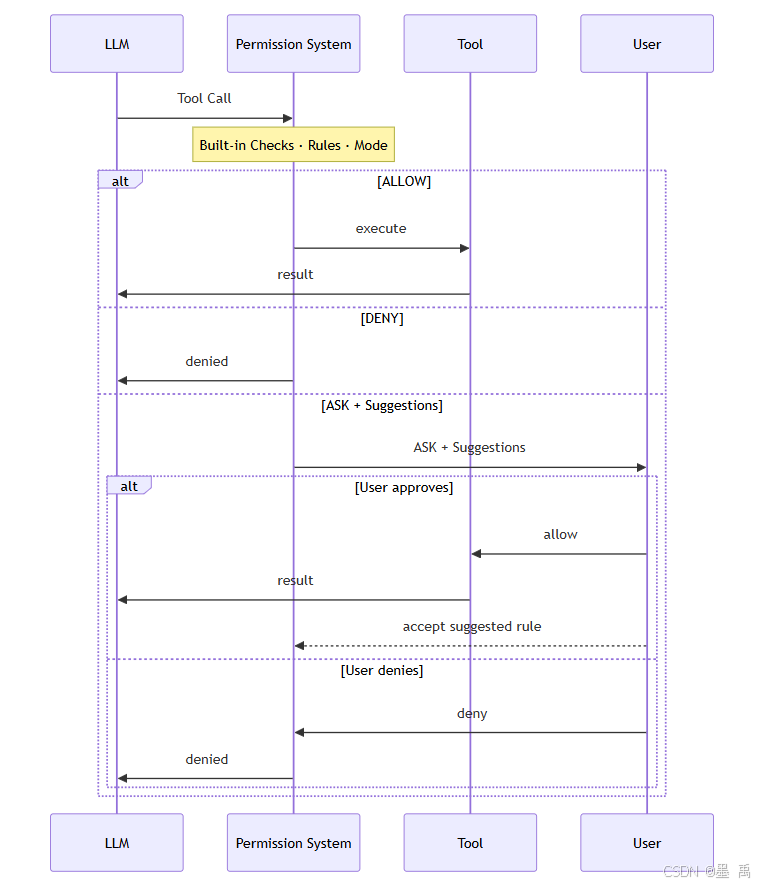
Deny规则与危险路径检查是不可绕过的 ------即使在BYPASS模式下也照常生效。
2. 决策流程
Tool 调用请求
    │
    ▼
┌─────────────────┐
│ 1. Deny 规则     │ → 命中 → DENY ✋  ← 不可绕过
└────────┬────────┘
    │ 未命中
    ▼
┌─────────────────┐
│ 2. Allow 规则    │ → 命中 → ALLOW ✅
└────────┬────────┘
    │ 未命中
    ▼
┌─────────────────┐
│ 3. ASK 规则      │ → 命中 → ASK ❓(生成建议规则,用户确认后回传)
└────────┬────────┘
    │ 未命中
    ▼
┌─────────────────┐
│ 4. Mode 默认策略  │ → DEFAULT/ACCEPT_EDITS/EXPLORE/BYPASS/DONT_ASK
└────────┬────────┘
    │
    ▼
┌─────────────────┐
│ 5. Built-in      │ → tool.checkPermissions() ← 不可绕过
│    Checks        │
└─────────────────┘
3. 核心类
3.1 PermissionBehavior ------ 四种决策行为
java
public enum PermissionBehavior {
    ALLOW,        // 允许执行
    DENY,         // 拒绝执行
    ASK,          // 询问用户确认
    PASSTHROUGH   // 透传(不干预)
}
3.2 PermissionDecision ------ 决策结果
java
PermissionDecision.allow("Read-only tool");     // 允许
PermissionDecision.deny("Dangerous operation"); // 拒绝
PermissionDecision.ask("Please confirm");       // 询问
PermissionDecision.passthrough("No opinion");   // 透传

// 带建议规则(ASK 时自动生成)
decision.withSuggestedRules(List.of(
    new PermissionRule("get_weather", "Beijing", PermissionBehavior.ALLOW, "user")
));| 方法 | 说明 |
|---|---|
getBehavior() |
ALLOW / DENY / ASK / PASSTHROUGH |
getMessage() |
决策说明 |
getUpdatedInput() |
修改后的输入(允许时可能被改写) |
getSuggestedRules() |
ASK 时基于本次调用生成的建议规则 |
3.3 PermissionMode ------ 五种全局模式
java
public enum PermissionMode {
    DEFAULT,       // 未知调用 → ASK
    ACCEPT_EDITS,  // 文件编辑 → ALLOW;其他 → DEFAULT
    EXPLORE,       // 只读工具 → ALLOW;写入 → DENY
    BYPASS,        // 放行一切(deny/ask 规则仍生效)
    DONT_ASK       // 把所有 ASK 转为 DENY(静默拒绝)
}| 模式 | 行为 | 适用场景 |
|---|---|---|
DEFAULT |
未命中规则的调用 → ASK | 交互式开发 |
ACCEPT_EDITS |
文件编辑自动允许,其余默认 | 编码助手 |
EXPLORE |
只读允许,写入拒绝 | 只读 Agent / 代码审查 |
BYPASS |
全部放行(deny/ask 规则仍生效) | 信任环境 |
DONT_ASK |
ASK 转 DENY(静默拒绝) | 自动化部署 |
3.4 PermissionRule ------ 规则定义
java
public record PermissionRule(
    String toolName,          // 工具名(null = 匹配所有)
    String ruleContent,       // 匹配模式(传给 tool.matchRule())
    PermissionBehavior behavior,  // ALLOW / DENY / ASK / PASSTHROUGH
    String source             // 规则来源标识(如 "userSettings")
) {}
3.5 PermissionContextState ------ 权限上下文
java
PermissionContextState permCtx = PermissionContextState.builder()
    .mode(PermissionMode.DEFAULT)
    // Allow 规则
    .addAllowRule(new PermissionRule(
        "safe_read", null, PermissionBehavior.ALLOW, "userSettings"))
    .addAllowRule(new PermissionRule(
        "get_weather", null, PermissionBehavior.ALLOW, "userSettings"))
    // ASK 规则
    .addAskRule(new PermissionRule(
        "write_file", "*.md", PermissionBehavior.ASK, "userSettings"))
    .addAskRule(new PermissionRule(
        "execute_command", null, PermissionBehavior.ASK, "userSettings"))
    // Deny 规则
    .addDenyRule(new PermissionRule(
        "drop_table", null, PermissionBehavior.DENY, "userSettings"))
    .addDenyRule(new PermissionRule(
        "rm_rf", "/etc/*", PermissionBehavior.DENY, "userSettings"))
    .build();

ReActAgent agent = ReActAgent.builder()
    .model(model).toolkit(toolkit)
    .permissionContext(permCtx)
    .build();
4. 规则详解
4.1 初始化时------静态预配置
通过 PermissionContextState.builder() 在构建 Agent 时传入:
java
// Allow:读操作一律放行
new PermissionRule("read_file", null, PermissionBehavior.ALLOW, "admin")
new PermissionRule("get_weather", null, PermissionBehavior.ALLOW, "admin")

// ASK:写操作询问用户
new PermissionRule("write_file", null, PermissionBehavior.ASK, "admin")
new PermissionRule("execute_command", null, PermissionBehavior.ASK, "admin")

// Deny:危险操作直接拒绝
new PermissionRule("drop_table", null, PermissionBehavior.DENY, "admin")
4.2 运行时------动态建议规则
当权限系统返回 ASK 时,会基于本次调用自动生成建议规则 。用户确认后,已接受的规则附在 ConfirmResult.acceptedRules 中回传,Agent 自动写入引擎:
java
// 前端收到 RequireUserConfirmEvent
event.getToolCalls().forEach(tc -> {
    // 展示给用户:tc.getName() + tc.getInput()
    // 用户确认后
    ConfirmResult result = new ConfirmResult(
        true,           // confirmed
        tc,             // 工具调用
        List.of(        // 接受的建议规则
            new PermissionRule(
                tc.getName(), null, PermissionBehavior.ALLOW, "user-accepted")
        )
    );
    // 回传给 Agent → 后续相同调用自动 ALLOW
});
5. Built-in Checks(不可绕过)
每个 ToolBase 子类在 checkPermissions() 中进行运行时动态分析:
java
public class FileWriteTool extends ToolBase {
    @Override
    public Mono<PermissionDecision> checkPermissions(
            Map<String, Object> toolInput, ToolExecutionContext context) {
        String path = (String) toolInput.get("path");

        // 危险目录检查------不可绕过
        if (path.startsWith("/etc/") || path.startsWith("/sys/")) {
            return Mono.just(PermissionDecision.deny("System directory access denied"));
        }

        // 危险文件后缀
        if (path.endsWith(".sh") || path.endsWith(".bash")) {
            return Mono.just(PermissionDecision.deny("Script file write denied"));
        }

        return Mono.just(PermissionDecision.allow("Safe file write"));
    }
}
6. HITL 集成
Agent 调用 tool
    │
    ▼
Permission System 评估 → ALLOW / DENY
    │
    ├── ALLOW → 直接执行
    ├── DENY  → 拒绝,Agent 收到错误
    └── ASK   →
            │
            ▼
        发出 RequireUserConfirmEvent(暂停)
            │
        前端展示 toolCall 详情
            │
        用户点击 确认 / 拒绝
            │
        回传 UserConfirmResultEvent(含 acceptedRules)
            │
            ▼
        Agent 恢复执行(后续相同调用自动处理)
7. 完整示例
java
// 1. 创建权限上下文
PermissionContextState permCtx = PermissionContextState.builder()
    .mode(PermissionMode.DEFAULT)
    // 读操作允许
    .addAllowRule(new PermissionRule("read_file", null, ALLOW, "admin"))
    .addAllowRule(new PermissionRule("get_weather", null, ALLOW, "admin"))
    // 写操作询问
    .addAskRule(new PermissionRule("write_file", null, ASK, "admin"))
    .addAskRule(new PermissionRule("execute_command", null, ASK, "admin"))
    // 危险操作拒绝
    .addDenyRule(new PermissionRule("drop_table", null, DENY, "admin"))
    .build();

// 2. 构建 Agent
ReActAgent agent = ReActAgent.builder()
    .name("secure-agent")
    .model(model)
    .toolkit(toolkit)
    .permissionContext(permCtx)
    .sysPrompt("你是一个安全的 AI 助手,文件写入和命令执行需要用户确认。")
    .build();

// 3. 监听 HITL 事件
agent.streamEvents(userMsg)
    .subscribe(event -> {
        if (event instanceof RequireUserConfirmEvent confirm) {
            // 前端弹出确认框
            confirm.getToolCalls().forEach(tc -> {
                System.out.println("确认执行: " + tc.getName() + " → " + tc.getInput());
            });
        }
    });