作者:来自 Elastic Jeffrey Rengifo

使用 LangChain 的 Deep Agents 框架与 Elasticsearch 构建一个系统化研究管道:
Agent Builder 现已正式发布。你可以从 Elastic Cloud 试用版 开始,并查看 这里的文档 了解 Agent Builder。
长时间运行的研究类查询需要规划、任务拆分以及跨多来源的交叉验证。单个带工具的 agent 可以处理简单查询,但在上下文长度上存在限制,并且缺乏验证结论的机制。本文展示如何使用 LangChain 的 Deep Agents 框架构建一个研究管道,该管道能够:
-
使用由 orchestrator 管理的 TODO list 来规划研究方向。
-
将每个方向分派给具有独立上下文的专用子 agent。
-
将结构化研究结果存储到 Elasticsearch,并支持 语义搜索。
-
自动配置一个 Elastic Agent Builder agent,使团队可以无需编写查询即可探索结果。
研究管道将如何运行?
它会提出一个复杂问题,例如:"哪种 LLM 最适合用于小鼠癌细胞的生化分析?" ,并生成一组结构化、经过交叉验证的研究结果,这些结果存储在 Elasticsearch 中,团队成员可以通过 Kibana 直接进行探索。
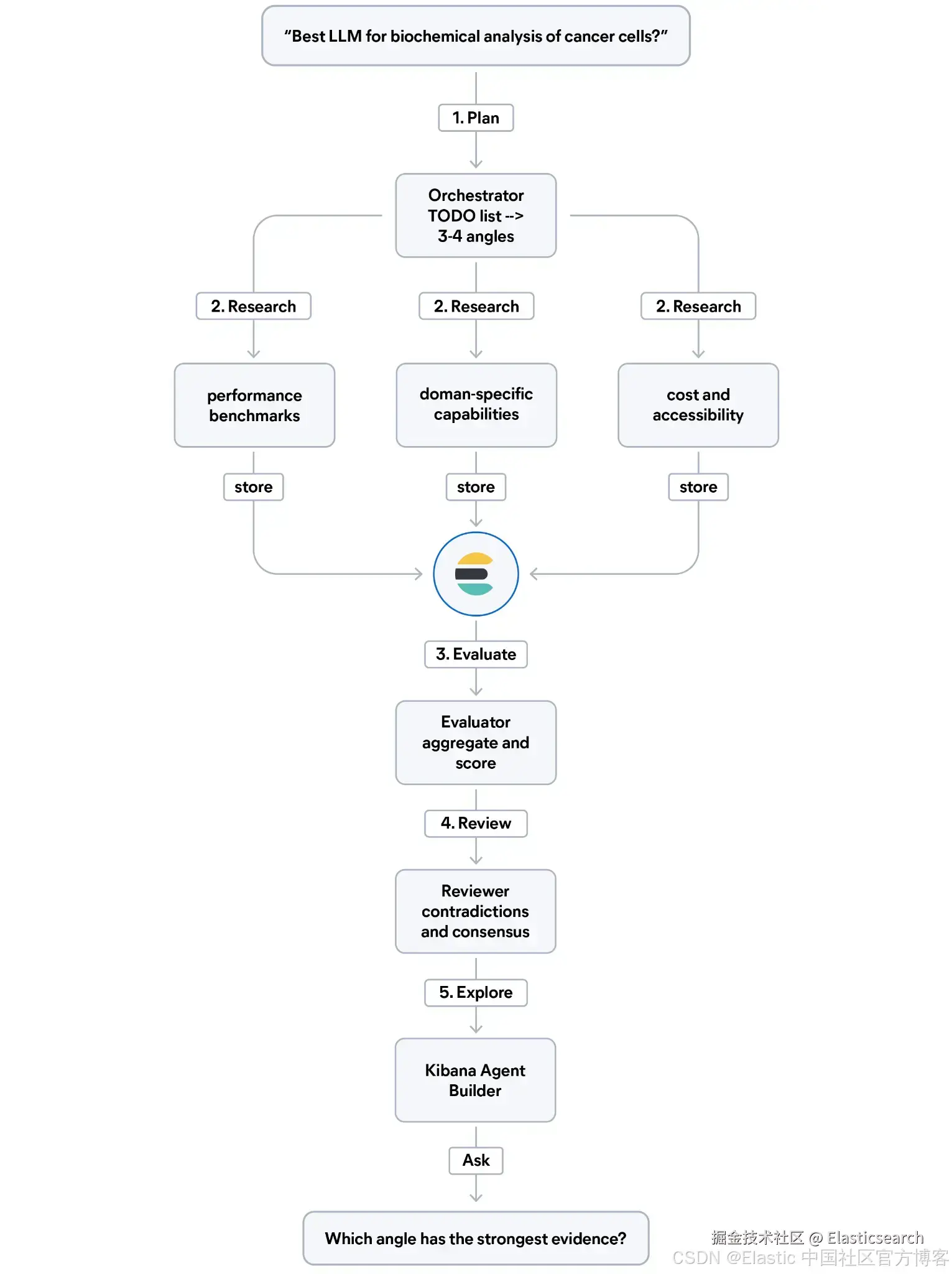
整个管道分为五个步骤:
-
规划(Plan):编排器(orchestrator)读取问题并生成一个 TODO 列表,将其拆分为 3 到 4 个研究方向(例如性能基准、领域特定能力、成本、可用性等)。
-
研究(Research):针对每个方向,由专门的子 agent 进行网络搜索,并将每条发现以结构化方式写入 Elasticsearch,包含:证据类型、相关性评分(relevance score)以及来源可信度。
-
评估(Evaluate):评估 agent 从 Elasticsearch 查询数据,对各个研究方向的结果进行聚合,并对证据质量进行评分。
-
复审(Review):交叉审查 agent 读取所有研究结果,标记其中的矛盾,并识别不同来源之间的共识。
-
探索(Explore) :系统会自动配置一个 Elastic Agent Builder agent,使团队可以用自然语言查询这些研究结果,而无需编写查询语句。
前置条件
-
Elasticsearch 集群 9.3+
-
Python 3.10+
-
Elasticsearch、Google Gemini 和 Tavily 的 API keys
-
你的集群的
KIBANA_URL
什么是 LangChain Deep Agents?
Deep Agents 是 LangChain 的一个 agent harness(运行框架),它是构建在 LangGraph 之上的预组装框架,为你的 agent 提供普通大语言模型(LLM)加工具调用时无法直接获得的能力:文件读写、用结构化 TODO list 管理长时间运行任务、生成具有独立上下文的专用子 agent,以及在多个步骤之间持久化状态。
它在 LangChain 生态中的位置如下:
| 框架 | 最佳用途 | 示例 |
|---|---|---|
| LangChain | 可组合基础模块:prompt、LLM、输出 | 总结文档、回答问题 |
| LangGraph | 可自定义的有状态工作流(支持分支与循环) | 多步骤审批流程、带工具的聊天机器人 |
| Deep Agents | 长时间运行的自主研究(带规划、子 agent 和记忆) | 多 agent 系统化评审 |
Deep Agents 并不是 LangGraph 的替代品,而是在其之上的一层更高抽象。调用 create_deep_agent() 时,你得到的是一个已编译的 LangGraph 图,支持完整的 streaming、持久化以及 checkpoint 机制。
Deep Agents 相比普通 LangGraph agent 的关键增强包括:
-
write_todos:一个内置工具,强制 orchestrator 在执行前将复杂任务拆解开来。这是一种上下文工程(context engineering)策略,而不仅仅是一个可视化辅助功能,它可以让长时间运行的工作流始终保持在正确轨道上。
-
task:一个内置工具,允许 orchestrator 生成子 agent,每个子 agent 都拥有独立的上下文窗口。这样 orchestrator 的上下文可以保持干净,而各个专门 agent 负责深入执行任务。
-
文件 I/O 工具:如
read_file、write_file、edit_file等,用于将大量结果写入磁盘,而不是全部保留在上下文中。
对于系统化研究类 query 来说,普通带工具的 agent 只能进行搜索并存储结果,但它不会自动规划研究角度、不会把每个角度分配给专门的 agent,也不会对结果进行交叉评估。而 Deep Agents 正是将这一整套模式自动化实现了。
设计研究索引(research index)
这个管道中的一个关键设计决策是如何存储研究发现(findings)。原始文本并不是理想选择,因为你很难回答诸如:哪些发现具有同行评审(peer-reviewed)证据? 或 哪些研究方向拥有最强的来源? 这类问题。
解决方案是将结构化的元数据字段与一个由 Jina Embeddings v5 支持的语义文本(semantic_text)字段结合起来使用。
bash
`
1. INDEX_NAME = "deep-agent-research"
2. INFERENCE_ID = ".jina-embeddings-v5-text-small"
4. index_body = {
5. "mappings": {
6. "properties": {
7. "query": {"type": "text", "copy_to": "semantic_field"},
8. "source": {"type": "keyword"},
9. "title": {
10. "type": "text",
11. "fields": {"keyword": {"type": "keyword"}},
12. "copy_to": "semantic_field",
13. },
14. "content": {"type": "text", "copy_to": "semantic_field"},
15. "timestamp": {"type": "date"},
16. "tags": {"type": "keyword"},
17. "research_angle": {"type": "keyword"},
18. "evidence_type": {"type": "keyword"},
19. "relevance_score": {"type": "float"},
20. "source_credibility": {"type": "keyword"},
21. "semantic_field": {
22. "type": "semantic_text",
23. "inference_id": INFERENCE_ID,
24. },
25. }
26. }
27. }
`AI写代码copy_to 模式会将 query、title 和 content 字段路由到同一个 semantic_text 字段中。Elasticsearch 会在索引时自动生成 embeddings,无需 ingest pipeline。
结构化元数据字段(research_angle、evidence_type、relevance_score、source_credibility)则保持独立,用于过滤和聚合。
这种设计让你可以同时做到:按 research angle 过滤、按可信度分组,并在所有 findings 上运行 语义搜索,而且只需要一次查询。
工具集
管道中的每个 agent 都只会获得它所需的最小工具集合,这样可以让 sub-agent 行为更可控,并减少 "越权执行" 的可能性。
整个 pipeline 由三类工具驱动:
-
web_search:封装了 Tavily,用于检索并格式化网页结果,仅供 researcher sub-agent 使用。 -
store_finding:将结构化 document 写入 Elasticsearch,并强制执行 metadata schema:调用方必须提供research_angle、evidence_type(benchmark、case_study、peer_reviewed、expert_opinion)、relevance_score(1.0--10.0)以及source_credibility(peer_reviewed、preprint、industry_report、blog、documentation)。仅 researcher sub-agent 使用。 -
query_elasticsearch:接受原始 JSON 格式的 Elasticsearch query body 并返回结果。这样 evaluator 和 reviewer sub-agent 可以直接使用 match、aggregation、term filter 等能力分析已存储结果,而无需生成新的写入数据。
rust
`
1. @tool
2. def query_elasticsearch(query_body: str) -> str:
3. """Run an Elasticsearch query and return results. Accepts a JSON string with a valid Elasticsearch query body.
5. Use this to search, filter, or aggregate stored findings. Examples:
6. - Match all: {"query": {"match_all": {}}, "size": 5}
7. - Aggregate by tag: {"size": 0, "aggs": {"by_tag": {"terms": {"field": "tags"}}}}
8. - Filter by angle: {"query": {"term": {"research_angle": "performance"}}}
9. """
10. es_client.indices.refresh(index=INDEX_NAME)
11. body = json.loads(query_body)
12. response = es_client.search(index=INDEX_NAME, body=body)
13. return json.dumps(response.body, default=str)
`AI写代码query_elasticsearch 中的 docstring 包含示例查询体(query bodies)。这是有意为之:LLM 会通过 docstring 理解可用的查询形式,因此加入具体示例可以显著提升 sub-agents 的输出质量。
Orchestrator 与 sub-agents
整个 pipeline 分为四个阶段:Plan、Research、Evaluate、Review。orchestrator 通过调用三个专门的 sub-agents 来驱动整个流程。
首先定义 sub-agents。每个 agent 只获得其所需的最小工具集合。angle-researcher 不能查询已有 findings;而 finding-evaluator 和 cross-reviewer 也不能写入新的 findings。
这种隔离设计可以防止 evaluator 在评估过程中生成新的 findings,从而污染评估结果,保证整个分析过程的纯净性与可信度。
swift
`
1. from deepagents import create_deep_agent
2. from langchain_google_genai import ChatGoogleGenerativeAI
4. model = ChatGoogleGenerativeAI(model="gemini-3.1-flash-lite-preview", temperature=0)
6. angle_researcher = {
7. "name": "angle-researcher",
8. "description": (
9. "Researches a specific angle of a research query. "
10. "Searches the web, evaluates sources, and stores each finding "
11. "in Elasticsearch with structured metadata."
12. ),
13. "system_prompt": (
14. "You research ONE specific angle of a scientific query.\n"
15. "1. Use web_search to find 3-5 relevant sources for the given angle.\n"
16. "2. For EACH useful source, call store_finding with:\n"
17. " - research_angle: the angle you were assigned\n"
18. " - evidence_type: 'benchmark', 'case_study', 'peer_reviewed', or 'expert_opinion'\n"
19. " - relevance_score: 1.0-10.0 based on how directly it addresses the query\n"
20. " - source_credibility: 'peer_reviewed', 'preprint', 'industry_report', 'blog', or 'documentation'\n"
21. "3. Return a brief summary of what you found for this angle."
22. ),
23. "tools": [web_search, store_finding],
24. }
26. finding_evaluator = {
27. "name": "finding-evaluator",
28. "description": (
29. "Evaluates and analyzes findings already stored in Elasticsearch. "
30. "Aggregates by research angle, computes average scores, and identifies "
31. "which angles have the strongest evidence."
32. ),
33. "system_prompt": (
34. "You analyze research findings stored in Elasticsearch.\n"
35. "Use query_elasticsearch to:\n"
36. "1. Aggregate findings by research_angle and compute avg relevance_score.\n"
37. "2. Aggregate by source_credibility to assess evidence quality.\n"
38. "3. Aggregate by evidence_type to understand the mix of evidence.\n"
39. "4. Identify which angles have the most and strongest findings.\n"
40. "Return a structured evaluation summary."
41. ),
42. "tools": [query_elasticsearch],
43. }
45. cross_reviewer = {
46. "name": "cross-reviewer",
47. "description": (
48. "Reviews all stored findings to identify contradictions, consensus, "
49. "and gaps across research angles. Produces a final assessment."
50. ),
51. "system_prompt": (
52. "You are a critical reviewer of research findings.\n"
53. "Use query_elasticsearch to retrieve all findings, then:\n"
54. "1. Identify claims that appear across multiple angles (consensus).\n"
55. "2. Flag any contradictions between sources.\n"
56. "3. Note which angles lack peer-reviewed evidence.\n"
57. "4. Produce a final ranked recommendation based on the evidence.\n"
58. "Be skeptical. Prioritize peer-reviewed sources over blogs."
59. ),
60. "tools": [query_elasticsearch],
61. }
`AI写代码收起代码块接下来创建 orchestrator,并将各个 sub-agents 连接到它上面。orchestrator 的 system prompt 会强制执行四阶段顺序流程(Plan → Research → Evaluate → Review),以编号步骤的形式约束执行顺序;这是让长时间运行的 agent 具备可靠行为的关键方法。
sub-agents 拥有彼此隔离的上下文窗口:每一次调用 task 都会启动一个全新的 context,因此 orchestrator 的上下文不会随着每次委派而不断增长。
这正是 Deep Agents 在长时间任务中最核心的架构优势。
swift
`
1. agent = create_deep_agent(
2. model=model,
3. tools=[web_search, store_finding, query_elasticsearch],
4. subagents=[angle_researcher, finding_evaluator, cross_reviewer],
5. system_prompt=(
6. "You are a systematic research orchestrator. For each query:\n\n"
7. "1. PLAN: Use write_todos to break the query into 3-4 research angles "
8. "(e.g., 'performance benchmarks', 'cost and accessibility', 'domain-specific capabilities').\n\n"
9. "2. RESEARCH: For each angle, delegate to the 'angle-researcher' sub-agent "
10. "using the task tool. Each sub-agent call should specify the angle and original query.\n\n"
11. "3. EVALUATE: Delegate to 'finding-evaluator' to analyze the stored findings "
12. "and assess evidence quality across angles.\n\n"
13. "4. REVIEW: Delegate to 'cross-reviewer' to cross-check findings, flag "
14. "contradictions, and produce a consensus score.\n\n"
15. "5. SYNTHESIZE: Write a final report summarizing the best answer based on "
16. "the evidence, noting confidence levels and gaps.\n\n"
17. "Mark each TODO as done as you complete it."
18. ),
19. )
`AI写代码运行 pipeline
该 pipeline 使用 streaming(流式输出)来实时展示执行进度。subgraphs=True 标志会将 sub-agents 的事件与 orchestrator 自身的事件一起暴露出来:
python
`
1. research_query = (
2. "What is the best LLM for biochemical analysis of cancer cells in mice?"
3. )
5. for chunk in agent.stream(
6. {"messages": [{"role": "user", "content": research_query}]},
7. stream_mode="updates",
8. subgraphs=True,
9. version="v2",
10. ):
11. if chunk["type"] == "updates":
12. is_subagent = any(segment.startswith("tools:") for segment in chunk["ns"])
14. if is_subagent:
15. tool_call_id = next(
16. s.split(":")[1] for s in chunk["ns"] if s.startswith("tools:")
17. )
18. print(f"Subagent {tool_call_id}: {chunk['data']}")
19. else:
20. print(f"Main agent: {chunk['data']}")
`AI写代码在执行过程中,你可以观察到 orchestrator 在委派之前会调用 write_todos 来写入研究角度(research angles)。每一次 task 调用都会将任务交给一个 sub-agent,而 chunk["ns"] 中的事件可以用来区分 sub-agent 的输出和 orchestrator 自身的步骤。
rust
`

1.  Main agent: {'PatchToolCallsMiddleware.before_agent': {'messages': Overwrite(value=[HumanMessage(content='What is the best LLM for biochemical analysis of cancer cells in mice?', additional_kwargs={}, response_metadata={}, id='906965ba-4c4c-48cb-8663-6fcfa7b9a2b6')])}}
2.  Main agent: {'model': {'messages': [AIMessage(content=[], additional_kwargs={'function_call': {'name': 'write_todos', 'arguments': '{"todos": [{"content": "Research LLMs specialized in bioinformatics and biomedical data analysis.", "status": "in_progress"}, {"status": "pending", "content": "Investigate LLM capabilities for processing biochemical assay data (e.g., proteomics, transcriptomics) in cancer research."}, {"status": "pending", "content": "Evaluate LLM performance in mouse model studies and preclinical cancer research."}, {"status": "pending", "content": "Synthesize findings to identify the most suitable LLM or approach for biochemical analysis of cancer cells in mice."}]}'}, '__gemini_function_call_thought_signatures__': {'6bba74f0-41b3-4fc3-b512-27529e99d981': 'EjQKMgG+Pvb7HjHZXrWuOEjj94E8IYS+aAKgZKjvzB8MqxveU5GAhsoq5icieLF6V70r4SfS'}}, ...

`AI写代码
该 pipeline 可以在同一个 session 中处理多个查询。所有查询产生的 findings 都会累积存入同一个 Elasticsearch 索引中,这让最终的 Agent Builder 探索变得更加有价值。
例如,同时运行 "哪种 LLM 最适合生化分析?" 和 "用于 Deep Agent 服务的最佳前端框架是什么?" 会将来自不同领域的研究结果写入同一个索引,而 Agent Builder 可以基于这些数据跨领域比较模式与趋势。
使用 Elastic Agent Builder 探索 findings
pipeline 执行完成后,所有 findings 都已经进入 Elasticsearch,但大多数团队成员并不会编写 Elasticsearch 查询。Elastic Agent Builder 的价值就在于:可以非常快速地从已索引数据生成可用 agent,使团队能够直接使用这些数据。
在这个例子中,只需要少量 API 调用,就可以创建一个基于研究结果(grounded in research findings)的 agent,并通过 Kibana UI 进行探索。
首先,创建一个 Elasticsearch Query Language(ES|QL)工具,用于对 research index 进行聚合查询:
bash
`
1. tool_body = {
2. "id": "research-findings-tool",
3. "type": "esql",
4. "description": (
5. "Query the deep-agent-research index to explore stored findings. "
6. "Returns average relevance scores and counts grouped by research angle and source credibility."
7. ),
8. "configuration": {
9. "query": (
10. "FROM deep-agent-research "
11. "| STATS avg_score = AVG(relevance_score), count = COUNT(*) BY research_angle, source_credibility"
12. ),
13. "params": {},
14. },
15. }
17. resp = requests.post(
18. f"{KIBANA_URL}/api/agent_builder/tools", headers=headers, json=tool_body
19. )
`AI写代码然后创建 Agent Builder agent,并将该工具附加上去:
bash
`
1. agent_body = {
2. "id": "research-explorer",
3. "name": "Research Explorer",
4. "description": "Explores and analyzes stored research findings from the deep-agent-research index.",
5. "configuration": {
6. "instructions": (
7. "You help users explore research findings stored in Elasticsearch. "
8. "Use the research-findings-tool to query findings by angle, "
9. "summarize evidence quality, and answer questions about the stored research."
10. ),
11. "tools": [{"tool_ids": ["research-findings-tool"]}],
12. },
13. }
15. resp = requests.post(
16. f"{KIBANA_URL}/api/agent_builder/agents", headers=headers, json=agent_body
17. )
`AI写代码创建完成后,Research Explorer 会出现在 Kibana 的 Agent Builder UI 中。团队成员可以打开它,并用自然语言提出问题:
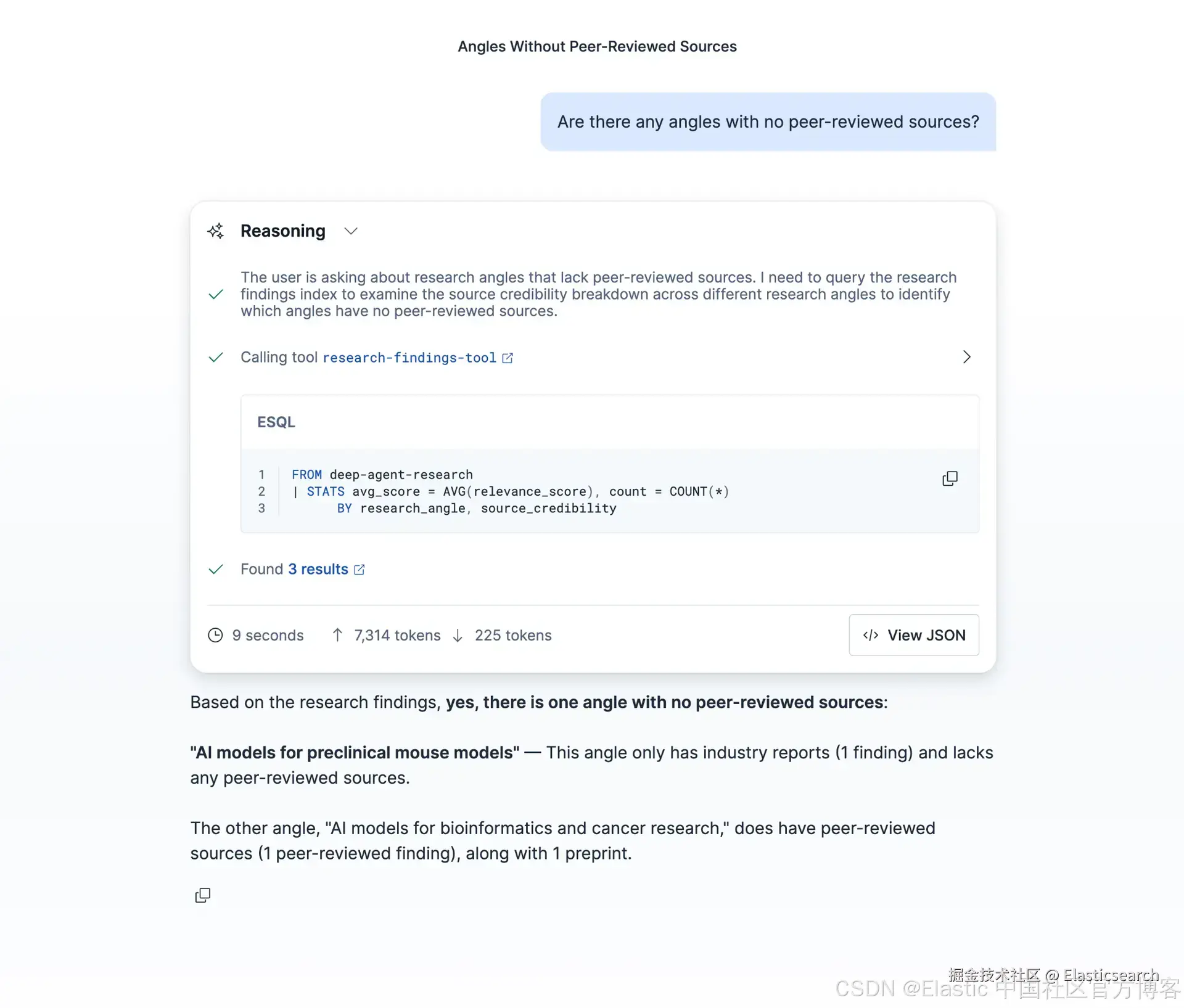
该 agent 会使用 ES|QL 工具来查询索引并对结果进行总结,全程无需编写查询语句。
这是完整的闭环流程:Deep Agents 负责系统化研究,Elasticsearch 负责存储结构化发现,而 Agent Builder 则让这些发现对团队中的任何人都可访问。
总结
我们介绍了以下内容:
-
Deep Agents 用于长时间运行的研究:
write_todos强制在执行前进行规划,而task工具将每个研究角度分配给具有独立上下文窗口的 sub-agent。这种模式可以处理单个 agent 无法承载的复杂查询。 -
Elasticsearch 作为结构化知识存储 :将
research_angle、evidence_type、relevance_score和source_credibility与semantic_text一起存储,使得系统既能进行语义搜索,也能对研究质量进行结构化聚合。如果只是原始文本存储,将无法支持 evaluator 和 reviewer agent 的分析需求。 -
Agent Builder 作为访问层:在 pipeline 末尾通过编程方式部署 Kibana agent,使研究结果可以立即通过 UI 探索,无需任何手动配置。
这种模式适用于任何需要多角度研究并进行交叉验证的领域:如竞争情报、科学文献综述、合规研究或多源事实核查。
下一步
-
在 GitHub 上尝试完整 notebook:full notebook
-
使用 LangGraph 的 interrupt 模式为 pipeline 添加人类介入(human-in-the-loop)审批节点。
-
学习如何使用 Elastic Agent Builder 和 MCP(Model Context Protocol)构建 agentic 应用的参考架构。
-
扩展 Agent Builder 中的 ES|QL 工具,支持参数化查询,以按 angle 或日期范围进行过滤。
原文:Elastic & deep agents: Systematic research with LangChain's Deep Agents - Elasticsearch Labs