场景
-
最近需要开发一个
Android数据传输的App,所以去重新找了下官方的开发者文档学习。目前谷歌的安卓开发者文档网站已经去掉了Java语言的示例,只有Kotlin的Jetpack Compose; 同时相关的Java版本的View,DataBinding包已经进入了维护阶段,即不添加新特性,只进行安全更新; -
我的原则是目前所学语言能解决问题的话就不去学新的语言,而
Java实际上还是可以开发界面的,只是用不了即时预览的声明式UI而已。 那么如果尽量不用过时的库,写一个最小的MVVM架构来开发App如何做呢?
说明
-
实际上,目前
Jetpack compose的声明式UI框架用的也是MVVM架构,所以Java版本的MVVM架构并不过时; 如果能良好的组织好代码,依赖解耦,模块化开发,那么任一种架构都可以。 -
简单说下
MVVM架构:-
M: Model - 业务实体,和后端通讯获取数据的业务逻辑部分; 可以是任意的普通类;
-
V: View - 页面视图,负责页面展现; 一般是
View和它的子类,Fragment; -
VM: ViewModel - 视图模型,负责模型和视图之间的通讯,模型和视图的数据同步。比如从模型里获取到的列表,更新视图模型里的变量,这个变量变化会触发视图的更新;它需要继承
ViewModel类;
-
-
官方的
ViewModel是在androidx.lifecycle.*包里,这个包在Jetpack里也会用到; 除了负责管理Model之外,ViewModel也用来在配置变更(如屏幕旋转)时存活,从而保存和恢复UI相关的数据状态。 -
ViewModel和数据类型LiveData也不是必须的,可以自定义实现替换官方的类; 开发界面必须的就是android.view.View和它的子类。 -
MVVM架构总的来说是这样的:-
通讯方式双向:
View<->ViewModel<->Model -
依赖方式单向:
View->ViewModel->Model
-
例子
-
这里写了一个登录例子,界面
View传递登录账号和密码给ViewModel,ViewModel调用Model模拟网络请求登录并返回登录结果。例子没有使用xml来创建界面,只使用了纯Java代码创建。 -
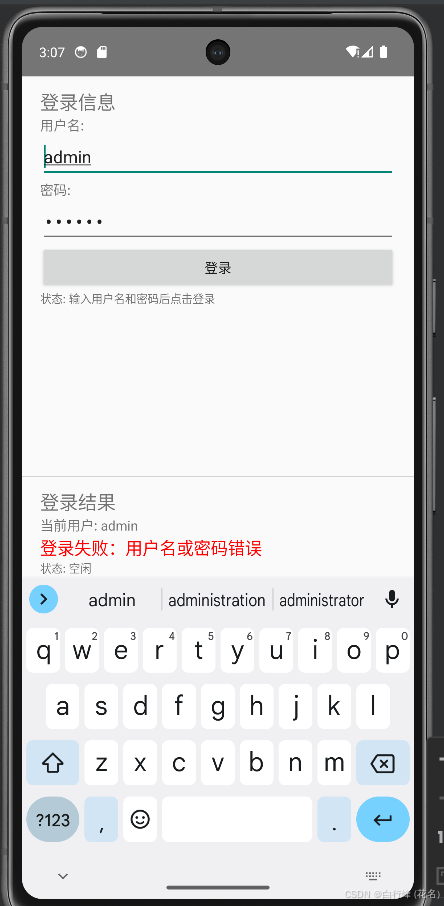
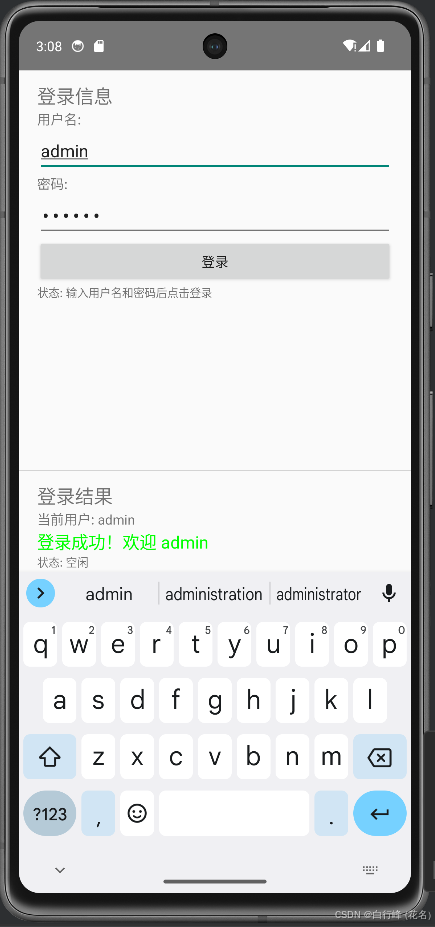
当输入错误的账号和密码时,登录会显示
用户名密码错误并在ViewModel里修改为正确的用户名密码,ViewModel的数据修改会反应到View上,当再次点击登录按钮会显示登录成功。 -
界面使用单页面模式,只有一个
Activity, 通过替换局部的区域为Fragment来显示不同的内容。
LoginInputFragment
- 这个类负责显示登录输入框和按钮,并包含了一个
SharedLoginViewModel类型的成员变量。这个成员变量创建的方式是通过以下单例模式创建:
java
viewModel = new ViewModelProvider(requireActivity()).get(SharedLoginViewModel.class);- 实现了一个
MutableLiveData的子类FlexibleLiveData来绑定ViewModel避免双向绑定失控的问题:ViewMoel的修改通知了View,而View的修改又通知了ViewModel从而陷入死循环; 目的是在View修改时先移除对ViewModel的修改监听; 而对View的修改也保存了TextWatcher的监听对象,在修改ViewModel时先移除View的监听。
java
// 观察用户名变化,同步到输入框
viewModel.getUsername().listen(getViewLifecycleOwner(), new Observer<String>() {
   @Override
   public void onChanged(String username) {
       if (etUsername != null) {
           String currentText = etUsername.getText().toString();
           if (!username.equals(currentText)) {
               etUsername.removeTextChangedListener(userWatcher);
               etUsername.setText(username);
               etUsername.addTextChangedListener(userWatcher);
           }
       }
   }
});
java
// 用户名输入监听
userWatcher = new TextWatcher() {
   @Override
   public void beforeTextChanged(CharSequence s, int start, int count, int after) {
   }

   @Override
   public void onTextChanged(CharSequence s, int start, int before, int count) {
   }

   @Override
   public void afterTextChanged(Editable s) {
       viewModel.getUsername().pauseListener();
       viewModel.setUsername(s.toString());
       viewModel.getUsername().resumeListener(getViewLifecycleOwner());
   }
};

etUsername.addTextChangedListener(userWatcher);- 这里是完整的
LoginInputFragment代码;
java
package com.test;

// LoginInputFragment.java

import android.os.Bundle;
import android.text.Editable;
import android.text.TextWatcher;
import android.view.LayoutInflater;
import android.view.View;
import android.view.ViewGroup;
import android.widget.Button;
import android.widget.EditText;
import android.widget.LinearLayout;
import android.widget.TextView;

import androidx.annotation.NonNull;
import androidx.annotation.Nullable;
import androidx.fragment.app.Fragment;
import androidx.lifecycle.Observer;
import androidx.lifecycle.ViewModelProvider;

public class LoginInputFragment extends Fragment {

    private SharedLoginViewModel viewModel;
    private EditText etUsername, etPassword;

    private TextWatcher userWatcher,passwordWatcher;
    private Button btnLogin;

    @Override
    public void onCreate(@Nullable Bundle savedInstanceState) {
        super.onCreate(savedInstanceState);
        // 注意:使用 requireActivity() 来获取共享的 ViewModel
        viewModel = new ViewModelProvider(requireActivity()).get(SharedLoginViewModel.class);
    }

    @Nullable
    @Override
    public View onCreateView(@NonNull LayoutInflater inflater, @Nullable ViewGroup container, @Nullable Bundle savedInstanceState) {
        // 纯代码创建布局
        LinearLayout root = new LinearLayout(getContext());
        root.setOrientation(LinearLayout.VERTICAL);
        root.setPadding(50, 30, 50, 30);

        // 标题
        TextView tvTitle = new TextView(getContext());
        tvTitle.setText("登录信息");
        tvTitle.setTextSize(20);

        // 用户名输入
        TextView tvUserLabel = new TextView(getContext());
        tvUserLabel.setText("用户名:");
        etUsername = new EditText(getContext());
        etUsername.setHint("请输入用户名");

        // 密码输入
        TextView tvPassLabel = new TextView(getContext());
        tvPassLabel.setText("密码:");
        etPassword = new EditText(getContext());
        etPassword.setHint("请输入密码");
        etPassword.setInputType(android.text.InputType.TYPE_CLASS_TEXT |
                android.text.InputType.TYPE_TEXT_VARIATION_PASSWORD);

        // 登录按钮
        btnLogin = new Button(getContext());
        btnLogin.setText("登录");

        // 当前状态提示
        TextView tvStatusHint = new TextView(getContext());
        tvStatusHint.setText("状态: 输入用户名和密码后点击登录");
        tvStatusHint.setTextSize(12);

        // 添加到布局
        root.addView(tvTitle);
        root.addView(tvUserLabel);
        root.addView(etUsername);
        root.addView(tvPassLabel);
        root.addView(etPassword);
        root.addView(btnLogin);
        root.addView(tvStatusHint);

        return root;
    }

    @Override
    public void onViewCreated(@NonNull View view, @Nullable Bundle savedInstanceState) {
        super.onViewCreated(view, savedInstanceState);

        setupViewModelObservers();
        setupViewListeners();
    }

    @Override
    public void onDestroyView() {
        super.onDestroyView();

        etPassword.removeTextChangedListener(passwordWatcher);
        etUsername.removeTextChangedListener(userWatcher);
    }

    private void setupViewModelObservers() {
        // 观察用户名变化,同步到输入框
        viewModel.getUsername().listen(getViewLifecycleOwner(), new Observer<String>() {
            @Override
            public void onChanged(String username) {
                if (etUsername != null) {
                    String currentText = etUsername.getText().toString();
                    if (!username.equals(currentText)) {
                        etUsername.removeTextChangedListener(userWatcher);
                        etUsername.setText(username);
                        etUsername.addTextChangedListener(userWatcher);
                    }
                }
            }
        });

        // 观察密码变化,同步到输入框
        viewModel.getPassword().listen(getViewLifecycleOwner(), new Observer<String>() {
            @Override
            public void onChanged(String password) {
                if (etPassword != null) {
                    String currentText = etPassword.getText().toString();
                    if (!password.equals(currentText)) {
                        etPassword.removeTextChangedListener(userWatcher);
                        etPassword.setText(password);
                        etPassword.addTextChangedListener(userWatcher);
                    }
                }
            }
        });

        // 观察登录触发
        viewModel.getLoginTrigger().listen(getViewLifecycleOwner(), new Observer<Boolean>() {
            @Override
            public void onChanged(Boolean shouldLogin) {
                if (shouldLogin != null && shouldLogin) {
                    // 重置触发标志
                    viewModel.getLoginTrigger().setValue(false);
                    // 开始登录流程
                    viewModel.startLoginProcess();
                }
            }
        });

        // 观察加载状态,禁用/启用按钮
        viewModel.getIsLoading().listen(getViewLifecycleOwner(), new Observer<Boolean>() {
            @Override
            public void onChanged(Boolean loading) {
                if (btnLogin != null) {
                    btnLogin.setEnabled(!loading);
                    btnLogin.setText(loading ? "登录中..." : "登录");
                }
            }
        });
    }

    private void setupViewListeners() {
        // 用户名输入监听
        userWatcher = new TextWatcher() {
            @Override
            public void beforeTextChanged(CharSequence s, int start, int count, int after) {
            }

            @Override
            public void onTextChanged(CharSequence s, int start, int before, int count) {
            }

            @Override
            public void afterTextChanged(Editable s) {
                viewModel.getUsername().pauseListener();
                viewModel.setUsername(s.toString());
                viewModel.getUsername().resumeListener(getViewLifecycleOwner());
            }
        };

        etUsername.addTextChangedListener(userWatcher);

        // 密码输入监听
        passwordWatcher = new TextWatcher() {
            @Override
            public void beforeTextChanged(CharSequence s, int start, int count, int after) {}

            @Override
            public void onTextChanged(CharSequence s, int start, int before, int count) {}

            @Override
            public void afterTextChanged(Editable s) {
                viewModel.getPassword().pauseListener();
                viewModel.setPassword(s.toString());
                viewModel.getPassword().resumeListener(getViewLifecycleOwner());
            }
        };

        etPassword.addTextChangedListener(passwordWatcher);

        // 登录按钮点击
        if (btnLogin != null) {
            btnLogin.setOnClickListener(new View.OnClickListener() {
                @Override
                public void onClick(View v) {
                    viewModel.performLogin();
                }
            });
        }
    }
}
SharedLoginViewModel
- 这里的
ViewModel负责创建Model和维护数据状态变量MutableLiveData<T>,它作为桥来连接Model和View的通讯。
java
package com.test;

// SharedLoginViewModel.java
import android.annotation.TargetApi;

import androidx.core.util.Pair;
import androidx.lifecycle.ViewModel;

import java.util.function.BiConsumer;

public class SharedLoginViewModel extends ViewModel {
    // 输入数据
    private final FlexibleLiveData<String> username = new FlexibleLiveData<>("");
    private final FlexibleLiveData<String> password = new FlexibleLiveData<>("");

    // 状态数据
    private final FlexibleLiveData<Boolean> isLoading = new FlexibleLiveData<>(false);
    private final FlexibleLiveData<String> loginResult = new FlexibleLiveData<>("");
    private final FlexibleLiveData<Boolean> loginTrigger = new FlexibleLiveData<>(false);

    // 只读的 LiveData (供外部观察)
    public FlexibleLiveData<String> getUsername() { return username; }
    public FlexibleLiveData<String> getPassword() { return password; }
    public FlexibleLiveData<Boolean> getIsLoading() { return isLoading; }
    public FlexibleLiveData<String> getLoginResult() { return loginResult; }

    // 用于触发登录的 LiveData
    public FlexibleLiveData<Boolean> getLoginTrigger() { return loginTrigger; }

    LoginModel model = new LoginModel();

    // 设置输入数据的方法
    public void setUsername(String user) {
        if (user != null && !user.equals(username.getValue())) {
            username.setValue(user);
        }
    }

    public void setPassword(String pass) {
        if (pass != null && !pass.equals(password.getValue())) {
            password.setValue(pass);
        }
    }

    // 登录方法
    public void performLogin() {
        loginTrigger.setValue(true);
    }

    // 实际的登录逻辑
    @TargetApi(android.os.Build.VERSION_CODES.N)
    public void startLoginProcess() {
        isLoading.setValue(true);
        loginResult.setValue(""); // 清空之前的结果

        model.taskDoLoginWork(username.getValue(), password.getValue(), new BiConsumer<String, Pair<Boolean, Boolean>>() {
            @Override
            public void accept(String result, Pair<Boolean, Boolean> pp) {
                if(pp.first){
                    loginResult.postValue(result);
                }else{
                    if(!result.isEmpty())
                        loginResult.postValue(result);

                    username.postValue("admin");
                    password.postValue("123456");
                }

                if(pp.second)
                    isLoading.postValue(false);
            }
        });
    }
}
LoginModel
- 它开了个独立线程来模拟异步登录,它的方法需要接收一个
BiConsumer<String, Pair<Boolean,Boolean>>函数对象来回调结果。
java
package com.test;

import android.annotation.TargetApi;

import androidx.core.util.Pair;

import java.util.function.BiConsumer;

public class LoginModel {

    /**
     * func: 是否成功登陆/是否结束
     * @param currentUser
     * @param currentPass
     * @param func
     */
    @TargetApi(android.os.Build.VERSION_CODES.N)
    public void taskDoLoginWork(String currentUser, String currentPass,
                                BiConsumer<String, Pair<Boolean,Boolean>> func){
        new Thread(() -> {
            try {
                // 模拟网络请求延迟
                Thread.sleep(2000);

                // 模拟验证逻辑
                boolean success = "admin".equals(currentUser) && "123456".equals(currentPass);
                String result = success ? "登录成功!欢迎 " + currentUser : "登录失败:用户名或密码错误";

                // 注意:后台线程更新 LiveData 要用 postValue
                if(func != null)
                    func.accept(result,new Pair<>(success,false));

            } catch (InterruptedException e) {
                if(func != null)
                    func.accept("登录过程中发生错误",new Pair<>(false,false));

            } finally {

                if(func != null)
                    func.accept("",new Pair<>(false,true));
            }
        }).start();
    }
}
MainActivity
java
package com.example.test.test;

// MainActivity.java

import android.os.Bundle;
import android.widget.LinearLayout;

import androidx.appcompat.app.AppCompatActivity;
import androidx.fragment.app.FragmentManager;
import androidx.fragment.app.FragmentTransaction;

public class MainActivity extends AppCompatActivity {

    // 自定义 ID 常量
    private static final int CONTAINER_TOP_ID = 1001;
    private static final int CONTAINER_BOTTOM_ID = 1002;

    @Override
    protected void onCreate(Bundle savedInstanceState) {
        super.onCreate(savedInstanceState);

        // 创建主布局
        LinearLayout mainLayout = new LinearLayout(this);
        mainLayout.setOrientation(LinearLayout.VERTICAL);
        mainLayout.setLayoutParams(new LinearLayout.LayoutParams(
                LinearLayout.LayoutParams.MATCH_PARENT,
                LinearLayout.LayoutParams.MATCH_PARENT
        ));

        // 创建顶部容器(用于输入 Fragment)
        LinearLayout topContainer = new LinearLayout(this);
        topContainer.setId(CONTAINER_TOP_ID);
        topContainer.setLayoutParams(new LinearLayout.LayoutParams(
                LinearLayout.LayoutParams.MATCH_PARENT,
                0,
                1.0f
        ));
        topContainer.setOrientation(LinearLayout.VERTICAL);

        // 添加分隔线
        LinearLayout divider = new LinearLayout(this);
        divider.setLayoutParams(new LinearLayout.LayoutParams(
                LinearLayout.LayoutParams.MATCH_PARENT,
                2
        ));
        divider.setBackgroundColor(android.graphics.Color.GRAY);

        // 创建底部容器(用于结果 Fragment)
        LinearLayout bottomContainer = new LinearLayout(this);
        bottomContainer.setId(CONTAINER_BOTTOM_ID);
        bottomContainer.setLayoutParams(new LinearLayout.LayoutParams(
                LinearLayout.LayoutParams.MATCH_PARENT,
                0,
                1.0f
        ));
        bottomContainer.setOrientation(LinearLayout.VERTICAL);

        // 将容器和分隔线添加到主布局
        mainLayout.addView(topContainer);
        mainLayout.addView(divider);
        mainLayout.addView(bottomContainer);

        setContentView(mainLayout);

        // 添加 Fragment
        FragmentManager fragmentManager = getSupportFragmentManager();
        FragmentTransaction transaction = fragmentManager.beginTransaction();

        // 顶部:输入 Fragment
        transaction.replace(CONTAINER_TOP_ID, new LoginInputFragment());
        // 底部:结果 Fragment
        transaction.replace(CONTAINER_BOTTOM_ID, new LoginResultFragment());

        transaction.commit();
    }
}
LoginResultFragment
java
package com.example.test.test;

// LoginResultFragment.java

import android.os.Bundle;
import android.view.LayoutInflater;
import android.view.View;
import android.view.ViewGroup;
import android.widget.LinearLayout;
import android.widget.ProgressBar;
import android.widget.TextView;

import androidx.annotation.NonNull;
import androidx.annotation.Nullable;
import androidx.fragment.app.Fragment;
import androidx.lifecycle.Observer;
import androidx.lifecycle.ViewModelProvider;

public class LoginResultFragment extends Fragment {

    private SharedLoginViewModel viewModel;
    private TextView tvResult, tvStatus, tvCurrentUser;
    private ProgressBar progressBar;

    @Override
    public void onCreate(@Nullable Bundle savedInstanceState) {
        super.onCreate(savedInstanceState);
        // 同样使用 requireActivity() 获取共享的 ViewModel
        viewModel = new ViewModelProvider(requireActivity()).get(SharedLoginViewModel.class);
    }

    @Nullable
    @Override
    public View onCreateView(@NonNull LayoutInflater inflater, @Nullable ViewGroup container, @Nullable Bundle savedInstanceState) {
        // 纯代码创建布局
        LinearLayout root = new LinearLayout(getContext());
        root.setOrientation(LinearLayout.VERTICAL);
        root.setPadding(50, 30, 50, 30);

        // 标题
        TextView tvTitle = new TextView(getContext());
        tvTitle.setText("登录结果");
        tvTitle.setTextSize(20);

        // 当前用户信息
        tvCurrentUser = new TextView(getContext());
        tvCurrentUser.setText("当前用户: 未输入");

        // 结果展示
        tvResult = new TextView(getContext());
        tvResult.setText("等待登录...");
        tvResult.setTextSize(18);

        // 进度条
        progressBar = new ProgressBar(getContext(), null, android.R.attr.progressBarStyleHorizontal);
        progressBar.setVisibility(View.GONE);

        // 状态提示
        tvStatus = new TextView(getContext());
        tvStatus.setText("状态: 空闲");
        tvStatus.setTextSize(12);

        // 添加到布局
        root.addView(tvTitle);
        root.addView(tvCurrentUser);
        root.addView(tvResult);
        root.addView(progressBar);
        root.addView(tvStatus);

        return root;
    }

    @Override
    public void onViewCreated(@NonNull View view, @Nullable Bundle savedInstanceState) {
        super.onViewCreated(view, savedInstanceState);

        setupViewModelObservers();
    }

    private void setupViewModelObservers() {
        // 观察用户名变化
        viewModel.getUsername().observe(getViewLifecycleOwner(), new Observer<String>() {
            @Override
            public void onChanged(String username) {
                if (tvCurrentUser != null) {
                    String displayText = username.isEmpty() ? "当前用户: 未输入" : "当前用户: " + username;
                    tvCurrentUser.setText(displayText);
                }
            }
        });

        // 观察登录结果
        viewModel.getLoginResult().observe(getViewLifecycleOwner(), new Observer<String>() {
            @Override
            public void onChanged(String result) {
                if (tvResult != null) {
                    tvResult.setText(result);
                    // 根据结果设置颜色
                    if (result.contains("成功")) {
                        tvResult.setTextColor(android.graphics.Color.GREEN);
                    } else if (result.contains("失败") || result.contains("错误")) {
                        tvResult.setTextColor(android.graphics.Color.RED);
                    } else {
                        tvResult.setTextColor(android.graphics.Color.BLACK);
                    }
                }
            }
        });

        // 观察加载状态
        viewModel.getIsLoading().observe(getViewLifecycleOwner(), new Observer<Boolean>() {
            @Override
            public void onChanged(Boolean loading) {
                if (progressBar != null) {
                    progressBar.setVisibility(loading ? View.VISIBLE : View.GONE);
                }

                if (tvStatus != null) {
                    tvStatus.setText(loading ? "状态: 正在登录..." : "状态: 空闲");
                }
            }
        });

        // 观察密码变化(可选,用于演示数据同步)
        viewModel.getPassword().observe(getViewLifecycleOwner(), new Observer<String>() {
            @Override
            public void onChanged(String password) {
                // 这里可以显示密码长度等信息
                if (tvStatus != null && !viewModel.getIsLoading().getValue()) {
                    int length = password.length();
                    String strength = length == 0 ? "未输入密码" :
                            length < 3 ? "密码强度: 弱" :
                                    length < 6 ? "密码强度: 中" : "密码强度: 强";
                    tvStatus.setText("状态: " + strength);
                }
            }
        });
    }
}
FlexibleLiveData
java
package com.example.test.test;

import androidx.annotation.NonNull;
import androidx.lifecycle.LifecycleOwner;
import androidx.lifecycle.MutableLiveData;
import androidx.lifecycle.Observer;

public class FlexibleLiveData<T> extends MutableLiveData<T> {

    public FlexibleLiveData(T value) {
        super(value);
    }

    public FlexibleLiveData() {
        super();
    }

    private Observer<? super T> observer;

    /**
     * 提交唯一观察者
     * @param owner
     * @param observer
     */
    public void listen(@NonNull LifecycleOwner owner, @NonNull Observer<? super T> observer) {
        if(this.observer != null)
            removeObserver(this.observer);

        observe(owner, observer);
        this.observer = observer;
    }

    /**
     * 移除唯一观察者
     */
    public void removeListener() {
        removeObserver(observer);
    }

    /**
     * 暂停监听
     */
    public void pauseListener(){
        removeListener();
    }

    /**
     * 继续监听
     */
    public void resumeListener(@NonNull LifecycleOwner owner){
        observe(owner, this.observer);
    }
}
AndroidManifest.xml
xml
<?xml version="1.0" encoding="utf-8"?>
<manifest xmlns:android="http://schemas.android.com/apk/res/android"
    package="com.example.test">

    <uses-sdk
        android:minSdkVersion="23"
        android:targetSdkVersion="34" />

    <!-- 如果不需要网络,可以不加这个权限 -->
    <uses-permission android:name="android.permission.INTERNET" />

    <application
        android:allowBackup="true"
        android:icon="@mipmap/ic_launcher"
        android:label="纯JavaApp"
        android:supportsRtl="true"
        android:theme="@style/Theme.AppCompat.Light.NoActionBar">

        <!-- MainActivity -->
        <activity
            android:name="com.example.test.test.MainActivity"
            android:exported="true">
            <intent-filter>
                <action android:name="android.intent.action.MAIN" />
                <category android:name="android.intent.category.LAUNCHER" />
            </intent-filter>
        </activity>

    </application>

</manifest>
build.gradle
groovy
apply plugin: 'com.android.application'
apply plugin: 'kotlin-android'
apply plugin: 'kotlin-kapt'


def getVersion() {
    def gitVersion
    try {
        def cmd = 'git rev-list HEAD --count'
        gitVersion = cmd.execute().text.trim().toInteger()
    } catch (Exception e) {
        gitVersion = 1
    }
    return gitVersion
}

def gitVersion = getVersion()
def javaVersion = JavaVersion.VERSION_1_8

android {
    signingConfigs {
        Properties properties = new Properties()
        File propFile = project.file('release.properties')
        if (propFile.exists()) {
            properties.load(propFile.newDataInputStream())
        }
        release {
            keyAlias properties.getProperty("RELEASE_KEY_ALIAS")
            keyPassword properties.getProperty("RELEASE_KEY_PASSWORD")
            storeFile file('qmuidemo.keystore')
            storePassword properties.getProperty("RELEASE_STORE_PASSWORD")
            v2SigningEnabled false
        }
    }
    compileSdkVersion parent.ext.compileSdkVersion

    // for butterknife, see https://github.com/JakeWharton/butterknife/blob/master/CHANGELOG.md#version-900-rc2-2018-11-19
    compileOptions {
        sourceCompatibility javaVersion
        targetCompatibility javaVersion
    }

    defaultConfig {
        applicationId "com.example.test"
        minSdk 24
        targetSdkVersion parent.ext.targetSdkVersion
        versionCode gitVersion
        versionName "1.0.0"
    }
    buildTypes {
        debug {
            minifyEnabled false
            proguardFiles getDefaultProguardFile('proguard-android.txt'), 'proguard-rules.pro'
        }
        release {
            minifyEnabled true
            proguardFiles getDefaultProguardFile('proguard-android.txt'), 'proguard-rules.pro'
            signingConfig signingConfigs.release
        }
    }
    // 避免 lint 检测出错时停止构建
    lintOptions {
        abortOnError false
    }
}

dependencies {
    implementation fileTree(dir: 'libs', include: ['*.jar'])
    implementation "androidx.appcompat:appcompat:$appcompatVersion"
    implementation "androidx.annotation:annotation:$annotationVersion"
    implementation "com.google.android.material:material:$materialVersion"
    implementation "org.jetbrains.kotlin:kotlin-stdlib:$kotlin_version"
    testImplementation 'junit:junit:4.13.2'
}
输出
项目下载
https://download.csdn.net/download/infoworld/92989957