1.发现问题
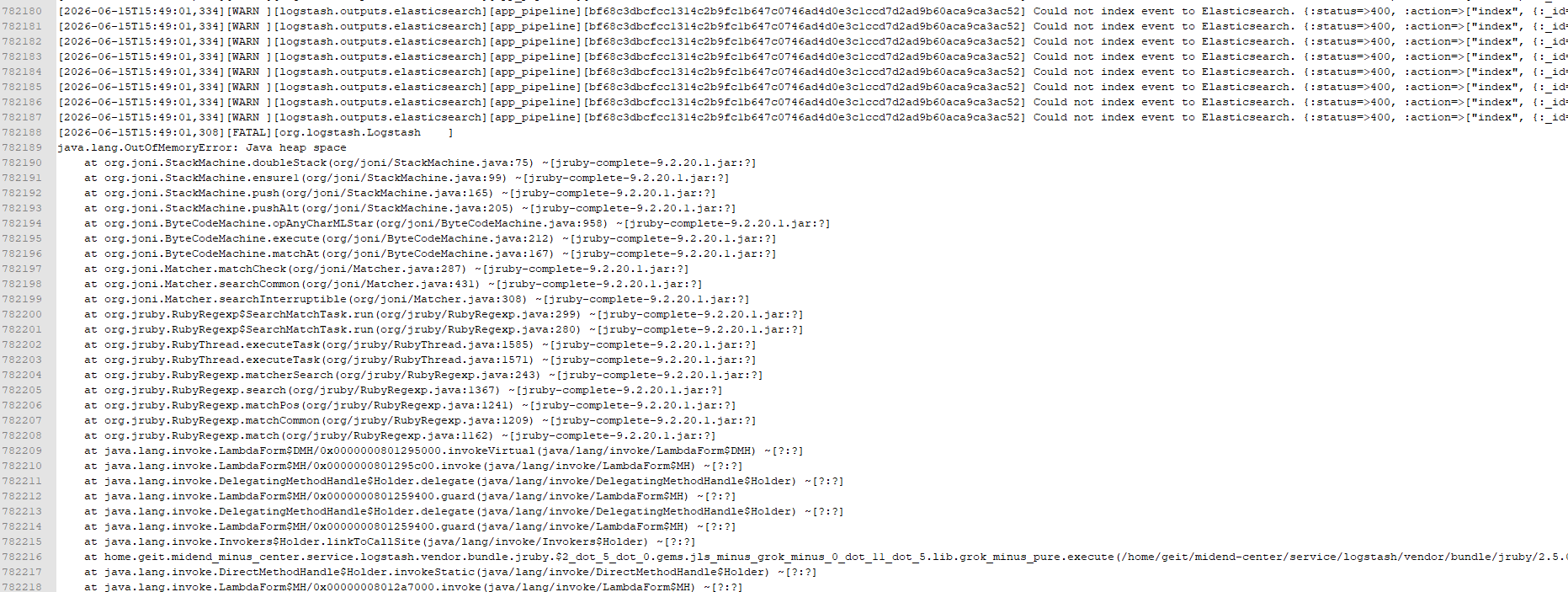
日志链路系统无法查到新的日志,检查logstash:
2.分析问题
根据以上报错信息
现有logstash配置:pipelines.yml、pipeline.conf、sql.conf
整理需求:十几个微服务,日志链路查询要保证90天,
提供ES的版本准确信息:7.17.29,
询问千问3.7MAX分析,得出结论:
1.分片爆炸:按天+服务+类型创建索引,90天将产生数千个分片。
2.sincedb 失效 :sql.conf 中使用 NUL(Windows语法),在 Linux 下会导致每次重启重读所有历史日志。
3.Data Stream 不兼容 :使用了自定义 document_id 和传统 index 输出模式。
3.解决方案(AI)
3.1.ES端配置
1. 调整集群分片上限
XML
PUT _cluster/settings
{
  "persistent": {
    "cluster.max_shards_per_node": 1500
  }
}
2. 创建 ILM 策略(90天保留)
XML
PUT _ilm/policy/microservice-logs-policy
{
  "policy": {
    "phases": {
      "hot": {
        "min_age": "0ms",
        "actions": {
          "rollover": {
            "max_size": "30gb",
            "max_age": "1d",
            "max_docs": 10000000
          },
          "set_priority": { "priority": 100 }
        }
      },
      "warm": {
        "min_age": "7d",
        "actions": {
          "forcemerge": { "max_num_segments": 1 },
          "shrink": { "number_of_shards": 1 },
          "set_priority": { "priority": 50 }
        }
      },
      "delete": {
        "min_age": "90d",
        "actions": { "delete": {} }
      }
    }
  }
}
3. 创建组件模板 + Data Stream 索引模板
XML
PUT _component_template/microservice-logs-settings
{
  "template": {
    "settings": {
      "number_of_shards": 1,
      "number_of_replicas": 0,
      "refresh_interval": "30s",
      "index.lifecycle.name": "microservice-logs-policy"
    },
    "mappings": {
      "properties": {
        "@timestamp":   { "type": "date" },
        "traceId":      { "type": "keyword" },
        "spanId":       { "type": "keyword" },
        "parentSpanId": { "type": "keyword" },
        "service":      { "type": "keyword" },
        "logType":      { "type": "keyword" },
        "dest":         { "type": "keyword" },
        "returnCode":   { "type": "keyword" },
        "returnMsg":    { "type": "text" },
        "requestUrl":   { "type": "keyword" },
        "url":          { "type": "keyword" },
        "duration":     { "type": "integer" },
        "serviceIp":    { "type": "ip" },
        "message":      { "type": "text" }
      }
    }
  }
}

PUT _index_template/microservice-logs-template
{
  "index_patterns": ["logs-microservice-*"],
  "data_stream": {},
  "composed_of": ["microservice-logs-settings"],
  "priority": 200,
  "allow_auto_create": true
}
Data Stream 没有自动映射学习的容错空间:
传统索引模式下,ES 会对未定义字段做 Dynamic Mapping(动态推断类型)。但在 Data Stream 中:
类型冲突直接拒绝写入:如果第一条日志的 duration 是 "120"(字符串),ES 自动推断为 text;后续日志写入 duration: 120(整数)时,Data Stream 会直接报错丢弃该文档,不会像传统索引那样尝试转换。
预定义 mapping 是唯一保障:提前声明 duration: integer,无论日志中传入的是字符串还是数字,ES 都会统一按 integer 处理,避免写入失败。
3.2.Logstash端配置
1.pipelines.yml
XML
- pipeline.id: app_pipeline
  path.config: "/home/geit/midend-center/service/logstash/config/pipeline.conf"
  pipeline.workers: 4
  pipeline.batch.size: 500

- pipeline.id: sql_pipeline
  path.config: "/home/geit/midend-center/service/logstash/config/sql.conf"
  pipeline.workers: 2
  pipeline.batch.size: 500
2.pipeline.conf(API 日志 - 完整保留解析逻辑)
XML
input {
  file {
    path => [
      "/home/geit/midend-center/service/*/logs/api.log",
      "/home/geit/midend-center/service/*/logs/*/api.log"
    ]
    start_position => "beginning"
    sincedb_path   => "/var/lib/logstash/sincedb-app-pipeline"
    codec          => plain { charset => "UTF-8" }
    stat_interval  => 1
    max_open_files => 1000
  }
}

filter {
  # 从文件路径动态提取 service 名称
  grok {
    match => { "path" => "/home/geit/midend-center/service/%{DATA:service}/logs/" }
    overwrite => ["service"]
  }

  # 1. 主日志行解析(保留原始正则)
  grok {
    match => {
      "message" => [
        '^\[%{DATA:service_name}\]\s+\[%{DATA:trace_id},%{DATA:span_id},%{DATA:parent_span_id}\]\s+\[%{DATA:class_name}\]\s+\[%{TIMESTAMP_ISO8601:timestamp}\]\s+>\s+\[%{LOGLEVEL:log_level}\]\s+\[%{DATA:thread}\]\s+-\s+%{GREEDYDATA:log_message}'
      ]
    }
    remove_field => ["@version", "host", "path"]
  }

  if ![service_name] or ![timestamp] or ![log_message] {
    drop {}
  }

  # 2. 业务类型解析(完整保留原始逻辑)
  if [log_message] =~ /收到请求:|发送请求:|收到返回:|返回结果:|请求URL:|收到请求URL:|耗时:/ {
    grok {
      match => {
        "log_message" => [
          '^(?<log_type>收到请求):\s*%{GREEDYDATA:content}',
          '^(?<log_type>发送请求):\s*%{GREEDYDATA:content}',
          '^(?<log_type>收到返回):\s*%{GREEDYDATA:content}',
          '^(?<log_type>返回结果):\s*%{GREEDYDATA:content}',
          '^(?<log_type>收到请求URL):\s*%{GREEDYDATA:content}',
          '^(?<log_type>请求URL):\s*%{GREEDYDATA:content}',
          '^(?<log_type>耗时):\s*%{NUMBER:duration}(?:毫秒|ms)?'
        ]
      }
    }

    if [log_type] == "收到请求" { mutate { replace => { "log_type" => "RECEIVED_REQUEST" } } }
    else if [log_type] == "发送请求" { mutate { replace => { "log_type" => "SEND_REQUEST" } } }
    else if [log_type] == "收到返回" { mutate { replace => { "log_type" => "RECEIVED_RESPONSE" } } }
    else if [log_type] == "返回结果" { mutate { replace => { "log_type" => "RETURN_RESULT" } } }
    else if [log_type] == "请求URL" { mutate { replace => { "log_type" => "REQUEST_API" } } }
    else if [log_type] == "收到请求URL" { mutate { replace => { "log_type" => "RECEIVE_API" } } }
    else if [log_type] == "耗时" { mutate { replace => { "log_type" => "DURATION" } } }

    if [duration] { mutate { convert => { "duration" => "integer" } } }

    if [content] =~ /^\{.*\}$/ {
      if [content] =~ /^\{(?:params|dest)[=:]/ {
        grok {
          match => {
            "content" => [
              "^\{params[=:](?<json_content_str>\{.*?\}),\s*dest[=:](?<dest_tmp>.*)\}$",
              "^\{dest[=:](?<dest_tmp>.*),\s*params[=:](?<json_content_str>\{.*?\})\}$"
            ]
          }
        }
        if [dest_tmp] { mutate { add_field => { "dest" => "%{dest_tmp}" } } }
        mutate { remove_field => ["dest_tmp"] }
      } else {
        mutate { copy => { "content" => "json_content_str" } }
      }

      if [json_content_str] {
        ruby {
          code => '
            v = event.get("json_content_str")
            if v.is_a?(String) && v.start_with?("\"") && v.end_with?("\"")
              begin
                unescaped = JSON.parse(v)
                event.set("json_content_str", unescaped) if unescaped.is_a?(String)
              rescue; end
            end
          '
        }
        json { source => "json_content_str"; target => "json_content" }

        if [json_content] {
          if [json_content][dest] { mutate { add_field => { "dest" => "%{[json_content][dest]}" } } }
          if [json_content][params] { mutate { add_field => { "params" => "%{[json_content][params]}" } } }
          if [json_content][header][returnCode] { mutate { add_field => { "returnCode" => "%{[json_content][header][returnCode]}" } } }
          if [json_content][header][returnMsg] { mutate { add_field => { "returnMsg" => "%{[json_content][header][returnMsg]}" } } }
          mutate { remove_field => ["json_content", "json_content_str"] }
        } else {
          mutate { remove_field => ["json_content_str"] }
        }
      }
    } else if [log_type] == "REQUEST_API" {
      mutate { add_field => { "requestUrl" => "%{content}" }; remove_field => ["content"] }
    } else if [log_type] == "RECEIVE_API" {
      mutate { add_field => { "url" => "%{content}" }; remove_field => ["content"] }
    }
  }

  # 3. 时间戳处理
  date {
    match    => ["timestamp", "yyyy-MM-dd HH:mm:ss.SSS"]
    target   => "@timestamp"
    timezone => "Asia/Shanghai"
  }

  # 4. 字段重命名与清理
  mutate {
    remove_field => ["log_time", "timestamp", "class_name", "log_level", "service_name"]
    add_field    => { "serviceIp" => "${SERVER_IP}" }
    rename       => { "trace_id" => "traceId" }
    rename       => { "span_id" => "spanId" }
    rename       => { "parent_span_id" => "parentSpanId" }
    rename       => { "log_message" => "message" }
    rename       => { "log_type" => "logType" }
  }
}

output {
  elasticsearch {
    hosts                 => ["http://172.16.35.11:9200"]
    data_stream           => "true"
    data_stream_type      => "logs"
    data_stream_dataset   => "%{service}"
    data_stream_namespace => "api"
  }
}
3.sql.conf(SQL + Other 日志)
XML
input {
  # SQL 日志统一采集
  file {
    path => [
      "/home/geit/midend-center/service/*/logs/logSql.log",
      "/home/geit/midend-center/service/*/logs/*/logSql.log"
    ]
    start_position => "beginning"
    sincedb_path   => "/var/lib/logstash/sincedb-sql-pipeline"
    codec          => plain { charset => "UTF-8" }
    stat_interval  => 1
    max_open_files => 1000
    add_field      => { "log_type" => "sql" }
  }

  # Other 日志统一采集
  file {
    path => [
      "/home/geit/midend-center/service/*/logs/*.log",
      "/home/geit/midend-center/service/*/logs/*/*.log"
    ]
    exclude        => ["logSql.log", "sql.log", "api.log"]
    start_position => "beginning"
    sincedb_path   => "/var/lib/logstash/sincedb-other-pipeline"
    codec          => plain { charset => "UTF-8" }
    stat_interval  => 1
    max_open_files => 1000
    add_field      => { "log_type" => "other" }
  }
}

filter {
  # 从路径提取 service
  grok {
    match => { "path" => "/home/geit/midend-center/service/%{DATA:service}/logs/" }
    overwrite => ["service"]
  }

  # 日志正文解析
  grok {
    match => {
      "message" => "^\s*\[%{DATA:parsed_service}\]\s+\[%{DATA:trace_id}(?:,[^\]]+)?\].*?%{TIMESTAMP_ISO8601:timestamp}.*"
    }
    remove_field => ["@version", "host"]
  }

  if ![parsed_service] or ![trace_id] { drop {} }

  date {
    match    => ["timestamp", "yyyy-MM-dd HH:mm:ss.SSS"]
    target   => "@timestamp"
    timezone => "Asia/Shanghai"
  }

  mutate {
    remove_field => ["log_time", "timestamp", "class_name", "thread", "parsed_service"]
    rename       => { "trace_id" => "traceId" }
    rename       => { "log_type" => "type" }
  }
}

output {
  elasticsearch {
    hosts                 => ["http://172.16.35.11:9200"]
    data_stream           => "true"
    data_stream_type      => "logs"
    data_stream_dataset   => "%{service}"
    data_stream_namespace => "%{type}"
  }
}
4.验证
命令确认是否正确采集:
XML
# 查看当前活跃的 Data Stream,应包含所有 9 个服务
GET _data_stream/logs-microservice-*?filter_path=data_streams.name

# 预期返回类似:
# logs-microservice-appmiddle-api-api
# logs-microservice-gateway-api
# logs-microservice-pay-wxzfb-server-api   ← 特殊路径服务也应正常出现
# ...