选型之前,先把几个关键依据列出来:
| 考量维度 | 关键判断 |
|---|---|
| 任务类型 | CPU密集型(数据处理、复杂计算)vs IO密集型(网络调用、数据库查询) |
| 线程池来源 | 默认ForkJoinPool.commonPool() vs 自定义ThreadPoolExecutor |
| 资源隔离 | 核心业务/非核心业务是否共用线程池 |
| 阻塞风险 | 任务是否会阻塞线程(HTTP超时、慢查询) |
| 超时控制 | 异步链路是否有超时兜底 |
| 异常处理 | 异常是否会被静默吞掉 |
这几条判断下来,可以归结为:IO密集型任务绝不能用默认commonPool;线程池必须按业务隔离;每条异步链路都要有超时和异常处理。
但从知道这个结论到在生产环境真正做对,中间还有不少坑。很多开发团队引入CompletableFuture优化接口后,都遇到过类似的困惑:平时流量小的时候确实快了,流量大的时候却莫名其妙卡了;parallelStream()看起来用起来挺简单的,整个应用的响应却时快时慢。
问题往往不在API本身,而在默认线程池的限制。我这边的基础框架工具包里的AsyncTask为了使用方便,直接以ForkJoinPool.commonPool()作为默认执行器,这在工具层简化了API,却在业务层埋下了隐患,这个是早期的设计了,现在我还不太好去改。但是在我这边的库存服务和进销存服务则用了另一种做法:为不同业务配置独立线程池,配合CallerRunsPolicy实现舱壁隔离。
本文结构:
- 先澄清CompletableFuture与ForkJoinPool的关系(它们不是二选一,而是默认绑定)
- 回答四个具体问题:数据/IO密集型任务选型、Web容器中的资源竞争风险、十万级任务的性能差异、两者混用的调度层次
- 结合JDK17源码和内部生产环境代码,给出可落地的线程池配置方案
下面按这个顺序展开。
一、CompletableFuture与ForkJoinPool到底是什么关系
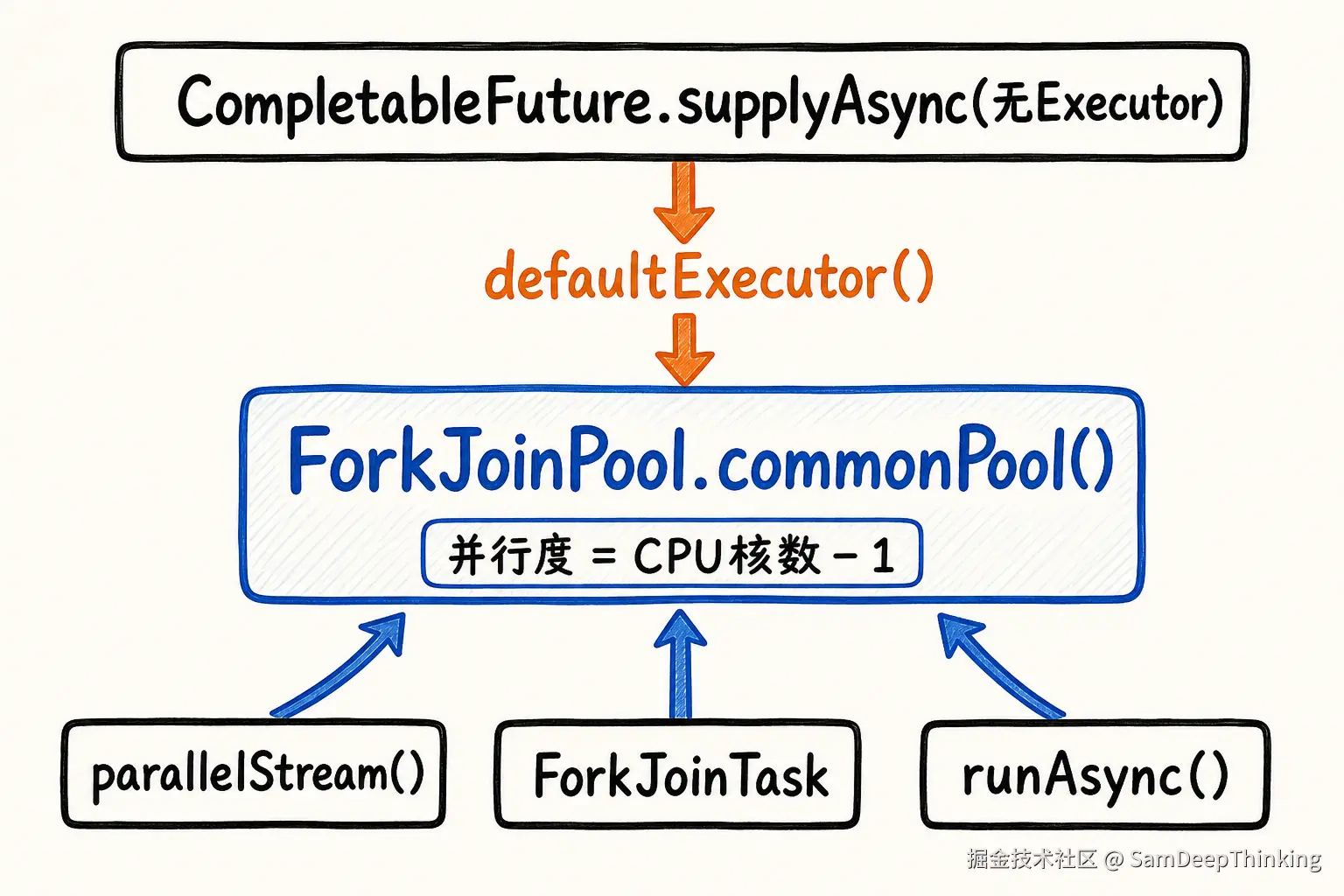
很多人把CompletableFuture和ForkJoinPool看成二选一的关系:前者管异步编排,后者管并行计算。但真相是它们的关系比你想的紧密得多。CompletableFuture默认就依托ForkJoinPool的commonPool,两者根本不是互斥选型,而是深度绑定的。
1.1 源码层面的依赖
打开JDK17的源码,CompletableFuture.java中明确定义了默认执行器:
Java
// Default executor -- ForkJoinPool.commonPool() unless it cannot
// support parallelism.
private static final Executor ASYNC_POOL = USE_COMMON_POOL ?
ForkJoinPool.commonPool() : new ThreadPerTaskExecutor();再看defaultExecutor()方法:
Java
public Executor defaultExecutor() {
    return ASYNC_POOL;
}这说明什么?当你调用CompletableFuture.supplyAsync(() -> {...})时,如果不指定第二个参数,它默认就是把任务扔进ForkJoinPool.commonPool()。CompletableFuture的异步编排能力,底层默认就是依托ForkJoinPool实现的。
1.2 commonPool的初始化逻辑
ForkJoinPool.java源码中揭示了commonPool的初始化:
Java
static {
    // ...
    common = tmp;
    COMMON_PARALLELISM = Math.max(common.mode & SMASK, 1);
}COMMON_PARALLELISM就是commonPool的并行度,默认值是Runtime.getRuntime().availableProcessors() - 1。4核机器只有3个线程,8核机器只有7个线程。这个线程数对于CPU密集型任务(复杂计算、数据处理)是合理的,因为线程太多反而会增加上下文切换开销。但对于IO密集型任务(网络调用、数据库查询),这就是灾难的开始。
1.3 一个形象的比喻
你可以把ForkJoinPool.commonPool()想象成公司里一个「公共会议室」。整个JVM(包括CompletableFuture、parallelStream、ForkJoinTask)都共用这一间会议室。会议室只有CPU核数-1个座位。
CPU密集型任务像是「头脑风暴会」。大家坐满座位激烈讨论,CPU被用起来,效率高。IO密集型任务则像是「电话会议」。一个人开始打电话,其他人只能干等着他打完。如果3个人同时在打电话(阻塞等待IO),其他人只能站在外面排队,包括那些本该干别的活儿的人。
这种资源共享带来的冲突在实际代码中很常见。比如在我这边的基础框架工具包里的AsyncTask抽象基类,直接使用了ForkJoinPool.commonPool()作为默认执行器:
Java
protected Executor executor = ForkJoinPool.commonPool();这个设计让使用方很方便,不指定线程池就能直接跑异步任务。但隐患也在这里:如果业务代码用这类工具类做IO密集型操作(比如HTTP调用、数据库查询),流量大的时候很容易把commonPool的线程耗尽,影响整个JVM里其他用到了commonPool的功能。
二、问题一:数据密集型与IO密集型任务各适合哪种方案
2.1 数据密集型任务:ForkJoinPool的工作窃取机制
数据密集型任务(大规模数据计算、批量处理)天生适合ForkJoinPool。它的主要机制是「工作窃取」(Work-Stealing)算法。
你可以想象成一个团队在做数据汇总:
- 大任务被递归拆分成小任务(Fork)
- 每个Worker线程有自己的双端队列(Deque)
- 自己队列的任务用LIFO(栈的方式)处理,缓存局部性好
- 做完自己的任务后,随机偷其他Worker队列尾部的任务(FIFO方式),减少冲突
JDK17源码中ForkJoinPool的注释讲得很清楚:
Work-stealing: all threads in the pool attempt to find and execute tasks submitted to the pool and/or created by other active tasks. This enables efficient processing when most tasks spawn other subtasks.
对于递归分治类计算(如归并排序、MapReduce式聚合),ForkJoinPool的效率远超普通线程池。RecursiveTask和RecursiveAction就是为此设计的。
2.2 IO密集型任务:CompletableFuture的编排能力
IO密集型任务(微服务调用、远程API聚合)的特点是等待时间长、CPU占用低。这类任务的关键不是「并行计算」,而是「非阻塞等待」和「依赖编排」。
CompletableFuture的价值在于:
supplyAsync/runAsync:发起异步任务thenApply/thenAccept/thenRun:任务完成后的同步处理thenApplyAsync/thenAcceptAsync:任务完成后的异步处理(切换线程池)thenCompose:任务链式依赖(A做完做B)thenCombine:任务并行合并(A和B都做完做C)allOf/anyOf:多任务等待策略
2.3 关键结论:别纠结选CompletableFuture还是ForkJoinPool,线程池怎么配才是关键
CompletableFuture和ForkJoinPool不是二选一的关系。CompletableFuture默认就用ForkJoinPool的commonPool,选哪个API其实都能干活。真正会踩坑的地方是:你有没有意识到自己在用默认线程池,以及它能不能扛住你的业务流量。
IO密集型任务也可以用ForkJoinPool,但必须是自定义的、线程数足够的ForkJoinPool。数据密集型任务也可以用CompletableFuture,但同样要考虑线程池配置。一句话:别用默认的ForkJoinPool.commonPool()跑阻塞任务。
三、问题二:Web容器中默认公共池的资源竞争风险
3.1 风险一:线程数天花板太低
默认commonPool的线程数是CPU核数-1。在容器化环境(Docker/K8s)里,这个值可能是2或3。如果你把HTTP调用、数据库查询这类阻塞任务丢进去,几个慢请求就能把线程池占满。
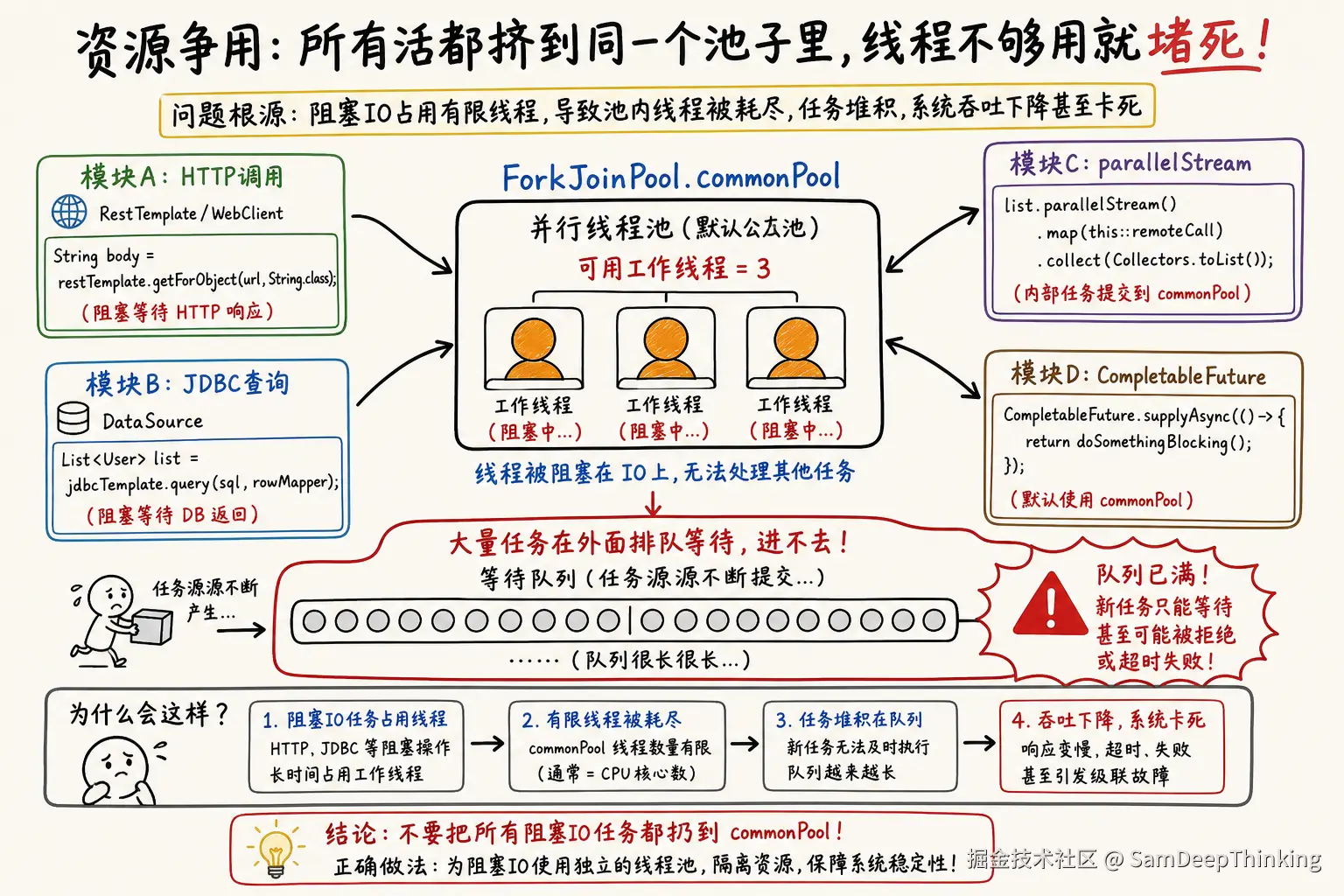
更危险的是,CompletableFuture和parallelStream共享同一个commonPool。想象一下:
Java
// 某处代码在做并行数据处理
list.parallelStream().map(this::heavyComputation).collect(toList());

// 另一处代码在做异步HTTP调用
CompletableFuture.supplyAsync(() -> callRemoteApi());
这两个看似无关的代码,其实在抢同一批线程。流量大的时候parallelStream占满了线程,异步HTTP调用就只能排队等待。
3.2 风险二:ManagedBlocker的扩容陷阱
有人可能会问:ForkJoinPool不是有动态扩容机制吗?阻塞时会新建线程啊?
这是一个常见误解。JDK的ForkJoinPool确实有补偿机制,但它只认ManagedBlocker接口。普通业务代码里的JDBC查询、HTTP调用,不会自动触发这个补偿。
只有显式实现了ManagedBlocker接口的同步器(如Phaser、CyclicBarrier内部实现),才会触发ForkJoinPool的补偿逻辑。业务代码里的RestTemplate.getForObject()或jdbcTemplate.query(),在commonPool看来就是「占着线程不干活的任务」,不会自动扩容。
3.3 风险三:Daemon线程的优雅停机隐患
ForkJoinPool.commonPool()里的线程都是Daemon线程。这会带来一个问题:
Java
// main线程结束,JVM会直接退出,不会等commonPool里的任务完成
public static void main(String[] args) {
    CompletableFuture.runAsync(() -> {
        // 模拟一个耗时10秒的任务
        Thread.sleep(10000);
        System.out.println("任务完成");
    });
    // main线程立即结束,上面的任务可能根本没执行完
}
在Spring Boot应用里,如果你用默认commonPool,服务发布重启时,正在执行的任务可能被强制中断,导致数据不一致。
3.4 线程池隔离策略
解决这些风险的核心是舱壁模式(Bulkhead Pattern):不同的业务用不同的线程池,一个业务出问题不会影响其他业务。

在我这边生产环境库存服务中,ThreadPoolConfig类配置了5个独立的线程池,每个对应不同的业务场景:
Java
@Configuration
public class ThreadPoolConfig {

    @Bean("taskScheduleThreadPool")
    public Executor getTaskScheduleThreadPool() {
        return new ThreadPoolExecutor(
            4, 10, 60, TimeUnit.SECONDS,
            new LinkedBlockingQueue<>(5000),
            new ThreadFactory() {
                private final AtomicInteger count = new AtomicInteger(1);
                @Override
                public Thread newThread(Runnable r) {
                    return new Thread(r, "biz-task-" + count.getAndIncrement());
                }
            },
            new ThreadPoolExecutor.CallerRunsPolicy());
    }

    @Bean("settlementThreadPool")
    public Executor getSettlementThreadPool() {
        return new ThreadPoolExecutor(4, 10, 60, TimeUnit.SECONDS,
            new LinkedBlockingQueue<>(5000),
            r -> new Thread(r, "settlement-pool-" + count.getAndIncrement()),
            new ThreadPoolExecutor.CallerRunsPolicy());
    }

    @Bean("inventoryThreadPool")
    public Executor getInventoryThreadPool() {
        return new ThreadPoolExecutor(4, 8, 60, TimeUnit.SECONDS,
            new LinkedBlockingQueue<>(5000),
            r -> new Thread(r, "inventory-pool-" + count.getAndIncrement()),
            new ThreadPoolExecutor.CallerRunsPolicy());
    }
    // ... 还有dataCorrectionThreadPool、warnThreadPool等
}
同样的设计在我这边生产环境进销存服务里也能看到。ExecutorConfig中定义了统计任务线程池和审计线程池:
Java
@Configuration
public class ExecutorConfig {
    @Bean("statisticsThreadPool")
    public Executor getStatisticsThreadPool() {
        return new ThreadPoolExecutor(4, 10, 60, TimeUnit.SECONDS,
            new LinkedBlockingQueue<>(5000),
            new ThreadPoolExecutor.CallerRunsPolicy());
    }

    @Bean("auditThreadPool")
    public Executor getAuditThreadPool() {
        return new ThreadPoolExecutor(4, 10, 60, TimeUnit.SECONDS,
            new LinkedBlockingQueue<>(5000),
            new ThreadPoolExecutor.CallerRunsPolicy());
    }
}
我这边生产环境进销存服务的线程池配置更是在注释里直接说明了设计意图:
Java
/**
 * 第三方数据同步线程池(流量很低,core 和队列不需要太大)
 */
@Bean(name = "thirdPartySyncExecutor")
public ThreadPoolExecutor thirdPartySyncExecutor() {
    return new ThreadPoolExecutor(2, 4, 60L, TimeUnit.SECONDS,
        new LinkedBlockingQueue<>(50),
        new ThreadFactoryBuilder()
            .setNameFormat("third-party-sync-pool-%d")
            .build(),
        new ThreadPoolExecutor.CallerRunsPolicy()
    );
}
这些配置体现了几个关键原则:
- 线程池按业务隔离:不同业务模块(任务调度、结算处理、库存管理等)各自独立
- CallerRunsPolicy作为拒绝策略:队列满时让提交线程自己执行,相当于天然限流
- 自定义线程名:排查问题时能快速定位是哪个业务线的线程出问题
- 根据业务流量调整参数:低流量业务用小核心线程数和队列,避免资源浪费
我这边生产环境进销存服务中的图像处理引擎类展示了如何在实际业务中使用这些线程池。这个引擎需要协调多个阶段:数据检索、图像处理、规则校验等。它在类内部定义了两个独立的线程池:
Java
@Component
public class ImageProcessingEngine implements DisposableBean {
    // 规则校验专用线程池
    private final ThreadPoolExecutor checkRuleExecutor = new ThreadPoolExecutor(4, 20,
        60L, TimeUnit.SECONDS, new ArrayBlockingQueue<>(5000),
        r -> new Thread(r, "rule-check-pool-" + count.getAndIncrement()),
        new ThreadPoolExecutor.CallerRunsPolicy());

    // 图像处理专用线程池
    private final ThreadPoolExecutor imageProcessingExecutor = new ThreadPoolExecutor(4, 20,
        60L, TimeUnit.SECONDS, new ArrayBlockingQueue<>(5000),
        r -> new Thread(r, "image-processing-pool-" + count.getAndIncrement()),
        new ThreadPoolExecutor.CallerRunsPolicy());
}
不同阶段的任务提交到不同的线程池,把计算密集型(图像处理)和规则校验型任务隔离开。
四、问题三:默认与自定义线程池在大量任务下的差异
4.1 十万级任务下的性能对比
假设你有一个批量处理场景:需要从10万个外部ID查询详细信息。
方案A:默认commonPool
Java
List<CompletableFuture<Detail>> futures = ids.stream()
    .map(id -> CompletableFuture.supplyAsync(() -> queryRemote(id)))
.collect(toList());在4核机器上,commonPool只有3个线程。10万个任务会进入ForkJoinPool的内部队列。由于queryRemote是阻塞IO,3个线程很快被占满,剩下的99997个任务在队列里等待。
更危险的是:CompletableFuture内部的依赖链是用Treiber栈(无锁链表)存储的。每个CompletableFuture对象都持有下游依赖的引用。如果任务堆积过多,内存占用会线性增长,最终可能导致OOM。
方案B:自定义线程池
Java
ThreadPoolExecutor executor = new ThreadPoolExecutor(
    50, 200, 60L, TimeUnit.SECONDS,
    new LinkedBlockingQueue<>(10000),
    new ThreadFactoryBuilder().setNameFormat("batch-query-%d").build(),
    new ThreadPoolExecutor.CallerRunsPolicy()
);

List<CompletableFuture<Detail>> futures = ids.stream()
    .map(id -> CompletableFuture.supplyAsync(() -> queryRemote(id), executor))
    .collect(toList());
这个配置的意思是:
- 常驻50个核心线程
- 流量大的时候可以扩展到200个线程
- 队列最多缓存10000个任务,满了之后调用线程自己执行(CallerRunsPolicy相当于天然限流)
10万个任务进来,50个线程并发处理,队列里放10000个,剩下的由提交任务的线程自己执行。系统不会被打垮,任务最终都能完成。
4.2 内存泄漏风险分析
CompletableFuture的源码实现(CompletableFuture.java)揭示了它的内存模型:
Java
/*
 * Overview:
 *
 * A CompletableFuture may have dependent completion actions,
 * collected in a linked stack. It atomically completes by CASing
 * a result field, and then pops off and runs those actions.
 * ...
 * Dependent actions are represented by Completion objects linked
 * as Treiber stacks headed by field "stack".
 */
每个CompletableFuture有两个关键字段:
volatile Object result:存储执行结果volatile Completion stack:存储下游依赖的Treiber栈
如果CompletableFuture对象长时间不完成(比如阻塞在IO上),且你又持有了它的引用,那么整个依赖链都不会被GC。在十万级任务场景下,这可能积累成内存问题。
4.3 生产环境压测参考
美团外卖商家端引入CompletableFuture异步化后,接口平均耗时从200毫秒降到了80毫秒,但中间也踩过坑。他们早期只配置了10个线程,流量大的时候大量任务排队,接口反而比同步调用更慢。后来把队列调到10万,结果内存占用飙升,Young GC变得频繁。还有一次用了DiscardPolicy,任务直接被丢弃,导致订单数据缺失,排查困难,后来改成了CallerRunsPolicy。
最终配置的经验值:
- 线程数:IO密集型任务可按《Java并发编程实战》的公式估算:线程数 = CPU核数 × 目标CPU利用率 × (1 + 等待时间/计算时间)
- 队列大小:一般设为线程数的10~20倍,太大容易堆积内存,太小容易触发拒绝
- 超时控制:每个异步任务必须有超时,防止慢查询拖垮整个线程池
五、问题四:两者混用时的调度层次问题
5.1 混用的常见写法
有人可能会这样写:
Java
ForkJoinPool customPool = new ForkJoinPool(4);

CompletableFuture.supplyAsync(() -> {
    // 外层用CompletableFuture
    return customPool.submit(() -> {
        // 内层又用ForkJoinPool
        return computeIntensiveTask();
    }).join();
}, customPool);
这种写法的问题:
- 外层CompletableFuture把任务提交给ForkJoinPool
- 任务内部又向同一个ForkJoinPool提交子任务并阻塞等待(join)
- 如果ForkJoinPool的线程数不足,外层任务占着线程,等内层任务完成;而内层任务又在队列里等着线程来执行,形成死锁
5.2 正确的分层策略
第一层:业务编排层(用CompletableFuture + 自定义Executor)
Java
Executor ioExecutor = Executors.newFixedThreadPool(50);

CompletableFuture<User> userFuture = CompletableFuture
    .supplyAsync(() -> userService.query(userId), ioExecutor);

CompletableFuture<Order> orderFuture = CompletableFuture
    .supplyAsync(() -> orderService.query(orderId), ioExecutor);
第二层:纯计算层(用ForkJoinTask或parallelStream + 隔离的ForkJoinPool)
Java
// 需要并行计算时,显式创建独立的ForkJoinPool
ForkJoinPool computePool = new ForkJoinPool(4);
try {
    List<Result> results = computePool.submit(() ->
        largeDataset.parallelStream()
            .map(this::computeHeavyTask)
            .collect(toList())
    ).join();
} finally {
    computePool.shutdown();
}关键原则:
- IO密集型任务和CPU密集型任务用不同的线程池
- 不要在ForkJoinPool里阻塞等待另一个ForkJoinTask的结果
- CompletableFuture的thenApply(不带Async)默认在上一阶段的线程执行,如果上一阶段是IO线程,不要做耗时操作
六、实验验证
以下运行结果均在本机实测,环境如下:
| 项目 | 配置 |
|---|---|
| 操作系统 | Windows 11 |
| Java版本 | 17 |
| CPU | 20核(availableProcessors()返回20,commonPool并行度19) |
为了验证上述结论,我在本文附带了3个Java测试程序:
| 测试文件 | 验证的问题 |
|---|---|
CommonPoolInspection.java |
验证CompletableFuture默认线程池确实是ForkJoinPool.commonPool() |
BlockingIOTest.java |
演示阻塞IO任务对commonPool的影响 |
ThreadPoolComparison.java |
自定义线程池 vs commonPool性能对比 |
每个测试下方先贴原始控制台输出,再写结果分析,把数据和前文结论对上号。
6.1 CommonPoolInspection
代码
Java
/**
 * 测试1:验证CompletableFuture默认线程池确实是ForkJoinPool.commonPool()
 * 以及commonPool的默认线程数
 */
public class CommonPoolInspection {
    public static void main(String[] args) {
        System.out.println("========== 测试1:CompletableFuture默认线程池检查 ==========");

        // 1. 获取ForkJoinPool.commonPool()的并行度
        int commonPoolParallelism = ForkJoinPool.getCommonPoolParallelism();
        System.out.println("ForkJoinPool.commonPool() 并行度: " + commonPoolParallelism);

        // 2. 获取CPU核数
        int availableProcessors = Runtime.getRuntime().availableProcessors();
        System.out.println("CPU核数: " + availableProcessors);
        System.out.println("CPU核数 - 1 = " + (availableProcessors - 1));

        // 3. 验证CompletableFuture默认是否使用commonPool
        CompletableFuture<String> future = CompletableFuture.supplyAsync(() -> {
            Thread currentThread = Thread.currentThread();
            String threadName = currentThread.getName();
            boolean isForkJoinThread = threadName.contains("ForkJoinPool");

            return String.format("执行线程: %s, 是否为ForkJoinPool线程: %s, 线程池类型: %s",
                threadName,
                isForkJoinThread,
                currentThread.getClass().getName()
            );
        });

        String result = future.join();
        System.out.println("\nCompletableFuture默认执行结果:");
        System.out.println(result);

        // 4. 显示commonPool的toString信息
        ForkJoinPool commonPool = ForkJoinPool.commonPool();
        System.out.println("\nForkJoinPool.commonPool() 详情:");
        System.out.println(commonPool.toString());
    }
}运行结果:
C
========== 测试1:CompletableFuture默认线程池检查 ==========
ForkJoinPool.commonPool() 并行度: 19
CPU核数: 20
CPU核数 - 1 = 19

CompletableFuture默认执行结果:
执行线程: ForkJoinPool.commonPool-worker-1, 是否为ForkJoinPool线程: true, 线程池类型: java.util.concurrent.ForkJoinWorkerThread

ForkJoinPool.commonPool() 详情:
java.util.concurrent.ForkJoinPool@20ad9418[Running, parallelism = 19, size = 1, active = 0, running = 0, steals = 1, tasks = 0, submissions = 0]结果分析:
三条输出和第一章源码结论一一对应。supplyAsync没传Executor,任务跑在ForkJoinPool.commonPool-worker-1上,线程类型是ForkJoinWorkerThread,说明默认执行器就是commonPool,不是普通ThreadPoolExecutor。
并行度19、CPU20核,符合ForkJoinPool初始化时COMMON_PARALLELISM = CPU核数 - 1的默认值。注意toString里parallelism = 19但size = 1:commonPool按需建线程,这次只提交了一个任务,池里暂时只有1个worker,不代表并行度配错了。
6.2 BlockingIOTest
代码
Java
/**
 * 测试2:演示在commonPool中执行阻塞IO任务的问题
 * 模拟HTTP调用阻塞,观察任务排队现象
 */
public class BlockingIOTest {

    public static void main(String[] args) throws Exception {
        System.out.println("========== 测试2:阻塞IO任务对commonPool的影响 ==========");
        int cpuCores = Runtime.getRuntime().availableProcessors();
        int commonPoolSize = cpuCores - 1;
        System.out.println("CPU核数: " + cpuCores + ", commonPool线程数: " + commonPoolSize);
        System.out.println();

        // 测试1:提交比commonPool线程数更多的阻塞任务
        int taskCount = commonPoolSize * 3; // 提交3倍于线程数的任务
        System.out.println("测试A: 提交 " + taskCount + " 个阻塞任务到commonPool(模拟HTTP调用阻塞1秒)");
        System.out.println("预期:只有 " + commonPoolSize + " 个任务并发执行,其余排队等待");
        System.out.println();

        long startTime = System.currentTimeMillis();
        List<CompletableFuture<String>> futures = new ArrayList<>();

        for (int i = 0; i < taskCount; i++) {
            final int taskId = i;
            CompletableFuture<String> future = CompletableFuture.supplyAsync(() -> {
                long taskStart = System.currentTimeMillis();
                Thread currentThread = Thread.currentThread();

                System.out.println("[任务" + taskId + "] 开始执行, 线程: " + currentThread.getName()
                    + ", 已耗时: " + (taskStart - startTime) + "ms");

                // 模拟阻塞IO(HTTP调用)
                try {
                    Thread.sleep(1000); // 阻塞1秒
                } catch (InterruptedException e) {
                    Thread.currentThread().interrupt();
                    return "interrupted";
                }

                long taskEnd = System.currentTimeMillis();
                long totalTime = taskEnd - startTime;
                return String.format("任务%d完成, 总耗时: %dms", taskId, totalTime);
            });
            futures.add(future);
        }

        // 等待所有任务完成
        CompletableFuture<Void> allDone = CompletableFuture.allOf(futures.toArray(new CompletableFuture[0]));
        allDone.join();

        long endTime = System.currentTimeMillis();
        long totalDuration = endTime - startTime;

        System.out.println();
        System.out.println("========== 测试结果 ==========");
        System.out.println("总任务数: " + taskCount);
        System.out.println("commonPool线程数: " + commonPoolSize);
        System.out.println("每个任务耗时: 1000ms (模拟阻塞IO)");
        System.out.println("理论最短耗时(无限线程): 1000ms");
        System.out.println("理论预期耗时(" + commonPoolSize + "线程): " + ((taskCount / commonPoolSize) * 1000) + "ms");
        System.out.println("实际总耗时: " + totalDuration + "ms");
        System.out.println();

        // 验证:实际耗时应该接近理论预期(证明线程数受限)
        if (totalDuration >= (taskCount / commonPoolSize) * 1000L - 500) {
            System.out.println("✓ 验证通过:耗时符合预期,证明commonPool线程数确实受限");
        } else {
            System.out.println("? 耗时低于预期,可能有线程复用或其他优化");
        }
    }
}运行结果:
C
========== 测试2:阻塞IO任务对commonPool的影响 ==========
CPU核数: 20, commonPool线程数: 19

测试A: 提交 57 个阻塞任务到commonPool(模拟HTTP调用阻塞1秒)
预期:只有 19 个任务并发执行,其余排队等待

[任务4] 开始执行, 线程: ForkJoinPool.commonPool-worker-5, 已耗时: 7ms
[任务2] 开始执行, 线程: ForkJoinPool.commonPool-worker-3, 已耗时: 6ms
[任务1] 开始执行, 线程: ForkJoinPool.commonPool-worker-2, 已耗时: 5ms
[任务3] 开始执行, 线程: ForkJoinPool.commonPool-worker-4, 已耗时: 6ms
[任务11] 开始执行, 线程: ForkJoinPool.commonPool-worker-12, 已耗时: 12ms
[任务15] 开始执行, 线程: ForkJoinPool.commonPool-worker-16, 已耗时: 15ms
[任务5] 开始执行, 线程: ForkJoinPool.commonPool-worker-6, 已耗时: 7ms
[任务6] 开始执行, 线程: ForkJoinPool.commonPool-worker-7, 已耗时: 8ms
[任务12] 开始执行, 线程: ForkJoinPool.commonPool-worker-13, 已耗时: 13ms
[任务9] 开始执行, 线程: ForkJoinPool.commonPool-worker-10, 已耗时: 10ms
[任务0] 开始执行, 线程: ForkJoinPool.commonPool-worker-1, 已耗时: 5ms
[任务18] 开始执行, 线程: ForkJoinPool.commonPool-worker-19, 已耗时: 17ms
[任务7] 开始执行, 线程: ForkJoinPool.commonPool-worker-8, 已耗时: 8ms
[任务14] 开始执行, 线程: ForkJoinPool.commonPool-worker-15, 已耗时: 14ms
[任务8] 开始执行, 线程: ForkJoinPool.commonPool-worker-9, 已耗时: 9ms
[任务16] 开始执行, 线程: ForkJoinPool.commonPool-worker-17, 已耗时: 17ms
[任务10] 开始执行, 线程: ForkJoinPool.commonPool-worker-11, 已耗时: 10ms
[任务13] 开始执行, 线程: ForkJoinPool.commonPool-worker-14, 已耗时: 14ms
[任务17] 开始执行, 线程: ForkJoinPool.commonPool-worker-18, 已耗时: 17ms
[任务20] 开始执行, 线程: ForkJoinPool.commonPool-worker-13, 已耗时: 1027ms
[任务19] 开始执行, 线程: ForkJoinPool.commonPool-worker-5, 已耗时: 1027ms
[任务21] 开始执行, 线程: ForkJoinPool.commonPool-worker-2, 已耗时: 1027ms
[任务22] 开始执行, 线程: ForkJoinPool.commonPool-worker-3, 已耗时: 1027ms
[任务23] 开始执行, 线程: ForkJoinPool.commonPool-worker-7, 已耗时: 1034ms
[任务24] 开始执行, 线程: ForkJoinPool.commonPool-worker-6, 已耗时: 1034ms
[任务26] 开始执行, 线程: ForkJoinPool.commonPool-worker-14, 已耗时: 1035ms
[任务27] 开始执行, 线程: ForkJoinPool.commonPool-worker-15, 已耗时: 1035ms
[任务25] 开始执行, 线程: ForkJoinPool.commonPool-worker-8, 已耗时: 1034ms
[任务28] 开始执行, 线程: ForkJoinPool.commonPool-worker-10, 已耗时: 1035ms
[任务29] 开始执行, 线程: ForkJoinPool.commonPool-worker-1, 已耗时: 1035ms
[任务30] 开始执行, 线程: ForkJoinPool.commonPool-worker-9, 已耗时: 1035ms
[任务31] 开始执行, 线程: ForkJoinPool.commonPool-worker-19, 已耗时: 1035ms
[任务32] 开始执行, 线程: ForkJoinPool.commonPool-worker-17, 已耗时: 1035ms
[任务33] 开始执行, 线程: ForkJoinPool.commonPool-worker-11, 已耗时: 1035ms
[任务34] 开始执行, 线程: ForkJoinPool.commonPool-worker-18, 已耗时: 1035ms
[任务35] 开始执行, 线程: ForkJoinPool.commonPool-worker-12, 已耗时: 1035ms
[任务36] 开始执行, 线程: ForkJoinPool.commonPool-worker-4, 已耗时: 1035ms
[任务37] 开始执行, 线程: ForkJoinPool.commonPool-worker-16, 已耗时: 1035ms
[任务38] 开始执行, 线程: ForkJoinPool.commonPool-worker-13, 已耗时: 2030ms
[任务39] 开始执行, 线程: ForkJoinPool.commonPool-worker-5, 已耗时: 2034ms
[任务40] 开始执行, 线程: ForkJoinPool.commonPool-worker-3, 已耗时: 2034ms
[任务41] 开始执行, 线程: ForkJoinPool.commonPool-worker-2, 已耗时: 2034ms
[任务42] 开始执行, 线程: ForkJoinPool.commonPool-worker-6, 已耗时: 2036ms
[任务43] 开始执行, 线程: ForkJoinPool.commonPool-worker-14, 已耗时: 2036ms
[任务44] 开始执行, 线程: ForkJoinPool.commonPool-worker-8, 已耗时: 2049ms
[任务45] 开始执行, 线程: ForkJoinPool.commonPool-worker-15, 已耗时: 2049ms
[任务46] 开始执行, 线程: ForkJoinPool.commonPool-worker-7, 已耗时: 2049ms
[任务47] 开始执行, 线程: ForkJoinPool.commonPool-worker-16, 已耗时: 2049ms
[任务48] 开始执行, 线程: ForkJoinPool.commonPool-worker-4, 已耗时: 2049ms
[任务49] 开始执行, 线程: ForkJoinPool.commonPool-worker-12, 已耗时: 2049ms
[任务53] 开始执行, 线程: ForkJoinPool.commonPool-worker-11, 已耗时: 2050ms
[任务52] 开始执行, 线程: ForkJoinPool.commonPool-worker-1, 已耗时: 2050ms
[任务51] 开始执行, 线程: ForkJoinPool.commonPool-worker-19, 已耗时: 2050ms
[任务50] 开始执行, 线程: ForkJoinPool.commonPool-worker-17, 已耗时: 2050ms
[任务54] 开始执行, 线程: ForkJoinPool.commonPool-worker-10, 已耗时: 2051ms
[任务56] 开始执行, 线程: ForkJoinPool.commonPool-worker-9, 已耗时: 2051ms
[任务55] 开始执行, 线程: ForkJoinPool.commonPool-worker-18, 已耗时: 2051ms

========== 测试结果 ==========
总任务数: 57
commonPool线程数: 19
每个任务耗时: 1000ms (模拟阻塞IO)
理论最短耗时(无限线程): 1000ms
理论预期耗时(19线程): 3000ms
实际总耗时: 3065ms

✓ 验证通过:耗时符合预期,证明commonPool线程数确实受限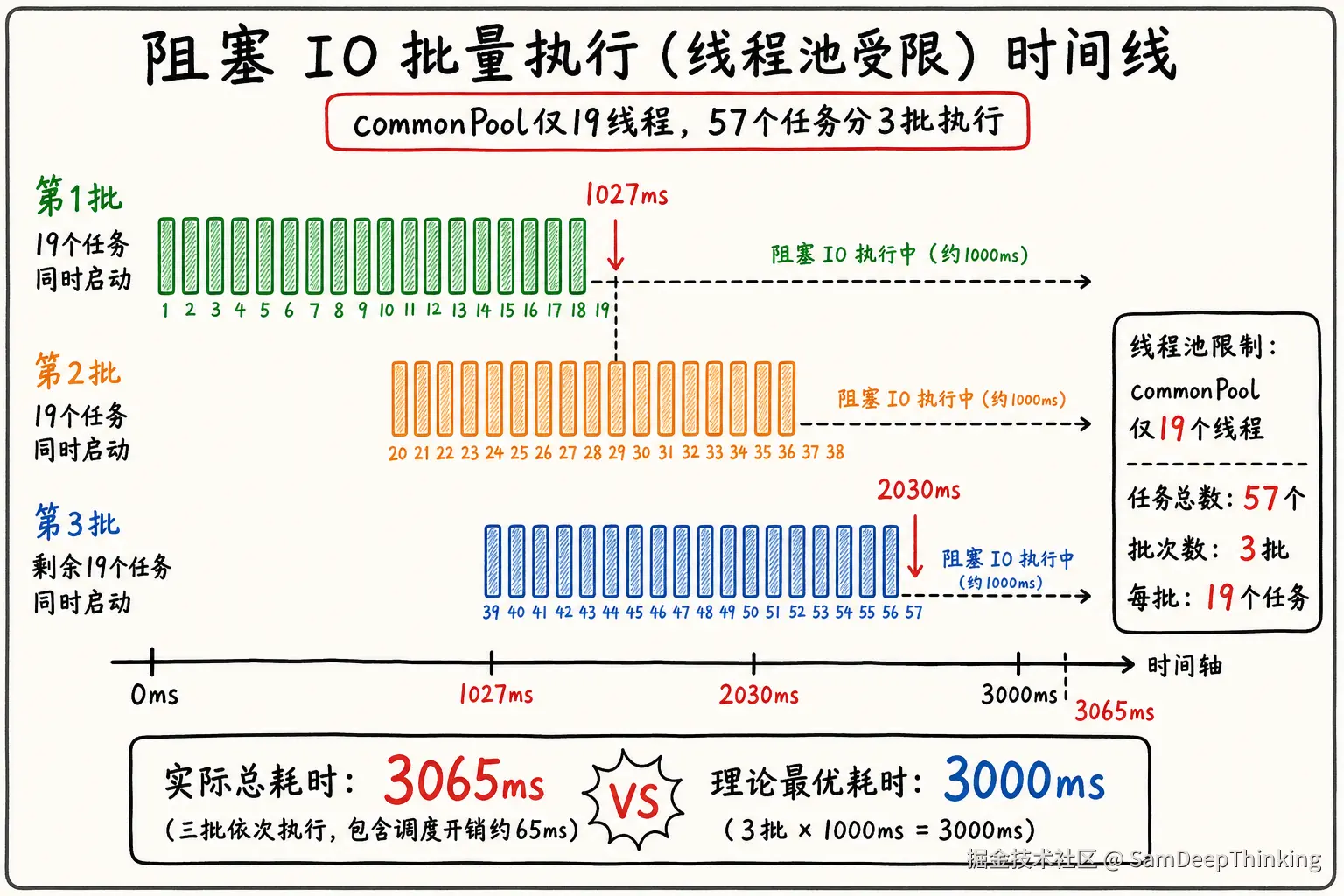
结果分析:
测试向commonPool一次提交57个任务,是19个线程的3倍;每个任务sleep(1000)模拟HTTP阻塞。日志里前19个任务在十几毫秒内几乎同时启动,占满worker-1到worker-19;第20个任务要等到约1027ms才有线程空出来,第38个约2030ms,按19路一批一批往下消化。
实际总耗时3065ms,和理论值3000ms(57÷19×1000)接近,说明commonPool并没有因为阻塞而额外扩容。这和3.2节一致:普通Thread.sleep、JDBC、HTTP调用不属于ManagedBlocker,ForkJoinPool的补偿机制不会介入。
IO密集型任务如果继续丢在默认commonPool里,任务数超过并行度,总耗时会按批成倍拉长。57个模拟请求已经要了3秒多,换成接口聚合场景,响应时间也会跟着涨。
6.3 ThreadPoolComparison
代码
Java
/**
 * 测试3:自定义线程池 vs ForkJoinPool.commonPool() 性能对比
 * 模拟IO密集型任务(HTTP调用)
 */
public class ThreadPoolComparison {

    // 任务数量
    private static final int TASK_COUNT = 30;
    // 每个任务模拟阻塞时间(毫秒)
    private static final int BLOCK_TIME_MS = 100;

    public static void main(String[] args) throws Exception {
        int cpuCores = Runtime.getRuntime().availableProcessors();
        System.out.println("========== 测试3:自定义线程池 vs commonPool 性能对比 ==========");
        System.out.println("CPU核数: " + cpuCores);
        System.out.println("任务数量: " + TASK_COUNT);
        System.out.println("每个任务模拟阻塞: " + BLOCK_TIME_MS + "ms (模拟HTTP调用)");
        System.out.println();

        // 测试1:使用默认commonPool
        testCommonPool();

        System.out.println();

        // 测试2:使用自定义线程池(适合IO密集型)
        testCustomThreadPool();

        System.out.println();
        System.out.println("========== 对比总结 ==========");
    }

    private static void testCommonPool() {
        System.out.println("【测试A】使用 ForkJoinPool.commonPool()");
        int commonPoolSize = ForkJoinPool.getCommonPoolParallelism();
        System.out.println("commonPool线程数: " + commonPoolSize);

        long startTime = System.currentTimeMillis();
        List<CompletableFuture<String>> futures = new ArrayList<>();

        for (int i = 0; i < TASK_COUNT; i++) {
            final int taskId = i;
            CompletableFuture<String> future = CompletableFuture.supplyAsync(() -> {
                Thread.currentThread().getName();
                try {
                    Thread.sleep(BLOCK_TIME_MS);
                } catch (InterruptedException e) {
                    Thread.currentThread().interrupt();
                }
                return "task" + taskId;
            });
            futures.add(future);
        }

        CompletableFuture.allOf(futures.toArray(new CompletableFuture[0])).join();
        long duration = System.currentTimeMillis() - startTime;

        System.out.println("总耗时: " + duration + "ms");
        System.out.println("理论预期耗时: " + (TASK_COUNT / commonPoolSize * BLOCK_TIME_MS) + "ms");
    }

    private static void testCustomThreadPool() {
        System.out.println("【测试B】使用自定义ThreadPoolExecutor(50核心线程)");

        // 自定义线程池,适合IO密集型
        ThreadPoolExecutor customExecutor = new ThreadPoolExecutor(
            50,                      // 核心线程数
            100,                     // 最大线程数
            60L, TimeUnit.SECONDS,
            new LinkedBlockingQueue<>(1000), // 有界队列
            new ThreadFactory() {
                private final java.util.concurrent.atomic.AtomicInteger count =
                    new java.util.concurrent.atomic.AtomicInteger(1);
                @Override
                public Thread newThread(Runnable r) {
                    return new Thread(r, "custom-io-pool-" + count.getAndIncrement());
                }
            },
            new ThreadPoolExecutor.CallerRunsPolicy()
        );

        long startTime = System.currentTimeMillis();
        List<CompletableFuture<String>> futures = new ArrayList<>();

        for (int i = 0; i < TASK_COUNT; i++) {
            final int taskId = i;
            CompletableFuture<String> future = CompletableFuture.supplyAsync(() -> {
                try {
                    Thread.sleep(BLOCK_TIME_MS);
                } catch (InterruptedException e) {
                    Thread.currentThread().interrupt();
                }
                return "task" + taskId;
            }, customExecutor);
            futures.add(future);
        }

        CompletableFuture.allOf(futures.toArray(new CompletableFuture[0])).join();
        long duration = System.currentTimeMillis() - startTime;

        System.out.println("总耗时: " + duration + "ms");
        System.out.println("理论预期耗时: ~" + BLOCK_TIME_MS + "ms (任务并发执行)");

        customExecutor.shutdown();
    }
}运行结果:
C
========== 测试3:自定义线程池 vs commonPool 性能对比 ==========
CPU核数: 20
任务数量: 30
每个任务模拟阻塞: 100ms (模拟HTTP调用)

【测试A】使用 ForkJoinPool.commonPool()
commonPool线程数: 19
总耗时: 227ms
理论预期耗时: 100ms

【测试B】使用自定义ThreadPoolExecutor(50核心线程)
总耗时: 115ms
理论预期耗时: ~100ms (任务并发执行)结果分析:
30个任务、每个阻塞100ms,两次测试逻辑相同,差别只在是否传入自定义Executor。测试A走commonPool,19个线程一轮消化不了30个任务,实际227ms,符合分两批执行的节奏。程序打印的理论值100ms是整数除法30/19=1算偏了,按批次数算是200ms左右,实测227ms和预期一致。
测试B传入50核心线程的ThreadPoolExecutor,30个任务可以同时开工,总耗时115ms,接近单任务100ms加一点调度开销。同一批IO模拟请求,custom池比commonPool快约一倍。
这个差距在20核机器上还不算夸张;若换成4核、commonPool只有3个线程,同样30个任务要分10批,耗时会拉到接近1秒。第四章里方案A和方案B的差异,在这就能量出来:IO密集型批量查询,线程池上限直接决定吞吐。
七、大厂最佳实践总结
7.1 美团外卖商家端的实践
美团技术团队在2022年分享了商家端API异步化的经验(商家端需要从30多个下游服务获取数据)。他们的几条硬性要求值得参考:
- 强制传线程池 :
supplyAsync、thenApplyAsync等方法必须显式传Executor参数,绝不用默认commonPool。 - 线程池隔离:核心/非核心业务、不同调用方用不同的线程池,防止雪崩。
- NIO回调要小心:如果使用基于Netty的异步RPC(如Dubbo异步),同步回调(thenApply不带Async后缀)会运行在IO线程上,里面不能有阻塞逻辑。
- 避免循环依赖死锁:父任务和子任务必须用不同的线程池,否则可能出现所有线程被父任务占满、子任务无法执行的死锁。
7.2 阿里云开发者社区的避坑指南
阿里云2025年的CompletableFuture最佳实践也有几条硬性规定:
- 不要用Executors工具类 :
Executors.newFixedThreadPool()创建的线程池队列是无界链表,任务堆积会导致OOM。必须用ThreadPoolExecutor手动指定有界队列。 - 异常处理不能省 :每条异步链路最后必须有
exceptionally或handle兜底,否则异常被吞掉排查困难。 - 超时控制必须加 :JDK9+用
orTimeout/completeOnTimeout,JDK8要自己实现ScheduledExecutor超时。 - ThreadLocal传递 :异步线程切换会导致ThreadLocal丢失,要用
TransmittableThreadLocal(阿里TTL库)或ContextSnapshot(美团)传递上下文。
7.3 面试踩坑案例
有位候选人分享过面试阿里的经历。他用CompletableFuture优化代码,被面试官评价「在生产环境埋雷」。面试官指出的典型问题代码是这样的:
Java
// 错误示范
CompletableFuture<String> future = CompletableFuture.supplyAsync(() -> {
    // 调用外部HTTP接口
    return restTemplate.getForObject(url, String.class);
});
// 没有指定线程池,使用默认commonPool
// 没有异常处理,get()会抛出 checked exception
// 没有超时控制,外部接口hang住会导致线程一直占用
String result = future.get();
正确写法:
Java
CompletableFuture<String> future = CompletableFuture
    .supplyAsync(() -> {
        return restTemplate.getForObject(url, String.class);
    }, customExecutor)
    .exceptionally(ex -> {
        log.error("调用失败", ex);
        return defaultValue;
    })
    .orTimeout(3, TimeUnit.SECONDS);
7.4 生产环境的真实案例
我这边生产环境进销存服务中的ThreadPoolUtils类封装了一个较为完整的异步任务执行模式,值得参考:
Java
public class ThreadPoolUtils {
    private ThreadPoolExecutor executor;
    private List<CompletableFuture<Void>> completableFutures;
    private CustomAbortPolicy abortPolicy;
    private AtomicInteger failedCount;

    public ThreadPoolUtils(int corePoolSize, int maximumPoolSize,
                          int queueSize, String poolName) {
        this.failedCount = new AtomicInteger(0);
        this.abortPolicy = new CustomAbortPolicy();
        this.completableFutures = new ArrayList<>();
        this.threadFactory = new CustomThreadFactory(poolName);
        this.executor = new ThreadPoolExecutor(corePoolSize, maximumPoolSize,
            60L, TimeUnit.SECONDS, new ArrayBlockingQueue<>(queueSize),
            this.threadFactory, abortPolicy);
    }

    public void execute(Runnable runnable){
        CompletableFuture<Void> future = CompletableFuture.runAsync(runnable, executor);
        // 异常处理
        future.exceptionally(e -> {
            failedCount.incrementAndGet();
            log.error("Task Failed..." , e);
            return null;
        });
        completableFutures.add(future);
    }

    // 关闭时打印统计信息
    public void shutdown(){
        executor.shutdown();
        log.info("活动线程数:"+ executor.getActiveCount());
        log.info("等待任务数:"+ executor.getQueue().size());
        log.info("完成任务数:"+ executor.getCompletedTaskCount());
        log.info("拒绝任务数:"+ abortPolicy.getRejectCount());
        log.info("异常任务数:"+ failedCount.get());
    }
}
这个工具类展示了几个好的实践:
- 必须传自定义executor,不用默认commonPool
- exceptionally兜底异常,避免被吞
- 自定义线程工厂,带poolName便于排查
- 自定义拒绝策略,统计拒绝任务数
- shutdown时打印完整统计,方便监控
某图像处理引擎则展示了CompletableFuture多阶段流水线的实际用法:
Java
public void processImage(ProcessContext context) {
    // 第一阶段:数据检索
    CompletableFuture<Boolean> stageOneFuture = executeStageOne(context);
    Boolean terminate = stageOneFuture.get(globalTimeoutMs, TimeUnit.MILLISECONDS);
    if (handleTerminate(context, terminate)) return;

    // 第二阶段:规则校验(并行)
    CompletableFuture<ProcessContext> stageTwoFuture = executeStageTwo(context);
    // 第三阶段:图像处理(并行)
    CompletableFuture<ProcessContext> stageThreeFuture = executeStageThree(context);

    // 等待二、三阶段完成,带超时控制
    CompletableFuture<Void> combinedFuture = CompletableFuture
        .allOf(stageTwoFuture, stageThreeFuture)
        .orTimeout(leftTimeoutMs, TimeUnit.MILLISECONDS);
    combinedFuture.join();
}
这个实现展示了:
- 多阶段CompletableFuture编排
- allOf等待多个并行阶段
- orTimeout超时控制
- 每个阶段可以使用不同的线程池(通过setExecutor设置)
小结
回过头来看,CompletableFuture和ForkJoinPool根本不是互斥的选型。CompletableFuture默认就依托ForkJoinPool.commonPool(),真正需要问的是:你有没有意识到自己在用默认线程池,以及它能承载什么、不能承载什么。
这类问题在很多技术团队都出现过。美团和阿里团队的经验也验证了这一点。核心建议可以归纳为:
- IO密集型任务(网络调用、数据库查询)必须用自定义线程池,绝不用commonPool。
- 线程池按业务隔离,核心/非核心、快/慢查询分开,避免雪崩。
- 每个异步链路必须有异常处理和超时控制。
- CompletableFuture和parallelStream共享commonPool,流量大的时候会互相干扰。
把这几点做到位,比记住所有API的用法更有价值。
参考的内容
- 美团技术团队:CompletableFuture原理与实践-外卖商家端API的异步化
- 阿里云开发者社区:CompletableFuture 异步编程全解
- OpenJDK:CompletableFuture.java 源码
- OpenJDK:ForkJoinPool.java 源码
- ScaleMind:Parallel Streams and the Common Pool in Java
- HeapPulse:Java Concurrency Defaults - What Actually Happens Under Load
- JRebel:Take Caution Using Java Parallel Streams