卧靠!Go 传给前端的 int64 竟然变成了这个?
问题
昨天写公司项目,后端 Go 返回了个 int64 类型的 ID,前端拿到后数值不对了。在浏览器打开开发者工具,看到返回给前端的Json是正常的,数字展示到页面上就不正常了。交给ai确认了一下,发现了这个问题。猛然想起之前做业务的时候,就碰到过一样的问题,结果没长记性,又犯了同样的错误,遂写博客记录之。
 后端返回:  1234567890123456789
 前端收到:  1234567890123456800
最后几位数字变了。
本地复现
环境
- Go 1.16+
- 浏览器(Chrome / Edge)
项目结构
bash
 blog-demo/
 ├── main.go      # Go 后端
 └── index.html   # 前端页面
1. 后端 main.go
go
package main
import (
"encoding/json"
"fmt"
"net/http"
"time"
)
type User struct {
ID int64 `json:"id"`
}
func userHandler(w http.ResponseWriter, r *http.Request) {
fmt.Printf("[%s] 收到请求: %s\n", time.Now().Format("2006-01-02 15:04:05"), r.URL.Path)
w.Header().Set("Content-Type", "application/json")
w.Header().Set("Access-Control-Allow-Origin", "*")
user := User{ID: 8765432109876543210}
data, _ := json.Marshal(user)
fmt.Printf("[%s] 返回数据: %s\n", time.Now().Format("2006-01-02 15:04:05"), string(data))
w.Write(data)
}
func main() {
http.HandleFunc("/user", userHandler)
http.Handle("/", http.FileServer(http.Dir(".")))
println("前端页面: http://localhost:8080/index.html")
println("接口地址: http://localhost:8080/user")
http.ListenAndServe(":8080", nil)
}同时托管了静态文件,index.html 可直接通过 HTTP 访问。
启动:
go
go run main.go2. 前端 index.html
xml
<!DOCTYPE html>
<html>
<head>
<meta charset="UTF-8">
<title>BigInt 精度丢失 Demo</title>
</head>
<body>
<h1>JavaScript BigInt 精度丢失问题</h1>
<h2>方式一:纯前端验证(无需后端)</h2>
<p>直接 JSON.parse 大整数,立即看到精度丢失:</p>
<pre id="demo1"></pre>
<h2>方式二:请求后端验证</h2>
<p>从 Go 服务获取数据后 JSON.parse:</p>
<pre id="demo2">等待点击按钮...</pre>
<button onclick="fetchUser()">获取用户数据</button>
<script>
// 方式一:页面加载自动执行,无需后端
(function() {
const json = '{"id":1234567890123456789}';
const expected = "1234567890123456789";
const user = JSON.parse(json);
const equal = String(user.id) === expected;
const diff = equal ? 0 : BigInt(expected) - BigInt(user.id);
document.getElementById('demo1').textContent =
'原始 JSON 文本: ' + json + '\n' +
'JSON.parse 后: ' + user.id + '\n' +
'预期值: ' + expected + '\n' +
'精度丢失: ' + (equal ? '否' : '是(丢失了 ' + diff + ')');
})();
async function fetchUser() {
const result = document.getElementById('demo2');
try {
const response = await fetch('http://localhost:8080/user');
const text = await response.text();
const user = JSON.parse(text);
const expected = "8765432109876543210";
result.textContent =
'原始 JSON: ' + text + '\n' +
'解析后 ID: ' + user.id + '\n' +
'预期 ID: ' + expected + '\n' +
'精度丢失: ' + (String(user.id) !== expected ? '是' : '否');
} catch (e) {
result.textContent = '错误: 请先启动后端 (go run main.go)\n' + e.message;
}
}
</script>
</body>
</html>3. 运行演示
- 启动后端:
go run main.go

-
浏览器打开
http://localhost:8080/index.html -
方式一自动展示精度丢失,方式二点击按钮验证后端返回
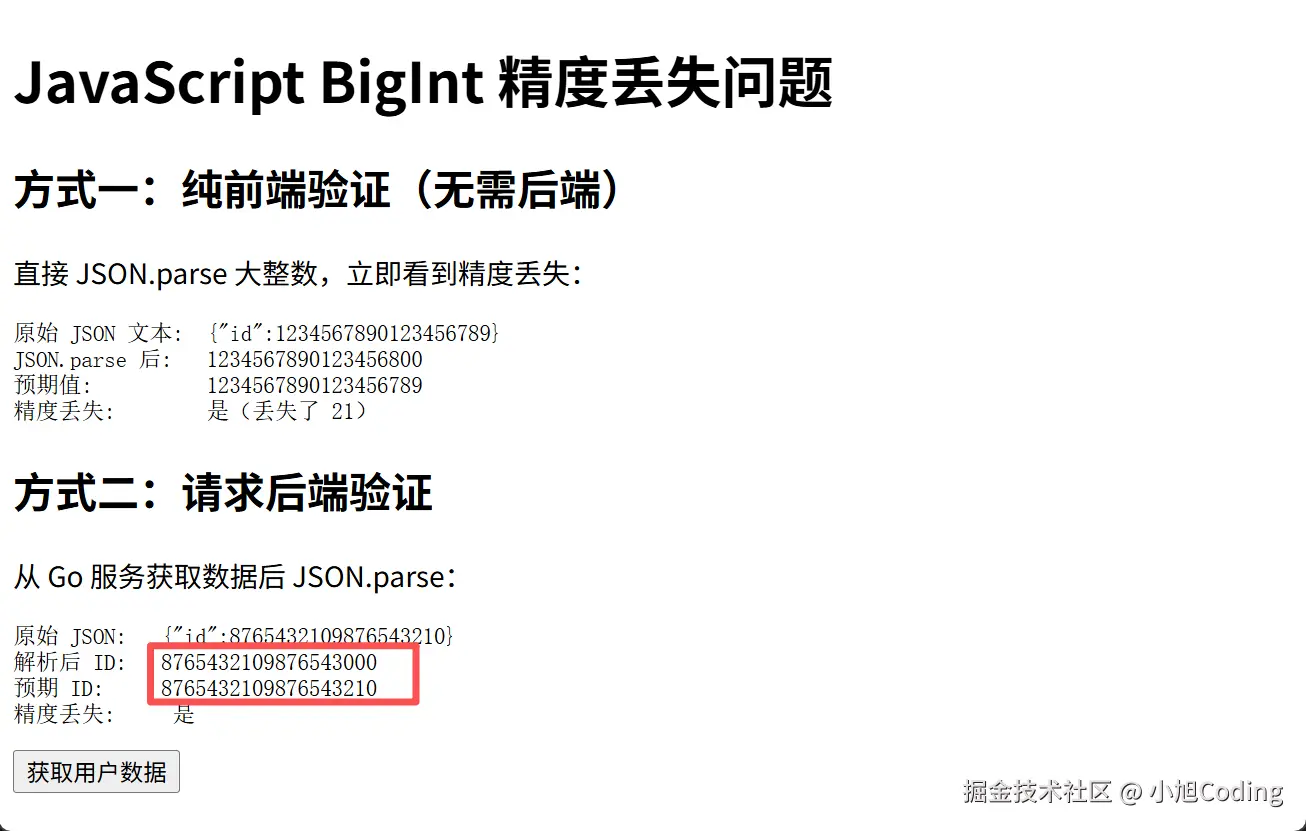
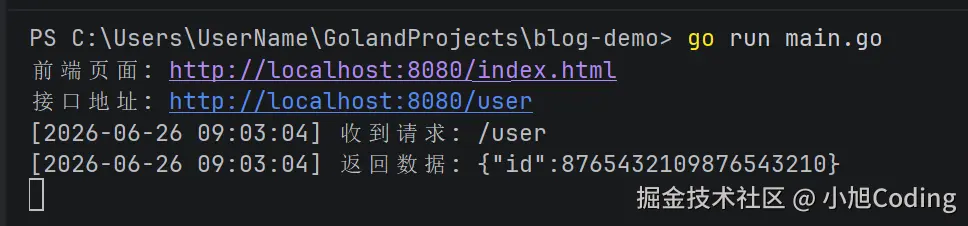
简化版 Demo
在浏览器控制台直接验证:
javascript
const json = '{"id":1234567890123456789}';
const user = JSON.parse(json);
console.log(user.id);
// 输出: 1234567890123456800 ← 精度丢失
// 注意:以下对比会输出 false 是因为
// JS 源码中的 1234567890123456789 字面量也丢失了精度
console.log(user.id === 1234567890123456789);
// 输出: false ← 两者都变成了 1234567890123456800
// 正确对比方式:用字符串
console.log(String(user.id) === "1234567890123456789");
// 输出: false ← 这才是正确的精度丢失判断原因
JavaScript 的 Number 类型用 IEEE 754 双精度浮点数,只能精确表示 -2^53 + 1 到 2^53 - 1 之间的整数(约 16 位)。
javascript
 console.log(Number.MAX_SAFE_INTEGER);
 // 输出: 9007199254740991  (即 2^53 - 1)
超过这个范围,精度就丢了。
| 类型 | 最大精确整数 | 位数 |
|---|---|---|
Go int64 |
9,223,372,036,854,775,807 | 19 位 |
JS Number |
9,007,199,254,740,991 | 16 位 |
解决方案
方案一:后端返回字符串(推荐)
go
 type User struct {
     ID string `json:"id"`  // 改成 string
 }
前端拿到字符串,需要计算时用 BigInt:
ini
const json = '{"id":"1234567890123456789"}';
const user = JSON.parse(json);
console.log(user.id); // "1234567890123456789" (字符串,无精度丢失)
const id = BigInt(user.id);
console.log(id + 1n); // 1234567890123456790n方案二:前端使用 json-bigint 库
sql
npm install json-bigint
javascript
import JSONBig from 'json-bigint';
const json = '{"id":1234567890123456789}';
const user = JSONBig.parse(json);
console.log(user.id.toString()); // "1234567890123456789"最佳实践
- ID 类字段用字符串传输 --- 简单可靠,无需额外依赖
- 前端用
BigInt处理大整数 --- ES2020+ 原生支持 - 数据库主键优先考虑字符串或雪花 ID 前缀 --- 避免后期迁移