内容回顾
1、JVM
2、JUC
- 线程池
-- 自定义线程池 ThreadPoolExecutor,传递7个参数
-- 核心线程数规则 : IO密集型 2N +1 ,CPU密集型 N+1
-- 为什么不使用Executors工具类创建?而是自定义创建线程池
3、MySQL高级
-
索引底层结构
-
SQL优化
-- 单表
-- 多表(关联查询)
今天内容
1、项目概述
总体概述
-
谷粒随享,阅读类听书项目,类似于喜马拉雅
-
我们项目运行在微信小程序中
技术栈
-
SpringBoot:简化Spring应用的初始搭建以及开发过程
-
SpringBoot+SpringCloudAlibaba(Nacos)+OpenFeign+Gateway
-
MyBatis-Plus:持久层框架,也依赖mybatis
-
Redis:内存做缓存
-
MongoDB: 分布式文件存储的数据库
-
Rabbitmq:消息中间件;大型分布式项目是标配;分布式事务最终一致性
-
ThreadPoolExecutor+CompletableFuture:线程池来实现异步操作,提高效率
-
Knife4J:Api接口文档工具
-
MinIO(私有化对象存储集群):分布式文件存储
-
Docker:容器化技术; 生产环境Redis(运维人员);快速搭建环境Docker run
-
Cannal:阿里开源增量订阅组件,数据增量同步
-
Seata:阿里开源分布式事务解决方案
-
Redisson:基于redis的Java驻内存数据网格 - 框架;分布式锁
-
ElasticSearch+Kibana+Logstash 全文检索服务器+可视化数据监控:检索
-
xxl-Job: 分布式定时任务调用中心
-
**支付平台:**微信支付
-
Git:多练习
2、搭建项目环境
搭建软件环境
- 项目运行需要使用服务,比如mysql、rabbitmq等等
方式一:使用提供虚拟机
**第一步,**下载我提供ts.7z,解压
**第二步,**使用VMware打开解压虚拟机,进行使用
第三步, 因为我提供虚拟机把ip地址写固定的,设置VMware网络环境
-
虚拟机ip: 192.168.200.130
-
用户名和密码 : root / 123456
-
设置VMware网络环境
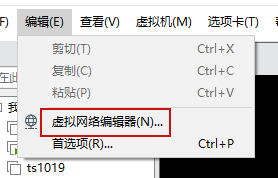
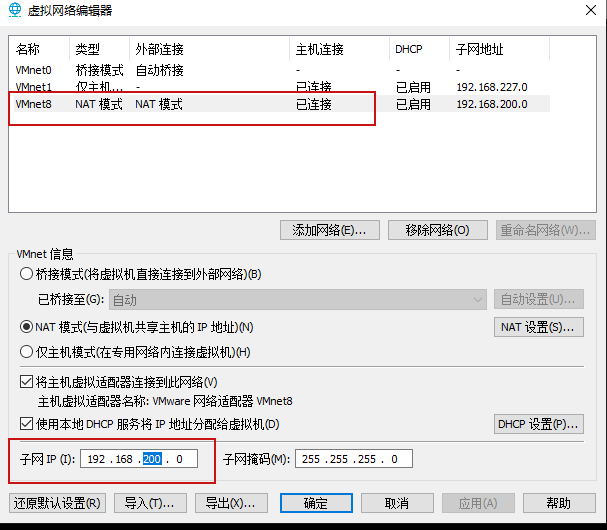
- 检查本地虚拟网卡ip
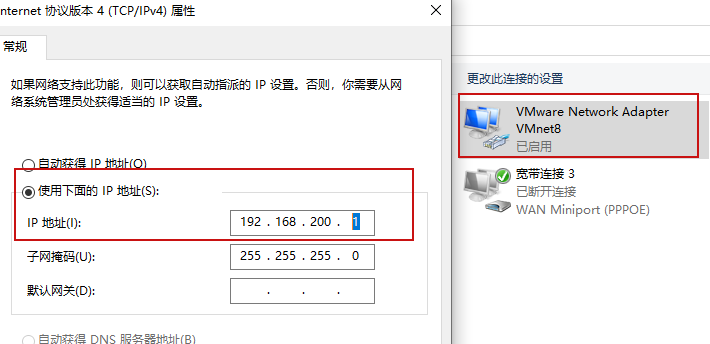
设置完成之后,使用连接工具,通过192.168.200.130连接虚拟机环境
虚拟机需要软件
-
mysql
-
nacos
-
redis
-
minio
-
rabbitmq
-
mongo
-
es
-
kibana
-
logstash
-
canal
我提供虚拟机里面,rabbitmq需要每次手动启动,docker start spzx_rabbitmq
其他服务自动启动
方式二:自己安装

搭建项目工程
-
我这里提供工程结构,有基础代码,比如实体类,有controller、service、mapper,有依赖
-
使用idea打开工程
第一步 到资料找到工程模板压缩文件,解压到目录里面
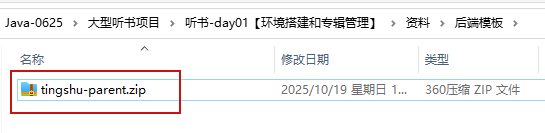
第二步 使用idea打开这个工程
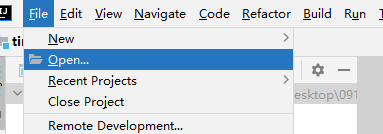
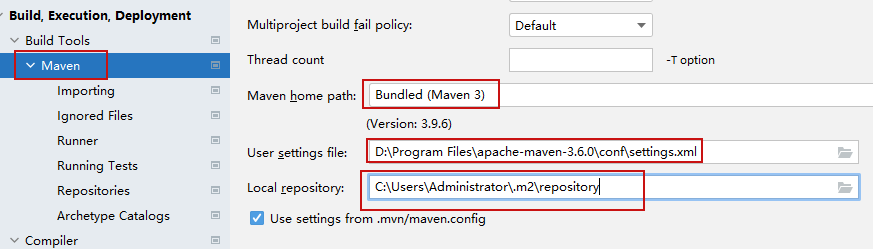
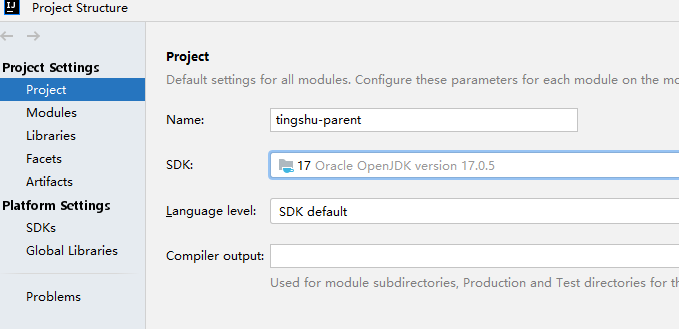
第三步 设置idea的maven环境 和 检查jdk版本
设置好之后,等待依赖下载
3、专辑管理
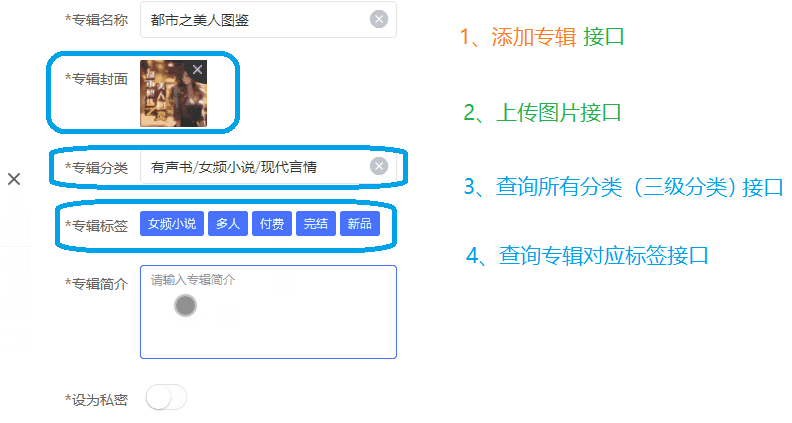
添加专辑分析
- 功能接口分析
- 项目表结构
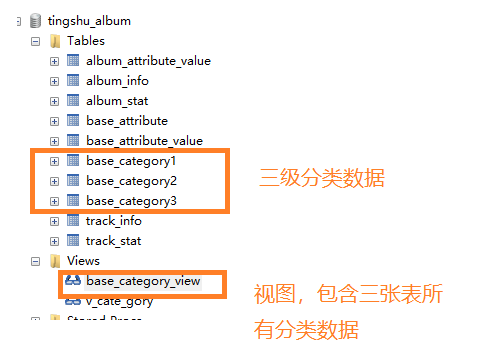
查询所有分类接口(★)
1、因为只是开发后端接口,前端已经开发完成了,后端接口路径和课件保持一致,返回数据和课件一致
2、三级分类返回数据格式:
[
    {
        一级分类id:   1
        一级分类名称:音乐
        child: [
            {
                二级分类id:11
                二级分类名称:古典音乐
                child: [
                    {
                        三级分类id:111
                        三级分类名称:希腊古典音乐
                    }
                ]
            }
        ]
    },
    {
        一级分类id:   2
        一级分类名称:军事
    }
]
BaseCategoryApiController
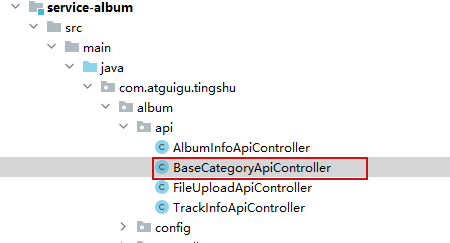
@Tag(name = "分类管理")
@RestController
@RequestMapping(value="/api/album/category")
@SuppressWarnings({"all"})
public class BaseCategoryApiController {
@Autowired
private BaseCategoryService baseCategoryService;
//查询所有分类
@GetMapping("getBaseCategoryList")
public Result getBaseCategoryList(){
//调用service方法
//List<Map> list = baseCategoryService.getBaseCategoryList();
List<JSONObject> list = baseCategoryService.getBaseCategoryList();
return Result.ok(list);
}
}service
package com.atguigu.tingshu.album.service.impl;
import com.alibaba.fastjson.JSONObject;
import com.atguigu.tingshu.album.mapper.*;
import com.atguigu.tingshu.album.service.BaseCategoryService;
import com.atguigu.tingshu.model.album.BaseAttribute;
import com.atguigu.tingshu.model.album.BaseCategory1;
import com.atguigu.tingshu.model.album.BaseCategory2;
import com.atguigu.tingshu.model.album.BaseCategoryView;
import com.baomidou.mybatisplus.extension.service.impl.ServiceImpl;
import org.springframework.beans.factory.annotation.Autowired;
import org.springframework.stereotype.Service;
import java.util.ArrayList;
import java.util.List;
import java.util.Map;
import java.util.stream.Collectors;
@Service
@SuppressWarnings({"all"})
public class BaseCategoryServiceImpl extends ServiceImpl<BaseCategory1Mapper, BaseCategory1> implements BaseCategoryService {
@Autowired
private BaseCategory1Mapper baseCategory1Mapper;
@Autowired
private BaseCategory2Mapper baseCategory2Mapper;
@Autowired
private BaseCategory3Mapper baseCategory3Mapper;
@Autowired
private BaseCategoryViewMapper baseCategoryViewMapper;
@Autowired
private BaseAttributeMapper baseAttributeMapper;
//查询所有分类
@Override
public List<JSONObject> getBaseCategoryList() {
//1 把视图里面所有分类查询出来,返回list集合
List<BaseCategoryView> baseCategoryViewList =
baseCategoryViewMapper.selectList(null);
//2 创建list集合封装最终数据
List<JSONObject> finalList = new ArrayList<>();
//3 封装所有一级分类
//把查询视图里面所有分类集合进行遍历,得到一级分类id,根据一级分类id进行分组
//分组之后返回map集合
// map的key:分组字段,一级分类id
// map的value:每组里面所有数据集合
Map<Long, List<BaseCategoryView>> map =
baseCategoryViewList.stream()
.collect(Collectors
.groupingBy(BaseCategoryView::getCategory1Id));
//for (Map.Entry<Long, List<BaseCategoryView>> entry : map.entrySet())
//遍历map,
map.forEach((k, v) -> {
Long categoryId1 = k; //一级分类id
List<BaseCategoryView> baseCategoryViewList1 = v; //每组一级分类组所有数据集合
//封装一级分类
JSONObject jsonObject1 = new JSONObject();
jsonObject1.put("categoryId",categoryId1);
jsonObject1.put("categoryName",baseCategoryViewList1.get(0).getCategory1Name());
//封装二级分类
//一级分类分组之后,每组里面集合,根据二级分类id分组
//一级分类每组集合 v == baseCategoryViewList1
Map<Long, List<BaseCategoryView>> map1 =
baseCategoryViewList1.stream()
.collect(Collectors
.groupingBy(BaseCategoryView::getCategory2Id));
//创建list集合,用于每个一级分类所有二级分类集合
List<JSONObject> categoryChild2 = new ArrayList<>();
map1.forEach((k1,v1)->{
Long categoryId2 = k1; //一级分类id
List<BaseCategoryView> baseCategoryViewList2 = v1;
JSONObject jsonObject2 = new JSONObject();
jsonObject2.put("categoryId",categoryId2);
jsonObject2.put("categoryName",
baseCategoryViewList2.get(0).getCategory2Name());
// baseCategoryViewList2 = v1有二级下面所有三级分类
// List<BaseCategoryView> --> List<JSONObject>
List<JSONObject> categoryChild3 =
baseCategoryViewList2.stream().map(baseCategoryView -> {
JSONObject jsonObject3 = new JSONObject();
jsonObject3.put("categoryId", baseCategoryView.getCategory3Id());
jsonObject3.put("categoryName", baseCategoryView.getCategory3Name());
return jsonObject3;
}).collect(Collectors.toList());
//把三级集合放到每个二级分类对象里面
jsonObject2.put("categoryChild",categoryChild3);
// 将二级分类对象添加到集合中
categoryChild2.add(jsonObject2);
});
//把二级分类集合放到每个一级里面
jsonObject1.put("categoryChild",categoryChild2);
//把所有一级分类对象放到最终集合里面
finalList.add(jsonObject1);
});
return finalList;
}
}文件上传接口
FileUploadApiController
@Tag(name = "上传管理接口")
@RestController
@RequestMapping("api/album")
public class FileUploadApiController {
@Autowired
private FileUploadService fileUploadService;
//文件上传接口
@Operation(summary = "文件上传")
@PostMapping("/fileUpload")
public Result fileUpload(MultipartFile file) {
// 文件上传
String url = fileUploadService.upload(file);
// 返回数据
return Result.ok(url);
}
}service
package com.atguigu.tingshu.album.service.impl;
import com.atguigu.tingshu.album.config.MinioConstantProperties;
import com.atguigu.tingshu.album.service.FileUploadService;
import io.minio.BucketExistsArgs;
import io.minio.MakeBucketArgs;
import io.minio.MinioClient;
import io.minio.PutObjectArgs;
import io.minio.errors.MinioException;
import org.apache.commons.io.FilenameUtils;
import org.springframework.beans.factory.annotation.Autowired;
import org.springframework.stereotype.Service;
import org.springframework.web.multipart.MultipartFile;
import java.io.IOException;
import java.security.NoSuchAlgorithmException;
import java.util.UUID;
@Service
public class FileUploadServiceImpl implements FileUploadService {
@Autowired
private MinioConstantProperties minioConstantProperties;
//文件上传接口
@Override
public String upload(MultipartFile file) {
// 声明一个url 地址
String url = "";
// 代码:
try {
// Create a minioClient with the MinIO server playground, its access key and secret key.
// ctrl+p
MinioClient minioClient =
MinioClient.builder()
.endpoint(minioConstantProperties.getEndpointUrl())
.credentials(minioConstantProperties.getAccessKey(),
minioConstantProperties.getSecreKey())
.build();
// Make 'asiatrip' bucket if not exist.
boolean found =
false;
found = minioClient.bucketExists(BucketExistsArgs.builder().bucket(minioConstantProperties.getBucketName()).build());
if (!found) {
// Make a new bucket called 'asiatrip'.
minioClient.makeBucket(MakeBucketArgs.builder().bucket(minioConstantProperties.getBucketName()).build());
} else {
System.out.println("Bucket " + minioConstantProperties.getBucketName() + " already exists.");
}
// 文件:
// new File().length(); 数组长度:length 集合长度:size() 字符串长度: length(); ()--> 方法 没有(); 属性
String fileName = UUID.randomUUID().toString().replaceAll("-", "") + "." + FilenameUtils.getExtension(file.getOriginalFilename());
// Upload known sized input stream.
minioClient.putObject(
PutObjectArgs.builder()
.bucket(minioConstantProperties.getBucketName())
.object(fileName).stream(
file.getInputStream(), file.getSize(), -1)
.contentType(file.getContentType())
.build());
// 获取到上传之后的文件路径:
// https://www.image.com/ts/1213oiqwe.jpg;
// http://192.168.200.130:9000/tingshu/atguigu.jpg
url = minioConstantProperties.getEndpointUrl()+"/"+minioConstantProperties.getBucketName()+"/"+fileName;
System.out.println("url:\t"+url);
} catch (Exception e) {
throw new RuntimeException(e);
}
return url;
}
}4、搭建前端环境
-
前端代码运行在微信小程序中
-
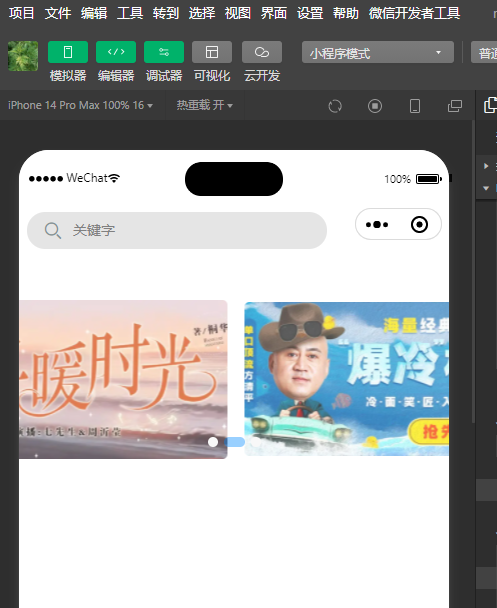
测试时候,使用微信开发者工具进行测试
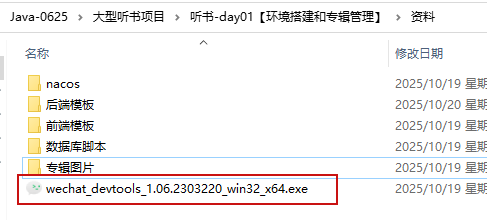
安装微信开发者工具
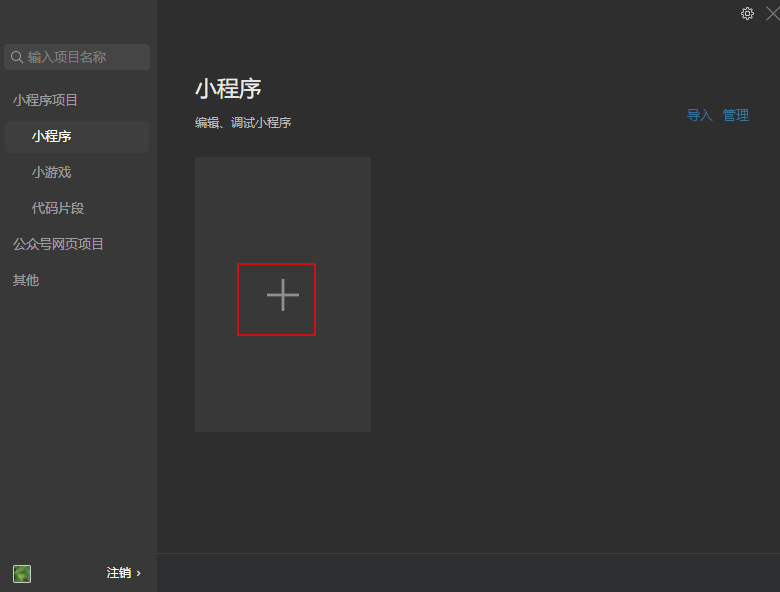
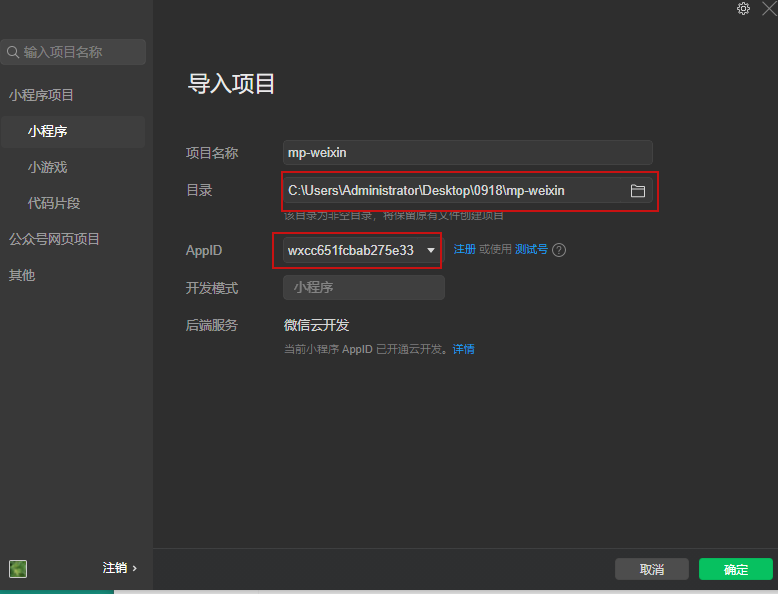
使用微信开发者工具导入前端项目
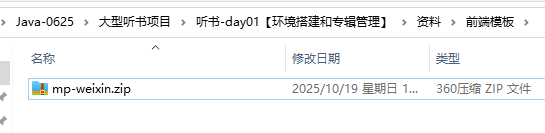
第一步 资料找到前端代码压缩文件,解压
第二步 打开微信开发者工具
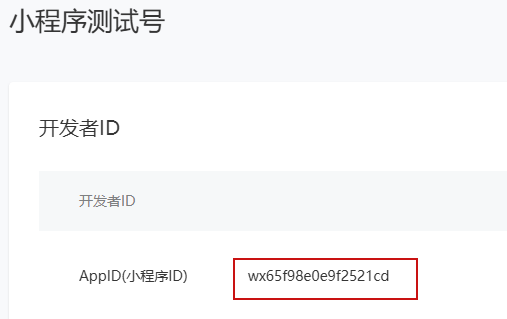
- 注册微信公众平台appid
1、注册正式号网站:小程序
2、注册测试号:微信公众平台