还在为 pip 下载龟速烦恼?一行命令永久解决,告别 -i 参数!
📌 为什么需要换源?
在使用 Python 进行开发时,pip 是我们最常打交道的工具之一。然而,默认的官方源 https://pypi.org/simple 服务器位于国外,国内用户访问时常常遇到:
-
⏱️ 下载速度几十 KB/s,甚至超时断开
-
❌ 频繁报错
ReadTimeoutError、ConnectionError -
😤 每次都要手动加
-i https://pypi.tuna.tsinghua.edu.cn/simple
解决方案很简单:配置全局镜像源,一次配置,永久生效!
切换源后,requirements.txt里面的所有库就可以一键下载!
🎯 清华镜像源介绍
清华大学开源软件镜像站(Tuna)是国内最稳定、最快速的 PyPI 镜像之一:
-
镜像地址 :
https://pypi.tuna.tsinghua.edu.cn/simple -
同步频率:每 5 分钟与官方源同步一次
-
特点:稳定、高速、永久免费
⚡ 一键永久配置(推荐)
🔹 方法一:直接终端运行(适用于所有平台)
打开你的终端(CMD、PowerShell、Bash 均可),直接执行以下两条命令:
python
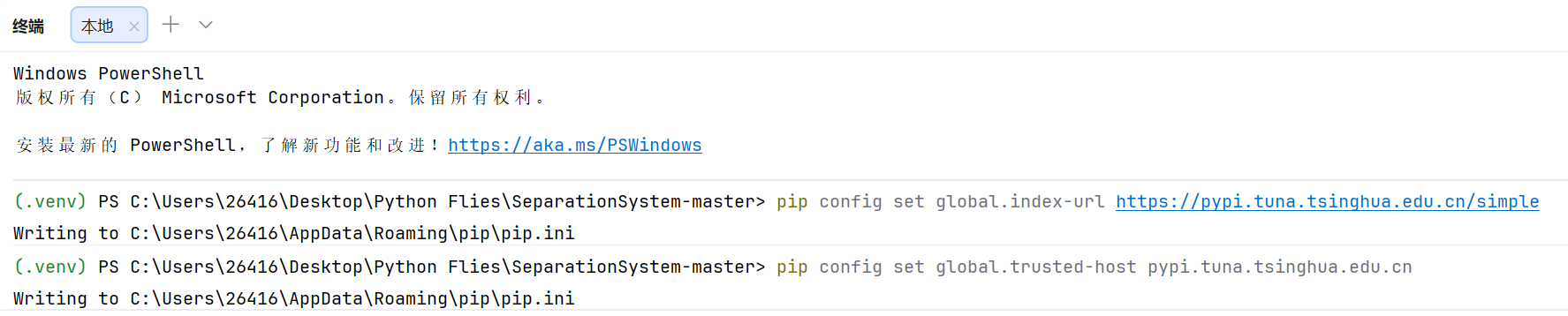
pip config set global.index-url https://pypi.tuna.tsinghua.edu.cn/simple
pip config set global.trusted-host pypi.tuna.tsinghua.edu.cn
执行效果:
**验证配置是否成功:**bash
python
pip config list输出示例:

大功告成!以后所有的 pip install 和 pip install -r requirements.txt 都会自动走清华镜像,速度直接拉满!
🔹 方法二:手动编辑配置文件(备选)
如果不想用命令行,也可以直接编辑 pip 配置文件:
Windows :%APPDATA%\pip\pip.ini
Linux/macOS :~/.config/pip/pip.conf 或 ~/.pip/pip.conf
添加以下内容:
python
pip install -i https://pypi.tuna.tsinghua.edu.cn/simple 包名保存即可。
🔄 如何切换回官方默认源?
如果你需要切回官方源(比如某些包在镜像源同步延迟),执行:
python
pip config unset global.index-url
pip config unset global.trusted-host
执行后,pip 将恢复使用默认官方源。
📦 其他国内镜像源备选
如果清华源某天出问题,也可以选用以下国内优质镜像:
| 镜像源 | 地址 |
|---|---|
| 阿里云 | https://mirrors.aliyun.com/pypi/simple |
| 豆瓣 | https://pypi.douban.com/simple |
| 中科大 | https://pypi.mirrors.ustc.edu.cn/simple |
| 华为云 | https://repo.huaweicloud.com/repository/pypi/simple |
配置方法同上,替换 URL 即可。
💡 小贴士:虚拟环境中的换源
如果你使用了 venv 或 conda 虚拟环境,pip 配置是全局生效 的,所有虚拟环境都会共用这个配置。如果你希望仅对当前项目生效 ,可以在项目根目录创建 pip.conf / pip.ini,或在 pip install 时临时指定:
python
pip install -i https://pypi.tuna.tsinghua.edu.cn/simple 包名📊 换源前后速度对比
| 场景 | 官方源(实测) | 清华镜像(实测) |
|---|---|---|
下载 numpy |
45 KB/s,多次重试 | 8.2 MB/s,秒下 |
下载 pytorch |
经常超时失败 | 稳定 12 MB/s |
requirements.txt 50个包 |
5~10 分钟 | 30 秒内完成 |
🚀 提升 10~50 倍,开发者必备!
🧠 常见问题 FAQ
Q1:配置后依然走官方源?
检查是否有项目级配置文件覆盖了全局配置,或在命令前加 --no-cache-dir 禁用缓存试试。
Q2:公司内网限制了镜像源?
可以尝试使用 HTTP 而非 HTTPS,或在公司内部搭建私有 PyPI 代理。
Q3:conda 用户怎么换源?
conda 换源需要另外配置 .condarc,命令如下:
conda config --add channels https://mirrors.tuna.tsinghua.edu.cn/anaconda/pkgs/main/
conda config --set show_channel_urls yes
📝 总结
| 操作 | 命令 |
|---|---|
| 配置清华源 | pip config set global.index-url https://pypi.tuna.tsinghua.edu.cn/simple pip config set global.trusted-host pypi.tuna.tsinghua.edu.cn |
| 查看当前配置 | pip config list |
| 恢复官方源 | pip config unset global.index-url pip config unset global.trusted-host |
从此告别 -i 参数,让 pip 飞起来吧! 🛫
📢 如果觉得有用,欢迎点赞、收藏、转发!更多 Python 开发技巧,持续更新中~