栈区与堆区初探
C程序会对内存进行分区,主要分为5个区域:
- 栈区(Stack)
- 堆区(Heap)
- 全局/静态区
- 常量区(Constant)
- 代码区
我们先主要了解前两个:
栈内存 由编译器自动分配和释放,我们不需要操心。每调用一个函数,都会在栈区为该函数分配一块内存区域,这块区域就叫做函数栈帧。其中主要存放一些非静态的局部变量、函数参数等。
例如,下面代码中的函数形参 b、定义的局部变量 a 所用到的内存,都会由编译器自动开辟,开辟的方式是静态内存开辟 。当 add 函数执行完毕返回时,对应的函数栈帧就会被销毁,自然这些占用的内存会被编译器自动回收。
c
int add(int b) {
	int a = 10;
	return a + b;
}而堆内存 由我们程序员手动分配(malloc 或 calloc)和释放(free)。
malloc和calloc的区别在于:malloc分配的内存存储的都是未初始化的随机垃圾值,而calloc会自动将分配的内存全部初始化为 0。
c
#include <stdio.h>
#include <stdlib.h>

int main() {
	// 申请了32MB的内存
	int* arr = (int*) malloc(8 * 1024 * 1024 * sizeof(int)); // 返回值类型是void*,表示无类型指针,我们可以强转赋予它类型

	// 每次动态分配内存后,都要检查返回值是否为 NULL
	if (arr == NULL) {
		// 防止操作到空指针,导致程序崩溃
		printf("Memory allocation failed!\n");
		return -1;
	}

	// 释放内存
	free(arr);
	// 置空,防止野指针
	arr = NULL;

	return 0;
}堆内存的开辟方式是动态内存开辟,这些内存不会自动回收,如果不手动回收,就会造成内存泄漏。
此外,栈空间通常很小(1MB),堆空间则很大,和系统可用的内存有关。
运行时决定内存大小
动态内存开辟的使用场景有很多:数据长度只在运行时才确定、栈空间不满足需求、需要延长变量的生命周期、内存大小需要动态改变等。
我们以第一种场景为例:运行时由用户输入决定人员的数量。
c
#include <stdio.h>
#include <stdlib.h>

int main() {
	// 用户输入
	int num = 0;
	printf("Please enter the number of people.\n");
	scanf_s("%d", &num);

	// 开辟对应大小的空间
	int* arr = (int*)malloc(num * sizeof(int));

	// 检查内存是否开辟成功
	if (arr == NULL) {
		printf("Memory allocation failed!\n");
		return -1; // 退出程序
	}

	for (int i = 0; i < num; i++)
	{
		// 输入年龄
		int age = 0;
		printf("Please enter the age of the %d member at this position.\n", i + 1);
		scanf_s("%d", &age);
		arr[i] = age;
	}

	// 输出每个人的年龄
	for (int i = 0; i < num; i++)
	{
		printf("The age of the %d member is %d\n", i + 1, arr[i]);
	}

	// 释放并置空
	free(arr);
	arr = NULL;

	return 0;
}
scanf_s是 Visual Studio 环境下特有的安全函数,在非 VS 环境中请使用scanf。
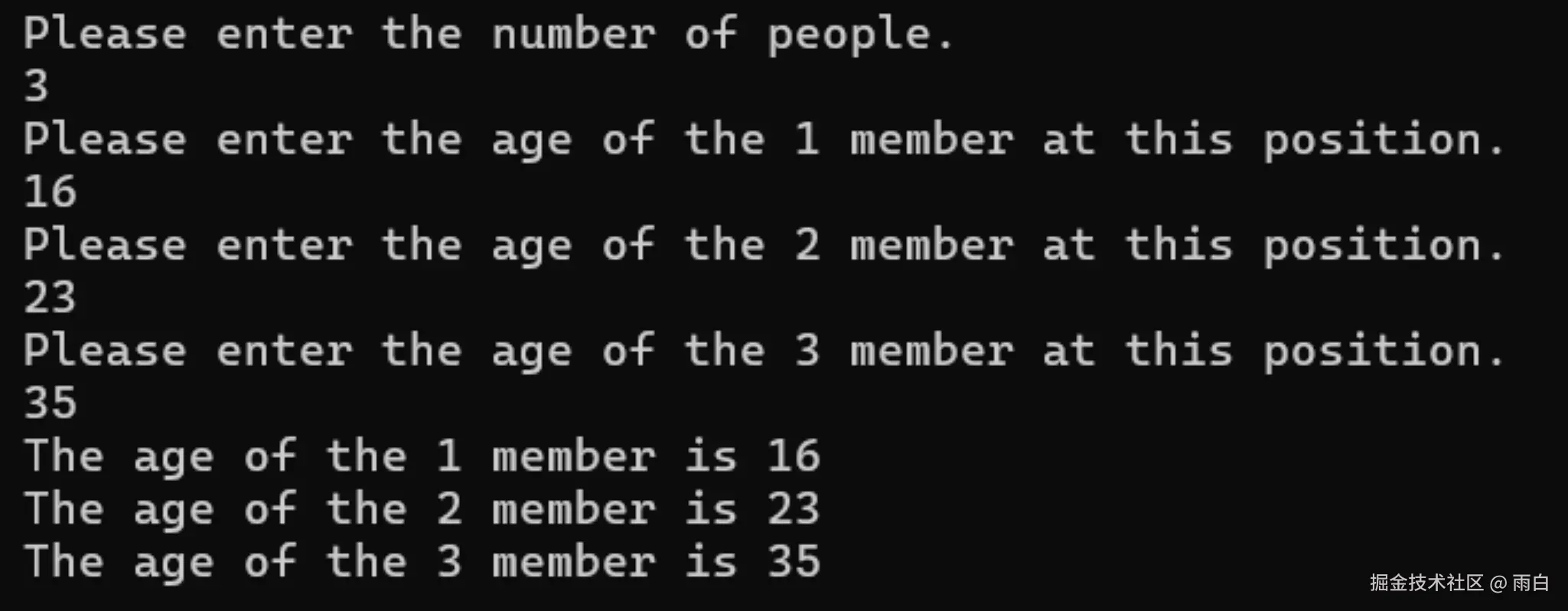
运行结果:
realloc 的扩容机制与暗坑
再来看看第四种场景,普通的数组一旦定义后,长度就固定了,而动态内存的大小可以使用 realloc 进行重新调整,根据自己的需要扩容或缩容。
使用 realloc 进行扩容时,有两种情况:
-
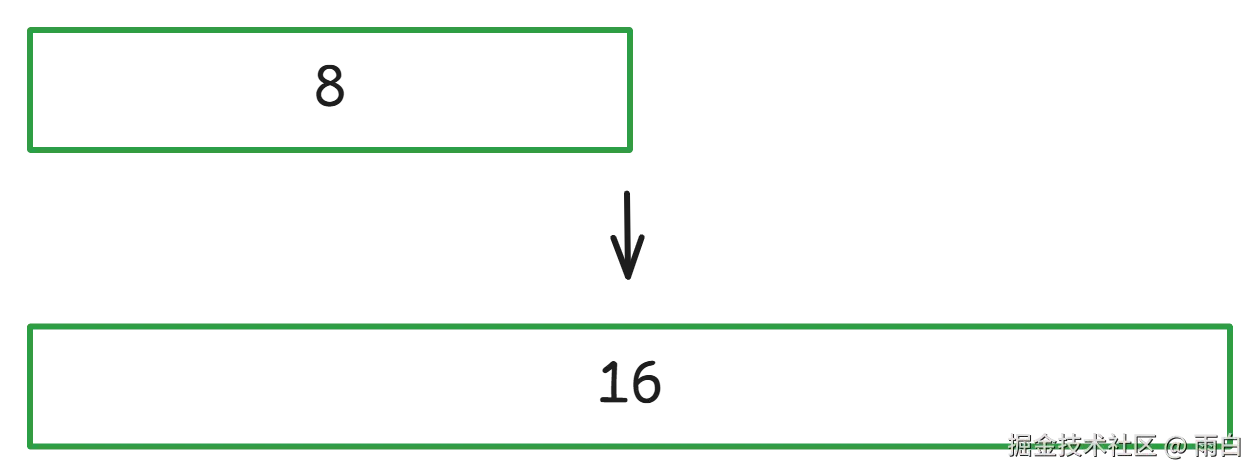
原地扩容:如果原位置后有足够的连续内存空间,它会直接在原地址后追加空间,返回的地址和原地址相同。
-
异地扩容 :如果原位置所需的连续地址空间不足,它会尝试在堆区找到一块合适的内存空间,将之前的数据拷贝到新位置,并自动释放之前的旧内存,最后返回指向这块新内存空间的指针。
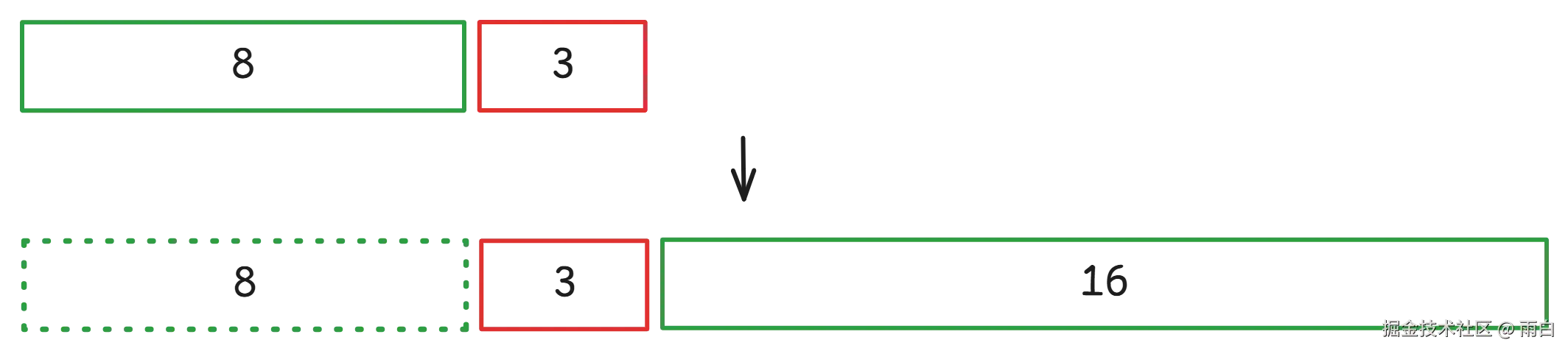
因为异地扩容很常见,所以我们应该总是要使用新的指针去接收返回值。同时,如果发生后了异地扩容,原来的指针就变为了野指针,应该置为空。
c
#include <stdio.h>
#include <stdlib.h>

int main() {
	// 初始可以存储8个整型
	int* p = (int*)malloc(8 * sizeof(int));
	if (p == NULL) {
		printf("Initial memory allocation failed.\n");
		return -1;
	}

	for (int i = 0; i < 8; i++)
	{
		p[i] = i + 1;
	}

	printf("Before capacity expansion\n");
	for (int i = 0; i < 8; i++)
	{
		printf("%d ", p[i]);
	}

	// 扩容至16
	printf("\nAfter capacity expansion\n");

	// 使用新指针变量接收,防止因扩容失败导致原内存地址 p 丢失
	int* new_p = (int*)realloc(p, 16 * sizeof(int));

	if (new_p == NULL) {
		printf("\nFailed to allocate memory for expansion.\n");
		// 扩容失败,旧内存 p 依然有效,程序结束前记得释放
		free(p);
		p = NULL;
		return -1;
	}

	// 扩容成功,原指针 p 可能已在异地扩容中被自动释放而失效,为防止误用,我们将其置空
	p = NULL;

	for (int i = 8; i < 16; i++)
	{
		new_p[i] = i + 1;
	}
	for (int i = 0; i < 16; i++)
	{
		printf("%d ", new_p[i]);
	}

	// 此时由 new_p 管理这块空间,我们只需释放 new_p
	free(new_p);
	new_p = NULL;

	return 0;
}
如果 realloc 扩容失败,它将返回 NULL 空指针,但旧内存不会被释放,我们需要手动处理。
c
#include <stdio.h>
#include <stdlib.h>

int main() {
	int* p = (int*)malloc(8 * sizeof(int));
	if (p == NULL) return -1;

	// 尝试申请一块非常大的内存,模拟失败的情况
	int* new_p = (int*)realloc(p, 8 * 1024LL * 1024 * 1024 * sizeof(int));

	if (new_p == NULL)
	{
		printf("Failed to allocate memory.\n");
		// 虽然申请新内存失败,但是旧内存块 p 依然存在,需要由我们手动释放
		free(p);
		p = NULL;
	}
	else
	{
		printf("Success to allocate memory.\n");
		// 如果成功,释放新指针 new_p 即可
		free(new_p);
		new_p = NULL;
		p = NULL; // 置空防误用
	}

	return 0;
}
注意:永远不要多次释放同一块内存,可能会导致程序崩溃。