pc端科技感的弹窗样式,纯手搓,先看一下实现的效果:
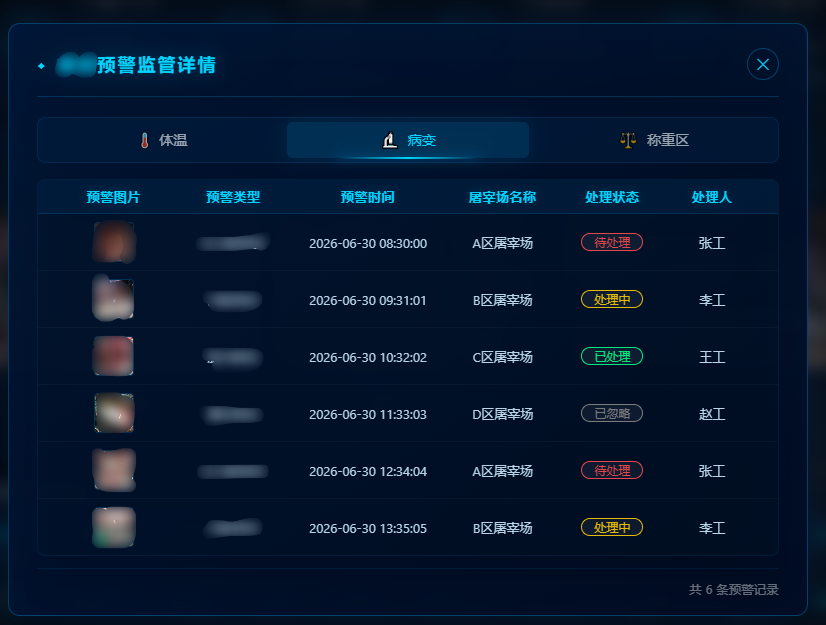
以上实现是react+ts:
javascript
// 页面布局
import screenStyle from './index.less';


	<div
        className={`${screenStyle.modalOverlay} ${isModalOpen ? screenStyle.modalVisible : ''
          }`}
        onClick={handleCloseModal}
      >
        <div
          className={screenStyle.modalContent}
          onClick={(e) => e.stopPropagation()}
        >
          {/* 装饰边框 */}
          <div className={screenStyle.modalBorder}>
            <div className={screenStyle.cornerTopLeft}></div>
            <div className={screenStyle.cornerTopRight}></div>
            <div className={screenStyle.cornerBottomLeft}></div>
            <div className={screenStyle.cornerBottomRight}></div>
            <div className={screenStyle.borderLineTop}></div>
            <div className={screenStyle.borderLineBottom}></div>
            <div className={screenStyle.borderLineLeft}></div>
            <div className={screenStyle.borderLineRight}></div>
          </div>

          {/* 弹窗头部 */}
          <div className={screenStyle.modalHeader}>
            <div className={screenStyle.modalTitle}>
              <span className={screenStyle.titleIcon}>◆</span>
              预警监管详情
            </div>
            <div className={screenStyle.modalClose} onClick={handleCloseModal}>
              ✕
            </div>
          </div>

          {/* Tab切换 */}
          <div className={screenStyle.modalTabs}>
            <div
              className={`${screenStyle.tabItem} ${activeTab === 'temperature' ? screenStyle.tabActive : ''
                }`}
              onClick={() => handleTabChange('temperature')}
            >
              <span className={screenStyle.tabIcon}>🌡️</span>
              体温
            </div>
            <div
              className={`${screenStyle.tabItem} ${activeTab === 'lesion' ? screenStyle.tabActive : ''
                }`}
              onClick={() => handleTabChange('lesion')}
            >
              <span className={screenStyle.tabIcon}>🔬</span>
              病变
            </div>
            <div
              className={`${screenStyle.tabItem} ${activeTab === 'weighing' ? screenStyle.tabActive : ''
                }`}
              onClick={() => handleTabChange('weighing')}
            >
              <span className={screenStyle.tabIcon}>⚖️</span>
              称重区
            </div>
          </div>

          {/* 表格内容 */}
          <div className={screenStyle.modalTableWrapper}>
            <div className={screenStyle.modalTable}>
              <div className={screenStyle.tableHeader}>
                {columns.map((col) => (
                  <div key={col.key}>{col.title}</div>
                ))}
              </div>
              <div className={screenStyle.tableBody}>
                {getCurrentData().map((item) => (
                  <div className={screenStyle.tableRow} key={item.id}>
                    <div className={screenStyle.warningImage}>
                      {item.imageUrl ? (
                        <img
                          src={item.imageUrl}
                          alt={item.image}
                          className={screenStyle.thumbnailImage}
                          onClick={() => handlePreviewImage(item.imageUrl!)}
                          onError={(e) => {
                            // 图片加载失败时显示占位
                            (e.target as HTMLImageElement).style.display =
                              'none';
                            const parent = (e.target as HTMLImageElement)
                              .parentElement;
                            if (parent) {
                              const placeholder =
                                document.createElement('span');
                              placeholder.textContent = '📷';
                              placeholder.className =
                                screenStyle.imagePlaceholder;
                              parent.appendChild(placeholder);
                            }
                          }}
                        />
                      ) : (
                        <span className={screenStyle.imagePlaceholder}>📷</span>
                      )}
                      {/* <span className={screenStyle.imageLabel}>{item.image}</span> */}
                    </div>
                    <div>{item.type}</div>
                    <div>{item.time}</div>
                    <div>{item.slaughterhouse}</div>
                    <div>
                      <span
                        className={screenStyle.statusTag}
                        style={{ color: getStatusColor(item.status) }}
                      >
                        {item.status}
                      </span>
                    </div>
                    <div>{item.processor}</div>
                  </div>
                ))}
              </div>
            </div>
          </div>

          {/* 底部信息 */}
          <div className={screenStyle.modalFooter}>
            <span className={screenStyle.footerInfo}>
              共 {getCurrentData().length} 条预警记录
            </span>
          </div>
        </div>
      </div>
javascript
//index.less样式
.modalOverlay {
  position: fixed;
  top: 0;
  left: 0;
  right: 0;
  bottom: 0;
  background: rgba(0, 0, 0, 70%);
  backdrop-filter: blur(8px);
  display: flex;
  align-items: center;
  justify-content: center;
  z-index: 9999;
  opacity: 0;
  visibility: hidden;
  transition: all 0.3s ease;

  &.modalVisible {
    opacity: 1;
    visibility: visible;
  }
}

.modalContent {
  position: relative;
  width: 800px;
  max-height: 80vh;
  background: linear-gradient(
    145deg,
    rgba(0, 20, 50, 95%),
    rgba(0, 10, 30, 98%)
  );
  border: 1px solid rgba(0, 180, 255, 30%);
  border-radius: 12px;
  padding: 24px 28px 20px;
  box-shadow: 0 0 60px rgba(0, 100, 255, 15%),
    inset 0 0 60px rgba(0, 100, 255, 5%);
  overflow-y: auto;
  transform: scale(0.95) translateY(20px);
  transition: all 0.3s ease;

  .modalOverlay.modalVisible & {
    transform: scale(1) translateY(0);
  }

  &::-webkit-scrollbar {
    width: 4px;
  }

  &::-webkit-scrollbar-track {
    background: rgba(0, 40, 80, 30%);
    border-radius: 2px;
  }

  &::-webkit-scrollbar-thumb {
    background: rgba(0, 180, 255, 40%);
    border-radius: 2px;
  }
}

// ===== Tab 样式 =====
.modalTabs {
  display: flex;
  gap: 4px;
  margin-bottom: 16px;
  padding: 4px;
  background: rgba(0, 40, 80, 30%);
  border-radius: 8px;
  border: 1px solid rgba(0, 180, 255, 10%);

  .tabItem {
    flex: 1;
    display: flex;
    align-items: center;
    justify-content: center;
    gap: 8px;
    padding: 10px 20px;
    border-radius: 6px;
    cursor: pointer;
    font-size: 14px;
    color: rgba(255, 255, 255, 60%);
    transition: all 0.3s ease;
    position: relative;
    user-select: none;

    .tabIcon {
      font-size: 16px;
    }

    &:hover {
      color: rgba(255, 255, 255, 80%);
      background: rgba(0, 180, 255, 5%);
    }

    &.tabActive {
      color: #00d4ff;
      background: rgba(0, 180, 255, 15%);
      box-shadow: 0 0 20px rgba(0, 180, 255, 10%);

      &::after {
        content: '';
        position: absolute;
        bottom: -1px;
        left: 20%;
        right: 20%;
        height: 2px;
        background: linear-gradient(90deg, transparent, #00d4ff, transparent);
        box-shadow: 0 0 10px rgba(0, 180, 255, 50%);
      }
    }
  }
}

// ===== 表格样式 =====
.modalTableWrapper {
  background: rgba(0, 20, 40, 30%);
  border-radius: 8px;
  border: 1px solid rgba(0, 180, 255, 8%);
  overflow: hidden;
  max-height: 400px;
  overflow-y: auto;

  &::-webkit-scrollbar {
    width: 4px;
  }

  &::-webkit-scrollbar-track {
    background: rgba(0, 40, 80, 20%);
    border-radius: 2px;
  }

  &::-webkit-scrollbar-thumb {
    background: rgba(0, 180, 255, 30%);
    border-radius: 2px;
  }
}

.modalTable {
  width: 100%;
  font-size: 13px;

  .tableHeader {
    display: grid;
    grid-template-columns: 1.2fr 1.2fr 1.5fr 1.2fr 1fr 1fr;
    background: rgba(0, 40, 80, 40%);
    padding: 10px 16px;
    color: #00d4ff;
    font-weight: 600;
    font-size: 13px;
    letter-spacing: 0.5px;
    border-bottom: 1px solid rgba(0, 180, 255, 15%);
    position: sticky;
    top: 0;
    z-index: 10;

    > div {
      text-align: center;
      text-shadow: 0 0 10px rgba(0, 180, 255, 20%);
    }
  }

  .tableBody {
    .tableRow {
      display: grid;
      grid-template-columns: 1.2fr 1.2fr 1.5fr 1.2fr 1fr 1fr;
      padding: 8px 16px;
      color: #b8d4e8;
      font-size: 13px;
      text-align: center;
      align-items: center;
      border-bottom: 1px solid rgba(255, 255, 255, 3%);
      transition: background 0.25s ease;

      &:hover {
        background: rgba(0, 180, 255, 4%);
      }

      &:last-child {
        border-bottom: none;
      }

      > div {
        overflow: hidden;
        text-overflow: ellipsis;
        white-space: nowrap;
        padding: 0 4px;
      }

      .warningImage {
        display: flex;
        align-items: center;
        justify-content: center;
        gap: 8px;

        span:first-child {
          font-size: 18px;
        }

        span:last-child {
          font-size: 12px;
          color: rgba(255, 255, 255, 50%);
        }
      }

      .statusTag {
        display: inline-block;
        padding: 2px 12px;
        border-radius: 12px;
        font-size: 12px;
        font-weight: 500;
        background: rgba(255, 255, 255, 6%);
        border: 1px solid currentcolor;
        opacity: 0.9;
      }
    }
  }
}

// ===== 底部信息 =====
.modalFooter {
  display: flex;
  justify-content: flex-end;
  align-items: center;
  padding-top: 14px;
  margin-top: 12px;
  border-top: 1px solid rgba(0, 180, 255, 10%);

  .footerInfo {
    color: rgba(255, 255, 255, 40%);
    font-size: 12px;
    letter-spacing: 0.5px;
  }
}