棋盘是游戏的"脸面"------Canvas让每一颗棋子都栩栩如生
设计棋盘如下:
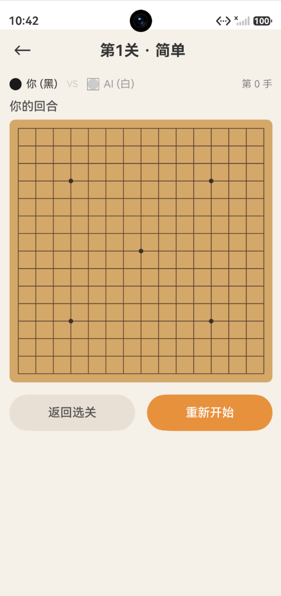
代码如下:
typescript
/**
 * ChessBoardView.ets - 可复用的五子棋棋盘组件
 * 使用Canvas绘制棋盘、网格、棋子
 */
import { BOARD_SIZE, EMPTY, BLACK, WHITE } from './GameConstants';

const BOARD_BG_COLOR: string = '#D4A868';
const LINE_COLOR: string = '#5C4033';
const STAR_COLOR: string = '#3B2F2F';
const LAST_MOVE_COLOR: string = '#E63946';

@Component
export struct ChessBoardView {
  /** 棋盘数据(扁平数组,row*15+col) */
  @Prop @Watch('onDataChange') boardData: number[] = [];
  /** 最后一手行 */
  @Prop lastMoveRow: number = -1;
  /** 最后一手列 */
  @Prop lastMoveCol: number = -1;
  /** 点击回调 */
  onCellClick: (row: number, col: number) => void = () => {};

  private context: CanvasRenderingContext2D =
    new CanvasRenderingContext2D(new RenderingContextSettings(true));
  private canvasSize: number = 320;
  private isReady: boolean = false;

  build() {
    Canvas(this.context)
      .width('100%')
      .aspectRatio(1)
      .onReady(() => {
        this.isReady = true;
        this.drawBoard();
      })
      .onClick((event: ClickEvent) => {
        this.handleClick(event);
      })
      .onAreaChange((_oldValue: Area, newValue: Area) => {
        const w = newValue.width;
        if (typeof w === 'number') {
          this.canvasSize = w;
          if (this.isReady) {
            this.drawBoard();
          }
        }
      })
  }

  /** 数据变化时重绘 */
  onDataChange(): void {
    if (this.isReady) {
      this.drawBoard();
    }
  }

  /** 处理点击事件 */
  private handleClick(event: ClickEvent): void {
    const cellSize = this.canvasSize / BOARD_SIZE;
    const x = event.x;
    const y = event.y;
    const col = Math.round((x - cellSize / 2) / cellSize);
    const row = Math.round((y - cellSize / 2) / cellSize);
    if (row >= 0 && row < BOARD_SIZE && col >= 0 && col < BOARD_SIZE) {
      this.onCellClick(row, col);
    }
  }

  /** 绘制棋盘 */
  private drawBoard(): void {
    const ctx = this.context;
    const size = this.canvasSize;
    if (size <= 0) return;

    const cellSize = size / BOARD_SIZE;
    const halfCell = cellSize / 2;

    // 清空画布
    ctx.clearRect(0, 0, size, size);

    // 绘制背景
    ctx.fillStyle = BOARD_BG_COLOR;
    ctx.fillRect(0, 0, size, size);

    // 绘制网格线
    ctx.strokeStyle = LINE_COLOR;
    ctx.lineWidth = 1;
    for (let i = 0; i < BOARD_SIZE; i++) {
      const pos = halfCell + i * cellSize;
      // 水平线
      ctx.beginPath();
      ctx.moveTo(halfCell, pos);
      ctx.lineTo(size - halfCell, pos);
      ctx.stroke();
      // 垂直线
      ctx.beginPath();
      ctx.moveTo(pos, halfCell);
      ctx.lineTo(pos, size - halfCell);
      ctx.stroke();
    }

    // 绘制星位
    const stars: number[][] = [[3, 3], [3, 11], [7, 7], [11, 3], [11, 11]];
    ctx.fillStyle = STAR_COLOR;
    for (const star of stars) {
      const sx = halfCell + star[1] * cellSize;
      const sy = halfCell + star[0] * cellSize;
      ctx.beginPath();
      ctx.arc(sx, sy, 3, 0, Math.PI * 2);
      ctx.fill();
    }

    // 绘制棋子
    for (let i = 0; i < BOARD_SIZE; i++) {
      for (let j = 0; j < BOARD_SIZE; j++) {
        const idx = i * BOARD_SIZE + j;
        if (idx < this.boardData.length) {
          const piece = this.boardData[idx];
          if (piece !== EMPTY) {
            const px = halfCell + j * cellSize;
            const py = halfCell + i * cellSize;
            const radius = cellSize * 0.42;
            this.drawPiece(ctx, px, py, radius, piece);
          }
        }
      }
    }

    // 绘制最后一手标记
    if (this.lastMoveRow >= 0 && this.lastMoveCol >= 0) {
      const px = halfCell + this.lastMoveCol * cellSize;
      const py = halfCell + this.lastMoveRow * cellSize;
      ctx.strokeStyle = LAST_MOVE_COLOR;
      ctx.lineWidth = 2;
      ctx.beginPath();
      ctx.arc(px, py, cellSize * 0.16, 0, Math.PI * 2);
      ctx.stroke();
    }
  }

  /** 绘制单个棋子(带渐变效果) */
  private drawPiece(ctx: CanvasRenderingContext2D, x: number, y: number,
    radius: number, player: number): void {
    if (player === BLACK) {
      const gradient = ctx.createRadialGradient(
        x - radius * 0.3, y - radius * 0.3, radius * 0.1,
        x, y, radius
      );
      gradient.addColorStop(0, '#666666');
      gradient.addColorStop(0.5, '#2A2A2A');
      gradient.addColorStop(1, '#111111');
      ctx.fillStyle = gradient;
    } else {
      const gradient = ctx.createRadialGradient(
        x - radius * 0.3, y - radius * 0.3, radius * 0.1,
        x, y, radius
      );
      gradient.addColorStop(0, '#FFFFFF');
      gradient.addColorStop(0.7, '#F0F0F0');
      gradient.addColorStop(1, '#C8C8C8');
      ctx.fillStyle = gradient;
    }

    ctx.beginPath();
    ctx.arc(x, y, radius, 0, Math.PI * 2);
    ctx.fill();

    // 棋子边框
    ctx.strokeStyle = player === BLACK ? '#000000' : '#999999';
    ctx.lineWidth = 0.5;
    ctx.stroke();
  }
}
组件声明
typescript
@Component
export struct ChessBoardView {
  @Prop @Watch('onDataChange') boardData: number[] = [];
  @Prop lastMoveRow: number = -1;
  @Prop lastMoveCol: number = -1;
  onCellClick: (row: number, col: number) => void = () => {};

  private context: CanvasRenderingContext2D =
    new CanvasRenderingContext2D(new RenderingContextSettings(true));
  private canvasSize: number = 320;
  private isReady: boolean = false;

  build() {
    Canvas(this.context)
      .width('100%')
      .aspectRatio(1)
      .onReady(() => {
        this.isReady = true;
        this.drawBoard();
      })
      .onClick((event: ClickEvent) => {
        this.handleClick(event);
      })
      .onAreaChange((_oldValue: Area, newValue: Area) => {
        const w = newValue.width;
        if (typeof w === 'number') {
          this.canvasSize = w;
          if (this.isReady) {
            this.drawBoard();
          }
        }
      })
  }
}
组件接口设计
ChessBoardView是一个纯表现组件------只负责显示和事件传递:
输入(@Prop)
typescript
@Prop @Watch('onDataChange') boardData: number[] = [];  // 棋盘数据
@Prop lastMoveRow: number = -1;                          // 最后一手行
@Prop lastMoveCol: number = -1;                          // 最后一手列
输出(回调)
typescript
onCellClick: (row: number, col: number) => void = () => {};内部状态
typescript
private context: CanvasRenderingContext2D;  // Canvas绘制上下文
private canvasSize: number = 320;            // 实际绘制尺寸
private isReady: boolean = false;            // Canvas是否就绪
Canvas初始化
typescript
private context: CanvasRenderingContext2D =
new CanvasRenderingContext2D(new RenderingContextSettings(true));RenderingContextSettings(true)中的true表示开启抗锯齿,让棋子和线条更加平滑。
Canvas组件的生命周期
组件创建
  ↓
Canvas挂载到组件树
  ↓
onReady触发 → isReady = true → drawBoard()
  ↓
onAreaChange触发 → canvasSize更新 → drawBoard()
  ↓
@Prop boardData变化 → @Watch onDataChange → drawBoard()
onReady
typescript
.onReady(() => {
  this.isReady = true;
  this.drawBoard();
})Canvas组件创建后需要等待onReady回调才能开始绘制。isReady标志位防止在Canvas未就绪时调用绘制方法。
onAreaChange
typescript
.onAreaChange((_oldValue: Area, newValue: Area) => {
  const w = newValue.width;
  if (typeof w === 'number') {
    this.canvasSize = w;
    if (this.isReady) {
      this.drawBoard();
    }
  }
})当组件尺寸变化时(如屏幕旋转、窗口调整),重新获取尺寸并重绘。typeof w === 'number'检查是因为Area的width可能是number或string类型。
@Watch数据驱动重绘
typescript
@Prop @Watch('onDataChange') boardData: number[] = [];

onDataChange(): void {
  if (this.isReady) {
    this.drawBoard();
  }
}当父组件传入的boardData发生变化时,@Watch自动触发onDataChange,进而调用drawBoard重绘。
注意 :ArkTS中@Prop数组变化需要创建新引用才能触发@Watch。父组件中的做法:
typescript
private refreshBoardData(): void {
  this.boardData = this.engine.toFlatArray();  // 创建新数组
}toFlatArray()每次返回新数组,确保引用变化触发@Watch。
drawBoard绘制流程
typescript
private drawBoard(): void {
  const ctx = this.context;
  const size = this.canvasSize;
  if (size <= 0) return;

  const cellSize = size / BOARD_SIZE;
  const halfCell = cellSize / 2;

  // 1. 清空画布
  ctx.clearRect(0, 0, size, size);

  // 2. 绘制背景
  ctx.fillStyle = BOARD_BG_COLOR;
  ctx.fillRect(0, 0, size, size);

  // 3. 绘制网格线
  ctx.strokeStyle = LINE_COLOR;
  ctx.lineWidth = 1;
  for (let i = 0; i < BOARD_SIZE; i++) {
    const pos = halfCell + i * cellSize;
    ctx.beginPath();
    ctx.moveTo(halfCell, pos);
    ctx.lineTo(size - halfCell, pos);
    ctx.stroke();
    ctx.beginPath();
    ctx.moveTo(pos, halfCell);
    ctx.lineTo(pos, size - halfCell);
    ctx.stroke();
  }

  // 4. 绘制星位
  // 5. 绘制棋子
  // 6. 绘制最后一手标记
}
颜色常量
typescript
const BOARD_BG_COLOR: string = '#D4A868';   // 棋盘木色
const LINE_COLOR: string = '#5C4033';        // 网格线深棕
const STAR_COLOR: string = '#3B2F2F';         // 星位黑色
const LAST_MOVE_COLOR: string = '#E63946';    // 最后一手红色
这些颜色定义在组件文件顶部,没有放入资源文件------因为它们是组件内部实现细节,不需要国际化或主题适配。
组件复用
ChessBoardView被两个页面复用:
typescript
// TwoPlayerPage
ChessBoardView({
  boardData: this.boardData,
  lastMoveRow: this.lastMoveRow,
  lastMoveCol: this.lastMoveCol,
  onCellClick: (row: number, col: number) => {
    this.onCellClick(row, col);
  }
})

// AIBattlePage --- 完全相同的用法
ChessBoardView({
  boardData: this.boardData,
  lastMoveRow: this.lastMoveRow,
  lastMoveCol: this.lastMoveCol,
  onCellClick: (row: number, col: number) => {
    this.onCellClick(row, col);
  }
})
组件不关心数据来源(双人对战还是AI对战),只负责渲染和事件传递。
总结
ChessBoardView的设计展示了ArkUI组件的最佳实践:
- @Prop + @Watch:数据驱动重绘
- Canvas生命周期:onReady后才绘制
- onAreaChange:响应式适配屏幕尺寸
- 纯表现组件:只负责显示和回调,不含业务逻辑
- 可复用:被两个页面无缝复用