AgentGate:一行命令给你的 AI Agent 加上企业级弹性层
本地跑,不传数据到云端。一个 YAML 文件。
上个月我的 Agent 挂了四次。一次 Brave Search 429,一次 Resend 500,两次 httpbin 超时。每次挂的表现不一样:有时候是 JSON 解析炸了,有时候是连接直接断开,有一次最离谱------API 返回了一段 HTML 报错页面,Agent 当成了正常回复,接着跟用户胡说八道了两轮。
我去翻代码。重试逻辑写在三个地方,每次重试的间隔算法还不一样。限流靠一个全局变量计数,重启就清零。熔断?没写。
AgentGate 就是把这件事做了。它坐在你的 Agent 和所有外部 API 中间------不是 SaaS,不是 K8s 插件,就是一个本地 HTTP 代理。你告诉它有哪些工具、每个工具的限流和重试怎么配,它替你挡住所有脏活。
安装
bash
pip install git+https://github.com/jjjkkll157/agentgate.gitPython 3.10 以上。fastapi + httpx + pyyaml + structlog + pydantic。
跑起来
新建 tools.yaml:
yaml
tools:
  web_search:
    endpoint: https://api.search.brave.com/res/v1/web/search
    method: GET
    headers:
      X-Subscription-Token: "${BRAVE_API_KEY}"
    retry:
      max_attempts: 3
      backoff: exponential
    ratelimit:
      max_per_minute: 20
    circuit_breaker:
      failure_threshold: 5
cooldown_seconds: 30BRAVEAPIKEY从你的环境变量里读。支持任意深度的dict和list里的{VAR} 替换------不是简单字符串替换,是一层一层递归进去的。
启动:
bash
agentgate --config tools.yaml会看到:
csharp
AgentGate v0.1.0 --- listening on http://127.0.0.1:9400
dashboard: http://127.0.0.1:9400/dashboard
metrics:  http://127.0.0.1:9400/metrics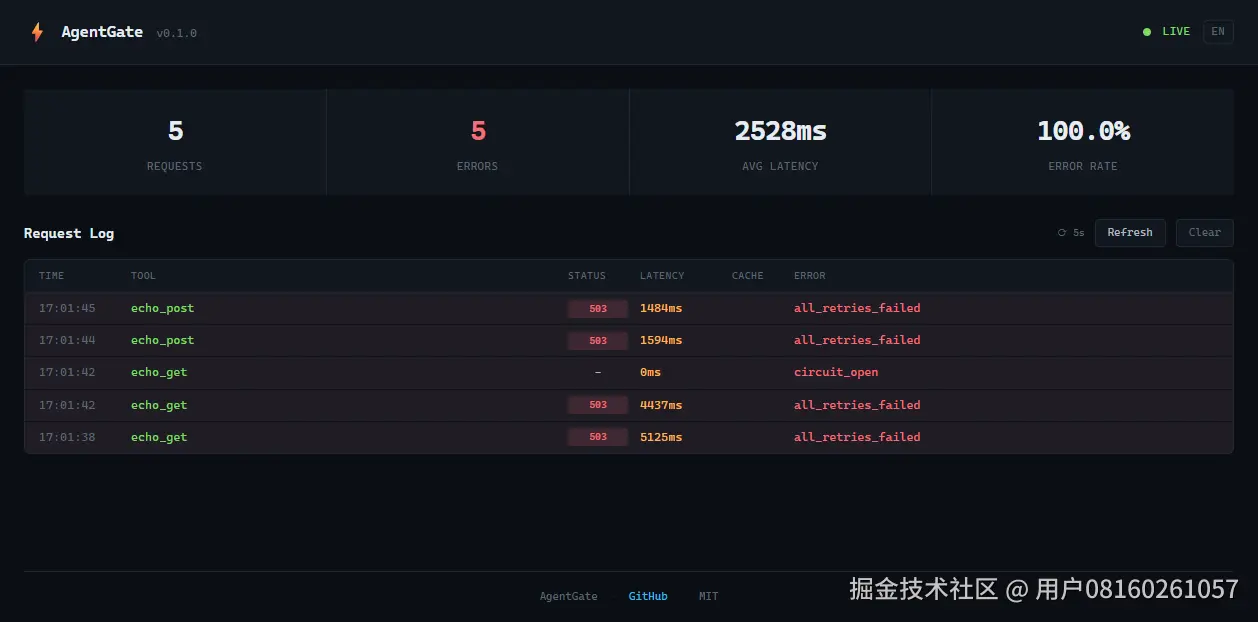
调工具------URL 从原来的 API 地址改成 AgentGate 就行:
bash
# 之前
curl "https://api.search.brave.com/res/v1/web/search?q=AI"

# 之后
curl "http://localhost:9400/tool/web_search?q=AI"
Agent 代码里改一行 base_url。别的不用动。
请求走一遍
一笔请求进到 AgentGate 后,按顺序过这些关卡:
schema 校验 → 缓存查询 → 熔断检查 → 限流排队 → 并发控制 → 重试循环 → 降级链路 → 转发 → schema 校验 → 缓存写入
顺序是刻意排过的。熔断在限流前面------如果电路已经开了,拒绝请求就行,不用浪费令牌桶的 token。缓存在最前面------命中了直接返回,后面的全跳过,省一趟 HTTP 往返。
熔断了是什么样的?
返回 JSON:
json
{
  "error": true,
  "reason": "circuit_open",
  "detail": "circuit open for 'web_search'",
  "retry_after": 25.3,
  "circuit_open": true,
  "request_id": "a1b2c3d4e5f6"
}
Agent 解析到 retry_after=25.3,等半分钟再试。比对着 HTML 报错页面硬解析强一百倍。
request_id 贯穿整条调用链。你在日志里搜这个 ID 能看到这笔请求经过了哪些层、每层花了多少毫秒、重试了几次。
Prometheus 指标长这样:
ini
agentgate_requests_total 6
agentgate_cache_hits_total 0
agentgate_errors_total 6
agentgate_latency_seconds_echo_get_bucket{le="0.01"} 0
agentgate_latency_seconds_echo_get_bucket{le="5.0"} 0
agentgate_latency_seconds_echo_get_bucket{le="10.0"} 2
agentgate_latency_seconds_echo_get_bucket{le="30.0"} 4
每个工具独立的延迟分布,不是混在一起算的平均数。4 次请求在 10-30 秒之间(走的外网 httpbin),2 次在 5-10 秒。你自己的工具配好 Prometheus scrape 就能出图,不用额外代码。
能配什么
| 干什么 | 配什么 |
|---|---|
| 重试 | retry.max_attempts,支持 exponential/linear/fixed 退避,遵守上游 Retry-After 头 |
| 限流 | ratelimit.max_per_minute,令牌桶,自动读 X-RateLimit-Remaining 同步 |
| 熔断 | circuit_breaker.failure_threshold + cooldown_seconds,三态机,半开只放一个探测请求 |
| 缓存 | cache.ttl_seconds,同参数在 TTL 内走缓存,超 10000 条自动驱逐旧数据 |
| 降级 | fallback: 备选工具名,主挂了自动切 |
| 并发 | concurrency.max_concurrent,信号量控制,超时排队 |
| Schema | schema.input/output,调之前查参数类型,调之后查返回结构 |
| 中间件 | middleware.before/after,传 Python 函数路径,做前置校验或后置清洗 |
| 健康 | health.endpoint,后台定时 GET,失败喂给熔断器 |
完整一版配置:
yaml
tools:
  my_tool:
    endpoint: https://api.example.com/v1/action
    method: POST
    headers:
      Authorization: "Bearer ${MY_API_KEY}"
    retry:
      max_attempts: 3
      backoff: exponential
      initial_delay: 1.0
      max_delay: 60.0
    ratelimit:
      max_per_minute: 60
    circuit_breaker:
      failure_threshold: 5
      cooldown_seconds: 30
    concurrency:
      max_concurrent: 10
    timeout: 30.0
    cache:
      ttl_seconds: 300
    fallback:
      - backup_tool
    middleware:
      before:
        - myproject.hooks.validate_auth
      after:
        - myproject.hooks.strip_sensitive
    health:
      endpoint: https://api.example.com/health
    schema:
      input:
        required: [query]
        properties:
          query: {type: string}
      output:
        required: [results]
接入真实 Agent
假设你有一个 LangChain 或自己写的 Agent。改前:
python
import httpx

async def call_search(query: str):
    async with httpx.AsyncClient() as c:
        resp = await c.get(
            "https://api.search.brave.com/res/v1/web/search",
            params={"q": query},
            headers={"X-Subscription-Token": os.environ["BRAVE_API_KEY"]},
        )
    return resp.json()
这段代码没有重试,没有限流,没有熔断。Brave 挂了或者限流了,你的 Agent 直接崩。
改后:
python
import httpx

async def call_search(query: str):
    async with httpx.AsyncClient() as c:
        resp = await c.get(
            "http://localhost:9400/tool/web_search",
            params={"q": query},
        )
    data = resp.json()
    if data.get("error"):
        raise ToolError(data["reason"], data.get("retry_after", 0))
    return data["data"]
所有弹性逻辑在 AgentGate 里,Agent 代码只关心成功还是失败。API key 从 Agent 代码里消失了------只有 AgentGate 的 tools.yaml 知道。
几个实际场景
场景一:上游挂了,不要傻等
你把 Brave Search 的熔断设成 failure_threshold=3, cooldown_seconds=30。连续三次 500 后,AgentGate 直接拒绝后续请求,返回 {"error":true,"reason":"circuit_open","retry_after":25}。Agent 拿到这个,去调你的 fallback(比如 DuckDuckGo),而不是挂在那里等 Brave 超时。
场景二:限流不够用
Brave 免费版每分钟 20 次。配 ratelimit.max_per_minute=20,AgentGate 自建令牌桶。第 21 次请求进来,没令牌了,排队等------不是直接报 429。排到了自动放行。如果 Brave 返回了 X-RateLimit-Remaining: 3,AgentGate 读到后把自己的令牌也压到 3,比你估算的准。
场景三:多人用同一个 API key
你三个 Agent 实例共用一个 Brave key。给工具配 concurrency.max_concurrent=5,AgentGate 保证同时最多 5 个请求打到 Brave。剩下的排队。不用在 Agent 代码里写锁。
场景四:半夜挂了没人管
配 health.endpoint: <api.brave.com/health, AgentGate> 每 30 秒探一次。探到 500 自动喂给熔断器。不用等真实请求来触发熔断------在第一次真实请求打到之前,电路已经开了。
中间件:做一点 YAML 写不下的逻辑
有些逻辑不适合声明式配置。比如"每次请求前检查 token 是否过期,过期了自动刷新"。
AgentGate 的中间件让你注册 Python 函数:
python
# myproject/hooks.py
async def refresh_token(params, context):
    if time.time() > TOKEN_EXPIRY:
        new_token = await fetch_new_token()
        params["headers"]["Authorization"] = f"Bearer {new_token}"
    return params
tools.yaml:
yaml
middleware:
  before:
    - myproject.hooks.refresh_token
函数签名是 async def fn(params, context) -> params。context 里有 tool 名和 request_id。函数可以改 params 再传回去,也可以不打------钩子抛异常不会中断请求,只记一条日志然后继续。
不吹牛:真实踩过的坑
isinstance(True, int) 在 Python 里是 True。第一版 schema 校验用 isinstance(val, int) 检查整数类型------你传个 true 进来,它当整数放过了。修的时候加了个 isinstance(val, bool) 的排除,算是吃了 Python 一个经典暗亏。
Retry-After 头有两种格式。一种是秒数(120),一种是 HTTP-date(Wed, 21 Oct 2026 07:28:00 GMT)。第一版只解析了秒数,HTTP-date 直接当 0 处理------等于不等待立刻重试,正好违反上游的意图。修的时候加了 email.utils.parsedate_to_datetime。
缓存一开始没设上限。有次跑了一整天的压力测试,内存涨到 2GB。加了 max_entries=10000 和最老驱逐,set() 的时候自动踢旧数据。
熔断器半开状态最初允许任意数量的探测请求。如果 10 个并发请求同时打到半开的电路,10 个全放过去。改成只放一个------加了个 _probe_active 标记,第二个请求直接拒绝。
这些坑现在都在测试里。47 个测试覆盖了重试策略、令牌桶、熔断三态机、schema 校验、并发控制、缓存驱逐、Retry-After 解析、中间件链。CI 跑 Python 3.10/3.11/3.12,GitHub Actions 自动触发。
跟 agentgateway 什么关系
agentgateway 是 K8s 原生的企业网关,需要 CRD 和 Gateway API,名字是我后来才知道的。它是给平台团队的,管几百个 Agent,配 Envoy、Istio 那一套。
AgentGate 就是一个进程,pip install 启动。目标是一个开发者的 dev 环境或者小规模部署。
不是竞品。场景不同。
后面想做但还没做的
- MCP(Model Context Protocol)适配------AgentGate 的工具直接暴露给 Claude Desktop
- 请求录制/回放------把真实 API 响应录下来,离线测试
- WebSocket 代理------现在只支持 HTTP,但越来越多 AI API 走 WS
- 配置热重载------改 tools.yaml 不用重启服务
PR 欢迎。