redis|spring-boot redis geo|附近定位功能
Redis GEO是从3.2版本开始提供的地理空间,能存储地点的经纬度坐标,并进行高效的位置计算和查询,适合用来实现"附近的人"、"查找附近商家"基于位置的服务(LBS)
源码
https://gitee.com/jysemel-spring/spring-boot/tree/master/action/action-redis-geo
Geo入门
有序集合+Geohash
- RedisGEO数据结构是有序集合(Sorted Set),当添加一个地理位置Redis会使用Geohash算法将经纬度编码成一个字符串值,作为有序集合的score
- Geohash将二维坐标转化为一维字符串,特点在于地理上越接近的点,其Geohash字符串前缀越相似,Redis能利用有序集合的排序特性,快速完成地理位置检索
常用命令
| 命令 | 说明 | 备注 |
|---|---|---|
GEOADD |
添加一个或多个地理位置(经度、纬度、名称)到指定的 key 中 | 可用 NX/XX 选项控制更新行为 |
GEOPOS |
从 key 中返回一个或多个位置的经纬度坐标 | |
GEODIST |
计算两个位置之间的距离,支持指定单位(m/km/mi/ft) | 默认单位为米 |
GEOSEARCH |
(推荐) 在指定范围内搜索位置,支持圆形(BYRADIUS)或矩形(BYBOX)两种范围。 |
可排序(ASC/DESC)和限制数量(COUNT) |
GEOSEARCHSTORE |
(推荐) 功能同 GEOSEARCH,但会将搜索结果存储到另一个 key 中 |
|
GEOHASH |
返回一个或多个位置元素的 Geohash 字符串表示 | 主要用于调试 |
GEORADIUS |
(已废弃) 以给定经纬度为中心,进行圆形范围查询 | 自 6.2.0 起废弃,使用 GEOSEARCH |
GEORADIUSBYMEMBER |
(已废弃) 以集合中已存在的某个成员为中心,进行圆形范围查询 | 自 6.2.0 起废弃,使用 GEOSEARCH |
GeoHash编码入门示例
pom依赖
 <dependency>
    <groupId>org.springframework.boot</groupId>
    <artifactId>spring-boot-dependencies</artifactId>
    <version>4.0.6</version>
    <type>pom</type>
    <scope>import</scope>
</dependency>

<dependency>
    <groupId>org.springframework.boot</groupId>
    <artifactId>spring-boot-starter-data-redis</artifactId>
</dependency>
启动初始化加载
 /**
     * 定时刷新:启动后延迟3秒首次执行,之后每30分钟刷新一次
     */
    @Scheduled(initialDelayString = "${store.cache.init-delay:3000}",
               fixedDelayString = "${store.cache.refresh-interval:1800000}")
    public void refreshStoreCache() {
        log.info(">>>> 开始刷新店铺GEO缓存 >>>>");
        try {
            List<Store> stores = storeRepository.findAll();
            log.info("SQLite 查询到 {} 条店铺数据", stores.size());
            if (stores.isEmpty()) {
                log.warn("SQLite 中没有店铺数据,跳过缓存刷新");
                return;
            }

            // 1. 测试 Redis 连接
            try {
                String pong = redisTemplate.getConnectionFactory().getConnection().ping();
                log.info("Redis PING 结果: {}", pong);
            } catch (Exception e) {
                log.error("Redis 连接失败", e);
                return;
            }

            // 2. 清除旧数据
            log.info("步骤1: 删除旧缓存数据...");
            redisTemplate.delete(GEO_KEY);

            // 3. ZADD: 成员 = geohash:storeId, score = 0(用 ZRANGEBYLEX 按前缀查询)
            log.info("步骤2: ZADD 写入 geohash 索引...");
            for (Store store : stores) {
                String geohash5 = GeoHashUtils.encode(store.getLatitude(), store.getLongitude(), GEOHASH_PRECISION);
                String member = geohash5 + ":" + store.getId();
                redisTemplate.opsForZSet().add(GEO_KEY, member, 0);
            }
            log.info("Redis ZADD 完成,加载 {} 条店铺坐标", stores.size());

            // 4. 缓存店铺详情
            log.info("步骤3: 缓存店铺详情...");
            for (Store store : stores) {
                String key = STORE_DETAIL_PREFIX + store.getId();
                redisTemplate.opsForValue().set(key, JSON.toJSONString(store), 1, TimeUnit.HOURS);
            }
            log.info("Redis 店铺详情缓存完成,共 {} 条", stores.size());

        } catch (Exception e) {
            log.error("刷新店铺GEO缓存失败", e);
        }
        log.info("<<<< 店铺GEO缓存刷新结束 <<<<");
    }
查询使用
/**
     * 搜索附近店铺
     */
    public List<StoreNearbyVO> searchNearby(double longitude, double latitude, double radiusKm) {
        // 缓存为空时重新加载
        Long geoSize = redisTemplate.opsForZSet().zCard(GEO_KEY);
        if (geoSize == null || geoSize == 0) {
            log.info("Redis 缓存为空,重新加载...");
            refreshStoreCache();
        }

        // 1. 计算中心点的 geohash(精度5)
        String centerHash = GeoHashUtils.encode(latitude, longitude, GEOHASH_PRECISION);

        // 2. 获取中心 + 8个邻居 geohash(九宫格覆盖搜索区域)
        List<String> searchHashes = GeoHashUtils.neighbors(centerHash);
        searchHashes.add(centerHash);
        log.debug("搜索九宫格: {}", searchHashes);

        // 3. ZRANGEBYLEX 按前缀查询每个 geohash 桶中的店铺
        Set<String> storeIds = new HashSet<>();
        for (String hash : searchHashes) {
            String min = hash + ":";
            String max = hash + ":\uffff";
            try {
                Set<String> members = redisTemplate.opsForZSet().rangeByLex(GEO_KEY, Range.closed(min, max));
                if (members != null) {
                    for (String member : members) {
                        // member 格式: "geohash:storeId"
                        int idx = member.indexOf(':');
                        if (idx >= 0) {
                            storeIds.add(member.substring(idx + 1));
                        }
                    }
                }
            } catch (Exception e) {
                log.warn("ZRANGEBYLEX 查询失败: hash={}", hash, e);
            }
        }

        if (storeIds.isEmpty()) {
            log.info("附近搜索:九宫格内无店铺");
            return Collections.emptyList();
        }

        // 4. 从 Redis 详情缓存中读取店铺,计算实际距离,过滤并排序
        List<StoreNearbyVO> result = new ArrayList<>();
        for (String storeId : storeIds) {
            String storeJson = redisTemplate.opsForValue().get(STORE_DETAIL_PREFIX + storeId);
            if (storeJson != null) {
                Store store = JSON.parseObject(storeJson, Store.class);
                double dist = GeoHashUtils.haversineDistance(latitude, longitude,
                        store.getLatitude(), store.getLongitude());
                if (dist <= radiusKm) {
                    result.add(toNearbyVO(store, dist));
                }
            }
        }

        // 按距离升序排序
        result.sort((a, b) -> Double.compare(a.getDistanceKm(), b.getDistanceKm()));

        log.info("附近搜索:中心({},{}) 半径{}km → 找到 {} 家店铺",
                longitude, latitude, radiusKm, result.size());
        return result;
    }

    public List<StoreNearbyVO> searchNearby(double longitude, double latitude) {
        return searchNearby(longitude, latitude, defaultRadiusKm);
    }

    private StoreNearbyVO toNearbyVO(Store store, double distanceKm) {
        StoreNearbyVO vo = new StoreNearbyVO();
        vo.setId(store.getId());
        vo.setName(store.getName());
        vo.setLongitude(store.getLongitude());
        vo.setLatitude(store.getLatitude());
        vo.setAddress(store.getAddress());
        vo.setPhone(store.getPhone());
        vo.setCategory(store.getCategory());
        vo.setDistanceKm(Math.round(distanceKm * 1000.0) / 1000.0);
        return vo;
    }
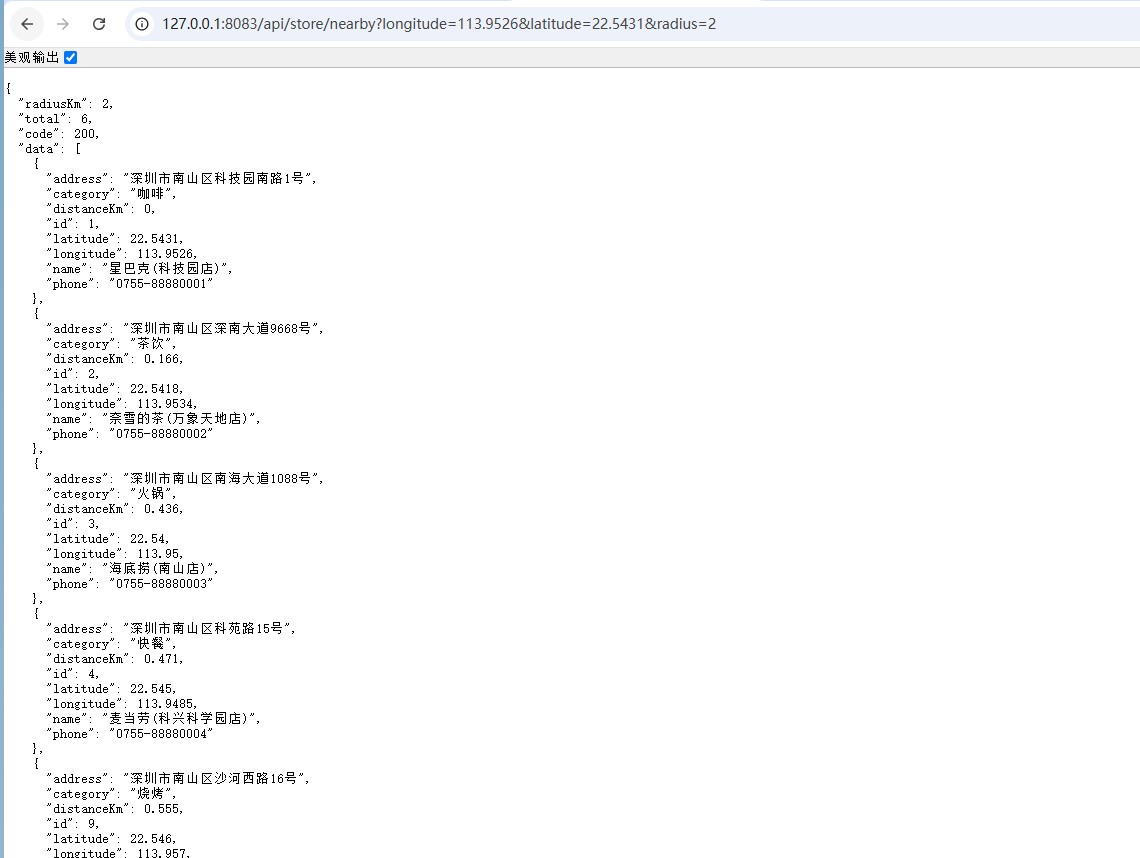
验证
http://127.0.0.1:8083/api/store/nearby?longitude=113.9526\&latitude=22.5431\&radius=2