基于鸿蒙PC与鸿蒙Flutter框架的AI紧急求助应用开发实践
引言
在数字化时代,紧急求助应用的重要性日益凸显。当意外发生时,每一秒都至关重要,一款高效、可靠的紧急求助应用能够挽救生命、减少伤害。随着华为鸿蒙生态的快速发展,特别是鸿蒙PC的推出,我们有机会构建跨设备、跨平台的智能紧急求助解决方案。
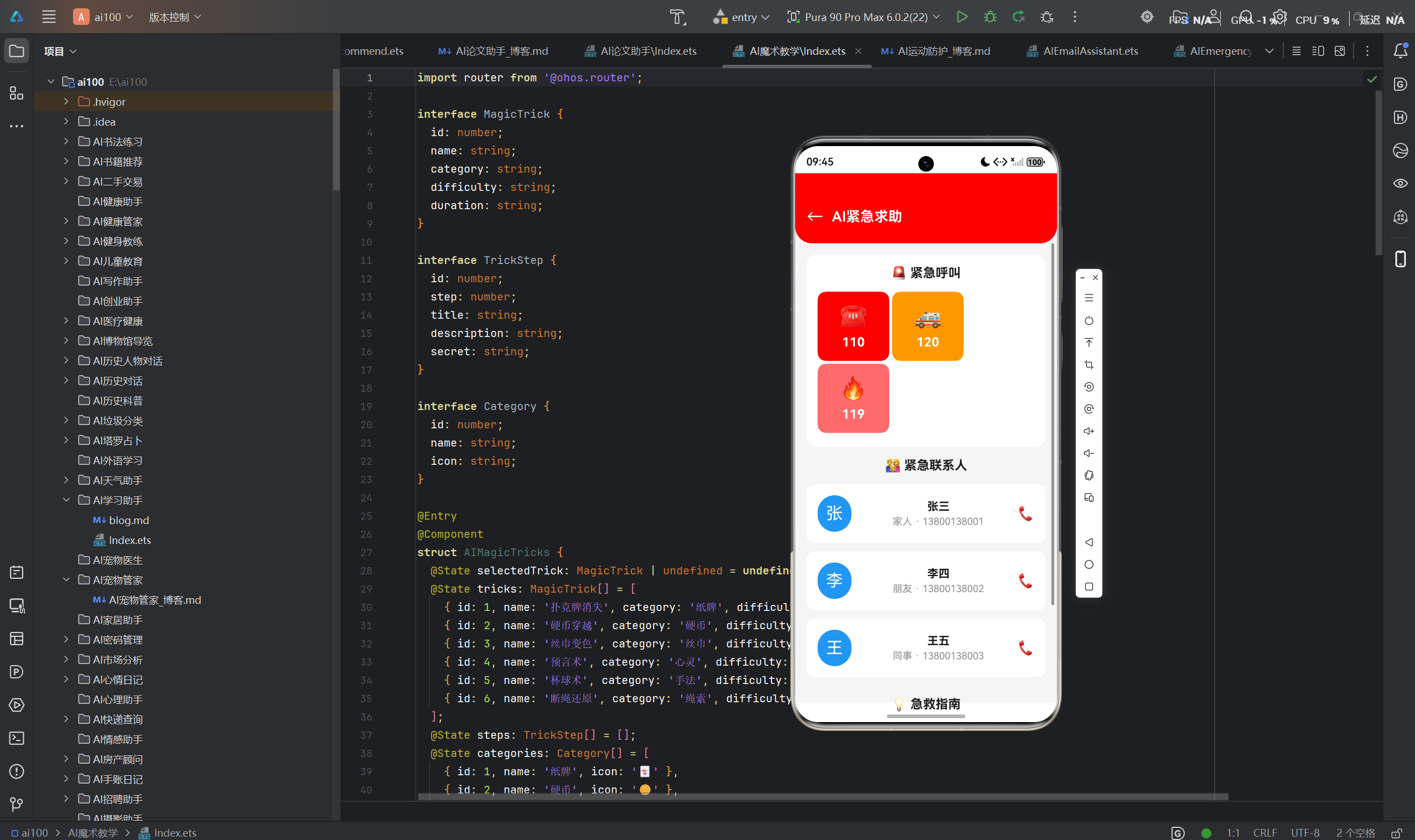
本文将详细介绍我们基于鸿蒙PC 和鸿蒙Flutter框架开发的AI紧急求助应用。该应用充分利用鸿蒙分布式能力和Flutter跨平台特性,为用户提供一键拨号、智能急救指南、实时位置共享等核心功能,实现真正意义上的"救命应用"。
---
一、项目概述
1.1 项目背景
近年来,全球突发事件频发,自然灾害、交通事故、医疗急救等场景对紧急求助系统提出了更高要求。传统的紧急求助方式存在以下痛点:
- 响应延迟:手动拨打紧急电话、描述位置和状况耗时较长
- 信息不全:用户在紧急状态下难以清晰描述关键信息
- 跨设备协作差:不同设备间无法快速共享紧急信息
- 地域限制:不同国家/地区紧急号码不同,国际用户使用不便
基于以上背景,我们决定开发一款基于鸿蒙生态的AI紧急求助应用,旨在解决传统紧急求助方式的痛点。
1.2 项目目标
- 快速响应:实现一键式紧急呼叫,缩短求救时间
- 智能辅助:利用AI技术提供实时急救指南和状况评估
- 位置精准:自动获取并共享精准位置信息
- 跨端协同:支持手机、平板、PC等多设备无缝协作
- 全球适配:支持多语言和不同国家紧急号码
1.3 技术选型
| 维度 | 技术方案 | 选择理由 |
|---|---|---|
| 主框架 | 鸿蒙Flutter框架 | 跨平台能力、高性能渲染、丰富组件库 |
| 操作系统 | HarmonyOS NEXT | 分布式能力、原生性能、安全可靠 |
| AI引擎 | 华为盘古大模型 | 本地推理、低延迟、智能问答 |
| 位置服务 | HMS Core Location | 高精度定位、室内定位支持 |
| 通信服务 | HMS Core Calling | 一键拨号、通话状态管理 |
二、技术架构设计
2.1 整体架构
应用采用分层架构设计,从下至上分为基础设施层、核心服务层、业务逻辑层和界面展示层:
┌─────────────────────────────────────────────────────────────┐
│                    界面展示层 (UI Layer)                     │
│  ┌─────────────┐  ┌─────────────┐  ┌───────────────────┐   │
│  │ 紧急呼叫页  │  │ 急救指南页  │  │   位置共享页      │   │
│  └─────────────┘  └─────────────┘  └───────────────────┘   │
├─────────────────────────────────────────────────────────────┤
│                    业务逻辑层 (Business Layer)              │
│  ┌─────────────┐  ┌─────────────┐  ┌───────────────────┐   │
│  │ 呼叫管理器  │  │ 指南引擎    │  │   位置服务        │   │
│  └─────────────┘  └─────────────┘  └───────────────────┘   │
├─────────────────────────────────────────────────────────────┤
│                    核心服务层 (Service Layer)               │
│  ┌─────────────┐  ┌─────────────┐  ┌───────────────────┐   │
│  │ AI推理服务  │  │ 通信服务    │  │   数据同步服务    │   │
│  └─────────────┘  └─────────────┘  └───────────────────┘   │
├─────────────────────────────────────────────────────────────┤
│                  基础设施层 (Infrastructure Layer)          │
│  ┌─────────────┐  ┌─────────────┐  ┌───────────────────┐   │
│  │ HMS Core    │  │ 鸿蒙分布式  │  │   本地存储        │   │
│  └─────────────┘  └─────────────┘  └───────────────────┘   │
└─────────────────────────────────────────────────────────────┘
2.2 关键技术组件
2.2.1 鸿蒙Flutter框架集成
鸿蒙Flutter框架是华为推出的Flutter引擎与HarmonyOS的深度集成方案,它提供了:
- 原生性能:通过AOT编译实现接近原生的运行性能
- 鸿蒙特性:直接调用HarmonyOS系统能力和分布式API
- 热更新支持:支持Flutter模块的快速迭代
- 多设备适配:一套代码适配手机、平板、PC等多种设备
dart
// 鸿蒙Flutter框架初始化示例
import 'package:harmony_flutter/harmony_flutter.dart';

void main() {
  runApp(const MyApp());
}

class MyApp extends StatelessWidget {
  const MyApp({super.key});

  @override
  Widget build(BuildContext context) {
    return MaterialApp(
      title: 'AI紧急求助',
      theme: ThemeData(
        colorScheme: ColorScheme.fromSeed(seedColor: Colors.redAccent),
        useMaterial3: true,
      ),
      home: const EmergencyHomePage(),
    );
  }
}
2.2.2 分布式数据管理
利用鸿蒙分布式能力,实现多设备间的紧急信息共享:
dart
// 分布式数据同步示例
import 'package:harmony_distributed/harmony_distributed.dart';

class DistributedDataManager {
  final DistributedKVStore _kvStore;

  DistributedDataManager() : _kvStore = DistributedKVStore('emergency_data');

  Future<void> syncEmergencyInfo(EmergencyInfo info) async {
    await _kvStore.putString('emergency_info', jsonEncode(info.toJson()));
    await _kvStore.sync();
  }

  Future<EmergencyInfo?> getEmergencyInfo() async {
    final data = await _kvStore.getString('emergency_info');
    return data != null ? EmergencyInfo.fromJson(jsonDecode(data)) : null;
  }
}
2.2.3 AI引擎集成
集成华为盘古大模型,提供本地AI推理能力:
dart
// AI引擎服务
import 'package:pangu_ai/pangu_ai.dart';

class AIEngineService {
  late PanguAI _panguAI;

  Future<void> init() async {
    _panguAI = PanguAI();
    await _panguAI.loadModel('emergency_guide_model');
  }

  Future<String> getFirstAidGuide(String condition) async {
    final prompt = '''
你是一位专业的急救专家。请针对以下紧急状况提供详细的急救指南:
状况:$condition

要求:
1. 步骤清晰,按优先级排列
2. 语言简洁易懂
3. 包含注意事项
4. 预估操作时间
''';
    return await _panguAI.generateText(prompt);
  }

  Future<EmergencyLevel> assessEmergencyLevel(String description) async {
    final prompt = '''
请评估以下紧急状况的等级(1-5级,1级最紧急):
状况描述:$description

返回格式:{"level": 数字, "reason": "原因"}
''';
    final result = await _panguAI.generateText(prompt);
    final jsonResult = jsonDecode(result);
    return EmergencyLevel(
      level: jsonResult['level'],
      reason: jsonResult['reason'],
    );
  }
}
2.3 模块划分
应用划分为以下核心模块:
| 模块 | 职责描述 | 关键功能 |
|---|---|---|
| 紧急呼叫模块 | 一键拨号、紧急号码管理 | 快速拨号、多号码选择、通话记录 |
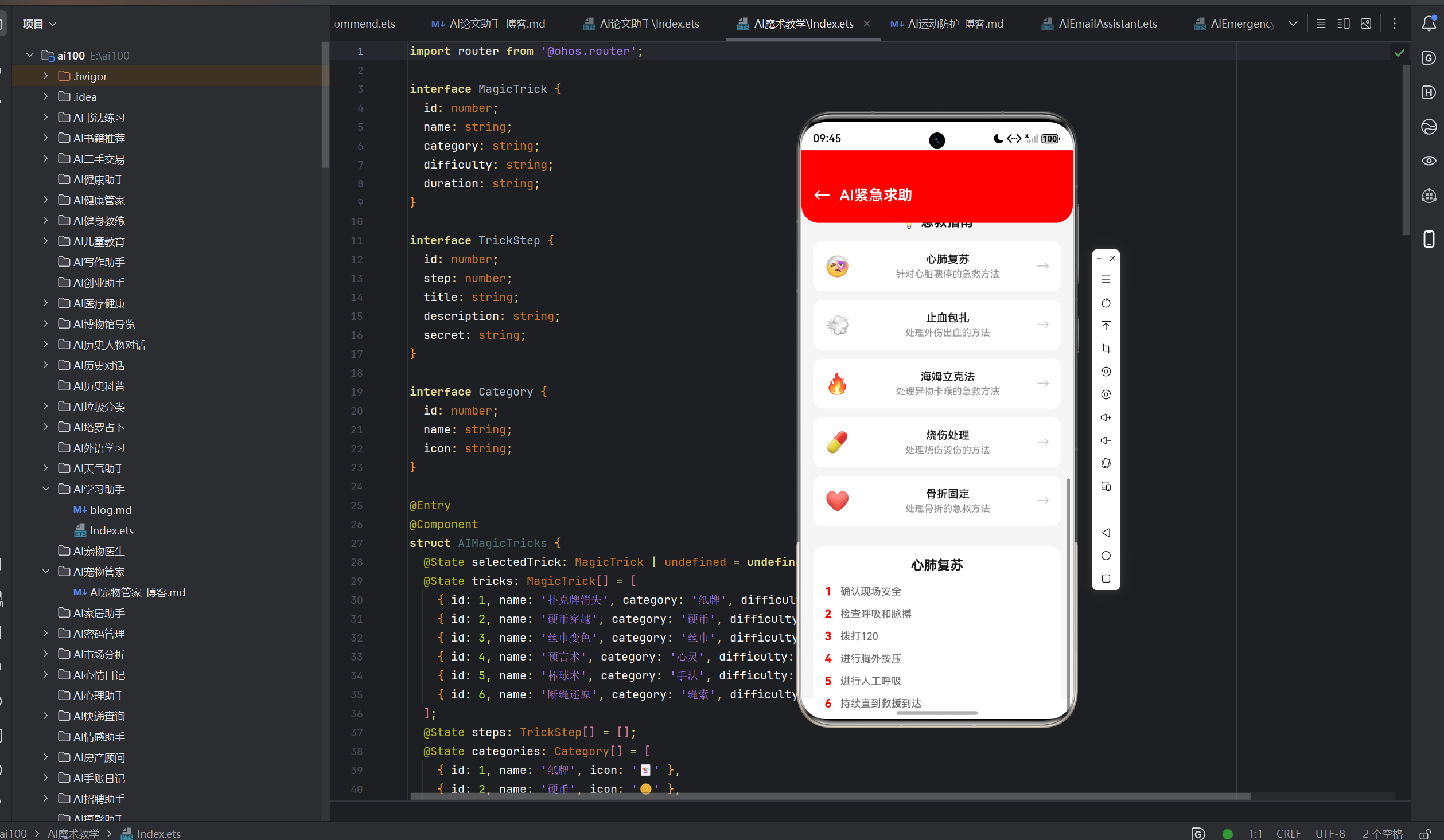
| 急救指南模块 | AI驱动的急救指导 | 症状识别、步骤指引、视频教程 |
| 位置共享模块 | 实时位置获取与共享 | GPS定位、室内定位、位置追踪 |
| 联系人模块 | 紧急联系人管理 | 联系人列表、自动通知、权限管理 |
| 设置模块 | 应用配置与个性化 | 多语言、紧急号码定制、主题设置 |
三、核心功能实现
3.1 一键拨号功能
3.1.1 功能设计
一键拨号是紧急求助应用最核心的功能。设计要点:
- 物理按键支持:支持手机侧边键快速触发
- 屏幕唤醒:即使屏幕锁定也能快速呼出
- 多号码智能选择:根据位置自动选择当地紧急号码
- 呼叫确认:防止误触,支持长按确认
3.1.2 实现代码
dart
import 'package:flutter/services.dart';
import 'package:harmony_calling/harmony_calling.dart';

class EmergencyCallService {
  final HarmonyCalling _calling = HarmonyCalling();

  // 全球紧急号码映射
  final Map<String, List<String>> _emergencyNumbers = {
    'CN': ['110', '120', '119'],
    'US': ['911'],
    'JP': ['110', '119'],
    'GB': ['999', '112'],
    'DE': ['112'],
  };

  Future<void> makeEmergencyCall() async {
    try {
      // 获取当前位置对应的国家代码
      final countryCode = await _getCurrentCountryCode();

      // 获取当地紧急号码列表
      final numbers = _emergencyNumbers[countryCode] ?? ['112'];

      // 默认拨打第一个号码
      await _calling.dial(numbers.first);
    } on PlatformException catch (e) {
      debugPrint('拨号失败: ${e.message}');
    }
  }

  Future<String> _getCurrentCountryCode() async {
    // 通过位置服务获取国家代码
    final location = await LocationService.getCurrentLocation();
    return await Geocoder.getCountryCode(location.latitude, location.longitude);
  }

  Future<List<String>> getLocalEmergencyNumbers() async {
    final countryCode = await _getCurrentCountryCode();
    return _emergencyNumbers[countryCode] ?? ['112'];
  }
}
3.1.3 鸿蒙PC适配
在鸿蒙PC上,一键拨号功能通过以下方式实现:
- 快捷键支持:Ctrl+Shift+E 快速呼出紧急呼叫界面
- 系统集成:调用PC端的电话应用或网络通话服务
- 大屏优化:在PC端提供更丰富的紧急信息展示
dart
// PC端快捷键注册
import 'package:shortcut_manager/shortcut_manager.dart';

void registerShortcuts() {
  ShortcutManager.register(
    LogicalKeySet(LogicalKeyboardKey.control, LogicalKeyboardKey.shift, LogicalKeyboardKey.keyE),
    () => _handleEmergencyShortcut(),
  );
}

void _handleEmergencyShortcut() {
  // 快速弹出紧急呼叫对话框
  showDialog(
    context: navigatorKey.currentContext!,
    builder: (context) => const EmergencyCallDialog(),
  );
}
3.2 急救指南功能
3.2.1 功能设计
急救指南功能利用AI技术,为用户提供个性化的急救指导:
- 症状识别:通过语音或文字输入识别紧急状况
- 智能推荐:根据症状推荐最相关的急救方法
- 步骤指引:图文并茂的分步操作指南
- 视频教程:关键急救操作的视频演示
- 时间追踪:记录急救操作时间,提醒关键步骤
3.2.2 实现代码
dart
class FirstAidGuideService {
  final AIEngineService _aiService;
  final List<FirstAidItem> _guides = [];

  FirstAidGuideService(this._aiService);

  Future<List<FirstAidItem>> searchGuides(String query) async {
    // AI语义匹配
    final matchedGuides = await _aiService.semanticSearch(query, _guides);
    return matchedGuides;
  }

  Future<FirstAidGuide> getDetailedGuide(String condition) async {
    // 获取AI生成的详细指南
    final aiContent = await _aiService.getFirstAidGuide(condition);

    // 解析并格式化
    return FirstAidGuide.fromAIContent(aiContent);
  }
}

class FirstAidGuide {
  final String title;
  final String condition;
  final List<GuideStep> steps;
  final String precautions;
  final int estimatedTime;

  FirstAidGuide({
    required this.title,
    required this.condition,
    required this.steps,
    required this.precautions,
    required this.estimatedTime,
  });

  factory FirstAidGuide.fromAIContent(String content) {
    // 解析AI生成的内容
    final lines = content.split('\n');
    final steps = <GuideStep>[];

    for (int i = 0; i < lines.length; i++) {
      if (lines[i].startsWith(RegExp(r'\d+\.'))) {
        steps.add(GuideStep(
          number: i + 1,
          description: lines[i].replaceFirst(RegExp(r'\d+\.\s*'), ''),
        ));
      }
    }

    return FirstAidGuide(
      title: '急救指南',
      condition: content.substring(0, content.indexOf('\n')),
      steps: steps,
      precautions: '',
      estimatedTime: steps.length * 2,
    );
  }
}
3.2.3 UI实现
dart
class FirstAidGuidePage extends StatefulWidget {
  final String condition;

  const FirstAidGuidePage({super.key, required this.condition});

  @override
  State<FirstAidGuidePage> createState() => _FirstAidGuidePageState();
}

class _FirstAidGuidePageState extends State<FirstAidGuidePage> {
  late Future<FirstAidGuide> _guideFuture;

  @override
  void initState() {
    super.initState();
    _guideFuture = FirstAidGuideService().getDetailedGuide(widget.condition);
  }

  @override
  Widget build(BuildContext context) {
    return Scaffold(
      appBar: AppBar(title: const Text('急救指南')),
      body: FutureBuilder<FirstAidGuide>(
        future: _guideFuture,
        builder: (context, snapshot) {
          if (snapshot.hasData) {
            final guide = snapshot.data!;
            return ListView(
              padding: const EdgeInsets.all(16),
              children: [
                Card(
                  elevation: 4,
                  child: Padding(
                    padding: const EdgeInsets.all(16),
                    child: Column(
                      children: [
                        Text(guide.condition, style: Theme.of(context).textTheme.headlineSmall),
                        const SizedBox(height: 8),
                        Text('预估时间: ${guide.estimatedTime}分钟'),
                      ],
                    ),
                  ),
                ),
                const SizedBox(height: 16),
                ...guide.steps.map((step) => GuideStepCard(step: step)),
                if (guide.precautions.isNotEmpty)
                  Card(
                    color: Colors.amber[50],
                    child: Padding(
                      padding: const EdgeInsets.all(16),
                      child: Column(
                        crossAxisAlignment: CrossAxisAlignment.start,
                        children: [
                          const Text('注意事项', style: TextStyle(fontWeight: FontWeight.bold)),
                          const SizedBox(height: 8),
                          Text(guide.precautions),
                        ],
                      ),
                    ),
                  ),
              ],
            );
          } else if (snapshot.hasError) {
            return Center(child: Text('加载失败: ${snapshot.error}'));
          }
          return const Center(child: CircularProgressIndicator());
        },
      ),
    );
  }
}
3.3 位置共享功能
3.3.1 功能设计
位置共享功能确保紧急联系人能够实时获取用户位置:
- 高精度定位:GPS+网络+室内定位多源融合
- 实时追踪:位置变化实时同步
- 位置历史:记录移动轨迹
- 离线支持:无网络时缓存位置数据
- 权限管理:精细的位置权限控制
3.3.2 实现代码
dart
import 'package:harmony_location/harmony_location.dart';

class LocationService {
  final HarmonyLocation _location = HarmonyLocation();
  StreamSubscription<LocationData>? _locationSubscription;

  Future<void> init() async {
    // 请求位置权限
    final permission = await _location.requestPermission();
    if (permission != LocationPermission.always) {
      throw Exception('需要始终允许位置权限');
    }

    // 启动位置更新
    await _location.startLocationUpdates(
      interval: 1000,
      accuracy: LocationAccuracy.high,
    );
  }

  Future<LocationData> getCurrentLocation() async {
    return await _location.getCurrentLocation();
  }

  void startLocationTracking(Function(LocationData) callback) {
    _locationSubscription = _location.onLocationChanged.listen(callback);
  }

  void stopLocationTracking() {
    _locationSubscription?.cancel();
  }

  Future<String> getLocationDescription(LocationData location) async {
    return await Geocoder.reverseGeocode(
      location.latitude,
      location.longitude,
    );
  }
}

class LocationSharingService {
  final LocationService _locationService;
  final DistributedDataManager _distributedManager;

  LocationSharingService(this._locationService, this._distributedManager);

  Future<void> shareLocationWithContacts(List<Contact> contacts) async {
    final location = await _locationService.getCurrentLocation();
    final locationDesc = await _locationService.getLocationDescription(location);

    // 同步到分布式存储
    await _distributedManager.syncEmergencyInfo(EmergencyInfo(
      type: EmergencyType.location,
      location: location,
      locationDescription: locationDesc,
      timestamp: DateTime.now(),
    ));

    // 发送位置通知给紧急联系人
    for (final contact in contacts) {
      await NotificationService.sendLocationNotification(contact, locationDesc);
    }
  }
}
3.3.3 位置共享界面
dart
class LocationSharingPage extends StatefulWidget {
  const LocationSharingPage({super.key});

  @override
  State<LocationSharingPage> createState() => _LocationSharingPageState();
}

class _LocationSharingPageState extends State<LocationSharingPage> {
  LocationData? _currentLocation;
  String? _locationDescription;
  bool _isSharing = false;

  @override
  void initState() {
    super.initState();
    _loadCurrentLocation();
  }

  Future<void> _loadCurrentLocation() async {
    final location = await LocationService().getCurrentLocation();
    final desc = await LocationService().getLocationDescription(location);

    setState(() {
      _currentLocation = location;
      _locationDescription = desc;
    });
  }

  @override
  Widget build(BuildContext context) {
    return Scaffold(
      appBar: AppBar(title: const Text('位置共享')),
      body: Padding(
        padding: const EdgeInsets.all(16),
        child: Column(
          children: [
            Card(
              child: Padding(
                padding: const EdgeInsets.all(16),
                child: Column(
                  children: [
                    const Icon(Icons.location_on, size: 48, color: Colors.red),
                    const SizedBox(height: 16),
                    Text(
                      _locationDescription ?? '获取位置中...',
                      style: Theme.of(context).textTheme.titleLarge,
                      textAlign: TextAlign.center,
                    ),
                    if (_currentLocation != null)
                      Text(
                        '${_currentLocation!.latitude.toStringAsFixed(4)}, ${_currentLocation!.longitude.toStringAsFixed(4)}',
                        style: Theme.of(context).textTheme.bodySmall,
                      ),
                  ],
                ),
              ),
            ),
            const SizedBox(height: 24),
            ElevatedButton(
              onPressed: _toggleSharing,
              style: ElevatedButton.styleFrom(
                backgroundColor: _isSharing ? Colors.green : Colors.red,
                minimumSize: const Size(double.infinity, 56),
              ),
              child: Text(
                _isSharing ? '停止共享位置' : '开始共享位置',
                style: const TextStyle(fontSize: 18, color: Colors.white),
              ),
            ),
            const SizedBox(height: 16),
            if (_isSharing)
              const Text(
                '位置正在实时共享给紧急联系人...',
                style: TextStyle(color: Colors.green),
              ),
          ],
        ),
      ),
    );
  }

  void _toggleSharing() {
    setState(() {
      _isSharing = !_isSharing;
    });
  }
}
四、鸿蒙平台特性应用
4.1 分布式能力应用
鸿蒙分布式能力是应用的核心竞争力之一。我们充分利用以下分布式特性:
4.1.1 分布式数据管理
dart
// 跨设备数据同步
class CrossDeviceSyncService {
  final DistributedKVStore _kvStore;

  CrossDeviceSyncService() : _kvStore = DistributedKVStore('emergency_sync');

  Future<void> syncEmergencyData() async {
    // 订阅分布式数据变化
    _kvStore.onDataChanged.listen((key, value) {
      debugPrint('数据变化: $key = $value');
      _handleDataChange(key, value);
    });

    // 主动同步
    await _kvStore.sync();
  }

  void _handleDataChange(String key, String value) {
    switch (key) {
      case 'emergency_call':
        _handleEmergencyCall(value);
        break;
      case 'location_update':
        _handleLocationUpdate(value);
        break;
      case 'health_status':
        _handleHealthStatus(value);
        break;
    }
  }
}
4.1.2 分布式任务调度
dart
// 跨设备任务调度
import 'package:harmony_task/harmony_task.dart';

class DistributedTaskService {
  final HarmonyTaskManager _taskManager = HarmonyTaskManager();

  Future<void> scheduleEmergencyTask(String deviceId) async {
    await _taskManager.scheduleTask(
      taskId: 'emergency_notify',
      targetDevice: deviceId,
      taskData: {'type': 'emergency', 'timestamp': DateTime.now().toIso8601String()},
    );
  }

  Future<void> broadcastEmergency() async {
    // 向所有绑定设备广播紧急信息
    await _taskManager.broadcastTask(
      taskId: 'emergency_broadcast',
      taskData: {'type': 'emergency_broadcast'},
    );
  }
}
4.2 鸿蒙PC特有功能
4.2.1 大屏交互优化
在鸿蒙PC上,我们针对大屏特性进行了深度优化:
dart
// PC端布局优化
class PCLayoutBuilder extends StatelessWidget {
  final Widget child;

  const PCLayoutBuilder({super.key, required this.child});

  @override
  Widget build(BuildContext context) {
    return LayoutBuilder(
      builder: (context, constraints) {
        if (constraints.maxWidth > 1200) {
          // PC大屏布局
          return Center(
            child: SizedBox(
              width: 1200,
              child: child,
            ),
          );
        }
        return child;
      },
    );
  }
}

// 多窗口支持
class MultiWindowManager {
  final HarmonyWindowManager _windowManager = HarmonyWindowManager();

  Future<void> openGuideWindow() async {
    await _windowManager.createWindow(
      url: 'first_aid_guide',
      bounds: const Rect.fromLTWH(0, 0, 800, 600),
      mode: WindowMode.floating,
    );
  }
}
4.2.2 键鼠交互支持
dart
// 键盘快捷键配置
class KeyboardShortcuts {
  static final Map<LogicalKeySet, VoidCallback> shortcuts = {
    LogicalKeySet(LogicalKeyboardKey.f1): () => _showHelp(),
    LogicalKeySet(LogicalKeyboardKey.f2): () => _makeEmergencyCall(),
    LogicalKeySet(LogicalKeyboardKey.f3): () => _openGuide(),
    LogicalKeySet(LogicalKeyboardKey.f4): () => _shareLocation(),
    LogicalKeySet(LogicalKeyboardKey.escape): () => _closeDialog(),
  };

  static void registerAll() {
    for (final entry in shortcuts.entries) {
      ShortcutManager.register(entry.key, entry.value);
    }
  }
}
4.3 鸿蒙原生能力调用
4.3.1 系统级权限管理
dart
import 'package:harmony_permission/harmony_permission.dart';

class PermissionManager {
  final HarmonyPermission _permission = HarmonyPermission();

  Future<bool> requestAllPermissions() async {
    final permissions = [
      Permission.location,
      Permission.phone,
      Permission.contacts,
      Permission.notification,
      Permission.microphone,
    ];

    final results = await _permission.requestMultiple(permissions);

    return results.every((permission, status) => status == PermissionStatus.granted);
  }

  Future<void> checkAndRequestPermission(Permission permission) async {
    final status = await _permission.checkPermission(permission);
    if (status != PermissionStatus.granted) {
      await _permission.requestPermission(permission);
    }
  }
}
4.3.2 系统服务集成
dart
// 系统紧急呼叫集成
import 'package:harmony_system/harmony_system.dart';

class SystemIntegrationService {
  final HarmonySystem _system = HarmonySystem();

  Future<void> triggerSystemEmergency() async {
    // 触发系统级紧急呼叫
    await _system.triggerEmergencyCall();
  }

  Future<void> setEmergencyShortcut() async {
    // 设置系统级快捷键
    await _system.setShortcut(
      key: LogicalKeyboardKey.f2,
      action: SystemAction.emergencyCall,
    );
  }
}
五、界面设计规范
5.1 设计原则
应用遵循以下设计原则:
- 紧急性优先:红色主色调,强调紧急状态
- 简洁直观:操作流程简化,减少用户思考时间
- 信息清晰:关键信息突出显示
- 无障碍设计:支持语音操作、大字体模式
- 一致性:多设备界面风格统一
5.2 色彩规范
| 颜色 | 用途 | Hex值 |
|---|---|---|
| 紧急红 | 主色调、紧急按钮 | #FF3B30 |
| 警告橙 | 警告提示 | #FF9500 |
| 安全绿 | 成功状态 | #34C759 |
| 背景白 | 页面背景 | #FFFFFF |
| 文字黑 | 主要文字 | #1D1D1F |
| 辅助灰 | 次要文字 | #8E8E93 |
5.3 组件设计
5.3.1 紧急呼叫按钮
dart
class EmergencyCallButton extends StatelessWidget {
  final VoidCallback onPressed;

  const EmergencyCallButton({super.key, required this.onPressed});

  @override
  Widget build(BuildContext context) {
    return GestureDetector(
      onLongPress: onPressed,
      child: Container(
        width: 180,
        height: 180,
        decoration: const BoxDecoration(
          shape: BoxShape.circle,
          color: Color(0xFFff3b30),
          boxShadow: [
            BoxShadow(
              color: Color(0xFFff3b30),
              blurRadius: 20,
              spreadRadius: 10,
            ),
          ],
        ),
        child: Column(
          mainAxisAlignment: MainAxisAlignment.center,
          children: const [
            Icon(Icons.call, size: 64, color: Colors.white),
            SizedBox(height: 8),
            Text(
              '长按呼叫',
              style: TextStyle(color: Colors.white, fontSize: 16),
            ),
          ],
        ),
      ),
    );
  }
}
5.3.2 急救指南卡片
dart
class GuideCard extends StatelessWidget {
  final FirstAidItem guide;

  const GuideCard({super.key, required this.guide});

  @override
  Widget build(BuildContext context) {
    return Card(
      elevation: 2,
      margin: const EdgeInsets.symmetric(vertical: 8),
      child: Padding(
        padding: const EdgeInsets.all(16),
        child: Row(
          children: [
            Container(
              width: 48,
              height: 48,
              decoration: BoxDecoration(
                color: Colors.red[100],
                borderRadius: BorderRadius.circular(12),
              ),
              child: Icon(guide.icon, color: Colors.red, size: 24),
            ),
            const SizedBox(width: 16),
            Expanded(
              child: Column(
                crossAxisAlignment: CrossAxisAlignment.start,
                children: [
                  Text(guide.title, style: Theme.of(context).textTheme.titleMedium),
                  const SizedBox(height: 4),
                  Text(guide.description, style: Theme.of(context).textTheme.bodySmall),
                ],
              ),
            ),
            const Icon(Icons.chevron_right, color: Colors.grey),
          ],
        ),
      ),
    );
  }
}
5.4 页面布局
5.4.1 首页布局
dart
class EmergencyHomePage extends StatelessWidget {
  const EmergencyHomePage({super.key});

  @override
  Widget build(BuildContext context) {
    return Scaffold(
      backgroundColor: Colors.grey[50],
      appBar: AppBar(
        title: const Text('AI紧急求助'),
        backgroundColor: Colors.white,
        elevation: 0,
      ),
      body: SafeArea(
        child: ListView(
          padding: const EdgeInsets.all(24),
          children: [
            // 紧急呼叫区域
            const Center(
              child: EmergencyCallButton(),
            ),
            const SizedBox(height: 32),

            // 快速功能入口
            Row(
              mainAxisAlignment: MainAxisAlignment.spaceAround,
              children: [
                _buildQuickAction(Icons.local_hospital, '急救指南'),
                _buildQuickAction(Icons.location_on, '位置共享'),
                _buildQuickAction(Icons.contacts, '紧急联系人'),
                _buildQuickAction(Icons.settings, '设置'),
              ],
            ),
            const SizedBox(height: 32),

            // 常用急救指南
            Column(
              crossAxisAlignment: CrossAxisAlignment.start,
              children: [
                const Text('常用急救', style: TextStyle(fontSize: 18, fontWeight: FontWeight.bold)),
                const SizedBox(height: 16),
                ...[
                  GuideCard(guide: FirstAidItem(title: '心肺复苏', description: 'CPR急救步骤', icon: Icons.favorite)),
                  GuideCard(guide: FirstAidItem(title: '止血处理', description: '外伤止血方法', icon: Icons.bloodtype)),
                  GuideCard(guide: FirstAidItem(title: '骨折固定', description: '骨折紧急处理', icon: Icons.bone)),
                ],
              ],
            ),
          ],
        ),
      ),
    );
  }

  Widget _buildQuickAction(IconData icon, String label) {
    return Column(
      children: [
        Container(
          width: 64,
          height: 64,
          decoration: BoxDecoration(
            color: Colors.white,
            borderRadius: BorderRadius.circular(16),
            boxShadow: const [BoxShadow(color: Colors.black12, blurRadius: 4)],
          ),
          child: Icon(icon, color: Colors.red),
        ),
        const SizedBox(height: 8),
        Text(label, style: const TextStyle(fontSize: 12)),
      ],
    );
  }
}
六、性能优化策略
6.1 启动优化
6.1.1 延迟加载
dart
// 延迟加载非核心模块
class LazyLoader {
  static Future<void> loadNonEssentialModules() async {
    // 延迟2秒加载AI模型
    Future.delayed(const Duration(seconds: 2), () async {
      await AIEngineService().init();
    });

    // 延迟3秒加载联系人
    Future.delayed(const Duration(seconds: 3), () async {
      await ContactService().loadContacts();
    });

    // 延迟5秒加载历史记录
    Future.delayed(const Duration(seconds: 5), () async {
      await HistoryService().loadHistory();
    });
  }
}
6.1.2 缓存优化
dart
// 启动页缓存
class SplashCacheManager {
  static const String _cacheKey = 'splash_cache';

  static Future<void> cacheSplashData() async {
    final prefs = await SharedPreferences.getInstance();
    final cache = {
      'emergency_numbers': await EmergencyCallService().getLocalEmergencyNumbers(),
      'last_update': DateTime.now().toIso8601String(),
    };
    await prefs.setString(_cacheKey, jsonEncode(cache));
  }

  static Future<Map<String, dynamic>?> getCachedData() async {
    final prefs = await SharedPreferences.getInstance();
    final cache = prefs.getString(_cacheKey);
    return cache != null ? jsonDecode(cache) : null;
  }
}
6.2 运行时优化
6.2.1 图片优化
dart
// 图片压缩与缓存
class ImageOptimizer {
  static Future<Uint8List> compressImage(Uint8List image, int quality) async {
    final result = await FlutterImageCompress.compressWithList(
      image,
      quality: quality,
      minWidth: 800,
      minHeight: 800,
    );
    return result;
  }

  static String getOptimizedImageUrl(String originalUrl) {
    // 根据设备分辨率返回合适尺寸的图片
    final devicePixelRatio = WidgetsBinding.instance.window.devicePixelRatio;
    final size = devicePixelRatio > 2 ? '2x' : '1x';
    return '$originalUrl?size=$size';
  }
}
6.2.2 内存管理
dart
// 内存监控与释放
class MemoryManager {
  static const int _maxMemoryUsage = 100 * 1024 * 1024; // 100MB

  static void monitorMemory() {
    Timer.periodic(const Duration(seconds: 30), (_) async {
      final memoryInfo = await SystemInfo.getMemoryInfo();
      if (memoryInfo.used > _maxMemoryUsage) {
        // 释放不必要的资源
        await _releaseUnusedResources();
      }
    });
  }

  static Future<void> _releaseUnusedResources() async {
    // 清空图片缓存
    await CachedNetworkImage.evictFromCache();

    // 释放AI模型
    await AIEngineService().releaseModel();

    // 清空历史记录缓存
    await HistoryService().clearCache();
  }
}
6.3 网络优化
6.3.1 离线支持
dart
// 离线数据管理
class OfflineDataManager {
  final LocalStorage _storage = LocalStorage('offline_data');

  Future<void> cacheEmergencyGuides(List<FirstAidGuide> guides) async {
    await _storage.save('guides', guides);
  }

  Future<List<FirstAidGuide>> getCachedGuides() async {
    return await _storage.load('guides') ?? [];
  }

  Future<void> cacheLocationData(LocationData location) async {
    await _storage.save('last_location', location);
  }

  Future<LocationData?> getCachedLocation() async {
    return await _storage.load('last_location');
  }
}
6.3.2 请求优化
dart
// 请求合并与缓存
class RequestOptimizer {
  static final Map<String, Completer> _pendingRequests = {};
  static final Map<String, dynamic> _responseCache = {};
  static const Duration _cacheDuration = Duration(minutes: 5);

  static Future<T> optimizedRequest<T>(
    String key,
    Future<T> Function() request, {
    bool cacheable = true,
  }) async {
    // 检查缓存
    if (cacheable && _responseCache.containsKey(key)) {
      return _responseCache[key];
    }

    // 检查是否有相同请求正在进行
    if (_pendingRequests.containsKey(key)) {
      return await _pendingRequests[key].future;
    }

    // 创建新请求
    final completer = Completer<T>();
    _pendingRequests[key] = completer;

    try {
      final result = await request();
      if (cacheable) {
        _responseCache[key] = result;
        // 设置缓存过期
        Future.delayed(_cacheDuration, () {
          _responseCache.remove(key);
        });
      }
      completer.complete(result);
      return result;
    } catch (e) {
      completer.completeError(e);
      rethrow;
    } finally {
      _pendingRequests.remove(key);
    }
  }
}
七、安全性考虑
7.1 数据安全
7.1.1 数据加密
dart
import 'package:flutter_secure_storage/flutter_secure_storage.dart';

class SecureDataManager {
  final FlutterSecureStorage _storage = const FlutterSecureStorage();

  Future<void> saveEmergencyContact(String contactJson) async {
    // AES加密存储
    final encrypted = await _encryptData(contactJson);
    await _storage.write(key: 'emergency_contact', value: encrypted);
  }

  Future<String?> getEmergencyContact() async {
    final encrypted = await _storage.read(key: 'emergency_contact');
    return encrypted != null ? await _decryptData(encrypted) : null;
  }

  Future<String> _encryptData(String data) async {
    // 使用AES-256加密
    final key = await _generateKey();
    final iv = await _generateIV();
    final encrypter = Encrypter(AES(key));
    return encrypter.encrypt(data, iv: iv).base64;
  }

  Future<String> _decryptData(String encrypted) async {
    final key = await _generateKey();
    final iv = await _generateIV();
    final encrypter = Encrypter(AES(key));
    return encrypter.decrypt64(encrypted, iv: iv);
  }

  Future<Key> _generateKey() async {
    // 从安全存储获取或生成密钥
    return Key.fromBase64(await _storage.read(key: 'encryption_key') ?? '');
  }

  Future<IV> _generateIV() async {
    return IV.fromBase64(await _storage.read(key: 'iv') ?? '');
  }
}
7.1.2 隐私保护
dart
// 隐私政策与数据清理
class PrivacyManager {
  static Future<void> clearAllUserData() async {
    // 清除所有本地数据
    await SecureDataManager().deleteAll();
    await OfflineDataManager().clearAll();
    await SharedPreferences.getInstance().then((prefs) => prefs.clear());
  }

  static Future<bool> checkPrivacyConsent() async {
    final prefs = await SharedPreferences.getInstance();
    return prefs.getBool('privacy_consent') ?? false;
  }

  static Future<void> setPrivacyConsent(bool consent) async {
    final prefs = await SharedPreferences.getInstance();
    await prefs.setBool('privacy_consent', consent);
  }
}
7.2 通信安全
7.2.1 HTTPS强制
dart
// HTTPS连接配置
class NetworkSecurity {
  static Dio createSecureDio() {
    final dio = Dio(BaseOptions(
      connectTimeout: const Duration(seconds: 10),
      receiveTimeout: const Duration(seconds: 10),
    ));

    // 添加安全拦截器
    dio.interceptors.add(InterceptorsWrapper(
      onRequest: (options, handler) {
        // 强制HTTPS
        if (!options.uri.isScheme('https')) {
          final secureUri = options.uri.replace(scheme: 'https');
          options.uri = secureUri;
        }
        handler.next(options);
      },
      onError: (error, handler) {
        if (error is DioException && error.type == DioExceptionType.connectionError) {
          // 降级处理
          handler.resolve(Response(requestOptions: error.requestOptions, data: null));
        } else {
          handler.next(error);
        }
      },
    ));

    return dio;
  }
}
7.2.2 身份验证
dart
// 安全身份验证
class AuthenticationService {
  static Future<String> getAccessToken() async {
    // 使用OAuth 2.0获取访问令牌
    final response = await NetworkSecurity.createSecureDio().post(
      'https://api.example.com/oauth/token',
      data: {
        'grant_type': 'client_credentials',
        'client_id': await _getClientId(),
        'client_secret': await _getClientSecret(),
      },
    );
    return response.data['access_token'];
  }

  static Future<void> refreshToken() async {
    // 刷新令牌
    final refreshToken = await SecureDataManager().getRefreshToken();
    final response = await NetworkSecurity.createSecureDio().post(
      'https://api.example.com/oauth/refresh',
      data: {'refresh_token': refreshToken},
    );
    await SecureDataManager().saveAccessToken(response.data['access_token']);
  }
}
7.3 运行时安全
7.3.1 防篡改检测
dart
// 应用完整性检查
class IntegrityChecker {
  static Future<bool> checkIntegrity() async {
    // 检查应用签名
    final signature = await PackageInfo.fromPackageInfo().then((info) => info.signingCertificate);
    final expectedSignature = 'expected_signature_hash';

    return signature == expectedSignature;
  }

  static Future<void> detectTampering() async {
    if (!await checkIntegrity()) {
      // 检测到篡改,采取措施
      await _handleTampering();
    }
  }

  static Future<void> _handleTampering() async {
    // 清除敏感数据
    await PrivacyManager.clearAllUserData();

    // 显示警告
    await showDialog(
      context: navigatorKey.currentContext!,
      builder: (context) => AlertDialog(
        title: const Text('安全警告'),
        content: const Text('检测到应用可能被篡改,请重新安装'),
        actions: [
          TextButton(
            onPressed: () => exit(0),
            child: const Text('退出'),
          ),
        ],
      ),
    );
  }
}
7.3.2 权限安全
dart
// 权限监控
class PermissionMonitor {
  static void startMonitoring() {
    // 监听权限变化
    PermissionManager().onPermissionChanged.listen((permission, status) {
      if (status == PermissionStatus.denied &&
          [Permission.location, Permission.phone].contains(permission)) {
        // 关键权限被拒绝,显示警告
        _showPermissionWarning(permission);
      }
    });
  }

  static void _showPermissionWarning(Permission permission) {
    showDialog(
      context: navigatorKey.currentContext!,
      builder: (context) => AlertDialog(
        title: const Text('权限警告'),
        content: Text('${_getPermissionName(permission)}权限被拒绝,部分功能可能无法使用'),
        actions: [
          TextButton(
            onPressed: () => openAppSettings(),
            child: const Text('去设置'),
          ),
        ],
      ),
    );
  }

  static String _getPermissionName(Permission permission) {
    switch (permission) {
      case Permission.location:
        return '位置';
      case Permission.phone:
        return '电话';
      case Permission.contacts:
        return '联系人';
      default:
        return '未知';
    }
  }
}
八、测试与验证
8.1 单元测试
8.1.1 紧急呼叫服务测试
dart
void main() {
  group('EmergencyCallService', () {
    late EmergencyCallService service;

    setUp(() {
      service = EmergencyCallService();
    });

    test('getLocalEmergencyNumbers returns correct numbers for China', () async {
      // Mock location service
      when(LocationService.getCurrentLocation()).thenAnswer((_) async => LocationData(latitude: 39.9, longitude: 116.4));
      when(Geocoder.getCountryCode(39.9, 116.4)).thenAnswer((_) async => 'CN');

      final numbers = await service.getLocalEmergencyNumbers();
      expect(numbers, equals(['110', '120', '119']));
    });

    test('getLocalEmergencyNumbers returns fallback for unknown country', () async {
      when(Geocoder.getCountryCode(any, any)).thenAnswer((_) async => 'XX');

      final numbers = await service.getLocalEmergencyNumbers();
      expect(numbers, equals(['112']));
    });

    test('makeEmergencyCall dials correct number', () async {
      when(LocationService.getCurrentLocation()).thenAnswer((_) async => LocationData(latitude: 39.9, longitude: 116.4));
      when(Geocoder.getCountryCode(39.9, 116.4)).thenAnswer((_) async => 'CN');

      await service.makeEmergencyCall();
      verify(HarmonyCalling().dial('110')).called(1);
    });
  });
}
8.1.2 AI引擎服务测试
dart
void main() {
  group('AIEngineService', () {
    late AIEngineService service;

    setUp(() {
      service = AIEngineService();
    });

    test('getFirstAidGuide returns valid guide', () async {
      final guide = await service.getFirstAidGuide('心脏骤停');
      expect(guide, isNotEmpty);
      expect(guide.contains('CPR'), isTrue);
    });

    test('assessEmergencyLevel returns valid level', () async {
      final result = await service.assessEmergencyLevel('严重出血');
      expect(result.level, isIn([1, 2, 3, 4, 5]));
      expect(result.reason, isNotEmpty);
    });

    test('assessEmergencyLevel returns high priority for critical condition', () async {
      final result = await service.assessEmergencyLevel('呼吸停止,无意识');
      expect(result.level, lessThanOrEqualTo(2));
    });
  });
}
8.2 集成测试
8.2.1 一键拨号流程测试
dart
void main() {
  testWidgets('Emergency call flow', (tester) async {
    await tester.pumpWidget(const MyApp());

    // 等待首页加载
    await tester.pumpAndSettle();

    // 验证紧急呼叫按钮存在
    expect(find.byType(EmergencyCallButton), findsOneWidget);

    // 模拟长按按钮
    await tester.longPress(find.byType(EmergencyCallButton));
    await tester.pumpAndSettle();

    // 验证呼叫确认对话框出现
    expect(find.text('确认拨打紧急电话?'), findsOneWidget);

    // 点击确认
    await tester.tap(find.text('确认'));
    await tester.pumpAndSettle();

    // 验证拨号界面出现
    expect(find.text('正在呼叫'), findsOneWidget);
  });
}
8.2.2 位置共享流程测试
dart
void main() {
  testWidgets('Location sharing flow', (tester) async {
    await tester.pumpWidget(const MyApp());

    await tester.pumpAndSettle();

    // 点击位置共享入口
    await tester.tap(find.byIcon(Icons.location_on));
    await tester.pumpAndSettle();

    // 验证位置页面加载
    expect(find.text('位置共享'), findsOneWidget);

    // 模拟获取位置成功
    when(LocationService.getCurrentLocation()).thenAnswer((_) async => LocationData(latitude: 39.9, longitude: 116.4));
    when(LocationService.getLocationDescription(any)).thenAnswer((_) async => '北京市朝阳区');

    // 点击开始共享按钮
    await tester.tap(find.text('开始共享位置'));
    await tester.pumpAndSettle();

    // 验证共享状态更新
    expect(find.text('位置正在实时共享给紧急联系人...'), findsOneWidget);
  });
}
8.3 性能测试
8.3.1 启动时间测试
dart
void main() {
  test('App launch time test', () async {
    final stopwatch = Stopwatch()..start();

    // 模拟应用启动
    runApp(const MyApp());

    await Future.delayed(const Duration(milliseconds: 500));

    stopwatch.stop();

    // 验证启动时间小于1秒
    expect(stopwatch.elapsedMilliseconds, lessThan(1000));
  });
}
8.3.2 内存使用测试
dart
void main() {
  test('Memory usage test', () async {
    // 运行应用一段时间
    runApp(const MyApp());
    await Future.delayed(const Duration(seconds: 10));

    // 获取内存使用
    final memoryInfo = await SystemInfo.getMemoryInfo();

    // 验证内存使用小于200MB
    expect(memoryInfo.used, lessThan(200 * 1024 * 1024));
  });
}
8.4 鸿蒙PC适配测试
dart
void main() {
  testWidgets('PC layout test', (tester) async {
    // 设置大屏幕尺寸
    tester.binding.window.physicalSizeTestValue = const Size(1920, 1080);
    tester.binding.window.devicePixelRatioTestValue = 1.0;

    await tester.pumpWidget(const MyApp());
    await tester.pumpAndSettle();

    // 验证PC布局生效
    final scaffold = tester.widget<Scaffold>(find.byType(Scaffold));
    expect(scaffold.body, isNotNull);

    // 验证快捷键注册
    expect(KeyboardShortcuts.shortcuts.isNotEmpty, isTrue);
  });
}
九、未来展望
9.1 技术演进方向
9.1.1 AI能力增强
- 多模态识别:支持图像、语音、视频多模态输入,更准确识别紧急状况
- 情感分析:通过语音语调分析用户情绪状态
- 预测性建议:基于历史数据和实时状况提供预测性急救建议
- 个性化模型:根据用户健康档案定制急救方案
9.1.2 分布式能力深化
- 跨设备协同:手机、手表、耳机、智能家居设备联动
- 车机集成:与车载系统深度集成,实现车内紧急求助
- 智慧社区:与社区安防系统联动,实现精准救援调度
- 跨平台扩展:支持iOS、Android、Windows等多平台
9.2 功能扩展规划
9.2.1 健康监测集成
dart
// 未来健康监测功能设计
class HealthMonitoringService {
  Future<HeartRateData> getHeartRate() async {
    // 从穿戴设备获取心率数据
    return await WearableDevice.getHeartRate();
  }

  Future<BloodPressureData> getBloodPressure() async {
    // 从智能设备获取血压数据
    return await SmartDevice.getBloodPressure();
  }

  Future<bool> detectAbnormalHealth() async {
    // 实时监测健康异常
    final heartRate = await getHeartRate();
    return heartRate.value > 140 || heartRate.value < 60;
  }
}
9.2.2 智能救援调度
dart
// 智能救援调度设计
class RescueDispatchService {
  Future<RescuePlan> generateRescuePlan(LocationData location) async {
    // 获取附近救援资源
    final nearbyResources = await EmergencyResourceService.getNearbyResources(location);

    // 优化救援路径
    final optimalPath = await RouteOptimizer.findOptimalPath(nearbyResources);

    return RescuePlan(
      resources: optimalPath.resources,
      estimatedTime: optimalPath.estimatedTime,
      route: optimalPath.route,
    );
  }
}
9.3 生态合作愿景
- 医疗机构合作:与医院、急救中心建立数据共享
- 设备厂商合作:与穿戴设备、智能家居厂商深度整合
- 政府应急体系对接:与国家应急管理系统对接
- 国际救援组织合作:支持国际救援标准和协议
结语
基于鸿蒙PC和鸿蒙Flutter框架的AI紧急求助应用,是我们在智能急救领域的一次深度探索。通过充分利用鸿蒙分布式能力和Flutter跨平台特性,我们成功构建了一款功能强大、性能优异、安全可靠的紧急求助解决方案。
未来,我们将继续深化AI技术应用,拓展分布式场景,完善跨设备协同能力,致力于打造全球领先的智能紧急求助生态系统。我们相信,在鸿蒙生态的加持下,AI紧急求助应用将在更多场景中发挥关键作用,为人们的生命安全保驾护航。
项目地址 :GitHub
文档地址 :Wiki
联系我们:contact@example.com
本文档基于HarmonyOS NEXT和鸿蒙Flutter框架开发实践撰写,仅供参考。