Loop Engineering: 硅谷AI圈正在热议的新范式,到底是什么?
文章目录
- [Loop Engineering: 硅谷AI圈正在热议的新范式,到底是什么?](#Loop Engineering: 硅谷AI圈正在热议的新范式,到底是什么?)
-
- [1.为什么会出现 Loop Engineering?](#1.为什么会出现 Loop Engineering?)
- [2. 什么是Loop? 五大模块+持久化记忆](#2. 什么是Loop? 五大模块+持久化记忆)
-
- [2.1. Automation: Loop的"心跳"](#2.1. Automation: Loop的“心跳”)
- [2.2 Worktrees: 并行协作的「隔离舱」](#2.2 Worktrees: 并行协作的「隔离舱」)
- [2.3 Skills:项目知识的「沉淀池」](#2.3 Skills:项目知识的「沉淀池」)
- [2.4 Plugins和Connectors: 打通真实工作流的「接口」](#2.4 Plugins和Connectors: 打通真实工作流的「接口」)
- [2.5 Sub-agents:生成与校验的「权责分离」](#2.5 Sub-agents:生成与校验的「权责分离」)
- [2.6 不可或缺:持久化记忆](#2.6 不可或缺:持久化记忆)
- [3. Loop Engineering演示](#3. Loop Engineering演示)
最近硅谷 AI 圈一个新概念快速升温 ------Loop Engineering。
从 OpenClaw 开发者 Peter Steinberger 提出「不该再手动提示编码智能体,而要设计让智能体自动运行的 loop」,到 Claude Code 负责人 Boris Cherny 坦言自己已很少手动输入提示词、工作重心转向编写 loops,再到 Karpathy 的 AutoResearch 项目所倡导的「把人从循环中抽离,让系统完全自主运行」,一场关于人机协作模式的迭代正在悄然发生。

翻译:别再什么事都自己上手解决。专注于那些能够通过更多智能体实现扩展的系统,例如目标设定和编排,把一个人的能力扩展成一群 Agent 的执行力。
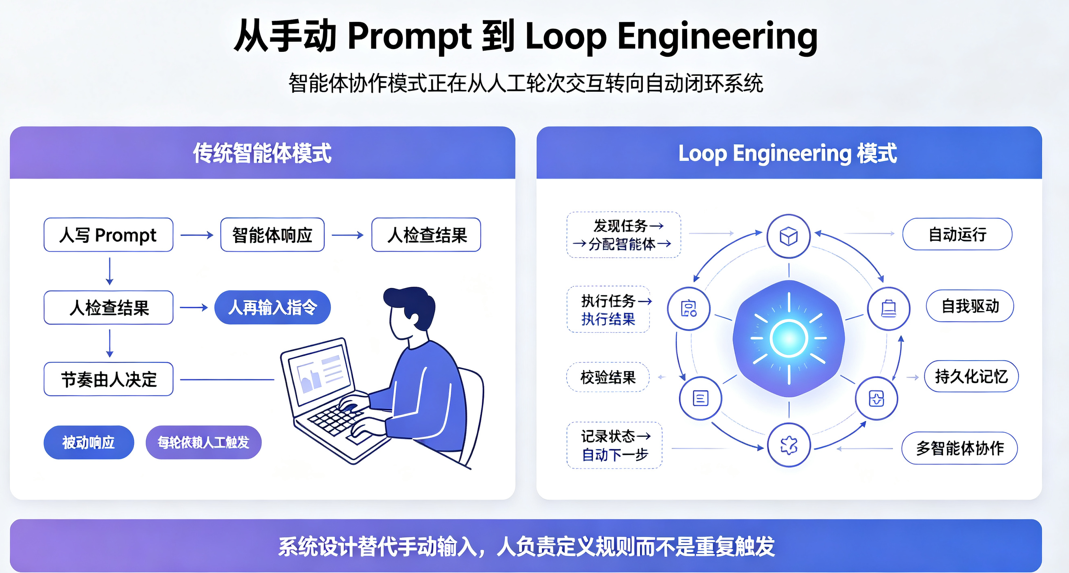
过去两年,我们与编码智能体的协作始终围绕「提示词工程」展开:人写 prompt、读取结果、再输入下一轮指令,人是整个流程的绝对主控者。而 Loop Engineering 的出现,正在把这个逻辑彻底翻转 ------ 人不再是每一步的触发者,而是设计一套自动运转的系统,让 Agent 自主完成任务发现、执行、校验与迭代。
本文基于 Google Cloud AI 总监 Addy Osmani 的深度拆解,系统梳理 Loop Engineering 的核心逻辑、模块构成与落地边界。
1.为什么会出现 Loop Engineering?
传统的智能体使用模式,本质上是「人在回路中」的轮次式交互。你需要不断输入指令、判断输出、修正方向,智能体只是被动响应的工具,效率天花板完全取决于人的操作节奏。
Loop Engineering 的核心,就是用系统设计替代手动 prompt:你搭建一套小型系统,让它自动去发现任务、分配任务、检查结果、记录状态、决定下一步,再由系统去触发智能体执行。人从每一轮的操作者,变成了整个系统的设计者。
它位于此前的 agent harness engineering(智能体运行环境构建)之上,是一个可定时运行、可自我驱动、可自动生成子智能体的上层框架。而这一概念快速普及的关键在于,它早已不再是少数人用 bash 脚本维护的个人技巧 而是Claude Code、Codex 等主流编码智能体,已经将相关能力原生内置到了产品中,底层模块高度趋同。
2. 什么是Loop? 五大模块+持久化记忆
一个可长期稳定运行的 Loop,由五个核心模块外加一套持久化记忆体系构成。这一架构在 Claude Code 和 Codex 中已形成共识,只是命名略有差异。
2.1. Automation: Loop的"心跳"
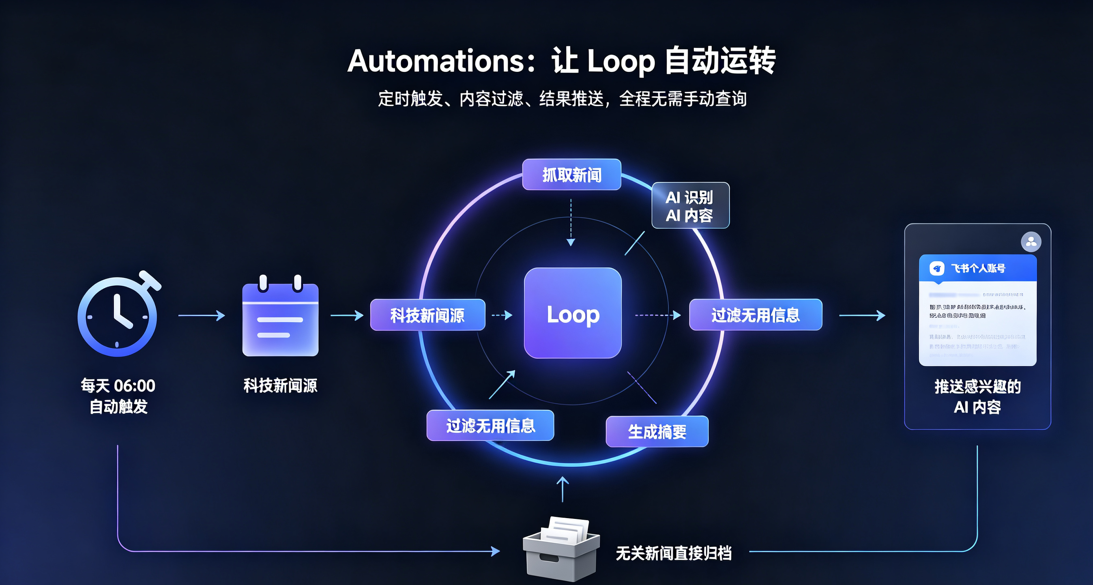
Automations 是让 Loop 真正成为「循环」,而非单次手动执行的核心。它的目标是让任务自主运转、结果主动触达,而不需要人主动去查询和触发。
比如说:我想让Claude Code每天6点钟自动让Loop处理我的科技新闻,将感兴趣的AI内容推送到我的飞书个人账号,其他无用的新闻直接过滤。
2.2 Worktrees: 并行协作的「隔离舱」
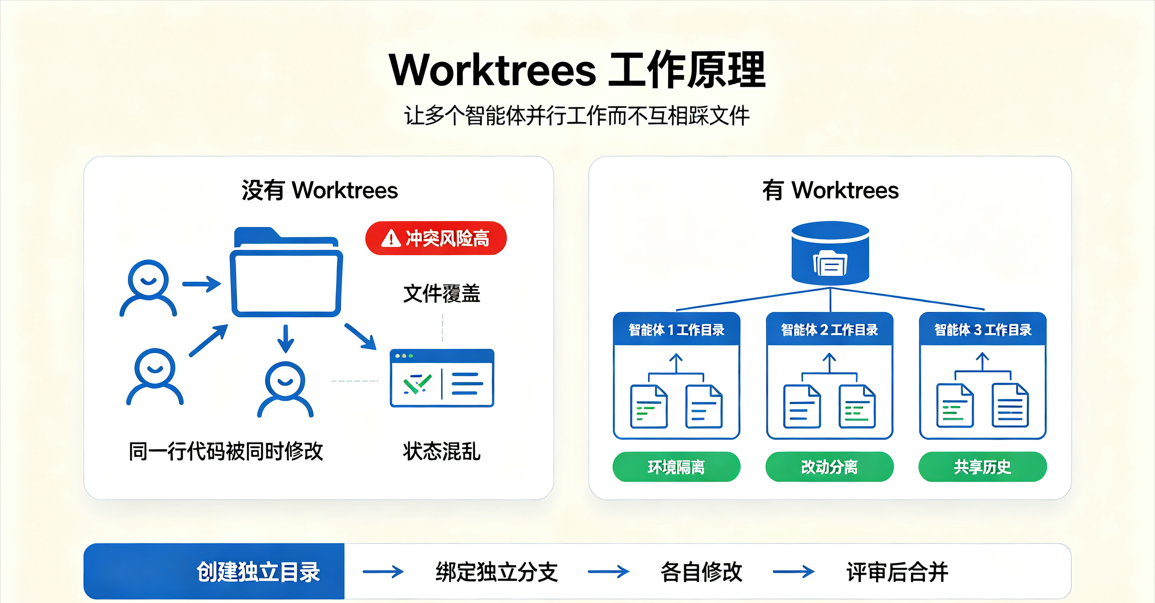
当多个智能体同时工作时,文件冲突是最常见的失败根源,就像两个工程师无沟通修改同一行代码。因此Worktrees 基于 git worktree 机制,为每个智能体提供独立的工作目录与分支,共享仓库历史但物理隔离改动,从根源上避免并行写入冲突。
Codex 直接内置了多线程 worktree 支持;Claude Code 则通过 --worktree 参数、子智能体隔离配置等方式实现同样的效果。
2.3 Skills:项目知识的「沉淀池」
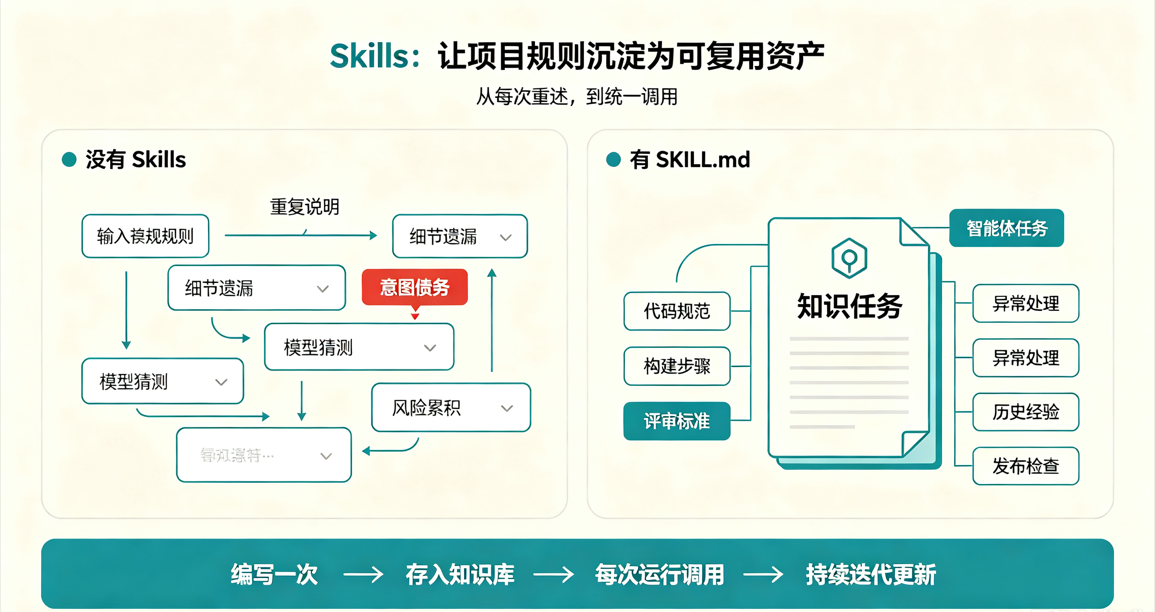
每次新开会话都要重述项目规则,是智能体使用中的一大隐性成本。如果你某件事没说清的细节,模型会自行猜测,长此以往累积下来会形成较大风险。
而Skills 以 SKILL.md 为核心载体,将项目规范、构建流程、历史踩坑经验等固化下来,一次编写,智能体每次运行都可调用,让项目认知实现复利积累。
2.4 Plugins和Connectors: 打通真实工作流的「接口」
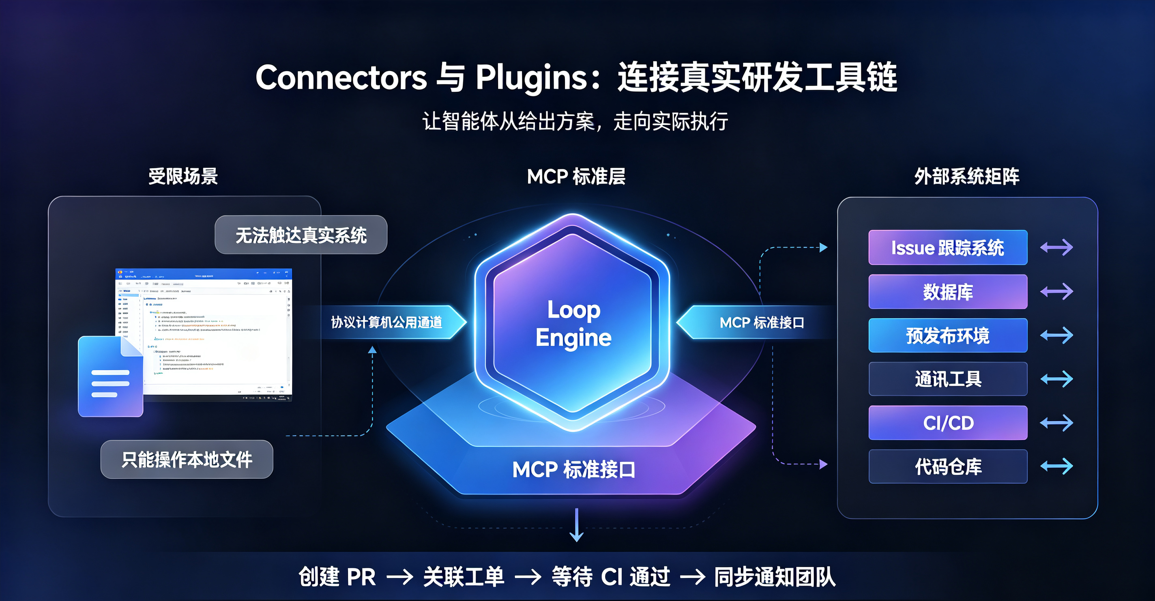
只能操作本地文件的 Loop,价值非常有限。只有接入真实的研发工具链,智能体才能从「给出方案」走向「实际执行」。
基于 MCP 标准的 Connectors,让智能体可以访问 issue 跟踪系统、数据库、预发布环境、通讯工具等外部系统;Plugins 则将 Connectors 与 Skills 打包封装,实现团队内一键复用。
由此,智能体不再只是输出一段修复代码,而是可以直接创建 PR、关联工单、等待 CI 通过后同步通知团队,完成完整的工作闭环。
2.5 Sub-agents:生成与校验的「权责分离」
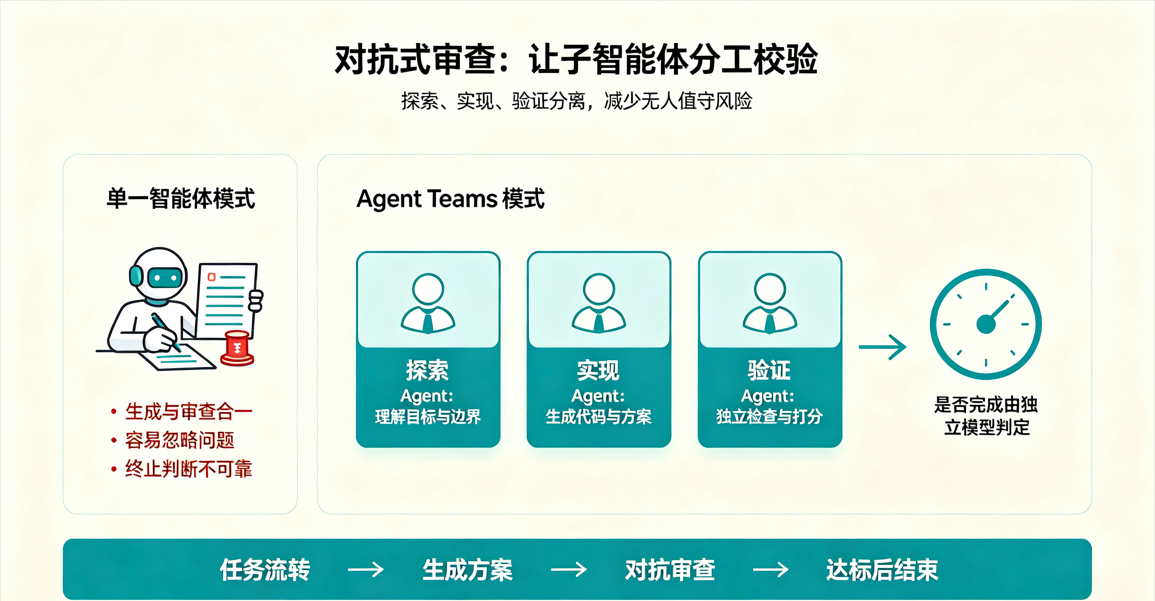
无人值守的最大风险,是模型对自己的输出缺乏客观判断。Loop 中最关键的设计之一,就是将生成者与检查者拆分为不同的子智能体,甚至使用不同能力等级的模型。
比如:Claude Code 通过 agent teams 实现任务流转,常见分工是「探索 - 实现 - 验证」三者分离。这种「对抗式审查」的逻辑,也延伸到了
/goal的终止判断上 ------ 由独立模型判定任务是否完成,而非执行任务的模型自己说了算。
2.6 不可或缺:持久化记忆
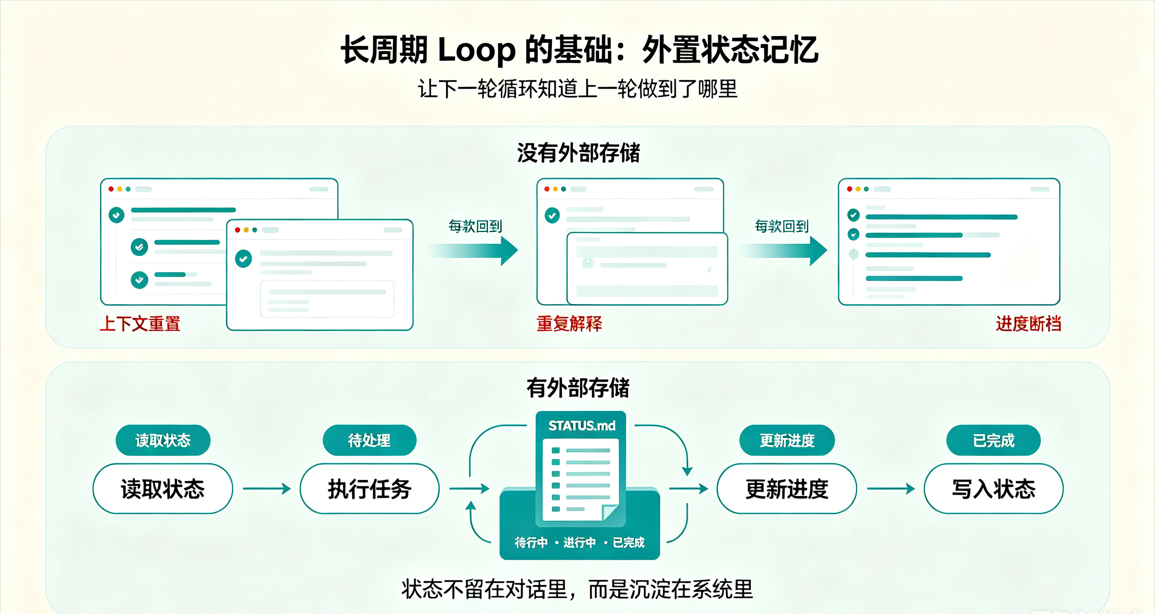
所有长周期运行的 Loop,都依赖同一个基础技巧:把状态存在对话之外。
模型每次运行都会清空上下文,因此任务进度、已完成项、历史尝试、下一步计划,必须记录在外部存储中 ------ 可以是一个 Markdown 状态文件,也可以是项目看板。只有这样,下一轮循环才能承接上一次的结果继续推进,而不是每次都从零开始。
3. Loop Engineering演示
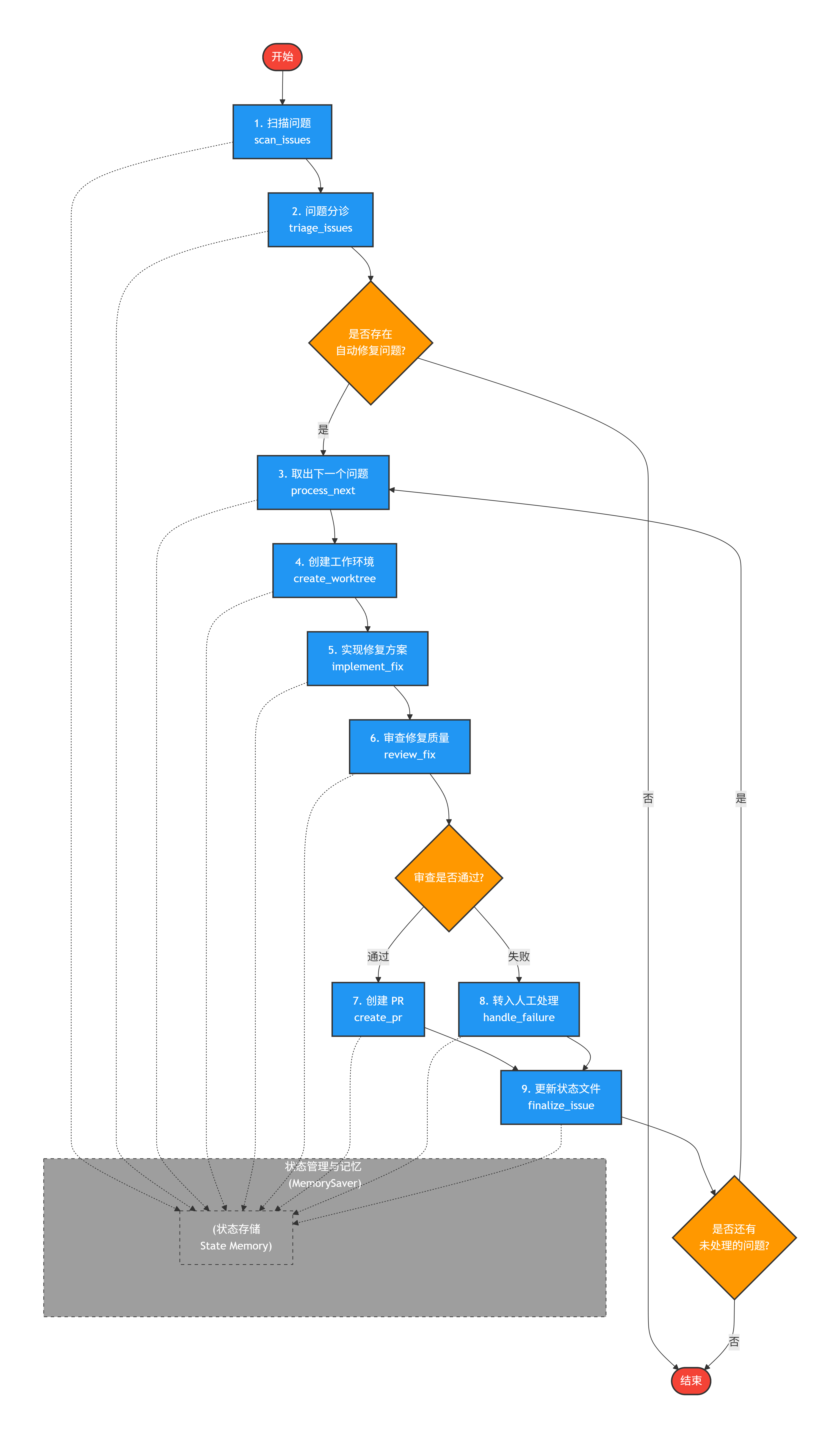
接下来我将用一个最小化的demo 演示Loop Engineering 的流程, 该demo演示了每日扫描日常训练的Loop流程。 其中包含:
- 状态管理(issues 列表、当前处理进度、人工任务等)
- 自动化扫描与分诊
- 针对每个可自动处理问题的循环处理(创建工作目录、起草修复、审查、创建 PR/人工介入)
- 条件边控制流程(审查通过/失败、是否还有下一个问题)
首先定义状态:
python
from typing import TypedDict, List, Dict, Any
from langgraph.graph import StateGraph, END
from langgraph.checkpoint import MemorySaver
import random

# ---------- 1. 定义状态 ----------
class AgentState(TypedDict):
    issues: List[Dict]                 # 所有问题列表
    current_issue: Dict                # 当前正在处理的问题
    processed_count: int               # 已处理计数
    human_issues: List[Dict]           # 需要人工介入的问题
    worktree_path: str                 # 模拟的工作目录
    fix_proposal: str                  # 修复方案草稿
    review_passed: bool                # 审查是否通过
    pr_created: bool                   # PR 是否已创建
    log: List[str]                     # 运行日志
然后定义模拟函数:
python
# ---------- 2. 节点函数 ----------
def scan_issues(state: AgentState) -> AgentState:
    """模拟每天扫描任务,生成问题列表"""
    issues = [
        {"id": 1, "description": "CI 单元测试失败", "auto_fixable": True, "fixed": False},
        {"id": 2, "description": "内存泄漏 issue", "auto_fixable": False, "fixed": False},
        {"id": 3, "description": "最新提交引入 lint 错误", "auto_fixable": True, "fixed": False},
    ]
    state["issues"] = issues
    state["processed_count"] = 0
    state["human_issues"] = []
    state["log"] = ["✅ 扫描完成,发现 3 个问题"]
    return state

def triage_issues(state: AgentState) -> AgentState:
    """分诊:自动标记可自动修复的问题,人工问题单独保存"""
    for issue in state["issues"]:
        if not issue["auto_fixable"]:
            state["human_issues"].append(issue)
    # 可自动处理的列表(用于后续判断)
    state["log"].append(f"🔍 分诊完成:{len(state['human_issues'])} 个需人工介入")
    return state

def process_next(state: AgentState) -> AgentState:
    """取出下一个待处理的自动修复问题"""
    auto_issues = [i for i in state["issues"] if i["auto_fixable"] and not i.get("fixed", False)]
    if not auto_issues:
        state["log"].append("🏁 所有自动修复任务已完成")
        return state
    issue = auto_issues[0]
    state["current_issue"] = issue
    state["worktree_path"] = f"/tmp/worktree/issue_{issue['id']}"
    state["fix_proposal"] = ""
    state["review_passed"] = False
    state["pr_created"] = False
    state["log"].append(f"🔄 开始处理 Issue #{issue['id']}: {issue['description']}")
    return state

def create_worktree(state: AgentState) -> AgentState:
    """模拟为当前问题创建独立工作环境"""
    issue = state["current_issue"]
    state["log"].append(f"📁 创建工作目录 {state['worktree_path']} 用于 Issue #{issue['id']}")
    return state

def implement_fix(state: AgentState) -> AgentState:
    """模拟实现子智能体起草修复方案(这里用固定字符串代替真实 LLM 调用)"""
    issue = state["current_issue"]
    fix = f"修复 Issue #{issue['id']}: 修正了相关代码逻辑"
    state["fix_proposal"] = fix
    state["log"].append(f"✍️  起草修复方案: {fix}")
    return state

def review_fix(state: AgentState) -> AgentState:
    """模拟审查子智能体校验修复质量(随机通过/失败,用于演示)"""
    passed = random.choice([True, False])
    state["review_passed"] = passed
    state["log"].append(f"🔎 审查结果: {'✅ 通过' if passed else '❌ 未通过'}")
    return state

def create_pr(state: AgentState) -> AgentState:
    """模拟创建 PR 并更新工单"""
    issue = state["current_issue"]
    pr_url = f"https://github.com/pr/{issue['id']}"
    state["pr_created"] = True
    issue["fixed"] = True
    issue["pr_url"] = pr_url
    state["log"].append(f"🚀 创建 PR: {pr_url},已更新工单")
    return state

def handle_failure(state: AgentState) -> AgentState:
    """审查失败时,将问题转入人工队列"""
    issue = state["current_issue"]
    state["human_issues"].append(issue)
    state["log"].append(f"⚠️  Issue #{issue['id']} 自动修复失败,已转入人工分诊")
    return state

def finalize_issue(state: AgentState) -> AgentState:
    """更新状态文件(模拟),记录本次处理结果"""
    state["processed_count"] += 1
    state["log"].append(f"📝 状态文件已更新,累计处理 {state['processed_count']} 个问题")
    return state

# ---------- 3. 条件边函数 ----------
def should_continue(state: AgentState) -> str:
    """判断是否还有未处理的自动修复问题"""
    remaining = [i for i in state["issues"] if i["auto_fixable"] and not i.get("fixed", False)]
    return "continue" if remaining else "end"

def review_outcome(state: AgentState) -> str:
    """根据审查结果决定下一步"""
    return "create_pr" if state["review_passed"] else "handle_failure"
构建Langgraph图:
python
# ---------- 4. 构建 LangGraph ----------
builder = StateGraph(AgentState)

# 添加节点
builder.add_node("scan", scan_issues)
builder.add_node("triage", triage_issues)
builder.add_node("process_next", process_next)
builder.add_node("create_worktree", create_worktree)
builder.add_node("implement", implement_fix)
builder.add_node("review", review_fix)
builder.add_node("create_pr", create_pr)
builder.add_node("handle_failure", handle_failure)
builder.add_node("finalize", finalize_issue)

# 设置入口
builder.set_entry_point("scan")

# 连接边
builder.add_edge("scan", "triage")

# triage 后:如果没有自动修复任务,直接结束;否则进入下一个处理
builder.add_conditional_edges(
    "triage",
    lambda state: "process_next" if any(i["auto_fixable"] and not i.get("fixed", False) for i in state["issues"]) else END,
    {
        "process_next": "process_next",
        END: END
    }
)

builder.add_edge("process_next", "create_worktree")
builder.add_edge("create_worktree", "implement")
builder.add_edge("implement", "review")

# review 后根据结果分支
builder.add_conditional_edges(
    "review",
    review_outcome,
    {
        "create_pr": "create_pr",
        "handle_failure": "handle_failure"
    }
)

builder.add_edge("create_pr", "finalize")
builder.add_edge("handle_failure", "finalize")

# finalize 后判断是否还有下一个问题
builder.add_conditional_edges(
    "finalize",
    should_continue,
    {
        "continue": "process_next",   # 回到 process_next 处理下一个
        "end": END
    }
)

# ---------- 5. 编译并运行 ----------
memory = MemorySaver()
app = builder.compile(checkpointer=memory)

if __name__ == "__main__":
    # 初始状态
    initial_state = AgentState(
        issues=[],
        current_issue={},
        processed_count=0,
        human_issues=[],
        worktree_path="",
        fix_proposal="",
        review_passed=False,
        pr_created=False,
        log=[]
    )

    # 使用 thread_id 保存状态(便于查看完整历史)
    config = {"configurable": {"thread_id": "daily_loop"}}

    # 流式执行,打印每一步的节点输出
    for event in app.stream(initial_state, config):
        for node_name, node_output in event.items():
            print(f"🟢 执行节点: {node_name}")
            # 打印该节点产生的最新日志(最后一条)
            if node_output.get("log"):
                print("   " + node_output["log"][-1])
            print("-" * 50)

    # 最终状态
    final_state = app.get_state(config).values
    print("\n🏁 最终状态摘要:")
    print(f"   - 总问题数: {len(final_state['issues'])}")
    print(f"   - 已自动修复: {sum(1 for i in final_state['issues'] if i.get('fixed'))}")
    print(f"   - 需人工介入: {len(final_state['human_issues'])}")
    print(f"   - 完整日志: {final_state['log']}")
Loop流程: