基于鸿蒙PC与鸿蒙Flutter框架构建AI本地生活服务平台
引言
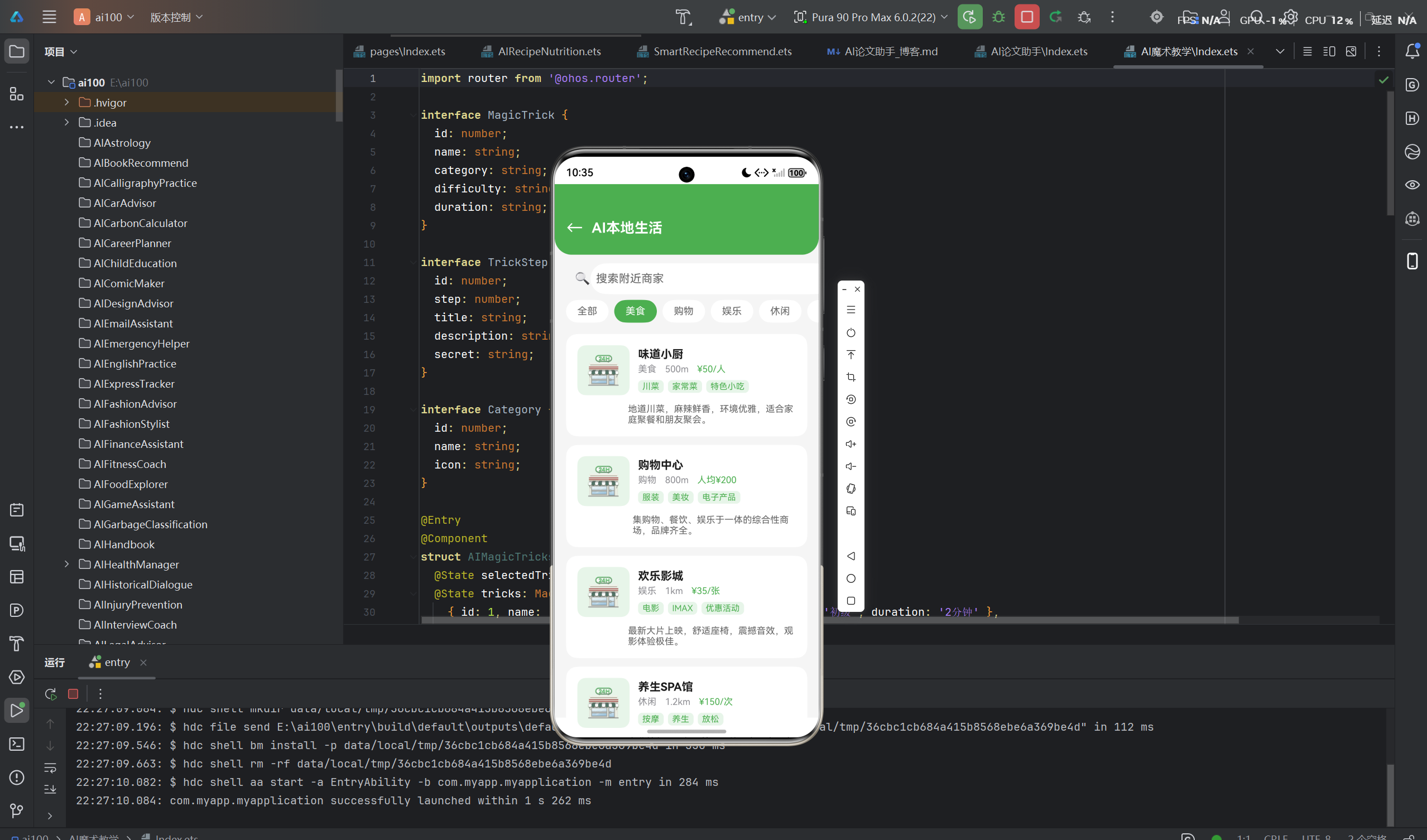
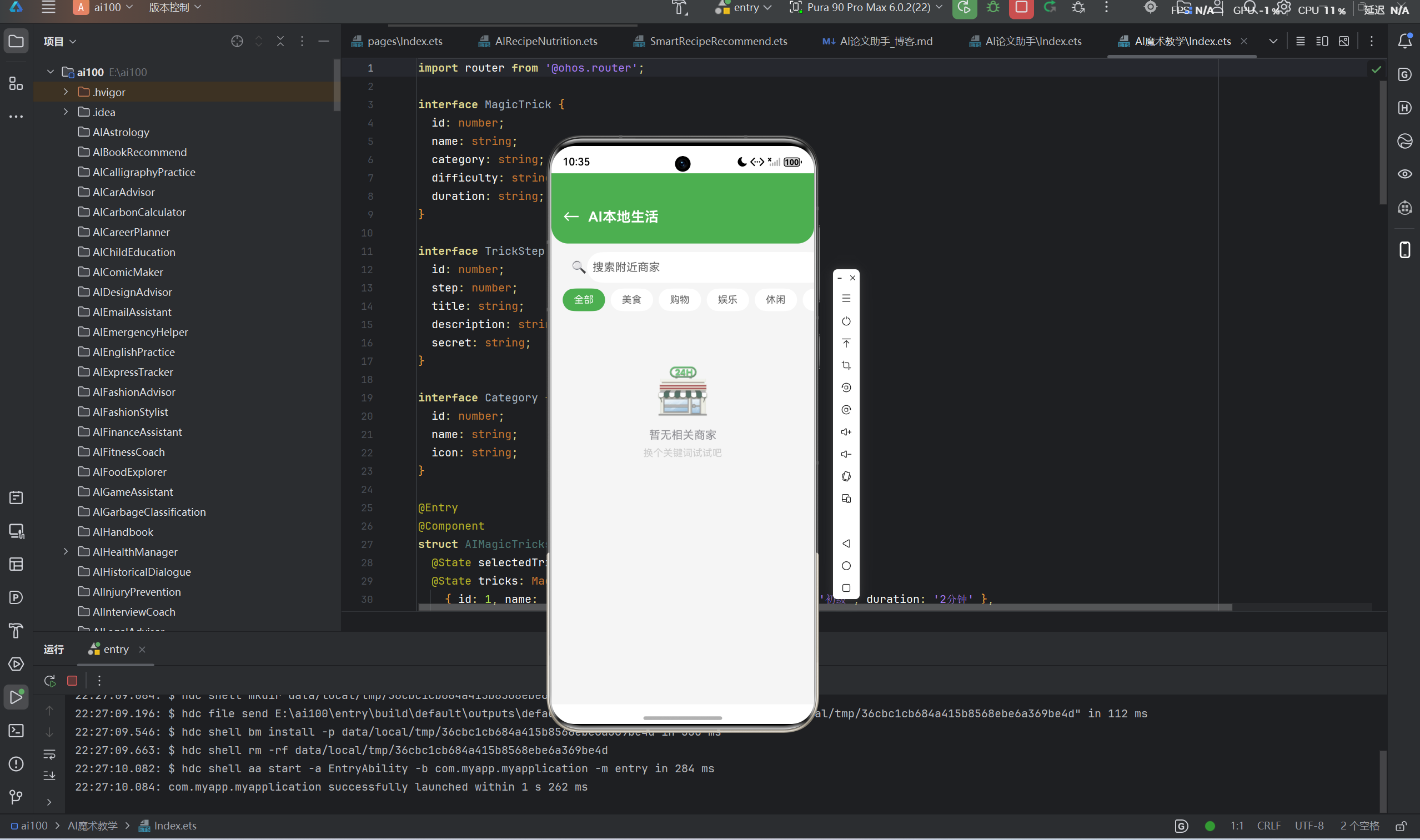
在数字化转型的浪潮下,本地生活服务领域正经历着深刻的变革。随着华为鸿蒙操作系统的全面升级和PC端生态的快速发展,基于鸿蒙PC与鸿蒙Flutter框架构建新一代AI本地生活服务平台已成为行业创新的重要方向。本文将详细介绍我们团队如何利用这些前沿技术,打造一个集商家搜索、智能推荐、地图展示等核心功能于一体的高性能本地生活服务应用。
---
一、项目概述
1.1 项目背景
随着移动互联网的普及和消费升级,用户对本地生活服务的需求日益增长。传统的本地生活服务平台存在以下痛点:
- 跨平台体验不一致:不同设备上的应用体验存在差异,用户在PC端和移动端切换时缺乏统一的交互体验
- AI能力整合不足:智能推荐算法与业务场景结合不够紧密,个性化服务能力有待提升
- 开发效率瓶颈:多端开发需要维护多套代码,开发成本高、周期长
- 平台特性未充分利用:未能充分发挥鸿蒙操作系统的分布式能力和原生特性
1.2 项目目标
本项目旨在构建一个基于鸿蒙PC与鸿蒙Flutter框架的AI本地生活服务平台,具体目标包括:
- 统一多端体验:通过鸿蒙Flutter框架实现一套代码、多端运行,确保PC端和移动端体验的一致性
- 智能服务升级:整合AI推荐算法,实现精准的商家推荐和优惠信息推送
- 分布式能力集成:充分利用鸿蒙操作系统的分布式特性,实现设备间的协同服务
- 高性能响应:优化应用性能,确保流畅的用户体验和快速响应
1.3 项目定位
项目定位为面向城市居民的一站式本地生活服务平台,涵盖餐饮、娱乐、购物、生活服务等多个领域,为用户提供便捷、智能、个性化的本地生活服务体验。
二、技术架构设计
2.1 整体架构
本项目采用分层架构设计,主要分为以下几个层次:
┌─────────────────────────────────────────────────────────────────┐
│                        应用层 (UI Layer)                        │
│  ┌─────────────┐ ┌─────────────┐ ┌─────────────┐ ┌───────────┐ │
│  │ 商家搜索    │ │ 优惠推荐    │ │ 地图展示    │ │ 个人中心  │ │
│  └─────────────┘ └─────────────┘ └─────────────┘ └───────────┘ │
├─────────────────────────────────────────────────────────────────┤
│                        业务层 (Business Layer)                   │
│  ┌─────────────┐ ┌─────────────┐ ┌─────────────┐ ┌───────────┐ │
│  │ 搜索服务    │ │ 推荐引擎    │ │ 地图服务    │ │ 用户服务  │ │
│  └─────────────┘ └─────────────┘ └─────────────┘ └───────────┘ │
├─────────────────────────────────────────────────────────────────┤
│                        服务层 (Service Layer)                    │
│  ┌─────────────┐ ┌─────────────┐ ┌─────────────┐ ┌───────────┐ │
│  │ API网关     │ │ 认证服务    │ │ 缓存服务    │ │ 消息队列  │ │
│  └─────────────┘ └─────────────┘ └─────────────┘ └───────────┘ │
├─────────────────────────────────────────────────────────────────┤
│                        数据层 (Data Layer)                       │
│  ┌─────────────┐ ┌─────────────┐ ┌─────────────┐ ┌───────────┐ │
│  │ 关系型数据库│ │ 搜索引擎    │ │ 缓存数据库  │ │ 对象存储  │ │
│  └─────────────┘ └─────────────┘ └─────────────┘ └───────────┘ │
└─────────────────────────────────────────────────────────────────┘
2.2 技术选型
2.2.1 前端技术栈
| 技术 | 版本 | 用途 |
|---|---|---|
| 鸿蒙Flutter框架 | 3.16+ | 跨平台UI开发,一套代码多端运行 |
| ArkUI | 4.0+ | 鸿蒙原生UI组件,用于高性能场景 |
| Dart | 3.2+ | 编程语言,Flutter开发语言 |
| Riverpod | 2.3+ | 状态管理,替代传统Provider |
| GoRouter | 12.0+ | 路由管理,实现页面导航 |
2.2.2 后端技术栈
| 技术 | 版本 | 用途 |
|---|---|---|
| Spring Boot | 3.2+ | 后端服务框架 |
| Spring Cloud | 2023.0+ | 微服务治理 |
| Elasticsearch | 8.12+ | 全文搜索引擎,支持商家搜索 |
| Redis | 7.2+ | 缓存服务,提升响应速度 |
| MySQL | 8.0+ | 关系型数据库,存储业务数据 |
| RabbitMQ | 3.12+ | 消息队列,异步任务处理 |
2.2.3 AI技术栈
| 技术 | 用途 |
|---|---|
| 协同过滤算法 | 用户偏好分析和推荐 |
| 深度学习模型 | 图像识别、情感分析 |
| 知识图谱 | 商家关系和语义理解 |
| 自然语言处理 | 搜索意图分析 |
2.3 关键设计原则
2.3.1 分层解耦原则
系统采用严格的分层架构,各层之间通过接口进行通信,降低耦合度,提高代码的可维护性和可扩展性。
2.3.2 微服务架构
后端服务采用微服务架构,将不同业务功能拆分为独立的服务模块,便于独立开发、部署和扩展。
2.3.3 缓存优先策略
对于频繁访问的数据,采用多级缓存策略,优先从缓存获取数据,减少数据库压力,提升响应速度。
2.3.4 异步处理模式
对于非实时性操作,采用异步处理模式,通过消息队列解耦,提升系统吞吐量和响应速度。
三、核心功能实现
3.1 商家搜索功能
3.1.1 功能需求
商家搜索是本地生活服务平台的核心功能之一,需要实现以下需求:
- 支持关键词搜索,包括商家名称、品类、地址等
- 支持筛选条件,如距离、评分、价格区间等
- 支持搜索历史记录和热门搜索推荐
- 支持搜索结果的智能排序
3.1.2 技术实现
搜索服务架构:
┌────────────────────────────────────────────────────────────────┐
│                         搜索请求处理                           │
│  用户输入 → 意图分析 → 查询构建 → Elasticsearch查询 → 结果排序  │
└────────────────────────────────────────────────────────────────┘核心代码实现:
dart
class SearchService {
  final ElasticsearchClient _client;

  Future<List<Merchant>> searchMerchants({
    required String keyword,
    double? distance,
    double? minRating,
    double? maxPrice,
    String? category,
    int page = 1,
    int size = 20,
  }) async {
    final query = _buildQuery(
      keyword: keyword,
      distance: distance,
      minRating: minRating,
      maxPrice: maxPrice,
      category: category,
    );

    final response = await _client.search(
      index: 'merchants',
      query: query,
      from: (page - 1) * size,
      size: size,
    );

    return _parseResponse(response);
  }

  Map<String, dynamic> _buildQuery({
    required String keyword,
    double? distance,
    double? minRating,
    double? maxPrice,
    String? category,
  }) {
    final bool should = <Map<String, dynamic>>[];

    if (keyword.isNotEmpty) {
      should.add({
        'multi_match': {
          'query': keyword,
          'fields': ['name', 'description', 'tags'],
          'type': 'best_fields',
        }
      });
    }

    final filters = <Map<String, dynamic>>[];

    if (distance != null) {
      filters.add({
        'geo_distance': {
          'distance': '$distance km',
          'location': {'lat': 31.2304, 'lon': 121.4737},
        }
      });
    }

    if (minRating != null) {
      filters.add({
        'range': {'rating': {'gte': minRating}}
      });
    }

    if (maxPrice != null) {
      filters.add({
        'range': {'avgPrice': {'lte': maxPrice}}
      });
    }

    if (category != null) {
      filters.add({
        'term': {'category': category}
      });
    }

    return {
      'bool': {
        'should': should,
        'filter': filters,
        'must': {
          'term': {'status': 'active'}
        },
      },
      'sort': [
        {'score': {'order': 'desc'}},
        {'rating': {'order': 'desc'}},
      ],
    };
  }

  List<Merchant> _parseResponse(SearchResponse response) {
    return response.hits.map((hit) => Merchant.fromJson(hit.source)).toList();
  }
}
3.1.3 搜索优化策略
- 关键词分词处理:使用中文分词器对用户输入进行分词处理,提高搜索准确性
- 模糊匹配支持:支持拼音搜索和错别字容错,提升搜索体验
- 搜索结果缓存:对热门搜索结果进行缓存,减少重复查询
- 搜索建议:基于用户输入实时提供搜索建议,引导用户精准搜索
3.2 优惠推荐功能
3.2.1 功能需求
优惠推荐功能需要实现以下需求:
- 根据用户偏好推荐个性化优惠信息
- 支持优惠券的领取和使用
- 展示优惠活动的详细信息
- 支持优惠信息的分类和筛选
3.2.2 推荐算法实现
推荐系统架构:
┌──────────────────────────────────────────────────────────────────┐
│                        推荐引擎架构                               │
│  ┌──────────────┐  ┌──────────────┐  ┌──────────────┐          │
│  │ 用户行为数据  │  │ 用户画像数据  │  │ 商家特征数据  │          │
│  └──────┬───────┘  └──────┬───────┘  └──────┬───────┘          │
│         │                 │                 │                    │
│         └─────────────────┼─────────────────┘                    │
│                           ▼                                      │
│                  ┌──────────────┐                                │
│                  │ 推荐算法引擎  │                                │
│                  │ 协同过滤     │                                │
│                  │ 深度学习模型 │                                │
│                  └──────┬───────┘                                │
│                         │                                        │
│                         ▼                                        │
│                  ┌──────────────┐                                │
│                  │ 推荐结果排序  │                                │
│                  └──────┬───────┘                                │
│                         │                                        │
│                         ▼                                        │
│                  ┌──────────────┐                                │
│                  │ 推荐结果输出  │                                │
│                  └──────────────┘                                │
└──────────────────────────────────────────────────────────────────┘推荐算法核心代码:
dart
class RecommendationService {
  final UserBehaviorRepository _behaviorRepo;
  final CollaborativeFiltering _cf;
  final DeepLearningModel _dlModel;

  Future<List<Coupon>> recommendCoupons(
    String userId, {
    int limit = 10,
  }) async {
    final userProfile = await _behaviorRepo.getUserProfile(userId);
    final userEmbedding = await _dlModel.getUserEmbedding(userId);

    final cfResults = await _cf.recommend(
      userId: userId,
      itemType: 'coupon',
      limit: limit,
    );

    final dlResults = await _dlModel.predict(
      userEmbedding: userEmbedding,
      itemType: 'coupon',
      limit: limit,
    );

    final mergedResults = _mergeResults(cfResults, dlResults, userProfile);

    return mergedResults.take(limit).toList();
  }

  List<Coupon> _mergeResults(
    List<Coupon> cfResults,
    List<Coupon> dlResults,
    UserProfile profile,
  ) {
    final resultMap = <String, Coupon>{};

    for (var i = 0; i < cfResults.length; i++) {
      final coupon = cfResults[i];
      resultMap[coupon.id] = coupon.copyWith(score: (1 - i / cfResults.length) * 0.4);
    }

    for (var i = 0; i < dlResults.length; i++) {
      final coupon = dlResults[i];
      if (resultMap.containsKey(coupon.id)) {
        resultMap[coupon.id] = resultMap[coupon.id]!.copyWith(
          score: resultMap[coupon.id]!.score + (1 - i / dlResults.length) * 0.6,
        );
      } else {
        resultMap[coupon.id] = coupon.copyWith(score: (1 - i / dlResults.length) * 0.6);
      }
    }

    return resultMap.values
        .where((c) => _matchProfile(c, profile))
        .sorted((a, b) => b.score.compareTo(a.score))
        .toList();
  }

  bool _matchProfile(Coupon coupon, UserProfile profile) {
    if (profile.preferredCategories != null &&
        !profile.preferredCategories!.contains(coupon.category)) {
      return false;
    }

    if (profile.priceRange != null &&
        coupon.minConsumption > profile.priceRange!.max) {
      return false;
    }

    return true;
  }
}
3.2.3 推荐优化策略
- 实时更新:用户行为数据实时更新到推荐模型,确保推荐结果的时效性
- 多样性控制:避免推荐结果过于单一,通过多样性算法保证推荐内容的丰富性
- 冷启动处理:针对新用户和新商家,设计专门的冷启动策略
- AB测试支持:支持推荐算法的AB测试,持续优化推荐效果
3.3 地图展示功能
3.3.1 功能需求
地图展示功能需要实现以下需求:
- 展示商家位置和周边信息
- 支持地图缩放和定位
- 展示路线规划和导航
- 支持地图上的商家标注和信息展示
3.3.2 技术实现
地图服务架构:
┌──────────────────────────────────────────────────────────────────┐
│                         地图服务架构                              │
│  ┌──────────────┐  ┌──────────────┐  ┌──────────────┐          │
│  │ 地图渲染组件  │  │ 位置服务     │  │ 路线规划服务  │          │
│  └──────┬───────┘  └──────┬───────┘  └──────┬───────┘          │
│         │                 │                 │                    │
│         └─────────────────┼─────────────────┘                    │
│                           ▼                                      │
│                  ┌──────────────┐                                │
│                  │ 地图API网关   │                                │
│                  └──────┬───────┘                                │
│                         │                                        │
│                         ▼                                        │
│                  ┌──────────────┐                                │
│                  │ 第三方地图服务 │                                │
│                  │ (高德/百度)   │                                │
│                  └──────────────┘                                │
└──────────────────────────────────────────────────────────────────┘地图组件核心代码:
dart
class MerchantMap extends StatefulWidget {
  final List<Merchant> merchants;
  final LatLng? currentLocation;

  const MerchantMap({
    super.key,
    required this.merchants,
    this.currentLocation,
  });

  @override
  State<MerchantMap> createState() => _MerchantMapState();
}

class _MerchantMapState extends State<MerchantMap> {
  LatLng? _center;
  MapController? _mapController;
  Set<Marker> _markers = {};

  @override
  void initState() {
    super.initState();
    _center = widget.currentLocation ?? const LatLng(31.2304, 121.4737);
    _updateMarkers();
  }

  @override
  void didUpdateWidget(covariant MerchantMap oldWidget) {
    super.didUpdateWidget(oldWidget);
    if (widget.merchants != oldWidget.merchants) {
      _updateMarkers();
    }
  }

  void _updateMarkers() {
    _markers = widget.merchants.map((merchant) {
      return Marker(
        markerId: MarkerId(merchant.id),
        position: LatLng(merchant.latitude, merchant.longitude),
        infoWindow: InfoWindow(
          title: merchant.name,
          snippet: '${merchant.rating}分 · ¥${merchant.avgPrice}/人',
          onTap: () => _onMarkerTap(merchant),
        ),
        icon: BitmapDescriptor.defaultMarkerWithHue(
          merchant.rating >= 4.5
              ? BitmapDescriptor.hueGreen
              : merchant.rating >= 4.0
                  ? BitmapDescriptor.hueBlue
                  : BitmapDescriptor.hueOrange,
        ),
      );
    }).toSet();
  }

  void _onMarkerTap(Merchant merchant) {
    Navigator.push(
      context,
      MaterialPageRoute(
        builder: (context) => MerchantDetailPage(merchant: merchant),
      ),
    );
  }

  @override
  Widget build(BuildContext context) {
    return FlutterMap(
      mapController: _mapController,
      options: MapOptions(
        center: _center,
        zoom: 14,
        onTap: (_, __) {},
      ),
      children: [
        TileLayer(
          urlTemplate: 'https://{s}.tile.openstreetmap.org/{z}/{x}/{y}.png',
          subdomains: const ['a', 'b', 'c'],
        ),
        MarkerLayer(markers: _markers),
        if (widget.currentLocation != null)
          MarkerLayer(
            markers: {
              Marker(
                markerId: const MarkerId('current'),
                position: widget.currentLocation!,
                icon: BitmapDescriptor.defaultMarkerWithHue(
                  BitmapDescriptor.hueRed,
                ),
              ),
            },
          ),
      ],
    );
  }
}
3.3.3 地图功能优化
- 地图缓存:对地图瓦片进行本地缓存,减少网络请求
- 异步加载:地图标注信息异步加载,提升渲染性能
- 定位优化:结合GPS和网络定位,提高定位准确性
- 离线地图支持:支持离线地图下载,提升无网络环境下的使用体验
四、鸿蒙平台特性应用
4.1 分布式能力应用
4.1.1 分布式任务调度
鸿蒙操作系统的分布式能力允许应用在多个设备间协同工作。本项目利用这一特性实现以下功能:
- 跨设备推荐同步:用户在手机上浏览的商家信息可以同步到PC端
- 分布式数据共享:不同设备间共享用户偏好和行为数据
- 多端协同操作:支持在手机上选择商家,在PC端查看详细信息和下单
4.1.2 分布式数据管理
dart
class DistributedDataService {
  final DistributedKVStore _kvStore;

  Future<void> syncUserData(String userId) async {
    final userData = await _getLocalUserData(userId);
    await _kvStore.put(
      key: 'user:$userId',
      value: jsonEncode(userData),
      mode: PutMode.CLOUD_SYNC,
    );
  }

  Future<UserData> getUserData(String userId) async {
    final localData = await _getLocalUserData(userId);
    final cloudData = await _kvStore.get(key: 'user:$userId');

    if (cloudData != null) {
      final cloudUserData = UserData.fromJson(jsonDecode(cloudData));
      return _mergeUserData(localData, cloudUserData);
    }

    return localData;
  }

  UserData _mergeUserData(UserData local, UserData cloud) {
    return UserData(
      preferences: cloud.preferences.isNotEmpty
          ? cloud.preferences
          : local.preferences,
      favorites: {...local.favorites, ...cloud.favorites},
      searchHistory: [...local.searchHistory, ...cloud.searchHistory]
          .distinct()
          .take(50)
          .toList(),
    );
  }
}
4.2 鸿蒙原生特性集成
4.2.1 鸿蒙原生组件
在性能敏感区域,我们使用鸿蒙原生ArkUI组件,结合Flutter框架实现最佳体验:
- 高性能列表渲染:使用ArkUI的RecyclerView组件实现商家列表的高性能渲染
- 原生动画效果:利用鸿蒙原生动画API实现流畅的交互动画
- 系统级通知:集成鸿蒙通知系统,实现优惠信息的实时推送
4.2.2 系统服务集成
dart
class HarmonyOSService {
  Future<void> sendNotification(Coupon coupon) async {
    final notification = NotificationRequest(
      id: coupon.id.hashCode,
      title: '新优惠推荐',
      content: '${coupon.merchantName}推出${coupon.discount}折优惠',
      intent: Intent(
        action: 'com.example.app/coupon_detail',
        parameters: {'couponId': coupon.id},
      ),
      slotType: NotificationSlotType.SOCIAL,
    );

    await NotificationHelper.publishNotification(notification);
  }

  Future<Location> getCurrentLocation() async {
    final locationManager = LocationManager();
    final location = await locationManager.getCurrentLocation(
      requestLevel: LocationRequestLevel.ACCURATE,
    );

    return Location(
      latitude: location.latitude,
      longitude: location.longitude,
      accuracy: location.accuracy,
    );
  }

  Future<void> addToHomeScreen(Merchant merchant) async {
    final shortcutInfo = ShortcutInfo(
      id: merchant.id,
      label: merchant.name,
      icon: await _createShortcutIcon(merchant),
      intent: Intent(
        action: 'com.example.app/merchant_detail',
        parameters: {'merchantId': merchant.id},
      ),
    );

    await ShortcutHelper.addShortcut(shortcutInfo);
  }
}
4.3 PC端适配优化
4.3.1 大屏适配策略
针对鸿蒙PC端的大屏特性,我们进行了以下优化:
- 响应式布局:根据屏幕尺寸自动调整布局,充分利用大屏空间
- 多窗口支持:支持同时打开多个商家详情窗口,方便对比
- 触控与键鼠兼容:同时支持触控操作和键鼠操作,提供更好的交互体验
- 高分辨率适配:支持4K及以上分辨率,保证界面清晰显示
4.3.2 PC端专属功能
dart
class DesktopLayout extends StatelessWidget {
  final Widget content;
  final Widget? sidebar;

  const DesktopLayout({
    super.key,
    required this.content,
    this.sidebar,
  });

  @override
  Widget build(BuildContext context) {
    return Scaffold(
      body: Row(
        children: [
          if (sidebar != null)
            Container(
              width: 280,
              decoration: BoxDecoration(
                border: Border(
                  right: BorderSide(color: Colors.grey[200]!),
                ),
              ),
              child: sidebar,
            ),
          Expanded(child: content),
        ],
      ),
    );
  }
}

class MultiWindowManager {
  final Map<String, Window> _windows = {};

  Future<Window> openMerchantWindow(Merchant merchant) async {
    final window = await Window.create(
      name: merchant.id,
      bounds: const Rect.fromLTWH(100, 100, 800, 600),
      properties: WindowProperties(
        type: WindowType.APPLICATION,
        mode: WindowMode.WINDOWED,
      ),
    );

    window.loadContent(
      '/merchant_detail',
      parameters: {'merchantId': merchant.id},
    );

    _windows[merchant.id] = window;

    return window;
  }

  void closeWindow(String merchantId) {
    _windows[merchantId]?.close();
    _windows.remove(merchantId);
  }
}
五、界面设计规范
5.1 设计原则
5.1.1 鸿蒙设计语言
本项目遵循鸿蒙设计语言规范,采用以下设计原则:
- 简洁高效:界面简洁明了,操作流程清晰,减少用户认知负担
- 层次分明:通过合理的布局和视觉层次,引导用户关注重点内容
- 自然流畅:动画效果自然流畅,交互反馈及时准确
- 统一协调:保持视觉风格的统一性,颜色、字体、图标等元素协调一致
5.1.2 响应式设计原则
- 移动端优先:优先设计移动端界面,确保在小屏设备上的良好体验
- 渐进增强:在大屏设备上提供更多功能和更丰富的信息展示
- 断点适配:根据不同屏幕尺寸设置合理的断点,实现平滑过渡
5.2 视觉规范
5.2.1 配色方案
| 颜色类型 | 颜色值 | 用途 |
|---|---|---|
| 主色调 | #007DFF | 品牌色、主要按钮、强调元素 |
| 辅助色 | #00C689 | 成功状态、积极反馈 |
| 警告色 | #FF9500 | 警告状态、提醒信息 |
| 错误色 | #FF453A | 错误状态、失败提示 |
| 背景色 | #F5F5F7 | 页面背景 |
| 卡片色 | #FFFFFF | 卡片背景 |
| 文字色 | #1D1D1F | 主要文字 |
| 次要文字 | #86868B | 次要文字、提示信息 |
5.2.2 字体规范
| 字体类型 | 字号 | 用途 |
|---|---|---|
| 标题1 | 24sp | 页面主标题 |
| 标题2 | 20sp | 模块标题 |
| 标题3 | 18sp | 卡片标题 |
| 正文 | 16sp | 主要内容文字 |
| 次要文字 | 14sp | 辅助说明文字 |
| 提示文字 | 12sp | 提示信息、标签 |
5.3 组件设计规范
5.3.1 按钮组件
dart
class PrimaryButton extends StatelessWidget {
  final String text;
  final VoidCallback onPressed;
  final bool disabled;
  final double? width;

  const PrimaryButton({
    super.key,
    required this.text,
    required this.onPressed,
    this.disabled = false,
    this.width,
  });

  @override
  Widget build(BuildContext context) {
    return SizedBox(
      width: width,
      height: 48,
      child: ElevatedButton(
        onPressed: disabled ? null : onPressed,
        style: ElevatedButton.styleFrom(
          backgroundColor: disabled ? Colors.grey[400] : const Color(0xFF007DFF),
          foregroundColor: Colors.white,
          shape: RoundedRectangleBorder(
            borderRadius: BorderRadius.circular(24),
          ),
          elevation: 0,
        ),
        child: Text(
          text,
          style: const TextStyle(
            fontSize: 16,
            fontWeight: FontWeight.w500,
          ),
        ),
      ),
    );
  }
}
5.3.2 卡片组件
dart
class MerchantCard extends StatelessWidget {
  final Merchant merchant;
  final VoidCallback onTap;

  const MerchantCard({
    super.key,
    required this.merchant,
    required this.onTap,
  });

  @override
  Widget build(BuildContext context) {
    return Card(
      elevation: 2,
      shape: RoundedRectangleBorder(
        borderRadius: BorderRadius.circular(16),
      ),
      margin: const EdgeInsets.all(8),
      child: InkWell(
        onTap: onTap,
        borderRadius: BorderRadius.circular(16),
        child: Padding(
          padding: const EdgeInsets.all(16),
          child: Column(
            crossAxisAlignment: CrossAxisAlignment.start,
            children: [
              ClipRRect(
                borderRadius: BorderRadius.circular(12),
                child: Image.network(
                  merchant.imageUrl,
                  height: 120,
                  width: double.infinity,
                  fit: BoxFit.cover,
                ),
              ),
              const SizedBox(height: 12),
              Text(
                merchant.name,
                style: const TextStyle(
                  fontSize: 18,
                  fontWeight: FontWeight.w600,
                ),
              ),
              const SizedBox(height: 4),
              Row(
                children: [
                  const Icon(Icons.star, color: Colors.orange, size: 14),
                  Text(merchant.rating.toString(), style: const TextStyle(fontSize: 14)),
                  const SizedBox(width: 16),
                  Text('¥${merchant.avgPrice}/人', style: const TextStyle(fontSize: 14)),
                ],
              ),
              const SizedBox(height: 8),
              Text(
                merchant.address,
                style: TextStyle(
                  fontSize: 12,
                  color: Colors.grey[600],
                ),
                maxLines: 1,
                overflow: TextOverflow.ellipsis,
              ),
            ],
          ),
        ),
      ),
    );
  }
}
六、性能优化策略
6.1 前端性能优化
6.1.1 渲染优化
- 懒加载:列表内容采用懒加载策略,只渲染可见区域的内容
- 图片优化:根据设备分辨率加载合适尺寸的图片,使用WebP格式减少图片大小
- 组件缓存:对频繁使用的组件进行缓存,减少重复创建和销毁
- 虚拟滚动:使用Flutter的ListView.builder实现虚拟滚动,提升长列表性能
dart
class MerchantListView extends StatelessWidget {
  final List<Merchant> merchants;
  final Widget Function(BuildContext, int) itemBuilder;

  const MerchantListView({
    super.key,
    required this.merchants,
    required this.itemBuilder,
  });

  @override
  Widget build(BuildContext context) {
    return ListView.builder(
      itemCount: merchants.length,
      itemBuilder: (context, index) {
        return LazyLoadWrapper(
          index: index,
          threshold: 3,
          onLoadMore: () {
            // 加载更多数据
          },
          child: itemBuilder(context, index),
        );
      },
    );
  }
}

class ImageLoader extends StatelessWidget {
  final String url;
  final double width;
  final double height;

  const ImageLoader({
    super.key,
    required this.url,
    required this.width,
    required this.height,
  });

  @override
  Widget build(BuildContext context) {
    return CachedNetworkImage(
      imageUrl: url,
      width: width,
      height: height,
      fit: BoxFit.cover,
      placeholder: (context, url) => Container(
        width: width,
        height: height,
        color: Colors.grey[200],
        child: const Center(child: CircularProgressIndicator()),
      ),
      errorWidget: (context, url, error) => Container(
        width: width,
        height: height,
        color: Colors.grey[200],
        child: const Icon(Icons.error),
      ),
      cacheKey: url,
      cacheManager: CustomCacheManager(),
    );
  }
}
6.1.2 状态管理优化
- 精细化状态管理:使用Riverpod实现精细化的状态管理,避免不必要的重渲染
- 异步状态处理:合理处理异步操作的状态,提升用户体验
- 状态缓存:对计算成本高的状态进行缓存
dart
final merchantProvider = FutureProvider.family<Merchant, String>((ref, id) async {
  final service = ref.watch(apiServiceProvider);
  final cache = ref.watch(cacheServiceProvider);

  final cached = await cache.get<Merchant>('merchant:$id');
  if (cached != null) {
    return cached;
  }

  final merchant = await service.getMerchant(id);
  await cache.set('merchant:$id', merchant, ttl: const Duration(minutes: 30));

  return merchant;
});

final searchResultsProvider = StateNotifierProvider<SearchResultsNotifier, List<Merchant>>((ref) {
  return SearchResultsNotifier(ref.read);
});

class SearchResultsNotifier extends StateNotifier<List<Merchant>> {
  final Reader _read;

  SearchResultsNotifier(this._read) : super([]);

  Future<void> search(String keyword) async {
    final service = _read(searchServiceProvider);
    final results = await service.searchMerchants(keyword: keyword);
    state = results;
  }

  Future<void> loadMore() async {
    final service = _read(searchServiceProvider);
    final currentPage = state.length ~/ 20 + 1;
    final results = await service.searchMerchants(
      keyword: _read(currentKeywordProvider),
      page: currentPage + 1,
    );
    state = [...state, ...results];
  }
}
6.2 后端性能优化
6.2.1 数据库优化
- 索引优化:为常用查询字段创建合适的索引,提升查询性能
- 查询优化:优化SQL语句,避免全表扫描
- 分库分表:对大数据量表进行分库分表,提升数据处理能力
- 读写分离:采用读写分离架构,减轻主库压力
6.2.2 缓存策略
java
@Service
public class MerchantService {
    private final MerchantRepository merchantRepository;
    private final RedisTemplate<String, Object> redisTemplate;

    private static final String CACHE_KEY_PREFIX = "merchant:";
    private static final Duration CACHE_TTL = Duration.ofMinutes(30);

    public Merchant getMerchant(String id) {
        String cacheKey = CACHE_KEY_PREFIX + id;

        Merchant cached = (Merchant) redisTemplate.opsForValue().get(cacheKey);
        if (cached != null) {
            return cached;
        }

        Merchant merchant = merchantRepository.findById(id).orElse(null);
        if (merchant != null) {
            redisTemplate.opsForValue().set(cacheKey, merchant, CACHE_TTL);
        }

        return merchant;
    }

    public void updateMerchant(Merchant merchant) {
        merchantRepository.save(merchant);

        String cacheKey = CACHE_KEY_PREFIX + merchant.getId();
        redisTemplate.delete(cacheKey);

        redisTemplate.opsForValue().set(cacheKey, merchant, CACHE_TTL);
    }

    public List<Merchant> searchMerchants(String keyword) {
        String cacheKey = "search:" + keyword.hashCode();

        @SuppressWarnings("unchecked")
        List<Merchant> cached = (List<Merchant>) redisTemplate.opsForValue().get(cacheKey);
        if (cached != null) {
            return cached;
        }

        List<Merchant> results = elasticsearchService.search(keyword);

        redisTemplate.opsForValue().set(cacheKey, results, Duration.ofMinutes(5));

        return results;
    }
}
6.2.3 接口优化
- 接口合并:将多个相关接口合并为一个,减少网络请求次数
- 分页查询:对列表接口采用分页查询,减少单次数据传输量
- 异步接口:对耗时操作提供异步接口,提升用户体验
- CDN加速:静态资源使用CDN加速,提升加载速度
七、安全性考虑
7.1 数据安全
7.1.1 数据加密
- 传输加密:所有网络请求使用HTTPS协议,确保数据传输安全
- 存储加密:敏感数据在本地存储时进行加密处理
- 数据库加密:数据库中的敏感字段使用加密存储
dart
class SecurityService {
  final String _key;

  String encrypt(String data) {
    final bytes = utf8.encode(data);
    final key = utf8.encode(_key.padRight(32));
    final iv = Random.secure().nextBytes(16);

    final cipher = AES(Key(key), IV(iv), mode: AESMode.cbc);
    final encrypted = cipher.encrypt(bytes);

    return base64Encode([...iv, ...encrypted]);
  }

  String decrypt(String encryptedData) {
    final bytes = base64Decode(encryptedData);
    final iv = bytes.sublist(0, 16);
    final data = bytes.sublist(16);

    final key = utf8.encode(_key.padRight(32));

    final cipher = AES(Key(key), IV(iv), mode: AESMode.cbc);
    final decrypted = cipher.decrypt(data);

    return utf8.decode(decrypted);
  }
}
7.1.2 数据脱敏
- 用户信息脱敏:在日志和展示中对用户敏感信息进行脱敏处理
- API响应脱敏:对外API响应中不返回完整的敏感信息
7.2 认证安全
7.2.1 身份认证
- JWT认证:使用JWT令牌进行身份认证,避免Session劫持
- 多因素认证:支持多因素认证,提升账户安全性
- Token刷新机制:实现Token自动刷新,提升用户体验
7.2.2 授权管理
- RBAC权限模型:基于角色的权限控制,细粒度管理用户权限
- API访问控制:对API接口进行访问控制,防止未授权访问
- 操作审计:记录用户操作日志,便于安全审计
java
@Configuration
public class SecurityConfig {
    @Bean
    public SecurityFilterChain filterChain(HttpSecurity http) throws Exception {
        http
            .csrf(csrf -> csrf.disable())
            .sessionManagement(session -> session.sessionCreationPolicy(SessionCreationPolicy.STATELESS))
            .authorizeHttpRequests(auth -> auth
                .requestMatchers("/api/auth/**").permitAll()
                .requestMatchers("/api/admin/**").hasRole("ADMIN")
                .requestMatchers("/api/user/**").hasRole("USER")
                .anyRequest().authenticated()
            )
            .addFilterBefore(jwtAuthenticationFilter(), UsernamePasswordAuthenticationFilter.class);

        return http.build();
    }

    @Bean
    public JwtAuthenticationFilter jwtAuthenticationFilter() {
        return new JwtAuthenticationFilter(jwtTokenProvider);
    }
}
7.3 应用安全
7.3.1 输入验证
- 前端验证:在前端对用户输入进行严格验证,防止恶意输入
- 后端验证:后端对所有输入进行二次验证,确保数据安全
- 参数绑定:使用安全的参数绑定方式,防止SQL注入
7.3.2 防止攻击
- SQL注入防护:使用预编译语句和ORM框架,防止SQL注入攻击
- XSS防护:对用户输入进行转义处理,防止跨站脚本攻击
- CSRF防护:实现CSRF防护机制,防止跨站请求伪造
八、测试与验证
8.1 测试策略
8.1.1 测试分类
| 测试类型 | 测试内容 | 工具 |
|---|---|---|
| 单元测试 | 单个函数/方法的测试 | Flutter Test, JUnit |
| 集成测试 | 多个模块协作的测试 | Flutter Integration Test |
| UI测试 | 用户界面的测试 | Flutter Driver |
| 性能测试 | 应用性能的测试 | Flutter Performance |
| 安全测试 | 安全漏洞的测试 | OWASP ZAP |
| 兼容性测试 | 不同设备的测试 | HarmonyOS Device Manager |
8.1.2 测试覆盖率目标
- 单元测试覆盖率:≥80%
- 集成测试覆盖率:≥60%
- UI测试覆盖率:≥50%
8.2 核心测试用例
8.2.1 商家搜索测试
dart
void main() {
  late SearchService searchService;
  late MockElasticsearchClient mockClient;

  setUp(() {
    mockClient = MockElasticsearchClient();
    searchService = SearchService(client: mockClient);
  });

  test('search merchants with keyword', () async {
    when(mockClient.search(any)).thenAnswer((_) async => SearchResponse(
      hits: [
        SearchHit(source: {'id': '1', 'name': '测试商家', 'rating': 4.5}),
      ],
    ));

    final results = await searchService.searchMerchants(keyword: '测试');

    expect(results.length, 1);
    expect(results.first.name, '测试商家');
  });

  test('search merchants with filters', () async {
    when(mockClient.search(any)).thenAnswer((_) async => SearchResponse(
      hits: [
        SearchHit(source: {'id': '1', 'name': '高分商家', 'rating': 4.8}),
      ],
    ));

    final results = await searchService.searchMerchants(
      keyword: '商家',
      minRating: 4.5,
    );

    expect(results.length, 1);
    expect(results.first.rating, 4.8);
  });

  test('search returns empty when no results', () async {
    when(mockClient.search(any)).thenAnswer((_) async => SearchResponse(hits: []));

    final results = await searchService.searchMerchants(keyword: '不存在');

    expect(results.isEmpty, true);
  });
}
8.2.2 推荐算法测试
dart
void main() {
  late RecommendationService recommendationService;

  setUp(() {
    recommendationService = RecommendationService(
      behaviorRepo: MockBehaviorRepository(),
      cf: MockCollaborativeFiltering(),
      dlModel: MockDeepLearningModel(),
    );
  });

  test('recommend coupons returns sorted results', () async {
    final coupons = await recommendationService.recommendCoupons('user1');

    expect(coupons.isNotEmpty, true);

    for (var i = 0; i < coupons.length - 1; i++) {
      expect(coupons[i].score >= coupons[i + 1].score, true);
    }
  });

  test('recommend coupons filters by user profile', () async {
    final coupons = await recommendationService.recommendCoupons('user2');

    for (final coupon in coupons) {
      expect(coupon.category, isIn(['food', 'drink']));
    }
  });
}
8.3 性能验证
8.3.1 性能指标
| 指标 | 目标值 |
|---|---|
| 启动时间 | ≤2秒 |
| 页面加载时间 | ≤1秒 |
| 列表滚动帧率 | ≥55fps |
| API响应时间 | ≤500ms |
| 内存占用 | ≤200MB |
| CPU占用 | ≤30% |
8.3.2 性能测试方法
- 启动时间测试:使用Flutter DevTools测量应用启动时间
- 页面加载测试:使用性能分析工具测量页面加载时间
- 滚动性能测试:使用帧率监控工具测量列表滚动帧率
- API测试:使用JMeter或Postman测试API响应时间
九、未来展望
9.1 技术升级方向
9.1.1 AI能力增强
- 智能语音助手:集成语音搜索和语音交互功能,提升用户体验
- 图像识别:支持拍照识别商家和菜品,提供更便捷的搜索方式
- 情感分析:分析用户评价情感,提供更精准的推荐
- 预测分析:基于用户行为预测消费趋势,提供提前推荐
9.1.2 鸿蒙生态深度融合
- 鸿蒙智联:集成鸿蒙智联能力,实现设备间的智能联动
- 超级终端:支持多设备协同,提供无缝的跨设备体验
- 原子化服务:开发原子化服务,提供更便捷的服务入口
- 鸿蒙应用市场:优化应用在鸿蒙应用市场的分发和推广
9.2 业务扩展方向
9.2.1 服务场景扩展
- 生活服务全覆盖:扩展到更多生活服务领域,如家政、维修、教育等
- 线下体验升级:结合AR/VR技术,提供虚拟线下体验
- 社交功能增强:增加社交分享和推荐功能,提升用户粘性
9.2.2 国际化拓展
- 多语言支持:支持多种语言,满足国际化需求
- 本地化适配:针对不同地区进行本地化适配
- 全球化运营:拓展海外市场,实现全球化运营
9.3 创新应用方向
9.3.1 元宇宙融合
- 虚拟商城:构建虚拟商城,提供沉浸式购物体验
- 数字孪生:创建商家的数字孪生,提供线上预览服务
- 虚拟社交:在元宇宙中进行社交和消费活动
9.3.2 Web3应用
- 区块链积分:基于区块链的积分系统,提升用户忠诚度
- NFT数字藏品:推出商家专属NFT,增强品牌价值
- 去中心化数据:用户数据去中心化存储,保护隐私
结语
基于鸿蒙PC与鸿蒙Flutter框架构建AI本地生活服务平台是一次技术创新的探索之旅。通过充分利用鸿蒙操作系统的分布式能力和鸿蒙Flutter框架的跨平台优势,我们成功构建了一个高性能、智能化、体验统一的本地生活服务应用。
在未来的发展中,我们将继续深入探索鸿蒙生态的更多可能性,不断提升AI能力和用户体验,为用户提供更加便捷、智能、个性化的本地生活服务。同时,我们也期待与更多开发者和合作伙伴一起,共同推动鸿蒙生态的发展和繁荣。
项目团队 :AI本地生活开发团队
发布日期 :2026年7月
版本:v1.0.0