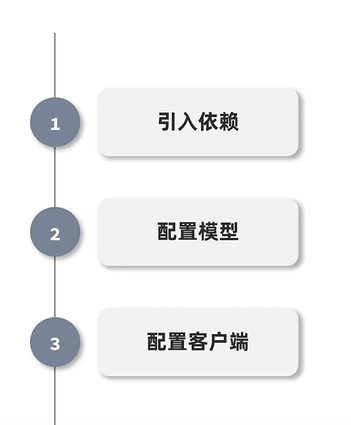
结合之前我们讨论过的低延迟大模型推理网关、Netty高性能网络通信的技术背景,以下是SpringAI对话机器人的快速入门全流程,适配Spring Boot生态,可快速搭建出具备上下文记忆的可用对话机器人:
一、前置环境准备
基础依赖:JDK 17+、Spring Boot 3.x 版本,适配Spring AI的自动配置特性。
大模型服务:提前部署Ollama本地大模型,或准备好OpenAI、DeepSeek等大模型的API密钥。
二、项目初始化与依赖配置
新建Spring Boot项目,在pom.xml中引入Spring AI核心依赖,以Ollama对接为例:
1,SpringAI使用ollama
java
<dependencyManagement>
    <dependencies>
        <dependency>
            <groupId>org.springframework.ai</groupId>
            <artifactId>spring-ai-bom</artifactId>
            <version>1.0.0-M4</version> <!-- 请使用最新的稳定版本或里程碑版本 -->
            <type>pom</type>
            <scope>import</scope>
        </dependency>
    </dependencies>
</dependencyManagement>
<dependencies>
	<dependency>
	    <groupId>org.springframework.ai</groupId>
	    <artifactId>spring-ai-ollama-spring-boot-starter</artifactId>
	    <version>1.0.0-M4</version>
	</dependency>
</dependencies>
2,SpringAI使用使用OpenAI
java
<dependencyManagement>
    <dependencies>
        <dependency>
            <groupId>org.springframework.ai</groupId>
            <artifactId>spring-ai-bom</artifactId>
            <version>1.0.0-M4</version> <!-- 请使用最新的稳定版本或里程碑版本 -->
            <type>pom</type>
            <scope>import</scope>
        </dependency>
    </dependencies>
</dependencyManagement>

<dependencies>
    <dependency>
        <groupId>org.springframework.ai</groupId>
        <artifactId>spring-ai-openai-spring-boot-starter</artifactId>
    </dependency>
</dependencies>
三,模型配置
在application.yml中配置大模型连接信息:
1,SpringAI使用ollama
java
spring:
  ai:
    ollama:
      base-url: http://localhost:11434
      chat:
        options:
          model: deepseek-r1:latest
2,SpringAI使用使用OpenAI
application.yml
java
spring:
  ai:
    openai:
      base-url: https://dashscope.aliyuncs.com/compatible-mode
      api-key: ${OPENAI_API_KEY} # 从环境变量读取,避免硬编码
      chat:
        options:
          model: gpt-4o # 指定使用的模型,如 gpt-4o, gpt-3.5-turbo,qwen-max等
          temperature: 0.7 # 控制生成的随机性  值越大,输出结果越随机
或者在 application.properties 中配置:
spring.ai.openai.base-url=https://dashscope.aliyuncs.com/compatible-mode
spring.ai.openai.api-key=${OPENAI_API_KEY}
spring.ai.openai.chat.options.model=gpt-4o
spring.ai.openai.chat.options.temperature=0.7注意:在启动应用前,需确保环境中已设置 OPENAI_API_KEY 变量,例如在终端执行 export OPENAI_API_KEY=sk-xxxxxx。
- 代码实现与调用
Spring AI 提供了自动配置的 ChatClient 或具体的 OpenAiChatModel Bean,可直接注入使用。
四、核心功能快速实现
1,ollama方式
方式一:
配置对话上下文记忆
通过内置组件实现对话历史留存,保障多轮对话的上下文连贯性:
java
@Bean
public ChatMemory chatMemory() {
    return new InMemoryChatMemory();   // 会将所有历史消息全量传入模型,易导致 Token 溢出 。 已经过时,弃用,已经被重构了 InMemoryChatMemoryRepository 替代
}
java
package com.example.chatai.config;

import org.springframework.ai.chat.memory.ChatMemory;
import org.springframework.ai.chat.memory.InMemoryChatMemoryRepository;
import org.springframework.ai.chat.memory.MessageWindowChatMemory;
import org.springframework.context.annotation.Bean;
import org.springframework.context.annotation.Configuration;

@Configuration
public class ChatMemoryConfig {

    /**
     * 配置基于内存的消息仓库
     * 生产环境建议替换为 RedisChatMemoryRepository 或 JdbcChatMemoryRepository
     */
    @Bean
    public InMemoryChatMemoryRepository chatMemoryRepository() {
        return new InMemoryChatMemoryRepository();
    }

    /**
     * 配置聊天记忆实例
     * maxMessages: 设置保留最近的消息数量,避免上下文过长导致费用增加或超出模型限制
     */
    @Bean
    public ChatMemory chatMemory(InMemoryChatMemoryRepository repository) {
        return MessageWindowChatMemory.builder()
                .chatMemoryRepository(repository)
                .maxMessages(10) // 保留最近10条消息
                .build();
    }
}构建对话引擎
整合AI客户端、对话模板和记忆组件,生成核心对话处理单元:
java
@Bean
public ChatEngine chatEngine(AiClient aiClient, ChatMemory memory) {
    return ChatEngine.builder(aiClient)
            .memory(memory)
            .build();
}暴露Web交互接口
快速编写REST接口,实现用户请求的接收与回复返回:
java
@RestController
@RequestMapping("/api/chat")
public class ChatController {
    @Autowired
    private ChatEngine chatEngine;

    @PostMapping
    public String chat(@RequestParam String question) {
        return chatEngine.chat(question);
    }
}
方式二:
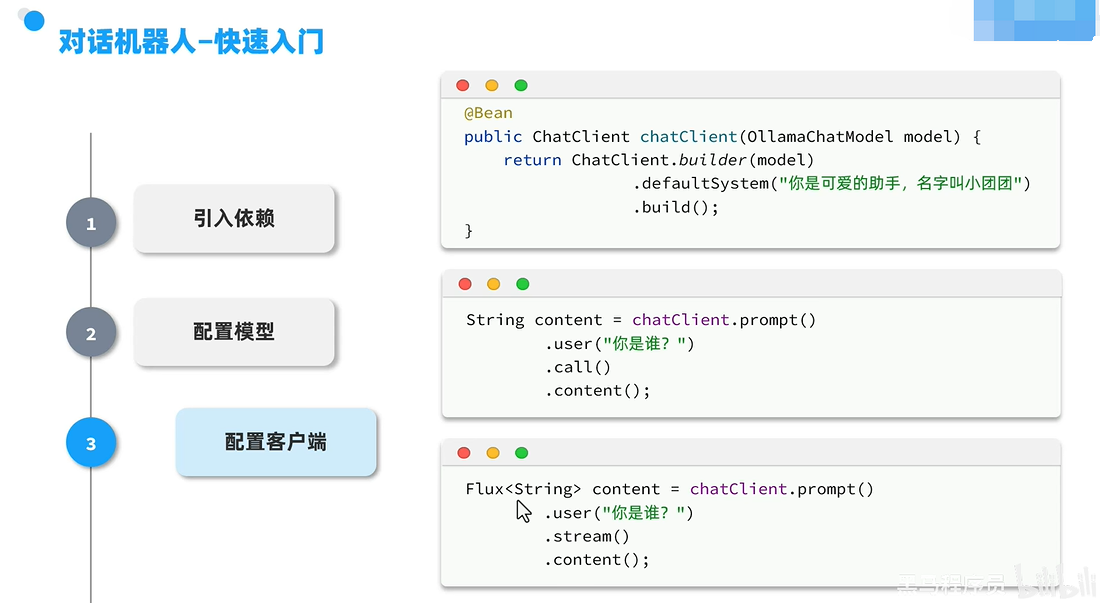
java
@Bean
public ChatClient chatClient(OllamaChatModel model) {
    return ChatClient.builder(model)
            .defaultSystem("你是可爱的助手,名字叫小团团")
            .build();
}
java
@RestController
@RequestMapping("/chat")
public class ChatController {
    private final ChatClient chatClient;
    // 直接注入我们配置好的ChatClient
    public ChatController(ChatClient chatClient) {
        this.chatClient = chatClient;
    }

    @GetMapping(produces = MediaType.TEXT_EVENT_STREAM_VALUE)
    public Flux<String> chat(@RequestParam String userInput) {
        // 自动带上"小团团"的人设,返回流式响应
        return chatClient.prompt()
                .user(userInput)
                .stream()
                .content();
    }
}
2,使用OpenAI方式
方式一:使用通用的 ChatClient(推荐)
ChatClient 是 Spring AI 提供的高级抽象,支持流式输出和更灵活的提示词构建。
java
import org.springframework.ai.chat.client.ChatClient;
import org.springframework.web.bind.annotation.GetMapping;
import org.springframework.web.bind.annotation.RequestParam;
import org.springframework.web.bind.annotation.RestController;
import reactor.core.publisher.Flux;

@RestController
public class ChatController {

    private final ChatClient chatClient;

    // 注入自动配置的 ChatClient.Builder
    public ChatController(ChatClient.Builder chatClientBuilder) {
        this.chatClient = chatClientBuilder.build();
    }

    @GetMapping("/ai/chat")
    public String chat(@RequestParam(value = "message", defaultValue = "Hello!") String message) {
        return chatClient.prompt()
                .user(message)
                .call()
                .content();
    }

    @GetMapping("/ai/chat/stream")
    public Flux<String> chatStream(@RequestParam(value = "message", defaultValue = "Hello!") String message) {
        return chatClient.prompt()
                .user(message)
                .stream()
                .content();
    }
}
方式二:直接使用 OpenAiChatModel
如果需要更底层的控制,可以直接注入 OpenAiChatModel。
java
import org.springframework.ai.openai.OpenAiChatModel;
import org.springframework.ai.chat.model.ChatResponse;
import org.springframework.web.bind.annotation.GetMapping;
import org.springframework.web.bind.annotation.RequestParam;
import org.springframework.web.bind.annotation.RestController;

@RestController
public class LegacyChatController {

    private final OpenAiChatModel chatModel;

    public LegacyChatController(OpenAiChatModel chatModel) {
        this.chatModel = chatModel;
    }

    @GetMapping("/ai/generate")
    public String generate(@RequestParam(value = "message", defaultValue = "Tell me a joke") String message) {
        return chatModel.call(message);
    }
}
常见问题排查
401 Unauthorized 错误:通常意味着 API Key 未正确加载。检查环境变量是否生效,或确认 application.yml 中的占位符 ${OPENAI_API_KEY} 是否被正确解析。启用调试日志 logging.level.org.springframework.ai=DEBUG 可查看属性绑定详情。
版本冲突:确保 spring-ai-openai-spring-boot-starter 的版本与 Spring Boot 版本兼容。Spring Boot 3.2+ 通常对应 Spring AI 0.8.1+ 或 1.0.0+。
网络问题:如果在国内访问 OpenAI API,可能需要配置代理。可以通过设置 JVM 参数 -Dhttp.proxyHost 和 -Dhttp.proxyPort 或在配置类中自定义 OpenAiApi 的 RestTemplate 来实现。
五、启动验证
启动Spring Boot应用,调用http://localhost:8080/api/chat?question=你好,即可收到大模型返回的对话回复,完成基础对话机器人的搭建。