1、RNG
c
&rng {
	status = "okay";
};

CONFIG_ENTROPY_GENERATOR=y
CONFIG_TEST_RANDOM_GENERATOR=y


#include <zephyr/drivers/entropy.h>
const struct device *rng_dev = DEVICE_DT_GET(DT_NODELABEL(rng));
void thread_entry4(void *p1, void *p2, void *p3)
{  	 int ret;
 uint32_t random_num = 0;

    // 1. 检查设备是否就绪
    if (!device_is_ready(rng_dev)) {
        LOG_ERR("RNG device is not ready");

    }

    // 2. 获取 32位真随机数
    // entropy_get_entropy 会自动从硬件读取数据
    ret = entropy_get_entropy(rng_dev, (uint8_t *)&random_num, sizeof(random_num));
    if (ret != 0) {
        LOG_ERR("Failed to get random number: %d", ret);

    }

    // 3. 打印随机数(十进制和十六进制)
    LOG_INF("Hardware RNG: %u (0x%08X)", random_num, random_num);
 while (1)
	{
         k_sleep(K_MSEC(1000));


    }
}
2、CRC
c
&crc {
    status = "okay";
};

CONFIG_CRC=y

#include <zephyr/drivers/rtc.h>
#include <zephyr/sys/util.h>

const struct device *crc_dev = DEVICE_DT_GET(DT_NODELABEL(crc));
void led_thread_entry4(void *p1, void *p2, void *p3)
{  	 int ret;
//************************************CRC
  // 准备测试数据
    uint8_t data[] = {0x01, 0x02, 0x03, 0x04};
    uint32_t crc_result = 0;

    // 2. 定义 CRC 上下文(配置参数)
    struct crc_ctx ctx = {
        .type = CRC32_IEEE,            // 使用标准的 CRC-32 IEEE 算法
        .polynomial = 0x04C11DB7,      // CRC-32 标准多项式
        .seed = 0xFFFFFFFF,            // 初始值
        .reversed = CRC_FLAG_REVERSE_INPUT | CRC_FLAG_REVERSE_OUTPUT, // 输入输出反转
    };

    // 3. 开始计算(配置硬件并重置)
    if (crc_begin(crc_dev, &ctx) != 0) {
        LOG_ERR("Failed to begin CRC calculation");
    }

    // 4. 喂入数据(支持分块计算)
    if (crc_update(crc_dev, &ctx, data, sizeof(data)) != 0) {
        LOG_ERR("Failed to update CRC data");
    }

    // 5. 获取最终结果
    if (crc_finish(crc_dev, &ctx) != 0) {
        LOG_ERR("Failed to finish CRC calculation");
    }

    crc_result = ctx.result;
    LOG_INF("Hardware CRC32 Result: 0x%08X", crc_result);

    while (1)
	{
      k_sleep(K_MSEC(1000));


    }
}
3、WDG
(1)iwdg
c
&iwdg {
    status = "okay";
};
&wwdg {
    status = "okay";
};
CONFIG_WATCHDOG=y


#include <zephyr/drivers/watchdog.h>
const struct device *wdt_dev = DEVICE_DT_GET(DT_NODELABEL(iwdg));
struct wdt_timeout_cfg wdt_config = {
    .window.min = 0,
    .window.max = 2000, // 超时时间 2000ms
    .callback = NULL,
    .flags = WDT_FLAG_RESET_SOC
};

void thread_entry4(void *p1, void *p2, void *p3)
{
//***********************IWDG
static int  wdt_channel_id = wdt_install_timeout(wdt_dev, &wdt_config);
wdt_setup(wdt_dev, WDT_OPT_PAUSE_HALTED_BY_DBG);
    if (!device_is_ready(crc_dev)) {
        LOG_ERR("CRC device is not ready");
    }
        while (1)
         {
        wdt_feed(wdt_dev, wdt_channel_id);
       k_sleep(K_MSEC(1000));
    }
}
(2)wwdg
c
const struct device *wwdg_dev = DEVICE_DT_GET(DT_NODELABEL(wwdg));
static int wdt_channel_id;
void thread_entry4(void *p1, void *p2, void *p3)
{  	 int ret;
//************************************WWDG
    struct wdt_timeout_cfg wwdg_config;

    // 1. 检查设备是否就绪
    if (!device_is_ready(wwdg_dev)) {
        LOG_ERR("WWDG device is not ready");

    }

    // 2. 配置 WWDG 参数
    wwdg_config.flags = WDT_FLAG_RESET_SOC;       // 触发复位
    wwdg_config.window.min = 10;                 // 【窗口下限】10ms(过早喂狗会触发复位)
    wwdg_config.window.max = 80;                // 【窗口上限】80ms(过晚喂狗会触发复位)
    wwdg_config.callback = NULL;                  // 超时前的警告回调(可选)

    // 3. 安装超时配置并启动看门狗
    ret = wdt_install_timeout(wwdg_dev, &wwdg_config);
    if (ret < 0) {
        LOG_ERR("Failed to install WWDG timeout: %d", ret);

    }

    // 启动看门狗,并允许在调试器暂停时挂起看门狗
    ret = wdt_setup(wwdg_dev, WDT_OPT_PAUSE_HALTED_BY_DBG);
    if (ret != 0) {
        LOG_ERR("Failed to setup WWDG: %d", ret);

    }
  wdt_feed(wwdg_dev, wdt_channel_id);
    LOG_INF("WWDG started successfully. Window: [%d ms, %d ms]",
            wwdg_config.window.min, wwdg_config.window.max);

       while (1)
	{
       wdt_feed(wwdg_dev, wdt_channel_id);
       k_sleep(K_MSEC(30));
    }
}
4、COUNTRER
c
&timers2 {
    status = "okay";
	st,prescaler = <200>;
    counter
   {
        status = "okay";
    };
};

CONFIG_COUNTER=y
CONFIG_COUNTER_TIMER_STM32=y


#include <zephyr/drivers/counter.h>

/* 假设在 overlay 中绑定了 timers2 ,是单独的没有rtc*/
//#define COUNTER_DEV DT_NODELABEL(timers2)
#define COUNTER_DEV DT_INST(0, st_stm32_counter)

/* 定义一个 2 秒的延时(单位:微秒) */
#define DELAY_US 2000000

/* 1. 定义闹钟回调函数 */
static void counter_alarm_callback(const struct device *dev,
                                   uint8_t chan_id,
                                   uint32_t ticks,
                                   void *user_data)
{
    LOG_INF("!!! Alarm Triggered! Channel: %d, Ticks: %u\n", chan_id, ticks);

    /* 如果需要周期性触发,可以在这里重新设置闹钟 */
    struct counter_alarm_cfg *cfg = (struct counter_alarm_cfg *)user_data;
    counter_set_channel_alarm(dev, chan_id, cfg);
}
void thread_entry2(void *p1, void *p2, void *p3)
{
//*************************counter
    struct counter_alarm_cfg alarm_cfg;

    /* 2. 获取设备指针 */
    const struct device *counter_dev = DEVICE_DT_GET(COUNTER_DEV);
    if (!device_is_ready(counter_dev)) {
        LOG_INF("Counter device is not ready!\n");

    }

    /* 3. 启动计数器 */
    counter_start(counter_dev);

    /* 4. 配置闹钟参数 */
    alarm_cfg.flags = 0; /* 0 表示相对延时模式(Relative Alarm) */
    alarm_cfg.ticks = counter_us_to_ticks(counter_dev, DELAY_US);
    alarm_cfg.callback = counter_alarm_callback;
    alarm_cfg.user_data = &alarm_cfg;

    /* 5. 设置闹钟(使用通道 0) */
    err = counter_set_channel_alarm(counter_dev, 0, &alarm_cfg);
    if (err != 0) {
        LOG_INF("Failed to set alarm, error: %d\n", err);
    } else {
        LOG_INF("Alarm set successfully! Delay: %u us (%u ticks)\n",
               DELAY_US, alarm_cfg.ticks);
    }

 while (1) {
     k_sleep(K_MSEC(1000));
    }
}
5、RTC
c
aliases {
	rtc = &rtc;
 };
&rtc {
	clocks = <&rcc STM32_CLOCK(APB4, 16)>,
		 <&rcc STM32_SRC_LSI RTC_SEL(2)>;
	status = "okay";
};

CONFIG_RTC=y
CONFIG_RTC_STM32=y
CONFIG_CLOCK_CONTROL=y
CONFIG_CLOCK_CONTROL_STM32_CUBE=y

#include <zephyr/drivers/rtc.h>
#include <zephyr/sys/util.h>


const struct device *const rtc = DEVICE_DT_GET(DT_ALIAS(rtc));

static int set_date_time(const struct device *rtc)
{
	int ret = 0;
	struct rtc_time tm = {
		.tm_year = 2027 - 1900,
		.tm_mon = 7-1 ,
		.tm_mday = 13,
		.tm_hour = 21,
		.tm_min = 19,
		.tm_sec = 0,
	};

	ret = rtc_set_time(rtc, &tm);
	if (ret < 0) {
		LOG_INF("Cannot write date time: %d\n", ret);
		return ret;
	}
	return ret;
}

static int get_date_time(const struct device *rtc)
{
	int ret = 0;
	struct rtc_time tm;

	ret = rtc_get_time(rtc, &tm);
	if (ret < 0) {
		LOG_INF("Cannot read date time: %d\n", ret);
		return ret;
	}

	LOG_INF("RTC date and time: %04d-%02d-%02d %02d:%02d:%02d\n", tm.tm_year + 1900,
	       tm.tm_mon + 1, tm.tm_mday, tm.tm_hour, tm.tm_min, tm.tm_sec);

	return ret;
}
void thread_entry2(void *p1, void *p2, void *p3)
{
LOG_INF("led_thread_entry2: Hello from thread 2!\n");
   if (!device_is_ready(rtc)) {
		LOG_INF("Device is not ready\n");

	}
set_date_time(rtc);
 while (1) {
    if(
	get_date_time(rtc) == 0)

		k_sleep(K_MSEC(1000));
    }
 }
结果演示:
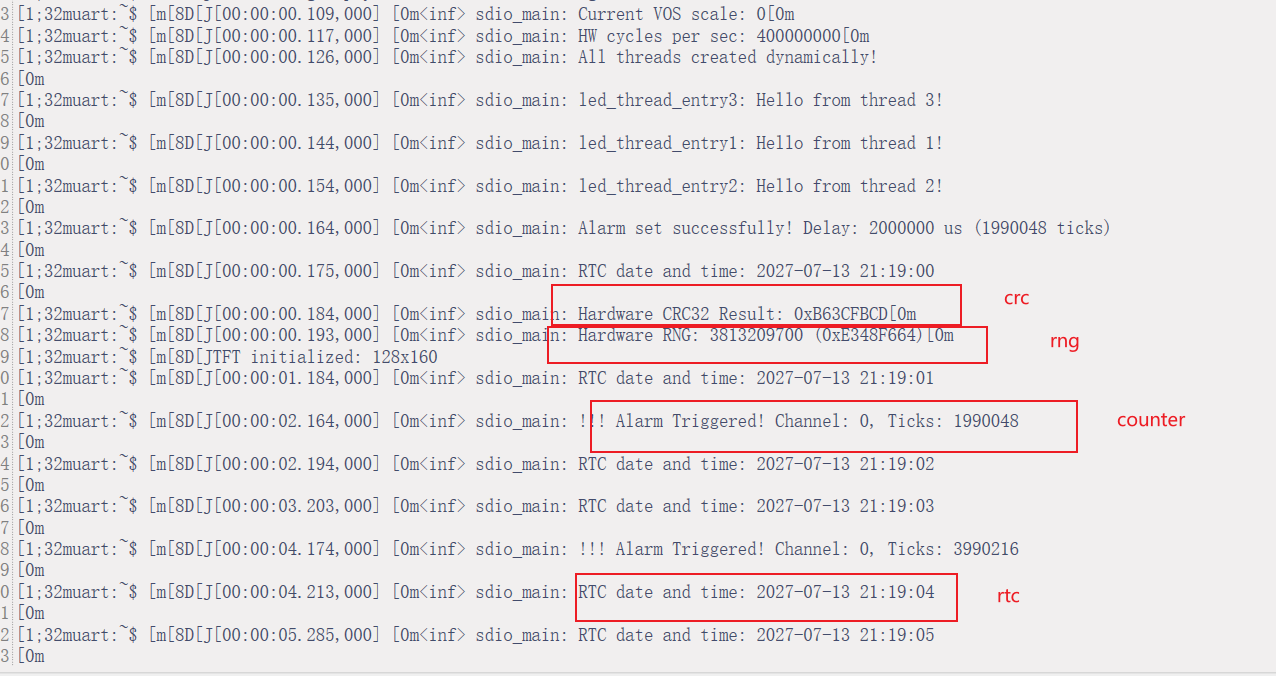
注意:rtc和counter使用需要格外注意同时使用,则关注下面的
#define COUNTER_DEV DT_INST(0, st_stm32_counter)
#define SAMPLE_TIMER DT_INST(0, st_stm32_rtc)
来做区分处理,否则无法编译过去,
其中0,表示第一个timer,或rtc。
如使用第三3个配置的timer,就将0改为2即可。
对rtc,当没有开启timer时,配置counter就会指向rtc来配置。
但单独配置使用不用注意这些问题。