工具
工具是为模型提供对外交互的方案之一(比如联网搜索,查询天气...),实际上是定义了输入和输出的函数,
function calling | tool calling在
langchain中工具的声明遵循两种方案,基于docstring和装饰器。
py
from langchain.tools import tool

@tool
def get_weather(local: str, days: int):
    """获取某地的指定天数的天气状况"""
    return f" {local} 未来 {days} 晴天"

# 可以直接使用 工具名.invoke 调用
res = get_weather.invoke({"local": "北京", "days": 2})
docstring
要遵循 Google 的注释规范
py
@tool
def get_weather(local: str, days: int) -> str:
    """
    获取指定地点未来几天的状况

    Args:
        local (str): 地区
        days (int): 天数

    Returns:
        str: 天气状况
    """
    return f" {local} 未来 {days} 晴天"
Args | Returns 不是必须,存在之后更加友好。可以通过 convert_to_openai_tool 查看转换后的内容。
包括函数参数的名称、类型、以及返回值最后都会被解析为 json 丢给模型
py
from langchain_core.utils.function_calling import convert_to_openai_tool

print(convert_to_openai_tool(get_weather))
# {
#     'type': 'function',
#     'function': {
#         'name': 'get_weather',
#         'description': '获取指定地点未来几天的状况\n\nArgs:\n    local (str): 地区\n    days (int): 天数\n\nReturns:\n    str: 天气状况',
#         'parameters': {
#             'properties': {
#                 'local': {'type': 'string'},
#                 'days': {'type': 'integer'}
#             },
#             'required': ['local', 'days'],
#             'type': 'object'
#          }
#     }
# }
可以通过 parse_docstring 属性优化描述信息的展示
py
@tool(parse_docstring=True)
def get_weather(local: str, days: int) -> str:
    pass
# {
#     'type': 'function',
#     'function': {
#         'name': 'get_weather',
#         'description': '获取指定地点未来几天的状况',
#         'parameters': {
#             'properties': {
#                 'local': {'description': '地区', 'type': 'string'},
#                 'days': {'description': '天数', 'type': 'integer'}
#             },
#             'required': ['local', 'days'],
#             'type': 'object'
#         }
#     }
# }
@tool
name_or_callable默认属性,可以不按需传递,工具的名称;如果不指定则按照函数名description工具的描述args_schema工具的参数类型
与 docstring 可以共存,但参数大于注释
py
@tool(name_or_callable="getWeather", description="获取指定地点未来几天的状况")
def get_weather(local: str, days: int) -> str:
    pass
args_schema
基于 pydantic 约束参数的类型,并且可以为每个参数增加对应的描述、默认值等数据
py
from pydantic import BaseModel, Field
from typing import Literal

class User(BaseModel):
    username: str = Field(description='用户名')
    password: str = Field(description='密码')
    is_active: Literal['active', 'inactive'] = Field('active', description='是否激活')
    age: int | None = Field(None, description='年龄')

class Users(BaseModel):
    total: int
    data: list[User]


# 这个参数必须 Users 类型,否则就会校验失败
@tool(args_schema=Users)
def get_users(users: Users):
    """获取用户列表"""
    pass

print(convert_to_openai_tool(get_users))

# {
#     'type': 'function',
#     'function': {
#         'name': 'get_users',
#         'description': '获取用户列表',
          # 👉🏻 可以直接将对象的 value 做为 args_schema 的参数
          # 👉🏻 在动态工具的场景很常见
#         'parameters': {
#             'properties': {
#                 'total': {'type': 'integer'},
#                 'data': {
#                     'items': {
#                         'properties': {
#                             'username': {'description': '用户名', 'type': 'string'},
#                             'password': {'description': '密码', 'type': 'string'},
#                             'is_active': {'default': 'active', 'description': '是否激活', 'enum': ['active', 'inactive'], 'type': 'string'},
#                             'age': {'anyOf': [{'type': 'integer'}, {'type': 'null'}], 'default': None, 'description': '年龄'}
#                         },
#                         'required': ['username', 'password'],
#                         'type': 'object'
#                     },
#                     'type': 'array'
#                 }
#             },
#             'required': ['total', 'data'],
#             'type': 'object'
#         }
#     }
# }
args_schema 除了接收 pydantic 的对象也可以直接传递 json;就是通过 convert_to_openai_tool 转换之后的 parameters 的内容;
工具的调用
当下看工具的调用分为两种,模型调用、工具调用
py
@tool
def get_weather(local: str) -> str:
    """获取指定地区的天气情况"""
    return f"{local} 天气晴朗"

# 工具调用 -> 杭州天气怎么样? 天气晴朗
print(get_weather.invoke("杭州天气怎么样?"))

# 工具调用 -> 通过 bind_tools 先绑定工具
model_with_tools = model.bind_tools([get_weather])
result = model_with_tools.invoke("杭州天气怎么样?")

rprint(result.pretty_print())
# ================================== Ai Message ==================================
# Tool Calls:
#   get_weather (call_00_fswh3fPohLjpQ3Arc24j4671)
#  Call ID: call_00_fswh3fPohLjpQ3Arc24j4671
#   Args:
#     local: 杭州
模型本身不能直接调用工具,所以仅返回了工具信息告知下一步需要怎么做
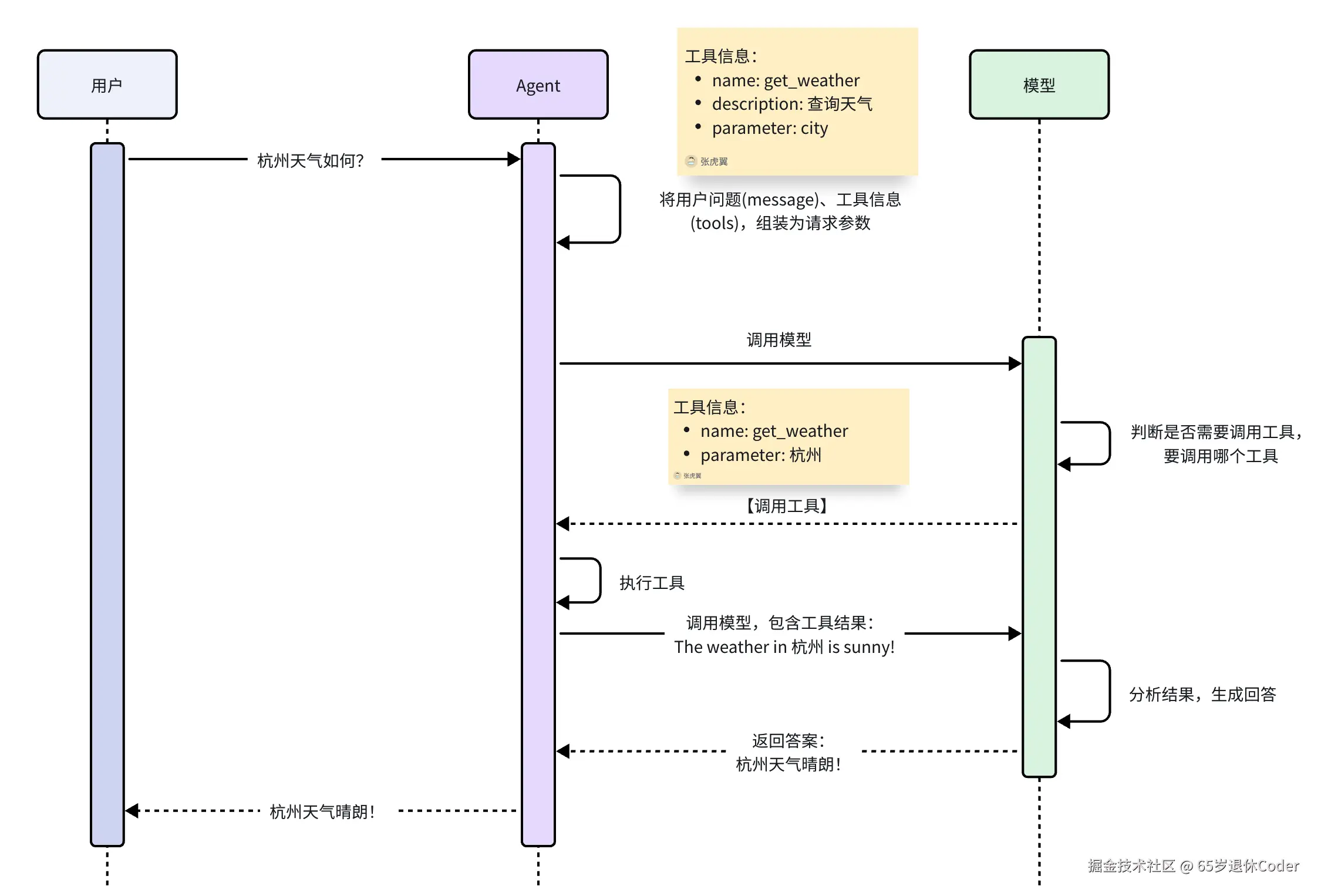
- 模型将信息和工具组装好丢给模型;
- 模型决定调用哪个工具丢给 agent;
- agent 调用工具后拿到结果,在给模型;
- 模型组织好信息,再给 agent,agent 再给用户组装好的信息。
langchain 提供了 create_agent 去完成上面的流程,当前还没有提及 可以通过自行构建 message 列表去实现类似的功能
py
# 1. 用户问题
messages = [HumanMessage('杭州天气怎么样')]

# 2. 绑定工具,并且拿到需要调用的工具信息
model_with_tools = model.bind_tools([get_weather])
result = model_with_tools.invoke("杭州天气怎么样?")

# 3. 把 ai message 也塞进 list 中
messages.append(result)

# 4. 通过 ai message 拿到需要调用的工具
for tool_call in result.tool_calls:
    if tool_call["name"] == "get_weather":
        # 主动调用工具
        messages.append(get_weather.invoke(tool_call))

# 5. 打印整个对话流程
for message in messages:
    print(message.pretty_print())
tool_choice 工具使用策略
在通过 bind_tools 绑定工具的时候可以指定 tool_choice 属性控制模型使用工具的策略
none不调用任何工具required必须调用一个或者多个工具auto模型自己抉择<tool_name>指定一个工具名,强制调用(这是langchain的规则,其他平时是对象)
大多数模型都支持这个参数,比如 kimi deepseek openai
预定义工具
langchain 中提供了一些预定义的工具可以直接使用,比如浏览器搜索等 预定义工具
以 Tavily Search 网页搜索为例
py
# uv add langchain_tavily
from langchain_tavily import TavilySearch

# 会默认查找 TAVILY_API_KEY key, 需要自行去申请
tavily_search = TavilySearch(max_results=5, topic="general")

res = tavily_search.invoke("上海今天的天气怎么样?")
结构化输出
最简单的方案,不过于在 prompt 的最后一句,给 AI 来一句 "输出为 JSON 格式",万一 AI 抽风回复你:"好的,{"xx":"xx"}" 不就炸了
最好的方案是通过类型限制,然后结合 with_structured_output 绑定输出模式;
类型限制的方案包括 pydantic | TypedDict | json_schema | @dataclass
仅 pydantic 会返回构造对象,并且输出格式不对会出现校验错误,其余方案都只是返回字典且不会出现校验错误
pydantic
py
from pydantic import BaseModel, Field, UUID4
from typing import Literal, Optional

class Active(str, Enum):
    ACTIVE = "active"
    INAVTIVE = "inactive"

class Info(BaseModel):
    phone: str = Field(description="手机号")
    email: Optional[str] = Field(description="邮箱") # 可选属性
    role: Literal["admin", "plain"] = Field("plain", description="角色") # 枚举属性

class User(BaseModel):
    id: UUID4 = Field(default_factory=uuid4, description="唯一 id", exclude=True)
    username: str = Field(description="账号")
    password: str = Field(description="密码")
    is_active: Active = Field("active", description="激活状态") # 枚举属性
    hobby: list[str] = Field(description="爱好")
    info: Info = Field(description="详情") # 嵌套属性

# 构造格式化输出的 model
structured_model = model.with_structured_output(User)
# 通过 model 获取格式化数据
result = structured_model.invoke([HumanMessage("生成一个用户数据")])
格式化的输出与模型有很强的关系
- 直接使用
deepseek | kimi模型需要关闭思考模式extra_body={"thinking": {"type": "disabled"}}- 如果使用
openai:deepseek-chat这种model_provider方案则会直接报错。这和with_structured_output中的method方案有关接收三个参数
function_calling | json_schema | json_mode
function_calling默认值,本质上也是将数据类型包装成工具交给模型去调用json_schema已知仅 openai 支持response_format={"type": "json_schema"}json_mode使用此模式,提示中必须包含 json 字样,要求模型输出且不一定准确使用
model_provider出现错误的本质原因,就是json_schema是 openai 的默认方案,但是 deepseek 不支持这种方案,所以要手动指定参数method="function_calling",如果直接使用 deepseek 则不存在这种问题目前已知 kimi 需要和 deepseek 做一样的处理方案
with_structured_output 可以传递另一个参数 include_raw=True 会输出 AIMessage 内容包含解析后的数据,和是否解析错误的字段以及整个元数据
py
structured_model = model.with_structured_output(User, include_raw=True, method="function_calling")
result = structured_model.invoke([HumanMessage("生成一个用户数据")])
# {
#     'raw': AIMessage(
#         content='',
#         additional_kwargs={'refusal': None},
#         response_metadata={
#             'token_usage': {
#                 'completion_tokens': 65,
#                 'prompt_tokens': 158,
#                 'total_tokens': 223,
#                 'completion_tokens_details': {
#                     'accepted_prediction_tokens': None,
#                     'audio_tokens': None,
#                     'reasoning_tokens': 1,
#                     'rejected_prediction_tokens': None
#                 },
#                 'prompt_tokens_details': None
#             },
#             'model_provider': 'openai',
#             'model_name': 'kimi-k2.6',
#             'system_fingerprint': None,
#             'id': 'chatcmpl-6a5736d5f296670ce7d01bb9',
#             'finish_reason': 'tool_calls',
#             'logprobs': None
#         },
#         id='lc_run--019f64ae-3118-7091-b119-9198e6b272c6-0',
#         tool_calls=[
#             {
#                 'name': 'User',
#                 'args': {
#                     'username': 'zhangsan',
#                     'password': 'aBc123!@#',
#                     'info': {'phone': '13800138000', 'email': 'zhangsan@example.com'},
#                     'hobby': ['篮球', '阅读', '旅游']
#                 },
#                 'id': 'User_0',
#                 'type': 'tool_call'
#             }
#         ],
#         invalid_tool_calls=[],
#         usage_metadata={'input_tokens': 158, 'output_tokens': 65, 'total_tokens': 223, 'input_token_details': {}, 'output_token_details': {'reasoning': 1}}
#     ),
#     'parsed': User(
#         id=UUID('d13ed36c-f20c-4920-99ca-3fd1614bded8'),
#         username='zhangsan',
#         password='aBc123!@#',
#         is_active='active',
#         hobby=['篮球', '阅读', '旅游'],
#         info=Info(phone='13800138000', email='zhangsan@example.com', role='plain')
#     ),
#     'parsing_error': None
# }
TypedDict
通过 Annotated 为字段注入元数据
py
from typing import Literal, TypedDict, Annotated

class Info(TypedDict):
    phone: Annotated[str, '手机号']
    email: Annotated[str, '邮箱']
    role: Annotated[Literal['admin', 'plain'], '角色']

class User(TypedDict):
    account: Annotated[str, '账号']
    password: Annotated[str, '密码']
    info: Annotated[Info, '用户信息']
json_schema
py
User = {
  "title": "",
  "description": "",
  "type": "object",
  "properties": {
    "account": {"type": "string", "description": "账号"},
    "password": {"type": "string", "description": "密码"},
  },
  "required": ["account", "password"]
}
# deepseek & kimi 不支持这种场景
@dataclass
py
from pydantic import Field
from dataclasses import dataclass
from typing import Literal, Optional

@dataclass
class Info():
    phone: str = Field(description="手机号")
    email: Optional[str] = Field(description="邮箱")
    role: Literal["admin", "plain"] = Field("plain", description="角色")

@dataclass
class User():
    account: str = Field(description="账号")
    password: str = Field(description="密码")
    info: Info = Field(description="详情")