鸿蒙应用开发实战【91】--- 完整功能串联从添加到换绑的全链路
本文是「号码助手全栈开发系列」第 91 篇,持续更新中...
前言
本篇将串联号码助手从「卡号添加」到「应用换绑」的完整功能链路,展示数据如何在 DAO 层、页面状态、组件之间流转。这是前面 90 篇文章知识点的实战整合。
本篇涵盖:全链路流程图、添加卡号 → 绑定应用 → 管理卡号 → 换绑操作 → 状态同步,每一步对应的文件、DAO 调用和状态管理。
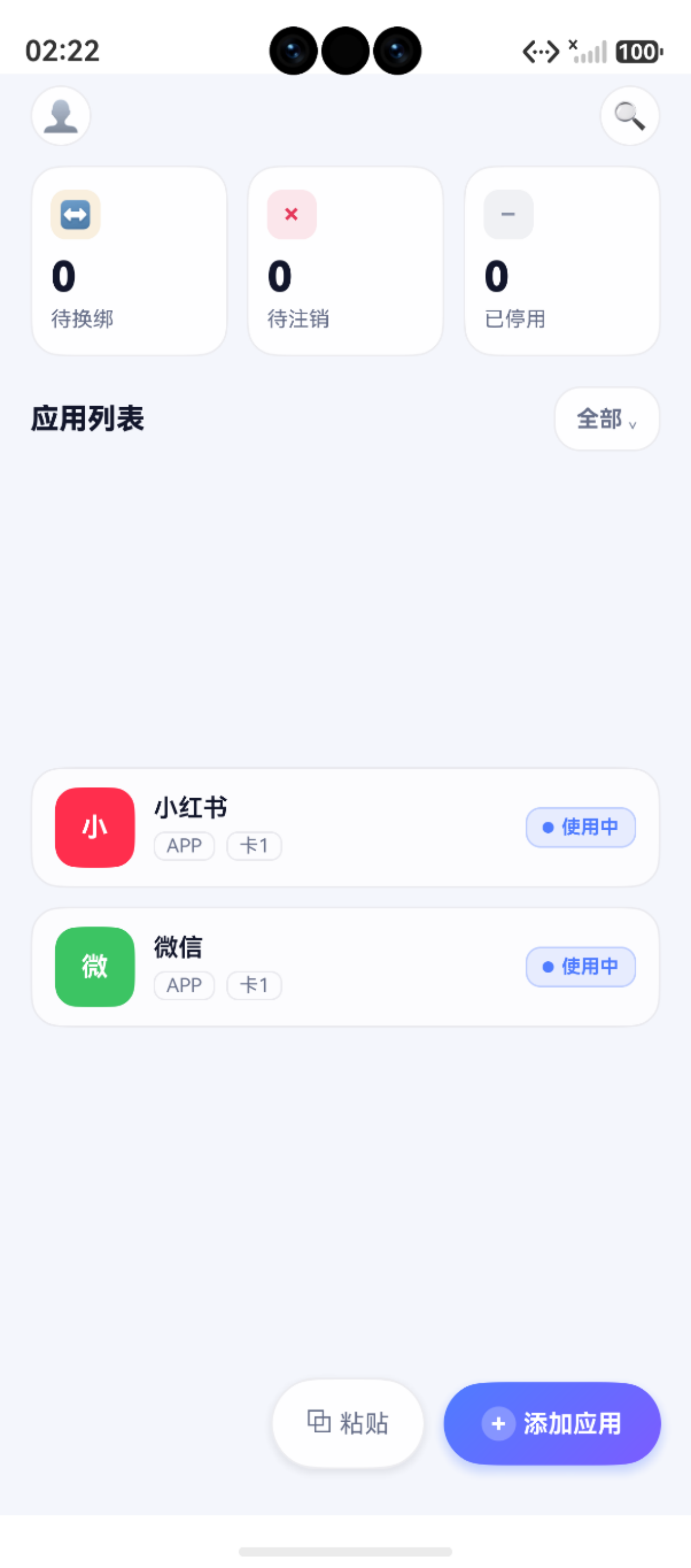
一、全链路全景图
添加卡号 (AddCardPage)
    │  CardDao.create()
    ▼
首页统计卡片 (HomePage)
    │  CardDao.countByStatus()
    ▼
绑定应用到卡号 (AddAppPage / bindSheet)
    │  AppBindingDao.create()
    ▼
卡号详情/应用列表 (CardDetailPage / AppDetailPage)
    │  AppBindingDao.findByCardId()
    ▼
换绑操作 (RebindPage)
    │  AppBindingDao.updateStatus()
    ▼
状态变更 → 首页自动更新
    │  AppStorage 状态同步
    ▼
筛选 / 搜索 (StatusListPage / SearchPage)
    │  CardDao.findAll() + predicates
二、第 1 步:卡号添加
文件 :pages/AddCardPage.ets
DAO :CardDao.create()
typescript
// AddCardPage 核心逻辑
async addCard() {
  const now = Date.now()
  const newCard: CardEntity = {
    label: this.label,
    phone_number: this.phoneNumber,
    carrier: this.carrier,
    color: this.selectedColor,
    sort_order: 0,
    created_at: now,
    updated_at: now
  }
  const id = await CardDao.create(newCard)
  if (id > 0) {
    hilog.info(0x0000, 'AddCard', '卡号创建成功 id=%{public}d', id)
    // 刷新首页统计数据
    AppStorage.Set<number>('cardCount', await CardDao.countByStatus())
    router.back()
  }
}
第 3 步:绑定应用到卡号
文件 :pages/AddAppPage.ets + common/components/AppListItem.ets
DAO :AppBindingDao.create()
typescript
// 从 bindSheet 确认绑定
async confirmBind() {
  const now = Date.now()
  const binding: AppBindingEntity = {
    app_name: this.selectedAppName,
    icon_key: this.selectedIcon,
    category: this.selectedCategory as AppCategory,
    card_id: this.currentCardId,
    status: '使用中',
    source: '手动',
    created_at: now,
    updated_at: now
  }
  await AppBindingDao.create(binding)
  // 刷新卡号详情页的应用列表
  this.loadBindings()
}
第 4 步:卡号详情与换绑
文件 :pages/RebindPage.ets
DAO :AppBindingDao.updateStatus()
typescript
// 换绑工作流:旧绑定 → 注销 → 绑定新卡号
async rebind(oldBinding: AppBindingEntity, newCardId: number) {
  const now = Date.now()

  // 1. 旧绑定标记为待换绑
  await AppBindingDao.updateStatus(oldBinding.id!, '待换绑')

  // 2. 创建新绑定
  const newBinding: AppBindingEntity = {
    ...oldBinding,
    id: undefined,
    card_id: newCardId,
    status: '使用中',
    created_at: now,
    updated_at: now
  }
  await AppBindingDao.create(newBinding)

  // 3. 刷新首页数据
  AppStorage.Set<number>('cardCount', await CardDao.countByStatus())

  hilog.info(0x0000, 'Rebind', '换绑完成: %{public}s → card_%{public}d',
    oldBinding.app_name, newCardId)
}
四、状态流转矩阵
┌──────────┐   添加    ┌──────────┐   换绑    ┌──────────┐
│ 使用中   │ ──────→  │ 待换绑   │ ──────→  │ 使用中   │
│ (初始态) │          │          │          │ (新卡)   │
└──────────┘          └──────────┘          └──────────┘
     │                      │
     │ 注销                 │ 确认注销
     ▼                      ▼
┌──────────┐          ┌──────────┐
│ 待注销   │          │ 已停用   │
└──────────┘          └──────────┘
     │
     │ 完成
     ▼
┌──────────┐
│ 已停用   │
└──────────┘
五、数据流分析
5.1 数据写入路径
UI Page → State 变量 → DAO.create/update → RdbStore.insert/update → SQLite5.2 数据读取路径
SQLite → RdbStore.query → ResultSet → DAO.parseRow → Entity → UI 渲染5.3 跨页面状态同步
CardDao.countByStatus()
    → AppStorage.Set('cardCount', count)
    → @Watch('cardCount') 装饰的首页统计卡片自动刷新
六、涉及的完整文件列表
| 步骤 | 页面文件 | DAO 文件 | 数据模型 | 状态变更 |
|---|---|---|---|---|
| 添加卡号 | AddCardPage.ets |
CardDao.ets |
CardEntity |
--- |
| 首页统计 | HomePage.ets |
CardDao.ets |
聚合查询 | --- |
| 绑定应用 | AddAppPage.ets |
AppBindingDao.ets |
AppBindingEntity |
--- |
| 卡号详情 | CardDetailPage.ets |
AppBindingDao.ets |
关联查询 | --- |
| 换绑操作 | RebindPage.ets |
AppBindingDao.ets |
状态更新 | 待换绑 → 使用中 |
| 注销操作 | AppDetailPage.ets |
AppBindingDao.ets |
状态更新 | 待注销 → 已停用 |
| 筛选搜索 | StatusListPage.ets |
CardDao.ets |
predicates 查询 | --- |
小结
| 阶段 | 核心动作 | 涉及文件 |
|---|---|---|
| 卡号添加 | CardDao.create → router.back | AddCardPage + CardDao |
| 首页联动 | CardDao.countByStatus → AppStorage | HomePage + CardDao |
| 应用绑定 | AppBindingDao.create → 列表刷新 | AddAppPage + AppBindingDao |
| 换绑 | 旧绑定更新 → 新绑定创建 | RebindPage + AppBindingDao |
| 状态同步 | @Watch + AppStorage → UI 自动更新 | 所有页面联动 |
如果这篇文章对你有帮助,欢迎点赞👍、收藏⭐、关注🔔,你的支持是我持续创作的动力!
相关资源:
- 开源鸿蒙跨平台社区:https://openharmonycrossplatform.csdn.net
- HarmonyOS 官方文档:https://developer.huawei.com/consumer/cn/doc/
- HarmonyOS hilog文档:https://developer.huawei.com/consumer/cn/doc/harmonyos-references/hilog
- HarmonyOS testing:https://developer.huawei.com/consumer/cn/doc/harmonyos-guides/unit-test
- HarmonyOS 安全与权限:https://developer.huawei.com/consumer/cn/doc/harmonyos-guides/permissions-overview