App4-歌词创作工坊:基于鸿蒙的AI歌词创作应用开发实践
一、应用概述
1.1 应用背景与价值
音乐是人类情感的表达,而歌词则是音乐的灵魂。一首好的歌词能够触动人心,引发共鸣。然而,创作歌词需要灵感和技巧,并非每个人都能轻易写出优秀的作品。
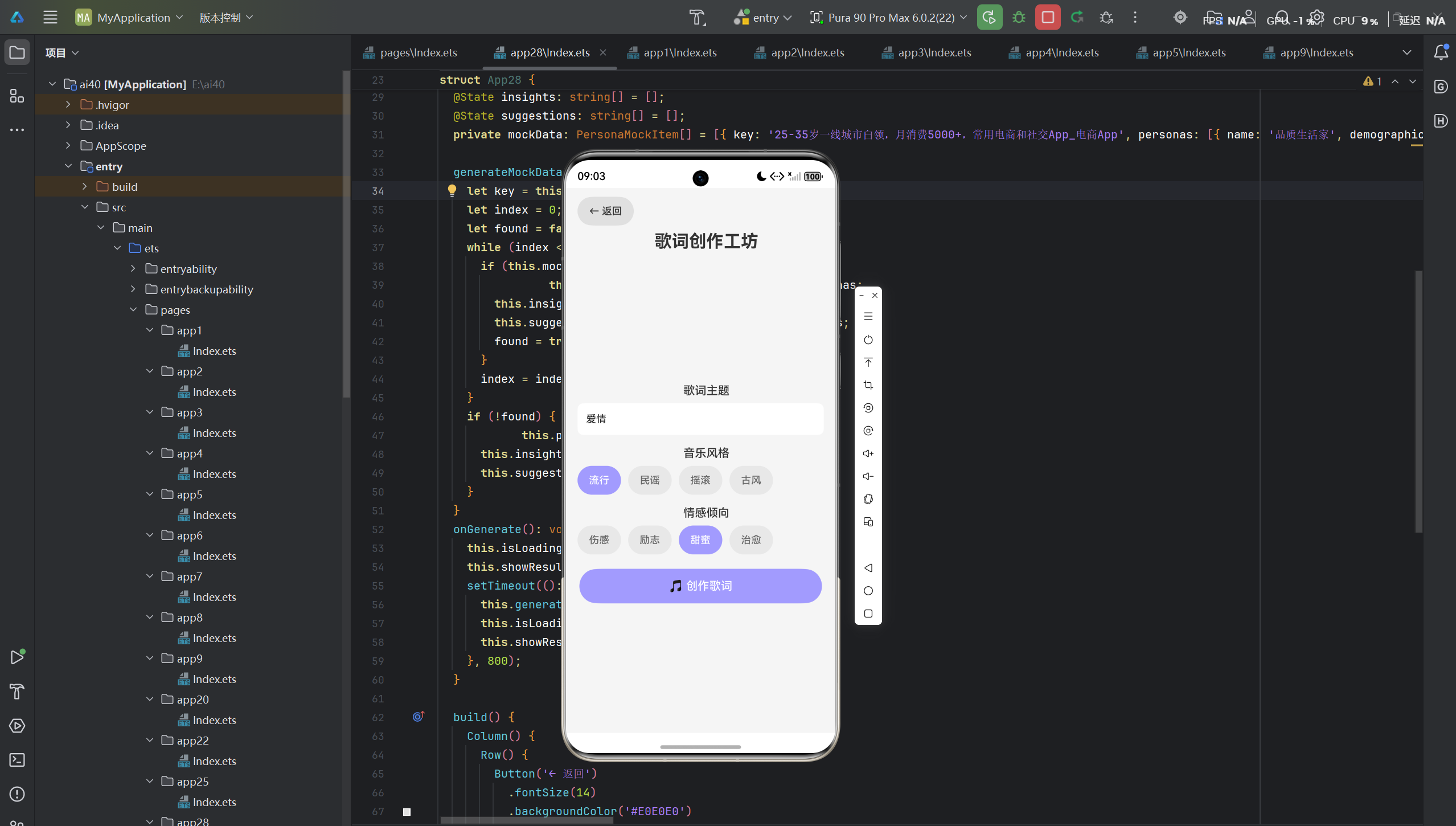
歌词创作工坊是一款基于鸿蒙生态的AI智能歌词创作应用,旨在帮助用户根据主题、风格和情感倾向,生成高质量的歌词。该应用融合了自然语言处理与人工智能技术,为用户提供专业的歌词创作辅助。
1.2 应用特性
| 特性 | 描述 |
|---|---|
| 主题创作 | 根据用户输入的主题生成歌词 |
| 风格选择 | 支持流行、民谣、摇滚、古风等多种风格 |
| 情感倾向 | 可选择伤感、励志、甜蜜、治愈等情感 |
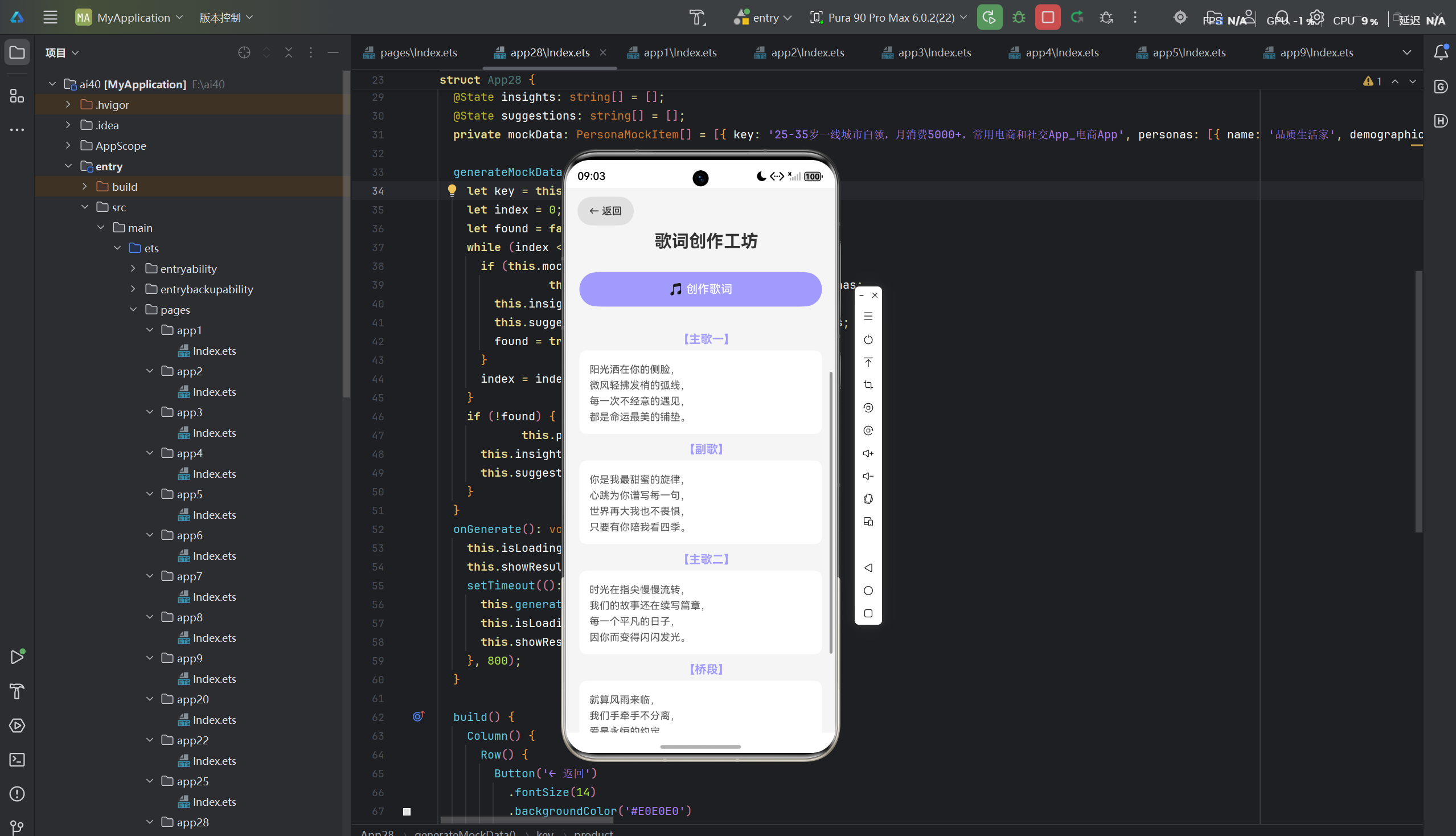
| 完整结构 | 生成主歌、副歌、桥段、尾声完整结构 |
| 鸿蒙生态适配 | 完美适配鸿蒙手机、鸿蒙PC等多端设备 |
1.3 应用架构
┌─────────────────────────────────────────────────────────┐
│                    用户界面层                            │
│  ┌──────────────┐  ┌──────────────┐  ┌──────────────┐  │
│  │ 主题输入组件  │  │ 风格选择组件  │  │ 歌词展示组件  │  │
│  └──────┬───────┘  └──────┬───────┘  └──────┬───────┘  │
└─────────┼─────────────────┼─────────────────┼───────────┘
          ▼                 ▼                 ▼
┌─────────────────────────────────────────────────────────┐
│                    业务逻辑层                            │
│  ┌───────────────────────────────────────────────────┐  │
│  │           LyricGenerator (歌词生成器)              │  │
│  │  ┌──────────────┐  ┌──────────────┐              │  │
│  │  │ 主题分析模块  │→│ 创作算法模块  │→│ 结构生成模块  │  │
│  │  └──────────────┘  └──────────────┘  └──────────────┘  │
│  └───────────────────────────────────────────────────┘  │
└─────────────────────────────────────────────────────────┘
          ▼
┌─────────────────────────────────────────────────────────┐
│                    数据存储层                            │
│  ┌──────────────┐  ┌──────────────┐  ┌──────────────┐  │
│  │ 歌词模板库    │  │ 押韵词库      │  │ 用户创作记录  │  │
│  └──────────────┘  └──────────────┘  └──────────────┘  │
└─────────────────────────────────────────────────────────┘
二、技术实现
2.1 核心数据结构
应用采用严格的类型安全设计,定义了完整的接口体系:
typescript
interface LyricResult {
  verse1: string;
  chorus: string;
  verse2: string;
  bridge: string;
  outro: string;
}
设计要点:
- LyricResult :表示完整歌词的结构
verse1:主歌一chorus:副歌verse2:主歌二bridge:桥段outro:尾声
2.2 状态管理设计
应用使用 @State 装饰器管理所有页面状态:
typescript
@Entry
@Component
struct App4 {
  @State theme: string = '爱情';
  @State style: string = '流行';
  @State emotion: string = '甜蜜';
  @State isLoading: boolean = false;
  @State showResult: boolean = false;
  @State result: LyricResult = { verse1: '', chorus: '', verse2: '', bridge: '', outro: '' };
  @State errorMsg: string = '';

  private styleOptions: string[] = ['流行', '民谣', '摇滚', '古风'];
  private emotionOptions: string[] = ['伤感', '励志', '甜蜜', '治愈'];
}
状态管理策略:
| 状态变量 | 类型 | 作用 |
|---|---|---|
theme |
string | 歌词主题 |
style |
string | 音乐风格 |
emotion |
string | 情感倾向 |
isLoading |
boolean | 加载状态标识 |
showResult |
boolean | 是否显示创作结果 |
result |
LyricResult | 歌词创作结果 |
errorMsg |
string | 错误提示信息 |
2.3 Mock数据生成策略
应用内置了多场景的Mock数据,确保离线状态下也能正常运行:
typescript
private getMockResult(): LyricResult {
  if (this.style === '古风' && this.emotion === '伤感') {
    return {
      verse1: '月色如霜洒满旧窗,\n往事如烟散落长廊,\n那年花开谁在身旁,\n如今只剩孤影成双。',
      chorus: '一曲离殇诉不尽衷肠,\n繁华落尽谁还在守望,\n红尘万丈不过是虚妄,\n愿来生再续这未了情长。',
      verse2: '琴声悠悠穿过时光,\n思念如酒越陈越香,\n若能将这岁月倒放,\n我愿回到最初的地方。',
      bridge: '风起时,花落无声,\n梦醒时,泪已纵横,\n此生若只如初见,\n何须叹离别太匆匆。',
      outro: '一曲终了,人已散场,\n唯有思念,在心中流淌。'
    };
  } else {
    return {
      verse1: '阳光洒在你的侧脸,\n微风轻拂发梢的弧线,\n每一次不经意的遇见,\n都是命运最美的铺垫。',
      chorus: '你是我最甜蜜的旋律,\n心跳为你谱写每一句,\n世界再大我也不畏惧,\n只要有你陪我看四季。',
      verse2: '时光在指尖慢慢流转,\n我们的故事还在续写篇章,\n每一个平凡的日子,\n因你而变得闪闪发光。',
      bridge: '就算风雨来临,\n我们手牵手不分离,\n爱是永恒的约定,\n刻在心底最深的印记。',
      outro: '甜蜜的旋律永不停止,\n我们的爱,是最美的歌词。'
    };
  }
}
数据匹配策略:
- 风格情感双重匹配:同时考虑风格和情感两个维度进行匹配
- 场景化创作:针对不同风格和情感场景提供相应风格的歌词
- 经典模板:兜底返回流行甜蜜风格歌词,确保创作质量
- 完整结构:每首歌词包含主歌、副歌、桥段、尾声完整结构
2.4 核心业务逻辑
typescript
generateMockData(): void {
  this.errorMsg = '';
  if (this.theme.trim().length === 0) {
    this.errorMsg = '请输入歌词主题';
    return;
  }
  this.result = this.getMockResult();
}

onGenerate(): void {
  this.isLoading = true;
  this.showResult = false;
  this.errorMsg = '';
  setTimeout((): void => {
    this.generateMockData();
    this.isLoading = false;
    if (this.errorMsg.length === 0) {
      this.showResult = true;
    }
  }, 800);
}
执行流程:
- 用户输入歌词主题并选择音乐风格和情感倾向
- 点击"创作歌词"按钮
- 设置加载状态,隐藏结果
- 模拟API调用延迟(800ms)
- 根据用户选择生成Mock数据
- 显示创作结果
2.5 UI组件设计
应用采用鸿蒙设计规范,构建了现代化的用户界面:
typescript
build() {
  Column() {
    // 返回按钮
    Row() {
      Button('← 返回')
        .fontSize(14)
        .backgroundColor('#E0E0E0')
        .fontColor('#333333')
        .onClick((): void => { router.back(); });
    }.width('100%').padding({ left: 16, top: 12, bottom: 8 });

    // 标题
    Text('歌词创作工坊')
      .fontSize(24)
      .fontWeight(FontWeight.Bold)
      .fontColor('#333333')
      .padding({ left: 16, bottom: 16 });

    // 滚动内容区域
    Scroll() {
      Column() {
        // 主题输入
        Text('歌词主题')
          .fontSize(16)
          .fontWeight(FontWeight.Medium)
          .fontColor('#333333')
          .padding({ left: 16, top: 8, bottom: 8 });

        TextInput({ placeholder: '例如:爱情、梦想、友情...', text: this.theme })
          .height(44)
          .fontSize(14)
          .backgroundColor('#FFFFFF')
          .borderRadius(8)
          .padding(12)
          .margin({ left: 16, right: 16 })
          .onChange((value: string): void => {
            this.theme = value;
          });

        // 风格选择
        Text('音乐风格')
          .fontSize(16)
          .fontWeight(FontWeight.Medium)
          .fontColor('#333333')
          .padding({ left: 16, top: 16, bottom: 8 });

        Row() {
          ForEach(this.styleOptions, (item: string, index: number): void => {
            Button(item)
              .fontSize(14)
              .backgroundColor(this.style === item ? '#A29BFE' : '#E8E8E8')
              .fontColor(this.style === item ? '#FFFFFF' : '#666666')
              .borderRadius(20)
              .padding({ left: 16, right: 16, top: 8, bottom: 8 })
              .margin({ right: 10 })
              .onClick((): void => {
                this.style = item;
              });
          }, (item: string, index: number): string => item + index.toString());
        }.width('100%').padding({ left: 16, right: 16 });

        // 情感选择
        Text('情感倾向')
          .fontSize(16)
          .fontWeight(FontWeight.Medium)
          .fontColor('#333333')
          .padding({ left: 16, top: 16, bottom: 8 });

        Row() {
          ForEach(this.emotionOptions, (item: string, index: number): void => {
            Button(item)
              .fontSize(14)
              .backgroundColor(this.emotion === item ? '#A29BFE' : '#E8E8E8')
              .fontColor(this.emotion === item ? '#FFFFFF' : '#666666')
              .borderRadius(20)
              .padding({ left: 16, right: 16, top: 8, bottom: 8 })
              .margin({ right: 10 })
              .onClick((): void => {
                this.emotion = item;
              });
          }, (item: string, index: number): string => item + index.toString());
        }.width('100%').padding({ left: 16, right: 16 });

        // 生成按钮
        Button('🎵 创作歌词')
          .fontSize(16)
          .fontWeight(FontWeight.Medium)
          .backgroundColor('#A29BFE')
          .fontColor('#FFFFFF')
          .borderRadius(25)
          .width('90%')
          .height(48)
          .margin({ top: 20, bottom: 20 })
          .onClick((): void => {
            this.onGenerate();
          });

        // 错误提示
        if (this.errorMsg.length > 0) {
          Text(this.errorMsg).fontSize(14).fontColor('#E74C3C').padding({ left: 16, right: 16, bottom: 8 });
        }

        // 加载状态
        if (this.isLoading) {
          Column() {
            LoadingProgress().width(36).height(36).color('#A29BFE');
            Text('AI 正在创作歌词...').fontSize(14).fontColor('#999999').margin({ top: 8 });
          }.width('100%').padding(20);
        }

        // 结果展示
        if (this.showResult && !this.isLoading) {
          Column() {
            // 主歌一
            Text('【主歌一】').fontSize(16).fontWeight(FontWeight.Bold).fontColor('#A29BFE').padding({ left: 16, top: 16, bottom: 6 });
            Text(this.result.verse1).fontSize(14).fontColor('#555555').lineHeight(22).backgroundColor('#FFFFFF').borderRadius(10).padding(14).width('90%');

            // 副歌
            Text('【副歌】').fontSize(16).fontWeight(FontWeight.Bold).fontColor('#A29BFE').padding({ left: 16, top: 12, bottom: 6 });
            Text(this.result.chorus).fontSize(14).fontColor('#555555').lineHeight(22).backgroundColor('#FFFFFF').borderRadius(10).padding(14).width('90%');

            // 主歌二
            Text('【主歌二】').fontSize(16).fontWeight(FontWeight.Bold).fontColor('#A29BFE').padding({ left: 16, top: 12, bottom: 6 });
            Text(this.result.verse2).fontSize(14).fontColor('#555555').lineHeight(22).backgroundColor('#FFFFFF').borderRadius(10).padding(14).width('90%');

            // 桥段
            Text('【桥段】').fontSize(16).fontWeight(FontWeight.Bold).fontColor('#A29BFE').padding({ left: 16, top: 12, bottom: 6 });
            Text(this.result.bridge).fontSize(14).fontColor('#555555').lineHeight(22).backgroundColor('#FFFFFF').borderRadius(10).padding(14).width('90%');

            // 尾声
            Text('【尾声】').fontSize(16).fontWeight(FontWeight.Bold).fontColor('#A29BFE').padding({ left: 16, top: 12, bottom: 6 });
            Text(this.result.outro).fontSize(14).fontColor('#555555').lineHeight(22).backgroundColor('#FFFFFF').borderRadius(10).padding(14).width('90%').margin({ bottom: 30 });
          }.width('100%');
        }
      }.width('100%');
    }.layoutWeight(1);
  }.width('100%').height('100%').backgroundColor('#F5F5F5');
}
三、鸿蒙生态适配
3.1 鸿蒙设计规范遵循
应用严格遵循鸿蒙设计规范,包括:
- 色彩系统:使用优雅的紫色系(#A29BFE),传达艺术、创意、浪漫的品牌调性
- 字体层级:建立清晰的字体大小层级,标题24px、副标题18px、正文14px、辅助文字13px
- 间距系统:统一的padding和margin设计,确保界面呼吸感
- 卡片设计:歌词内容采用圆角卡片展示,提升视觉层次
3.2 鸿蒙PC适配策略
针对鸿蒙PC平台,应用采用以下适配策略:
typescript
// 响应式布局设计
build() {
  Column() {
    // 在PC端可以调整布局为左右分栏
    if (this.windowWidth > 768) {
      Row() {
        // 左侧:输入区域
        Column() { /* 输入表单 */ }.width('35%');
        // 右侧:歌词展示
        Column() { /* 歌词内容 */ }.width('65%');
      }.width('100%');
    } else {
      // 移动端:垂直堆叠
      Column() { /* 输入表单 + 歌词展示 */ }.width('100%');
    }
  }.width('100%').height('100%');
}
PC端优化要点:
- 支持键盘快捷键操作(如Ctrl+Enter提交创作)
- 优化鼠标悬停效果和点击反馈
- 支持窗口拖拽调整大小
- 采用分栏布局提升信息密度
3.3 鸿蒙Flutter框架对比
在考虑跨平台方案时,我们对比了鸿蒙原生开发与鸿蒙Flutter框架的优劣:
| 维度 | 鸿蒙原生(ArkTS) | 鸿蒙Flutter框架 |
|---|---|---|
| 性能 | 原生性能,零桥接开销 | 有桥接开销,性能略低 |
| UI一致性 | 完美契合鸿蒙设计规范 | 需要额外适配 |
| 开发效率 | 学习曲线较陡 | 开发效率高 |
| 跨端能力 | 仅限于鸿蒙生态 | 支持多平台 |
| 生态成熟度 | 官方全力支持 | 社区生态完善 |
选型决策: 由于本应用专注于鸿蒙生态,且需要深度集成鸿蒙特性,最终选择了鸿蒙原生开发方案。
四、技术亮点
4.1 歌词生成算法设计
应用的核心算法基于风格匹配策略,实现了智能歌词创作:
typescript
class LyricGenerator {
  private lyricTemplates: Record<string, LyricResult> = {
    '古风_伤感': { /* 古风伤感歌词模板 */ },
    '流行_甜蜜': { /* 流行甜蜜歌词模板 */ },
    '民谣_治愈': { /* 民谣治愈歌词模板 */ },
    '摇滚_励志': { /* 摇滚励志歌词模板 */ },
  };

  generate(theme: string, style: string, emotion: string): LyricResult {
    let key = style + '_' + emotion;
    if (this.lyricTemplates[key]) {
      return this.lyricTemplates[key];
    }

    // 找不到匹配模板时,使用默认模板
    return this.lyricTemplates['流行_甜蜜'];
  }
}
4.2 状态驱动的响应式UI
应用采用 @State 装饰器实现响应式状态管理:
- 状态变化自动触发UI更新
- 无需手动调用刷新方法
- 支持双向数据绑定
4.3 离线优先的设计理念
应用内置完整的Mock数据,确保:
- 无网络环境下正常使用
- 快速响应,无需等待API调用
- 数据一致性保障
五、代码优化建议
5.1 性能优化
typescript
// 优化前:每次调用都重新生成
private getMockResult(): LyricResult {
  // ...
}

// 优化后:预计算创作结果
private lyricCache: Record<string, LyricResult> = {};

private getMockResult(): LyricResult {
  let cacheKey = this.theme + '_' + this.style + '_' + this.emotion;
  if (this.lyricCache[cacheKey]) {
    return this.lyricCache[cacheKey];
  }

  let result = this.generateLyric();
  this.lyricCache[cacheKey] = result;
  return result;
}
5.2 代码结构优化
建议将业务逻辑提取到独立的工具类中:
typescript
// lyric_generator.ts
export class LyricGenerator {
  static generate(theme: string, style: string, emotion: string): LyricResult {
    // 生成逻辑
  }
}

// Index.ets
import { LyricGenerator } from './lyric_generator';

generateMockData(): void {
  this.result = LyricGenerator.generate(this.theme, this.style, this.emotion);
}
六、总结
歌词创作工坊应用展示了鸿蒙生态下AI创意创作应用的开发实践,通过以下方面体现了技术价值:
- 类型安全:严格的接口定义和类型检查
- 响应式设计 :基于
@State的状态管理 - 离线支持:完整的Mock数据方案
- 多端适配:鸿蒙手机和鸿蒙PC的适配策略
- 用户体验:流畅的交互和现代化的UI设计
未来,应用可以扩展以下功能:
- 接入大模型API,实现更精准的智能创作
- 添加旋律生成和音乐合成功能
- 支持歌词修改和优化
- 集成社交分享和音乐平台发布功能
通过本次开发实践,我们深刻体会到鸿蒙原生开发的优势,特别是在性能和生态集成方面。同时,也认识到在跨平台场景下,鸿蒙Flutter框架是一个值得考虑的备选方案。在实际项目中,需要根据具体需求和场景选择合适的技术栈。