单臂路由实验
- 实验拓扑:
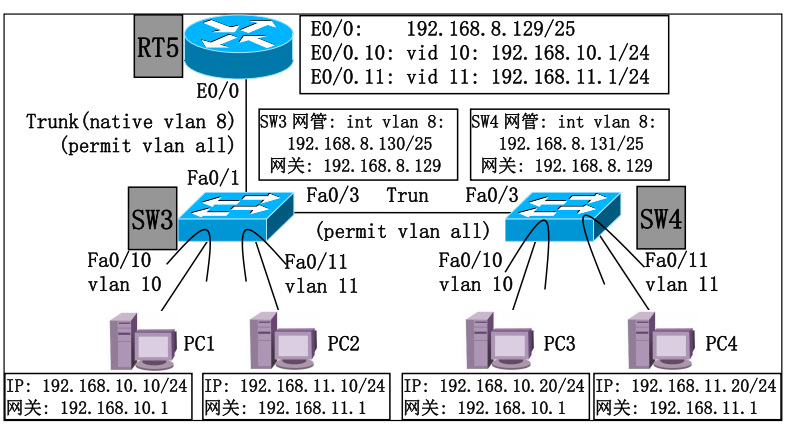
- 实验配置(核心):
dockerfile
// 路由器使用子接口
enable
configure terminal
! 物理接口关闭IP,开启no shutdown
interface Ethernet0/0
 no ip address
 no shutdown
exit

! 子接口E0/0.10 对应VLAN10,802.1Q封装
interface Ethernet0/0.10
 encapsulation dot1Q 10
 ip address 192.168.10.1 255.255.255.0
exit

! 子接口E0/0.11 对应VLAN11
interface Ethernet0/0.11
 encapsulation dot1Q 11
 ip address 192.168.11.1 255.255.255.0
exit

! 路由器管理网段(VLAN8 native)
interface Ethernet0/0
 ip address 192.168.8.129 255.255.255.128
exit- 注意事项:本征vlan的配置
sw tr native vl 8
DHCP中继
- 实验拓扑:
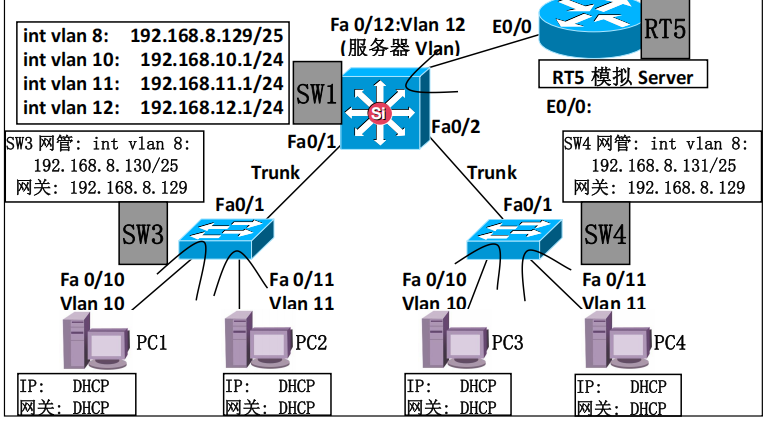
- 实验配置:
dockerfile
// 三层交换机做中继
! 管理Vlan8 中继(交换机管理地址自动获取可选)
interface Vlan8
 ip address 192.168.8.129 255.255.255.128
 ip helper-address 192.168.12.100
 no shutdown
exit

! Vlan10 用户网段,配置中继
interface Vlan10
 ip address 192.168.10.1 255.255.255.0
 ip helper-address 192.168.12.100
 no shutdown
exit

! Vlan11 用户网段,配置中继
interface Vlan11
 ip address 192.168.11.1 255.255.255.0
 ip helper-address 192.168.12.100
 no shutdown
exit

! Vlan12 服务器网段,无需中继(服务器同网段)
interface Vlan12
 ip address 192.168.12.1 255.255.255.0
 no shutdown
exit


// 服务器:
service dhcp
ip dhcp pool VLAN10
 network 192.168.10.0 255.255.255.0
 default-router 192.168.10.1
 dns-server 223.5.5.5
exit
ip dhcp excluded-address 192.168.10.1 192.168.10.9

ip dhcp pool VLAN11
 network 192.168.11.0 255.255.255.0
 default-router 192.168.11.1
 dns-server 223.5.5.5
exit
ip dhcp excluded-address 192.168.11.1 192.168.11.9 // 排除1-9分发地址- 注意事项:dhcp中继用于大规模需要用到dhcp的场景
VRRP实验
- 实验拓扑:
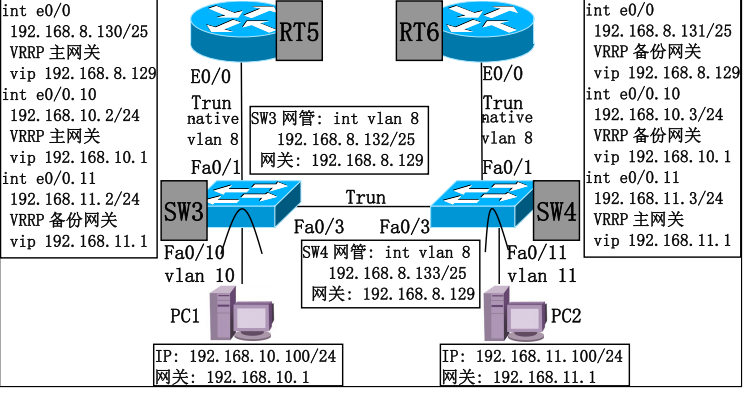
- 实验配置:
dockerfile
enable
configure terminal
! 开启单臂物理口
interface Ethernet0/0
 no ip address
 no shutdown
exit
! ========== VLAN8 原生VLAN,VRRP组8,主网关 ==========
interface Ethernet0/0
 ip address 192.168.8.130 255.255.255.128
 vrrp 8 ip 192.168.8.129    ! 虚拟网关VIP
 vrrp 8 priority 120        ! 优先级120 > RT6的100,为主
 vrrp 8 preempt             ! 故障恢复后自动抢回主角色
exit
! ========== VLAN10 子接口,VRRP组10,主网关 ==========
interface Ethernet0/0.10
 encapsulation dot1Q 10
 ip address 192.168.10.2 255.255.255.0
 vrrp 10 ip 192.168.10.1
 vrrp 10 priority 120
 vrrp 10 preempt
exit
! ========== VLAN11 子接口,VRRP组11,备份网关 ==========
interface Ethernet0/0.11
 encapsulation dot1Q 11
 ip address 192.168.11.2 255.255.255.0
 vrrp 11 ip 192.168.11.1
 ! 默认优先级100,低于RT6的120,作为备份
 vrrp 11 preempt
exit
write memory- 注意事项:在vrrp没有配置好之前pc是ping不通的因为没有能用的网关。
VRRP+MSTP组网实验
- 实验拓扑:在上一个实验的基础上加一个交换机互联。
- 实验配置:
dockerfile
enable
configure terminal
! 切换生成树模式为MST
spanning-tree mode mst
spanning-tree mst configuration

! 和SW3完全相同的区域参数(关键!不一致会分割区域)
 name MST-AREA
 revision 1
 instance 1 vlan 10
 instance 2 vlan 11
exit

! SW4作为实例2主根,实例1备份根,实现负载分担
spanning-tree mst 2 root primary
spanning-tree mst 1 root secondary

! 全局优化
spanning-tree portfast default
spanning-tree portfast bpduguard default

! Trunk端口关闭PortFast
interface range Fa0/1,Fa0/3
 spanning-tree portfast disable
 spanning-tree guard root
exit
write- 注意事项:
OSPF单区域实验
- 实验拓扑:
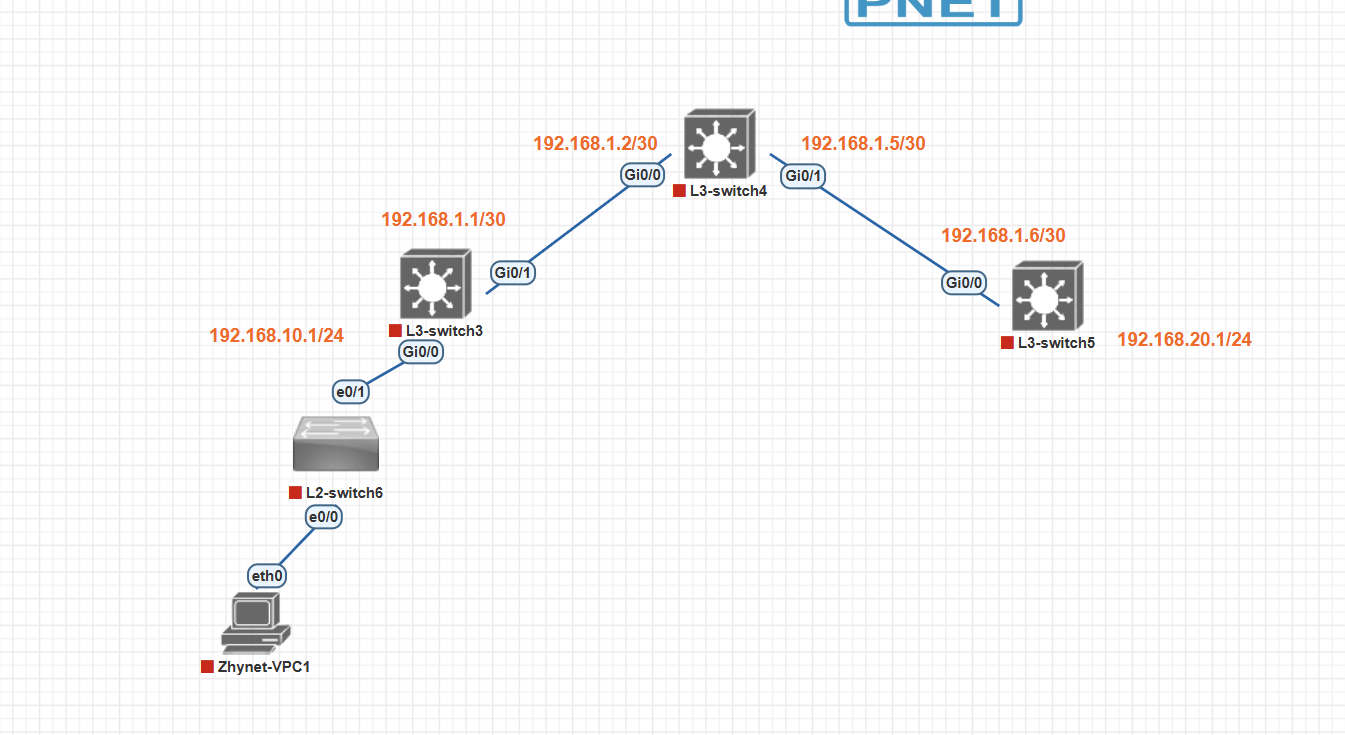
- 实验配置:
dockerfile
enable
conf t
! 对接L3SW3
interface GigabitEthernet0/0
 no switchport
 ip address 192.168.1.2 255.255.255.252
 no shutdown
exit
! 对接L3SW5
interface GigabitEthernet0/1
 no switchport
 ip address 192.168.1.5 255.255.255.252
 no shutdown
exit
! OSPF
router ospf 1
 router-id 4.0.0.0
 network 192.168.1.0 0.0.0.3 area 0
 network 192.168.1.4 0.0.0.3 area 0
 ! 所有互联口都需要建立邻居,不配置passive
exit- 注意事项:ip地址可以标注在图上,不然宣告网段的时候比较麻烦
OSPF多区域实验
- 实验拓扑:
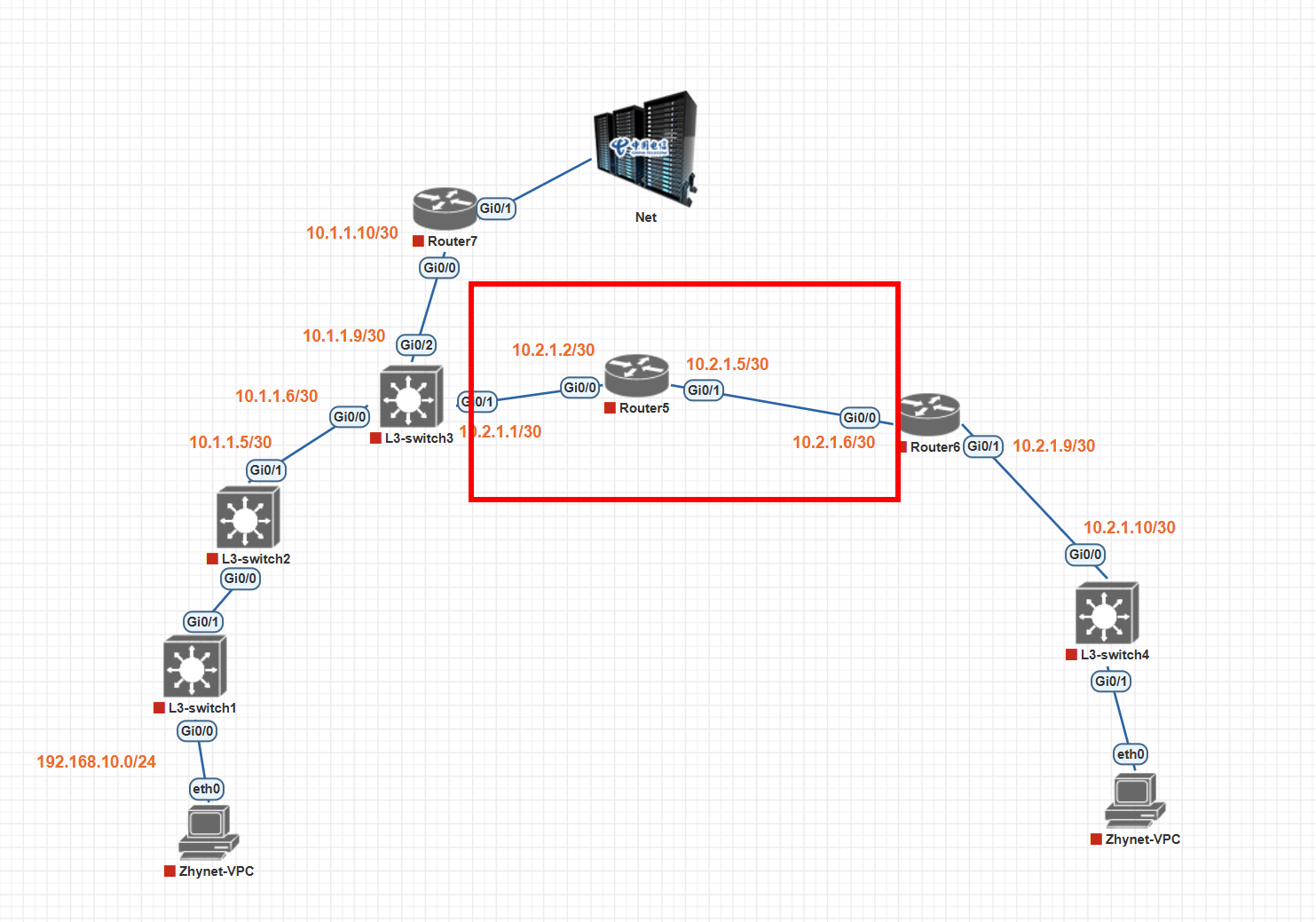
- 实验配置(核心):
dockerfile
enable
conf t
! Area1 下联L3SW2
interface GigabitEthernet0/0
 no switchport
 ip address 10.1.1.5 255.255.255.252
 no shutdown
exit
! Area1 上联Router7
interface GigabitEthernet0/2
 no switchport
 ip address 10.1.1.9 255.255.255.252
 no shutdown
exit
! Area0 上联Router5(骨干)
interface GigabitEthernet0/1
 no switchport
 ip address 10.2.1.1 255.255.255.252
 no shutdown
exit
! OSPF ABR配置
router ospf 1
 router-id 3.3.3.3
 ! Area1网段
 network 10.1.1.4 0.0.0.3 area 1
 network 10.1.1.8 0.0.0.3 area 1
 ! Area0骨干网段
 network 10.2.1.0 0.0.0.3 area 0
exit
write //其余类似- 总结一下,在实验中遇到最多的问题是关于物理机网卡的问题,有时候涉及到ip是手动分配还是自动分配,也要对应调整网卡的ip地址,还有有时候wifi和自己网线网卡同时连接的时候,物理机会选择已经连接到互联网的网络连接,这个时候大概率不会用到我们实验的网络,于是就需要禁用wifi网卡或者关闭wifi。