系列: HarmonyOS 智能工具箱 App 全栈开发 · 第 3 篇
上一篇 : OCR 文字识别工具
引言
语音是最自然的人机交互方式。本文将使用 HarmonyOS 的 Core Speech Kit 实现语音输入(ASR)和语音朗读(TTS)功能,并将其集成到智能工具箱中。用户可以用语音输入文字、用语音控制 App 操作、让 App 朗读 OCR 识别结果。
通过本文你将学到:
- 使用 Core Speech Kit 的
speechRecognizer进行端侧语音识别 - 使用
textToSpeech实现文字转语音朗读 - 实现麦克风权限的动态申请
- 构建实时字幕和语音指令系统
环境准备
| 项目 | 版本 |
|---|---|
| DevEco Studio | 6.1.1 Release (6.1.1.280) |
| API Level | API 24 (HarmonyOS 6.1.1 Release) |
| 设备 | 真机(需要麦克风) |
依赖配置
json5
// oh-package.json5
{
  "dependencies": {
    "@kit.CoreSpeechKit": "^1.0.0",
    "@kit.AbilityKit": "^1.0.0",
    "@kit.PerformanceAnalysisKit": "^1.0.0"
  }
}
权限配置
json5
// entry/src/main/module.json5
{
  "requestPermissions": [
    { "name": "ohos.permission.MICROPHONE", "reason": "语音识别需要使用麦克风采集音频" }
  ]
}注意:语音识别(ASR)必须声明麦克风权限并运行时动态申请;语音合成(TTS)播放无需麦克风权限。
核心实现
Step 1: 封装语音服务层
目标: 将 Core Speech Kit 的 ASR 和 TTS 能力封装为统一服务。
typescript
// service/SpeechService.ets
import { speechRecognizer, textToSpeech } from '@kit.CoreSpeechKit';
import { abilityAccessCtrl } from '@kit.AbilityKit';
import { hilog } from '@kit.PerformanceAnalysisKit';

const TAG = 'SpeechService';
const DOMAIN = 0xFF00;

// ASR 识别结果
export class AsrResult {
  text: string = '';
  isFinal: boolean = false;
  confidence: number = 0;
}

// TTS 状态
export enum TtsState {
  IDLE = 'idle',
  SPEAKING = 'speaking',
  PAUSED = 'paused'
}

// 语音服务类
export class SpeechService {
  private static asrListener: speechRecognizer.SpeechRecognitionListener | null = null;
  private static ttsSynthesizer: textToSpeech.TextToSpeechSynthesizer | null = null;
  private static ttsState: TtsState = TtsState.IDLE;

  // ========== ASR 语音识别 ==========

  /**
   * 检查并申请麦克风权限
   */
  static async checkPermission(context: Context): Promise<boolean> {
    try {
      const atManager = abilityAccessCtrl.createAtManager();
      const result = await atManager.checkAccessToken(
        context.tokenID as number,
        'ohos.permission.MICROPHONE'
      );
      if (result === abilityAccessCtrl.GrantStatus.PERMISSION_GRANTED) {
        return true;
      }

      // 申请权限
      const grantResults = await atManager.requestPermissionsFromUser(
        context,
        ['ohos.permission.MICROPHONE']
      );
      return grantResults.authResults[0] === abilityAccessCtrl.GrantStatus.PERMISSION_GRANTED;
    } catch (err) {
      hilog.error(DOMAIN, TAG, `权限检查失败: ${JSON.stringify(err)}`);
      return false;
    }
  }

  /**
   * 开始语音识别
   * @param onResult 识别结果回调
   * @param onError 错误回调
   * @param onVolume 音量变化回调
   */
  static startListening(
    onResult: (result: AsrResult) => void,
    onError: (code: number, message: string) => void,
    onVolume?: (volume: number) => void
  ): void {
    // 创建监听器
    this.asrListener = speechRecognizer.createSpeechRecognizerListener({
      onResult: (result) => {
        const asrResult = new AsrResult();
        asrResult.text = result.text;
        asrResult.isFinal = result.isFinal;
        onResult(asrResult);
      },
      onError: (error) => {
        hilog.error(DOMAIN, TAG, `ASR 错误: ${error.code} - ${error.message}`);
        onError(error.code, error.message);
      },
      onVolumeChanged: (volume) => {
        if (onVolume) {
          onVolume(volume);
        }
      }
    });

    // 开始识别 --- 推荐音频格式:16kHz, 16-bit, 单声道
    speechRecognizer.startListening(this.asrListener, {
      language: 'zh',
      audioFormat: {
        sampleRate: 16000,
        channelCount: 1,
        sampleBit: 16
      }
    });

    hilog.info(DOMAIN, TAG, 'ASR 开始识别');
  }

  /**
   * 停止语音识别
   */
  static stopListening(): void {
    if (this.asrListener) {
      speechRecognizer.stopListening(this.asrListener);
      this.asrListener = null;
      hilog.info(DOMAIN, TAG, 'ASR 停止识别');
    }
  }

  /**
   * 释放 ASR 资源
   */
  static releaseAsr(): void {
    this.stopListening();
    speechRecognizer.release();
    hilog.info(DOMAIN, TAG, 'ASR 资源已释放');
  }

  // ========== TTS 语音合成 ==========

  /**
   * 初始化 TTS 合成器
   */
  static initTts(): void {
    if (this.ttsSynthesizer) return;

    this.ttsSynthesizer = textToSpeech.createSynthesizer();

    // 监听合成状态
    this.ttsSynthesizer.on('state', (state: string) => {
      hilog.info(DOMAIN, TAG, `TTS 状态: ${state}`);
      if (state === 'playing') {
        this.ttsState = TtsState.SPEAKING;
      } else if (state === 'paused') {
        this.ttsState = TtsState.PAUSED;
      } else {
        this.ttsState = TtsState.IDLE;
      }
    });

    hilog.info(DOMAIN, TAG, 'TTS 初始化完成');
  }

  /**
   * 朗读文本
   * @param text 要朗读的文本
   * @param options 朗读选项
   */
  static async speak(text: string, options?: TtsOptions): Promise<void> {
    this.initTts();

    if (!this.ttsSynthesizer) {
      hilog.error(DOMAIN, TAG, 'TTS 合成器未初始化');
      return;
    }

    try {
      await this.ttsSynthesizer.speak(text, {
        language: options?.language ?? 'zh',
        voiceId: options?.voiceId ?? 'zh_female',
        speed: options?.speed ?? 1.0,
        volume: options?.volume ?? 1.0
      });
      hilog.info(DOMAIN, TAG, `TTS 开始朗读: ${text.substring(0, 20)}...`);
    } catch (err) {
      hilog.error(DOMAIN, TAG, `TTS 朗读失败: ${JSON.stringify(err)}`);
    }
  }

  /**
   * 停止朗读
   */
  static stopSpeaking(): void {
    if (this.ttsSynthesizer) {
      this.ttsSynthesizer.stop();
      this.ttsState = TtsState.IDLE;
    }
  }

  /**
   * 暂停朗读
   */
  static pauseSpeaking(): void {
    if (this.ttsSynthesizer) {
      this.ttsSynthesizer.pause();
    }
  }

  /**
   * 恢复朗读
   */
  static resumeSpeaking(): void {
    if (this.ttsSynthesizer) {
      this.ttsSynthesizer.resume();
    }
  }

  /**
   * 获取当前 TTS 状态
   */
  static getTtsState(): TtsState {
    return this.ttsState;
  }
}

// TTS 选项
export class TtsOptions {
  language: string = 'zh';
  voiceId: string = 'zh_female';
  speed: number = 1.0;
  volume: number = 1.0;
}
Step 2: 创建语音输入页面
目标: 实现语音输入主界面,支持实时字幕显示。
typescript
// features/speech/SpeechPage.ets
import { SpeechService, AsrResult } from '../../service/SpeechService';
import { hilog } from '@kit.PerformanceAnalysisKit';

const TAG = 'SpeechPage';

@Entry
@Component
struct SpeechPage {
  @Local recognizedText: string = '';
  @Local intermediateText: string = '';
  @Local isListening: boolean = false;
  @Local volumeLevel: number = 0;
  @Local speechHistory: string[] = [];

  async aboutToAppear(): Promise<void> {
    // 检查麦克风权限
    const context = getContext(this);
    const hasPermission = await SpeechService.checkPermission(context);
    if (!hasPermission) {
      this.recognizedText = '请授予麦克风权限后使用语音功能';
    }
  }

  aboutToDisappear(): void {
    // 释放资源
    SpeechService.releaseAsr();
  }

  // 切换语音识别状态
  toggleListening(): void {
    if (this.isListening) {
      this.stopListening();
    } else {
      this.startListening();
    }
  }

  // 开始语音识别
  startListening(): void {
    this.intermediateText = '';
    this.recognizedText = '';

    SpeechService.startListening(
      // onResult
      (result: AsrResult) => {
        if (result.isFinal) {
          // 最终结果 --- 确认识别
          this.recognizedText = result.text;
          this.intermediateText = '';
          this.isListening = false;
          // 添加到历史
          if (result.text.trim()) {
            this.speechHistory.unshift(result.text);
            if (this.speechHistory.length > 20) {
              this.speechHistory.pop();
            }
          }
        } else {
          // 中间结果 --- 实时显示
          this.intermediateText = result.text;
        }
      },
      // onError
      (code: number, message: string) => {
        hilog.error(DOMAIN, TAG, `识别错误: ${code} - ${message}`);
        this.isListening = false;
        this.intermediateText = '';
      },
      // onVolume
      (volume: number) => {
        this.volumeLevel = volume;
      }
    );

    this.isListening = true;
  }

  // 停止语音识别
  stopListening(): void {
    SpeechService.stopListening();
    this.isListening = false;
    this.intermediateText = '';
  }

  build() {
    Column({ space: 16 }) {
      // 顶部标题
      Row() {
        Text('语音助手')
          .fontSize(24)
          .fontWeight(FontWeight.Bold)
        Blank()
      }
      .width('100%')
      .padding({ left: 16, right: 16, top: 12 })

      // 识别结果展示区
      Column({ space: 12 }) {
        // 中间结果(实时字幕)
        if (this.intermediateText) {
          Text(this.intermediateText)
            .fontSize(16)
            .fontColor('#666')
            .fontStyle(FontStyle.Italic)
            .width('100%')
            .padding(12)
            .backgroundColor('#F8F8F8')
            .borderRadius(8)
        }

        // 最终结果
        if (this.recognizedText) {
          Column({ space: 8 }) {
            Row() {
              Text('识别结果')
                .fontSize(14)
                .fontColor('#999')
              Blank()
              Button('朗读')
                .type(ButtonType.Normal)
                .height(28)
                .fontSize(12)
                .onClick(() => {
                  SpeechService.speak(this.recognizedText);
                })
              Button('复制')
                .type(ButtonType.Normal)
                .height(28)
                .fontSize(12)
                .margin({ left: 8 })
                .onClick(() => {
                  this.getUIContext().getPromptAction().showToast({
                    message: '已复制',
                    duration: 1000
                  });
                })
            }
            .width('100%')

            Text(this.recognizedText)
              .fontSize(18)
              .fontColor('#333')
              .width('100%')
              .padding(12)
              .backgroundColor('#FFFFFF')
              .borderRadius(8)
          }
        }

        // 提示文字
        if (!this.recognizedText && !this.intermediateText) {
          Text(this.isListening ? '正在聆听...' : '点击麦克风开始语音输入')
            .fontSize(15)
            .fontColor('#999')
            .margin({ top: 40 })
        }
      }
      .width('100%')
      .padding({ left: 16, right: 16 })
      .layoutWeight(1)

      // 麦克风按钮
      Column({ space: 8 }) {
        // 音量指示器
        if (this.isListening) {
          Row({ space: 4 }) {
            ForEach([0, 1, 2, 3, 4], (index: number) => {
              Column()
                .width(4)
                .height(10 + this.volumeLevel * 2)
                .backgroundColor(this.volumeLevel > index ? '#007DFF' : '#E0E0E0')
                .borderRadius(2)
            })
          }
          .height(30)
          .alignItems(VerticalAlign.Bottom)
        }

        // 麦克风按钮
        SymbolGlyph(this.isListening ? $r('sys.symbol.mic_fill') : $r('sys.symbol.mic'))
          .fontSize(40)
          .fontColor([this.isListening ? '#FF4444' : '#007DFF'])
          .onClick(() => this.toggleListening())
          .padding(20)
          .borderRadius(40)
          .backgroundColor(this.isListening ? '#FFF0F0' : '#F0F8FF')
      }
      .width('100%')
      .padding({ bottom: 24 })

      // 语音历史
      if (this.speechHistory.length > 0) {
        Column({ space: 8 }) {
          Text('识别历史')
            .fontSize(14)
            .fontColor('#999')
            .width('100%')

          List({ space: 4 }) {
            ForEach(this.speechHistory, (text: string, index: number) => {
              ListItem() {
                Row() {
                  Text(text)
                    .fontSize(13)
                    .fontColor('#666')
                    .maxLines(1)
                    .textOverflow({ overflow: TextOverflow.Ellipsis })
                    .layoutWeight(1)
                  SymbolGlyph($r('sys.symbol.speaker'))
                    .fontSize(16)
                    .fontColor(['#007DFF'])
                    .onClick(() => SpeechService.speak(text))
                }
                .padding({ left: 12, right: 12, top: 8, bottom: 8 })
                .backgroundColor('#FFFFFF')
                .borderRadius(6)
              }
            })
          }
          .height(150)
        }
        .padding({ left: 16, right: 16, bottom: 16 })
      }
    }
    .width('100%')
    .height('100%')
    .backgroundColor('#F5F5F5')
  }
}
Step 3: 创建语音指令解析器
目标: 支持用语音控制 App 操作(如"打开设置"、"朗读结果")。
typescript
// features/speech/VoiceCommand.ets
import { SpeechService } from '../../service/SpeechService';
import { hilog } from '@kit.PerformanceAnalysisKit';

const TAG = 'VoiceCommand';

// 指令定义
interface VoiceCommandItem {
  keywords: string[];
  action: () => void;
  description: string;
}

export class VoiceCommandParser {
  private commands: VoiceCommandItem[] = [];

  // 注册指令
  register(keywords: string[], action: () => void, description: string): void {
    this.commands.push({ keywords, action, description });
  }

  // 解析并执行指令
  parse(text: string): boolean {
    const lower = text.toLowerCase().trim();

    for (const cmd of this.commands) {
      for (const keyword of cmd.keywords) {
        if (lower.includes(keyword)) {
          hilog.info(DOMAIN, TAG, `匹配指令: ${cmd.description}`);
          cmd.action();
          return true;
        }
      }
    }

    return false;
  }

  // 获取所有指令描述
  getCommandList(): string[] {
    return this.commands.map((cmd: VoiceCommandItem) => {
      const keywords = cmd.keywords.map((k: string) => `"${k}"`).join(' / ');
      return `${keywords} --- ${cmd.description}`;
    });
  }
}
在页面中集成语音指令:
typescript
// 在 SpeechPage 中集成
private commandParser: VoiceCommandParser = new VoiceCommandParser();

aboutToAppear() {
  // 注册语音指令
  this.commandParser.register(
    ['朗读', '读出来', '播放'],
    () => {
      if (this.recognizedText) {
        SpeechService.speak(this.recognizedText);
      }
    },
    '朗读识别结果'
  );

  this.commandParser.register(
    ['停止', '暂停', '别读了'],
    () => { SpeechService.stopSpeaking(); },
    '停止朗读'
  );

  this.commandParser.register(
    ['清空', '清除', '重来'],
    () => {
      this.recognizedText = '';
      this.intermediateText = '';
    },
    '清空识别结果'
  );

  this.commandParser.register(
    ['复制', '拷贝'],
    () => {
      // 复制到剪贴板
    },
    '复制识别文本'
  );
}

// 在 onResult 回调中尝试匹配指令
onResult(result: AsrResult) {
  if (result.isFinal) {
    // 先尝试匹配指令
    const isCommand = this.commandParser.parse(result.text);
    if (!isCommand) {
      // 非指令,作为普通文本处理
      this.recognizedText = result.text;
    }
  }
}
Step 4: 创建 TTS 设置页面
目标: 提供语音朗读的语速、音量和音色设置。
typescript
// features/speech/TtsSettings.ets
import { SpeechService } from '../../service/SpeechService';
import { PersistenceV2, Type } from '@kit.ArkUI';

@ObservedV2
class TtsSettings {
  @Trace @Type(Number) speed: number = 1.0
  @Trace @Type(Number) volume: number = 1.0
  @Trace @Type(String) voiceId: string = 'zh_female'
}

const ttsSettings = PersistenceV2.connect(
  TtsSettings, 'tts_settings', () => new TtsSettings()
)!

@Component
export struct TtsSettingsPage {
  @Local testText: string = '你好,我是 HarmonyOS 智能工具箱的语音助手。'

  build() {
    Column({ space: 16 }) {
      Text('语音朗读设置')
        .fontSize(20)
        .fontWeight(FontWeight.Bold)
        .width('100%')
        .padding({ left: 16, top: 16 })

      // 语速设置
      Column({ space: 8 }) {
        Row() {
          Text('语速').fontSize(15)
          Blank()
          Text(`${ttsSettings!.speed.toFixed(1)}x`).fontSize(14).fontColor('#999')
        }.width('100%')

        Slider({ value: $$ttsSettings!.speed, min: 0.5, max: 2.0, step: 0.1 })
          .width('100%')
      }
      .padding(16)
      .backgroundColor('#FFFFFF')
      .borderRadius(12)

      // 音量设置
      Column({ space: 8 }) {
        Row() {
          Text('音量').fontSize(15)
          Blank()
          Text(`${Math.round(ttsSettings!.volume * 100)}%`).fontSize(14).fontColor('#999')
        }.width('100%')

        Slider({ value: $$ttsSettings!.volume, min: 0.0, max: 1.0, step: 0.1 })
          .width('100%')
      }
      .padding(16)
      .backgroundColor('#FFFFFF')
      .borderRadius(12)

      // 音色选择
      Column({ space: 8 }) {
        Text('音色').fontSize(15).width('100%')

        Row({ space: 12 }) {
          Button('女声')
            .type(ButtonType.Normal)
            .backgroundColor(ttsSettings!.voiceId === 'zh_female' ? '#007DFF' : '#F0F0F0')
            .fontColor(ttsSettings!.voiceId === 'zh_female' ? '#FFF' : '#333')
            .onClick(() => { ttsSettings!.voiceId = 'zh_female' })

          Button('男声')
            .type(ButtonType.Normal)
            .backgroundColor(ttsSettings!.voiceId === 'zh_male' ? '#007DFF' : '#F0F0F0')
            .fontColor(ttsSettings!.voiceId === 'zh_male' ? '#FFF' : '#333')
            .onClick(() => { ttsSettings!.voiceId = 'zh_male' })
        }
      }
      .padding(16)
      .backgroundColor('#FFFFFF')
      .borderRadius(12)

      // 试听按钮
      Button('试听语音')
        .type(ButtonType.Capsule)
        .width('80%')
        .height(44)
        .onClick(() => {
          SpeechService.speak(this.testText, {
            speed: ttsSettings!.speed,
            volume: ttsSettings!.volume,
            voiceId: ttsSettings!.voiceId
          });
        })

      // 试听文本
      TextArea({ text: this.testText, placeholder: '输入试听文本' })
        .width('90%')
        .height(100)
        .onChange((value: string) => { this.testText = value })
    }
    .width('100%')
    .height('100%')
    .backgroundColor('#F5F5F5')
    .padding({ left: 16, right: 16 })
  }
}
Step 5: 注册路由
目标: 在首页 Navigation 中注册语音页面路由。
typescript
// pages/Index.ets 中的 navDestination 部分
.navDestination((name: string, param: Object) => {
  if (name === 'SpeechPage') {
    SpeechPage()
  } else if (name === 'TtsSettings') {
    TtsSettingsPage()
  }
})
效果展示
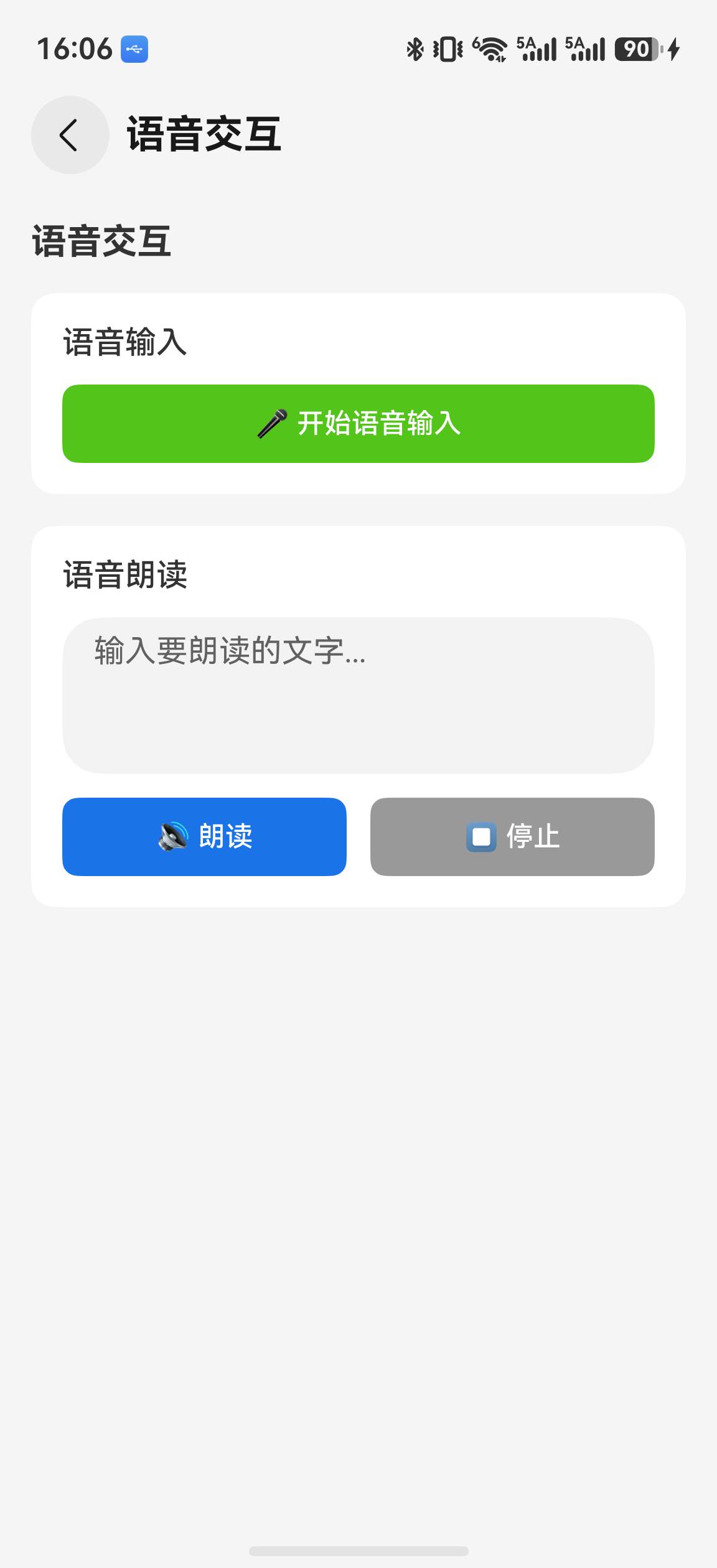
语音页面包含 ASR 语音输入和 TTS 文字朗读两个区域。首次使用时请求麦克风权限,引擎初始化完成后才允许开始识别。
当前监听器在 isFinal 为 true 时更新最终文本;示例没有实现中间字幕、语速/音量/音色设置页,也没有语音指令解析器,因此这些能力不作为本篇完成项。
关键代码解读
ASR 识别流程
typescript
// 1. 创建监听器
const listener = speechRecognizer.createSpeechRecognizerListener({
  onResult: (result) => {
    if (result.isFinal) {
      // 最终结果 --- 可信度高,用于确认
    } else {
      // 中间结果 --- 可能被修正,用于实时显示
    }
  }
});

// 2. 开始识别
speechRecognizer.startListening(listener, {
  language: 'zh',
  audioFormat: { sampleRate: 16000, channelCount: 1, sampleBit: 16 }
});

// 3. 停止识别
speechRecognizer.stopListening(listener);

// 4. 释放资源
speechRecognizer.release();
关键点:
- 中间结果 vs 最终结果 :
isFinal: false的中间结果可能被后续回调修正,UI 应区分显示 - 音频格式:推荐 16kHz/16-bit/单声道,不匹配可能导致识别率下降
- 并发限制 :同一时间只能有一个 ASR 实例,重复调用
startListening()会抛错
TTS 合成流程
typescript
// 1. 创建合成器
const synthesizer = textToSpeech.createSynthesizer();

// 2. 监听状态
synthesizer.on('state', (state) => {
  // state: 'playing' | 'paused' | 'idle'
});

// 3. 朗读
await synthesizer.speak(text, {
  language: 'zh',
  voiceId: 'zh_female',
  speed: 1.0,
  volume: 1.0
});

// 4. 控制
synthesizer.pause();   // 暂停
synthesizer.resume();  // 恢复
synthesizer.stop();    // 停止
总结
本文实现了智能工具箱的语音交互工具,主要完成了:
- SpeechService 服务层:封装 Core Speech Kit 的 ASR 和 TTS 能力
- 语音输入页面:实时字幕显示、识别历史、一键朗读
- 语音指令系统:自然语言匹配控制 App 操作
- TTS 设置页面:语速、音量、音色可调,自动持久化
语音能力可与 OCR 结合------识别出的文字可以直接朗读出来,形成完整的"看→听"体验。
下篇预告
下一篇: HarmonyOS 智能工具箱(四):AI 图像处理工具
将使用 Core Vision Kit 和 MindSpore Lite 实现图像分类、目标检测和图像超分辨率功能。