📂 前言
在 AR 眼镜的交互方案中,手势控制是核心痛点之一,传统的触控板、语音控制、按键等方式各有局限性,而HID 蓝牙戒指作为一种新型输入设备,能够提供更自然、更精准的操作体验。本文将详细介绍三种渐进式接入方案,从简单到复杂,逐步实现戒指控制 AR 眼镜的目标。
核心流程:
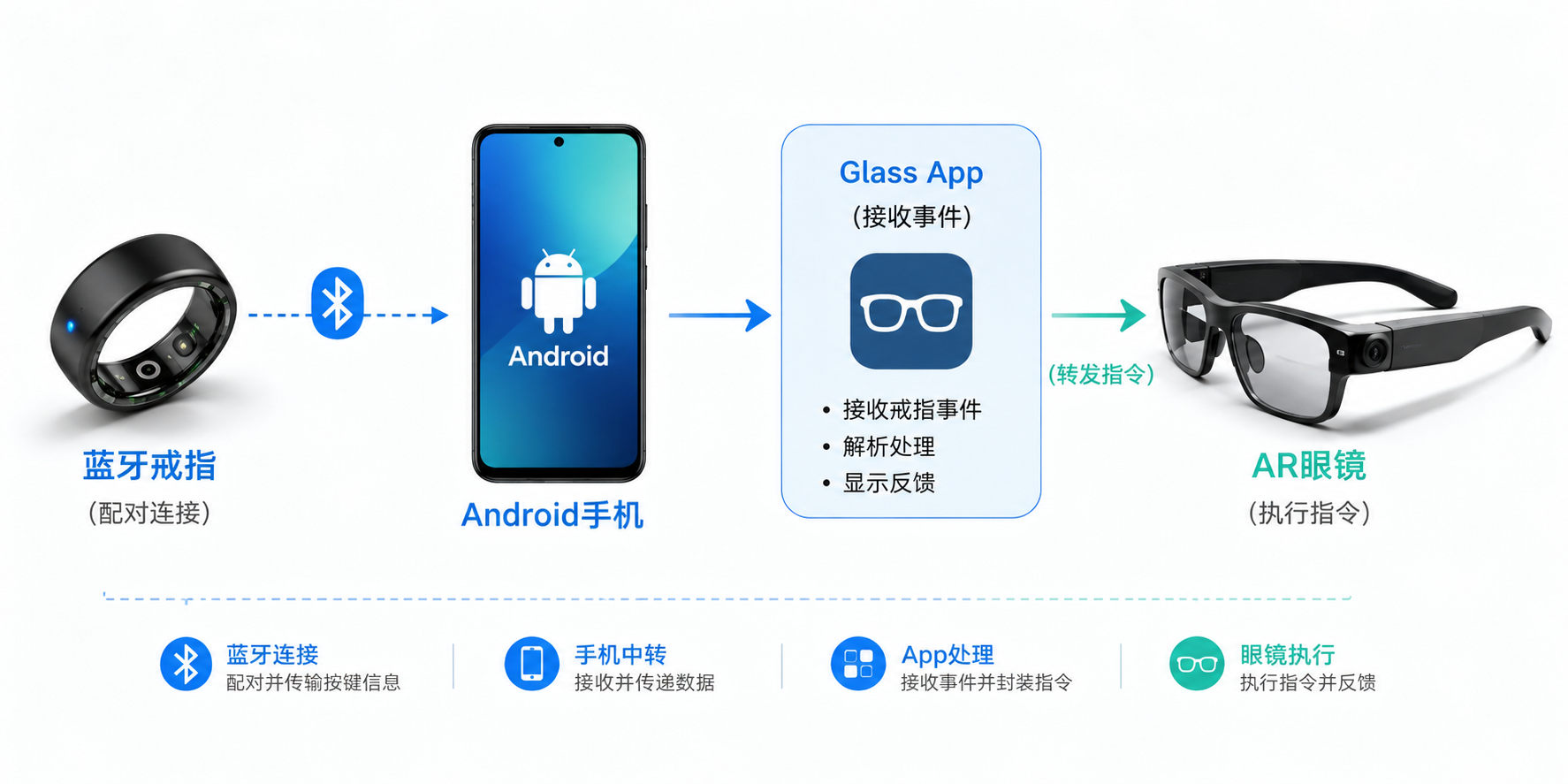
戒指支持的手势事件:
-
前滑:向前滑动
-
后滑:向后滑动
-
进入:点击/确认
-
退出:返回/取消
1. 🔱 技术方案概述
1.1 方案对比
|----------------|-----------|----------|----------------|---------------|
| 方案 | 适用场景 | 息屏支持 | 优点 | 缺点 |
| 方案一:前台界面监听 | App 前台运行时 | - | 实现简单,无需系统权限 | App 后台或锁屏时失效 |
| 方案二:无障碍服务 | 前台/后台/锁屏 | - | 无需修改戒指协议,系统级拦截 | 息屏时可能失效,需用户授权 |
| 方案三:私有蓝牙协议 | 全场景 | Y | 功能完整,体验最优 | 需要戒指厂商提供协议文档 |
1.2 架构设计
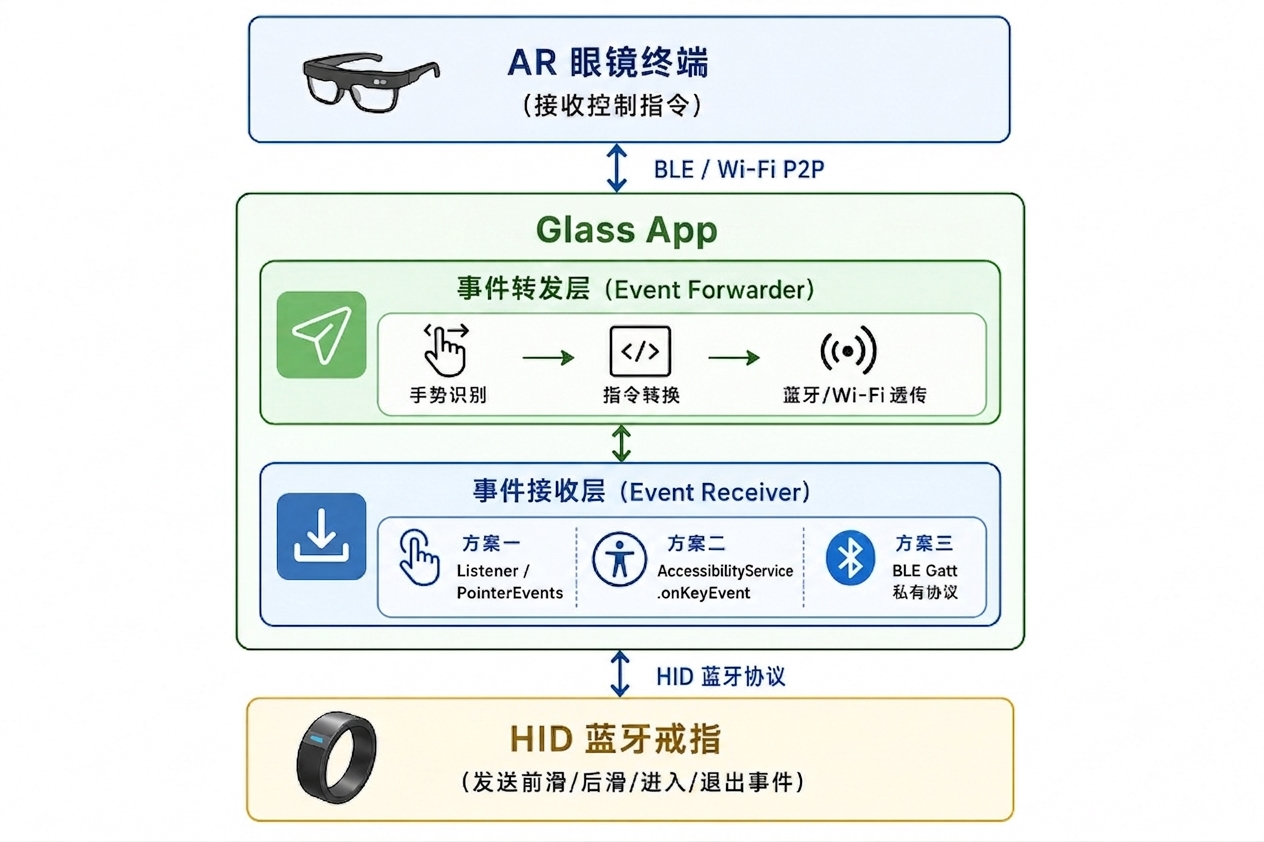
2. ⚛️ 方案一:前台界面监听
2.1 方案原理
当蓝牙戒指作为 HID 设备连接到手机后,戒指的手势操作会转化为标准的指针事件(PointerEvent)或按键事件(KeyEvent),通过在 Flutter 界面中使用 Listener 组件,可以直接捕获这些事件。
2.2 实现方案
创建一个专门的中转 Widget,负责:
-
监听戒指发出的指针事件(滑动、点击、长按)
-
识别手势类型(单击、双击、长按、滑动)
-
将手势转换为控制指令
-
通过蓝牙/Wi-Fi 转发给 AR 眼镜
2.2.1 核心代码:Focus.Listener
  Widget build(BuildContext context) {
    return Focus(
      focusNode: _focusNode,
      autofocus: true,
      onFocusChange: (hasFocus) {
        logI("焦点状态改变: $hasFocus", tag: "RingToGlassesControllerWidget");
      },
      child: Listener(
        // 2. 指针按下时,开启手势判定管道
        onPointerDown: _handlePointerDown,
        // 3. 指针移动时,检查是否移动过大需取消点击
        onPointerMove: _handlePointerMove,
        // 4. 指针抬起,识别单击或双击
        onPointerUp: _handlePointerUp,

        // 5. 娱乐模式下的纯移动事件(用于滑动)
        onPointerHover: (PointerHoverEvent event) {
          if (event.delta.dy > 1.0) {
            _internalEventStream.add("HOVER_DOWN");
          } else if (event.delta.dy < -1.0) {
            _internalEventStream.add("HOVER_UP");
          }
        },
      ),
    );
  }
2.2.2 完整代码:RingToGlassesControllerWidget.dart
import 'dart:async';
import 'package:flutter/gestures.dart';
import 'package:flutter/material.dart';
import 'package:flutter/services.dart';
import 'package:mb_app/device/manager/device_setting_manager.dart';
import 'package:mb_app/device/view/widgets/glasses_remote_controller_popup.dart';

class RingToGlassesControllerWidget extends StatefulWidget {
  const RingToGlassesControllerWidget({Key? key}) : super(key: key);

  @override
  State<RingToGlassesControllerWidget> createState() => _RingToGlassesControllerWidgetState();
}

class _RingToGlassesControllerWidgetState extends State<RingToGlassesControllerWidget> {
  final FocusNode _focusNode = FocusNode();

  final List<String> _consoleLogs = [];


  bool _isConnectedToGlasses = false;
  bool _isConnecting = false;

  final StreamController<String> _internalEventStream = StreamController<String>.broadcast();
  StreamSubscription<String>? _eventForwardingSub;

  Offset? _pointerDownPosition;
  DateTime? _pointerDownTime;
  Timer? _longPressTimer;
  Timer? _clickDelayTimer;
  DateTime? _lastClickTime;

  static const Duration _longPressThreshold = Duration(milliseconds: 500);
  static const Duration _clickThreshold = Duration(milliseconds: 250);
  static const Duration _doubleClickThreshold = Duration(milliseconds: 300);
  static const double _moveTolerance = 15.0;

  @override
  void initState() {
    super.initState();
    WidgetsBinding.instance.addPostFrameCallback((_) {
      if (mounted) _focusNode.requestFocus();
    });
    _eventForwardingSub = _internalEventStream.stream.listen((command) {
      _sendDataToGlasses(command);
    });
    _connectToGlasses();
  }

  @override
  void dispose() {
    _focusNode.dispose();
    _eventForwardingSub?.cancel();
    _internalEventStream.close();
    _longPressTimer?.cancel();
    _clickDelayTimer?.cancel();
    _disconnectFromGlasses();
    super.dispose();
  }

  void _connectToGlasses() async {
    if (_isConnectedToGlasses || _isConnecting) return;
    setState(() {
      _isConnecting = true;
      _logToConsole("正在尝试建立与眼镜的无线通信链路...");
    });
    await Future.delayed(const Duration(seconds: 2));
    if (!mounted) return;
    setState(() {
      _isConnecting = false;
      _isConnectedToGlasses = true;
      _logToConsole("🟢 眼镜连接成功!可以开始中转指环指令。");
    });
  }

  void _sendDataToGlasses(String command) {
    if (!_isConnectedToGlasses) return;

    int code = RemoteControlKeyCode.touchBarForward;
    if (command == "HOVER_DOWN") {
      code = RemoteControlKeyCode.touchBarForward;
    } else if (command == "HOVER_UP") {
      code = RemoteControlKeyCode.touchBarBackward;
    } else if (command == "CONFIRM_CLICK" || command == "TOUCH_CLICK") {
      code = RemoteControlKeyCode.touchBarSingleClick;
    } else if (command == "TOUCH_DOUBLE_CLICK") {
      code = RemoteControlKeyCode.touchBarDoubleClick;
    } else if (command == "TOUCH_LONG_PRESS") {
      code = RemoteControlKeyCode.touchBarLongPressed;
    }

    unawaited(deviceSettingManager.sendCmdControlVirtualKey(code));
  }

  void _handlePointerDown(PointerDownEvent event) {
    _pointerDownPosition = event.localPosition;
    _pointerDownTime = DateTime.now();
    _longPressTimer?.cancel();
    _longPressTimer = Timer(_longPressThreshold, () {
      if (_pointerDownPosition != null) {
        _internalEventStream.add("TOUCH_LONG_PRESS");
        _cleanupGestureState();
      }
    });
  }

  void _handlePointerMove(PointerMoveEvent event) {
    if (_pointerDownPosition == null) return;
    final double distance = (event.localPosition - _pointerDownPosition!).distance;
    if (distance > _moveTolerance) {
      _longPressTimer?.cancel();
      _pointerDownPosition = null;
    }
  }

  void _handlePointerUp(PointerUpEvent event) {
    _longPressTimer?.cancel();
    if (_pointerDownPosition == null || _pointerDownTime == null) return;

    final DateTime now = DateTime.now();
    final Duration pressDuration = now.difference(_pointerDownTime!);

    if (pressDuration < _clickThreshold) {
      if (_lastClickTime != null && now.difference(_lastClickTime!) < _doubleClickThreshold) {
        _clickDelayTimer?.cancel();
        _internalEventStream.add("TOUCH_DOUBLE_CLICK");
        _lastClickTime = null;
      } else {
        _lastClickTime = now;
        _clickDelayTimer?.cancel();
        _clickDelayTimer = Timer(_doubleClickThreshold, () {
          _internalEventStream.add("TOUCH_CLICK");
          _lastClickTime = null;
        });
      }
    }
    _cleanupGestureState();
  }

  void _cleanupGestureState() {
    _pointerDownPosition = null;
    _pointerDownTime = null;
    _longPressTimer?.cancel();
  }

  @override
  Widget build(BuildContext context) {
    return Focus(
      focusNode: _focusNode,
      autofocus: true,
      child: Listener(
        onPointerDown: _handlePointerDown,
        onPointerMove: _handlePointerMove,
        onPointerUp: _handlePointerUp,
        onPointerHover: (PointerHoverEvent event) {
          if (event.delta.dy > 1.0) {
            _internalEventStream.add("HOVER_DOWN");
          } else if (event.delta.dy < -1.0) {
            _internalEventStream.add("HOVER_UP");
          }
        },
        onPointerSignal: (PointerSignalEvent pointerSignal) {
          if (pointerSignal is PointerScrollEvent) {
            if (pointerSignal.scrollDelta.dy > 0) {
              _internalEventStream.add("SLIDE_DOWN");
            } else if (pointerSignal.scrollDelta.dy < 0) {
              _internalEventStream.add("SLIDE_UP");
            }
          }
        },
        child: Container(
          padding: const EdgeInsets.all(16.0),
          decoration: BoxDecoration(
            color: Colors.grey.shade100,
            borderRadius: BorderRadius.circular(12),
            border: Border.all(color: Colors.grey.shade300),
          ),
          child: Column(
            crossAxisAlignment: CrossAxisAlignment.stretch,
            children: [
              Row(
                mainAxisAlignment: MainAxisAlignment.center,
                children: [
                  const Text("OnCtrl 中转中心", style: TextStyle(fontSize: 16, fontWeight: FontWeight.bold)),
                  _buildStatusBadge(),
                ],
              ),
              const SizedBox(height: 12),
              Text(
                _isConnectedToGlasses ? "请操作指环,指令将通过手机自动实时透传至眼镜..." : "等待眼镜连接通道准备就绪...",
                style: TextStyle(color: Colors.grey.shade600, fontSize: 13),
              ),
              const SizedBox(height: 12),
              const Text("实时同步日志:", style: TextStyle(fontSize: 12, fontWeight: FontWeight.w500)),
              const SizedBox(height: 6),
              Expanded(
                child: Container(
                  padding: const EdgeInsets.all(8),
                  decoration: BoxDecoration(
                    color: Colors.black87,
                    borderRadius: BorderRadius.circular(6),
                  ),
                  child: _consoleLogs.isEmpty
                      ? const Center(child: Text("等待指环物理信号...", style: TextStyle(color: Colors.greenAccent, fontSize: 12)))
                      : ListView.builder(
                          itemCount: _consoleLogs.length,
                          itemBuilder: (context, index) => Text(
                            _consoleLogs[index],
                            style: const TextStyle(color: Colors.greenAccent, fontFamily: 'monospace', fontSize: 11),
                          ),
                        ),
                ),
              ),
            ],
          ),
        ),
      ),
    );
  }

  Widget _buildStatusBadge() {
    if (_isConnecting) {
      return const SizedBox(width: 16, height: 16, child: CircularProgressIndicator(strokeWidth: 2, color: Colors.orange));
    }
    return Container(
      padding: const EdgeInsets.symmetric(horizontal: 8, vertical: 4),
      decoration: BoxDecoration(
        color: _isConnectedToGlasses ? Colors.green.shade100 : Colors.red.shade100,
        borderRadius: BorderRadius.circular(4),
      ),
      child: Text(
        _isConnectedToGlasses ? "眼镜在线" : "眼镜离线",
        style: TextStyle(
          color: _isConnectedToGlasses ? Colors.green.shade800 : Colors.red.shade800,
          fontSize: 11,
          fontWeight: FontWeight.bold,
        ),
      ),
    );
  }
}
2.3 方案总结
适用场景:开发调试阶段、简单演示、用户主动打开控制界面时
核心问题:当 App 进入后台或手机锁屏时,Listener 将无法接收事件,导致戒指控制失效。
3. 💠 方案二:无障碍服务
3.1 方案原理
Android 的 AccessibilityService 提供了系统级的事件监听能力,当戒指作为 HID 设备发送按键事件时,无障碍服务可以在任何应用(包括系统界面)中拦截这些事件,无论 App 是否在前台运行。
-
关键特性:支持前台、后台、锁屏状态下的事件监听
-
限制:息屏状态下,大多数 Android 设备会暂停无障碍服务
3.2 实现方案
3.2.1 无障碍服务配置:accessibility_service_config.xml
<?xml version="1.0" encoding="utf-8"?>
<accessibility-service xmlns:android="http://schemas.android.com/apk/res/android"
    android:accessibilityEventTypes="typeAllMask"
    android:accessibilityFeedbackType="feedbackGeneric"
    android:accessibilityFlags="flagDefault|flagRequestFilterKeyEvents"
    android:canRequestFilterKeyEvents="true"
    android:description="@string/accessibility_service_description"
    android:notificationTimeout="100" />
3.2.2 服务描述:strings.xml
<string name="accessibility_service_description">用于在后台实时转发智能指环的多媒体控制指令至眼镜终端。</string>3.2.3 核心代码:RingAccessibilityService.kt
package com.metabounds.mojieglass.plugin.ring

import android.accessibilityservice.AccessibilityService
import android.util.Log
import android.view.KeyEvent
import android.view.accessibility.AccessibilityEvent
import com.metabounds.libglass.v2.req.CmdV2ReqControllerKey
import com.metabounds.mojieglass.bluetooth.manager.MBBTManager

class RingAccessibilityService : AccessibilityService() {
    override fun onAccessibilityEvent(event: AccessibilityEvent?) {
        // 娱乐模式下,指环动作可能触发窗口状态改变或焦点变化
        // 如果指环发送特定 Accessibility 类型的节点点击,可以在此拦截
    }

    override fun onInterrupt() {
        Log.e(TAG, "无障碍服务被强行中断")
    }

    override fun onServiceConnected() {
        super.onServiceConnected()
        Log.i(TAG, "🟢 指环后台无障碍中转服务已成功连接!")
    }

    override fun onKeyEvent(event: KeyEvent): Boolean {
        val keyCode = event.keyCode
        val action = event.action

        if (action == KeyEvent.ACTION_DOWN) {
            when (keyCode) {
                KeyEvent.KEYCODE_MEDIA_NEXT -> BTManager.sendCmd(CmdV2ReqControllerKey(0))
                KeyEvent.KEYCODE_MEDIA_PREVIOUS -> BTManager.sendCmd(CmdV2ReqControllerKey(1))
                KeyEvent.KEYCODE_MEDIA_PLAY_PAUSE, KeyEvent.KEYCODE_MEDIA_PLAY ->
                    BTManager.sendCmd(CmdV2ReqControllerKey(2))
                KeyEvent.KEYCODE_BACK, KeyEvent.KEYCODE_ESCAPE ->
                    BTManager.sendCmd(CmdV2ReqControllerKey(11))
            }
            Log.i(TAG, "onKeyEvent: keyCode=$keyCode")
            return true
        }
        return super.onKeyEvent(event)
    }

    companion object {
        private const val TAG = "RingAccessibility"
    }
}
3.2.4 注册服务:AndroidManifest.xml
<service
    android:name=".plugin.ring.RingAccessibilityService"
    android:exported="true"
    android:label="指环无障碍控制服务"
    android:permission="android.permission.BIND_ACCESSIBILITY_SERVICE">
    <intent-filter>
        <action android:name="android.accessibilityservice.AccessibilityService" />
    </intent-filter>
    <meta-data
        android:name="android.accessibilityservice"
        android:resource="@xml/accessibility_service_config" />
</service>
3.2.5 引导用户授权:MainActivity.kt
override fun onCreate(savedInstanceState: Bundle?) {
    super.onCreate(savedInstanceState)
    // ... 其他初始化
    openAccessibilitySettings()
}

private fun openAccessibilitySettings() {
    try {
        val intent = Intent(Settings.ACTION_ACCESSIBILITY_SETTINGS).apply {
            addFlags(Intent.FLAG_ACTIVITY_NEW_TASK)
        }
        startActivity(intent)
    } catch (e: Exception) {
        e.printStackTrace()
    }
}
3.3 方案总结
适用场景:需要后台持续监听、锁屏状态下使用
核心问题:
-
用户需要手动在系统设置中开启无障碍权限,流程较复杂
-
息屏状态下,部分 Android 厂商会限制无障碍服务运行
-
不同厂商的系统对无障碍服务的行为可能存在差异
4. 🎯 方案三:私有蓝牙协议
4.1 方案原理
目前市面上的 HID 蓝牙戒指大多基于标准 HID 协议工作,将手势转换为键盘/鼠标事件,但这种方式存在以下问题:
-
功能受限:只能映射到有限的标准按键
-
兼容性差:不同设备对 HID 事件的处理不一致
-
体验不佳:无法区分戒指的特定手势(如前滑、后滑)
最佳方案:与戒指厂商合作,开放私有蓝牙协议,通过 BLE GATT 特征值直接传输手势数据。
4.2 协议设计
// 监听 GATT 特征值变化
ringGatt?.setCharacteristicNotification(gestureCharacteristic, true)
val descriptor = gestureCharacteristic.getDescriptor(UUID.fromString("00002902-0000-1000-8000-00805F9B34FB"))
descriptor?.value = BluetoothGattDescriptor.ENABLE_NOTIFICATION_VALUE
ringGatt?.writeDescriptor(descriptor)

// 接收手势事件
override fun onCharacteristicChanged(gatt: BluetoothGatt, characteristic: BluetoothGattCharacteristic) {
    val data = characteristic.value
    val eventType = data[0].toInt()
    val direction = data[1].toInt()
    val pressure = data[2].toInt()

    when (eventType) {
        0x01 -> handlePress(direction)
        0x02 -> handleRelease(direction)
        0x03 -> handleSlide(direction)
        0x04 -> handleLongPress(direction)
    }
}

private fun handleSlide(direction: Int) {
    val command = when (direction) {
        0x01 -> CmdV2ReqControllerKey(0)  // 上滑
        0x02 -> CmdV2ReqControllerKey(1)  // 下滑
        0x03 -> CmdV2ReqControllerKey(2)  // 左滑
        0x04 -> CmdV2ReqControllerKey(3)  // 右滑
        else -> return
    }
    BTManager.sendCmd(command)
}
4.3 方案总结
适用场景:正式产品、追求最佳体验
优点:
-
功能完整:支持自定义手势,不受标准 HID 限制
-
体验最优:低延迟、高精度,支持压力感应
-
息屏支持:BLE 连接在息屏状态下仍可保持
-
扩展性强:可通过协议升级增加新功能
缺点:
-
需要戒指厂商配合开放协议
-
开发成本较高,需要双方联调
5. 📊 方案对比与选择建议
5.1 综合对比
|-------|-------|-------|-------|
| 维度 | 方案一 | 方案二 | 方案三 |
| 开发周期 | 1-2 天 | 3-5 天 | 2-4 周 |
| 用户体验 | ⭐⭐ | ⭐⭐⭐ | ⭐⭐⭐⭐⭐ |
| 后台运行 | ❌ | ✅ | ✅ |
| 息屏支持 | ❌ | ❌ | ✅ |
| 手势种类 | 有限 | 有限 | 丰富 |
| 系统兼容性 | 高 | 中 | 高 |
| 用户授权 | 无需 | 需要 | 需要 |
5.2 选择建议
-
初期:使用方案一快速验证戒指与眼镜的联动效果
-
中期:接入方案二,在 App 后台和锁屏时也能工作
-
长期:推动戒指厂商开放私有协议,实现方案三
6. ⚡ 常见问题与解决方案
6.1 戒指连接不稳定
**问题:**蓝牙连接频繁断开,尤其在手机息屏后。
解决方案:
-
使用 BLE 长连接,设置合适的连接参数
-
在 Android 端申请
FOREGROUND_SERVICE_CONNECTED_DEVICE权限 -
添加电池优化白名单,防止系统杀死蓝牙进程
6.2 事件识别不准确
**问题:**滑动和点击事件混淆,长按判定不准确。
解决方案:
-
调整手势识别参数(时间阈值、位移阈值)
-
使用状态机管理手势状态
-
在硬件层面(戒指端)增加防抖处理
6.3 无障碍服务被系统关闭
**问题:**部分国产 ROM 会在后台自动关闭无障碍服务。
解决方案:
-
在 App 启动时检查服务状态,未开启则引导用户
-
使用前台服务保活,增加服务优先级
-
提供详细的开启指引文档
7. 📝 小结
本文介绍了三种 HID 蓝牙戒指接入 AR 眼镜的方案,从简单到复杂,逐步递进:
-
方案一(前台界面监听):实现简单,适合开发调试和基础演示
-
方案二(无障碍服务):系统级拦截,支持后台和锁屏状态,但息屏受限
-
方案三(私有蓝牙协议):功能完整,体验最优,是正式产品的最佳选择
在实际项目中,建议采用渐进式策略:先用方案一验证可行性,再用方案二提升用户体验,最终推动戒指厂商开放私有协议实现方案三。