使用最新版d2l【1.0.3】的同学,由于新版d2l包不包含第三章训练代码,需要手动在【环境目录\d2l\Lib\site-packages\d2l\torch.py】文件中添加以下代码:
py
def evaluate_accuracy(net, data_iter: torch.utils.data.DataLoader):
    if isinstance(net, torch.nn.Module):
        net.eval()
    metric = Accumulator(2)
    with torch.no_grad():
        for X, y in data_iter:
            metric.add(accuracy(net(X), y), y.numel())
    return metric[0] / metric[1]

def train_epoch_ch3(net, train_iter, loss, updater):
    metrics = Accumulator(3)
    if isinstance(net, torch.nn.Module):
        net.train()
    for X, y in train_iter:
        y_hat = net(X)
        l = loss(y_hat, y)
        if isinstance(updater, torch.optim.Optimizer):
            updater.zero_grad()
            l.mean().backward()
            updater.step()
        else:
            l.sum().backward()
            updater(X.shape[0]) # number of X's samples
        metrics.add(float(l.detach().sum()), accuracy(y_hat, y), y.numel())

    return metrics[0] / metrics[2], metrics[1] / metrics[2]

def train_ch3(net, train_iter, test_iter, loss, num_epochs, updater):
    """训练模型(定义见第3章)"""
    animator = Animator(xlabel='epoch', xlim=[1, num_epochs], ylim=[0.3, 0.9],
                        legend=['train loss', 'train acc', 'test acc'])
    for i in range(num_epochs):
        train_metrics = train_epoch_ch3(net, train_iter, loss, updater)
        test_acc = evaluate_accuracy(net, test_iter)
        animator.add(i + 1, train_metrics + (test_acc,))
    train_loss, train_acc = train_metrics
    assert train_loss < 0.5, train_loss
    assert train_acc <= 1 and train_acc > 0.7, train_acc
    assert test_acc <= 1 and test_acc > 0.7, test_acc
改动点:将本书中的:
metrics.add(float(l.sum()), accuracy(y_hat, y), y.numel())
改为:
metrics.add(float(l.detach().sum()), accuracy(y_hat, y), y.numel())
同时,针对使用在Pycharm专业版中,使用Jupyter时,没有图像输出,或者图像一闪而过的情况,需修改以下代码:
在【环境目录\d2l\Lib\site-packages\d2l\torch.py】文件中,将【Animator】类中的:
py
display.display(self.fig)
display.clear_output(wait=True)
注释掉即可。
新的【Animator】类如下:【注:3.6中存在这样的问题也直接去掉就好了,3.7中需要在上面提到的torch文件中手动注释】
py
class Animator:
    """For plotting data in animation."""

    def __init__(self, xlabel=None, ylabel=None, legend=None, xlim=None,
                 ylim=None, xscale='linear', yscale='linear',
                 fmts=('-', 'm--', 'g-.', 'r:'), nrows=1, ncols=1,
                 figsize=(3.5, 2.5)):
        """Defined in :numref:`sec_utils`"""
        # Incrementally plot multiple lines
        if legend is None:
            legend = []
        d2l.use_svg_display()
        self.fig, self.axes = d2l.plt.subplots(nrows, ncols, figsize=figsize)
        if nrows * ncols == 1:
            self.axes = [self.axes, ]
        # Use a lambda function to capture arguments
        self.config_axes = lambda: d2l.set_axes(
            self.axes[0], xlabel, ylabel, xlim, ylim, xscale, yscale, legend)
        self.X, self.Y, self.fmts = None, None, fmts

    def add(self, x, y):
        # Add multiple data points into the figure
        if not hasattr(y, "__len__"):
            y = [y]
        n = len(y)
        if not hasattr(x, "__len__"):
            x = [x] * n
        if not self.X:
            self.X = [[] for _ in range(n)]
        if not self.Y:
            self.Y = [[] for _ in range(n)]
        for i, (a, b) in enumerate(zip(x, y)):
            if a is not None and b is not None:
                self.X[i].append(a)
                self.Y[i].append(b)
        self.axes[0].cla()
        for x, y, fmt in zip(self.X, self.Y, self.fmts):
            self.axes[0].plot(x, y, fmt)
        self.config_axes()
        # display.display(self.fig)
        # display.clear_output(wait=True)
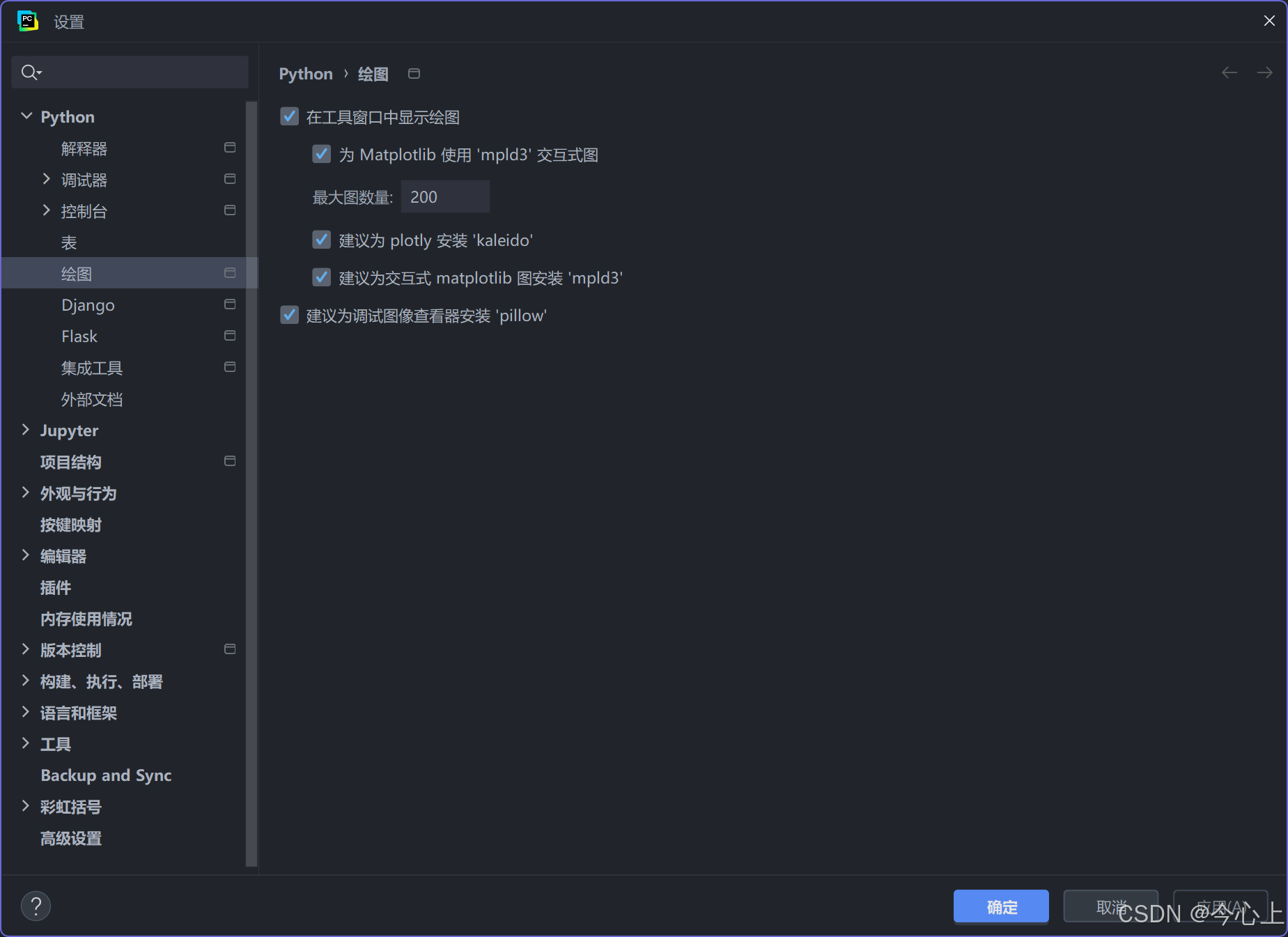
如果还是没有显示的话(一般来说之前显示图没问题的话这一步是不用设置的,并且如果全部都设置了还是无法显示就要考虑matplotlib和d2l的冲突了),就在以下设置需要打开:【不同的版本可能没有pillow那个,无需理会全部勾选就ok】
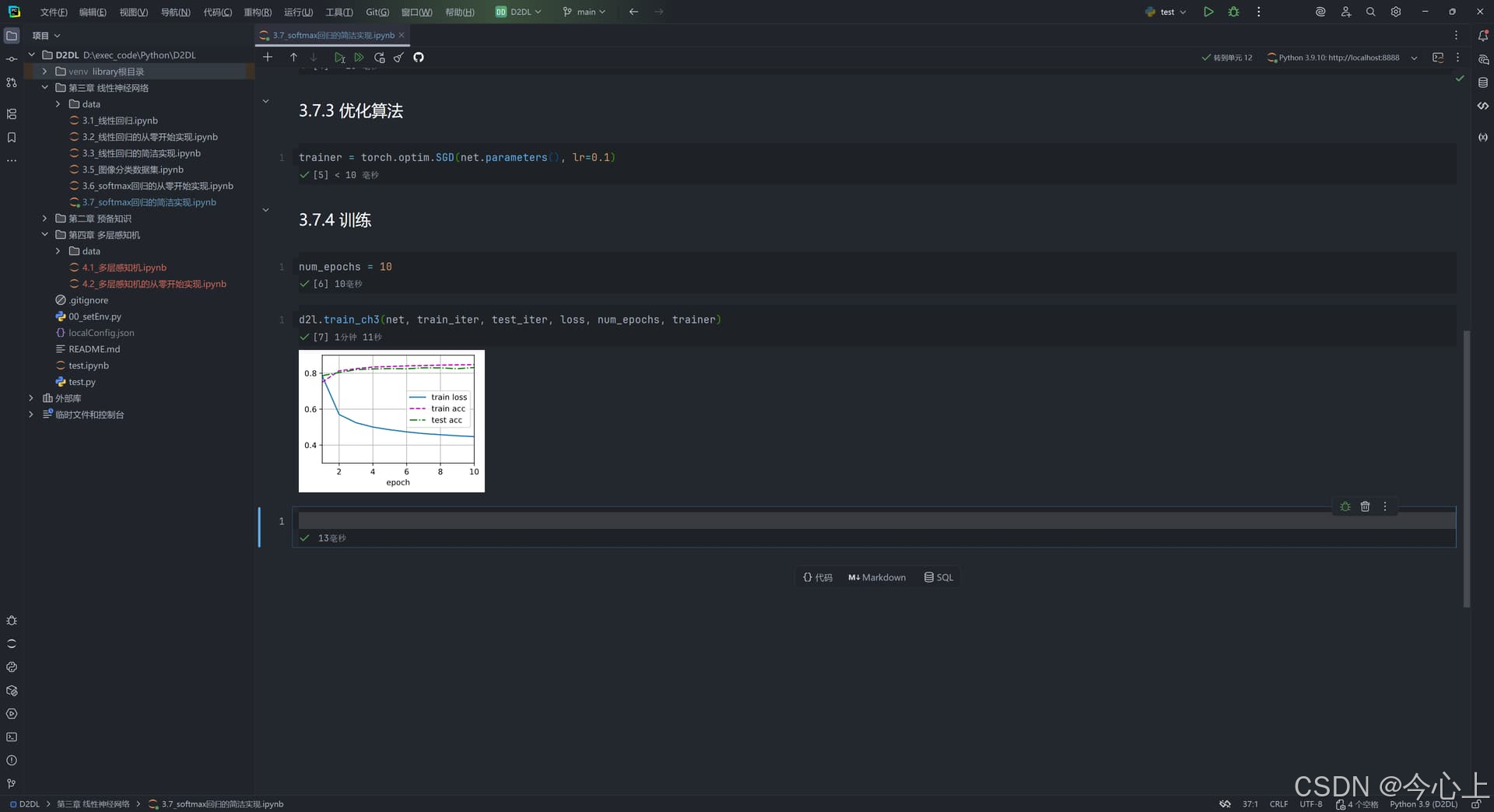
成功结果如下所示:
注:本文参考d2l参考书中Zhang_Xuhui同学的评论,并且贴主进行了一定的修改和优化