TF-M 是 Arm 为 Cortex-M23/M33/M55/M85 这类带 TrustZone 的 MCU 写的开源安全固件。它把 PSA 架构从白皮书变成了能跑的代码------安全启动、加密服务、安全存储、设备认证,全套都有。读完这篇你能理解 TF-M 为什么不是"又一个 RTOS",而是设备安全的底层地基。
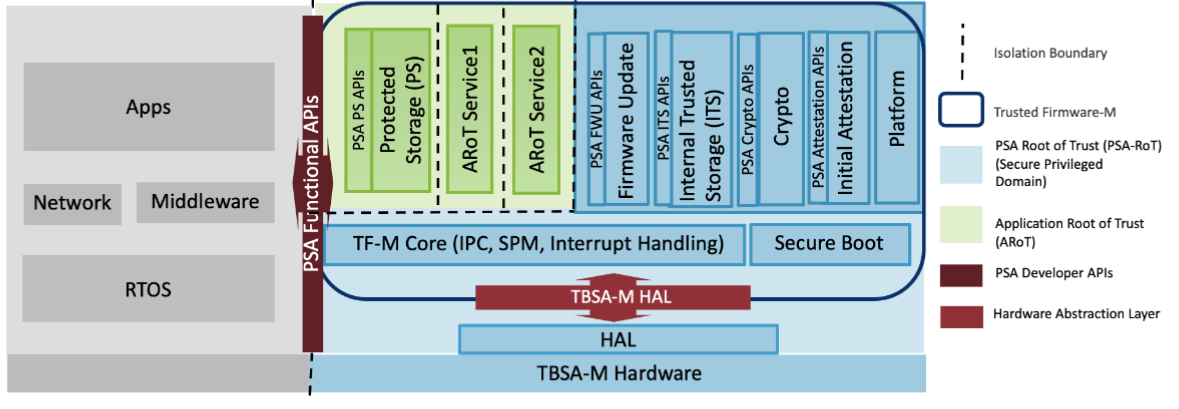
1. TF-M 解决什么问题
在 TF-M 之前,Cortex-M 上的安全靠的是"代码写好不出 bug"。如果固件里任何一个 buffer overflow 发生,密钥就可能泄露------Cortex-M0/M3/M4/M7 没有硬件强隔离,所有代码都在同一个世界里跑。
Arm 的做法是把 CPU 拆成两个世界:
- 安全世界:运行 TF-M 固件,掌管密钥、设备身份、安全存储。普通固件访问不到。
- 非安全世界:运行你的应用固件------门锁 UI、传感器采集、蓝牙协议栈。
两个世界通过硬件隔离。哪怕非安全世界的固件全盘被黑,攻击者也读不到安全世界里的密钥------因为 CPU 的 Memory Protection Controller 在硬件层面拦住了。
这个硬件隔离技术在 Cortex-A 上叫 TrustZone,在 Cortex-M 上叫 TrustZone for Cortex-M(Armv8-M 架构才有,对应 M23/M33/M55/M85)。
TF-M 就是安全世界里跑的那套固件。 它提供标准的安全服务接口,让非安全世界的应用通过 PSA API 调用加密、存储、认证等安全功能------应用不需要知道密钥怎么存的,只调用 psa_crypto_hash() 这种标准函数就行。
2. 硬件地基:TrustZone for Cortex-M 怎么拆开两个世界
Cortex-M33 的 TrustZone 不需要额外的 MMU 或 Hypervisor------它是通过内存地址空间的物理划分实现的。
2.1 三类内存区域
#mermaid-svg-i3sjLKh7em5jhbSX{font-family:"trebuchet ms",verdana,arial,sans-serif;font-size:16px;fill:#333;}@keyframes edge-animation-frame{from{stroke-dashoffset:0;}}@keyframes dash{to{stroke-dashoffset:0;}}#mermaid-svg-i3sjLKh7em5jhbSX .edge-animation-slow{stroke-dasharray:9,5!important;stroke-dashoffset:900;animation:dash 50s linear infinite;stroke-linecap:round;}#mermaid-svg-i3sjLKh7em5jhbSX .edge-animation-fast{stroke-dasharray:9,5!important;stroke-dashoffset:900;animation:dash 20s linear infinite;stroke-linecap:round;}#mermaid-svg-i3sjLKh7em5jhbSX .error-icon{fill:#552222;}#mermaid-svg-i3sjLKh7em5jhbSX .error-text{fill:#552222;stroke:#552222;}#mermaid-svg-i3sjLKh7em5jhbSX .edge-thickness-normal{stroke-width:1px;}#mermaid-svg-i3sjLKh7em5jhbSX .edge-thickness-thick{stroke-width:3.5px;}#mermaid-svg-i3sjLKh7em5jhbSX .edge-pattern-solid{stroke-dasharray:0;}#mermaid-svg-i3sjLKh7em5jhbSX .edge-thickness-invisible{stroke-width:0;fill:none;}#mermaid-svg-i3sjLKh7em5jhbSX .edge-pattern-dashed{stroke-dasharray:3;}#mermaid-svg-i3sjLKh7em5jhbSX .edge-pattern-dotted{stroke-dasharray:2;}#mermaid-svg-i3sjLKh7em5jhbSX .marker{fill:#333333;stroke:#333333;}#mermaid-svg-i3sjLKh7em5jhbSX .marker.cross{stroke:#333333;}#mermaid-svg-i3sjLKh7em5jhbSX svg{font-family:"trebuchet ms",verdana,arial,sans-serif;font-size:16px;}#mermaid-svg-i3sjLKh7em5jhbSX p{margin:0;}#mermaid-svg-i3sjLKh7em5jhbSX .label{font-family:"trebuchet ms",verdana,arial,sans-serif;color:#333;}#mermaid-svg-i3sjLKh7em5jhbSX .cluster-label text{fill:#333;}#mermaid-svg-i3sjLKh7em5jhbSX .cluster-label span{color:#333;}#mermaid-svg-i3sjLKh7em5jhbSX .cluster-label span p{background-color:transparent;}#mermaid-svg-i3sjLKh7em5jhbSX .label text,#mermaid-svg-i3sjLKh7em5jhbSX span{fill:#333;color:#333;}#mermaid-svg-i3sjLKh7em5jhbSX .node rect,#mermaid-svg-i3sjLKh7em5jhbSX .node circle,#mermaid-svg-i3sjLKh7em5jhbSX .node ellipse,#mermaid-svg-i3sjLKh7em5jhbSX .node polygon,#mermaid-svg-i3sjLKh7em5jhbSX .node path{fill:#ECECFF;stroke:#9370DB;stroke-width:1px;}#mermaid-svg-i3sjLKh7em5jhbSX .rough-node .label text,#mermaid-svg-i3sjLKh7em5jhbSX .node .label text,#mermaid-svg-i3sjLKh7em5jhbSX .image-shape .label,#mermaid-svg-i3sjLKh7em5jhbSX .icon-shape .label{text-anchor:middle;}#mermaid-svg-i3sjLKh7em5jhbSX .node .katex path{fill:#000;stroke:#000;stroke-width:1px;}#mermaid-svg-i3sjLKh7em5jhbSX .rough-node .label,#mermaid-svg-i3sjLKh7em5jhbSX .node .label,#mermaid-svg-i3sjLKh7em5jhbSX .image-shape .label,#mermaid-svg-i3sjLKh7em5jhbSX .icon-shape .label{text-align:center;}#mermaid-svg-i3sjLKh7em5jhbSX .node.clickable{cursor:pointer;}#mermaid-svg-i3sjLKh7em5jhbSX .root .anchor path{fill:#333333!important;stroke-width:0;stroke:#333333;}#mermaid-svg-i3sjLKh7em5jhbSX .arrowheadPath{fill:#333333;}#mermaid-svg-i3sjLKh7em5jhbSX .edgePath .path{stroke:#333333;stroke-width:2.0px;}#mermaid-svg-i3sjLKh7em5jhbSX .flowchart-link{stroke:#333333;fill:none;}#mermaid-svg-i3sjLKh7em5jhbSX .edgeLabel{background-color:rgba(232,232,232, 0.8);text-align:center;}#mermaid-svg-i3sjLKh7em5jhbSX .edgeLabel p{background-color:rgba(232,232,232, 0.8);}#mermaid-svg-i3sjLKh7em5jhbSX .edgeLabel rect{opacity:0.5;background-color:rgba(232,232,232, 0.8);fill:rgba(232,232,232, 0.8);}#mermaid-svg-i3sjLKh7em5jhbSX .labelBkg{background-color:rgba(232, 232, 232, 0.5);}#mermaid-svg-i3sjLKh7em5jhbSX .cluster rect{fill:#ffffde;stroke:#aaaa33;stroke-width:1px;}#mermaid-svg-i3sjLKh7em5jhbSX .cluster text{fill:#333;}#mermaid-svg-i3sjLKh7em5jhbSX .cluster span{color:#333;}#mermaid-svg-i3sjLKh7em5jhbSX div.mermaidTooltip{position:absolute;text-align:center;max-width:200px;padding:2px;font-family:"trebuchet ms",verdana,arial,sans-serif;font-size:12px;background:hsl(80, 100%, 96.2745098039%);border:1px solid #aaaa33;border-radius:2px;pointer-events:none;z-index:100;}#mermaid-svg-i3sjLKh7em5jhbSX .flowchartTitleText{text-anchor:middle;font-size:18px;fill:#333;}#mermaid-svg-i3sjLKh7em5jhbSX rect.text{fill:none;stroke-width:0;}#mermaid-svg-i3sjLKh7em5jhbSX .icon-shape,#mermaid-svg-i3sjLKh7em5jhbSX .image-shape{background-color:rgba(232,232,232, 0.8);text-align:center;}#mermaid-svg-i3sjLKh7em5jhbSX .icon-shape p,#mermaid-svg-i3sjLKh7em5jhbSX .image-shape p{background-color:rgba(232,232,232, 0.8);padding:2px;}#mermaid-svg-i3sjLKh7em5jhbSX .icon-shape .label rect,#mermaid-svg-i3sjLKh7em5jhbSX .image-shape .label rect{opacity:0.5;background-color:rgba(232,232,232, 0.8);fill:rgba(232,232,232, 0.8);}#mermaid-svg-i3sjLKh7em5jhbSX .label-icon{display:inline-block;height:1em;overflow:visible;vertical-align:-0.125em;}#mermaid-svg-i3sjLKh7em5jhbSX .node .label-icon path{fill:currentColor;stroke:revert;stroke-width:revert;}#mermaid-svg-i3sjLKh7em5jhbSX :root{--mermaid-font-family:"trebuchet ms",verdana,arial,sans-serif;} PSA API call
SG instruction
Non-Secure Flash + SRAM
Secure Flash + SRAM
Non-Secure Callable NSC stub
芯片的 Flash 和 SRAM 在链接阶段就被分配到了安全和非安全区域的物理地址上。CPU 上电后默认在安全模式运行,初始化完成之后跳转到非安全世界执行应用代码。
安全世界的代码和数据,非安全世界的 CPU 完全访问不了------这个拦截是硬件做的(Implementation Defined Attribution Unit, IDAU + SAU)。
2.2 非安全世界怎么调安全世界的函数
不是直接调------直接跳转会触发 HardFault。
正确路径是:非安全世界的代码调用 PSA API 函数(如 psa_crypto_hash()),这个函数指向一段叫 Non-Secure Callable (NSC) 的代码。NSC 区域在安全 Flash 的最前面,它只包含一条 SG(Secure Gateway)指令------非安全世界只能看到这一条指令,调到这条指令后 CPU 自动切到安全模式,然后进入 TF-M 内部的 SPM(Secure Partition Manager)调度。
应用代码 → NSC 跳板 → SPM 调度 → 加密分区 → 返回结果 → NSC → 应用代码全程应用代码没有直接接触任何安全世界的密钥或内存。
3. TF-M 内部结构:SPM 管理的一群"分区"
TF-M 内部不是一个大而全的安全模块------它把安全功能拆成了独立的 Secure Partition,每个分区有自己的内存、栈和 ID。SPM 负责调度它们。
#mermaid-svg-b60ngTvLgsLexTBm{font-family:"trebuchet ms",verdana,arial,sans-serif;font-size:16px;fill:#333;}@keyframes edge-animation-frame{from{stroke-dashoffset:0;}}@keyframes dash{to{stroke-dashoffset:0;}}#mermaid-svg-b60ngTvLgsLexTBm .edge-animation-slow{stroke-dasharray:9,5!important;stroke-dashoffset:900;animation:dash 50s linear infinite;stroke-linecap:round;}#mermaid-svg-b60ngTvLgsLexTBm .edge-animation-fast{stroke-dasharray:9,5!important;stroke-dashoffset:900;animation:dash 20s linear infinite;stroke-linecap:round;}#mermaid-svg-b60ngTvLgsLexTBm .error-icon{fill:#552222;}#mermaid-svg-b60ngTvLgsLexTBm .error-text{fill:#552222;stroke:#552222;}#mermaid-svg-b60ngTvLgsLexTBm .edge-thickness-normal{stroke-width:1px;}#mermaid-svg-b60ngTvLgsLexTBm .edge-thickness-thick{stroke-width:3.5px;}#mermaid-svg-b60ngTvLgsLexTBm .edge-pattern-solid{stroke-dasharray:0;}#mermaid-svg-b60ngTvLgsLexTBm .edge-thickness-invisible{stroke-width:0;fill:none;}#mermaid-svg-b60ngTvLgsLexTBm .edge-pattern-dashed{stroke-dasharray:3;}#mermaid-svg-b60ngTvLgsLexTBm .edge-pattern-dotted{stroke-dasharray:2;}#mermaid-svg-b60ngTvLgsLexTBm .marker{fill:#333333;stroke:#333333;}#mermaid-svg-b60ngTvLgsLexTBm .marker.cross{stroke:#333333;}#mermaid-svg-b60ngTvLgsLexTBm svg{font-family:"trebuchet ms",verdana,arial,sans-serif;font-size:16px;}#mermaid-svg-b60ngTvLgsLexTBm p{margin:0;}#mermaid-svg-b60ngTvLgsLexTBm .label{font-family:"trebuchet ms",verdana,arial,sans-serif;color:#333;}#mermaid-svg-b60ngTvLgsLexTBm .cluster-label text{fill:#333;}#mermaid-svg-b60ngTvLgsLexTBm .cluster-label span{color:#333;}#mermaid-svg-b60ngTvLgsLexTBm .cluster-label span p{background-color:transparent;}#mermaid-svg-b60ngTvLgsLexTBm .label text,#mermaid-svg-b60ngTvLgsLexTBm span{fill:#333;color:#333;}#mermaid-svg-b60ngTvLgsLexTBm .node rect,#mermaid-svg-b60ngTvLgsLexTBm .node circle,#mermaid-svg-b60ngTvLgsLexTBm .node ellipse,#mermaid-svg-b60ngTvLgsLexTBm .node polygon,#mermaid-svg-b60ngTvLgsLexTBm .node path{fill:#ECECFF;stroke:#9370DB;stroke-width:1px;}#mermaid-svg-b60ngTvLgsLexTBm .rough-node .label text,#mermaid-svg-b60ngTvLgsLexTBm .node .label text,#mermaid-svg-b60ngTvLgsLexTBm .image-shape .label,#mermaid-svg-b60ngTvLgsLexTBm .icon-shape .label{text-anchor:middle;}#mermaid-svg-b60ngTvLgsLexTBm .node .katex path{fill:#000;stroke:#000;stroke-width:1px;}#mermaid-svg-b60ngTvLgsLexTBm .rough-node .label,#mermaid-svg-b60ngTvLgsLexTBm .node .label,#mermaid-svg-b60ngTvLgsLexTBm .image-shape .label,#mermaid-svg-b60ngTvLgsLexTBm .icon-shape .label{text-align:center;}#mermaid-svg-b60ngTvLgsLexTBm .node.clickable{cursor:pointer;}#mermaid-svg-b60ngTvLgsLexTBm .root .anchor path{fill:#333333!important;stroke-width:0;stroke:#333333;}#mermaid-svg-b60ngTvLgsLexTBm .arrowheadPath{fill:#333333;}#mermaid-svg-b60ngTvLgsLexTBm .edgePath .path{stroke:#333333;stroke-width:2.0px;}#mermaid-svg-b60ngTvLgsLexTBm .flowchart-link{stroke:#333333;fill:none;}#mermaid-svg-b60ngTvLgsLexTBm .edgeLabel{background-color:rgba(232,232,232, 0.8);text-align:center;}#mermaid-svg-b60ngTvLgsLexTBm .edgeLabel p{background-color:rgba(232,232,232, 0.8);}#mermaid-svg-b60ngTvLgsLexTBm .edgeLabel rect{opacity:0.5;background-color:rgba(232,232,232, 0.8);fill:rgba(232,232,232, 0.8);}#mermaid-svg-b60ngTvLgsLexTBm .labelBkg{background-color:rgba(232, 232, 232, 0.5);}#mermaid-svg-b60ngTvLgsLexTBm .cluster rect{fill:#ffffde;stroke:#aaaa33;stroke-width:1px;}#mermaid-svg-b60ngTvLgsLexTBm .cluster text{fill:#333;}#mermaid-svg-b60ngTvLgsLexTBm .cluster span{color:#333;}#mermaid-svg-b60ngTvLgsLexTBm div.mermaidTooltip{position:absolute;text-align:center;max-width:200px;padding:2px;font-family:"trebuchet ms",verdana,arial,sans-serif;font-size:12px;background:hsl(80, 100%, 96.2745098039%);border:1px solid #aaaa33;border-radius:2px;pointer-events:none;z-index:100;}#mermaid-svg-b60ngTvLgsLexTBm .flowchartTitleText{text-anchor:middle;font-size:18px;fill:#333;}#mermaid-svg-b60ngTvLgsLexTBm rect.text{fill:none;stroke-width:0;}#mermaid-svg-b60ngTvLgsLexTBm .icon-shape,#mermaid-svg-b60ngTvLgsLexTBm .image-shape{background-color:rgba(232,232,232, 0.8);text-align:center;}#mermaid-svg-b60ngTvLgsLexTBm .icon-shape p,#mermaid-svg-b60ngTvLgsLexTBm .image-shape p{background-color:rgba(232,232,232, 0.8);padding:2px;}#mermaid-svg-b60ngTvLgsLexTBm .icon-shape .label rect,#mermaid-svg-b60ngTvLgsLexTBm .image-shape .label rect{opacity:0.5;background-color:rgba(232,232,232, 0.8);fill:rgba(232,232,232, 0.8);}#mermaid-svg-b60ngTvLgsLexTBm .label-icon{display:inline-block;height:1em;overflow:visible;vertical-align:-0.125em;}#mermaid-svg-b60ngTvLgsLexTBm .node .label-icon path{fill:currentColor;stroke:revert;stroke-width:revert;}#mermaid-svg-b60ngTvLgsLexTBm :root{--mermaid-font-family:"trebuchet ms",verdana,arial,sans-serif;} SPM Secure Partition Manager
Scheduler and IPC
Crypto Partition
AES SHA ECC
Initial Attestation
Device Identity
Internal Trusted Storage
On-chip secure storage
Protected Storage
External Flash encrypted
3.1 Crypto Partition------加密服务
提供 PSA Crypto API 的全部操作:
| 功能 | 典型调用 |
|---|---|
| AES-CCM / AES-GCM | psa_cipher_encrypt() |
| SHA-256 / SHA-512 | psa_hash_compute() |
| ECDSA 签名/验签 | psa_sign_hash() / psa_verify_hash() |
| ECDH 密钥交换 | psa_key_agreement() |
| 真随机数 (TRNG) | psa_generate_random() |
底层可用 Mbed TLS 或 TinyCrypt 两个库。如果你芯片有硬件加密引擎(如 Telink TL321x 的 HW AES/HASH),TF-M 也支持注册硬件加速驱动。
3.2 Initial Attestation------设备身份证明
设备上电后生成一个签名的 token(IAT, Initial Attestation Token),包含:
- 设备唯一 ID(来自硬件)
- 固件度量值(启动过程中积累的哈希值)
- 安全声明(SW 组件清单和版本号)
这个 token 送给云端服务(如 IoT Core 或 Matter Fabric)验证后,云端才知道"这台设备是正品、固件没被改过"。这是 Matter 认证的一个核心要求。
3.3 Internal Trusted Storage (ITS)------片内安全存储
在 MCU 内部 Flash 的安全区域存储少量高价值数据(如设备密钥、配对信息)。非安全世界通过以下 API 访问:
c
psa_its_set(uid, data_length, p_data, create_flags);   // 写入
psa_its_get(uid, offset, data_length, p_data, &len);     // 读取
数据仅存在安全 Flash 中,非安全世界拿不到原始内容。
3.4 Protected Storage (PS)------片外加密存储
如果密钥或数据需要存到外部 SPI Flash(容量大但不可信的介质),PS 分区会对数据进行 AES-GCM 加密后再写入外部 Flash。即使攻击者把 SPI Flash 拆下来直接读,看到的也是密文。
4. TF-M 的启动过程------从 ROM 到安全世界的每一步
Application NS TF-M Secure MCUBoot NS ROM Boot Application NS TF-M Secure MCUBoot NS ROM Boot #mermaid-svg-4RDnSzaM5rTmX0ru{font-family:"trebuchet ms",verdana,arial,sans-serif;font-size:16px;fill:#333;}@keyframes edge-animation-frame{from{stroke-dashoffset:0;}}@keyframes dash{to{stroke-dashoffset:0;}}#mermaid-svg-4RDnSzaM5rTmX0ru .edge-animation-slow{stroke-dasharray:9,5!important;stroke-dashoffset:900;animation:dash 50s linear infinite;stroke-linecap:round;}#mermaid-svg-4RDnSzaM5rTmX0ru .edge-animation-fast{stroke-dasharray:9,5!important;stroke-dashoffset:900;animation:dash 20s linear infinite;stroke-linecap:round;}#mermaid-svg-4RDnSzaM5rTmX0ru .error-icon{fill:#552222;}#mermaid-svg-4RDnSzaM5rTmX0ru .error-text{fill:#552222;stroke:#552222;}#mermaid-svg-4RDnSzaM5rTmX0ru .edge-thickness-normal{stroke-width:1px;}#mermaid-svg-4RDnSzaM5rTmX0ru .edge-thickness-thick{stroke-width:3.5px;}#mermaid-svg-4RDnSzaM5rTmX0ru .edge-pattern-solid{stroke-dasharray:0;}#mermaid-svg-4RDnSzaM5rTmX0ru .edge-thickness-invisible{stroke-width:0;fill:none;}#mermaid-svg-4RDnSzaM5rTmX0ru .edge-pattern-dashed{stroke-dasharray:3;}#mermaid-svg-4RDnSzaM5rTmX0ru .edge-pattern-dotted{stroke-dasharray:2;}#mermaid-svg-4RDnSzaM5rTmX0ru .marker{fill:#333333;stroke:#333333;}#mermaid-svg-4RDnSzaM5rTmX0ru .marker.cross{stroke:#333333;}#mermaid-svg-4RDnSzaM5rTmX0ru svg{font-family:"trebuchet ms",verdana,arial,sans-serif;font-size:16px;}#mermaid-svg-4RDnSzaM5rTmX0ru p{margin:0;}#mermaid-svg-4RDnSzaM5rTmX0ru .actor{stroke:hsl(259.6261682243, 59.7765363128%, 87.9019607843%);fill:#ECECFF;}#mermaid-svg-4RDnSzaM5rTmX0ru text.actor>tspan{fill:black;stroke:none;}#mermaid-svg-4RDnSzaM5rTmX0ru .actor-line{stroke:hsl(259.6261682243, 59.7765363128%, 87.9019607843%);}#mermaid-svg-4RDnSzaM5rTmX0ru .innerArc{stroke-width:1.5;stroke-dasharray:none;}#mermaid-svg-4RDnSzaM5rTmX0ru .messageLine0{stroke-width:1.5;stroke-dasharray:none;stroke:#333;}#mermaid-svg-4RDnSzaM5rTmX0ru .messageLine1{stroke-width:1.5;stroke-dasharray:2,2;stroke:#333;}#mermaid-svg-4RDnSzaM5rTmX0ru #arrowhead path{fill:#333;stroke:#333;}#mermaid-svg-4RDnSzaM5rTmX0ru .sequenceNumber{fill:white;}#mermaid-svg-4RDnSzaM5rTmX0ru #sequencenumber{fill:#333;}#mermaid-svg-4RDnSzaM5rTmX0ru #crosshead path{fill:#333;stroke:#333;}#mermaid-svg-4RDnSzaM5rTmX0ru .messageText{fill:#333;stroke:none;}#mermaid-svg-4RDnSzaM5rTmX0ru .labelBox{stroke:hsl(259.6261682243, 59.7765363128%, 87.9019607843%);fill:#ECECFF;}#mermaid-svg-4RDnSzaM5rTmX0ru .labelText,#mermaid-svg-4RDnSzaM5rTmX0ru .labelText>tspan{fill:black;stroke:none;}#mermaid-svg-4RDnSzaM5rTmX0ru .loopText,#mermaid-svg-4RDnSzaM5rTmX0ru .loopText>tspan{fill:black;stroke:none;}#mermaid-svg-4RDnSzaM5rTmX0ru .loopLine{stroke-width:2px;stroke-dasharray:2,2;stroke:hsl(259.6261682243, 59.7765363128%, 87.9019607843%);fill:hsl(259.6261682243, 59.7765363128%, 87.9019607843%);}#mermaid-svg-4RDnSzaM5rTmX0ru .note{stroke:#aaaa33;fill:#fff5ad;}#mermaid-svg-4RDnSzaM5rTmX0ru .noteText,#mermaid-svg-4RDnSzaM5rTmX0ru .noteText>tspan{fill:black;stroke:none;}#mermaid-svg-4RDnSzaM5rTmX0ru .activation0{fill:#f4f4f4;stroke:#666;}#mermaid-svg-4RDnSzaM5rTmX0ru .activation1{fill:#f4f4f4;stroke:#666;}#mermaid-svg-4RDnSzaM5rTmX0ru .activation2{fill:#f4f4f4;stroke:#666;}#mermaid-svg-4RDnSzaM5rTmX0ru .actorPopupMenu{position:absolute;}#mermaid-svg-4RDnSzaM5rTmX0ru .actorPopupMenuPanel{position:absolute;fill:#ECECFF;box-shadow:0px 8px 16px 0px rgba(0,0,0,0.2);filter:drop-shadow(3px 5px 2px rgb(0 0 0 / 0.4));}#mermaid-svg-4RDnSzaM5rTmX0ru .actor-man line{stroke:hsl(259.6261682243, 59.7765363128%, 87.9019607843%);fill:#ECECFF;}#mermaid-svg-4RDnSzaM5rTmX0ru .actor-man circle,#mermaid-svg-4RDnSzaM5rTmX0ru line{stroke:hsl(259.6261682243, 59.7765363128%, 87.9019607843%);fill:#ECECFF;stroke-width:2px;}#mermaid-svg-4RDnSzaM5rTmX0ru :root{--mermaid-font-family:"trebuchet ms",verdana,arial,sans-serif;} Verify and load MCUBootVerify TF-M sig, load to Secure FlashSPM init partitionsVerify App sig, jump to NSPSA API call secure service
关键点:
- TF-M 的代码和密钥在第一步就被加载到安全 Flash 中,之后的任何验证都在安全世界内进行
- 非安全世界的 App 永远无法直接访问 TF-M 的 RAM
- 如果 App 的签名验证失败,TF-M 不会跳转------设备停留在安全世界
5. TF-M 和 zephyr/secure boot 的关系
ROM Boot
  │
  └→ MCUBoot 验证 TF-M 固件 (Second Stage)
       │
       └→ TF-M 启动(安全世界)
            │
            └→ TF-M 验证 Application 固件
                 │
                 └→ Application(非安全世界)
MCUBoot 负责验证,TF-M 负责运行时的安全服务。它们是同一链路的不同阶段:
| 组件 | 职责 | 运行世界 |
|---|---|---|
| MCUBoot | 签名验证 + 固件切换 | 非安全世界 |
| TF-M | 加密 / 存储 / 认证 / 生命周期管理 | 安全世界 |
| Application | 业务逻辑 | 非安全世界 |
TF-M 的签名时间优化(硬件 Hash、升频等)------那些优化就是针对 TF-M 固件验签这个阶段的。
6. 最后
6.1 五个要点
- TF-M 是 Arm 为 Cortex-M TrustZone 写的开源安全固件。不是 RTOS,是一个安全处理环境(SPE)。
- 它把 CPU 拆成安全/非安全两个世界。通过内存物理隔离+SG 指令实现,不是软件虚拟出来的。
- 内部用 SPM 调度独立的安全分区------加密、存储、认证都互不干扰。一个分区的 bug 不会拖垮另一个。
- 非安全世界通过 PSA 标准 API 调用安全服务。应用代码不需要知道密钥在哪。
- MCUBoot 验签、TF-M 运行、App 做业务------这是标准的 PSA 三级启动链路。