使用 uni-popup 实现数据选择器Data-Picker
将 uni-popup 作为底部弹出面板,内部放置可滚动的选择列表,点击选项后关闭弹窗并回传数据。
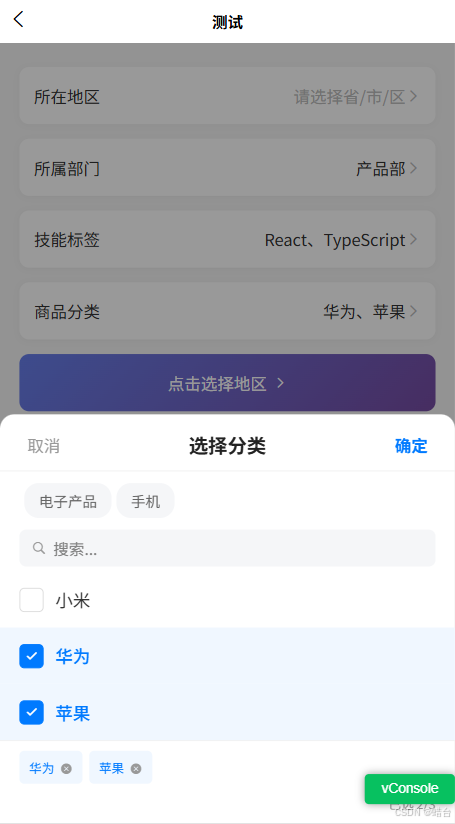
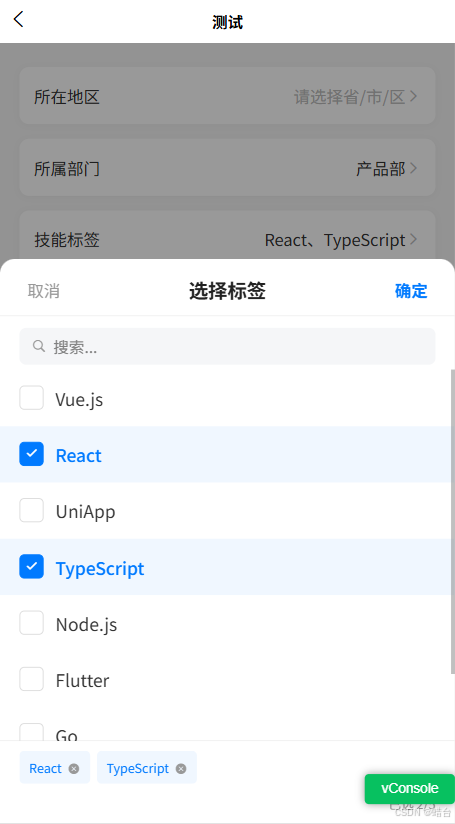
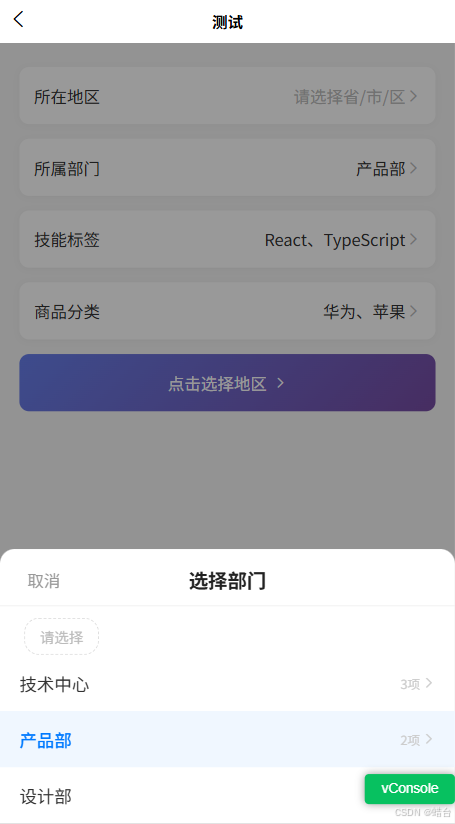
1.单选数据选择
Vue
<template>
  <view class="page">
    <!-- 触发区域 -->
    <view class="selector" @click="openPicker">
      <text class="selector-label">选择城市</text>
      <text class="selector-value" :class="{ placeholder: !selectedCity }">
        {{ selectedCity || '请选择城市' }}
      </text>
      <uni-icons type="right" size="16" color="#999" />
    </view>

    <!-- 弹窗 -->
    <uni-popup ref="popup" type="bottom" :is-mask-click="true" @change="onPopupChange">
      <view class="popup-content">
        <!-- 标题栏 -->
        <view class="popup-header">
          <text class="popup-title">选择城市</text>
          <view class="popup-close" @click="closePicker">
            <uni-icons type="closeempty" size="20" color="#999" />
          </view>
        </view>

        <!-- 搜索框 -->
        <view class="search-bar">
          <uni-icons type="search" size="16" color="#999" />
          <input
            class="search-input"
            v-model="keyword"
            placeholder="搜索..."
            :adjust-position="false"
          />
          <view v-if="keyword" class="search-clear" @click="keyword = ''">
            <uni-icons type="clear" size="16" color="#ccc" />
          </view>
        </view>

        <!-- 选项列表 -->
        <scroll-view class="option-list" scroll-y :scroll-into-view="scrollTarget">
          <view
            v-for="item in filteredList"
            :key="item.value"
            class="option-item"
            :class="{ active: selectedCity === item.label }"
            @click="onSelect(item)"
          >
            <text class="option-text">{{ item.label }}</text>
            <uni-icons
              v-if="selectedCity === item.label"
              type="checkmarkempty"
              size="18"
              color="#007AFF"
            />
          </view>

          <!-- 空状态 -->
          <view v-if="filteredList.length === 0" class="empty-state">
            <text class="empty-text">没有匹配的选项</text>
          </view>
        </scroll-view>
      </view>
    </uni-popup>
  </view>
</template>

<script>
export default {
  data() {
    return {
      selectedCity: '',
      keyword: '',
      scrollTarget: '',
      cityList: [
        { label: '北京', value: 'beijing' },
        { label: '上海', value: 'shanghai' },
        { label: '广州', value: 'guangzhou' },
        { label: '深圳', value: 'shenzhen' },
        { label: '杭州', value: 'hangzhou' },
        { label: '成都', value: 'chengdu' },
        { label: '武汉', value: 'wuhan' },
        { label: '南京', value: 'nanjing' },
        { label: '西安', value: 'xian' },
        { label: '重庆', value: 'chongqing' },
        { label: '苏州', value: 'suzhou' },
        { label: '天津', value: 'tianjin' },
        { label: '长沙', value: 'changsha' },
        { label: '郑州', value: 'zhengzhou' },
        { label: '青岛', value: 'qingdao' }
      ]
    }
  },

  computed: {
    filteredList() {
      if (!this.keyword) return this.cityList
      const kw = this.keyword.toLowerCase()
      return this.cityList.filter(item =>
        item.label.toLowerCase().includes(kw) ||
        item.value.toLowerCase().includes(kw)
      )
    }
  },

  methods: {
    openPicker() {
      this.keyword = ''
      this.$refs.popup.open()
    },

    closePicker() {
      this.$refs.popup.close()
    },

    onSelect(item) {
      this.selectedCity = item.label
      this.$refs.popup.close()
      this.$emit('change', item)
      console.log('已选择:', item)
    },

    onPopupChange(e) {
      // e.show: true=打开, false=关闭
      if (!e.show) {
        this.keyword = ''
      }
    }
  }
}
</script>

<style scoped>
.page {
  min-height: 100vh;
  background: #f5f5f5;
  padding: 40rpx 32rpx;
}

/* ── 触发选择器 ── */
.selector {
  display: flex;
  align-items: center;
  background: #fff;
  border-radius: 16rpx;
  padding: 28rpx 24rpx;
  box-shadow: 0 2rpx 12rpx rgba(0, 0, 0, 0.04);
}
.selector-label {
  font-size: 28rpx;
  color: #333;
  margin-right: 24rpx;
  white-space: nowrap;
}
.selector-value {
  flex: 1;
  font-size: 28rpx;
  color: #333;
  text-align: right;
}
.selector-value.placeholder {
  color: #bbb;
}

/* ── 弹窗内容 ── */
.popup-content {
  background: #fff;
  border-radius: 24rpx 24rpx 0 0;
  max-height: 75vh;
  display: flex;
  flex-direction: column;
  overflow: hidden;
}

.popup-header {
  display: flex;
  align-items: center;
  justify-content: space-between;
  padding: 32rpx 32rpx 16rpx;
  border-bottom: 1rpx solid #f0f0f0;
}
.popup-title {
  font-size: 32rpx;
  font-weight: 600;
  color: #222;
}
.popup-close {
  padding: 8rpx;
}

/* ── 搜索栏 ── */
.search-bar {
  display: flex;
  align-items: center;
  margin: 16rpx 32rpx 8rpx;
  padding: 16rpx 20rpx;
  background: #f5f6f8;
  border-radius: 12rpx;
}
.search-input {
  flex: 1;
  font-size: 26rpx;
  color: #333;
  margin-left: 12rpx;
}
.search-clear {
  padding: 4rpx;
}

/* ── 选项列表 ── */
.option-list {
  flex: 1;
  padding: 8rpx 0 calc(env(safe-area-inset-bottom) + 16rpx);
  max-height: 55vh;
}
.option-item {
  display: flex;
  align-items: center;
  justify-content: space-between;
  padding: 28rpx 32rpx;
  transition: background 0.15s;
}
.option-item:active {
  background: #f5f5f5;
}
.option-item.active {
  background: #f0f7ff;
}
.option-text {
  font-size: 30rpx;
  color: #333;
}
.option-item.active .option-text {
  color: #007AFF;
  font-weight: 500;
}

/* ── 空状态 ── */
.empty-state {
  padding: 80rpx 0;
  text-align: center;
}
.empty-text {
  font-size: 26rpx;
  color: #bbb;
}
</style>
2.多选数据选择
在单选基础上,改用数组维护选中状态,增加"确定"按钮:
vue
<template>
  <view class="page">
    <view class="selector" @click="openPicker">
      <text class="selector-label">选择标签</text>
      <view class="tags-wrap">
        <view v-if="selectedTags.length === 0" class="placeholder">请选择标签</view>
        <view v-for="tag in selectedTags" :key="tag" class="tag-chip">{{ tag }}</view>
      </view>
      <uni-icons type="right" size="16" color="#999" />
    </view>

    <uni-popup ref="popup" type="bottom" :is-mask-click="true">
      <view class="popup-content">
        <view class="popup-header">
          <text class="popup-action" @click="closePicker">取消</text>
          <text class="popup-title">选择标签</text>
          <text class="popup-action confirm" @click="confirmMulti">确定</text>
        </view>

        <!-- 已选数量提示 -->
        <view class="selected-count" v-if="tempSelected.length > 0">
          已选 {{ tempSelected.length }} 项
        </view>

        <scroll-view class="option-list" scroll-y>
          <view
            v-for="item in tagList"
            :key="item.value"
            class="option-item"
            :class="{ active: tempSelected.includes(item.value) }"
            @click="toggleItem(item.value)"
          >
            <view class="option-left">
              <view class="checkbox" :class="{ checked: tempSelected.includes(item.value) }">
                <uni-icons
                  v-if="tempSelected.includes(item.value)"
                  type="checkmarkempty"
                  size="14"
                  color="#fff"
                />
              </view>
              <text class="option-text">{{ item.label }}</text>
            </view>
          </view>
        </scroll-view>
      </view>
    </uni-popup>
  </view>
</template>

<script>
export default {
  data() {
    return {
      selectedTags: [],      // 最终选中
      tempSelected: [],      // 弹窗内临时选中
      tagList: [
        { label: '前端开发', value: 'frontend' },
        { label: '后端开发', value: 'backend' },
        { label: 'UI 设计', value: 'ui' },
        { label: '产品经理', value: 'pm' },
        { label: '数据分析', value: 'data' },
        { label: '人工智能', value: 'ai' },
        { label: '运维部署', value: 'devops' },
        { label: '测试质量', value: 'qa' }
      ]
    }
  },

  methods: {
    openPicker() {
      // 打开时拷贝一份当前选中状态,用于临时编辑
      this.tempSelected = [...this.selectedTags]
      this.$refs.popup.open()
    },

    closePicker() {
      this.$refs.popup.close()
    },

    toggleItem(value) {
      const idx = this.tempSelected.indexOf(value)
      if (idx > -1) {
        this.tempSelected.splice(idx, 1)
      } else {
        this.tempSelected.push(value)
      }
    },

    confirmMulti() {
      this.selectedTags = [...this.tempSelected]
      this.$refs.popup.close()

      // 回传完整选中对象
      const result = this.tagList.filter(item =>
        this.selectedTags.includes(item.value)
      )
      this.$emit('change', result)
      console.log('已选择:', result)
    }
  }
}
</script>

<style scoped>
/* 复用上面的基础样式,额外增加: */

.tags-wrap {
  flex: 1;
  display: flex;
  flex-wrap: wrap;
  gap: 12rpx;
  justify-content: flex-end;
  margin-right: 16rpx;
}
.tag-chip {
  font-size: 22rpx;
  color: #007AFF;
  background: #ecf5ff;
  border-radius: 8rpx;
  padding: 6rpx 16rpx;
}

.popup-action {
  font-size: 28rpx;
  color: #999;
  padding: 8rpx;
}
.popup-action.confirm {
  color: #007AFF;
  font-weight: 600;
}

.selected-count {
  font-size: 24rpx;
  color: #007AFF;
  padding: 12rpx 32rpx 0;
}

.option-left {
  display: flex;
  align-items: center;
  gap: 20rpx;
}

.checkbox {
  width: 40rpx;
  height: 40rpx;
  border: 3rpx solid #ddd;
  border-radius: 8rpx;
  display: flex;
  align-items: center;
  justify-content: center;
  transition: all 0.2s;
}
.checkbox.checked {
  background: #007AFF;
  border-color: #007AFF;
}
</style>
3. 封装成通用组件 PopupPicker.vue
把以上逻辑抽成可复用组件,通过 props 控制行为:
vue
<!-- components/PopupPicker.vue -->
<template>
  <view>
    <!-- 插槽:自定义触发器 -->
    <view @click="open">
      <slot :selected="displayLabel">
        <view class="default-trigger">
          <text :class="{ placeholder: !displayLabel }">
            {{ displayLabel || placeholder }}
          </text>
          <uni-icons type="right" size="16" color="#bbb" />
        </view>
      </slot>
    </view>

    <uni-popup ref="popup" type="bottom" :is-mask-click="maskClose" @change="$emit('popup-change', $event)">
      <view class="picker-panel">
        <!-- 头部 -->
        <view class="picker-header">
          <text v-if="multiple" class="picker-btn" @click="close">取消</text>
          <text class="picker-title">{{ title }}</text>
          <text v-if="multiple" class="picker-btn confirm" @click="confirm">确定</text>
          <view v-else style="width: 80rpx" />
        </view>

        <!-- 搜索 -->
        <view v-if="searchable" class="picker-search">
          <uni-icons type="search" size="16" color="#999" />
          <input class="picker-search-input" v-model="keyword" placeholder="搜索..." />
        </view>

        <!-- 列表 -->
        <scroll-view class="picker-list" scroll-y>
          <view
            v-for="item in filtered"
            :key="item[valueKey]"
            class="picker-item"
            :class="{ active: isActive(item[valueKey]) }"
            @click="handleTap(item)"
          >
            <view v-if="multiple" class="cb" :class="{ on: isActive(item[valueKey]) }">
              <uni-icons v-if="isActive(item[valueKey])" type="checkmarkempty" size="13" color="#fff" />
            </view>
            <text class="picker-item-text">{{ item[labelKey] }}</text>
            <uni-icons v-if="!multiple && isActive(item[valueKey])" type="checkmarkempty" size="18" color="#007AFF" />
          </view>
          <view v-if="filtered.length === 0" class="picker-empty">
            <text>暂无数据</text>
          </view>
        </scroll-view>
      </view>
    </uni-popup>
  </view>
</template>

<script>
export default {
  name: 'PopupPicker',

  props: {
    // 数据源
    options: { type: Array, default: () => [] },
    // 字段映射
    labelKey: { type: String, default: 'label' },
    valueKey: { type: String, default: 'value' },
    // 标题
    title: { type: String, default: '请选择' },
    // 占位文字
    placeholder: { type: String, default: '请选择' },
    // 是否多选
    multiple: { type: Boolean, default: false },
    // 是否可搜索
    searchable: { type: Boolean, default: false },
    // 点击遮罩关闭
    maskClose: { type: Boolean, default: true },
    // 已选中的值(v-model)
    value: { type: [String, Number, Array], default: '' },
    // 最大选择数(仅多选)
    max: { type: Number, default: Infinity }
  },

  data() {
    return {
      keyword: '',
      tempValue: ''
    }
  },

  computed: {
    filtered() {
      if (!this.keyword) return this.options
      const kw = this.keyword.toLowerCase()
      return this.options.filter(item =>
        String(item[this.labelKey]).toLowerCase().includes(kw)
      )
    },

    displayLabel() {
      if (this.multiple && Array.isArray(this.value)) {
        return this.options
          .filter(item => this.value.includes(item[this.valueKey]))
          .map(item => item[this.labelKey])
          .join('、')
      }
      const found = this.options.find(item => item[this.valueKey] === this.value)
      return found ? found[this.labelKey] : ''
    }
  },

  methods: {
    open() {
      this.keyword = ''
      this.tempValue = this.multiple ? [...(this.value || [])] : this.value
      this.$refs.popup.open()
    },

    close() {
      this.$refs.popup.close()
    },

    isActive(val) {
      return this.multiple
        ? Array.isArray(this.tempValue) && this.tempValue.includes(val)
        : this.tempValue === val
    },

    handleTap(item) {
      const val = item[this.valueKey]
      if (this.multiple) {
        const idx = this.tempValue.indexOf(val)
        if (idx > -1) {
          this.tempValue.splice(idx, 1)
        } else if (this.tempValue.length < this.max) {
          this.tempValue.push(val)
        }
      } else {
        this.tempValue = val
        this.$emit('input', val)
        this.$emit('change', item)
        this.close()
      }
    },

    confirm() {
      this.$emit('input', [...this.tempValue])
      const selected = this.options.filter(item =>
        this.tempValue.includes(item[this.valueKey])
      )
      this.$emit('change', selected)
      this.close()
    }
  }
}
</script>

<style scoped>
.picker-panel {
  background: #fff;
  border-radius: 24rpx 24rpx 0 0;
  max-height: 75vh;
  display: flex;
  flex-direction: column;
}
.picker-header {
  display: flex;
  align-items: center;
  justify-content: space-between;
  padding: 28rpx 32rpx 20rpx;
  border-bottom: 1rpx solid #f0f0f0;
}
.picker-title {
  font-size: 32rpx;
  font-weight: 600;
  color: #222;
}
.picker-btn {
  font-size: 28rpx;
  color: #999;
  min-width: 80rpx;
  text-align: center;
}
.picker-btn.confirm {
  color: #007AFF;
  font-weight: 600;
}

.picker-search {
  display: flex;
  align-items: center;
  margin: 16rpx 32rpx;
  padding: 14rpx 20rpx;
  background: #f5f6f8;
  border-radius: 12rpx;
}
.picker-search-input {
  flex: 1;
  font-size: 26rpx;
  margin-left: 12rpx;
}

.picker-list {
  flex: 1;
  max-height: 50vh;
  padding-bottom: env(safe-area-inset-bottom);
}
.picker-item {
  display: flex;
  align-items: center;
  justify-content: space-between;
  padding: 26rpx 32rpx;
}
.picker-item:active {
  background: #f8f8f8;
}
.picker-item.active {
  background: #f0f7ff;
}
.picker-item-text {
  flex: 1;
  font-size: 30rpx;
  color: #333;
}
.picker-item.active .picker-item-text {
  color: #007AFF;
}

.cb {
  width: 38rpx;
  height: 38rpx;
  border: 2rpx solid #ddd;
  border-radius: 8rpx;
  margin-right: 20rpx;
  display: flex;
  align-items: center;
  justify-content: center;
}
.cb.on {
  background: #007AFF;
  border-color: #007AFF;
}

.default-trigger {
  display: flex;
  align-items: center;
  justify-content: space-between;
  background: #fff;
  border-radius: 16rpx;
  padding: 28rpx 24rpx;
  font-size: 28rpx;
  color: #333;
}
.default-trigger .placeholder {
  color: #bbb;
}

.picker-empty {
  padding: 80rpx 0;
  text-align: center;
  font-size: 26rpx;
  color: #bbb;
}
</style>
4. 兼容级联选择
vue
<!-- components/PopupPicker.vue -->
<template>
  <view>
    <!-- 触发器插槽 -->
    <view @click="open">
      <slot :selected="displayLabel" :selectedPath="displayPath">
        <view class="trigger">
          <text class="trigger-label" v-if="label">{{ label }}</text>
          <text class="trigger-value" :class="{ placeholder: !displayLabel }">
            {{ displayLabel || placeholder }}
          </text>
          <uni-icons type="right" size="16" color="#bbb" />
        </view>
      </slot>
    </view>

    <!-- 弹窗 -->
    <uni-popup ref="popup" type="bottom" :is-mask-click="maskClose">
      <view class="panel">
        <!-- 头部 -->
        <view class="panel-header">
          <text class="header-btn" @click="close">取消</text>
          <text class="header-title">{{ title }}</text>
          <text
            class="header-btn confirm"
            :class="{ disabled: !canConfirm }"
            @click="confirm"
          >
            {{ multiple ? '确定' : '' }}
          </text>
        </view>

        <!-- 面包屑标签栏(多级时显示) -->
        <view class="breadcrumb" v-if="isTree">
          <view
            v-for="(tab, idx) in tabs"
            :key="idx"
            class="crumb"
            :class="{ active: currentLevel === idx }"
            @click="switchLevel(idx)"
          >
            <text class="crumb-text">{{ tab }}</text>
          </view>
          <!-- 当前级未选时的占位标签 -->
          <view class="crumb placeholder-crumb" v-if="!isLastLevel">
            <text class="crumb-text">请选择</text>
          </view>
        </view>

        <!-- 搜索栏 -->
        <view class="search-bar" v-if="searchable">
          <uni-icons type="search" size="16" color="#999" />
          <input
            class="search-input"
            v-model="keyword"
            placeholder="搜索..."
            :adjust-position="false"
          />
          <view v-if="keyword" @click="keyword = ''">
            <uni-icons type="clear" size="16" color="#ccc" />
          </view>
        </view>

        <!-- 选项列表 -->
        <scroll-view class="list" scroll-y scroll-with-animation>
          <view
            v-for="item in displayList"
            :key="item[valueKey]"
            class="list-item"
            :class="{ active: isItemActive(item) }"
            @click="handleTap(item)"
          >
            <view class="item-left">
              <!-- 多选模式复选框 -->
              <view v-if="showCheckbox(item)" class="checkbox" :class="{ on: isItemActive(item) }">
                <uni-icons v-if="isItemActive(item)" type="checkmarkempty" size="13" color="#fff" />
              </view>
              <text class="item-text">{{ item[labelKey] }}</text>
            </view>

            <view class="item-right">
              <!-- 单选勾选 -->
              <uni-icons
                v-if="!multiple && !hasChildren(item) && isItemActive(item)"
                type="checkmarkempty"
                size="18"
                color="#007AFF"
              />
              <!-- 子级箭头 -->
              <view v-if="hasChildren(item)" class="child-badge">
                <text class="child-count">{{ item.children.length }}项</text>
                <uni-icons type="right" size="14" color="#ccc" />
              </view>
            </view>
          </view>

          <!-- 空状态 -->
          <view v-if="displayList.length === 0" class="empty">
            <text class="empty-text">暂无数据</text>
          </view>
        </scroll-view>

        <!-- 底部已选摘要(多选模式) -->
        <view class="footer" v-if="multiple && tempSelected.length > 0">
          <view class="footer-tags">
            <view
              v-for="(tag, idx) in selectedDisplayList"
              :key="idx"
              class="footer-tag"
            >
              <text class="footer-tag-text">{{ tag }}</text>
              <view @click.stop="removeSelected(idx)">
                <uni-icons type="clear" size="14" color="#999" />
              </view>
            </view>
          </view>
          <view class="footer-count">
            <text class="count-text">已选 {{ tempSelected.length }}{{ max < Infinity ? '/' + max : '' }}</text>
          </view>
        </view>
      </view>
    </uni-popup>
  </view>
</template>

<script>
export default {
  name: 'PopupPicker',

  props: {
    // ── 数据 ──
    options: { type: Array, default: () => [] },
    labelKey: { type: String, default: 'label' },
    valueKey: { type: String, default: 'value' },
    childrenKey: { type: String, default: 'children' },

    // ── 显示 ──
    title: { type: String, default: '请选择' },
    label: { type: String, default: '' },
    placeholder: { type: String, default: '请选择' },
    searchable: { type: Boolean, default: false },
    maskClose: { type: Boolean, default: true },

    // ── 选择模式 ──
    multiple: { type: Boolean, default: false },
    max: { type: Number, default: Infinity },

    // ── 多级控制 ──
    // 是否允许选择非叶子节点(有子级的节点)
    selectParent: { type: Boolean, default: false },
    // 固定选择到第几级(从0开始),默认自动到叶子节点
    maxLevel: { type: Number, default: -1 },

    // ── v-model ──
    // 单选: String/Number(叶子节点的 value)
    // 多选: Array
    // 级联回传路径: Array(从根到叶子的 value 路径)
    value: { type: [String, Number, Array], default: '' },

    // ── 返回模式 ──
    // 'leaf'   - 返回叶子节点的 value(默认)
    // 'path'   - 返回整条路径的 value 数组 [省, 市, 区]
    // 'object' - 返回完整路径对象数组
    resultType: { type: String, default: 'leaf' }
  },

  data() {
    return {
      keyword: '',
      currentLevel: 0,           // 当前浏览的层级
      pathStack: [],              // 已选的祖先节点栈 [{item, children}]
      tempSelected: [],           // 多选临时存储
      tempPath: []                // 单选临时路径
    }
  },

  computed: {
    // 判断数据是否为树结构
    isTree() {
      if (!this.options.length) return false
      return this.options.some(item =>
        item[this.childrenKey] && item[this.childrenKey].length > 0
      ) || this.pathStack.length > 0
    },

    // 当前展示的列表
    currentChildren() {
      if (this.pathStack.length === 0) return this.options
      const last = this.pathStack[this.pathStack.length - 1]
      return last.item[this.childrenKey] || []
    },

    // 搜索过滤后的列表
    displayList() {
      if (!this.keyword) return this.currentChildren
      const kw = this.keyword.toLowerCase()
      return this.currentChildren.filter(item =>
        String(item[this.labelKey]).toLowerCase().includes(kw)
      )
    },

    // 是否最后一级
    isLastLevel() {
      if (this.maxLevel >= 0) return this.currentLevel >= this.maxLevel
      // 当前列表没有节点有 children,视为最后一级
      return !this.currentChildren.some(item =>
        item[this.childrenKey] && item[this.childrenKey].length > 0
      )
    },

    // 面包屑标签
    tabs() {
      return this.pathStack.map(entry => entry.item[this.labelKey])
    },

    // 显示标签(触发器上显示的文字)
    displayLabel() {
      if (this.multiple) {
        // 多选模式:拼接所有选中项
        if (!this.tempSelected.length && !this.value?.length) return ''
        const arr = this.tempSelected.length ? this.tempSelected : (this.value || [])
        return arr.map(v => this.findLabelByValue(v)).filter(Boolean).join('、')
      }

      // 单选模式:根据 resultType 取最后一级或全路径
      if (this.resultType === 'path' && Array.isArray(this.value)) {
        return this.value.map(v => this.findLabelByValue(v)).filter(Boolean).join(' / ')
      }

      // 默认取叶子标签
      const label = this.findLabelByValue(this.value)
      return label || ''
    },

    // 完整路径文本
    displayPath() {
      if (this.tempPath.length) {
        return this.tempPath.map(i => i[this.labelKey]).join(' / ')
      }
      if (Array.isArray(this.value)) {
        return this.value.map(v => this.findLabelByValue(v)).join(' / ')
      }
      return this.displayLabel
    },

    // 多选底部展示
    selectedDisplayList() {
      return this.tempSelected
        .map(v => this.findLabelByValue(v))
        .filter(Boolean)
    },

    // 是否可确认
    canConfirm() {
      if (!this.multiple) return true
      return this.tempSelected.length > 0
    }
  },

  methods: {
    // ════════ 打开/关闭 ════════
    open() {
      this.keyword = ''
      this.currentLevel = 0
      this.pathStack = []

      // 初始化临时选中状态
      if (this.multiple) {
        this.tempSelected = Array.isArray(this.value) ? [...this.value] : []
      } else {
        // 单选:尝试还原路径
        this.tempPath = this.reconstructPath(this.value)
      }

      this.$refs.popup.open()
    },

    close() {
      this.$refs.popup.close()
    },

    // ════════ 点击选项 ════════
    handleTap(item) {
      const hasKids = this.hasChildren(item)
      const isLeafLevel = this.isLastLevel || this.selectParent

      // 有子级 且 不是强制最后一级 且 未设置 selectParent → 进入下一级
      if (hasKids && !isLeafLevel) {
        this.enterChildren(item)
        return
      }

      // 可以选中
      if (this.multiple) {
        this.toggleMulti(item)
      } else {
        this.selectSingle(item)
      }
    },

    // 进入子级
    enterChildren(item) {
      this.keyword = ''
      this.pathStack.push({
        item,
        children: item[this.childrenKey]
      })
      this.currentLevel = this.pathStack.length
    },

    // 单选
    selectSingle(item) {
      const path = [...this.pathStack.map(e => e.item), item]

      if (this.resultType === 'path') {
        const values = path.map(i => i[this.valueKey])
        this.$emit('input', values)
        this.$emit('change', { values, path, item })
      } else if (this.resultType === 'object') {
        this.$emit('input', path.map(i => ({
          [this.labelKey]: i[this.labelKey],
          [this.valueKey]: i[this.valueKey]
        })))
        this.$emit('change', { path, item })
      } else {
        this.$emit('input', item[this.valueKey])
        this.$emit('change', item)
      }

      this.close()
    },

    // 多选切换
    toggleMulti(item) {
      const val = item[this.valueKey]
      const idx = this.tempSelected.indexOf(val)
      if (idx > -1) {
        this.tempSelected.splice(idx, 1)
      } else if (this.tempSelected.length < this.max) {
        this.tempSelected.push(val)
      }
    },

    // 多选确认
    confirm() {
      if (!this.multiple || !this.canConfirm) return

      this.$emit('input', [...this.tempSelected])

      const selected = this.tempSelected.map(v => this.findItemByValue(v)).filter(Boolean)
      this.$emit('change', selected)
      this.close()
    },

    // ════════ 面包屑导航 ════════
    switchLevel(idx) {
      if (idx >= this.pathStack.length) return
      this.keyword = ''
      this.pathStack = this.pathStack.slice(0, idx)
      this.currentLevel = idx
    },

    // ════════ 底部已选移除 ════════
    removeSelected(idx) {
      this.tempSelected.splice(idx, 1)
    },

    // ════════ 工具方法 ════════
    hasChildren(item) {
      return item[this.childrenKey] && item[this.childrenKey].length > 0
    },

    isItemActive(item) {
      const val = item[this.valueKey]
      if (this.multiple) {
        return this.tempSelected.includes(val)
      }
      // 单选:比较 value
      if (this.resultType === 'path' && Array.isArray(this.value)) {
        return this.value[this.currentLevel] === val
      }
      return this.value === val
    },

    showCheckbox(item) {
      if (!this.multiple) return false
      // 最后一级或允许选父级时显示
      return this.isLastLevel || this.selectParent || !this.hasChildren(item)
    },

    // 全局查找 value 对应的 label
    findLabelByValue(value) {
      const item = this.findItemByValue(value)
      return item ? item[this.labelKey] : ''
    },

    // 递归查找节点
    findItemByValue(value, list) {
      list = list || this.options
      for (const item of list) {
        if (item[this.valueKey] === value) return item
        if (item[this.childrenKey]) {
          const found = this.findItemByValue(value, item[this.childrenKey])
          if (found) return found
        }
      }
      return null
    },

    // 根据叶子 value 反查完整路径
    reconstructPath(value) {
      if (!value) return []
      const path = []
      const search = (list) => {
        for (const item of list) {
          path.push(item)
          if (item[this.valueKey] === value) return true
          if (item[this.childrenKey] && search(item[this.childrenKey])) return true
          path.pop()
        }
        return false
      }
      search(this.options)
      return path
    }
  }
}
</script>

<style scoped>
/* ════════ 触发器 ════════ */
.trigger {
  display: flex;
  align-items: center;
  background: #fff;
  border-radius: 16rpx;
  padding: 28rpx 24rpx;
  box-shadow: 0 2rpx 12rpx rgba(0, 0, 0, 0.04);
}
.trigger-label {
  font-size: 28rpx;
  color: #333;
  margin-right: 24rpx;
  white-space: nowrap;
}
.trigger-value {
  flex: 1;
  text-align: right;
  font-size: 28rpx;
  color: #333;
  overflow: hidden;
  text-overflow: ellipsis;
  white-space: nowrap;
}
.trigger-value.placeholder {
  color: #bbb;
}

/* ════════ 面板 ════════ */
.panel {
  background: #fff;
  border-radius: 24rpx 24rpx 0 0;
  max-height: 80vh;
  display: flex;
  flex-direction: column;
  overflow: hidden;
}

.panel-header {
  display: flex;
  align-items: center;
  justify-content: space-between;
  padding: 28rpx 32rpx 20rpx;
  border-bottom: 1rpx solid #f0f0f0;
  flex-shrink: 0;
}
.header-title {
  font-size: 32rpx;
  font-weight: 600;
  color: #222;
}
.header-btn {
  font-size: 28rpx;
  color: #999;
  min-width: 80rpx;
  text-align: center;
}
.header-btn.confirm {
  color: #007AFF;
  font-weight: 600;
}
.header-btn.confirm.disabled {
  color: #ccc;
}
.header-btn.confirm:empty {
  visibility: hidden;
}

/* ════════ 面包屑 ════════ */
.breadcrumb {
  display: flex;
  align-items: center;
  padding: 20rpx 32rpx 0;
  flex-shrink: 0;
  flex-wrap: wrap;
  gap: 8rpx;
}
.crumb {
  padding: 10rpx 24rpx;
  border-radius: 24rpx;
  background: #f5f6f8;
  transition: all 0.2s;
}
.crumb.active {
  background: #007AFF;
}
.crumb-text {
  font-size: 24rpx;
  color: #666;
}
.crumb.active .crumb-text {
  color: #fff;
  font-weight: 500;
}
.placeholder-crumb {
  background: transparent;
  border: 1rpx dashed #ddd;
}
.placeholder-crumb .crumb-text {
  color: #bbb;
}
.crumb + .crumb::before,
.crumb + .placeholder-crumb::before {
  content: '';
  display: inline-block;
  width: 0;
  height: 0;
}
/* 分隔符号 */
.breadcrumb > .crumb:not(:first-child)::before,
.breadcrumb > .placeholder-crumb::before {
  content: '';
}
.breadcrumb::before {
  content: '';
}
/* 用 gap 和结构自带间隔即可 */

/* ════════ 搜索 ════════ */
.search-bar {
  display: flex;
  align-items: center;
  margin: 20rpx 32rpx 8rpx;
  padding: 14rpx 20rpx;
  background: #f5f6f8;
  border-radius: 12rpx;
  flex-shrink: 0;
}
.search-input {
  flex: 1;
  font-size: 26rpx;
  color: #333;
  margin-left: 12rpx;
}

/* ════════ 列表 ════════ */
.list {
  flex: 1;
  max-height: 45vh;
  padding-bottom: env(safe-area-inset-bottom);
}
.list-item {
  display: flex;
  align-items: center;
  justify-content: space-between;
  padding: 26rpx 32rpx;
  transition: background 0.12s;
}
.list-item:active {
  background: #f8f8f8;
}
.list-item.active {
  background: #f0f7ff;
}
.item-left {
  display: flex;
  align-items: center;
  flex: 1;
  min-width: 0;
}
.item-text {
  font-size: 30rpx;
  color: #333;
  overflow: hidden;
  text-overflow: ellipsis;
  white-space: nowrap;
}
.list-item.active .item-text {
  color: #007AFF;
  font-weight: 500;
}
.item-right {
  display: flex;
  align-items: center;
  margin-left: 16rpx;
  flex-shrink: 0;
}
.child-badge {
  display: flex;
  align-items: center;
  gap: 4rpx;
}
.child-count {
  font-size: 22rpx;
  color: #ccc;
}

/* 复选框 */
.checkbox {
  width: 38rpx;
  height: 38rpx;
  border: 2rpx solid #ddd;
  border-radius: 8rpx;
  margin-right: 20rpx;
  display: flex;
  align-items: center;
  justify-content: center;
  flex-shrink: 0;
  transition: all 0.15s;
}
.checkbox.on {
  background: #007AFF;
  border-color: #007AFF;
}

/* 空状态 */
.empty {
  padding: 100rpx 0;
  text-align: center;
}
.empty-text {
  font-size: 26rpx;
  color: #bbb;
}

/* ════════ 底部已选 ════════ */
.footer {
  border-top: 1rpx solid #f0f0f0;
  padding: 16rpx 32rpx calc(16rpx + env(safe-area-inset-bottom));
  flex-shrink: 0;
}
.footer-tags {
  display: flex;
  flex-wrap: wrap;
  gap: 12rpx;
  margin-bottom: 12rpx;
  max-height: 120rpx;
  overflow-y: auto;
}
.footer-tag {
  display: flex;
  align-items: center;
  gap: 8rpx;
  background: #f0f7ff;
  border-radius: 8rpx;
  padding: 8rpx 16rpx;
}
.footer-tag-text {
  font-size: 22rpx;
  color: #007AFF;
  max-width: 180rpx;
  overflow: hidden;
  text-overflow: ellipsis;
  white-space: nowrap;
}
.footer-count {
  text-align: right;
}
.count-text {
  font-size: 22rpx;
  color: #999;
}
</style>
5. 支持异步级联加载
vue
<!-- components/PopupPicker.vue -->
<template>
  <view>
    <!-- ════════ 触发器 ════════ -->
    <view @click="open">
      <slot :selected="displayLabel" :selectedPath="displayPath">
        <view class="trigger">
          <text class="trigger-label" v-if="label">{{ label }}</text>
          <text class="trigger-value" :class="{ placeholder: !displayLabel }">
            {{ displayLabel || placeholder }}
          </text>
          <uni-icons type="right" size="16" color="#bbb" />
        </view>
      </slot>
    </view>

    <!-- ════════ 弹窗 ════════ -->
    <uni-popup ref="popup" type="bottom" :is-mask-click="maskClose">
      <view class="panel">
        <!-- 头部 -->
        <view class="panel-header">
          <text class="header-btn" @click="close">取消</text>
          <text class="header-title">{{ title }}</text>
          <text
            v-if="multiple"
            class="header-btn confirm"
            :class="{ disabled: !canConfirm }"
            @click="confirm"
          >确定</text>
          <view v-else style="width: 80rpx" />
        </view>

        <!-- 面包屑 -->
        <view class="breadcrumb" v-if="isTree">
          <view
            v-for="(crumb, idx) in breadcrumbs"
            :key="idx"
            class="crumb"
            :class="{
              active: currentLevel === idx,
              loading: crumbLoading && currentLevel === idx
            }"
            @click="switchLevel(idx)"
          >
            <text class="crumb-text">{{ crumb.label }}</text>
          </view>
          <view v-if="showPlaceholderCrumb" class="crumb placeholder-crumb">
            <text class="crumb-text">请选择</text>
          </view>
        </view>

        <!-- 搜索栏 -->
        <view class="search-bar" v-if="searchable">
          <uni-icons type="search" size="16" color="#999" />
          <input
            class="search-input"
            v-model="keyword"
            placeholder="搜索..."
            :adjust-position="false"
          />
          <view v-if="keyword" @click="keyword = ''">
            <uni-icons type="clear" size="16" color="#ccc" />
          </view>
        </view>

        <!-- ════════ 选项列表 ════════ -->
        <scroll-view class="list" scroll-y scroll-with-animation>

          <!-- 加载中 -->
          <view v-if="listState === 'loading'" class="state-box">
            <view class="loading-spinner" />
            <text class="state-text">加载中...</text>
          </view>

          <!-- 加载失败 -->
          <view v-else-if="listState === 'error'" class="state-box">
            <uni-icons type="refresh" size="36" color="#ccc" @click="retryLoad" />
            <text class="state-text error-text">{{ errorMsg || '加载失败,点击重试' }}</text>
            <view class="retry-btn" @click="retryLoad">
              <text class="retry-btn-text">重新加载</text>
            </view>
          </view>

          <!-- 正常列表 -->
          <template v-else>
            <view
              v-for="item in displayList"
              :key="item[valueKey]"
              class="list-item"
              :class="{
                active: isItemActive(item),
                disabled: item._disabled
              }"
              @click="handleTap(item)"
            >
              <view class="item-left">
                <!-- 多选复选框 -->
                <view v-if="showCheckbox(item)" class="checkbox" :class="{ on: isItemActive(item) }">
                  <uni-icons v-if="isItemActive(item)" type="checkmarkempty" size="13" color="#fff" />
                </view>
                <text class="item-text">{{ item[labelKey] }}</text>
                <text v-if="item._tag" class="item-tag">{{ item._tag }}</text>
              </view>

              <view class="item-right">
                <!-- 单选勾选 -->
                <uni-icons
                  v-if="!multiple && !hasChildren(item) && !item[asyncKey] && isItemActive(item)"
                  type="checkmarkempty"
                  size="18"
                  color="#007AFF"
                />
                <!-- 子级信息 -->
                <view v-if="hasChildren(item) || item[asyncKey]" class="child-info">
                  <text v-if="hasChildren(item)" class="child-count">
                    {{ item[childrenKey].length }}项
                  </text>
                  <text v-else-if="item[asyncKey]" class="child-hint">待加载</text>
                  <!-- 正在加载该子级 -->
                  <view v-if="item._loading" class="mini-spinner" />
                  <uni-icons v-else type="right" size="14" color="#ccc" />
                </view>
              </view>
            </view>

            <!-- 空状态 -->
            <view v-if="displayList.length === 0" class="state-box">
              <text class="state-text">{{ emptyText }}</text>
            </view>
          </template>
        </scroll-view>

        <!-- 底部已选摘要 -->
        <view class="footer" v-if="multiple && tempSelected.length > 0">
          <scroll-view scroll-x class="footer-scroll">
            <view class="footer-tags">
              <view v-for="(tag, idx) in selectedDisplayList" :key="idx" class="footer-tag">
                <text class="footer-tag-text">{{ tag }}</text>
                <view @click.stop="removeSelected(idx)">
                  <uni-icons type="clear" size="14" color="#999" />
                </view>
              </view>
            </view>
          </scroll-view>
          <view class="footer-count">
            <text class="count-text">已选 {{ tempSelected.length }}{{ max < Infinity ? '/' + max : '' }}</text>
          </view>
        </view>
      </view>
    </uni-popup>
  </view>
</template>

<script>
export default {
  name: 'PopupPicker',

  props: {
    // ── 数据 ──
    options: { type: Array, default: () => [] },
    labelKey: { type: String, default: 'label' },
    valueKey: { type: String, default: 'value' },
    childrenKey: { type: String, default: 'children' },

    // ── 异步加载 ──
    // 函数签名:(node, level) => Promise<Array>
    loadChildren: { type: Function, default: null },
    // 标记节点有子级但尚未加载的字段名
    // 为 true 时表示该节点有子级,需点击后异步加载
    asyncKey: { type: String, default: 'hasChildren' },
    // 是否缓存已加载的子级数据
    cacheAsync: { type: Boolean, default: true },
    // 是否允许同一节点重新加载
    reloadable: { type: Boolean, default: false },

    // ── 显示 ──
    title: { type: String, default: '请选择' },
    label: { type: String, default: '' },
    placeholder: { type: String, default: '请选择' },
    emptyText: { type: String, default: '暂无数据' },
    searchable: { type: Boolean, default: false },
    maskClose: { type: Boolean, default: true },

    // ── 选择模式 ──
    multiple: { type: Boolean, default: false },
    max: { type: Number, default: Infinity },
    selectParent: { type: Boolean, default: false },
    maxLevel: { type: Number, default: -1 },

    // ── v-model ──
    value: { type: [String, Number, Array], default: '' },

    // ── 返回模式 ──
    // 'leaf'   - 叶子节点的 value
    // 'path'   - 路径 value 数组
    // 'object' - 路径对象数组
    resultType: { type: String, default: 'leaf' }
  },

  data() {
    return {
      keyword: '',
      currentLevel: 0,
      pathStack: [],          // [{item, children, label}]
      tempSelected: [],
      tempPath: [],

      // 异步状态
      listState: 'ready',     // 'ready' | 'loading' | 'error'
      errorMsg: '',
      crumbLoading: false,
      loadingNodeKey: null,   // 当前正在加载子级的节点 key
      asyncCache: new Map()   // 已加载子级的缓存
    }
  },

  computed: {
    // 是否树形结构
    isTree() {
      if (this.pathStack.length > 0) return true
      return this.options.some(item =>
        this.hasChildren(item) || !!item[this.asyncKey]
      )
    },

    // 当前层级数据
    currentChildren() {
      if (this.pathStack.length === 0) return this.options
      const last = this.pathStack[this.pathStack.length - 1]
      return last.children || []
    },

    // 过滤后的展示列表
    displayList() {
      let list = this.currentChildren
      if (this.keyword) {
        const kw = this.keyword.toLowerCase()
        list = list.filter(item =>
          String(item[this.labelKey]).toLowerCase().includes(kw)
        )
      }
      return list
    },

    // 面包屑数据
    breadcrumbs() {
      return this.pathStack.map(entry => ({
        label: entry.item[this.labelKey],
        level: entry.level
      }))
    },

    // 是否显示面包屑占位
    showPlaceholderCrumb() {
      if (this.listState === 'loading') return false
      if (this.maxLevel >= 0) return this.currentLevel <= this.maxLevel
      // 当前列表有可展开节点 → 还有下一级
      return this.currentChildren.some(item =>
        this.hasChildren(item) || !!item[this.asyncKey]
      )
    },

    // 是否最后一级(可选择级)
    isLastLevel() {
      if (this.maxLevel >= 0) return this.currentLevel >= this.maxLevel
      return !this.currentChildren.some(item =>
        this.hasChildren(item) || !!item[this.asyncKey]
      )
    },

    // 触发器显示文字
    displayLabel() {
      if (this.multiple) {
        const arr = this.tempSelected.length ? this.tempSelected : (this.value || [])
        return arr.map(v => this.findLabelByValue(v)).filter(Boolean).join('、')
      }
      if (this.resultType === 'path' && Array.isArray(this.value)) {
        return this.value.map(v => this.findLabelByValue(v)).filter(Boolean).join(' / ')
      }
      return this.findLabelByValue(this.value) || ''
    },

    // 完整路径文本
    displayPath() {
      if (this.tempPath.length) {
        return this.tempPath.map(i => i[this.labelKey]).join(' / ')
      }
      if (Array.isArray(this.value)) {
        return this.value.map(v => this.findLabelByValue(v)).join(' / ')
      }
      return this.displayLabel
    },

    // 多选底部展示
    selectedDisplayList() {
      return this.tempSelected.map(v => this.findLabelByValue(v)).filter(Boolean)
    },

    canConfirm() {
      return this.multiple && this.tempSelected.length > 0
    }
  },

  methods: {
    // ══════════════════════════════════
    //  打开 / 关闭
    // ══════════════════════════════════
    open() {
      this.keyword = ''
      this.currentLevel = 0
      this.pathStack = []
      this.listState = 'ready'
      this.errorMsg = ''
      this.loadingNodeKey = null

      if (this.multiple) {
        this.tempSelected = Array.isArray(this.value) ? [...this.value] : []
      } else {
        this.tempPath = this.reconstructPath(this.value)
      }

      this.$refs.popup.open()
    },

    close() {
      this.$refs.popup.close()
    },

    // ══════════════════════════════════
    //  点击选项
    // ══════════════════════════════════
    handleTap(item) {
      if (item._disabled) return

      const hasSyncKids = this.hasChildren(item)
      const hasAsyncKids = !!item[this.asyncKey]
      const isLeafLevel = this.isLastLevel

      // ── 1. 有同步子级 → 直接进入
      if (hasSyncKids && !isLeafLevel) {
        this.enterChildren(item, item[this.childrenKey])
        return
      }

      // ── 2. 有异步子级标记 → 发起加载
      if (hasAsyncKids && !isLeafLevel) {
        // 已有缓存直接使用
        if (this.cacheAsync && this.asyncCache.has(item[this.valueKey])) {
          const cached = this.asyncCache.get(item[this.valueKey])
          this.enterChildren(item, cached)
          return
        }
        this.loadAsyncChildren(item)
        return
      }

      // ── 3. 叶子节点 / 可选父级 → 执行选中
      if (this.multiple) {
        this.toggleMulti(item)
      } else {
        this.selectSingle(item)
      }
    },

    // ══════════════════════════════════
    //  异步加载子级
    // ══════════════════════════════════
    async loadAsyncChildren(item) {
      if (!this.loadChildren) {
        console.warn('[PopupPicker] loadChildren 未定义,无法异步加载')
        return
      }

      const key = item[this.valueKey]

      // 标记该节点 loading(列表项旁的小 spinner)
      this.$set ? this.$set(item, '_loading', true) : (item._loading = true)
      this.loadingNodeKey = key

      try {
        const children = await this.loadChildren(item, this.currentLevel)

        // 做一份不可变副本写入缓存
        const safeChildren = Array.isArray(children) ? children : []

        if (this.cacheAsync) {
          this.asyncCache.set(key, safeChildren)
        }

        // 将子级挂载到原始数据节点上
        this.$set ? this.$set(item, this.childrenKey, safeChildren) : (item[this.childrenKey] = safeChildren)

        // 清除异步标记
        if (item[this.asyncKey]) {
          this.$set ? this.$set(item, this.asyncKey, false) : (item[this.asyncKey] = false)
        }

        // 如果用户在加载期间没有切换到其他节点,自动进入
        if (this.loadingNodeKey === key) {
          this.enterChildren(item, safeChildren)
        }
      } catch (err) {
        console.error('[PopupPicker] 加载子级失败:', err)
        this.errorMsg = (err && err.message) || '加载失败,请重试'
        this.listState = 'error'
      } finally {
        this.$set ? this.$set(item, '_loading', false) : (item._loading = false)
        if (this.loadingNodeKey === key) {
          this.loadingNodeKey = null
        }
      }
    },

    // 重试
    retryLoad() {
      if (this.pathStack.length === 0) {
        this.listState = 'ready'
        return
      }

      const last = this.pathStack[this.pathStack.length - 1]
      const item = last.item

      this.listState = 'ready'
      this.loadAsyncChildren(item)
    },

    // ══════════════════════════════════
    //  进入子级
    // ══════════════════════════════════
    enterChildren(item, children) {
      this.keyword = ''
      this.listState = 'ready'

      this.pathStack.push({
        item,
        children,
        level: this.currentLevel
      })
      this.currentLevel = this.pathStack.length
    },

    // ══════════════════════════════════
    //  单选
    // ══════════════════════════════════
    selectSingle(item) {
      const path = [...this.pathStack.map(e => e.item), item]
      const result = this.buildResult(path, item)

      this.$emit('input', result.value)
      this.$emit('change', result)
      this.close()
    },

    // ══════════════════════════════════
    //  多选
    // ══════════════════════════════════
    toggleMulti(item) {
      const val = item[this.valueKey]
      const idx = this.tempSelected.indexOf(val)
      if (idx > -1) {
        this.tempSelected.splice(idx, 1)
      } else if (this.tempSelected.length < this.max) {
        this.tempSelected.push(val)
      }
    },

    confirm() {
      if (!this.multiple || !this.canConfirm) return

      this.$emit('input', [...this.tempSelected])
      const selected = this.tempSelected.map(v => this.findItemByValue(v)).filter(Boolean)
      this.$emit('change', selected)
      this.close()
    },

    // ══════════════════════════════════
    //  面包屑导航
    // ══════════════════════════════════
    switchLevel(idx) {
      if (idx >= this.pathStack.length) return
      this.keyword = ''
      this.listState = 'ready'
      this.pathStack = this.pathStack.slice(0, idx)
      this.currentLevel = idx
    },

    // ══════════════════════════════════
    //  底部已选移除
    // ══════════════════════════════════
    removeSelected(idx) {
      this.tempSelected.splice(idx, 1)
    },

    // ══════════════════════════════════
    //  构建结果
    // ══════════════════════════════════
    buildResult(path, leaf) {
      switch (this.resultType) {
        case 'path':
          return {
            value: path.map(i => i[this.valueKey]),
            path,
            item: leaf
          }
        case 'object':
          return {
            value: path.map(i => ({
              [this.labelKey]: i[this.labelKey],
              [this.valueKey]: i[this.valueKey]
            })),
            path,
            item: leaf
          }
        default:
          return {
            value: leaf[this.valueKey],
            path,
            item: leaf
          }
      }
    },

    // ══════════════════════════════════
    //  工具方法
    // ══════════════════════════════════
    hasChildren(item) {
      return item[this.childrenKey] && item[this.childrenKey].length > 0
    },

    isItemActive(item) {
      const val = item[this.valueKey]
      if (this.multiple) return this.tempSelected.includes(val)
      if (this.resultType === 'path' && Array.isArray(this.value)) {
        return this.value[this.currentLevel] === val
      }
      return this.value === val
    },

    showCheckbox(item) {
      if (!this.multiple) return false
      return this.isLastLevel || this.selectParent || (!this.hasChildren(item) && !item[this.asyncKey])
    },

    findLabelByValue(value, list) {
      const item = this.findItemByValue(value, list)
      return item ? item[this.labelKey] : ''
    },

    findItemByValue(value, list) {
      list = list || this.options
      for (const item of list) {
        if (item[this.valueKey] === value) return item
        if (item[this.childrenKey]) {
          const found = this.findItemByValue(value, item[this.childrenKey])
          if (found) return found
        }
      }
      return null
    },

    reconstructPath(value) {
      if (!value) return []
      const path = []
      const search = (list) => {
        for (const item of list) {
          path.push(item)
          if (item[this.valueKey] === value) return true
          if (item[this.childrenKey] && search(item[this.childrenKey])) return true
          path.pop()
        }
        return false
      }
      search(this.options)
      return path
    }
  }
}
</script>

<style scoped>
/* ════════ 触发器 ════════ */
.trigger {
  display: flex;
  align-items: center;
  background: #fff;
  border-radius: 16rpx;
  padding: 28rpx 24rpx;
  box-shadow: 0 2rpx 12rpx rgba(0, 0, 0, 0.04);
}
.trigger-label {
  font-size: 28rpx;
  color: #333;
  margin-right: 24rpx;
  white-space: nowrap;
}
.trigger-value {
  flex: 1;
  text-align: right;
  font-size: 28rpx;
  color: #333;
  overflow: hidden;
  text-overflow: ellipsis;
  white-space: nowrap;
}
.trigger-value.placeholder {
  color: #bbb;
}

/* ════════ 面板 ════════ */
.panel {
  background: #fff;
  border-radius: 24rpx 24rpx 0 0;
  max-height: 80vh;
  display: flex;
  flex-direction: column;
  overflow: hidden;
}
.panel-header {
  display: flex;
  align-items: center;
  justify-content: space-between;
  padding: 28rpx 32rpx 20rpx;
  border-bottom: 1rpx solid #f0f0f0;
  flex-shrink: 0;
}
.header-title {
  font-size: 32rpx;
  font-weight: 600;
  color: #222;
}
.header-btn {
  font-size: 28rpx;
  color: #999;
  min-width: 80rpx;
  text-align: center;
}
.header-btn.confirm {
  color: #007AFF;
  font-weight: 600;
}
.header-btn.confirm.disabled {
  color: #ccc;
}

/* ════════ 面包屑 ════════ */
.breadcrumb {
  display: flex;
  align-items: center;
  padding: 20rpx 32rpx 0;
  flex-shrink: 0;
  flex-wrap: wrap;
  gap: 12rpx;
}
.crumb {
  padding: 10rpx 24rpx;
  border-radius: 24rpx;
  background: #f5f6f8;
  transition: all 0.2s;
  position: relative;
}
.crumb.active {
  background: #007AFF;
}
.crumb.loading::after {
  content: '';
  position: absolute;
  top: 4rpx;
  right: 4rpx;
  width: 10rpx;
  height: 10rpx;
  border-radius: 50%;
  background: #ff9500;
  animation: blink 0.8s infinite;
}
.crumb-text {
  font-size: 24rpx;
  color: #666;
}
.crumb.active .crumb-text {
  color: #fff;
  font-weight: 500;
}
.placeholder-crumb {
  background: transparent;
  border: 1rpx dashed #ddd;
}
.placeholder-crumb .crumb-text {
  color: #bbb;
}
@keyframes blink {
  0%, 100% { opacity: 1; }
  50% { opacity: 0.3; }
}

/* ════════ 搜索 ════════ */
.search-bar {
  display: flex;
  align-items: center;
  margin: 20rpx 32rpx 8rpx;
  padding: 14rpx 20rpx;
  background: #f5f6f8;
  border-radius: 12rpx;
  flex-shrink: 0;
}
.search-input {
  flex: 1;
  font-size: 26rpx;
  color: #333;
  margin-left: 12rpx;
}

/* ════════ 列表 ════════ */
.list {
  flex: 1;
  max-height: 50vh;
  padding-bottom: env(safe-area-inset-bottom);
}
.list-item {
  display: flex;
  align-items: center;
  justify-content: space-between;
  padding: 26rpx 32rpx;
  transition: background 0.12s;
}
.list-item:active {
  background: #f8f8f8;
}
.list-item.active {
  background: #f0f7ff;
}
.list-item.disabled {
  opacity: 0.4;
  pointer-events: none;
}
.item-left {
  display: flex;
  align-items: center;
  flex: 1;
  min-width: 0;
}
.item-text {
  font-size: 30rpx;
  color: #333;
  overflow: hidden;
  text-overflow: ellipsis;
  white-space: nowrap;
}
.list-item.active .item-text {
  color: #007AFF;
  font-weight: 500;
}
.item-tag {
  font-size: 20rpx;
  color: #ff9500;
  background: #fff8e6;
  border-radius: 6rpx;
  padding: 2rpx 10rpx;
  margin-left: 12rpx;
  white-space: nowrap;
}
.item-right {
  display: flex;
  align-items: center;
  margin-left: 16rpx;
  flex-shrink: 0;
}
.child-info {
  display: flex;
  align-items: center;
  gap: 8rpx;
}
.child-count {
  font-size: 22rpx;
  color: #ccc;
}
.child-hint {
  font-size: 22rpx;
  color: #ff9500;
}

/* ════════ 加载状态 ════════ */
.state-box {
  display: flex;
  flex-direction: column;
  align-items: center;
  justify-content: center;
  padding: 100rpx 0;
  gap: 20rpx;
}
.state-text {
  font-size: 26rpx;
  color: #bbb;
}
.state-text.error-text {
  color: #999;
}

.loading-spinner {
  width: 48rpx;
  height: 48rpx;
  border: 4rpx solid #eee;
  border-top-color: #007AFF;
  border-radius: 50%;
  animation: spin 0.7s linear infinite;
}
.mini-spinner {
  width: 28rpx;
  height: 28rpx;
  border: 3rpx solid #eee;
  border-top-color: #007AFF;
  border-radius: 50%;
  animation: spin 0.7s linear infinite;
}
@keyframes spin {
  to { transform: rotate(360deg); }
}

.retry-btn {
  margin-top: 16rpx;
  padding: 16rpx 48rpx;
  background: #f5f6f8;
  border-radius: 32rpx;
}
.retry-btn-text {
  font-size: 26rpx;
  color: #007AFF;
}

/* ════════ 复选框 ════════ */
.checkbox {
  width: 38rpx;
  height: 38rpx;
  border: 2rpx solid #ddd;
  border-radius: 8rpx;
  margin-right: 20rpx;
  display: flex;
  align-items: center;
  justify-content: center;
  flex-shrink: 0;
  transition: all 0.15s;
}
.checkbox.on {
  background: #007AFF;
  border-color: #007AFF;
}

/* ════════ 底部 ════════ */
.footer {
  border-top: 1rpx solid #f0f0f0;
  padding: 16rpx 32rpx calc(16rpx + env(safe-area-inset-bottom));
  flex-shrink: 0;
}
.footer-scroll {
  white-space: nowrap;
}
.footer-tags {
  display: inline-flex;
  flex-wrap: nowrap;
  gap: 12rpx;
  padding-bottom: 12rpx;
}
.footer-tag {
  display: inline-flex;
  align-items: center;
  gap: 8rpx;
  background: #f0f7ff;
  border-radius: 8rpx;
  padding: 8rpx 16rpx;
}
.footer-tag-text {
  font-size: 22rpx;
  color: #007AFF;
  max-width: 180rpx;
  overflow: hidden;
  text-overflow: ellipsis;
  white-space: nowrap;
}
.footer-count {
  text-align: right;
}
.count-text {
  font-size: 22rpx;
  color: #999;
}
</style>
如何使用组件:
vue
<template>
  <view class="page">

    <!-- ① 级联异步:省 → 市 → 区 -->
    <PopupPicker
      v-model="district"
      :options="provinceList"
      :load-children="loadRegion"
      title="选择地区"
      label="所在地区"
      placeholder="请选择省/市/区"
      result-type="path"
      searchable
      @change="onRegionChange"
    />

    <!-- ② 异步 + 多选(末级打标签) -->
    <PopupPicker
      v-model="categoryIds"
      :options="rootCategories"
      :load-children="loadCategories"
      async-key="isParent"
      title="选择商品分类"
      label="商品分类"
      placeholder="请选择分类"
      multiple
      searchable
      :max="5"
      @change="onCategoryChange"
    />

    <!-- ③ 混合模式:部分同步 + 部分异步 -->
    <PopupPicker
      v-model="deptPath"
      :options="mixedTree"
      :load-children="loadDeptMembers"
      async-key="hasChildren"
      title="选择人员"
      label="负责人"
      placeholder="请选择"
      result-type="path"
      @change="onMemberChange"
    />

    <!-- ④ 普通扁平列表(完全兼容,不传 loadChildren) -->
    <PopupPicker
      v-model="simple"
      :options="simpleList"
      title="选择选项"
      label="普通选择"
      placeholder="请选择"
      @change="onSimpleChange"
    />

  </view>
</template>

<script>
import PopupPicker from '@/components/PopupPicker.vue'

export default {
  components: { PopupPicker },
  data() {
    return {
      district: [],
      categoryIds: [],
      deptPath: [],
      simple: '',

      // ── 省份(首级同步数据)──
      provinceList: [
        { label: '浙江省', value: 'zj', hasChildren: true },
        { label: '江苏省', value: 'js', hasChildren: true },
        { label: '广东省', value: 'gd', hasChildren: true },
        { label: '四川省', value: 'sc', hasChildren: true }
      ],

      // ── 商品根分类 ──
      rootCategories: [
        { label: '电子产品', value: 'elec', isParent: true },
        { label: '服装鞋帽', value: 'cloth', isParent: true },
        { label: '食品饮料', value: 'food', isParent: true },
        { label: '图书音像', value: 'book', isParent: true }
      ],

      // ── 混合树(部分节点同步有子级,部分需要异步)──
      mixedTree: [
        {
          label: '技术中心', value: 'tech',
          children: [
            { label: '前端组', value: 'fe', hasChildren: true },
            { label: '后端组', value: 'be', hasChildren: true }
          ]
        },
        {
          label: '产品部', value: 'pm',
          children: [
            { label: '策略组', value: 'strategy', hasChildren: true },
            { label: '体验组', value: 'ux', hasChildren: true }
          ]
        }
      ],

      // ── 普通列表 ──
      simpleList: [
        { label: '选项 A', value: 'a' },
        { label: '选项 B', value: 'b' },
        { label: '选项 C', value: 'c' }
      ]
    }
  },

  methods: {
    // ═══════════════════════════════════
    //  ① 地区异步加载
    // ═══════════════════════════════════
    async loadRegion(node, level) {
      // level 0 = 省→市, level 1 = 市→区
      console.log(`加载地区: ${node.label} (level ${level})`)

      // 模拟 API 请求
      const res = await this.mockApi('/api/region', {
        parentCode: node.value,
        level: level + 1
      })
      return res.data
    },

    // ═══════════════════════════════════
    //  ② 商品分类异步加载
    // ═══════════════════════════════════
    async loadCategories(node, level) {
      console.log(`加载分类: ${node.label}`)

      const res = await this.mockApi('/api/categories', {
        parentId: node.value
      })
      return res.data
    },

    // ═══════════════════════════════════
    //  ③ 部门成员异步加载
    // ═══════════════════════════════════
    async loadDeptMembers(node, level) {
      // level=1 时加载组内成员
      const res = await this.mockApi('/api/dept/members', {
        deptId: node.value
      })
      return res.data
    },

    // ═══════════════════════════════════
    //  模拟 API(实际替换成真实请求)
    // ═══════════════════════════════════
    mockApi(url, params) {
      return new Promise((resolve, reject) => {
        setTimeout(() => {
          // 模拟错误(10% 概率)
          if (Math.random() < 0.1) {
            reject(new Error('网络请求超时'))
            return
          }

          const mockData = {
            '/api/region': {
              zj: [
                { label: '杭州市', value: 'hz', hasChildren: true },
                { label: '宁波市', value: 'nb', hasChildren: true },
                { label: '温州市', value: 'wz', hasChildren: true }
              ],
              js: [
                { label: '南京市', value: 'nj', hasChildren: true },
                { label: '苏州市', value: 'sz', hasChildren: true }
              ],
              gd: [
                { label: '广州市', value: 'gz', hasChildren: true },
                { label: '深圳市', value: 'sz_city', hasChildren: true }
              ],
              sc: [
                { label: '成都市', value: 'cd', hasChildren: true },
                { label: '绵阳市', value: 'my' }
              ],
              hz: [
                { label: '西湖区', value: 'xihu' },
                { label: '余杭区', value: 'yuhang' },
                { label: '滨江区', value: 'binjiang' },
                { label: '萧山区', value: 'xiaoshan' },
                { label: '拱墅区', value: 'gongshu' }
              ],
              nb: [
                { label: '鄞州区', value: 'yinzhou' },
                { label: '海曙区', value: 'haishu' },
                { label: '北仑区', value: 'beilun' }
              ],
              wz: [
                { label: '鹿城区', value: 'lucheng' },
                { label: '龙湾区', value: 'longwan' }
              ],
              nj: [
                { label: '玄武区', value: 'xuanwu' },
                { label: '鼓楼区', value: 'gulou' },
                { label: '建邺区', value: 'jianye' }
              ],
              sz: [
                { label: '姑苏区', value: 'gusu' },
                { label: '虎丘区', value: 'huqiu' }
              ],
              gz: [
                { label: '天河区', value: 'tianhe' },
                { label: '越秀区', value: 'yuexiu' }
              ],
              sz_city: [
                { label: '南山区', value: 'nanshan' },
                { label: '福田区', value: 'futian' },
                { label: '宝安区', value: 'baoan' }
              ],
              cd: [
                { label: '武侯区', value: 'wuhou' },
                { label: '锦江区', value: 'jinjiang' },
                { label: '青羊区', value: 'qingyang' }
              ]
            },

            '/api/categories': {
              elec: [
                { label: '手机通讯', value: 'phone', isParent: true },
                { label: '电脑办公', value: 'computer', isParent: true },
                { label: '智能设备', value: 'smart', isParent: true }
              ],
              cloth: [
                { label: '男装', value: 'men' },
                { label: '女装', value: 'women' },
                { label: '运动鞋', value: 'shoes' }
              ],
              food: [
                { label: '零食', value: 'snack' },
                { label: '饮料', value: 'drink' },
                { label: '生鲜', value: 'fresh' }
              ],
              book: [
                { label: '计算机', value: 'cs_book' },
                { label: '文学', value: 'literature' },
                { label: '教育', value: 'education' }
              ],
              phone: [
                { label: '小米', value: 'xiaomi_phone', _tag: '热门' },
                { label: '华为', value: 'huawei_phone', _tag: '热门' },
                { label: '苹果', value: 'apple_phone' },
                { label: 'OPPO', value: 'oppo_phone' },
                { label: 'vivo', value: 'vivo_phone' }
              ],
              computer: [
                { label: '笔记本', value: 'laptop' },
                { label: '台式机', value: 'desktop' },
                { label: '平板电脑', value: 'tablet' }
              ],
              smart: [
                { label: '智能手表', value: 'watch' },
                { label: '智能音箱', value: 'speaker' },
                { label: '智能门锁', value: 'lock' }
              ]
            },

            '/api/dept/members': {
              fe: [
                { label: '张三', value: 'zhangsan' },
                { label: '李四', value: 'lisi' },
                { label: '王五', value: 'wangwu' }
              ],
              be: [
                { label: '赵六', value: 'zhaoliu' },
                { label: '钱七', value: 'qianqi' }
              ],
              strategy: [
                { label: '孙八', value: 'sunba' }
              ],
              ux: [
                { label: '周九', value: 'zhoujiu' },
                { label: '吴十', value: 'wushi' }
              ]
            }
          }

          const data = mockData[url]
          const result = data ? data[params.parentCode] || [] : []
          resolve({ data: result })
        }, 400 + Math.random() * 600)
      })
    },

    // ═══════════════════════════════════
    //  事件回调
    // ═══════════════════════════════════
    onRegionChange(e) {
      // result-type="path" → e = { values: ['zj','hz','xihu'], path: [...], item: {...} }
      console.log('地区:', e.values, '→', e.path.map(i => i.label).join(' / '))
    },

    onCategoryChange(items) {
      // multiple → items = [{label,value}, ...]
      console.log('分类:', items.map(i => i.label))
    },

    onMemberChange(e) {
      console.log('人员:', e)
    },

    onSimpleChange(item) {
      console.log('选择:', item)
    }
  }
}
</script>

<style scoped>
.page {
  min-height: 100vh;
  background: #f5f5f5;
  padding: 40rpx 32rpx;
  display: flex;
  flex-direction: column;
  gap: 24rpx;
}
</style>
设计说明:
在数据节点上用一个布尔字段(默认 hasChildren,可通过 asyncKey 自定义)标记"有子级但未加载":
js
// 前端传入的初始数据
[
  { label: '浙江省', value: 'zj', hasChildren: true },   // 需要异步加载子级
  { label: '杭州市', value: 'hz', children: [...] }      // 子级已同步存在
]
组件根据数据标识自行判断
textile
点击节点
  ├── 有 children(同步)→ 直接进入下一级
  ├── 有 asyncKey 标记   → 调用 loadChildren → 成功后进入
  │                     → 失败时显示错误 + 重试
  ├── 有缓存             → 命中缓存直接进入(不重复请求)
  └── 都没有             → 视为叶子节点 → 执行选中
流程图如下:
textile
handleTap(item)
     │
     ├─ hasSyncChildren? ──→ enterChildren(item, item.children)
     │
     ├─ hasAsyncFlag?
     │     ├─ cache命中? ──→ enterChildren(item, cache)
     │     └─ 无缓存:
     │           │
     │           ▼
     │     loadAsyncChildren(item)
     │           │
     │           ├── item._loading = true  (列表项旁小spinner)
     │           ├── loadingNodeKey = key   (防止重复点击)
     │           │
     │           ▼
     │     await loadChildren(item, level)
     │           │
     │           ├── 成功:
     │           │     ├── cache.set(key, children)
     │           │     ├── item[childrenKey] = children
     │           │     ├── item[asyncKey] = false
     │           │     └── enterChildren(item, children)
     │           │
     │           └── 失败:
     │                 ├── listState = 'error'
     │                 ├── 显示错误信息 + 重试按钮
     │                 └── retryLoad() → 重新调用
     │
     └─ 都没有 → selectSingle / toggleMulti
组件属性说明:
| 属性 | 类型 | 默认值 | 说明 |
|---|---|---|---|
value / v-model |
`String | Number | Array` |
options |
Array |
[] |
数据源,支持扁平或树结构 |
labelKey |
String |
'label' |
显示文本对应的字段名 |
valueKey |
String |
'value' |
唯一标识对应的字段名 |
childrenKey |
String |
'children' |
子级数组对应的字段名 |
| 异步相关 | |||
loadChildren |
Function |
null |
异步加载函数 (node, level) => Promise<Array> |
asyncKey |
String |
'hasChildren' |
标记"有子级但未加载"的字段名 |
cacheAsync |
Boolean |
true |
缓存已加载数据,不重复请求 |
| 显示 | |||
title |
String |
'请选择' |
弹窗标题 |
label |
String |
'' |
触发器左侧标签文字 |
placeholder |
String |
'请选择' |
未选中时的占位文字 |
emptyText |
String |
'暂无数据' |
列表为空时的提示 |
searchable |
Boolean |
false |
是否显示搜索栏 |
maskClose |
Boolean |
true |
点击遮罩是否关闭弹窗 |
| 选择模式 | |||
multiple |
Boolean |
false |
是否多选 |
max |
Number |
Infinity |
多选最大数量 |
selectParent |
Boolean |
false |
是否允许选择有子级的父节点 |
maxLevel |
Number |
-1 |
限制最大层级(0起),-1 不限制 |
resultType |
String |
'leaf' |
返回值模式,见下方说明 |
resultType 详解
| 值 | v-model 类型 | change 回传 | 适用场景 |
|---|---|---|---|
'leaf' |
`String | Number` | item(叶子节点对象) |
'path' |
Array |
{ value, path, item } |
需要完整路径(如省市区三级码) |
'object' |
Array<Object> |
{ path, item } |
需要路径上每级的 label + value |
异步加载时对接服务端
js
// 真实 API 对接
async loadRegion(node, level) {
  const { data } = await uni.request({
    url: 'https://api.example.com/region/list',
    method: 'GET',
    data: {
      parentCode: node.value,
      level: level + 1
    }
  })

  // 按接口返回格式映射
  return data.list.map(item => ({
    label: item.name,
    value: item.code,
    hasChildren: item.childCount > 0   // 标记是否有下级
  }))
}

// 对接 Element Plus / Ant Design 等后端的 tree 接口
async loadTree(node, level) {
  const { data } = await api.get('/tree/children', {
    params: { id: node.value }
  })

  return data.map(item => ({
    label: item.title,
    value: item.id,
    hasChildren: item.isLeaf === 0
  }))
}