基础知识:
虚函数和纯虚函数
纯虚函数:用来定义【接口规范】 基类只规定 "要有这个行为",不知道具体怎么做。
普通虚函数:提供【默认行为,允许子类个性化覆盖】:基类有一套通用逻辑;大部分子类直接复用,少数子类按需改写。
普通类
可以直接创建对象的类 ,里面没有纯虚函数。 你可以随便 类名 对象; 实例化。
抽象类
包含至少一个纯虚函数 virtual func() = 0; 的类 ✅ 规则:抽象类不能直接创建对象! 只能用指针 / 引用指向它的子类。(eg:LogStrategy obj; 编译报错!抽象类不能实例化)
| 对比项 | 普通虚函数 virtual func(){} |
纯虚函数 virtual func() = 0; |
|---|---|---|
| 基类实现 | 允许写实现 | 一般不写实现 |
| 所在类 | 普通类,可以实例化 | 抽象类,不能实例化 |
| 子类重写 | 都可以,不写就继承父类的 | 基类没有,强制必须重写 |
| 设计定位 | 扩展:有默认逻辑,支持覆盖 | 接口:定义规范,无默认逻辑 |
enum class LogLevel
两大关键特性:
作用域隔离 不能直接写 DEBUG,必须带上名字
LogLevel::DEBUG;    //  正确
DEBUG;              //  编译报错
禁止隐式向整型转换
int x = LogLevel::INFO; //  编译报错,不能自动转int
int x = static_cast<int>(LogLevel::INFO); //  必须显式强制转换
可以手动指定枚举底层数值
默认规则:
-
DEBUG→0INFO→1 ``WARNING→2 ``ERROR→3 ``FATAL→4enum class LogLevel
{
DEBUG = 10,
INFO, // 自动=11
};
对比一下老式写法:
enum LogLevel {
    DEBUG, INFO, WARNING
};
缺陷:
- 枚举名字泄露到外层作用域 ,直接写
DEBUG就能访问,容易发生名字冲突; - 隐式转换成整数,可以随便和
int比较、赋值,类型不安全。
时间相关接口:
time(nullptr)
css
time_t time(time_t *timer);作用 :获取当前系统 UTC 时间戳
- 参数传
nullptr:直接返回时间戳; - 如果传入
&curr,会同时把值写入变量,两种用法等价
css
curr = time(nullptr);
time(&curr);
struct tm
时间分解结构体,把秒数戳拆成年、月、日、时、分、秒:
css
struct tm {
    int tm_sec;   // 秒 [0,60](60为闰秒)
    int tm_min;   // 分 [0,59]
    int tm_hour;  // 时 [0,23]
    int tm_mday;  // 日期 [1,31]
    int tm_mon;   // 月份 **[0,11]** → 所以输出要 +1
    int tm_year;  // 年份 = 实际年份 - 1900 → 输出要 +1900
    int tm_wday;  // 星期 [0,6] 0=周日
    int tm_yday;  // 年内第几天
    int tm_isdst; // 夏令时标记
};
localtime_r(&curr, &curr_tm)
css
struct tm *localtime_r(const time_t *timer, struct tm *result);功能 :把time_t时间戳 → 转为本地时区 的struct tm分解时间
_r代表可重入 / 线程安全版本 ,对比:localtime() 不安全
线程安全的单例模式
饿汉实现方式和懒汉实现方式
洗碗的例子
吃完饭, 立刻洗碗, 这种就是饿汉方式,因为下⼀顿吃的时候可以立刻拿着碗就能吃饭.
吃完饭, 先把碗放下, 然后下⼀顿饭用到这个碗了再洗碗, 就是懒汉方式式.
懒汉方式最核心的思想是"延时加载".从而能够优化服务器的启动速度.
饿汉方式实现单例模式
思想:程序启动时,直接创建实例;提前加载,不是用到的时候才创建。如果data很大可能会影响启动速度
css
template <typename T>
class Singleton {
    static T data; // 静态成员,全局初始化阶段就创建
public:
    static T* GetInstance() {
        return &data;
    }
};
template<typename T>
T Singleton<T>::data; // 类外定义!
懒汉方式实现单例模式
思想:延时加载,第一次调用GetInstance()才 new 创建对象。延时加载,不用就不创建,优化程序启动速度
css
template <typename T>
class Singleton {
    static T* inst;
public:
    static T* GetInstance() {
        if (inst == nullptr) {
            inst = new T();
        }
        return inst;
    }
};
template<typename T>
T* Singleton<T>::inst = nullptr; // 类外初始化
为什么要加static?
1.static T*GetInstance(){}
不加 static:必须先创建 Singleton 对象,才能调用 GetInstance(); 加 static:不用创建任何 Singleton 对象,直接 Singleton<T>::GetInstance() 获取单例(没有this指针了)。
普通成员函数:
css
class Singleton{
public:
    T* GetInstance() { ... }
};
调用方式必须:
css
Singleton s;    // 先创建类对象
s.GetInstance(); // 通过对象调用我们设计单例的目的就是:全局只有唯一一份 T 实例 。 如果还要先创建 Singleton 对象才能调用,等于凭空多出一个对象,违背单例思想。
2.static T data; / static T* inst;
不属于任何一个类对象,所有 Singleton<T> 对象共享同一份 data,如果不加 static: T data 是普通成员,u每创建一个 Singleton 对象,就多出一份 data,不可能实现 "全局唯一实例"
为什么线程池要用这种方式?
线程池是系统全局资源 ,整个程序只需要唯一一组工作线程 ,不能到处新建多个线程池; 单例就是用来保证:全局只能有一个线程池实例
线程安全(对线程)和重入问题(对函数)
重入其实可以分为两种情况
• 多线程重入函数
• 信号导致⼀个执行流重复进入函数
eg:
css
#include <iostream>
#include <unistd.h>
#include <signal.h>

void test()
{
    std::cout << "进入test\n";
    sleep(5);
    std::cout << "离开test\n";
}

void sig_cb(int sig)
{
    std::cout << "收到信号!\n";
    test(); // 信号处理函数再次调用test
}

int main()
{
    signal(SIGINT, sig_cb);
    test();
    return 0;
}- 程序运行,进入
test()休眠 - 按下
Ctrl + C触发信号 - 主线程被强行打断,进入信号回调,再次调用 test () 同一个线程,
test还没走完,又一次进入,就是信号引发函数重入。
重要结论:
函数是可重入的,那就是线程安全的
线程安全不⼀定是可重入的,而可重入函数则⼀定是线程安全的。
怎么理解线程安全不⼀定是可重入的?
css
Mutex m;
int g_val = 0;
void func()
{
    LockGuard guard(m);
    g_val++;
}线程安全:多线程调用有锁保护,不会乱。
不可重入 场景:主线程正在func内持有锁,此时收到信号,信号处理函数又调用func → 同一个线程再次尝试获取锁,死锁。
死锁:
4大必要条件((四个条件必须同时全部满足,才会产生死锁;破坏任意一条,就能避免死锁)):
- 互斥:一把锁一次只能一个人拿,不能共用。
- 请求与保持:我手上已经拿着一把锁不松手,同时还要去抢另一把锁。
- 不可剥夺:别人不能强行把我手里的锁抢走,只能我自己主动放手。
- 循环等待 A 拿着锁 1,想要 B 手里的锁 2; B 拿着锁 2,想要 A 手里的锁 1; 两个人互相等对方放手,形成死循环。
避免死锁:
死锁检测算法(了解)
银行家算法(了解)
STL 中的容器是否是线程安全的?
不是. 原因是,STL 的设计初衷是将性能挖掘到极致,而一旦涉及到加锁保证线程安全,会对性能造成巨大的影响. 而且对于不同的容器,加锁方式的不同,性能可能也不同 (例如 hash 表的锁表和锁桶). 因此 STL 默认不是线程安全。如果需要在多线程环境下使用,往往需要调用者自行保证线程安全.
智能指针是否是线程安全的?
对于 unique_ptr, 由于只是在当前代码块范围内生效,因此不涉及线程安全问题. 对于 shared_ptr, 多个对象需要共用一个引用计数变量,所以会存在线程安全问题。但是标准库实现的时候考虑到了这个问题,基于原子操作 (CAS) 的方式保证 shared_ptr 能够高效,原子的操作引用计数.
其他常见的各种锁
- 悲观锁
- 乐观锁
- CAS 操作
日志代码实现:
Log.hpp:
css
#pragma once
#include <iostream>
#include "Mutex.hpp"
#include <string>
#include <fstream>
#include <filesystem>
#include <pthread.h>
#include <thread>
#include <unistd.h>

// LogStrategy  ConsoleLogStrategy FileLogStrategy
using namespace std;
namespace LogMoudle
{
    const string gsap = "\r\n";//换行转义是 \r\n,
    // / 只是普通斜杠字符,不是转义符,控制台原样输出文本,不会触发换行。
    using namespace MutexModule;
    class LogStrategy
    {
    public:
        virtual ~LogStrategy(){};// 析构函数也要写vitural
        virtual void SyncLog(const string &message) = 0; // 纯虚函数
    };
    class ConsoleLogStrategy : public LogStrategy
    {
    public:

        // 构造函数和析构函数都可以不写,系统自己生成
        virtual void SyncLog(const string &message)
        {
            //可能多个文件同时向显示器打印,也要锁
            LockGuard guard(_mutex);
            cout << message << gsap;
        }

    private:
        Mutex _mutex;
    };
    const string defaultpath = "./log";
    const string defaultfile = "my.log";
    class FileLogStrategy : public LogStrategy
    {
    public:
        FileLogStrategy(const string &path = defaultpath, const string &file = defaultfile)
            : _path(path), _file(file)
        {
            // 下面的任务就是创建目录
           //LockGuard guard(_mutex);

            if (filesystem::exists(_path))
            {
                return; // 目录已经存在为真直接return
            }
            try
            {
                filesystem::create_directories(_path);
            }
            catch (filesystem::filesystem_error &e)
            {
                cerr << e.what() << "\n";
            }
        }
        virtual void SyncLog(const string &message)
        {
            //可能多个线程同时调用 SyncLog 写同一个文件,要加锁。
            LockGuard guard(_mutex);
            string tmp = _path + (_path.back() == '/' ? "" : "/") + _file;
            ofstream out(tmp, ios::app);
            if (!out.is_open()) // 打开失败直接返回
            {
                return;
            }
            out << message << gsap;
            out.close();
        }
        ~FileLogStrategy() {}

    private:
        string _path;
        string _file;
        Mutex _mutex;
    };
    enum class LogLevel
    {
        DEBUG,
        INFO,
        WARNING,
        ERROR,
        FATAL
    };
    string Level2Str(LogLevel level)
    {
        switch (level)
        {
        case LogLevel::DEBUG:
            return "DEBUG";
        case LogLevel::INFO:
            return "INFO";
        case LogLevel::WARNING:
            return "WARNING";
        case LogLevel::ERROR:
            return "ERROR";
        case LogLevel::FATAL:
            return "FATAL";
        default:
            return "UNKNOW";
        }
    }
    string GetTimeStamp()
    {
        time_t curr = time(nullptr);
        struct tm curr_tm;
        localtime_r(&curr, &curr_tm);
        char timebuffer[128];
        snprintf(timebuffer, sizeof(timebuffer), "%4d-%02d-%02d %02d:%02d:%02d",
                 curr_tm.tm_year + 1900,
                 curr_tm.tm_mon + 1,
                 curr_tm.tm_mday,
                 curr_tm.tm_hour,
                 curr_tm.tm_min,
                 curr_tm.tm_sec);
        return timebuffer;
    }
    // Logger  EnableConsoleLogStrategy
    class Logger
    {
    public:
        void EnableConsoleLogStrategy()
        {
            _fflush_strategy = make_unique<ConsoleLogStrategy>();
        }
        void EnableFileLogStrategy()
        {
            _fflush_strategy = std::make_unique<FileLogStrategy>();
        }


        class LogMessage
        {
        public:
            LogMessage(LogLevel level, string &src_name, int line_number, Logger &logger)
                : _curr_time(GetTimeStamp()), _level(level), _pid(getpid()), _src_name(src_name), _line_number(line_number), _logger(logger) // 后续直接传this指针
            {
                stringstream ss;
                ss << "[" << _curr_time << "] "
                   << "[" << Level2Str(_level) << "] "
                   << "[" << _pid << "] "
                   << "[" << _src_name << "] "
                   << "[" << _line_number << "] "
                   << "- ";
                _loginfo = ss.str();
            }
            template <typename T>//函数模板
            LogMessage &operator<<(const T &in)
            {
                //一行日志语句(LOG(INFO) << "test1" << 123 << "test2";),只会产生唯一一个临时 LogMessage
                //不存在多个线程同时操作同一个 LogMessage 对象!
                stringstream ss;
                ss << in;
                _loginfo += ss.str();
                return *this;
            }
            ~ LogMessage()//临时对象析构自动调用,做到刷新
            {
                if(_logger._fflush_strategy)//指针不为空
                {
                    _logger._fflush_strategy->SyncLog(_loginfo);
                }
            }


        private:
            string _curr_time;
            LogLevel _level;
            pid_t _pid;
            string _src_name;
            int _line_number;
            string _loginfo;
            Logger &_logger;
        };
        // 这里故意写成返回临时对象
        LogMessage operator()(LogLevel level, std::string name, int line)
        {
            return LogMessage(level, name, line, *this);
        }

    private:
        unique_ptr<LogStrategy> _fflush_strategy;
    };
    Logger logger;//为什么在这里写这个,这样在其它文件就不需要再写 Logger logger这里已经定义好了
    //使用宏简化用户使用操作
    #define LOG(level) logger(level, __FILE__, __LINE__)//自动获取文件名和行数
    #define Enable_Console_Log_Strategy() logger.EnableConsoleLogStrategy()
    #define Enable_File_Log_Strategy() logger.EnableFileLogStrategy()

}
css
#include "Log.hpp"
#include <memory>
using namespace LogMoudle;
int main()
{
    Enable_Console_Log_Strategy();
    LOG(LogLevel::DEBUG) << "hello world" << 3.141;
    LOG(LogLevel::DEBUG) << "hello world" << 3.142;

    Enable_File_Log_Strategy();
    LOG(LogLevel::DEBUG) << "hello world" << 3.143;
    LOG(LogLevel::DEBUG) << "hello world" << 3.144;

    return 0;
}
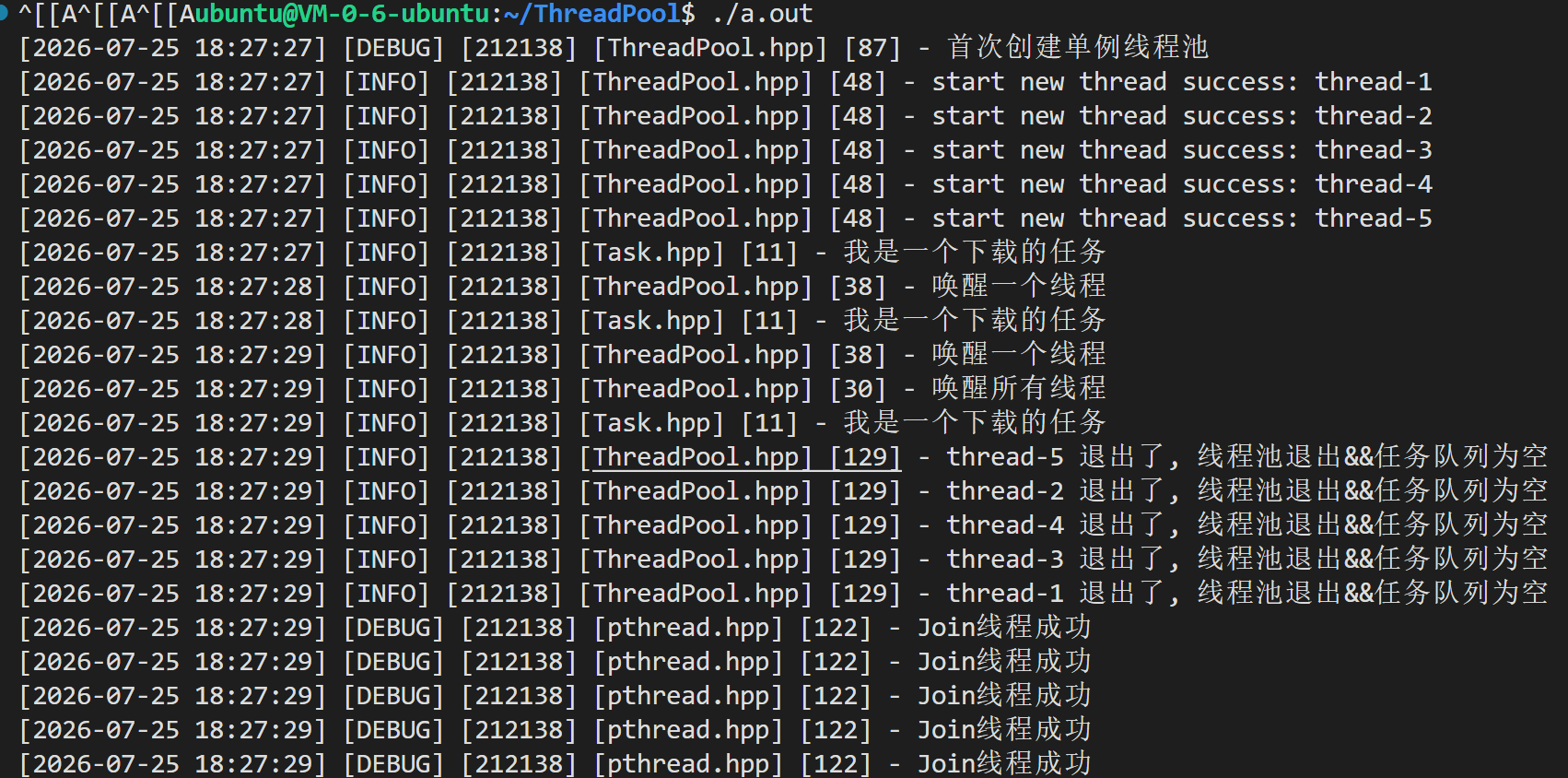
运行结果:
my.log:
css
[2026-07-24 11:28:54] [DEBUG] [3974252] [Main.cc] [11] - hello world3.143
[2026-07-24 11:28:54] [DEBUG] [3974252] [Main.cc] [12] - hello world3.144
显示器:

线程池代码实现:
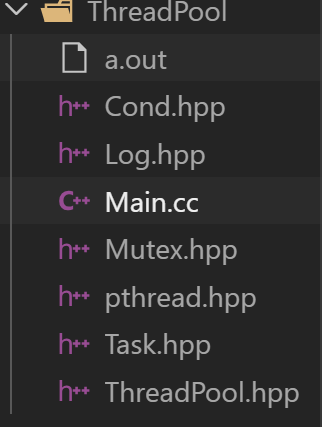
其它板块Task.hpp,Cond.hpp,Mutex.hpp,pthread.hpp前面已经写过了这里就不再重复写了
ThreadPool.hpp:
css
#include <iostream>
#include "pthread.hpp"
#include "Mutex.hpp"
#include "Cond.hpp"
#include <vector>
#include "Log.hpp"
#include <queue>
#include "Task.hpp"
using namespace std;
using namespace CondModule;
using namespace MutexModule;
using namespace ThreadModlue;
using namespace LogMoudle;

const int defaultnum = 5;

namespace ThreadPoolModule
{
    template <typename T>
    class ThreadPool
    {
    private:
        void WakeUpAllThread()
        {
            LockGuard guard(_mutex);
            if (_sleepnum > 0)
            {
                _cond.Broadcast();
            }
            LOG(LogLevel::INFO) << "唤醒所有线程";
        }
        void WakeUpOne()
        {
            if (_sleepnum > 0)
            {
                _cond.Signal();
            }
            LOG(LogLevel::INFO) << "唤醒一个线程";
        }
        void Start()
        {
            if (_isrunning)
                return;
            _isrunning = true;
            for (auto &e : _threads)
            {
                e.Start();
                LOG(LogLevel::INFO) << "start new thread success: " << e.Name();
            }
            // _isrunning = true;
        }
        ThreadPool(int num = defaultnum)
            : _num(num), _sleepnum(0), _isrunning(false)
        {
            for (int i = 0; i < num; i++)
            {
                _threads.emplace_back(
                    [this]()
                    { HandlerTask(); });
                // 这样写不行_threads.emplace_back(HandlerTask);//HandlerTask 是非静态成员函数,类型是 void (ThreadPool::*)()
                // 而 Thread 构造参数是 std::function<void()>类型是void(*)()没有this指针
            }
        }

        // 禁用掉拷贝构造和赋值重载,保证只能创建一个实例
        ThreadPool(const ThreadPool<T> &) = delete;
        ThreadPool<T> &operator=(const ThreadPool<T> &) = delete;

    public:
        static ThreadPool<T> *GetInstance()
        {
            // 两个if判断+锁,解决如果线程池本身,会被多线程获取的问题

            // 外层第一次检查.无锁快速判断:如果实例已经创建,直接 return,不用争抢锁。
            // 作用:避免每次调用 GetInstance 都频繁加锁,提升性能
            if (_inst == nullptr)
            {
                LockGuard guard(_lock);
                // 内层第二次检查.解决多线程并发冲突:
                // 假设线程 A、B 同时通过外层判断,都进入等待锁;
                // A 拿到锁 new 出实例释放锁;
                // B 拿到锁后,内层再次判断,发现实例已经存在,跳过创建。
                // 防止多个线程重复 new,产生多个对象。

                if (_inst == nullptr)
                {
                    LOG(LogLevel::DEBUG) << "首次创建单例线程池";
                    _inst = new ThreadPool<T>();
                    _inst->Start();
                }
            }
            return _inst;
        }
        void Stop()
        {
            if (_isrunning == false)
                return;
            _isrunning = false;
            WakeUpAllThread();
        }
        void Join()
        {
            for (auto &e : _threads)
            {
                e.Join();
            }
        }

        void HandlerTask()
        {
            char name[128];
            pthread_getname_np(pthread_self(), name, sizeof(name));
            while (true)
            {
                T t; // 写到锁外面
                {
                    LockGuard guard(_mutex);
                    // 1还是还处于运行状态2已经没有任务了
                    while (_isrunning == true && _taskq.empty())
                    {
                        _sleepnum++;
                        //LOG(LogLevel::DEBUG)<<_sleepnum;
                        _cond.Wait(_mutex);
                        _sleepnum--;
                    }
                    // 如果isrunning==false并且任务队列为空了就应该退出了
                    if (!_isrunning && _taskq.empty())
                    {
                        LOG(LogLevel::INFO) << name << " 退出了, 线程池退出&&任务队列为空";
                        break;
                    }
                    // 一定有任务
                    t = _taskq.front(); // 从q中获取任务,任务已经是线程私有的了!!!
                    _taskq.pop();
                }
                t(); // 同样的处理任务也不用加锁,放到外面
            }
        }

        bool Enqueue(const T &in)
        {
            LockGuard guard(_mutex); // 上课的方式写错了,锁要先加
            if (!_isrunning)
                return false; // 线程池关闭,入队失败
            _taskq.push(in);
            if (_sleepnum == _threads.size())
                WakeUpOne();
            return true;
        }


    private:
        vector<Thread> _threads;
        queue<T> _taskq;
        Cond _cond;
        Mutex _mutex;

        bool _isrunning; // 你这个是线程池有没有启动,和pthread.hpp的_isrunning区别开(单独的一个个线程有没有启动)
        int _sleepnum;
        int _num;

        // 声明:
        static ThreadPool<T> *_inst; // 单例指针
        static Mutex _lock;
    };
    // static不属于类成员不会走初始化列表初始化,所以在类外初始化
    // 定义:
    template <typename T>
    ThreadPool<T> *ThreadPool<T>::_inst = nullptr;

    template <typename T>
    Mutex ThreadPool<T>::_lock;

}
css
#include "ThreadPool.hpp"
using namespace ThreadPoolModule;
int main()
{

    Enable_Console_Log_Strategy();

    int count = 3;
    while (count)
    {
        sleep(1);
        ThreadPool<task_t>::GetInstance()->Enqueue(Download);
        count--;
    }

    ThreadPool<task_t>::GetInstance()->Stop();
    ThreadPool<task_t>::GetInstance()->Join();
    return 0;
}
运行结果: