基于 Preact + Cytoscape.js 构建实时状态机可视化组件
从 SVG 手写到 ReactFlow 踩坑,最终用 Cytoscape.js 实现工业级状态流转图的完整历程。
需求场景
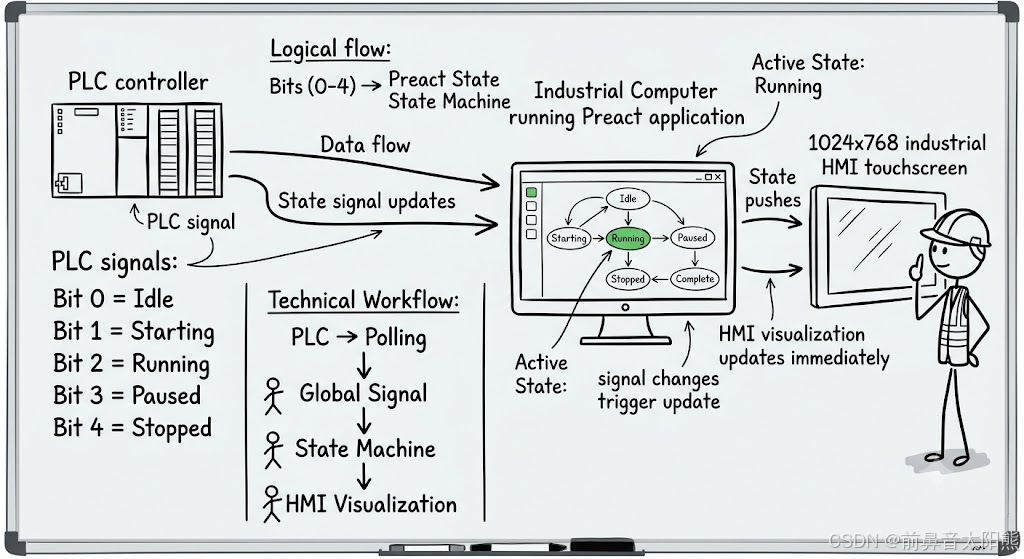
在工业 HMI 应用中,需要将 PLC 上报的设备运行状态实时渲染为可视化流程图。状态节点约 20 个,之间存在多条流转路径(含回环和分支),通过 PLC 寄存器位地址上报当前激活状态。
核心要求:
- 实时反映设备当前所处状态(绿色高亮)
- 连线清晰展示状态跳转关系,部分边上附带操作图标
- 支持拖拽微调节点布局,位置自动保存
- 适配工控触摸屏(1024×768)
状态流转图
                        ┌──────────────────────────────────────────┐
                        │              Pause Branch                │
                        ▼                                          │
Idle ──▶[▶]──▶ Starting ──▶ Running ──▶ Completing ──▶ Complete   │
              ▲          │   ▲    ▲                    │           │
              │          │   │    │                    ▼           │
              │          │   │    └─── Resuming ◄── Paused ◄── Pausing
              │          │   │                                     │
              │          │   └─── Releasing ◄── Suspended ◄── Suspending
              │          │                    [−]         [⏸]      │
              │          │                                         │
              │          └─────────────────────────────────────────┘
              │
              │        ┌──────────────────────────────────────────┐
              │        │            Stop / Reset Branch            │
              │        ▼                                          │
              └── Resetting ◄── Stopped ◄── Stopping ◄── Clearing ◄── Aborting ◄──┘
                     [↻]               [■]             [↻]

  ▶  Start     ⏸  Pause     −  Release     ↻  Reset     ■  Stop
17 个节点,19 条边,6 条关键边上附带操作图标标记。主流程横向展开,暂停/挂起分支从 Running 分出并回环,中止路径从 Complete 下折进入停止复位分支,最终回到 Idle。

第一版:手写 SVG
最初用纯 SVG 手写节点和连线:<rect> 做节点、<line> 和 <polyline> 做连线、<marker> 做箭头。很快发现问题:
- 坐标全靠手工微调,改一个节点连带调整五六条连线
- 折线和回环路径在 SVG 中调试极其痛苦
- 节点、连线、箭头频繁重叠,反复调整仍不理想
- 所有样式属性散落在 JSX 中,可维护性差
第二版:ReactFlow(失败)
ReactFlow(@xyflow/react v12)拥有自定义节点/边组件、内置 Dagre 布局、触摸支持等特性。但集成两天后发现:
- ReactFlow v12 深度依赖 React 内部机制(Context、ResizeObserver、Handle 系统)
- Preact 的
preact/compat兼容层无法完全复现这些行为 - 致命问题:容器尺寸检测持续失败 ------
"The parent container needs a width and a height to render the graph"(error #004) - 尝试了绝对定位、ref 测量、
requestAnimationFrame延迟渲染等方案,均无法解决
结论:ReactFlow v12 和 Preact 存在深度不兼容,不推荐在 Preact 项目中使用。
第三版:Cytoscape.js(最终方案)
Cytoscape.js 是一个纯 JavaScript 图论可视化库,框架无关,直接挂载到 DOM 容器:
bash
npm install cytoscape cytoscape-dagre三项关键优势解决了之前的所有问题:
| 痛点 | Cytoscape.js 方案 |
|---|---|
| 框架兼容 | 纯 JS,new cytoscape({ container }) 直挂 DOM |
| 自动布局 | cytoscape-dagre 插件自动层次布局 |
| 连线渲染 | 贝塞尔曲线 + 箭头内建,零手工坐标 |
| 缩放/拖拽 | 内置 minZoom/maxZoom,拖拽 + 位置持久化 |
| 动效 | animation() API + 样式过渡系统 |
| 样式系统 | CSS-like 选择器,声明式管理节点/边样式 |
架构设计

PLC / 数据源
  ↓ 轮询数据
Global Signal (Preact signals)
  ↓ subscribe()
├─ 监控面板     → 历史记录 + 事件日志
└─ 状态机页面 → Cytoscape 图 + 实时高亮关键设计决策:轮询数据走全局 signal,不在各组件内独立订阅。顶层页面在数据源连接成功时自动启动全局轮询,数据写入 signal,所有消费者组件统一读取。这样即使状态机页面未被打开,轮询数据也在积累,打开时立即可见历史数据。
核心实现
1. 全局信号
js
// 连接状态 --- 顶层页面统一管理
export const connectionSignal = signal({ connected: false, connectionId: null });

// 轮询数据 --- 连接建立后自动开始
export const pollDataSignal = signal({
    connectionId: null, items: [], lastRefresh: null, active: false,
});
2. Dagre 自动布局 + 横向拉伸
Dagre 的输出天然偏纵向------列多行少时浪费水平空间。解决方式:布局完成后等比拉伸 x 坐标。
js
_stretchLayout() {
    const nodes = cy.nodes();
    const positions = nodes.map(n => n.position());
    const minX = Math.min(...positions.map(p => p.x));
    const maxX = Math.max(...positions.map(p => p.x));
    const scale = containerW * 0.9 / (maxX - minX);

    nodes.forEach(n => {
        n.position({
            x: (n.position().x - minX) * scale + containerW * 0.05,
            y: n.position().y
        });
    });
}
3. CSS-like 样式系统
js
const STYLE = [
    // 节点默认
    {
        selector: 'node',
        style: {
            'shape': 'roundrectangle',
            'background-color': '#FFFFFF',
            'border-color': '#b0b8c4',
            'border-width': 2,
            'width': 120, 'height': 44,
            'font-size': '15px',
            'color': '#2d3748',
            'shadow-blur': 8,
            'shadow-color': '#b0bec5',
            'shadow-opacity': 0.35,
        },
    },
    // 节点激活 --- 叠加样式
    {
        selector: 'node.active',
        style: {
            'background-color': '#27ae60',
            'border-color': '#1e8449',
            'color': '#FFFFFF',
            'shadow-color': '#27ae60',
            'shadow-blur': 16,
            'shadow-opacity': 0.55,
        },
    },
    // 边 --- 科技感虚线
    {
        selector: 'edge',
        style: {
            'width': 2.5,
            'line-color': '#3a5a8c',
            'target-arrow-color': '#3a5a8c',
            'target-arrow-shape': 'triangle',
            'arrow-scale': 1.4,
            'curve-style': 'bezier',
            'line-style': 'dashed',
            'line-dash-pattern': [8, 5],
        },
    },
    // 边图标(彩色圆角徽章)
    {
        selector: 'edge[icon]',
        style: {
            'label': 'data(label)',
            'font-size': '9px',
            'color': '#fff',
            'text-background-opacity': 1,
            'text-background-shape': 'roundrectangle',
            'text-background-padding': '3px',
            'edge-text-rotation': 'autorotate',
        },
    },
    { selector: 'edge[icon="start"]',  style: { 'text-background-color': '#27ae60' } },
    { selector: 'edge[icon="pause"]',  style: { 'text-background-color': '#e67e22' } },
    { selector: 'edge[icon="stop"]',   style: { 'text-background-color': '#e74c3c' } },
    { selector: 'edge[icon="reset"]',  style: { 'text-background-color': '#4a8fdd' } },
];
4. 边图标标记
边的 data 中设置 icon 类型和对应的 Unicode 符号 label:
js
const edges = [
    { source: 'Idle', target: 'Starting', icon: 'start', label: '▶' },
    { source: 'Running', target: 'Suspending', icon: 'pause', label: '⏸' },
    { source: 'Aborted', target: 'Clearing', icon: 'reset', label: '↻' },
    { source: 'Clearing', target: 'Stopping', icon: 'stop', label: '■' },
];
5. 实时状态高亮
js
_processPollItems(items) {
    for (const item of items) {
        const idx = this._matchState(item);
        if (idx < 0) continue;
        const node = this._cy.getElementById(STATE_LIST[idx]);
        if (item.value) {
            if (!node.hasClass('active')) {
                node.addClass('active');
                this._startPulse(node);      // 呼吸脉冲
            }
        } else {
            node.removeClass('active');      // PLC 位变 false → 立即恢复
        }
    }
}关键点:每个位独立处理 true / false 。value=true → 加 active class + 脉冲;value=false → 移除 active class。避免只处理 true 导致状态无法清除的 bug。
6. 边虚线流动动效
js
_startEdgeFlow() {
    const edges = this._cy.edges();
    let offset = 0;
    const step = () => {
        offset = (offset - 1 + 13) % 13;
        edges.style('line-dash-offset', offset);
        this._flowFrame = requestAnimationFrame(step);
    };
    this._flowFrame = requestAnimationFrame(step);
}
line-style: 'dashed' + line-dash-pattern + 每帧微调 offset,产生数据沿线路流动的视觉效果。注意 :必须显式设置 line-style: 'dashed'------仅设 line-dash-pattern 不生效。另外 curve-style: 'taxi'(正交折线)不支持虚线,需用 bezier。
7. 节点呼吸脉冲
js
_startPulse(node) {
    const w = 120, h = 44;
    const run = () => {
        if (!node.hasClass('active')) return;  // 状态变更时自动停止
        node.animation({
            style: { width: w + 8, height: h + 5 }, duration: 800
        }).play().promise('complete').then(() => {
            node.animation({
                style: { width: w, height: h }, duration: 800
            }).play().promise('complete').then(() => run());
        });
    };
    run();
}
放大→缩小循环,通过 hasClass('active') 检测自动停止,无需手动管理动画引用。
8. 拖拽 + 位置持久化
js
// 拖拽结束 → 存储所有节点坐标到 localStorage
this._cy.on('dragfree', () => {
    const positions = {};
    this._cy.nodes().forEach(n => { positions[n.id()] = n.position(); });
    localStorage.setItem('node_positions', JSON.stringify(positions));
});

// 初始化 → 优先加载已保存位置
_loadPositions() {
    const saved = JSON.parse(localStorage.getItem('node_positions'));
    if (saved) {
        this._cy.nodes().forEach(n => {
            if (saved[n.id()]) n.position(saved[n.id()]);
        });
    }
}

// 重置 → 清存储 + Dagre 重新布局
_resetLayout() {
    localStorage.removeItem('node_positions');
    this._cy.layout({ name: 'dagre' }).run();
}
关于 Edge 虚线的一些坑
Cytoscape 虚线相关踩坑总结:
| 问题 | 原因 | 解决 |
|---|---|---|
line-dash-pattern 不生效 |
没设 line-style: 'dashed' |
先设 line-style,再设 pattern |
taxi 曲线无虚线 |
curve-style: 'taxi' 不支持虚线 |
改用 bezier 或 segments |
animation() 驱动 offset 偶有抖动 |
动画 API 与样式共存时冲突 | 改用 requestAnimationFrame + style() |
视觉效果总结
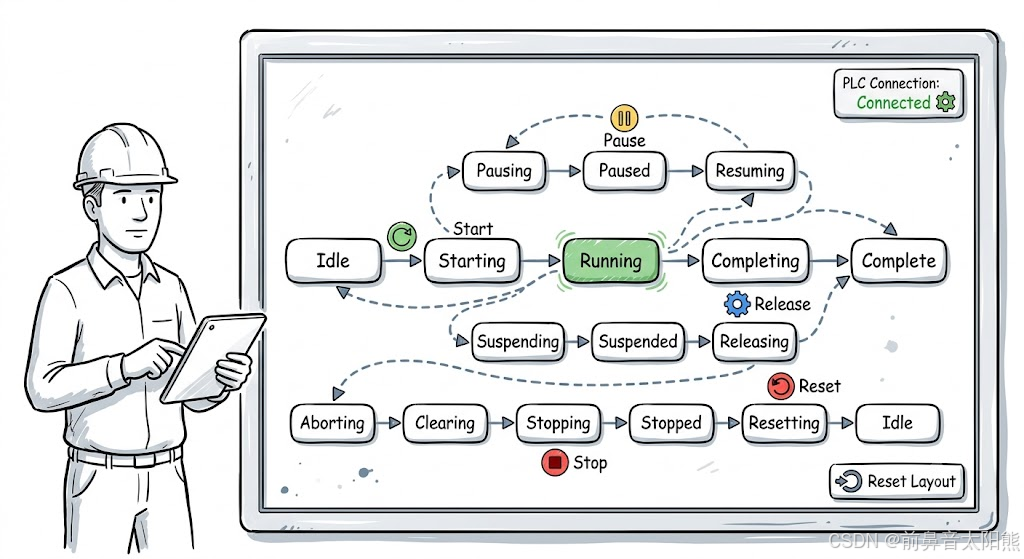
| 元素 | 样式 |
|---|---|
| 背景容器 | 浅灰蓝渐变 + 白色圆角边框 + 投影卡片 |
| 节点(默认) | 白色圆角矩形,灰色描边,投影 |
| 节点(激活) | 绿色填充 + 白字 + 绿色发光 + 呼吸脉冲 |
| 连线 | 深蓝灰色贝塞尔虚线,2.5px,带三角箭头 |
| 边操作图标 | 彩色圆角徽章覆盖在边中点 |
| 连线动效 | 虚线 offset 循环偏移,产生数据流动感 |
| PLC 角标 | 右上角胶囊:绿底已连接 / 灰底未连接 |
最终指标
| 指标 | 值 |
|---|---|
| 框架 | Preact 10 + Cytoscape.js 3.x |
| 节点数 | ~20 |
| 边数 | ~20(含图标标记) |
| 布局 | Dagre 自动层次 + 横向拉伸 |
| 动效 | 边虚线流动 + 节点呼吸脉冲 |
| 交互 | 拖拽调整 + localStorage 持久化 + 重置 |
| 构建增量 | ~500 KB(含 Cytoscape + Dagre) |
| 许可证 | MIT |