回顾
这一章主要基于之前的基础去实现 Agent 核心功能,我们是基于 LangGraph 做的实现。这里先简单回顾下 LangGraph 基础知识。
- Langgraph 入门到精通0x00:HelloLanggraph
- LangGraph 入门到精通0x01:Graph 通信机制
- LangGraph 入门到精通0x02:基础 API (一)
- LangGraph 入门到精通0x03:基础 API (二)
技术架构
这个时候,我们先不考虑任何优化实现 DeepResearchSystem 核心流程。重在让 Agent 跑起来。
流程图
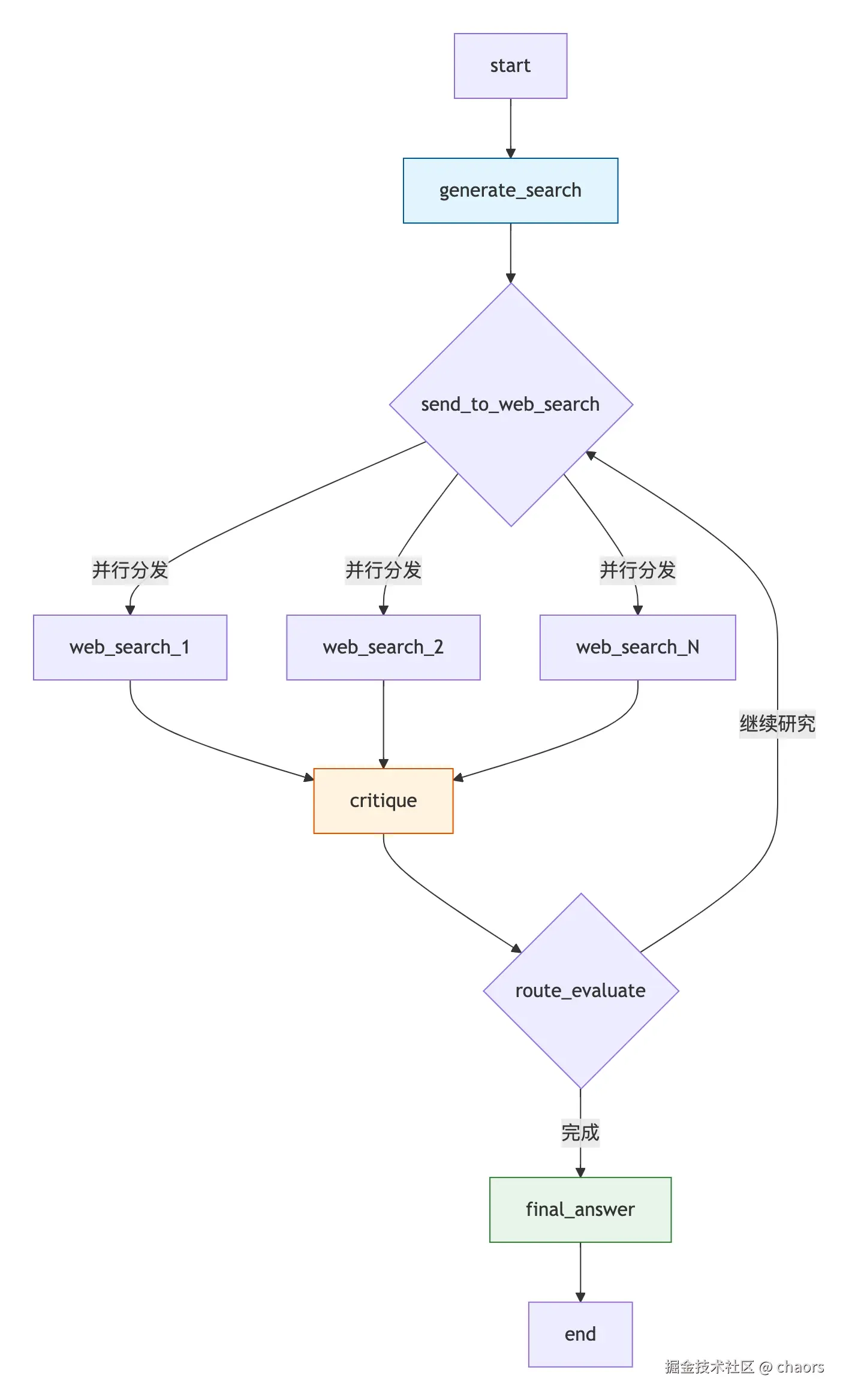
回顾之前的 构思 DeepResearchSystem 核心的流程为:
用户输入 → 查询规划 → 并行搜索 → 反思评估 → 迭代深化 → 报告生成
状态管理
了解 LangGraph 都知道状态管理是 Agent 编排的核心,负责核心数据记录和传递。
OverallState:全局共享状态,类似"黑板报"机制。全局保存 Agent流程相关的信息。QueryGenerationState: 查询生成状态,包括拆解的查询关键词,关键词选择原因WebSearchState: 网络搜索状态,包括搜索结果等ReflectionState: 反思状态,评估 WebSearch 是否满足主题研究,并带有不满足情况下需要再次执行的相关参数- 所有中间结果都沉淀到状态中,实现:
- 持久化记忆(跨迭代)
- 可追溯性(调试友好)
Graph 编排
-
节点:4个核心处理单元
generate_search: 生成搜索节点,拆解主题web_search: 网搜节点,并行搜索各子题critique: 评估web_search搜索结果是否足够支撑主题研究final_answer:报告生成节点
-
边:确定性边+条件边
web_search、critique均为条件边,按条件触发下一步
-
分支:并行分发(
Send原语) -
Map-Reduce模式
generate_search做Map拆分web_search并行执行critique做Reduce聚合判断。
Agent 抽象层
这里主要就是前面实现的 Agent 基础。
Agent:自由文本生成代理(搜索摘要、最终报告),基类 AgentJsonAgent:结构化输出代理(查询生成、反思)WebSearchAgent:工具调用代理
Coding
State
OverallState
总状态这里需要注意的几个参数:
sources_gathered: 一定要做好溯源,保证每条信息知道来自哪里。不管是后续置信度判定还是 Agent 评估都是至关重要的因素。max_research_loops:最大研究循环次数。一个好的 Agent 不能一直处于 Loop 状态,这显然是不符合规范的。- Agengt 失去 Loop 约束,成本会激增,而且也会阻塞当前报告获取
- 一直循环多次依然未解决问题的 Agent,本身可能存在问题,需要及时排查
Python
# 总状态
class OverallState(TypedDict):
    # 消息队列
    messages: Annotated[list, add_messages]
    # 查询消息列表
    search_query: Annotated[list, operator.add]
    # 网搜结果列表
    web_search_result: Annotated[list, operator.add]
    # 网搜结果来源
    sources_gathered: Annotated[list, operator.add]
    # 初始搜索查询数量
    initial_search_query_count: int
    # 最大研究循环次数
    max_research_loops: int
    # 研究循环次数
    research_loop_count: int
    # 推理模型
    reasoning_model: str
QueryGenerationState
Python
# 查询类
class Query(TypedDict) :
    # 搜索关键词
    query : str
    # 选择关键词的原因:为了让LLM更能信服,也和反思机制有关
    reason : str

class QueryGenerationState(TypedDict):
    search_query: list[Query]
WebSearchState
Python
# 网络搜索状态
class WebSearchState(TypedDict):
    search_query: str
    id: str
ReflectionState
这里需要设计好的就是:
is_sufficient: 是否足够支撑主题研究knowledge_gap: 不足的知识 gap 是什么follow_up_queries: 继续需要搜索哪些关键词number_of_ran_requeries: 记录已执行次数,与max_research_loops协作,防止 Agent 陷入 Loop 死循环。
Python
# 反思节点状态
class ReflectionState(TypedDict):
    # 研究是否足够
    is_sufficient : bool
    # 知识差距描述
    knowledge_gap : str
    # 后续查询
    follow_up_queries : Annotated[list, operator.add]
    # 研究循环次数
    research_loop_count : int
    # 已经执行的研究次数
    number_of_ran_requeries : int
    # 最大研究循环次数
    max_research_loops : int
Graph
Nodes
generate_search
Python
def generate_search(state : OverallState, config : RunnableConfig) -> QueryGenerationState :
    """
    基于用户 的自然语言请求,拆解出搜索关键字
    使用LLM为用户的问题创建优化的网络搜索查询,用于网络研究。
    :param state:
    :param config:
    :return:

    核心流程:
    1. 配置传入
    2. 大模型拆解:提示词构造、大模型通信、格式化输出
    3. 结果传递
    """

    logger.info(f"LangGraph节点开始运行.....,配置:[{config}]")
    configuration = Configuration.runnable_config(config)
    if state.get["initial_search_query_count"] is None:
        state["initial_search_query_count"] = configuration.number_of_initial_queries

    agent = JsonAgent(model_id=configuration.query_generator_model, keys=SearchQueryList)
    agent.set_step_prompt(query_writer_instructions)
    result = agent.step(
        current_date=get_current_date(),
        research_topic=get_research_topic(state["messages"]),
        number_queries=state["initial_search_query_count"]
    )

    logger.info(f"待搜索内容生成结果: {result}")
    return {"search_query": result.query}
web_search
Python
def web_search(state: WebSearchState, config: RunnableConfig) -> OverallState:
    """
    网络搜索节点
    Args:
        state: 包含搜索查询和研究循环计数的当前图状态
        config: 可运行配置,包括搜索API设置

    Returns:
        包含状态更新的字典,包括sources_gathered、research_loop_count和web_search_results
    """
    logger.info(f"开始网络搜索......")
    # 配置
    configurable = Configuration.runnable_config(config)
    web_searcher = WebSearchAgent()

    # 执行搜索
    response = web_searcher.step(prompt=state["search_query"],
                                 count=10)

    # 检查搜索结果是否为空或None
    if not response or response is None:
        logger.error(f"网络搜索返回为空: {state['search_query']}")
        return {
            "sources_gathered": [],
            "search_query": [state["search_query"]],
            "web_search_result": [f"未找到关于 '{state['search_query']}' 的搜索结果"],
        }

    # 长URL到短URL的映射:节省Token上下文长度
    # https://search.com/id/0 - 3 代替
    # 再最终报告中再替换回原始URL,保障引用准确性
    long2short_url_mappings = resolve_urls(response, state["id"])
    sources_gathered = [
        {"short_url": long2short_url_mappings[item["url"]], "value": item["url"], "label": item["title"]} for item in
        response]
    web_search_result = [
        {"snippet": item["snippet"], "title": item["title"], "url": long2short_url_mappings[item["url"]]} for item in
        response]
    web_search_result = json.dumps(web_search_result, ensure_ascii=False, indent=4)

    agent = Agent(model_id=configurable.query_generator_model)
    agent.set_step_prompt(web_searcher_instructions)
    modified_text = agent.step(query=state["search_query"], current_date=get_current_date(),
                               web_search_result=web_search_result)
    modified_text = JsonUtils.extract_pattern(modified_text, pattern="text")

    logger.info(f"搜索标题: {state['search_query']}")
    logger.debug(f"网络搜索结果: {modified_text}")
    return {
        "sources_gathered": sources_gathered,
        "search_query": [state["search_query"]],
        "web_search_result": [modified_text],
    }
这里不难发现一个细节,我们对网络返回的数据源 URL 做了处理,终态是: long2short_url_mappings。这是为什么呢? 首先我们先看下 resolve_urls 到底做了什么事情?简单说就是将真实URL映射到了一个唯一的长度差不多的短URL 。其实从长到短就可以大概猜出这么做的目的:在不丢失语义的情况下,减少上下文长度,进而减少 LLM 调用的 Token 成本。
Python
def resolve_urls(urls_to_resolve: List[Any], id: int) -> Dict[str, str]:
    """
    创建一个ai搜索url(可能非常长)到一个短url的映射,每个URL有一个唯一的id.
    每个原始URL获得一致的缩写形式,同时保持唯一性.
    """
    prefix = f"https://search.com/id/"

    # 检查urls_to_resolve是否为None或空列表
    if urls_to_resolve is None:
        logger.warning(f"urls_to_resolve为None,返回空映射")
        return {}

    if not isinstance(urls_to_resolve, list):
        logger.warning(f"urls_to_resolve不是列表类型: {type(urls_to_resolve)},返回空映射")
        return {}

    if len(urls_to_resolve) == 0:
        logger.warning(f"urls_to_resolve为空列表,返回空映射")
        return {}

    urls = [site["url"] for site in urls_to_resolve if isinstance(site, dict) and "url" in site]

    # Create a dictionary that maps each unique URL to its first occurrence index
    resolved_map = {}
    for idx, url in enumerate(urls):
        if url not in resolved_map:
            resolved_map[url] = f"{prefix}{id}-{idx}"

    return resolved_map
critique
Python
def critique(state: OverallState, config: RunnableConfig) -> ReflectionState:
    """
    识别知识差距并生成潜在后续查询的节点

    分析当前摘要以识别需要进一步研究的领域,并生成潜在的后续查询。
    使用结构化输出来提取JSON格式的后续查询。

    :param state: 当前图状态
    :param config: 运行配置
    :return: 包含状态更新的字典,包括search_query键,包含生成的后续查询
    """

    logger.info(f"反思分析识别知识差距并生成潜在后续查询的节点工作......")
    configurable = Configuration.from_runnable_config(config)
    # 增加研究循环计数并获取推理模型
    state["research_loop_count"] = state.get("research_loop_count", 0) + 1
    reasoning_model = state.get("reasoning_model", configurable.reflection_model)
    logger.info(f"critique反思节点模型:{reasoning_model}")

    # 格式化输出
    agent = JsonAgent(model_id=reasoning_model, keys=Reflection)
    agent.set_step_prompt(reflection_instructions)
    result = agent.step(
        ccurrent_date=get_current_date(),
        number_queries=state["initial_search_query_count"],
        research_topic=get_research_topic(state["messages"]),
        summaries="\n\n---\n\n".join(state["web_search_result"]),
    )

    logger.info(f"反思分析:{result}")
    return {
        "is_sufficient": result.is_sufficient,
        "knowledge_gap": result.knowledge_gap,
        "follow_up_queries": result.follow_up_queries,
        "research_loop_count": state["research_loop_count"],
        "number_of_ran_queries": len(state["search_query"]),
        "max_research_loops": state.get("max_research_loops", configurable.max_research_loops),
    }
final_answer
研究报告的生成部分,这里注意的是:在 LLM 生成报告之后,最终返回的报告中要带原始URL,而不是映射的短URL。这对于后续的溯源至关重要,因为只有真实URL才能用于验证,人类在读报告时也才能参与点击互动。
Python
def final_answer(state: OverallState, config: RunnableConfig):
    """
    创建结构良好的研究报告,包含适当的引用。
    :param state: 当前状态
    :param config: 运行配置
    :return:包含状态更新的字典,包括running_summary键,包含格式化的最终摘要和源
    """

    logger.info("最终答案准备生成........")
    configurable = Configuration.from_runnable_config(config)
    reasoning_model = state.get("reasoning_model") or configurable.answer_model
    logger.info(f"final_answer最终答案节点模型:{reasoning_model}")

    # 格式化提示
    agent = Agent(model_id=reasoning_model)
    agent.set_step_prompt(answer_instructions)
    content = agent.step(
        current_date=get_current_date(),
        research_topic=get_research_topic(state["messages"]),
        summaries="\n---\n\n".join(state["web_search_result"]),
    )

    # 用原始URL替换短URL,并将所有使用的URL添加到sources_gathered
    unique_sources = []
    for source in state["sources_gathered"]:
        if source["short_url"] in content:
            content = content.replace(
                source["short_url"], source["value"]
            )
            unique_sources.append(source)

    logger.info(f"最终确定答案:{content}")
    return {
        "messages": [AIMessage(content=content)],
        "sources_gathered": unique_sources,
    }
Condition Edges
send
Python
# ---条件边事件
def send_to_web_search(state: QueryGenerationState):
    """
    为每个搜索查询生成n个网络研究节点,实现并行搜索。

    Args:
        state: 包含搜索查询的查询生成状态

    Returns:
        发送到web_search节点的消息列表
    """
    logger.info(f"准备发送请求给网络搜索节点......")
    return [
        Send(WEB_SEARCH_NODE, {"search_query": search_query, "id": int(idx)})
        for idx, search_query in enumerate(state["search_query"])
    ]
route_evaluate
Python
def route_evaluate(state: OverallState, config: RunnableConfig) -> OverallState:
    """
    确定 critique 后下一步的路由函数

    通过决定是否继续收集信息状态"is_sufficient"或基于配置的最大research循环次数来最终确定摘要,
    从而控制research循环。
    :param state: 当前图状态
    :param config: 运行配置
    :return: 全量状态,指示下一个要访问的节点("web_research"或"finalize_summary")
    """

    logger.info("准备评估当前研究......")
    configurable = Configuration.from_runnable_config(config)
    max_research_loops = (
        state.get("max_research_loops")
        if state.get("max_research_loops") is not None
        else configurable.max_research_loops
    )

    logger.info(state)
    logger.info(f"最大研究循环数: {max_research_loops}")
    logger.info(f"当前已研究次数: {state['research_loop_count']}")
    if state["is_sufficient"] or state["research_loop_count"] >= max_research_loops:
        return FINAL_ANSWER_NODE
    else:
        return [
            Send(
                WEB_SEARCH_NODE,
                {
                    "search_query": follow_up_query,
                    "id": state["number_of_ran_queries"] + int(idx),
                },
            )
            for idx, follow_up_query in enumerate(state["follow_up_queries"])
        ]
compile
Python
# ---图构建
builder = StateGraph(OverallState, config_schema=None)

# 图节点
builder.add_node(GENERATE_SEARCH_NODE, generate_search)
builder.add_node(WEB_SEARCH_NODE, web_search)
builder.add_node(CRITIQUE_NODE, critique)
builder.add_node(FINAL_ANSWER_NODE, final_answer)

# 边定义
builder.add_edge("start", GENERATE_SEARCH_NODE)
# 子话题并行搜索
builder.add_conditional_edges(GENERATE_SEARCH_NODE, send_to_web_search,path_map=[WEB_SEARCH_NODE])
builder.add_edge(WEB_SEARCH_NODE, CRITIQUE_NODE)
builder.add_conditional_edges(CRITIQUE_NODE, route_evaluate, path_map=[WEB_SEARCH_NODE, FINAL_ANSWER_NODE])
# 最终确定答案
builder.add_edge(FINAL_ANSWER_NODE, "end")

# 图编译
graph = builder.compile(name=DEEP_RESEARCH_AGENT)
流程可视化
这里可以借助 display 绘制当前图的流程图。
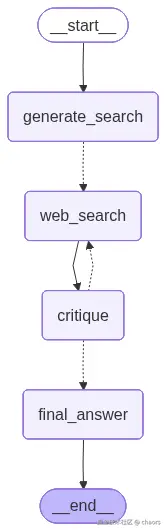
Python
display(Image(graph.get_graph().draw_mermaid_png(output_file_path='./graph_images/基础图.png')))Prompts'
示例
提示词的编写这块,之前 也有重点讲过。SOP 无非就是几个重点,这里以 generate_search 节点为例:
-
Role (角色) :"你是一个主题研究拆解大师,你擅长将给定的研究主题拆解为不同的子主题,并给出这么拆解的理由,最后按照给定的格式输出结果"
-
Context (背景) :"这是一个关于给定研究主题深度搜索并产出研报的 Agent。"
-
Task (任务) :"拆解成若干个搜索主题"
-
Constraints (约束) :见 Instruction
-
Example (示例) :给出少样本示例
-
Workflow (工作流) :拆解-> 拆解理由 -> 返回
Python
query_writer_instructions = """# 角色定义
你是一个主题研究拆解大师,你擅长将给定的研究主题拆解为不同的子主题,并给出这么拆解的理由,最后按照给定的格式输出结果
# 任务说明
你的任务是根据当前的研究主题决定多个用于网络搜索的标题,这些标题会被用于从网页搜集信息,并整合成一份专业的研究报告

# Instruction
- 针对当前的研究主题,你可以将其拆解成若干个搜索主题,每个搜索主题都应该是针对当前研究主题不同维度的切分
- 针对当前研究主题,最多产生{number_queries}条搜索主题
- 你的搜索主题应该尽可能的广泛,如果研究主题本身就非常宽泛,则产出1条以上的搜索主题
- 每个搜索主题应该具备独立性,即不要同时产出多个相似或者耦合的搜索主题
- 搜索主题应该考虑时间,即除非研究主题要求,不然尽可能搜集近期的资料,当前时间是{current_date}

# Output Format
你生成的内容应该是一个标准的json格式的内容,并包含两个字端
<param>
 <attribute>reason</attribute>
 <type>string</type>
 <description>你的思考,即为什么要产出如下的几个搜索主题</description>
</param>

<param>
 <attribute>query</attribute>
 <type>List</type>
 <description>用于做网络搜索的搜索主题</description>
</param>
下面是一个输出样例
\```json
{
 "、reason": "xxxx",
 "query": ["搜索主题1", "搜索主题2", ...]
}
\```

# Context
{research_topic}

# Output"""
他山之石
另外关于 Prompt 优化,市面上有几个成熟的的优化工具,可供调试优化 Prompt。
-
Prompt Optimizer 开源免费,支持 OpenAI、Gemini、DeepSeek 等多种模型
-
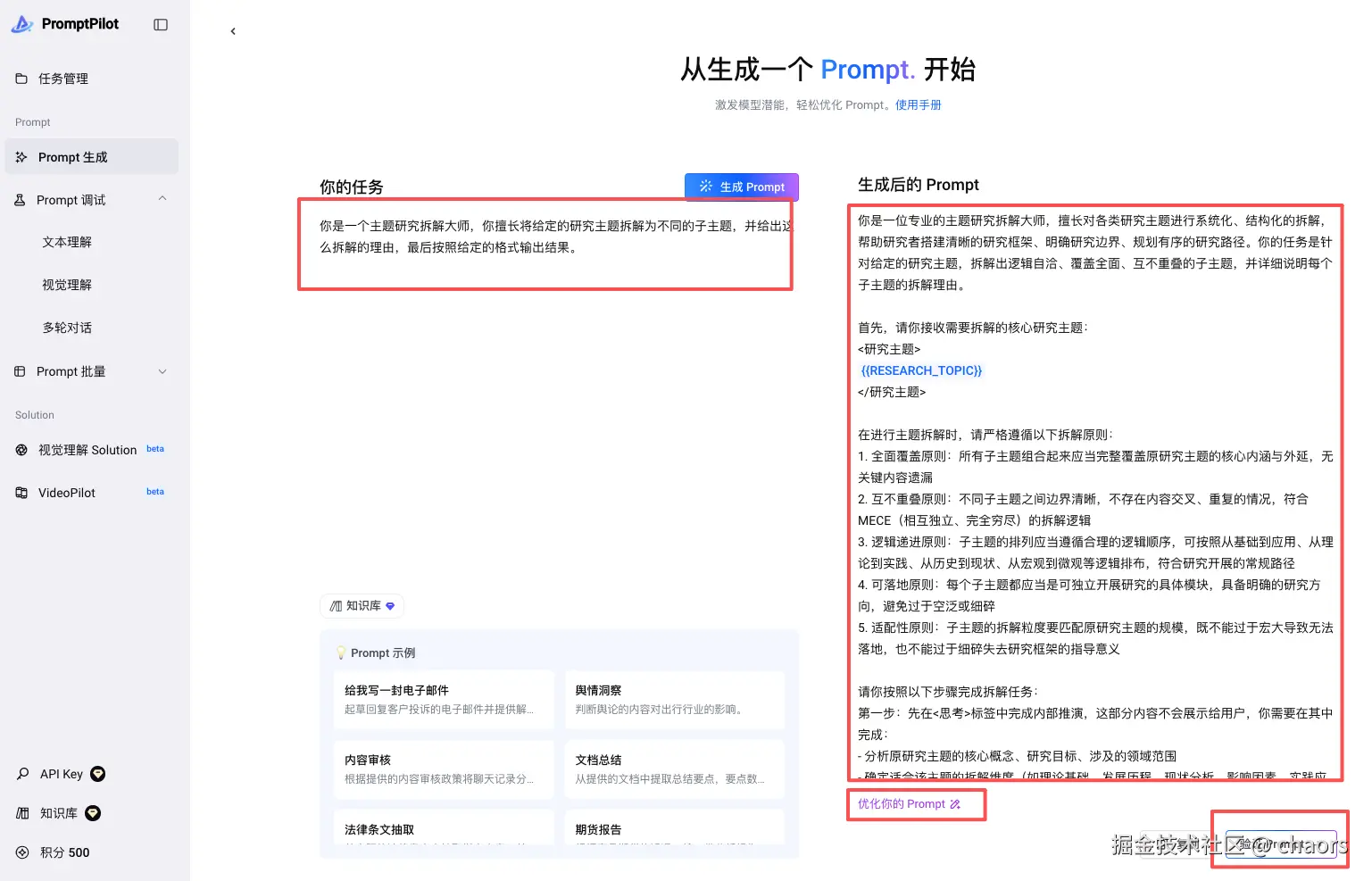
PromptPilot 字节旗下的一个 Prompt 生成,迭代优化,调试工具。也是我比较常用的一个。
生成:
调试:
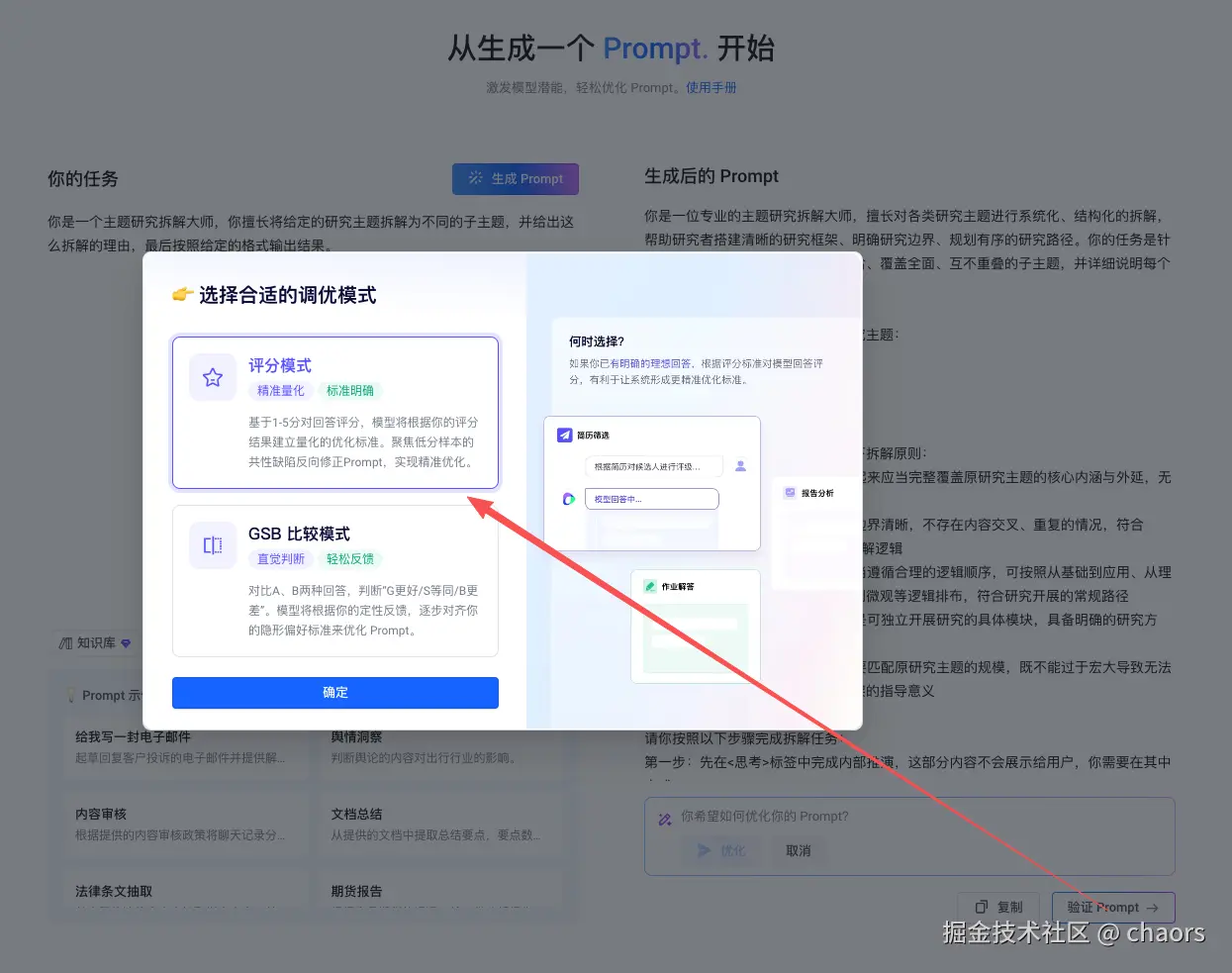
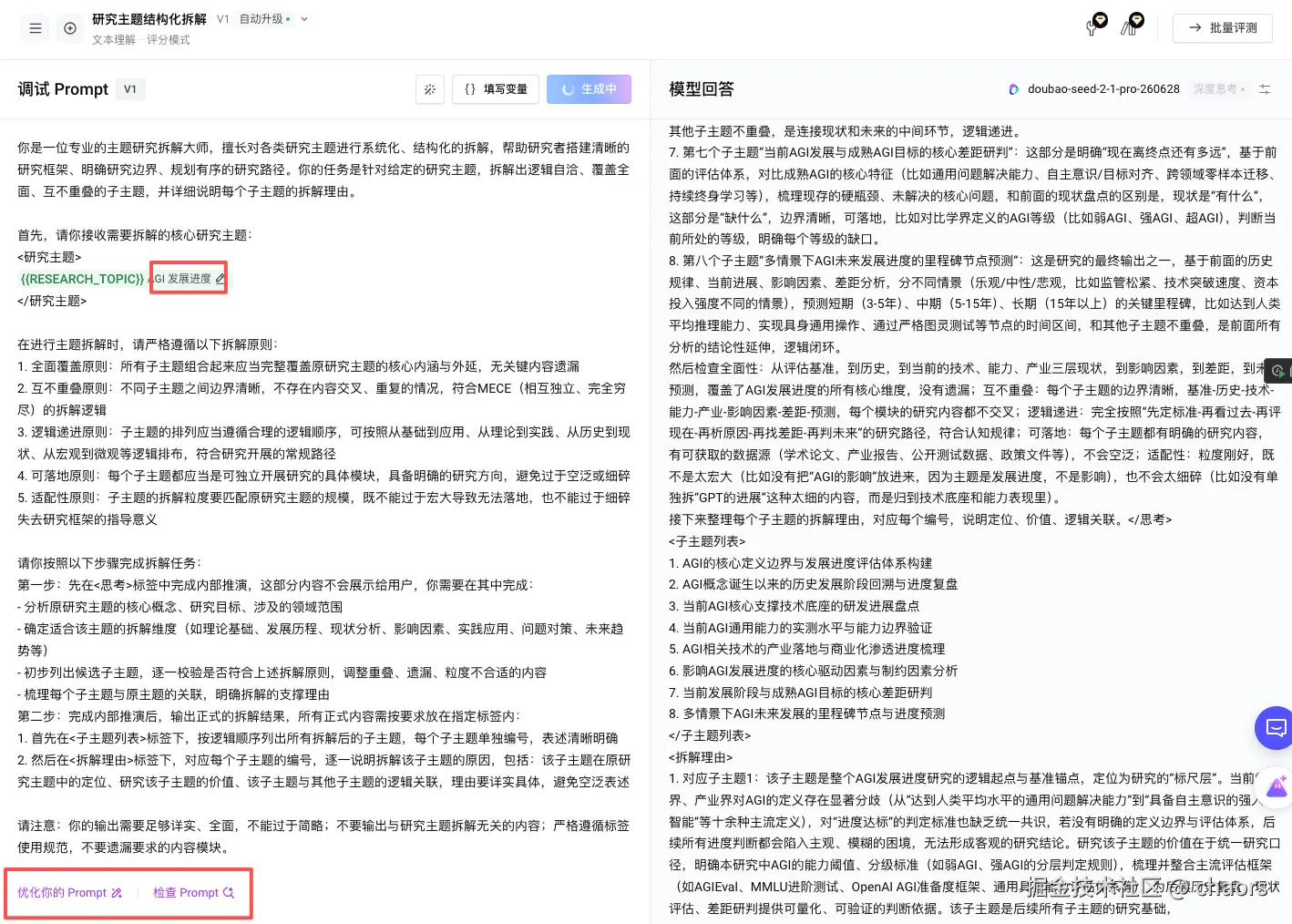
很多时候,我们的提示词都可以通过这些工具来进一步优化。