智能体构建技术分析
-
- AgentScope概述
- 智能体设计模式
-
- ReAct模式
- [Plan and Execute(PE)](#Plan and Execute(PE))
- Agentscope核心模块
- 构建ReAct智能体
- 结构化输出
- AgentScope工具动态管理
- 下一章
基于python语言使用AgentScope。
AgentScope概述
AgentScope是一个由阿里通义实验室开发并开源的多智能体(Multi-Agent)框架,在2025年9月2号正式发布1.0版本,意味着该框架开始进入稳定可用阶段,简单来说,AgentScope的目的是让开发者能够轻松、高效、可靠地构建基于大语言模型(LLM)的多智能体应用。
官方文档:https://doc.agentscope.io/
Github:https://github.com/agentscope-ai/agentscope
智能体设计模式
ReAct模式
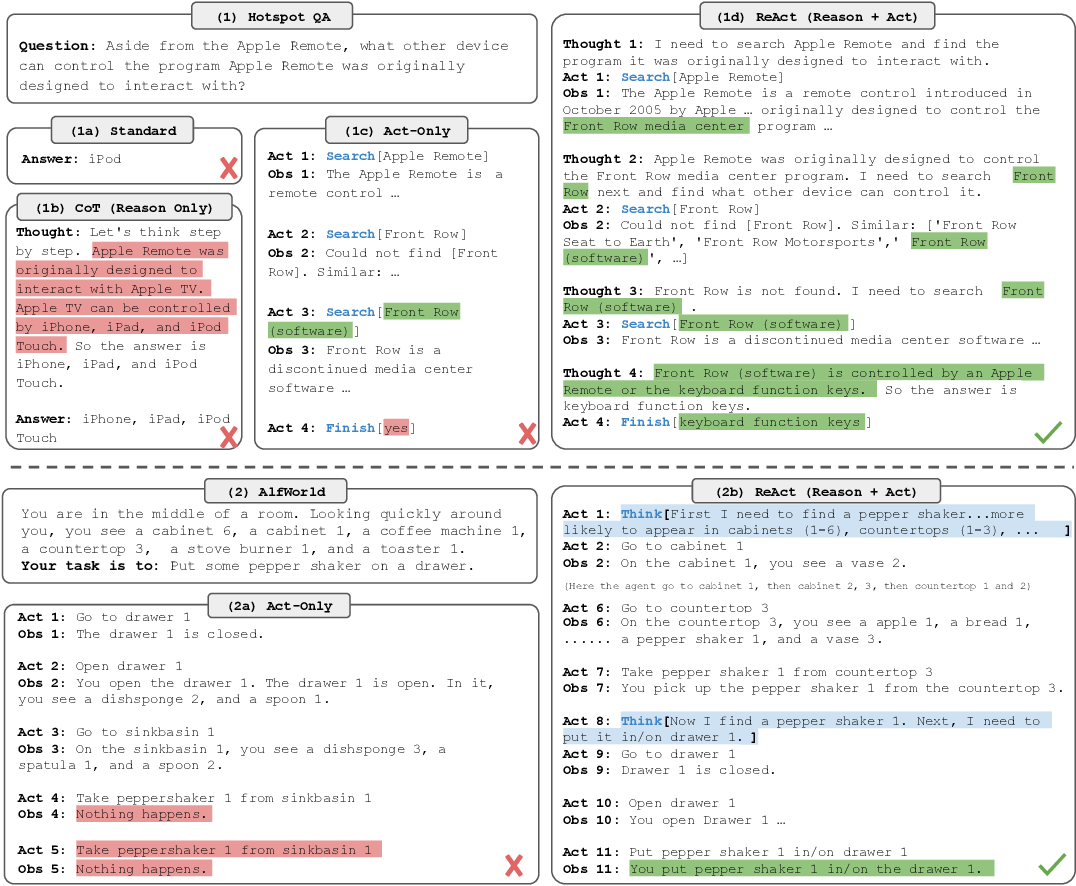
ReAct,是"Reason and Act" (思考与行动)的缩写,它是一种革命性的框架,旨在将大型语言模型(LLM)从一个单纯的文本生成器,转变为一个能够自主规划并与外部世界交互的"智能体"(Agent),ReAct的核心思想是模仿人类解决问题的方式:先思考,再行动,然后观察结果,并根据结果调整下一步的思考和行动。
下面图片地址:https://www.semanticscholar.org/paper/.../99832586d55f540f603637e458a292406a0ed75d
思考与行动
1.思考(Reason/Thought):这是智能体的"内心独白"或"思维链"(Chain of Thought),当接收到复杂任务时,LLM首先会生成一段非公开的、给自己看的"思考"文本,这段思考通常包含以下内容:
- 任务拆解:将一个宏大的目标分解成一系列更小、更具体的可执行步骤。
- 行动规划:决定下一步应该采取什么具体行动(比如:应该使用那个工具)。
- 自我反思:根据上一步行动的结果,进行分析、总结或者修正之前的计划。
2.行动(Act/Action):这是智能体与外部环境交互的"手和脚",基于"思考"得出的计划,智能体会选择并执行一个具体的"行动"。这个行动通常是调用一个预设的"工具"(Tool),常见的工具包括:
- 搜索引擎:用于查找需要实时信息或模型自身知识库中没有的知识。
- 计算器:用于执行精确的数学运算。
- 代码执行器:用于运行代码片段来处理数据或执行复杂逻辑。
Plan and Execute(PE)
规划与执行(Plan and Execute)模式 遵循一种更为深思熟虑、分阶段的方法,其核心思想是:
1.规划阶段(Planning):在接收到用户指令或任务后,智能体首先会调用一个强大的大型语言模型(LLM)来全面分析任务,并生成一个详尽的、多步骤的行动计划。这个计划是静态的,在执行开始前就已经完整制定。
2.执行阶段(Execution):智能体随后会严格按照预先制定的计划,一步一步地执行任务。在执行过程中,它可能会调用各种工具(如搜索引擎、代码解释器、API等)来完成每个具体的步骤,只有在整个计划执行完毕或遇到重大障碍时,才可能重新启动规划流程。
其工作流程可以概括为:先思考,后行动,一次性规划,序贯执行。
相比之下,"反应与行动"(ReAct,Reasoning and Acting)模式更为灵活、迭代的交互方式,而Plan and Execute模式则更稳定。
Agentscope核心模块
模块接入
Agentscope支持多种模型接入,可以快速实现模型接入与对话
javascript
from agentscope.message import Msg, TextBlock
import os
import asyncio
from agentscope.model import DashScopeChatModel

async def main():
    """异步主函数"""
    model = DashScopeChatModel(
        model_name="qwen-max",
        api_key=os.environ["AI_BAI_LIAN_API_KEY"],
        stream=False,
    )

    res = await model(
        messages=[
            {"role": "user", "content": "你好"},
        ]
    )
    print("The response:", res)


# 运行异步函数
if __name__ == "__main__":
    asyncio.run(main())
运行结果:
javascript
D:\work-python\agentscope\agentscope-learn\.venv\Scripts\python.exe D:\work-python\agentscope\agentscope-learn\basic_concept.py
The response: ChatResponse(content=[{'type': 'text', 'text': '你好!有什么我可以帮助你的吗?'}], id='125686a4-e56f-9438-8f72-2e5d1a06a68c', created_at='2026-05-06 21:35:16.679', type='chat', usage=ChatUsage(input_tokens=9, output_tokens=8, time=0.962619, type='chat', metadata=GenerationUsage(input_tokens=9, output_tokens=8)), metadata=None)

进程已结束,退出代码为 0
构建ReAct智能体
AI写代码并交Python解释器执行的智能体
让AI写代码,然后交给python解释器去执行的一个任务。
程序代码:
javascript
import asyncio
from agentscope.memory import InMemoryMemory
from agentscope.formatter import DashScopeChatFormatter
from agentscope.agent import ReActAgent
from agentscope.model import DashScopeChatModel
from agentscope.message import Msg, TextBlock
import os
from agentscope.tool import Toolkit, execute_python_code
import nest_asyncio

nest_asyncio.apply()

async def creating_react_agent() -> None:
    # Create a ReAct Agent and run a simple task。
    toolkit = Toolkit()
    toolkit.register_tool_function(execute_python_code)

    agent = ReActAgent(
        name="agent",
        sys_prompt="You're a helpful assistant",  # 定义系统提示词
        model=DashScopeChatModel(
            model_name="qwen-max",
            api_key=os.environ["AI_BAI_LIAN_API_KEY"],
            stream=False,
            enable_thinking=False,
        ),
        formatter=DashScopeChatFormatter(),
        toolkit=toolkit,
        memory=InMemoryMemory(),
    )

    msg = Msg(
        name="user",
        content="Hi! run Hello World in Python",
        role="user",
    )

    await agent(msg)

asyncio.run(creating_react_agent())
以上代码中我们通过AgentScope快速构建了一个ReAct模式的智能体,且为这个智能体添加了一个可执行任意python代码的工具(execute_python_code)。
执行结果:
javascript
D:\work-python\agentscope\agentscope-learn\.venv\Scripts\python.exe D:\work-python\agentscope\agentscope-learn\basic_agent.py
agent: {
    "type": "tool_use",
    "name": "execute_python_code",
    "input": {
        "code": "print('Hello World')",
        "timeout": 300
    },
    "id": "call_2d3284aee7944d14aec46a"
}
system: {
    "type": "tool_result",
    "id": "call_2d3284aee7944d14aec46a",
    "name": "execute_python_code",
    "output": [
        {
            "type": "text",
            "text": "<returncode>0</returncode><stdout>Hello World\r\n</stdout><stderr></stderr>"
        }
    ]
}
agent: The Python code executed successfully and printed:

|```
Hello World
|````

进程已结束,退出代码为 0
返回结果分析:
input:agent 的输入是 print('Hello World') ===》标准的python代码。
tool_result:工具返回的结果 ===》0Hello World\r\n 。
execute_python_code工具说明:
javascript
# -*- coding: utf-8 -*-
# pylint: disable=unused-argument
"""The Python code execution tool in agentscope."""

import asyncio
import os
import sys
import tempfile
from typing import Any
import shortuuid
from ...message import TextBlock
from .._response import ToolResponse


async def execute_python_code(
    code: str,
    timeout: float = 300,
    **kwargs: Any,
) -> ToolResponse:
    """Execute the given python code in a temp file and capture the return
    code, standard output and error. Note you must `print` the output to get
    the result, and the tmp file will be removed right after the execution.

    Args:
        code (`str`):
            The Python code to be executed.
        timeout (`float`, defaults to `300`):
            The maximum time (in seconds) allowed for the code to run.

    Returns:
        `ToolResponse`:
            The response containing the return code, standard output, and
            standard error of the executed code.
    """

    with tempfile.TemporaryDirectory() as temp_dir:
        temp_file = os.path.join(temp_dir, f"tmp_{shortuuid.uuid()}.py")
        with open(temp_file, "w", encoding="utf-8") as f:
            f.write(code)

        env = os.environ.copy()
        env["PYTHONUTF8"] = "1"
        env["PYTHONIOENCODING"] = "utf-8"
        proc = await asyncio.create_subprocess_exec(
            sys.executable,
            "-u",
            temp_file,
            stdout=asyncio.subprocess.PIPE,
            stderr=asyncio.subprocess.PIPE,
            env=env,
        )

        try:
            await asyncio.wait_for(proc.wait(), timeout=timeout)
            stdout, stderr = await proc.communicate()
            stdout_str = stdout.decode("utf-8")
            stderr_str = stderr.decode("utf-8")
            returncode = proc.returncode

        except asyncio.TimeoutError:
            stderr_suffix = (
                f"TimeoutError: The code execution exceeded "
                f"the timeout of {timeout} seconds."
            )
            returncode = -1
            try:
                proc.terminate()
                stdout, stderr = await proc.communicate()
                stdout_str = stdout.decode("utf-8")
                stderr_str = stderr.decode("utf-8")
                if stderr_str:
                    stderr_str += f"\n{stderr_suffix}"
                else:
                    stderr_str = stderr_suffix
            except ProcessLookupError:
                stdout_str = ""
                stderr_str = stderr_suffix

        return ToolResponse(
            content=[
                TextBlock(
                    type="text",
                    text=f"<returncode>{returncode}</returncode>"
                    f"<stdout>{stdout_str}</stdout>"
                    f"<stderr>{stderr_str}</stderr>",
                ),
            ],
        )
工具如何实现的?此处使用的工具(execute_python_code)是agentscope内部提供的,execute_python_code源码说明:
1.自定义工具类应该使用 async 方法。
2.规定输出是 ToolResponse 类型。
3.工具添加描述。为什么增加描述?因为这些工具要交给AI来执行,这个时候AI就必须知道这些工具到底是什么场景下需要使用它、如何使用它。
3.1 函数的功能描述:
javascript
Execute the given python code in a temp file and capture the return
    code, standard output and error. Note you must `print` the output to get
    the result, and the tmp file will be removed right after the execution.
3.2 参数部门描述:
javascript
Args:
        code (`str`):
            The Python code to be executed.
        timeout (`float`, defaults to `300`):
            The maximum time (in seconds) allowed for the code to run.
3.3 返回值描述:
javascript
Returns:
        `ToolResponse`:
            The response containing the return code, standard output, and
            standard error of the executed code.
自动执行Python代码的工具步骤拆分
1、打开一个临时目录,把代码写到这个临时目录里。
2、启动一个python子进程使用shell命令去执行上一步写入的代码(把标准输出流和标准错误流返回)。
3、进行decode解码。
4、把解码后的结果封装成一个ToolResponse返回。
结构化输出
为了保证输出结果的稳定性,多数AI大模型通常有结构化输出的能力,能够返回稳定的json格式数据,并经过框架处理后成为标准的Python类实体,不过在AgentScope中,智能体只能按照提供的格式输出Python字典。
以下代码中通过在调用智能体时设置 structured_model=EmotionModel即可以让智能体的最终输出为Python字典。
javascript
import os

import nest_asyncio
from agentscope.formatter import DashScopeMultiAgentFormatter
from pydantic import BaseModel,Field
from typing import Literal
import asyncio
from agentscope.agent import ReActAgent
from agentscope.model import DashScopeChatModel
from agentscope.message import Msg, TextBlock

nest_asyncio.apply()

class EmotionModel(BaseModel):
    emotion: Literal["negative", "positive", "natual"] = Field(
        description="情感趋势,包含 negative,positive,natual 三种"
    )

formatter = DashScopeMultiAgentFormatter()

# 初始化路由代理
agent = ReActAgent(
    name="agent",
    sys_prompt="你是一个情感分析师,负责分析出用户语句中的情感趋势",
    model=DashScopeChatModel(
        model_name="qwen-max",
        api_key=os.getenv("AI_BAI_LIAN_API_KEY"),
        stream=False,
    ),
    formatter=formatter,
)

async def run():
    user_msg = Msg("user", "今天的天气真不错", "user")
    response = await agent(user_msg, structured_model=EmotionModel)
    print(response.metadata)

asyncio.run(run())
输出结果:
javascript
D:\work-python\agentscope\agentscope-learn\.venv\Scripts\python.exe D:\work-python\agentscope\agentscope-learn\basic_structured_output.py
D:\work-python\agentscope\agentscope-learn\.venv\Lib\site-packages\agentscope\model\_dashscope_model.py:232: DeprecationWarning: 'required' is not supported by DashScope API. It will be converted to 'auto'.
  warnings.warn(
agent: {
    "type": "tool_use",
    "name": "generate_response",
    "input": {
        "emotion": "positive"
    },
    "id": "call_5f246c454fd34ba3942719"
}
system: {
    "type": "tool_result",
    "id": "call_5f246c454fd34ba3942719",
    "name": "generate_response",
    "output": [
        {
            "type": "text",
            "text": "Successfully generated response."
        }
    ]
}
agent: 确实,好天气总能让人的心情变得愉快起来!你觉得呢?
{'emotion': 'positive'}

进程已结束,退出代码为 0
AgentScope工具动态管理
工具定义
在AgentSope中,我们可以定义python函数的方式来定义工具,当我们使用python函数定义工具时,该函数需要遵守以下规则:
- 返回值必须是一个ToolResponse
- 通过注释来对函数的用途和参数的定义进行描述,注释模板如下:
javascript
def tool_function(a: int, b: str) -> ToolResponse:
    """(function description)

    Args:
        a (int):
            {description of the parameter}
        b (str):
            {description of the parameter}
"""- 根据智能体所在方法的同步/异步属性来确认定义的函数是同步或者异步
以下是AgentScope内置的execute_python_code函数可以参考:
javascript
from agentscope.tool import ToolResponse
from agentscope.tool import Toolkit
import asyncio
from agentscope.agent import ReActAgent
import nest_asyncio
from agentscope.model import DashScopeChatModel
from agentscope.message import Msg, TextBlock
import os
from agentscope.tool import Toolkit, execute_python_code
from agentscope.formatter import DashScopeChatFormatter
from agentscope.memory import InMemoryMemory

nest_asyncio.apply()

# 定义工具函数
def navigate(url: str) -> ToolResponse:
    """ 导航到网页

    Args:
        url (str): 要导航到的网页 URL
    """
    print(f"导航至{url}")
    return ToolResponse(
        content=[TextBlock(
            type="text",
            text=f"已经成功导航至{url}页面"
        )]
    )

def click_element(element_id: str) -> ToolResponse:
    """点击网页元素

    Args:
        element_id (str): 要点击的元素 ID
    """
    print(f"点击了{element_id}元素")
    return ToolResponse(
        content=[TextBlock(
            type="text",
            text=f"已经成功点击了{element_id}元素"
        )]
    )

toolkit = Toolkit()
toolkit.register_tool_function(navigate)
toolkit.register_tool_function(click_element)

# toolkit.create_tool_group("browser_use", description="浏览器操作工具组")
# # 注册到特定工具组
# toolkit.register_tool_function(navigate, group_name="browser_use")
# toolkit.register_tool_function(click_element, group_name="browser_use")

# 激活/停用工具组
# toolkit.update_tool_groups(group_names=["browser_use"], active=True)

async def creating_react_agent() -> None:
    """Create a ReAct agent and run a simple task."""
    agent = ReActAgent(
        name="agent",
        sys_prompt="You're a helpful assistant",
        model=DashScopeChatModel(
            model_name="qwen-max",
            api_key=os.getenv("AI_BAI_LIAN_API_KEY"),
            stream=True,
            enable_thinking=False,
        ),
        formatter=DashScopeChatFormatter(),
        toolkit=toolkit,
        memory=InMemoryMemory(),
    )
    msg = Msg(
        name="user",
        content="请先打开www.openai.com页面,然后点击里面的element_id为345的元素",
        role="user",
    )
    await agent(msg)

asyncio.run(creating_react_agent())
输出结果:
javascript
D:\work-python\agentscope\agentscope-learn\.venv\Scripts\python.exe D:\work-python\agentscope\agentscope-learn\basic_tools.py
agent: {
    "type": "tool_use",
    "id": "call_35be9e1a41a44ea7a3f538",
    "name": "navigate",
    "input": {
        "url": "www.openai.com"
    },
    "raw_input": "{\"url\": \"www.openai.com\"}"
}
agent: {
    "type": "tool_use",
    "id": "call_e4492062e0cf4574b12241",
    "name": "click_element",
    "input": {
        "element_id": "345"
    },
    "raw_input": "{\"element_id\": \"345\"}"
}
导航至www.openai.com
system: {
    "type": "tool_result",
    "id": "call_35be9e1a41a44ea7a3f538",
    "name": "navigate",
    "output": [
        {
            "type": "text",
            "text": "已经成功导航至www.openai.com页面"
        }
    ]
}
点击了345元素
system: {
    "type": "tool_result",
    "id": "call_e4492062e0cf4574b12241",
    "name": "click_element",
    "output": [
        {
            "type": "text",
            "text": "已经成功点击了345元素"
        }
    ]
}
agent: 已经成功导航至www.openai.com页面,并点击了ID为345的元素。

进程已结束,退出代码为 0
自动工具管理
工具维护的难点问题
工具库的扩展与维护
- 难点描述:当系统中有成百上千工具时,如何高效地进行"工具检索"就成了一个挑战。智能体不能在每次需要时都线性扫描所有工具的描述。此外,工具的版本控制,弃用的版本管理,以及如何避免功能相似工具之间的冲突,都是工程上需要解决的难题。
- 挑战所在:高效的检索算法(向量检索、语义搜索)、工具生命周期管理。
备注 :AgentScope本身不支持混合检索,提供了工具组的用法,具体实例如下:
代码示例:
javascript
from agentscope.tool import ToolResponse
from agentscope.tool import Toolkit
import asyncio
from agentscope.agent import ReActAgent
import nest_asyncio
from agentscope.model import DashScopeChatModel
from agentscope.message import Msg, TextBlock
import os
from agentscope.tool import Toolkit, execute_python_code
from agentscope.formatter import DashScopeChatFormatter
from agentscope.memory import InMemoryMemory

nest_asyncio.apply()

# 定义工具函数
def navigate(url: str) -> ToolResponse:
    """ 导航到网页

    Args:
        url (str): 要导航到的网页 URL
    """
    print(f"导航至{url}")
    return ToolResponse(
        content=[TextBlock(
            type="text",
            text=f"已经成功导航至{url}页面"
        )]
    )

def click_element(element_id: str) -> ToolResponse:
    """点击网页元素

    Args:
        element_id (str): 要点击的元素 ID
    """
    print(f"点击了{element_id}元素")
    return ToolResponse(
        content=[TextBlock(
            type="text",
            text=f"已经成功点击了{element_id}元素"
        )]
    )

toolkit = Toolkit()
# toolkit.register_tool_function(navigate)
# toolkit.register_tool_function(click_element)

toolkit.create_tool_group("browser_use", description="浏览器操作工具组")
# 注册到特定工具组
toolkit.register_tool_function(navigate, group_name="browser_use")
toolkit.register_tool_function(click_element, group_name="browser_use")

# 激活/停用工具组
toolkit.update_tool_groups(group_names=["browser_use"], active=True)

async def creating_react_agent() -> None:
    """Create a ReAct agent and run a simple task."""
    agent = ReActAgent(
        name="agent",
        sys_prompt="You're a helpful assistant",
        model=DashScopeChatModel(
            model_name="qwen-max",
            api_key=os.getenv("AI_BAI_LIAN_API_KEY"),
            stream=True,
            enable_thinking=False,
        ),
        formatter=DashScopeChatFormatter(),
        toolkit=toolkit,
        memory=InMemoryMemory(),
    )
    msg = Msg(
        name="user",
        content="请先打开www.openai.com页面,然后点击里面的element_id为345的元素",
        role="user",
    )
    await agent(msg)

asyncio.run(creating_react_agent())
执行结果:
javascript
D:\work-python\agentscope\agentscope-learn\.venv\Scripts\python.exe D:\work-python\agentscope\agentscope-learn\basic_tools.py
agent: {
    "type": "tool_use",
    "id": "call_d9c3fc6941834f8cbae0ac",
    "name": "navigate",
    "input": {
        "url": "www.openai.com"
    },
    "raw_input": "{\"url\": \"www.openai.com\"}"
}
agent: {
    "type": "tool_use",
    "id": "call_8b10983fcf294758bbcb32",
    "name": "click_element",
    "input": {
        "element_id": "345"
    },
    "raw_input": "{\"element_id\": \"345\"}"
}
导航至www.openai.com
system: {
    "type": "tool_result",
    "id": "call_d9c3fc6941834f8cbae0ac",
    "name": "navigate",
    "output": [
        {
            "type": "text",
            "text": "已经成功导航至www.openai.com页面"
        }
    ]
}
点击了345元素
system: {
    "type": "tool_result",
    "id": "call_8b10983fcf294758bbcb32",
    "name": "click_element",
    "output": [
        {
            "type": "text",
            "text": "已经成功点击了345元素"
        }
    ]
}
agent: 已经成功导航至www.openai.com页面,并点击了ID为345的元素。

进程已结束,退出代码为 0
安全性与权限控制
- 难点描述:这是最关键的风险点。赋予智能体强大的工具(如 执行代码、发送邮件、删除文件、进行支付)无异于给了它一把双刃剑。恶意的用户可能通过"提示词注入"(Prompt Injection)攻击,诱骗智能体执行危险操作。如何确保智能体只在授权范围内,为善意的目的使用工具至关重要。
- 挑战所在:构建安全的沙箱环境、精细化的权限管理(ACLs)、对危险操作进行人工确认、防止恶意指令。
成本、延迟与性能考量
- 难点描述:每一次LLM的思考(推理步骤)和每一次工具的调用都意味着成本(API费用)和 时间(延迟),如果智能体陷入了错误的推理循环,不断地调用某个昂贵的付费API,可能会导致巨大的资源浪费。如何优化推理路径,减少不必要的工具调用,并对结果进行缓存,是实现经济高效运行的关键。
- 挑战所在:成本控制、性能优化、结果缓存策略。
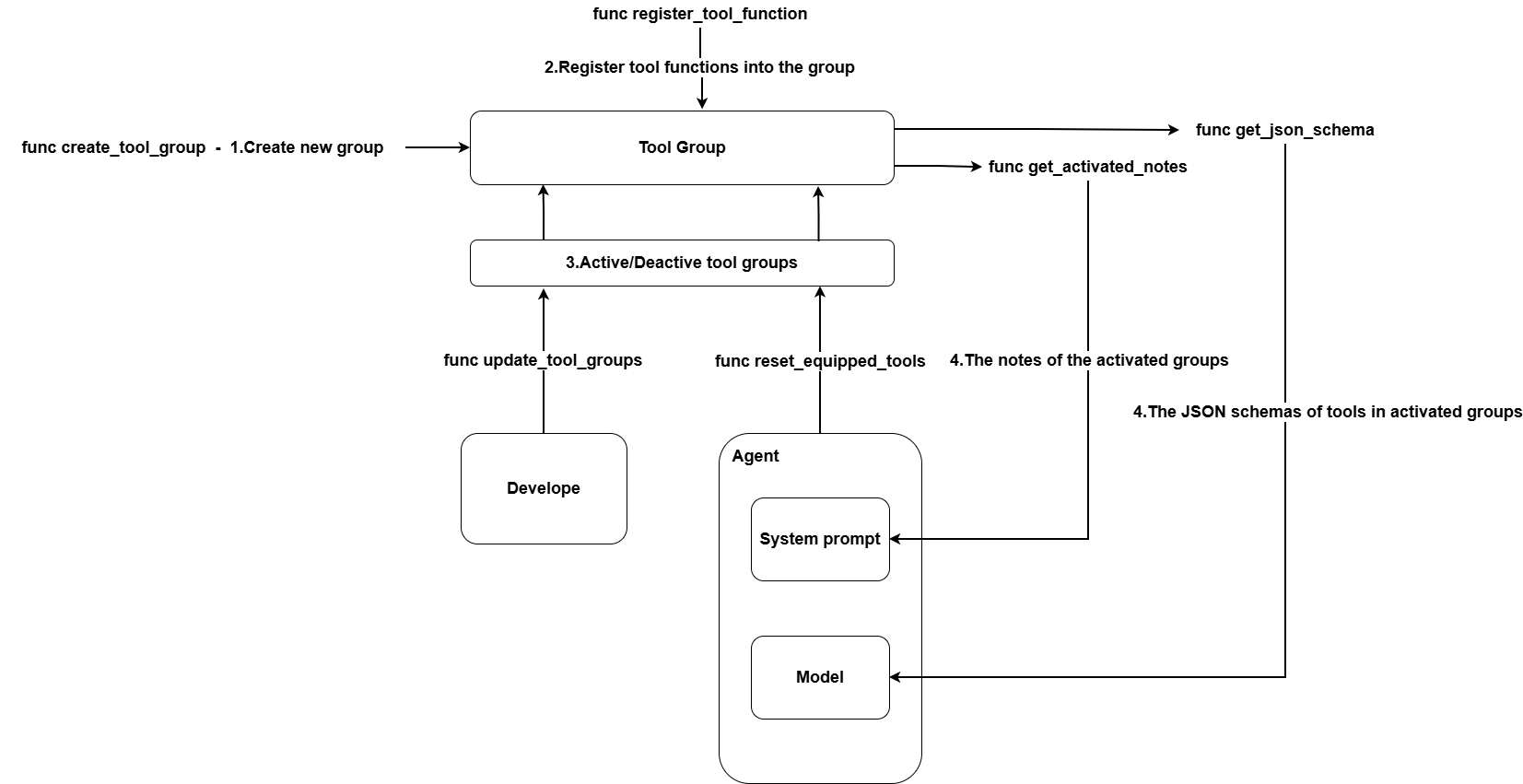
AgentScope中支持通过Toolkit来对工具进行管理,并且具备工具组的概念,这个是其他智能体框架一般没有的一个新概念,工具组可以让我们在集成大量工具时,让智能体可以在特定场景下只激活部分工具,减少AI调用时的上下文冗余信息,让AI大模型输出更稳定。
创建工具组
以下代码创建了一个名称为browser_user的工具组。
javascript
# 创建工具组
toolkit.create_tool_group(
    group_name="browser_use",
    description="网页浏览工具函数",
    active=False,
    notes="使用说明:
1. 使用 `navigate` 打开网页
2. 需要用户认证时,询问用户凭据
3. ...",
)
管理工具组
javascript
# 定义工具函数
def navigate(url: str) -> ToolResponse:
    """导航到网页
    Args:
    url (str): 要导航到的网页 URL
    """
    pass

# 注册到特定工具组
toolkit.register_tool_function(click_element, group_name="browser_use")

# 激活/停用工具组
toolkit.update_tool_groups(group_names=["browser_use"], active=True)
元工具函数
Toolkit 提供了 reset_equipped_tools 元工具函数,用于动态选择和激活工具组:
javascript
# 注册元工具函数
toolkit.register_tool_function(toolkit.reset_equipped_tools)

# 代理可以调用此函数来选择需要的工具组
# 函数会返回激活工具组的使用说明
动态激活工具
代码示例
javascript
from agentscope.tool import ToolResponse
from agentscope.tool import Toolkit
import asyncio
from agentscope.agent import ReActAgent
import nest_asyncio
from agentscope.model import DashScopeChatModel
from agentscope.message import Msg, TextBlock
import os
from agentscope.tool import Toolkit, execute_python_code
from agentscope.formatter import DashScopeChatFormatter
from agentscope.memory import InMemoryMemory

nest_asyncio.apply()

# 定义工具函数
def navigate(url: str) -> ToolResponse:
    """ 导航到网页

    Args:
        url (str): 要导航到的网页 URL
    """
    print(f"导航至{url}")
    return ToolResponse(
        content=[TextBlock(
            type="text",
            text=f"已经成功导航至{url}页面"
        )]
    )

def click_element(element_id: str) -> ToolResponse:
    """点击网页元素

    Args:
        element_id (str): 要点击的元素 ID
    """
    print(f"点击了{element_id}元素")
    return ToolResponse(
        content=[TextBlock(
            type="text",
            text=f"已经成功点击了{element_id}元素"
        )]
    )

toolkit = Toolkit()

toolkit.create_tool_group("browser_use_dynamic", description="浏览器操作工具组", active=False,
    notes="navigate工具用于进行地址导航。click_element工具用于点击指定元素")
# 注册到特定工具组
toolkit.register_tool_function(navigate, group_name="browser_use_dynamic")
toolkit.register_tool_function(click_element, group_name="browser_use_dynamic")

# 自动激活工具组
toolkit.register_tool_function(toolkit.reset_equipped_tools)

async def creating_react_agent() -> None:
    """Create a ReAct agent and run a simple task."""
    agent = ReActAgent(
        name="agent",
        sys_prompt="You're a helpful assistant",
        model=DashScopeChatModel(
            model_name="qwen-max",
            api_key=os.getenv("AI_BAI_LIAN_API_KEY"),
            stream=True,
            enable_thinking=False,
        ),
        formatter=DashScopeChatFormatter(),
        toolkit=toolkit,
        memory=InMemoryMemory(),
    )
    msg = Msg(
        name="user",
        content="请先打开www.openai.com页面,然后点击里面的element_id为345的元素",
        role="user",
    )
    await agent(msg)

asyncio.run(creating_react_agent())
控制台输出
javascript
D:\work-python\agentscope\agentscope-learn\.venv\Scripts\python.exe D:\work-python\agentscope\agentscope-learn\auto_dynamic_tool.py
agent: {
    "type": "tool_use",
    "id": "call_7d069b9a18b249c6946c1a",
    "name": "reset_equipped_tools",
    "input": {
        "browser_use_dynamic": true
    },
    "raw_input": "{\"browser_use_dynamic\": true}"
}
system: {
    "type": "tool_result",
    "id": "call_7d069b9a18b249c6946c1a",
    "name": "reset_equipped_tools",
    "output": [
        {
            "type": "text",
            "text": "Now tool groups 'browser_use_dynamic' are activated. You MUST follow these notes to use these tools:\n<notes>## About Tool Group 'browser_use_dynamic'\nnavigate工具用于进行地址导航。click_element工具用于点击指定元素</notes>"
        }
    ]
}
agent: {
    "type": "tool_use",
    "id": "call_4efb3781257441d4b7f847",
    "name": "navigate",
    "input": {
        "url": "www.openai.com"
    },
    "raw_input": "{\"url\": \"www.openai.com\"}"
}
agent: {
    "type": "tool_use",
    "id": "call_318c872330a148d79d7320",
    "name": "click_element",
    "input": {
        "element_id": "345"
    },
    "raw_input": "{\"element_id\": \"345\"}"
}
导航至www.openai.com
system: {
    "type": "tool_result",
    "id": "call_4efb3781257441d4b7f847",
    "name": "navigate",
    "output": [
        {
            "type": "text",
            "text": "已经成功导航至www.openai.com页面"
        }
    ]
}
点击了345元素
system: {
    "type": "tool_result",
    "id": "call_318c872330a148d79d7320",
    "name": "click_element",
    "output": [
        {
            "type": "text",
            "text": "已经成功点击了345元素"
        }
    ]
}
agent: 已经成功导航至www.openai.com页面,并且点击了element_id为345的元素。

进程已结束,退出代码为 0
智能体记忆
短期记忆(Short-Term-Memory)
AI智能体中的记忆通常分为短期记忆和长期记忆,对于短期记忆AgentScope默认提供了一个基于内存的记忆管理 InMemoryMemory,如果我们想将记忆存储到其他地方,需要自己实现 MemoryBase 类。
以下是MemoryBase的源代码,通过继承MemoryBase类即可实现自己的记忆模块,例如在分布式环境下,我们可能希望借助redis来实现短期记忆缓存。
javascript
from abc import abstractmethod
from typing import Any

from ...message import Msg
from ...module import StateModule

class MemoryBase(StateModule):
    """The base class for memory in agentscope."""

    def __init__(self) -> None:
        """Initialize the memory base."""
        super().__init__()

        self._compressed_summary: str = ""

        self.register_state("_compressed_summary")

    async def update_compressed_summary(self, summary: str) -> None:
        """Update the compressed summary of the memory.

        Args:
            summary (`str`):
                The new compressed summary.
        """
        self._compressed_summary = summary

    @abstractmethod
    async def add(
        self,
        memories: Msg | list[Msg] | None,
        marks: str | list[str] | None = None,
        **kwargs: Any,
    ) -> None:
        """Add message(s) into the memory storage with the given mark
        (if provided).

        Args:
            memories (`Msg | list[Msg] | None`):
                The message(s) to be added.
            marks (`str | list[str] | None`, optional):
                The mark(s) to associate with the message(s). If `None`, no
                mark is associated.
        """

    @abstractmethod
    async def delete(
        self,
        msg_ids: list[str],
        **kwargs: Any,
    ) -> int:
        """Remove message(s) from the storage by their IDs.

        Args:
            msg_ids (`list[str]`):
                The list of message IDs to be removed.

        Returns:
            `int`:
                The number of messages removed.
        """

    async def delete_by_mark(
        self,
        mark: str | list[str],
        *args: Any,
        **kwargs: Any,
    ) -> int:
        """Remove messages from the memory by their marks.

        Args:
            mark (`str | list[str]`):
                The mark(s) of the messages to be removed.

        Raises:
            `TypeError`:
                If the provided mark is not a string or a list of strings.

        Returns:
            `int`:
                The number of messages removed.
        """
        raise NotImplementedError(
            "The delete_by_mark method is not implemented in "
            f"{self.__class__.__name__} class.",
        )

    @abstractmethod
    async def size(self) -> int:
        """Get the number of messages in the storage.

        Returns:
            `int`:
                The number of messages in the storage.
        """

    @abstractmethod
    async def clear(self) -> None:
        """Clear the memory content."""

    @abstractmethod
    async def get_memory(
        self,
        mark: str | None = None,
        exclude_mark: str | None = None,
        prepend_summary: bool = True,
        **kwargs: Any,
    ) -> list[Msg]:
        """Get the messages from the memory by mark (if provided). Otherwise,
        get all messages.

        .. note:: If `mark` and `exclude_mark` are both provided, the messages
         will be filtered by both arguments.

        .. note:: `mark` and `exclude_mark` should not overlap.

        Args:
            mark (`str | None`, optional):
                The mark to filter messages. If `None`, return all messages.
            exclude_mark (`str | None`, optional):
                The mark to exclude messages. If provided, messages with
                this mark will be excluded from the results.
            prepend_summary (`bool`, defaults to True):
                Whether to prepend the compressed summary as a message

        Returns:
            `list[Msg]`:
                The list of messages retrieved from the storage.
        """

    async def update_messages_mark(
        self,
        new_mark: str | None,
        old_mark: str | None = None,
        msg_ids: list[str] | None = None,
    ) -> int:
        """A unified method to update marks of messages in the storage (add,
        remove, or change marks).

        - If `msg_ids` is provided, the update will be applied to the messages
         with the specified IDs.
        - If `old_mark` is provided, the update will be applied to the
         messages with the specified old mark. Otherwise, the `new_mark` will
         be added to all messages (or those filtered by `msg_ids`).
        - If `new_mark` is `None`, the mark will be removed from the messages.

        Args:
            new_mark (`str | None`, optional):
                The new mark to set for the messages. If `None`, the mark
                will be removed.
            old_mark (`str | None`, optional):
                The old mark to filter messages. If `None`, this constraint
                is ignored.
            msg_ids (`list[str] | None`, optional):
                The list of message IDs to be updated. If `None`, this
                constraint is ignored.

        Returns:
            `int`:
                The number of messages updated.
        """
        raise NotImplementedError(
            "The update_messages_mark method is not implemented in "
            f"{self.__class__.__name__} class.",
        )
长期记忆(Long-Term-Memory)
长期记忆我们一般需要进行持久化存储,以下是两个比较适合进行长期记忆管理的技术框架。
Graphiti - 时序知识图谱上下文管理
Mem0 - AI大模型记忆集中管理框架
消息格式器
在前面创建智能体的代码中,我们经常会看到在formatter参数中传入一个DashScopeChatFormatter对象,在AgentScope中,formatter可以实现以下功能:
1.将消息转化为对应模型API兼容的数据格式。
2.针对长消息进行一定的裁剪(内置的格式器通常都继承自TruncatedFormatterBase,具备自动进行消息裁剪的功能)。
3.对消息结构进行优化以提升大模型识别效果。
4.对消息进行总结获取其他一些自定义处理。
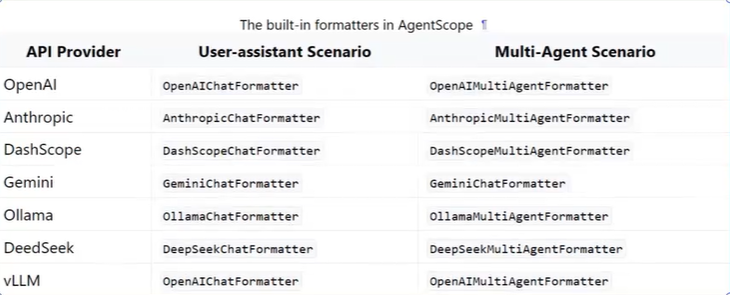
以下是所有内置的消息格式器,分别应用于不同的模型与不同场景。
状态管理
类似于langgraph或者其他一些工作流、智能体系统,当我们在创建智能体,通常需要一个持久化共享的数据结构来跟踪维持整个智能体或者工作流的运行状态,通过AgentScope在创建智能体时,默认会创建,AgentScope的状态管理具备以下功能:
- 核心价值:状态管理是 AgentScope 的基础构建块,维护对象运行时数据的快照。
- 设计理念:将对象初始化与状态管理分离,支持对象在初始化厚恢复到不同状态。
- 应用场景:多智能体对话、长期记忆、工具管理、任务恢复。
AgentScope的状态管理支持以下特性:
- 自定状态注册
- 手动状态注册
- 会话级/应用级状态管理
javascript
import json

initial_state = agent.state_dict()
print("state of the agent:")
print(json.dumps(initial_state, indent=4))
javascript
state of the agent:
{
    "memory": {
        "_compressed_summary": "",
        "content": [
            [
                {
                    "id": "WWjkCyUadFXNSWhDPuy7WW",
                    "name": "user",
                    "role": "user",
                    "content": "\u8bf7\u5148\u6253\u5f00www.openai.com\u9875\u9762\uff0c\u7136\u540e\u70b9\u51fb\u91cc\u9762\u7684element_id\u4e3a345\u7684\u5143\u7d20",
                    "metadata": {},
                    "timestamp": "2026-07-07 19:07:52.445"
                },
                []
            ],
            [
                {
                    "id": "hqoG7gAxKoSrEmC4nN7UQN",
                    "name": "agent",
                    "role": "assistant",
                    "content": [
                        {
                            "type": "tool_use",
                            "id": "call_d070a6fe68c047d5b82f22",
                            "name": "reset_equipped_tools",
                            "input": {
                                "browser_use_dynamic": true
                            },
                            "raw_input": "{\"browser_use_dynamic\": true}"
                        }
                    ],
                    "metadata": {},
                    "timestamp": "2026-07-07 19:07:52.517"
                },
                []
            ],
            [
                {
                    "id": "R4tBNmHEqa9SnQLLTSMQSs",
                    "name": "system",
                    "role": "system",
                    "content": [
                        {
                            "type": "tool_result",
                            "id": "call_d070a6fe68c047d5b82f22",
                            "name": "reset_equipped_tools",
                            "output": [
                                {
                                    "type": "text",
                                    "text": "Now tool groups 'browser_use_dynamic' are activated. You MUST follow these notes to use these tools:\n<notes>## About Tool Group 'browser_use_dynamic'\nnavigate\u5de5\u5177\u7528\u4e8e\u8fdb\u884c\u5730\u5740\u5bfc\u822a\u3002click_element\u5de5\u5177\u7528\u4e8e\u70b9\u51fb\u6307\u5b9a\u5143\u7d20</notes>"
                                }
                            ]
                        }
                    ],
                    "metadata": {},
                    "timestamp": "2026-07-07 19:07:54.039"
                },
                []
            ],
            [
                {
                    "id": "gngiX7J8BYHdbabNGbW6SG",
                    "name": "agent",
                    "role": "assistant",
                    "content": [
                        {
                            "type": "tool_use",
                            "id": "call_db12c158e4504a05901a69",
                            "name": "navigate",
                            "input": {
                                "url": "www.openai.com"
                            },
                            "raw_input": "{\"url\": \"www.openai.com\"}"
                        },
                        {
                            "type": "tool_use",
                            "id": "call_d3914c4a31b546ebba2d9b",
                            "name": "click_element",
                            "input": {
                                "element_id": "345"
                            },
                            "raw_input": "{\"element_id\": \"345\"}"
                        }
                    ],
                    "metadata": {},
                    "timestamp": "2026-07-07 19:07:54.042"
                },
                []
            ],
            [
                {
                    "id": "8W3jU4NzfCiMw2jNppUpZp",
                    "name": "system",
                    "role": "system",
                    "content": [
                        {
                            "type": "tool_result",
                            "id": "call_db12c158e4504a05901a69",
                            "name": "navigate",
                            "output": [
                                {
                                    "type": "text",
                                    "text": "\u5df2\u7ecf\u6210\u529f\u5bfc\u822a\u81f3www.openai.com\u9875\u9762"
                                }
                            ]
                        }
                    ],
                    "metadata": {},
                    "timestamp": "2026-07-07 19:07:55.855"
                },
                []
            ],
            [
                {
                    "id": "MP7hTbypyYQawSiJ7CTRUX",
                    "name": "system",
                    "role": "system",
                    "content": [
                        {
                            "type": "tool_result",
                            "id": "call_d3914c4a31b546ebba2d9b",
                            "name": "click_element",
                            "output": [
                                {
                                    "type": "text",
                                    "text": "\u5df2\u7ecf\u6210\u529f\u70b9\u51fb\u4e86345\u5143\u7d20"
                                }
                            ]
                        }
                    ],
                    "metadata": {},
                    "timestamp": "2026-07-07 19:07:55.856"
                },
                []
            ],
            [
                {
                    "id": "Qpw4eWecUEJUBQXVkdPtHv",
                    "name": "agent",
                    "role": "assistant",
                    "content": [
                        {
                            "type": "text",
                            "text": "\u5df2\u7ecf\u6210\u529f\u5bfc\u822a\u81f3www.openai.com\u9875\u9762\uff0c\u5e76\u70b9\u51fb\u4e86element_id\u4e3a345\u7684\u5143\u7d20\u3002"
                        }
                    ],
                    "metadata": {},
                    "timestamp": "2026-07-07 19:07:55.857"
                },
                []
            ]
        ]
    },
    "toolkit": {
        "active_groups": [
            "browser_use_dynamic"
        ]
    },
    "name": "agent",
    "_sys_prompt": "You're a helpful assistant"
}