承上 :上一篇我们把文档切成了高质量的小碎片,但它们还只是文本。AI不认识文本,只认识数字。今天,我们要把这些文本碎片变成一串串数字------向量,存入向量数据库,让AI真正能"理解"你的私有知识。
1. 先搞懂:什么是Embedding?
1.1. 用后端老鸟的类比
假设你是数据库管理员,要给1000本书建立索引:
arduino
传统索引:
"Java编程思想" → 按书名倒排 → J字母开头 → 第3排第5本

向量索引:
"Java编程思想" → 转成一串数字[0.23, -0.15, 0.78, ...] →
  在1536维空间里找一个坐标点 →
  查"Java入门"时 → 也转成坐标 → 找最近的点 → 就是这本书!
Embedding 就是把文本映射到高维空间的坐标点。语义越相似,坐标越接近。
arduino
"年假怎么请" → [0.12, -0.34, 0.56, ...]  ← 1536个数字
"休假政策"   → [0.13, -0.32, 0.54, ...]  ← 坐标非常接近!
"今天天气"   → [-0.78, 0.45, -0.23, ...] ← 坐标很远
Spring AI 2.0 通过统一的 EmbeddingModel 接口支持多种模型:
| 模型 | 维度 | 最大输入 | 价格 |
|---|---|---|---|
| text-embedding-ada-002(OpenAI) | 1536 | 8191 Token | ¥0.008/千Token |
| text-embedding-3-small(OpenAI) | 1536 | 8191 Token | ¥0.002/千Token |
| 通义千问 Embedding | 1536 | 2048 Token | ¥0.0007/千Token |
本篇使用通义千问的Embedding模型,和我们的对话模型一致,国内访问稳定,价格便宜。
2. 第一步:配置Embedding模型
2.1. 添加依赖
xml
<dependency>
    <groupId>org.springframework.ai</groupId>
    <artifactId>spring-ai-starter-openai</artifactId>
</dependency>注意:和之前的对话模型用同一个Starter。通义千问的Embedding也通过OpenAI兼容接口提供。
2.2. 配置Embedding
yaml
spring:
  ai:
    openai:
      api-key: xxxx
      base-url: https://ws-xxxx.cn-beijing.maas.aliyuncs.com/compatible-mode/v1
      chat:
        options:
          model: qwen3.7-max
      embedding:
        options:
          model: qwen3.7-text-embedding
2.3. 第一个Embedding测试
ini
package com.oldbird.ai.chapter13.embedding;

import org.springframework.ai.embedding.EmbeddingModel;
import org.springframework.ai.embedding.EmbeddingResponse;
import org.springframework.stereotype.Component;

import java.util.List;

@Component
public class EmbeddingDemo {

    private final EmbeddingModel embeddingModel;

    public EmbeddingDemo(EmbeddingModel embeddingModel) {
        this.embeddingModel = embeddingModel;
    }

    public void testEmbedding() {
        // 将文本转成向量
        EmbeddingResponse response = embeddingModel.embedForResponse(
                List.of("入职满1年享有5天带薪年假", "年假怎么申请")
        );

        List<float[]> vectors = response.getResults().stream()
                .map(result -> result.getOutput())
                .toList();

        System.out.println("向量维度:" + vectors.get(0).length);  // 1536
        System.out.println("第一个向量前5个值:" +
                vectors.get(0)[0] + ", " +
                vectors.get(0)[1] + ", " +
                vectors.get(0)[2] + ", " +
                vectors.get(0)[3] + ", " +
                vectors.get(0)[4]);

        // 计算相似度
        double similarity = cosineSimilarity(vectors.get(0), vectors.get(1));
        System.out.println("两句话的余弦相似度:" + similarity);
        // 输出:0.92(高度相似)
    }

    /**
     * 余弦相似度:衡量两个向量在多维空间中的夹角
     * 1.0 = 完全同向(语义相同)
     * 0.0 = 正交(无关)
     * -1.0 = 完全反向(语义相反)
     */
    private double cosineSimilarity(float[] a, float[] b) {
        double dotProduct = 0;
        double normA = 0;
        double normB = 0;
        for (int i = 0; i < a.length; i++) {
            dotProduct += a[i] * b[i];
            normA += a[i] * a[i];
            normB += b[i] * b[i];
        }
        return dotProduct / (Math.sqrt(normA) * Math.sqrt(normB));
    }
}运行结果:
向量维度:1024
第一个向量前5个值:0.023570376, -0.009924047, -0.025762115, 0.0029585415, 0.02347242
两句话的余弦相似度:0.643651355275984关键认知:文本→1024个浮点数→一个坐标。从此以后,"语义相似"可以用"坐标距离"来数学计算。这就是AI能"理解"文本的底层原理。
3. 第二步:选择向量数据库
3.1. 主流向量的数据库对比
向量数据的选型我没有经验可谈哈,但是用于学习实战和公司小型知识库我觉得redis足够。
| 数据库 | 类型 | 优势 | 劣势 | 适用场景 |
|---|---|---|---|---|
| Redis Stack | 内存+磁盘 | 已有Redis可复用,毫秒级 | 内存贵,大规模成本高 | 中小规模、已有Redis |
| Milvus | 专业向量库 | 十亿级向量,索引丰富 | 独立部署,运维复杂 | 大规模生产 |
| PGVector | PostgreSQL插件 | 和业务库一体,SQL查询 | 百万级以上性能下降 | 已有PostgreSQL |
| Elasticsearch | 搜索引擎 | 混合检索(关键词+向量) | 向量检索非原生 | 已有ES |
3.2. 本篇选择:Redis Stack
理由:
- 上一篇第9篇(ChatMemory)已经用了Redis,不引入新中间件
- 开发阶段零成本,Docker一行命令搞定
- 向量检索性能足够(百万级以下)
3.3. 部署Redis Stack
arduino
docker run -d \
  --name redis-stack \
  -p 6379:6379 \
  -p 8001:8001 \
  redis/redis-stack:latest
Redis Stack 包含了 RediSearch 模块,支持向量检索。普通Redis不行。
4. 第三步:向量化并写入Redis
4.1. 添加依赖
xml
<dependency>
    <groupId>org.springframework.ai</groupId>
    <artifactId>spring-ai-starter-vector-store-redis</artifactId>
</dependency>
4.2. 配置向量存储Bean
kotlin
package com.yunxi.ai.config;

import org.springframework.ai.embedding.EmbeddingModel;
import org.springframework.ai.vectorstore.redis.RedisVectorStore;
import org.springframework.beans.factory.annotation.Value;
import org.springframework.context.annotation.Bean;
import org.springframework.context.annotation.Configuration;
import redis.clients.jedis.JedisPoolConfig;
import redis.clients.jedis.RedisClient;

@Configuration
public class VectorStoreConfig {
    @Bean
    public RedisVectorStore vectorStore(RedisClient jedisRedisClient, EmbeddingModel embeddingModel) {
        return RedisVectorStore.builder(jedisRedisClient, embeddingModel)
                .indexName("spring-ai-knowledge")
                .prefix("doc:")
                .metadataFields(
                        RedisVectorStore.MetadataField.tag("source")
                )
                .initializeSchema(true)
                .build();
    }
}
4.3. 完整的导入服务
kotlin
package com.yunxi.ai.controller;

import com.yunxi.ai.entity.Result;
import lombok.extern.slf4j.Slf4j;
import org.springframework.ai.document.Document;
import org.springframework.ai.reader.tika.TikaDocumentReader;
import org.springframework.ai.transformer.splitter.TokenTextSplitter;
import org.springframework.ai.vectorstore.VectorStore;
import org.springframework.beans.factory.annotation.Autowired;
import org.springframework.core.io.Resource;
import org.springframework.web.bind.annotation.RequestMapping;
import org.springframework.web.bind.annotation.RequestParam;
import org.springframework.web.bind.annotation.RestController;
import org.springframework.web.multipart.MultipartFile;

import java.util.List;

@RestController
@RequestMapping("/rag")
@Slf4j
public class RagController {

    /**
     * 导入文档到向量数据库
     * 完整流程:读取 → 分割 → 向量化 → 存储
     */
    @RequestMapping("/uploadAndEmbedding")
    public Result uploadAndEmbedding(@RequestParam("file") MultipartFile file, @RequestParam(value = "chunkSize", defaultValue = "500") Integer chunkSize) {
        if (file == null || file.isEmpty()) {
            return Result.failed(500, "文件为空");
        }
        try {
            log.info("开始处理文件:{},分片大小:{}", file.getOriginalFilename(), chunkSize);
            Resource resource = file.getResource();
            TikaDocumentReader tikaDocumentReader = new TikaDocumentReader(resource);
            List<Document> read = tikaDocumentReader.read();
            log.info("文件解析完成,原始文档数:{}", read.size());
            TokenTextSplitter splitter = TokenTextSplitter.builder().withChunkSize(chunkSize).build();
            List<Document> apply = splitter.apply(read);
            log.info("分片完成,总分片数:{}", apply.size());
            // 向量化存储
            vectorStore.add(apply);
            return Result.successed(apply);
        } catch (Exception e) {
            log.error("文件处理异常", e);
            return Result.failed(500, "文件处理异常:" + e.getMessage());
        }
    }

}
核心代码就一句:vectorStore.add(apply);
4.4. 验证导入
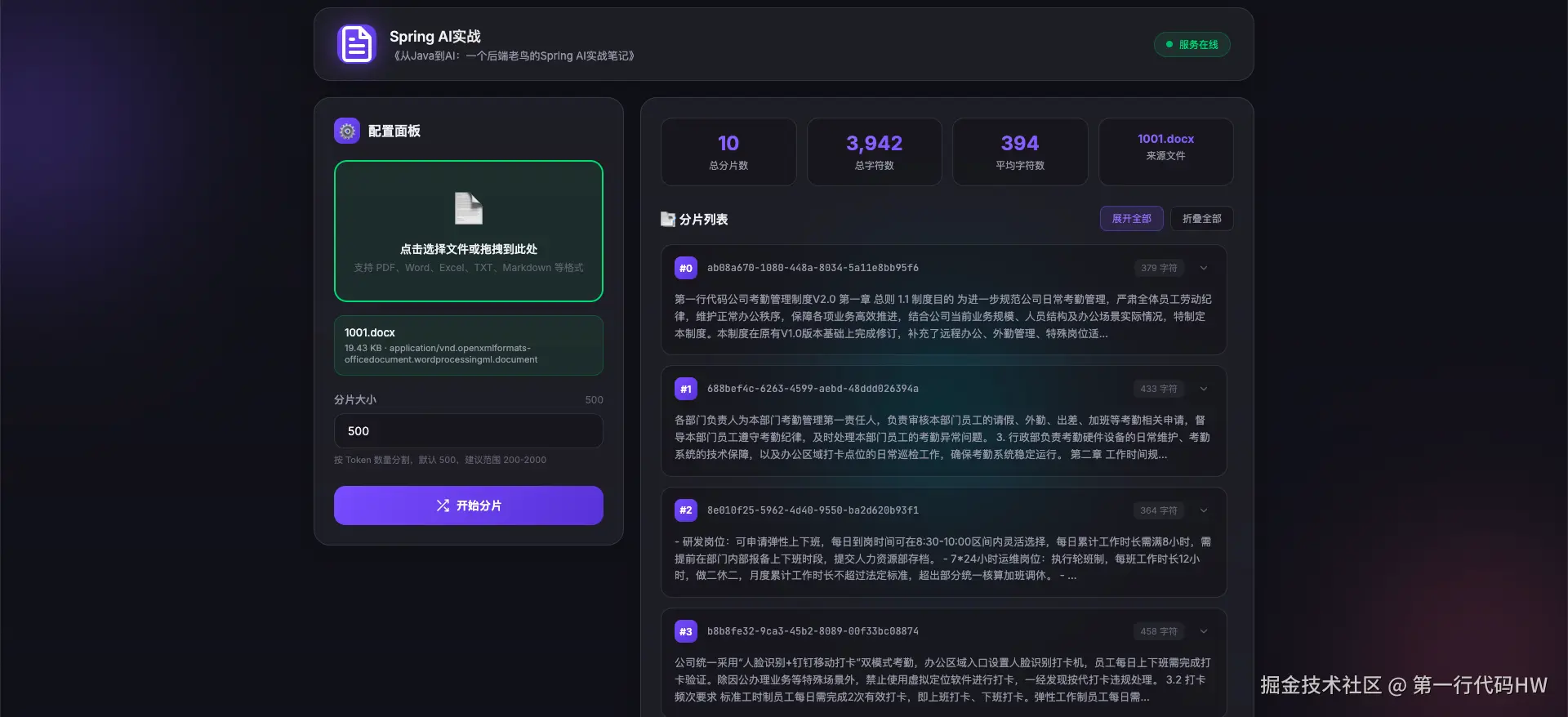
生成了10个分片,Redis里发生了什么?
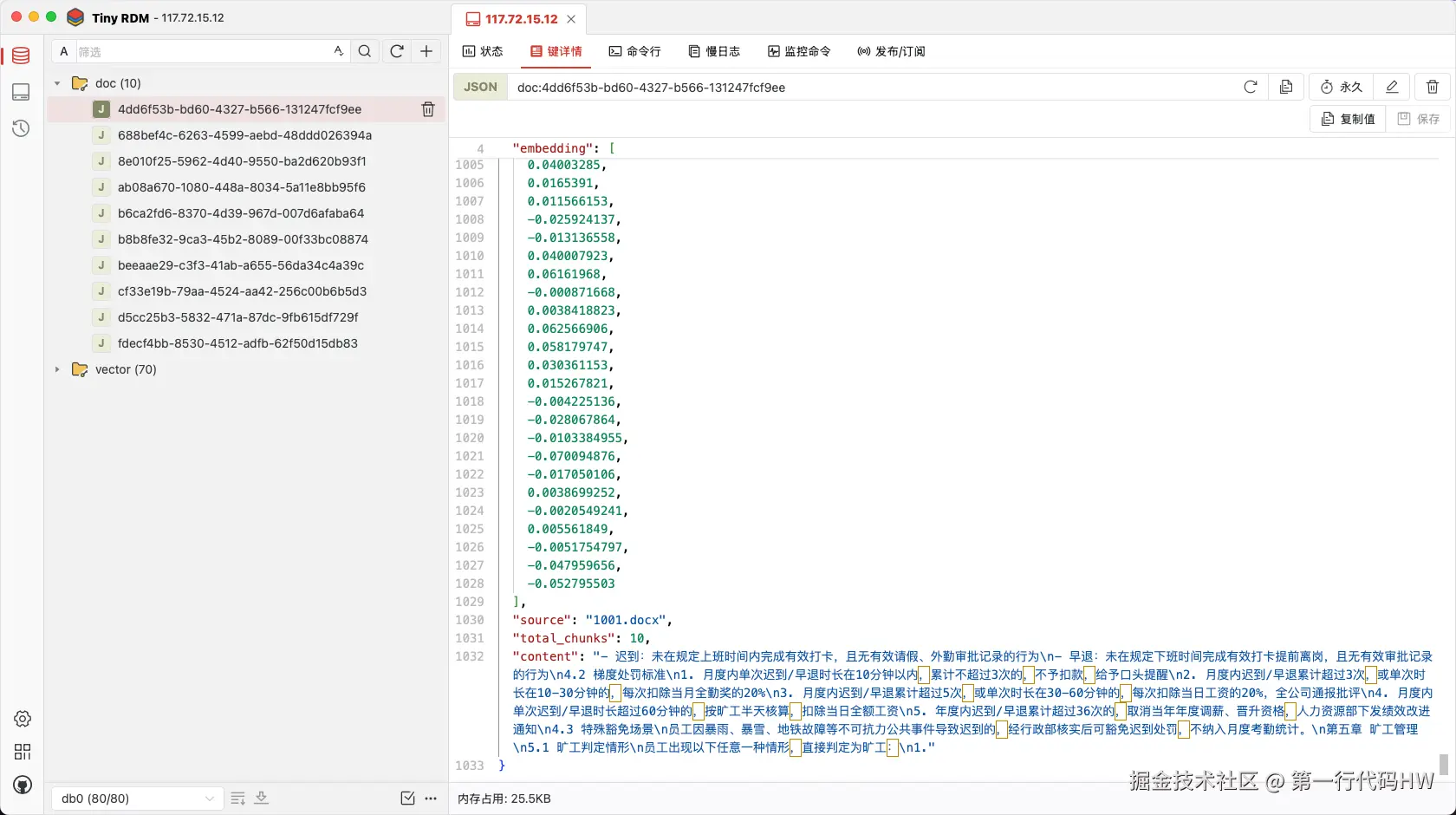
swift
Key: doc:4dd6f53b-bd60-4327-b566-131247fcf9ee
Type: Hash
Value: {
  "chunk_index": 4,
  "parent_document_id": "5f0a7d4a-b53f-4cc6-b5fd-8b6e5541120c",
  "embedding": [
    0.01784777,
    0.014171031,
    -0.020203378,
    -0.052795503...
  ],
  "source": "1001.docx",
  "total_chunks": 10,
  "content": "- 迟到:未在规定上班时间内完成有效打卡,且无有效请假、外勤审批记录的行为\n- 早退:未在规定下班时间完成有效打卡提前离岗,且无有效审批记录的行为\n4.2 梯度处罚标准\n1. 月度内单次迟到/早退时长在10分钟以内,累计不超过3次的,不予扣款,给予口头提醒\n2. 月度内迟到/早退累计超过3次,或单次时长在10-30分钟的,每次扣除当月全勤奖的20%\n3. 月度内迟到/早退累计超过5次,或单次时长在30-60分钟的,每次扣除当日工资的20%,全公司通报批评\n4. 月度内单次迟到/早退时长超过60分钟的,按旷工半天核算,扣除当日全额工资\n5. 年度内迟到/早退累计超过36次的,取消当年年度调薪、晋升资格,人力资源部下发绩效改进通知\n4.3 特殊豁免场景\n员工因暴雨、暴雪、地铁故障等不可抗力公共事件导致迟到的,经行政部核实后可豁免迟到处罚,不纳入月度考勤统计。\n第五章 旷工管理\n5.1 旷工判定情形\n员工出现以下任意一种情形,直接判定为旷工:\n1."
}每个文档块都存了:原始文本 + 元数据 + 向量。
5. 第四步:向量检索
5.1. 检索逻辑
scss
    /**
     * 向量检索
     */
    @RequestMapping("/searchEmbedding")
    public Result searchEmbedding(String query, Integer topK) {
        try{
            SearchRequest request = SearchRequest.builder()
                    .query(query)
                    .topK(topK)
                    .build();
            List<Document> results = vectorStore.similaritySearch(request);
            return Result.successed(results);
        } catch (Exception e) {
            return Result.failed(500, "系统异常");
        }
    }
5.2. 测试检索效果
查询1:年假相关
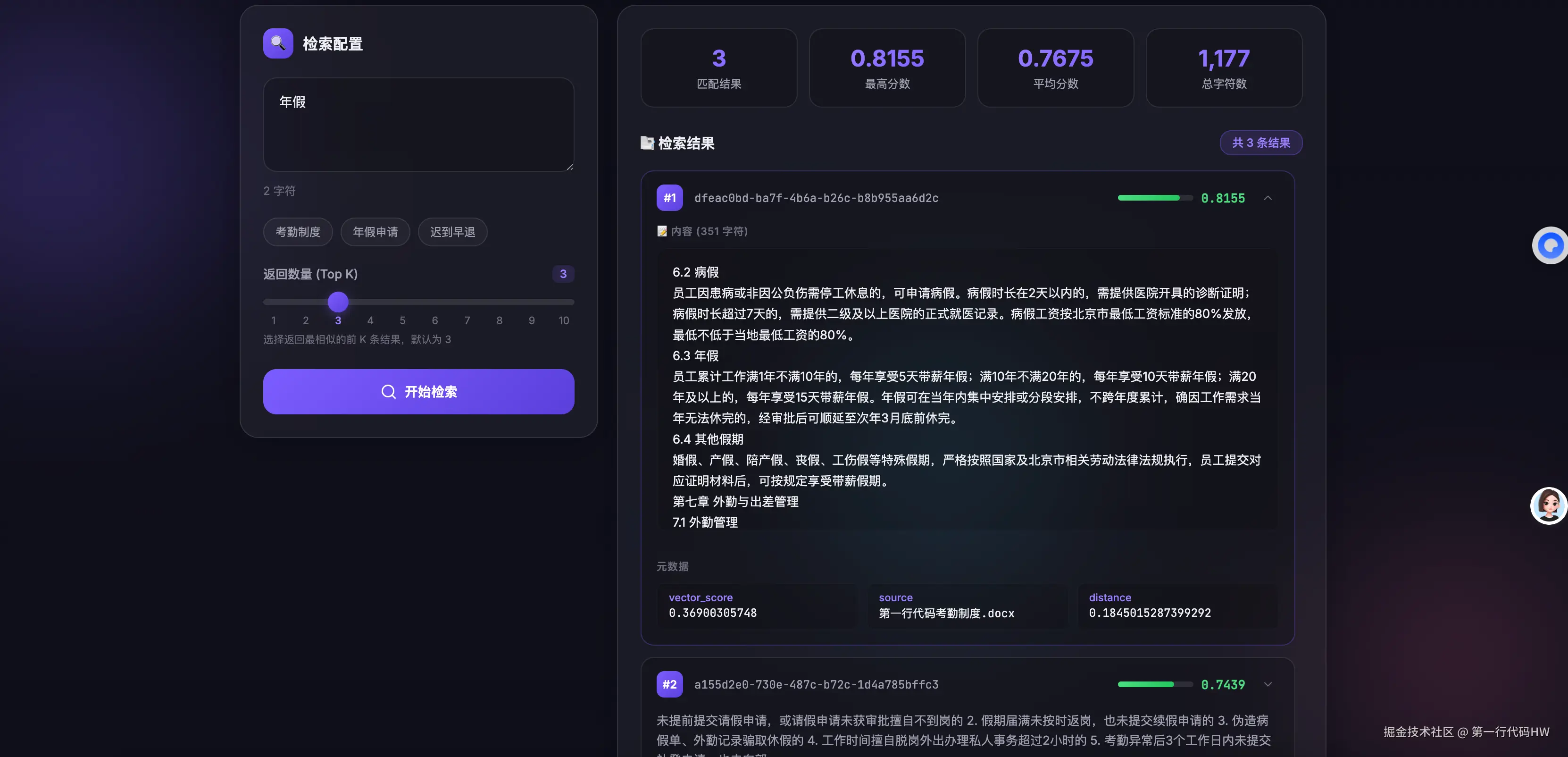
分析 :第一个结果精准命中"年假"内容。第二个和第三个虽然也是休假相关,但和年假不完全匹配------这就是向量检索的特点:找语义相似的,不一定是关键词完全匹配的。
查询2:长期超过50天
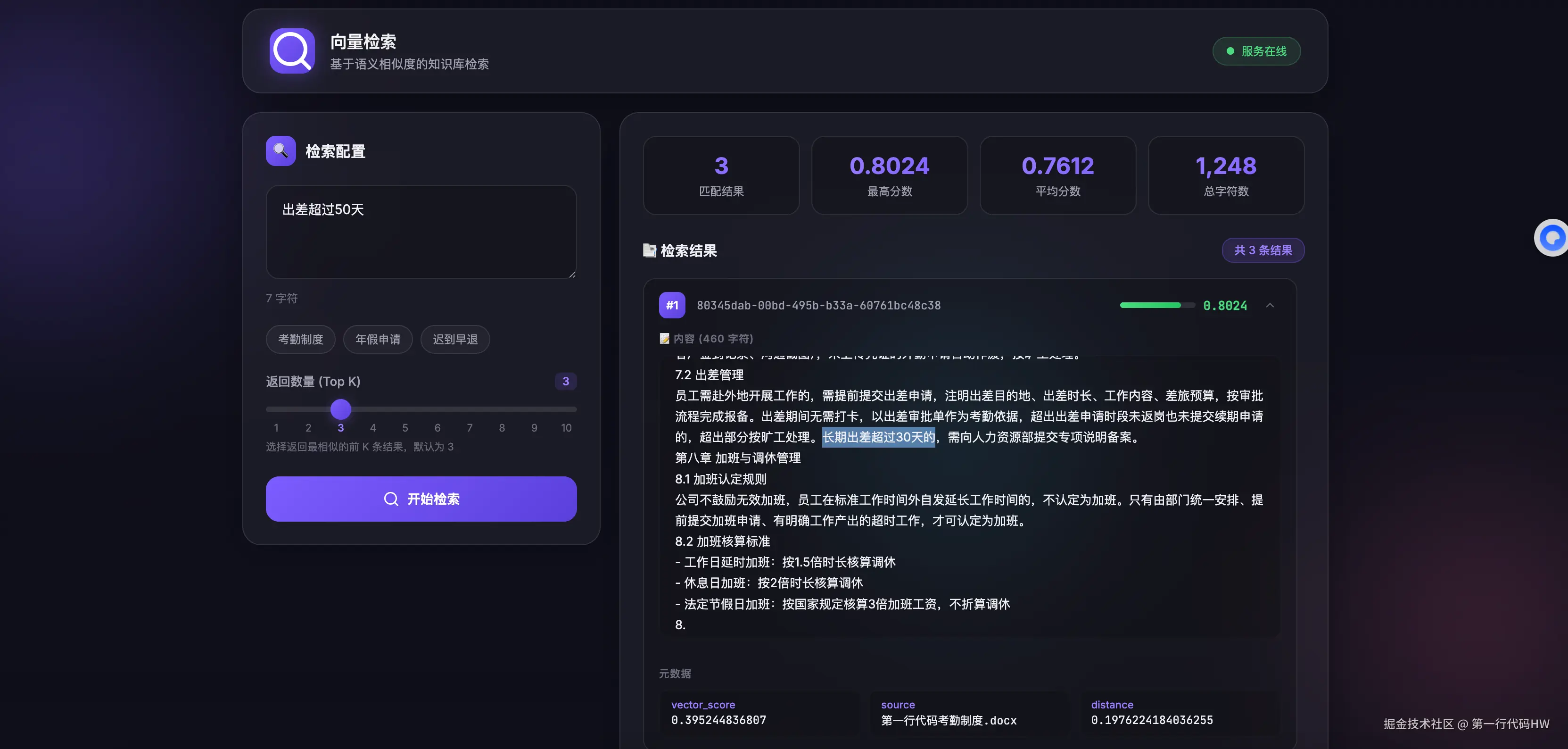
用户问的是"出差超过50天",AI精准检索到了"长期出差"那段,长期出差超过30天。用户可能用了口语化表达,但向量检索理解了他的语义。
6. 向量数据库里到底存了什么?
用Redis CLI看一下:
bash
# 查看索引信息
redis-cli FT.INFO spring-ai-knowledge
FT.INFO spring-ai-knowledge
1) "key_table_size_mb"
2) 0.0001659393310546875
3) "geoshapes_sz_mb"
4) 0
5) "bytes_per_record_avg"
6) 89.2532730102539
7) "index_name"
8) "spring-ai-knowledge"
9) "attributes"
10)     1)      1) "identifier"
        2) "$.content"
        3) "attribute"
        4) "content"
        5) "type"
        6) "TEXT"
        7) "WEIGHT"
        8) 1
        9) "flags"
        10)
        2)      1) "algorithm"
        2) "HNSW"
        3) "distance_metric"
        4) "COSINE"
        5) "flags"
        6)
        7) "identifier"
        8) "$.embedding"
        9) "data_type"
        10) "FLOAT32"
        11) "dim"
        12) 1024
        13) "M"
        14) 16
        15) "ef_construction"
        16) 200
        17) "attribute"
        18) "embedding"
        19) "type"
        20) "VECTOR"
        3)      1) "identifier"
        2) "$.source"
        3) "attribute"
        4) "source"
        5) "type"
        6) "TAG"
        7) "SEPARATOR"
        8) ""
        9) "flags"
        10)
11) "sortable_values_size_mb"
12) 0
13) "offset_bits_per_record_avg"
14) 8
15) "number_of_uses"
16) 1
17) "num_records"
18) 229
19) "total_index_memory_sz_mb"
20) 0.043750762939453125
21) "cleaning"
22) 0
23) "inverted_sz_mb"
24) 0.019492149353027344
25) "gc_stats"
26)     1) "bytes_collected"
        2) 0
        3) "total_ms_run"
        4) 0
        5) "total_cycles"
        6) 0
        7) "average_cycle_time_ms"
        8) NaN
        9) "last_run_time_ms"
        10) 0
        11) "gc_numeric_trees_missed"
        12) 0
        13) "gc_blocks_denied"
        14) 0
27) "num_terms"
28) 196
29) "offset_vectors_sz_mb"
30) 0.000385284423828125
31) "doc_table_size_mb"
32) 0.015834808349609375
33) "records_per_doc_avg"
34) 45.79999923706055
35) "offsets_per_term_avg"
36) 1.7641921043395996
37) "dialect_stats"
38)     1) "dialect_1"
        2) 0
        3) "dialect_2"
        4) 0
        5) "dialect_3"
        6) 0
        7) "dialect_4"
        8) 0
39) "field statistics"
40)     1)      1) "identifier"
        2) "$.content"
        3) "attribute"
        4) "content"
        5) "Index Errors"
        6)      1) "indexing failures"
        2) 0
        3) "last indexing error"
        4) "N/A"
        5) "last indexing error key"
        6) "N/A"
        2)      1) "identifier"
        2) "$.embedding"
        3) "attribute"
        4) "embedding"
        5) "Index Errors"
        6)      1) "indexing failures"
        2) 0
        3) "last indexing error"
        4) "N/A"
        5) "last indexing error key"
        6) "N/A"
        3)      1) "attribute"
        2) "source"
        3) "Index Errors"
        4)      1) "last indexing error key"
        2) "N/A"
        3) "indexing failures"
        4) 0
        5) "last indexing error"
        6) "N/A"
        5) "identifier"
        6) "$.source"
41) "index_options"
42)
43) "num_docs"
44) 5
45) "tag_overhead_sz_mb"
46) 0.00002765655517578125
47) "Index Errors"
48)     1) "background indexing status"
        2) "OK"
        3) "indexing failures"
        4) 0
        5) "last indexing error"
        6) "N/A"
        7) "last indexing error key"
        8) "N/A"
49) "index_definition"
50)     1) "key_type"
        2) "JSON"
        3) "prefixes"
        4)      1) "doc:"
        5) "default_score"
        6) 1
51) "total_inverted_index_blocks"
52) 2246
53) "text_overhead_sz_mb"
54) 0.006542205810546875
55) "percent_indexed"
56) 1
57) "hash_indexing_failures"
58) 0
59) "total_indexing_time"
60) 1.5779999494552612
61) "indexing"
62) 0
63) "cursor_stats"
64)     1) "global_idle"
        2) 0
        3) "global_total"
        4) 0
        5) "index_capacity"
        6) 128
        7) "index_total"
        8) 0
65) "max_doc_id"
66) 5
67) "vector_index_sz_mb"
68) 4.216209411621094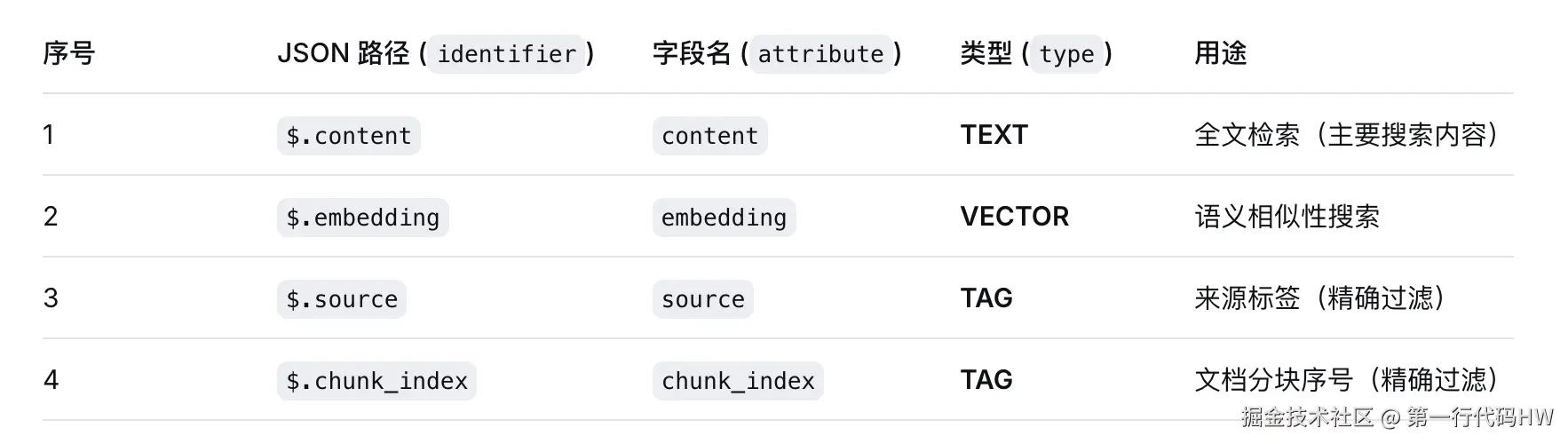
数据存储结构:
bash
索引:spring-ai-knowledge
├── 向量字段:embedding(1536维浮点数向量)
├── 文本字段:content(原始文本)
├── 元数据字段:source、chunk_index(可过滤)
└── 相似度算法:余弦相似度(COSINE)
7. 本篇避坑指南
7.1. 坑1:普通Redis不支持向量检索
arduino
错误:docker run -d redis
正确:docker run -d redis/redis-stack
Redis Stack 才包含 RediSearch 模块。普通Redis启动后,向量存储会报 ERR unknown command 'FT.CREATE'。
7.2. 坑2:Embedding维度不匹配
通义千问Embedding是1536维,但代码里如果配置了其他模型(如1024维),向量写入和检索会因维度不一致失败。
解决 :确认 spring.ai.openai.embedding.options.model 和实际用的模型一致。
7.3. 坑3:向量检索结果看似不相关
症状:搜"年假",第2、3名结果是"婚假"、"病假"。
原因:它们在向量空间里确实很近(都是休假相关段落)。这不是bug,是特征。
解决:后续用 Reranker 或混合检索提升精确度。
7.4. 坑4:Redis内存占用预估
每条向量存储约占用:1536 × 4字节(float32) ≈ 6KB。加上文本和元数据,每个文档块约10-20KB。
建议:万级文档块没问题,十万级以上考虑 Milvus。
7.5. 八、本篇小结
这一篇我们完成了RAG的第二步------向量化与存储:
| 步骤 | 工具 | 要点 |
|---|---|---|
| Embedding | EmbeddingModel |
文本→1536维向量 |
| 向量存储 | RedisVectorStore |
向量+文本+元数据 |
| 语义检索 | similaritySearch() |
用户问题→向量→找最近邻居 |
核心心法:
arduino
Embedding的本质:把"语义相似"变成"坐标距离"
向量的数据库的本质:用空间索引加速最近邻搜索

当你把100个文档、1000个文档块都转成向量存入Redis后,
你的AI就不再是"外人"------它能通过数学计算,
在你的知识库里找到最相关的那句话。
现在向量数据库里已经有我们的私有知识了,能搜到最相关的文档块。
下一篇,我们要把这些检索到的文档块注入Prompt模板,让AI看着资料回答问题,跑通完整的RAG链路。
本文与DeepSeek协作完成