一、认识消息队列中的交换机(Exchange)
在 RabbitMQ 中,交换机(Exchange) 扮演着"消息路由器"的角色。它接收生产者发送的消息,并根据既定规则将消息分发到一个或多个队列中。
交换机与队列的关系
在引入交换机之前,生产者直接发送消息到队列,模式简单但缺乏灵活性。而在订阅模型中,流程发生了变化
关键变化:
| 角色 | 职责 |
|---|---|
| Publisher | 不再直接发消息给队列,而是发给交换机 |
| Exchange | 接收消息并按规则路由到绑定的队列 |
| Queue | 接收并缓存消息,等待消费者拉取 |
| Consumer | 订阅队列,消费消息 |
⚠️ 重要提醒 :Exchange 只负责转发消息,不具备存储能力。如果没有任何队列与 Exchange 绑定,或者没有匹配的路由规则,消息将直接丢失!
二、交换机四大类型概览
RabbitMQ 提供了四种交换机类型:
| 类型 | 说明 | 适用场景 |
|---|---|---|
| Fanout | 广播模式,消息发送给所有绑定的队列 | 通知、公告、全局广播 |
| Direct | 精确匹配,基于 RoutingKey 路由 | 按级别/类型分发日志 |
| Topic | 通配符匹配,支持 * 和 # |
多维度消息分类 |
| Headers | 基于消息头属性匹配(较少使用) | 复杂路由条件 |
本文重点讲解前三种最常用的类型。
三、Fanout 交换机 ------ 广播模式
Fanout 交换机的核心是广播:它会将收到的每一条消息,无条件发送给所有与之绑定的队列。
工作原理
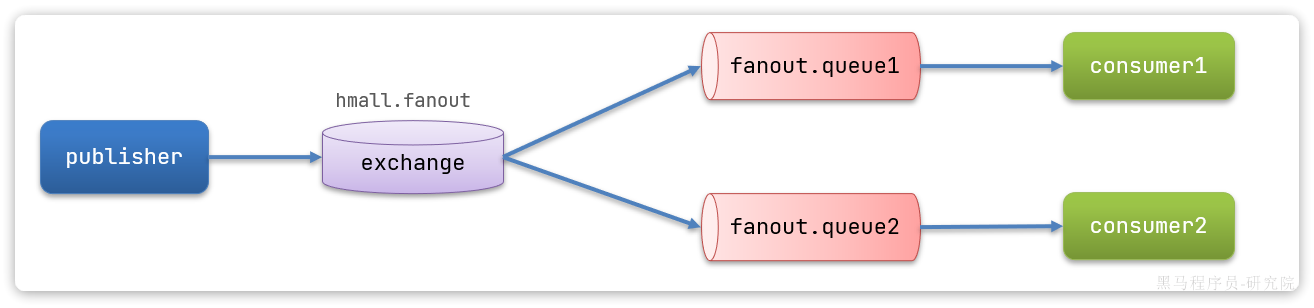
控制台操作步骤
1. 创建两个队列
| 配置项 | 值 |
|---|---|
| Virtual host | /hmall |
| Type | Classic |
| Name | fanout.queue1 |
| Durability | Durable |
| Auto delete | No |
同样方式创建 fanout.queue2。
2. 创建 Fanout 交换机
| 配置项 | 值 |
|---|---|
| Virtual host | /hmall |
| Name | hmall.fanout |
| Type | fanout |
| Durability | Durable |
3. 绑定队列到交换机
在交换机的 Bindings 面板中,依次将 fanout.queue1 和 fanout.queue2 绑定到 hmall.fanout。Fanout 模式下无需填写 RoutingKey。
代码实现
生产者发送消息:
java
@Test
public void testFanoutExchange() {
    String exchangeName = "hmall.fanout";
    String message = "hello, everyone!";
    // routingKey 留空(Fanout 不关心)
    rabbitTemplate.convertAndSend(exchangeName, "", message);
}
消费者接收消息:
java
@RabbitListener(queues = "fanout.queue1")
public void listenFanoutQueue1(String msg) {
    System.out.println("消费者1接收到Fanout消息:【" + msg + "】");
}

@RabbitListener(queues = "fanout.queue2")
public void listenFanoutQueue2(String msg) {
    System.out.println("消费者2接收到Fanout消息:【" + msg + "】");
}
运行结果
发送一条消息后,两个消费者都会收到同样的消息。
Fanout 核心特性总结
-
✅ 将消息路由给所有绑定的队列
-
✅ 不关心 RoutingKey
-
⚠️ 没有绑定的队列 → 消息丢失
-
🎯 适用:广播通知、配置刷新、缓存同步
四、Direct 交换机 ------ 精确路由
Direct 交换机基于 RoutingKey 精确匹配 来路由消息。只有当队列绑定的 RoutingKey 与消息携带的 RoutingKey 完全一致时,消息才会被路由到该队列。
工作原理
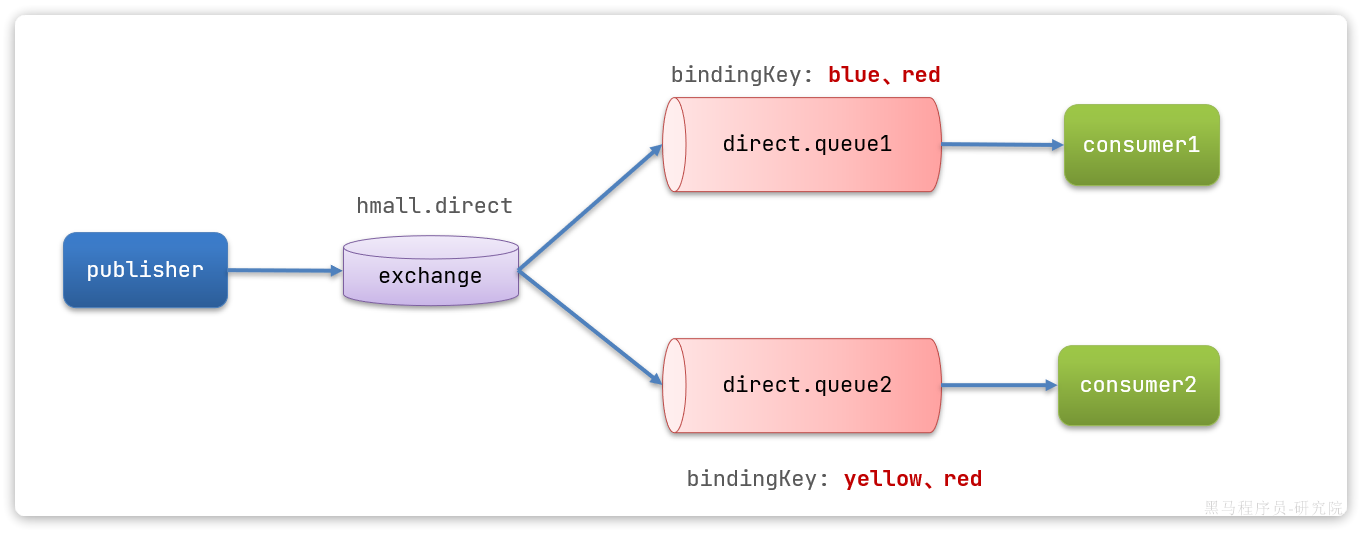
案例需求
| 队列 | 绑定 Key | 接收规则 |
|---|---|---|
direct.queue1 |
blue、red |
只接收 key 为 blue 或 red 的消息 |
direct.queue2 |
yellow、red |
只接收 key 为 yellow 或 red 的消息 |
控制台操作
1. 创建 Direct 交换机
| 配置项 | 值 |
|---|---|
| Name | hmall.direct |
| Type | direct |
2. 绑定队列并指定 RoutingKey
-
direct.queue1→ 绑定blue和red -
direct.queue2→ 绑定yellow和red
代码实现
消费者监听:
java
@RabbitListener(queues = "direct.queue1")
public void listenDirectQueue1(String msg) {
    System.out.println("消费者1接收到direct.queue1的消息:【" + msg + "】");
}

@RabbitListener(queues = "direct.queue2")
public void listenDirectQueue2(String msg) {
    System.out.println("消费者2接收到direct.queue2的消息:【" + msg + "】");
}
生产者发送:
java
@Test
public void testSendDirectExchange() {
    String exchangeName = "hmall.direct";
    String message = "红色警报!日本乱排核废水,导致海洋生物变异!";
    // 使用 red 作为 RoutingKey
    rabbitTemplate.convertAndSend(exchangeName, "red", message);
}
运行结果
| RoutingKey | 接收情况 |
|---|---|
red |
两个队列都收到(因为两个队列都绑定了 red) |
blue |
只有 queue1 收到 |
yellow |
只有 queue2 收到 |
Direct 核心特性总结
-
✅ 根据 RoutingKey 精确匹配路由
-
✅ 多个队列可以绑定相同的 Key(此时类似 Fanout)
-
🎯 适用:日志分级(error/info/debug)、消息类型分类
五、Topic 交换机 ------ 通配符路由
Topic 交换机是 Direct 的"升级版",它允许在绑定 Key 中使用通配符,实现更灵活的路由规则。
通配符规则
| 符号 | 含义 | 示例 |
|---|---|---|
* |
匹配恰好一个单词 | china.* → china.news ✅,china.news.breaking ❌ |
# |
匹配零个或多个单词 | china.# → china ✅,china.news.breaking ✅ |
📌 注意 :单词之间用
.分隔,如item.insert、china.news
工作原理示例
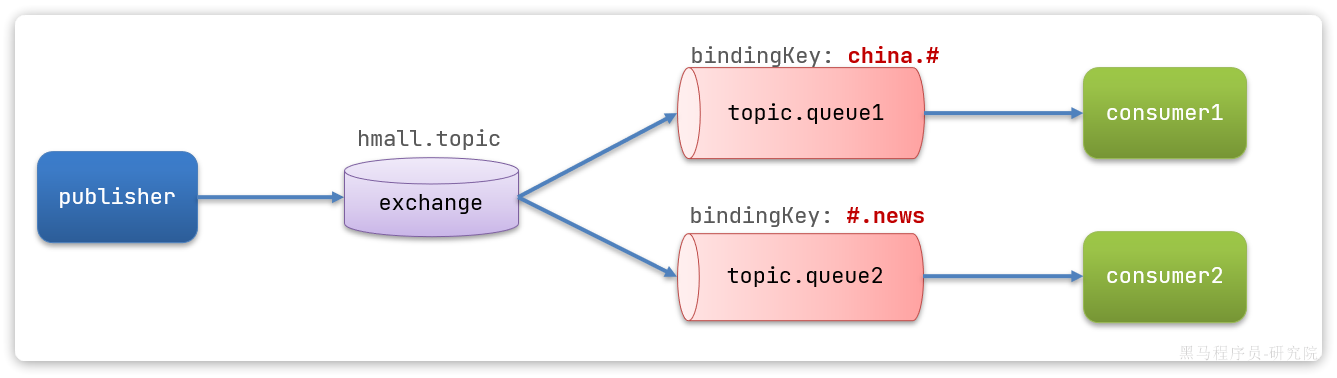
控制台绑定
交换机和队列,并绑定:
-
topic.queue1←china.# -
topic.queue2←#.news
代码实现
消费者:
java
@RabbitListener(queues = "topic.queue1")
public void listenTopicQueue1(String msg){
    System.out.println("消费者1接收到topic.queue1的消息:【" + msg + "】");
}

@RabbitListener(queues = "topic.queue2")
public void listenTopicQueue2(String msg){
    System.out.println("消费者2接收到topic.queue2的消息:【" + msg + "】");
}
生产者:
java
@Test
public void testSendTopicExchange() {
    String exchangeName = "hmall.topic";
    String message = "喜报!孙悟空大战哥斯拉,胜!";
    rabbitTemplate.convertAndSend(exchangeName, "china.news", message);
}
路由匹配测试
| RoutingKey | 命中队列 |
|---|---|
china.news |
queue1 ✅(china.#) queue2 ✅(#.news) |
china.weather |
queue1 ✅(china.#) queue2 ❌ |
japan.news |
queue1 ❌ queue2 ✅(#.news) |
news |
queue1 ❌ queue2 ✅(# 匹配 0 个词) |
Topic 核心特性总结
-
✅ RoutingKey 必须是多个单词,用
.分隔 -
✅
*匹配一个词,#匹配零个或多个词 -
✅ 比 Direct 更灵活,比 Headers 更简洁
-
🎯 适用:多维度消息分类(地区+主题)、复杂业务路由
六、三种交换机对比总结
| 特性 | Fanout | Direct | Topic |
|---|---|---|---|
| 路由依据 | 无(广播所有) | RoutingKey 精确匹配 | RoutingKey 通配符匹配 |
| BindingKey | 不需要 | 精确字符串 | 支持 * 和 # |
| 消息丢失风险 | 无绑定队列时 | 无匹配队列时 | 无匹配队列时 |
| 性能 | 最高(最简单) | 中等 | 略低(需匹配计算) |
| 典型场景 | 全局广播通知 | 日志分级 | 按地区/类型分类消息 |
七、最佳实践提醒
-
务必绑定队列:Exchange 不存储消息,路由失败即丢弃
-
合理命名 :使用有意义的名称,如
order.create、log.error -
注意通配符边界:
-
*不匹配空词:china.*不匹配china -
#会匹配空词:#.news匹配news
-
-
避免过深的 Key 层级:一般 3~4 层足够
-
生产环境使用 Durable:避免交换机/队列丢失