引言
上一章我们学习了如何连接两个对象并相互传递消息,今天我们来继续拓展这个项目
本节我们有以下目标
- 实现多人交互
- 收发信息互不影响
- 优化信息传递方式
一、实现多人连接
在上一篇笔记中,我们使用了A、B两个类,这种一个类代表一个对象的方式虽然简单,但是当对象数量偏多时编写起来就会很麻烦,每两个类之间都需要连接一次,这就会创建很多个socket
那么如何更简洁地实现它呢
其实很简单
这里我们只需要使用两个类:服务端Server (中转站)和客户端Client
1.服务端Server
首先,我们需要先创建serversocket对象并初始化,便于后面客户端识别身份并连接
java
public class Server {
    ServerSocket ss=null;
    public void init(){
        try {
            ss=new ServerSocket(54321);
        } catch (IOException e) {
            throw new RuntimeException(e);
        }
    }
}
其次,还需要创建listen监听函数,用于监测是否有新的客户端连接
java
public Socket listen(){
        try {
            return ss.accept();
        } catch (IOException e) {
            throw new RuntimeException(e);
        }
    }
接着,写主函数并创建线程,用死循环持续监听,每有一个新客户连接,就存到动态数组当中
这里两个get方法分别是ip和端口号
java
ArrayList<Socket> SocketList=new ArrayList<>();
public static void main(String[] args) {
        Server server=new Server();
        //初始化
        server.init();
        //匿名内部类放到线程中(监听连接部分)
        new Thread(()->{
            while(true) {
                System.out.println("等待连接...");
                Socket s = server.listen();
                server.SocketList.add(s);
                System.out.println("有新的连接:"+s.getInetAddress()+"("+s.getPort()+")");
            }
        }).start();
        }
tips.这里选择了用匿名内部类的方式创建线程,更方便(如下)
java
new Thread(()->{
               //代码写这里
               }).start();
2.客户端Client
跟服务端一样,Client也需要先创建对象并初始化
不过client里创建的是socket对象,且代表的是客户端,server中初始化是初始化成自己,而这里则是初始化成server对象
java
public class Client {
    //由于外部需要访问socket,所以定义为全局变量
    Socket socket=null;
    public void init(){
        try {
            socket=new Socket("127.0.0.1",54321);
        } catch (Exception e) {
            throw new RuntimeException(e);
        }
    }
}
接下来我们写主函数,尝试连接
java
public static void main(String[] args) {
        Client client=new Client();
        client.init();
}
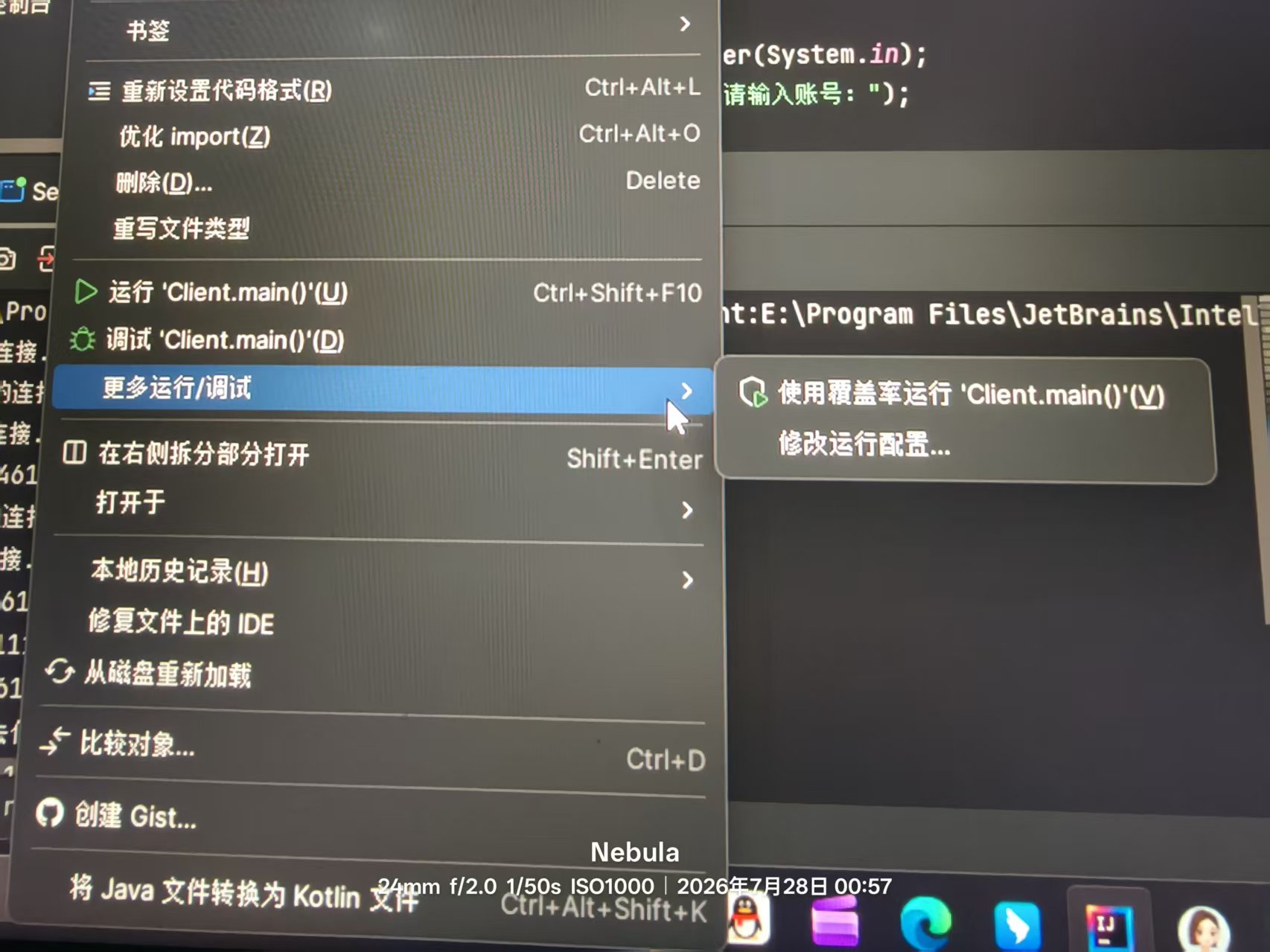
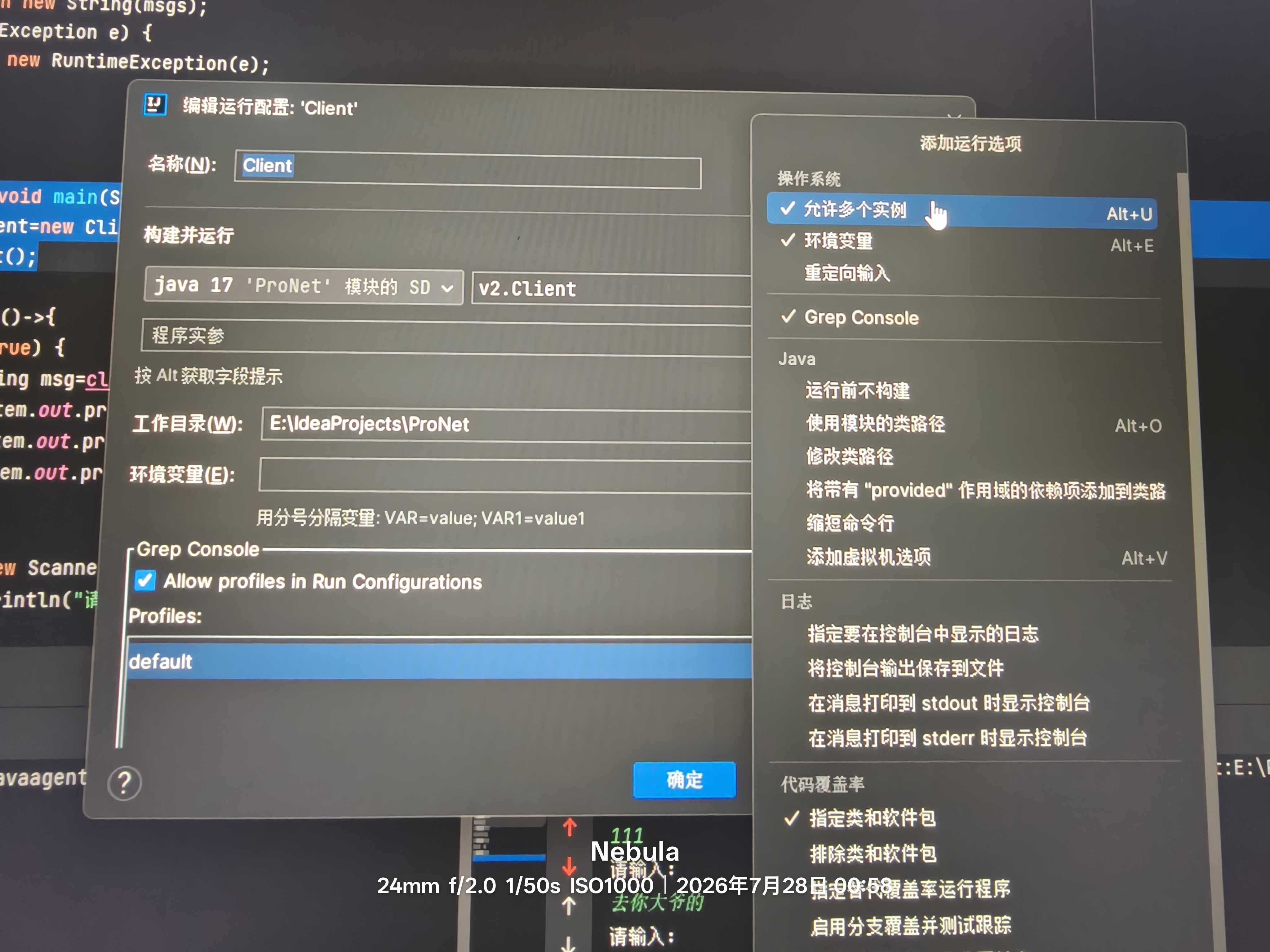
tips.Client类记得更改配置,使其能够允许多个实例同时运行(如下图,idea为例),否则可能需要多个client类
二、信息传递优化
这里为了方便使用我将各个功能进行了封装
1.服务端Server
·发送消息send
由于数字不方便存储,字符又无法直接通过write传递,所以这里使用byte数组
java
public void send(String message, OutputStream  os){
        try {
            //mission:通过os把这个消息发送出去
            byte[] msgs=message.getBytes();
            int len=msgs.length;
            os.write(len);//发送长度
            os.write(msgs);
            os.flush();
        } catch (IOException e) {
            throw new RuntimeException(e);
        }

    }
·接收消息receive
java
public String receive(InputStream is){
        try {
            int len=is.read();
            byte[] msgs=new byte[len];
            is.read(msgs);//可以直接传递数组,所以不采用下面注释的方法
//            for(int i=0;i<len;i++){
//                msgs[i]= (byte) is.read();
//            }
            String msg=new String(msgs);
            System.out.println("收到:"+msg);
            return msg;
        } catch (IOException e) {
            throw new RuntimeException(e);
        }
    }
·消息中转replyMsg
java
public void replyMsg(Socket socket,String msg){
        //转发消息
        for(int i=0;i<SocketList.size();i++){
            Socket s=SocketList.get(i);
            if (s!=socket){
                try {
                    send(msg,s.getOutputStream());
                } catch (IOException e) {
                    throw new RuntimeException(e);
                }
            }
        }
    }
·客户端消息处理proClintMsg(接收和转发)
java
public void proClintMsg(Socket socket){
        //注意:循环速度太快,导致cpu被占满,io流根本没机会运行,所以这里加一个println,让cpu空闲下来
            new Thread(()->{
                while(true) {
                    try {
                        InputStream is=socket.getInputStream();
                        System.out.println("监听"+socket.getPort()+"消息中:");//顺序不对?
                        String msg=receive(is);
                        replyMsg(socket,msg);
                    } catch (IOException e) {
                        throw new RuntimeException(e);
                    }
                }
            }).start();


    }
2.客户端Client
·发送消息send
这里和服务端的区别便是参数的不同,客户端socket固定为服务端,而服务端需要对接多个客户端,所以参数多一个socket
java
public void send(String  message){
        try {
            OutputStream os=socket.getOutputStream();
            byte[] msgs=message.getBytes();
            int len=msgs.length;
            os.write(len);
            os.write(msgs);
            os.flush();
        } catch (Exception e) {
            throw new RuntimeException(e);
        }
    }
·接收消息readMsg
java
public String readMsg(){
        try {
            InputStream is=socket.getInputStream();
            int len=is.read();
            byte[] msgs=new byte[len];
            is.read(msgs);
            return new String(msgs);
        } catch (Exception e) {
            throw new RuntimeException(e);
        }
    }
三、收发信息互不影响
在上一篇笔记中,仔细观察我们可以发现,发消息是有顺序的,a发完b才能够发,那么如何实现收发自由呢?
其实很简单,需要用到线程
将收发消息的操作分别放到两个线程中即可
如下(client-主函数)
java
new Thread(()->{
            while(true) {
                String msg=client.readMsg();
                System.out.print("接收消息:");
                System.out.println(msg);
                System.out.println("请输入:");
            }
        }).start();
        Scanner sc=new Scanner(System.in);
        System.out.println("请输入账号:");
        while (true){
            System.out.println("请输入:");
            String message=sc.nextLine();
            client.send(message);
        }
    }
四、完整代码
·Server
java
import java.io.IOException;
import java.io.InputStream;
import java.io.OutputStream;
import java.net.ServerSocket;
import java.net.Socket;
import java.util.ArrayList;

public class Server {
    ServerSocket ss=null;
    ArrayList<Socket> SocketList=new ArrayList<>();
    public void init(){
        try {
            ss=new ServerSocket(54321);
        } catch (IOException e) {
            throw new RuntimeException(e);
        }

    }
    public Socket listen(){
        try {
            return ss.accept();
        } catch (IOException e) {
            throw new RuntimeException(e);
        }
    }

    public void send(String message, OutputStream  os){
        try {
            //mission:通过os把这个消息发送出去
            byte[] msgs=message.getBytes();
            int len=msgs.length;
            os.write(len);//发送长度
            os.write(msgs);
            os.flush();
        } catch (IOException e) {
            throw new RuntimeException(e);
        }

    }

    public String receive(InputStream is){
        try {
            int len=is.read();
            byte[] msgs=new byte[len];
            is.read(msgs);
//            for(int i=0;i<len;i++){
//                msgs[i]= (byte) is.read();
//            }
            String msg=new String(msgs);
            System.out.println("收到:"+msg);
            return msg;
        } catch (IOException e) {
            throw new RuntimeException(e);
        }
    }

    public void replyMsg(Socket socket,String msg){
        //转发消息
        for(int i=0;i<SocketList.size();i++){
            Socket s=SocketList.get(i);
            if (s!=socket){
                try {
                    send(msg,s.getOutputStream());
                } catch (IOException e) {
                    throw new RuntimeException(e);
                }
            }
        }
    }

    public void proClintMsg(Socket socket){
        //注意:循环速度太快,导致cpu被占满,io流根本没机会运行,所以这里加一个println,让cpu空闲下来
            new Thread(()->{
                while(true) {
                    try {
                        InputStream is=socket.getInputStream();
                        System.out.println("监听"+socket.getPort()+"消息中:");//顺序不对?
                        String msg=receive(is);
                        replyMsg(socket,msg);
                    } catch (IOException e) {
                        throw new RuntimeException(e);
                    }
                }
            }).start();


    }

    public static void main(String[] args) {
        Server server=new Server();

        //初始化
        server.init();
        //匿名内部类放到线程中(监听连接部分)
        new Thread(()->{
            while(true) {
                System.out.println("等待连接...");
                Socket s = server.listen();
                System.out.println("有新的连接:"+s.getInetAddress()+"("+s.getPort()+")");
                server.SocketList.add(s);
                server.proClintMsg(s);//处理客户端消息 ,每个客户端一个线程
            }
        }).start();


        }

    }
·Client
java
import java.io.InputStream;
import java.io.OutputStream;
import java.net.Socket;
import java.util.Scanner;

public class Client {
    //由于外部需要访问socket,所以定义为全局变量
    Socket socket=null;
    public void init(){
        try {
            socket=new Socket("127.0.0.1",54321);
        } catch (Exception e) {
            throw new RuntimeException(e);
        }


    }

    public void send(String  message){
        try {
            OutputStream os=socket.getOutputStream();

            byte[] msgs=message.getBytes();
            int len=msgs.length;
            os.write(len);
            os.write(msgs);
            os.flush();
        } catch (Exception e) {
            throw new RuntimeException(e);
        }

    }

    public String readMsg(){
        try {
            InputStream is=socket.getInputStream();
            int len=is.read();
            byte[] msgs=new byte[len];
            is.read(msgs);
            return new String(msgs);
        } catch (Exception e) {
            throw new RuntimeException(e);
        }
    }

    public static void main(String[] args) {
        Client client=new Client();
        client.init();

        new Thread(()->{
            while(true) {
                String msg=client.readMsg();
                System.out.print("接收消息:");
                System.out.println(msg);
                System.out.println("请输入:");
            }
        }).start();
        Scanner sc=new Scanner(System.in);
        System.out.println("请输入账号:");
        while (true){
            System.out.println("请输入:");
            String message=sc.nextLine();
            client.send(message);
        }
    }

}