让 AI 帮忙分析老项目,最省事的做法似乎是把整个目录直接丢进去。
但项目里往往混着 .env、密钥、依赖目录、构建产物和大体积文件。全部提交不仅浪费上下文,还可能把不该出现的信息一起带出去。
我更建议先生成一份"仓库上下文清单":只列出适合分析的文件路径和大小,人工看一遍,再决定下一步让 AI 读取哪些文件。
这个脚本会做什么
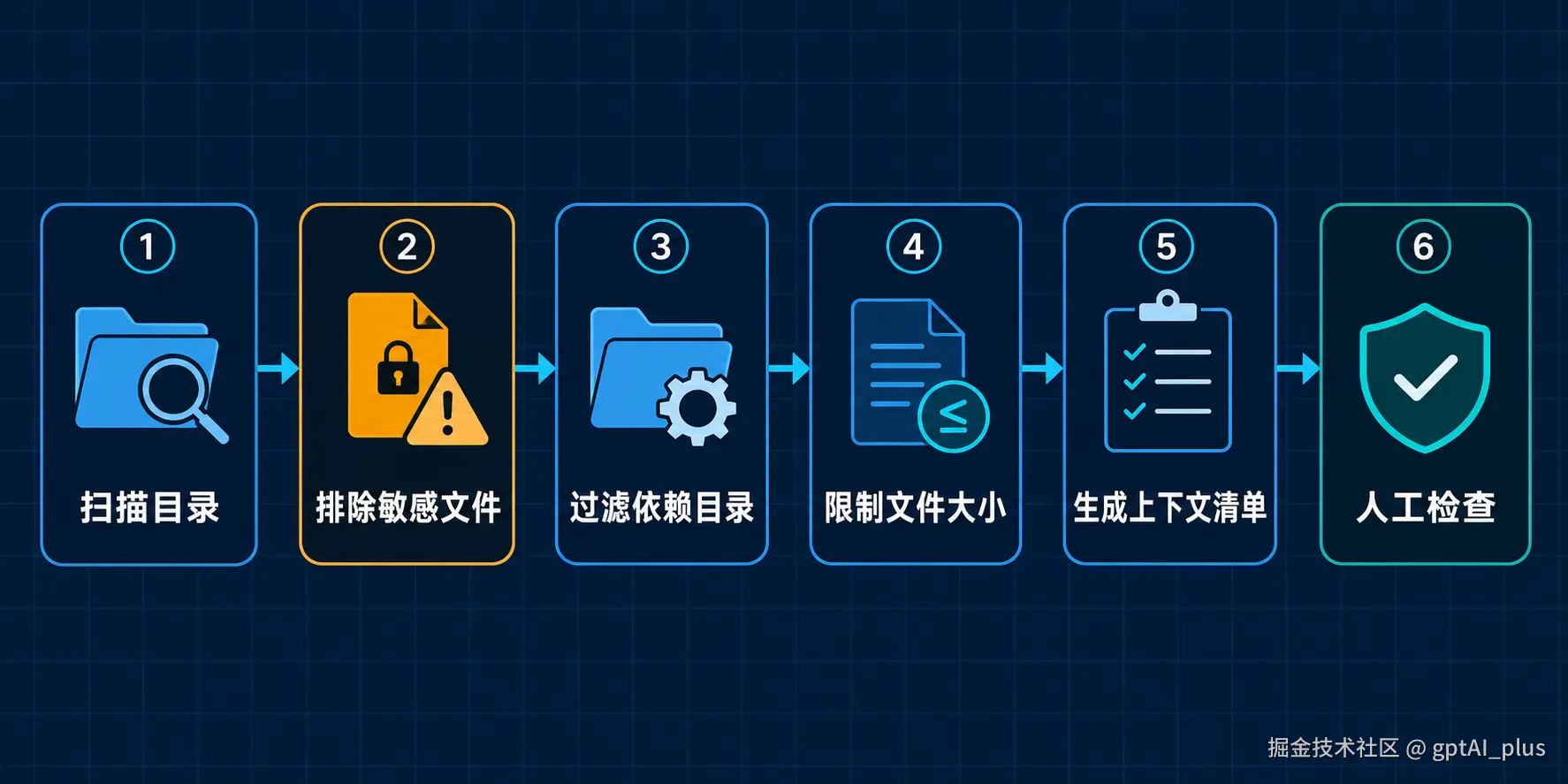
脚本默认执行以下处理:
-
忽略
.git、node_modules、dist、.venv等目录; -
排除
.env、私钥和常见凭据文件; -
跳过软链接,避免扫描到项目外部;
-
只保留常见代码、配置和文档文件;
-
跳过超过指定大小的文件;
-
只生成文件清单,不读取文件内容;
-
自动排除生成的报告本身。
脚本使用 Python 标准库,不需要安装第三方依赖。
完整代码
将下面代码保存为 repo_context.py:
bash
from __future__ import annotations

import argparse
import os
from collections import Counter
from pathlib import Path


IGNORE_DIRS = {
    ".git",
    ".idea",
    ".vscode",
    "node_modules",
    "dist",
    "build",
    "coverage",
    "__pycache__",
    ".venv",
    "venv",
}

SENSITIVE_NAMES = {
    ".env",
    ".env.local",
    ".env.production",
    "id_rsa",
    "id_ed25519",
    "credentials.json",
    "secrets.json",
}

ALLOWED_SUFFIXES = {
    ".py",
    ".js",
    ".jsx",
    ".ts",
    ".tsx",
    ".java",
    ".go",
    ".rs",
    ".php",
    ".vue",
    ".sql",
    ".md",
    ".json",
    ".yaml",
    ".yml",
    ".toml",
}


def collect_files(
    root: Path,
    max_bytes: int,
    excluded: set[Path] | None = None,
) -> tuple[list[tuple[Path, int]], Counter[str]]:
    files: list[tuple[Path, int]] = []
    skipped: Counter[str] = Counter()
    excluded = excluded or set()

    for current_dir, dir_names, file_names in os.walk(
        root,
        followlinks=False,
    ):
        dir_names[:] = sorted(
            name
            for name in dir_names
            if name not in IGNORE_DIRS
            and not name.startswith(".")
        )

        current = Path(current_dir)

        for name in sorted(file_names):
            path = current / name

            if path.resolve() in excluded:
                skipped["output"] += 1
                continue

            if name in SENSITIVE_NAMES or name.startswith(".env."):
                skipped["sensitive"] += 1
                continue

            if path.is_symlink():
                skipped["symlink"] += 1
                continue

            if path.suffix.lower() not in ALLOWED_SUFFIXES:
                skipped["unsupported"] += 1
                continue

            try:
                size = path.stat().st_size
            except OSError:
                skipped["unreadable"] += 1
                continue

            if size > max_bytes:
                skipped["too_large"] += 1
                continue

            files.append((path.relative_to(root), size))

    return files, skipped


def build_report(
    root: Path,
    files: list[tuple[Path, int]],
    skipped: Counter[str],
) -> str:
    suffix_counts = Counter(
        path.suffix.lower() or "[no suffix]"
        for path, _ in files
    )

    lines = [
        "# Repository Context",
        "",
        f"- Root: `{root.name}`",
        f"- Included files: {len(files)}",
        f"- Skipped files: {sum(skipped.values())}",
        "",
        "## File types",
        "",
    ]

    if suffix_counts:
        lines.extend(
            f"- `{suffix}`: {count}"
            for suffix, count in sorted(suffix_counts.items())
        )
    else:
        lines.append("- No matching files")

    lines.extend(["", "## Files", ""])

    if files:
        lines.extend(
            f"- `{path.as_posix()}` ({size} bytes)"
            for path, size in files
        )
    else:
        lines.append("- No matching files")

    lines.extend(["", "## Skip summary", ""])

    if skipped:
        lines.extend(
            f"- `{reason}`: {count}"
            for reason, count in sorted(skipped.items())
        )
    else:
        lines.append("- Nothing skipped")

    return "\n".join(lines) + "\n"


def parse_args() -> argparse.Namespace:
    parser = argparse.ArgumentParser(
        description="Generate a safe repository context manifest."
    )
    parser.add_argument(
        "root",
        type=Path,
        help="Project root directory",
    )
    parser.add_argument(
        "-o",
        "--output",
        type=Path,
        default=Path("REPO_CONTEXT.md"),
    )
    parser.add_argument(
        "--max-kb",
        type=int,
        default=200,
        help="Maximum size per file",
    )
    return parser.parse_args()


def main() -> int:
    args = parse_args()
    root = args.root.expanduser().resolve()

    if not root.is_dir():
        raise SystemExit(
            f"Project directory does not exist: {root}"
        )

    if args.max_kb <= 0:
        raise SystemExit(
            "--max-kb must be greater than 0"
        )

    output = args.output.expanduser().resolve()

    files, skipped = collect_files(
        root,
        args.max_kb * 1024,
        excluded={output},
    )

    report = build_report(root, files, skipped)
    output.write_text(report, encoding="utf-8")

    print(f"Wrote {len(files)} files to {output}")
    return 0


if __name__ == "__main__":
    raise SystemExit(main())
运行方法
macOS 或 Linux:
bash
python repo_context.py /path/to/project \
  -o REPO_CONTEXT.md \
  --max-kb 200
Windows PowerShell:
bash
python repo_context.py "D:\work\demo" `
  -o REPO_CONTEXT.md `
  --max-kb 200
执行完成后会得到类似下面的文件:
bash
# Repository Context

- Root: `demo`
- Included files: 18
- Skipped files: 326

## File types

- `.json`: 2
- `.md`: 3
- `.py`: 13

## Files

- `README.md` (1820 bytes)
- `src/main.py` (963 bytes)
- `src/config.json` (218 bytes)

## Skip summary

- `sensitive`: 2
- `too_large`: 3
- `unsupported`: 321
拿到这份清单后,先人工检查一次,再让 AI 按模块分析:
bash
这是项目文件清单。请先判断项目类型、主要入口和核心模块,
暂时不要生成代码,也不要假设你已经看到文件内容。

请告诉我:
1. 第一批需要读取哪些文件;
2. 每个文件的分析目的;
3. 哪些配置文件可能包含敏感信息,不应该直接提供。
这样做比一次上传整个项目更可控。AI 不需要先看到几百个依赖文件,也不会因为目录太杂而忽略真正的入口。
还需要注意两个边界
第一,这个脚本只按文件名、扩展名和大小过滤,不是专业的密钥扫描工具。即使文件通过过滤,也要在提交前人工检查内容。
第二,脚本默认忽略所有以点开头的目录。如果项目需要分析 .github/workflows,可以删除 not name.startswith("."),然后单独检查工作流里是否存在密钥、令牌或部署信息。
如果你长期使用 ChatGPT、Claude、Cursor 或 Kiro,会员充值问题也可以了解 gpt68.com。它是第三方 AI 会员充值平台,使用前应看清套餐说明、账号要求和售后规则。工具是否好用是一方面,能不能把项目上下文整理清楚,往往更影响最终结果。
本文脚本基于 Python 标准库 pathlib 和 os.walk 实现。pathlib 用于跨平台路径处理,可参考 Python 官方文档。