0. 目标
处理"刚进入上下文的新工具结果过大问题",让后续microcompact/autocompact 面对的上下文先被降噪。
1. 触发时机
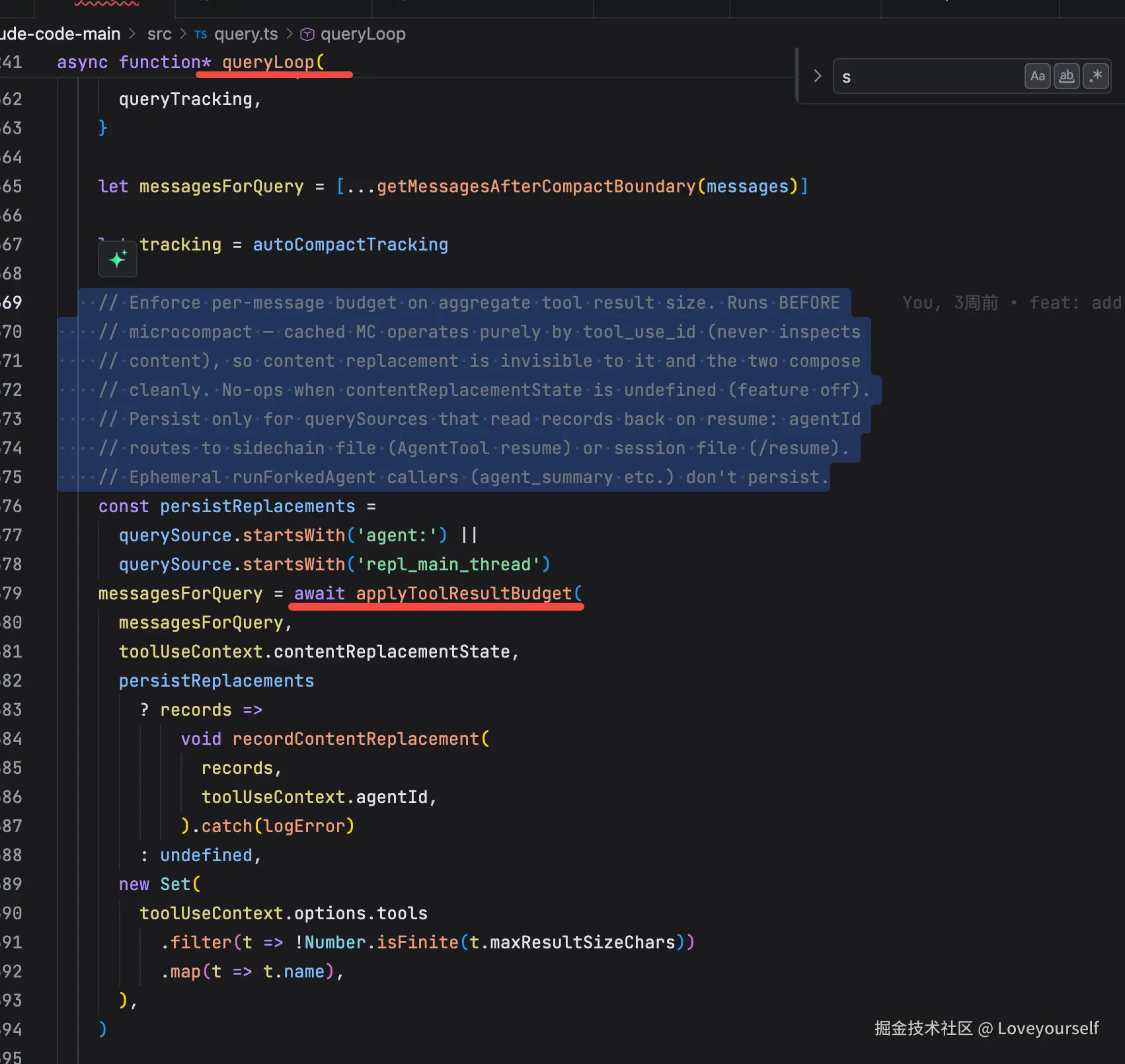
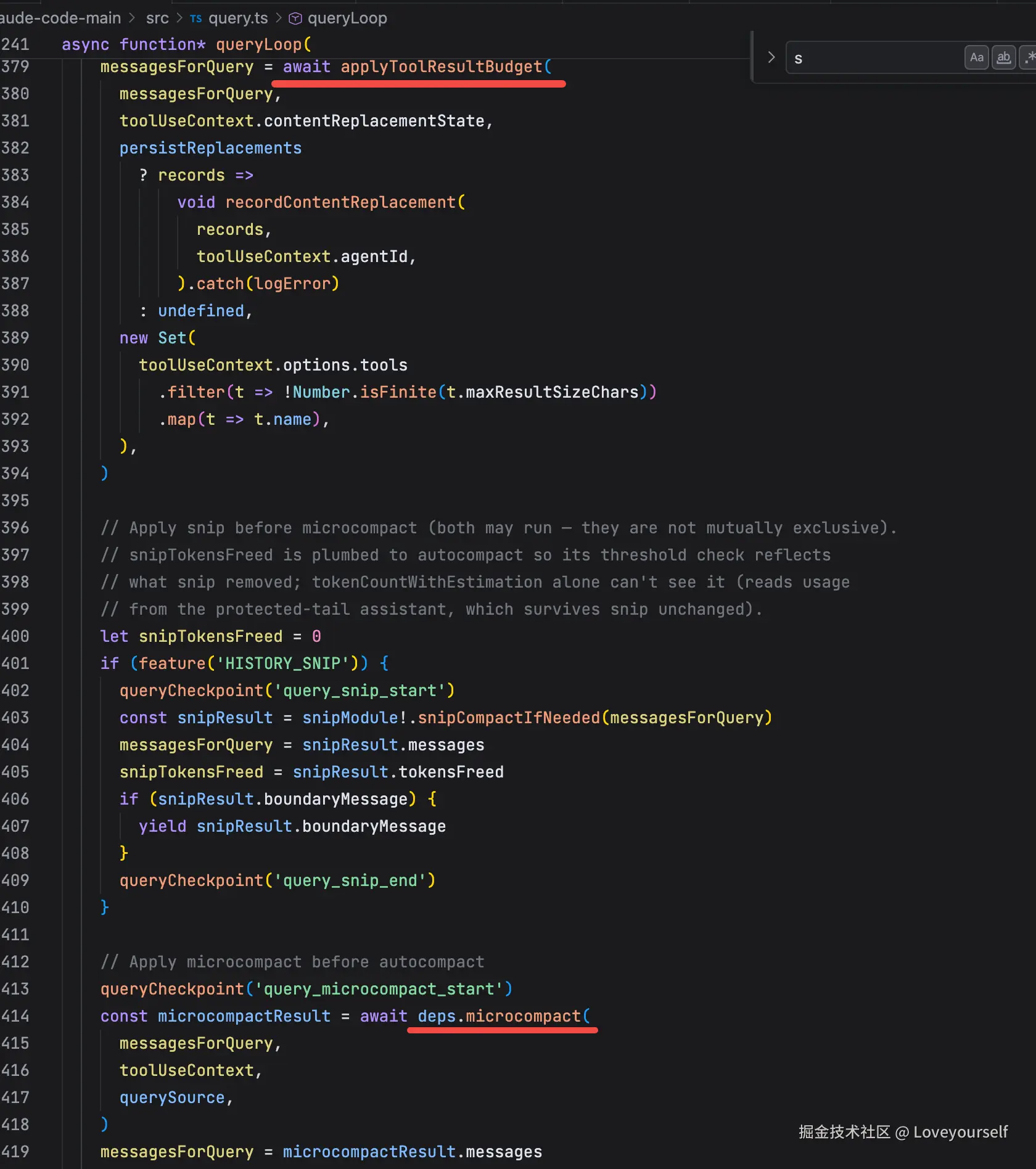
toolResultBudget 会在每次主查询循环准备发起模型请求前自动执行,对压缩层次而言,在microcompact 、 autocompact 之前。它不是等 API 报错后触发,也不是按全局 token 阈值触发;而是每轮都会检查当前即将发送给模型的消息里,单个 API-level user message 的 tool_result 总量是否超过预算,超过才做落盘替换。
对应cc源码:
- 在每轮ReactLoop中执行
- 在microcompact之前执行
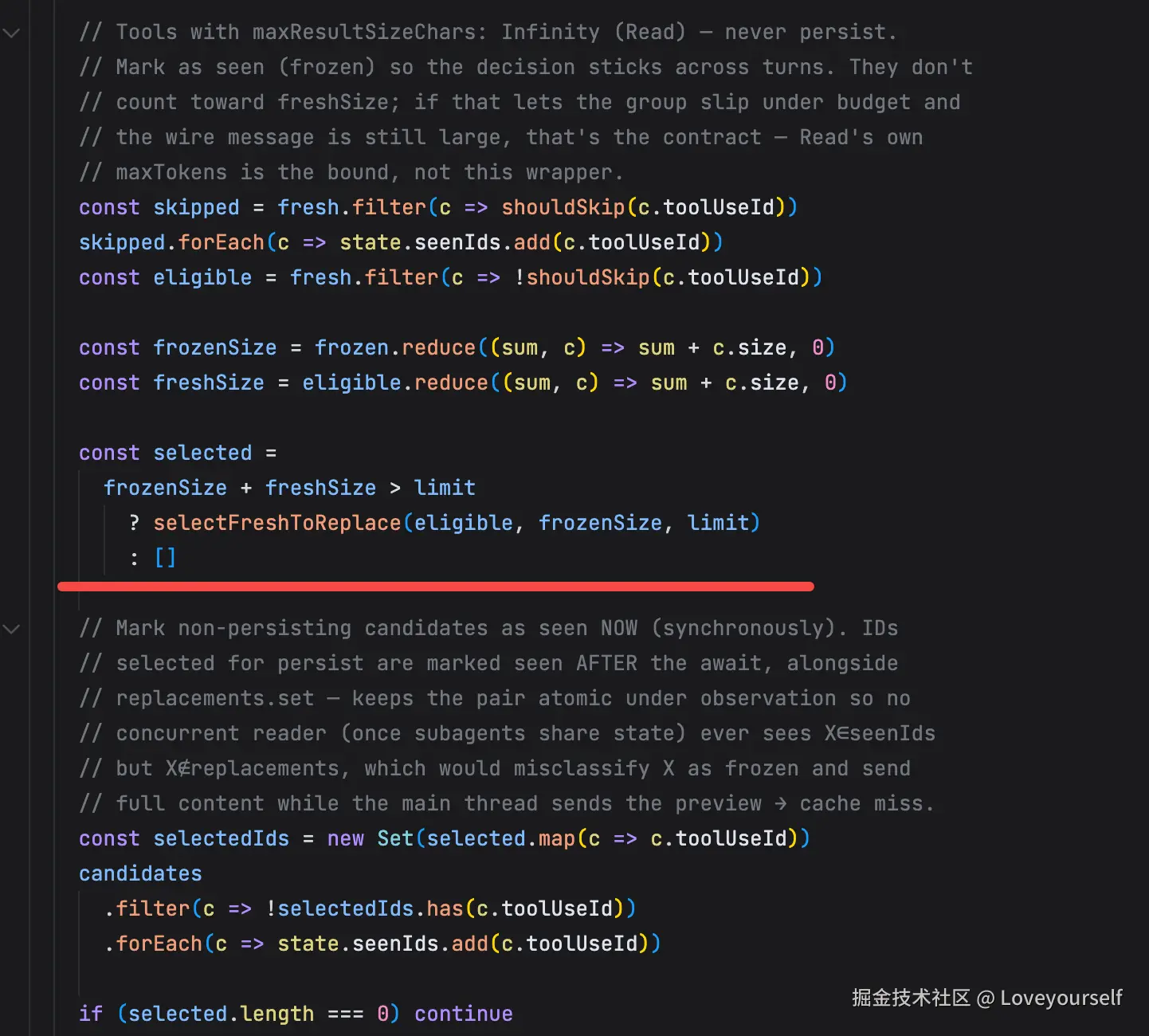
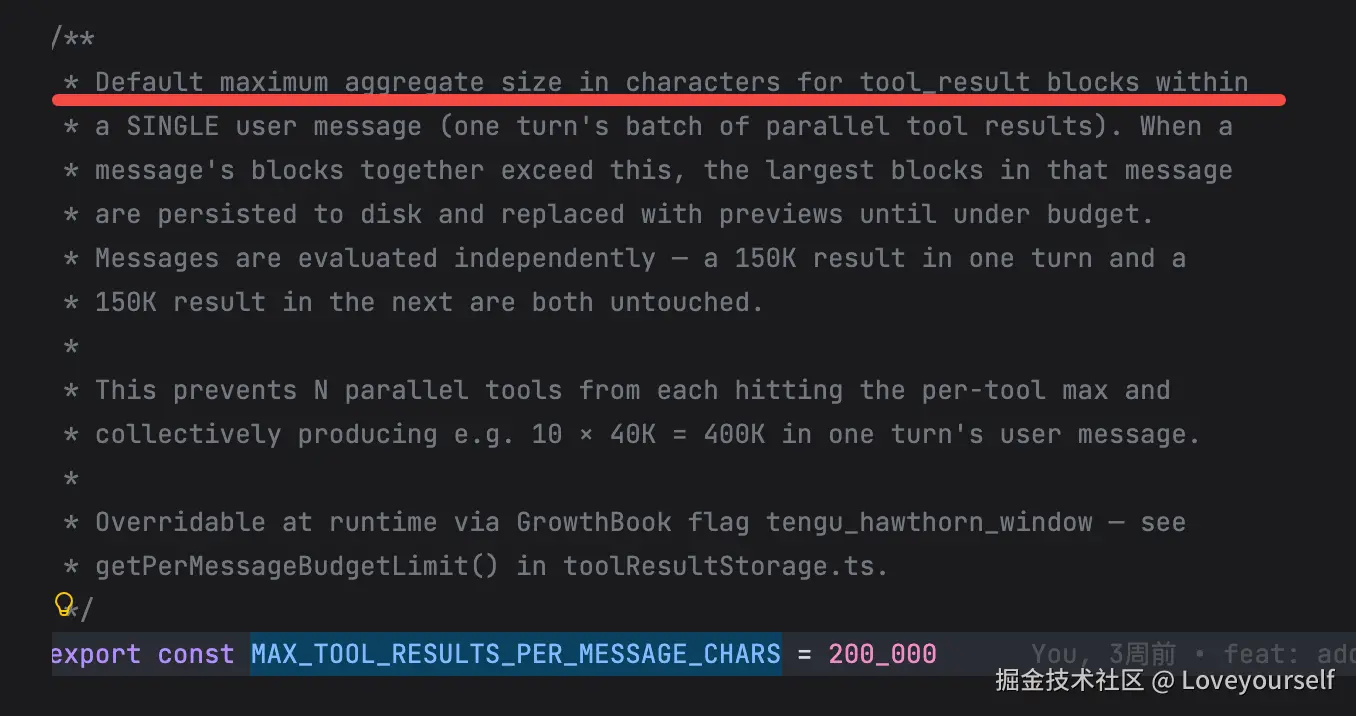
- 超预算才会处理,阈值默认 200_000 chars
2. 策略
toolResultBudget不是摘要,也不是直接删除,其策略为: 如果同一轮工具结果的总量超过预算,就把最大的几个新tool_result原文保存到磁盘,然后在上下文里只保留一个稳定的预览和文件路径。
toolResultBudget 对应的主代码在这几处:
- 入口调用: src/query.ts:L369-L394
- 预算阈值: src/constants/toolLimits.ts:L36-L49
- 策略主体: src/utils/toolResultStorage.ts:L739-L909
- 候选结果收集: src/utils/toolResultStorage.ts:L551-L638
- 最大项选择: src/utils/toolResultStorage.ts:L669-L692
- 落盘与预览: src/utils/toolResultStorage.ts:L137-L199
- 替换 tool_result 内容: src/utils/toolResultStorage.ts:L699-L726
代码解读:
2.1 它在压缩流水线的位置
入口在 query.ts :
ini
messagesForQuery = await applyToolResultBudget(
  messagesForQuery,
  toolUseContext.contentReplacementState,
  ...
)
见 src/query.ts:L379-L394 。
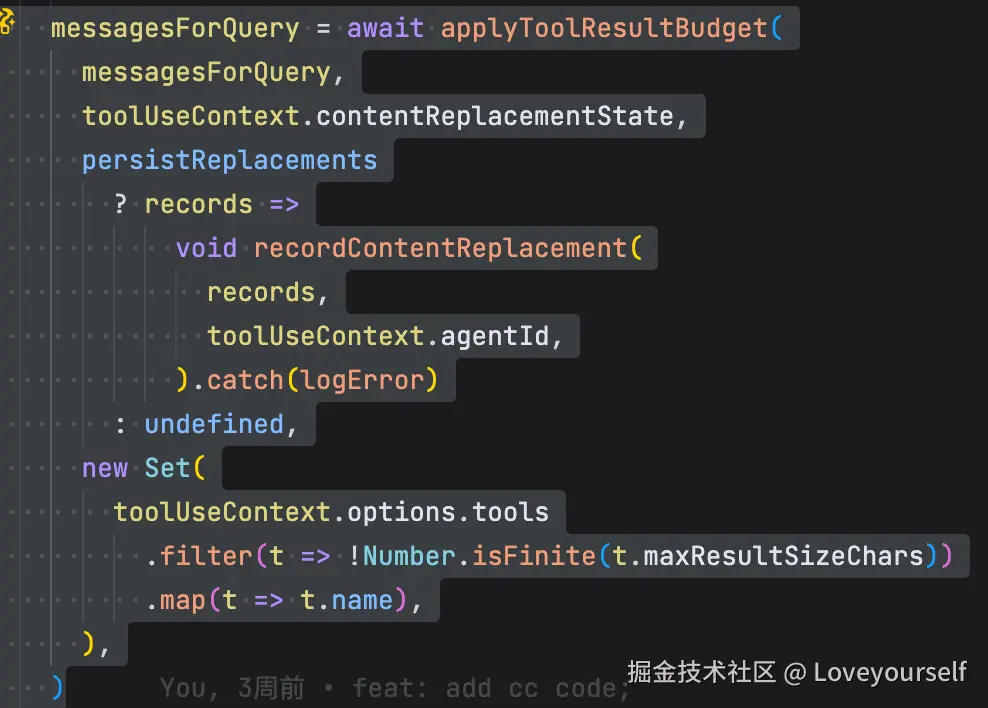
注意注释:
arduino
// Runs BEFORE microcompact见 src/query.ts:L369-L372 。
执行顺序是:
scss
toolResultBudget
→ History Snip
→ microcompact
→ context collapse
→ autocompact
所以它是最早的一层降噪,处理的是"刚产生的大工具结果"(其他的后面会讲)。
2.2 触发条件:单个 user message 内 tool_result 总和超过 200K chars
阈值定义在:
arduino
export const MAX_TOOL_RESULTS_PER_MESSAGE_CHARS = 200_000见 src/constants/toolLimits.ts:L36-L49 。
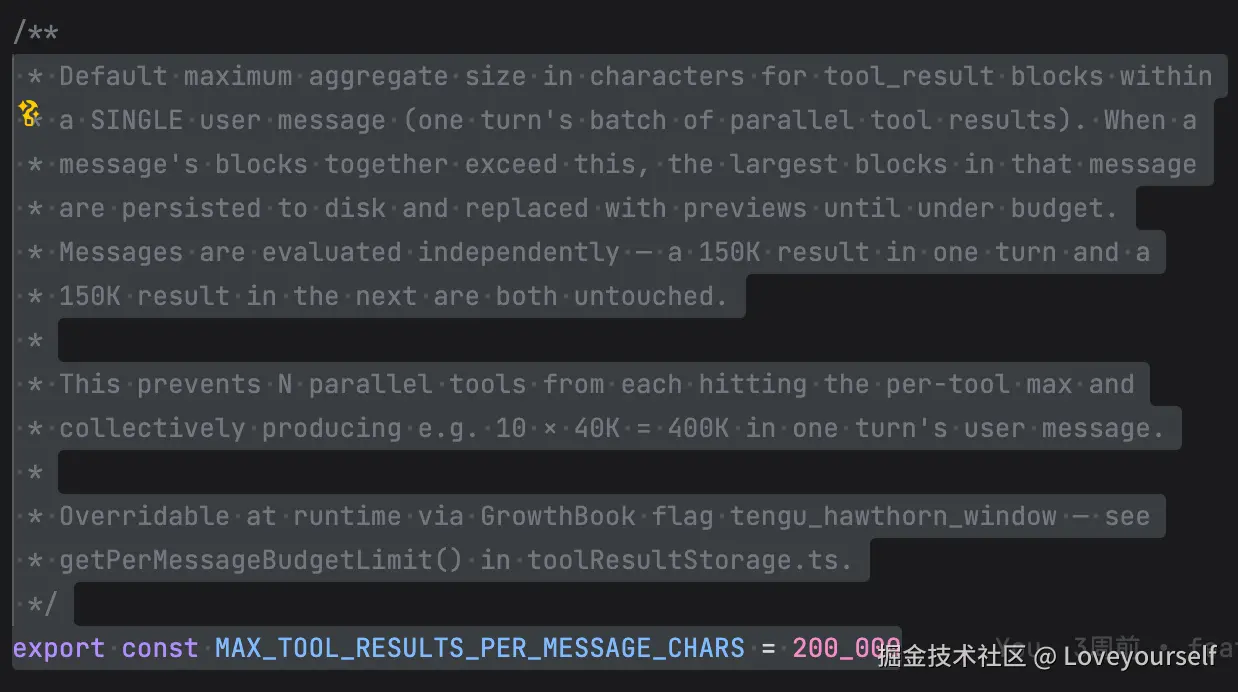
这里非常关键:它不是全会话总量,而是 单个 API-level user message 里的 tool_result 总和。
为什么是 user message?因为 Claude 的工具结果最终以 user message 的 tool_result block 形式发给模型。
源码注释解释了场景:
ini
10 个并行工具,每个结果 40K
单个工具都没超过 per-tool limit
但合起来是 10 × 40K = 400K
这就会触发 toolResultBudget。
2.3 它为什么按"API-level user message"分组
候选收集逻辑在:
scss
collectCandidatesByMessage(messages)见 src/utils/toolResultStorage.ts:L575-L638 。
scss
/**
 * Extract candidate tool_result blocks grouped by API-level user message.
 *
 * normalizeMessagesForAPI merges consecutive user messages into one
 * (Bedrock compat; 1P does the same server-side), so parallel tool
 * results that arrive as N separate user messages in our state become
 * ONE user message on the wire. The budget must group the same way or
 * it would see N under-budget messages instead of one over-budget
 * message and fail to enforce exactly when it matters most.
 *
 * A "group" is a maximal run of user messages NOT separated by an
 * assistant message. Only assistant messages create wire-level
 * boundaries --- normalizeMessagesForAPI filters out progress entirely
 * and merges attachment / system(local_command) INTO adjacent user
 * blocks, so those types do NOT break groups here either.
 *
 * This matters for abort-during-parallel-tools paths: agent_progress
 * messages (non-ephemeral, persisted in REPL state) can interleave
 * between fresh tool_result messages. If we flushed on progress, those
 * tool_results would split into under-budget groups, slip through
 * unreplaced, get frozen, then be merged by normalizeMessagesForAPI
 * into one over-budget wire message --- defeating the feature.
 *
 * Only groups with at least one eligible candidate are returned.
 */
function collectCandidatesByMessage(
  messages: Message[],
): ToolResultCandidate[][] {
  const groups: ToolResultCandidate[][] = []
  let current: ToolResultCandidate[] = []

  const flush = () => {
    if (current.length > 0) groups.push(current)
    current = []
  }

  // Track all assistant message.ids seen so far --- same-ID fragments are
  // merged by normalizeMessagesForAPI (messages.ts ~2126 walks back PAST
  // different-ID assistants via `continue`), so any re-appearance of a
  // previously-seen ID must NOT create a group boundary. Two scenarios:
  //   • Consecutive: streamingToolExecution yields one AssistantMessage per
  //     content_block_stop (same id); a fast tool drains between blocks;
  //     abort/hook-stop leaves [asst(X), user(trA), asst(X), user(trB)].
  //   • Interleaved: coordinator/teammate streams mix different responses
  //     so [asst(X), user(trA), asst(Y), user(trB), asst(X), user(trC)].
  // In both, normalizeMessagesForAPI merges the X fragments into one wire
  // assistant, and their following tool_results merge into one wire user
  // message --- so the budget must see them as one group too.
  const seenAsstIds = new Set<string>()
  for (const message of messages) {
    if (message.type === 'user') {
      current.push(...collectCandidatesFromMessage(message))
    } else if (message.type === 'assistant') {
      if (!seenAsstIds.has(message.message.id)) {
        flush()
        seenAsstIds.add(message.message.id)
      }
    }
    // progress / attachment / system are filtered or merged by
    // normalizeMessagesForAPI --- they don't create wire boundaries.
  }
  flush()

  return groups
}
源码注释说:
sql
normalizeMessagesForAPI 会把连续 user messages 合并成一个。
如果预算检查不按同样规则分组,
多个看似分散的小 tool_result 到 API 层会合成一个大 user message。
所以它不是简单遍历每条本地消息,而是模拟 API 最终看到的消息结构:
less
本地:
user tool_result A 80K
progress
user tool_result B 80K
attachment
user tool_result C 80K

API 视角:
user message: A + B + C = 240K
如果不这样分组,就会漏掉真实超预算情况。
2.4. 哪些 tool_result 可以被处理
候选提取在:
见 src/utils/toolResultStorage.ts:L551-L573 。
它只收集:
scss
是 user message
content 是数组
block.type === 'tool_result'
block.content 存在
不是已经 compacted 的内容
不包含 image block
也就是说,图片类 tool result 不会走这个落盘预览策略。
已经被替换过的内容也不会再次处理,因为它以:
lua
<persisted-output>开头,见 src/utils/toolResultStorage.ts:L29-L31 。
2.5. 状态设计:seen / replacements
状态定义在:
typescript
export type ContentReplacementState = {
  seenIds: Set<string>
  replacements: Map<string, string>
}
见 src/utils/toolResultStorage.ts:L390-L393 。
它有两个核心集合:
seenIds:
这个 tool_result 已经被预算逻辑看过。

replacements:
这个 tool_result 已经被落盘,并且上下文中应该替换成哪段预览文本。
为什么要这么设计?为了保持 Prompt Cache 稳定。
一旦某个 tool result 已经完整发给模型,后面就不能突然把它换成预览,否则历史 Prompt 前缀变了,缓存会失效。
所以状态分三类:
mustReapply:以前替换过,每轮继续用同一个预览
frozen:以前完整发过,不能再替换
fresh:第一次看到,可以决定是否替换
对应代码在 src/utils/toolResultStorage.ts:L641-L667 。
6. 核心策略:只从 fresh 里选最大的落盘
源码:
typescript
/**
 * Pick the largest fresh results to replace until the model-visible total
 * (frozen + remaining fresh) is at or under budget, or fresh is exhausted.
 * If frozen results alone exceed budget we accept the overage --- microcompact
 * will eventually clear them.
 */
function selectFreshToReplace(
  fresh: ToolResultCandidate[],
  frozenSize: number,
  limit: number,
): ToolResultCandidate[] {
  const sorted = [...fresh].sort((a, b) => b.size - a.size)
  const selected: ToolResultCandidate[] = []
  let remaining = frozenSize + fresh.reduce((sum, c) => sum + c.size, 0)
  for (const c of sorted) {
    if (remaining <= limit) break
    selected.push(c)
    // We don't know the replacement size until after persist, but previews
    // are ~2K and results hitting this path are much larger, so subtracting
    // the full size is a close approximation for selection purposes.
    remaining -= c.size
  }
  return selected
}
选择逻辑:
css
const sorted = [...fresh].sort((a, b) => b.size - a.size)见 src/utils/toolResultStorage.ts:L675-L692 。
它不是随机删,也不是全部落盘,而是:
按大小从大到小排序
选择最大的 fresh tool_result
直到剩余可见内容 <= 200K
伪代码:
ini
remaining = frozenSize + sum(freshSize)

for result of fresh.sort(desc size):
  if remaining <= 200K:
    break
  selected.push(result)
  remaining -= result.size
注意:这里的 frozen 不能动。
如果 frozen 自己已经超过 200K,代码接受超预算,交给后续 microcompact 处理。注释在 src/utils/toolResultStorage.ts:L669-L673 。
2.7. 落盘:完整内容保存到 session tool-results 目录
落盘函数:
scss
persistToolResult(content, toolUseId)见 src/utils/toolResultStorage.ts:L137-L184 。
保存路径来自:
scss
getToolResultPath(toolUseId, isJson)目录名是:
tool-results见 src/utils/toolResultStorage.ts:L26-L34:
arduino
// Subdirectory name for tool results within a session
export const TOOL_RESULTS_SUBDIR = 'tool-results'

// XML tag used to wrap persisted output messages
export const PERSISTED_OUTPUT_TAG = '<persisted-output>'
export const PERSISTED_OUTPUT_CLOSING_TAG = '</persisted-output>'

// Message used when tool result content was cleared without persisting to file
export const TOOL_RESULT_CLEARED_MESSAGE = '[Old tool result content cleared]'
落盘后,它生成一个约 2KB 预览:
ini
PREVIEW_SIZE_BYTES = 2000最终模型看到的 replacement 是:
lua
<persisted-output>
Output too large (...). Full output saved to: /path/to/tool-results/toolu_xxx.txt

Preview (first 2KB):
...
</persisted-output>
构造逻辑见 src/utils/toolResultStorage.ts:L189-L199 。
2.8. 替换:不删 tool_result,只替换 content
替换代码:
css
return { ...block, content: replacement }见 src/utils/toolResultStorage.ts:L699-L726:
typescript
/**
 * Return a new Message[] where each tool_result block whose id appears in
 * replacementMap has its content replaced. Messages and blocks with no
 * replacements are passed through by reference.
 */
function replaceToolResultContents(
  messages: Message[],
  replacementMap: Map<string, string>,
): Message[] {
  return messages.map(message => {
    if (message.type !== 'user' || !Array.isArray(message.message.content)) {
      return message
    }
    const content = message.message.content
    const needsReplace = content.some(
      b => b.type === 'tool_result' && replacementMap.has(b.tool_use_id),
    )
    if (!needsReplace) return message
    return {
      ...message,
      message: {
        ...message.message,
        content: content.map(block => {
          if (block.type !== 'tool_result') return block
          const replacement = replacementMap.get(block.tool_use_id)
          return replacement === undefined
            ? block
            : { ...block, content: replacement }
        }),
      },
    }
  })
}
也就是说:
js
tool_use 还在
tool_result 还在
tool_result.content 从完整大文本变成预览文本
这样可以保持 Claude API 需要的 tool_use/tool_result 配对结构。
它不是:删除整条 tool_result 而是:保留结构,替换内容
2.9. 为什么 Read 经常会被跳过
query.ts 传了一个 skipToolNames :
javascript
new Set(
  toolUseContext.options.tools
    .filter(t => !Number.isFinite(t.maxResultSizeChars))
    .map(t => t.name),
)
见 src/query.ts:L389-L393 。
在 enforceToolResultBudget 里:
less
// Tools with maxResultSizeChars: Infinity (Read) --- never persist.见 src/utils/toolResultStorage.ts:L816-L823 。
理由是: Read 自己已经有 maxTokens 控制。把 Read 结果落盘,然后让模型再用 Read 读取落盘文件,会形成循环。
2.10. Resume 时如何保持一致
ContentReplacementState 被挂在 ToolUseContext 上:
makefile
contentReplacementState?: ContentReplacementState见 src/Tool.ts:L284-L292 。
REPL 初始化时创建:
scss
provisionContentReplacementState(initialMessages, initialContentReplacements)见 src/screens/REPL.tsx:L1496-L1505 。
Resume 时重建:
scss
reconstructContentReplacementState(messages, log.contentReplacements ?? [])见 src/screens/REPL.tsx:L1918-L1925 。
query.ts 还会把新 replacement 记录到 transcript:
scss
recordContentReplacement(records, toolUseContext.agentId)见 src/query.ts:L376-L388 。
这保证恢复会话后,同一个 tool_result 仍然被替换成完全相同的预览文本,避免 Prompt Cache 前缀漂移。
3. 代价
0llm,仅仅是多了字符串替换的开销。
4. 与MC(micro Compact)是如何配合的
在每次发起模型请求前,先检查当前消息里工具结果是不是太大。如果某个 API user message 里的多个 tool_result 加起来超过预算,就把最大的结果落盘,并在上下文里替换成预览。
它必须放在 microcompact 前面,因为这是处理"新产生的大结果",而 microcompact 处理"旧结果清理"。cached microcompact 只看 tool_use_id ,不看具体内容,所以即使这里把内容替换成预览,也不会影响 microcompact 后续按 ID 清理,两者可以安全组合。
如果功能没启用, contentReplacementState 不存在,这段逻辑直接跳过。替换记录只会在可恢复的会话里持久化:主会话写 session transcript,AgentTool 写 sidechain;临时 fork agent 不写,因为它们不会 resume。