触发与位置
每次模型请求前, query.ts 的治理顺序是:
rust
Tool Result Budget
→ History Snip
→ Microcompact
→ Context Collapse
→ AutoCompact
→ 主模型 API 调用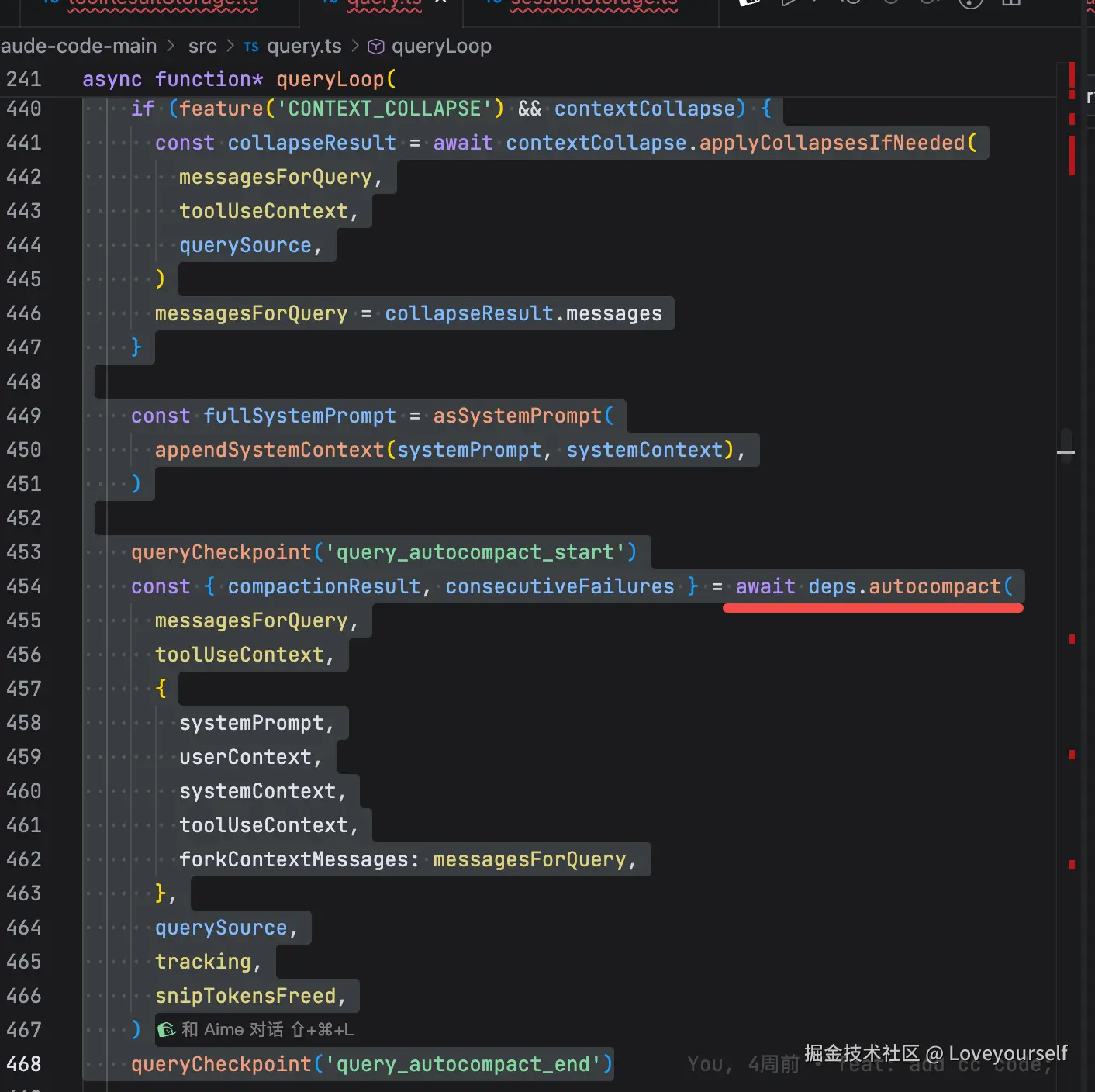
见 query.ts:L396-L468 。
autoCompact 以"有效上下文窗口 - 13K buffer"为阈值。有效窗口还预留了最多 20K token 给"生成摘要的模型输出",避免摘要请求自己溢出。见 autoCompact.ts:L28-L90 。
它会在以下情况下跳过:配置关闭、摘要子 Agent 自己运行、Context Collapse 接管、Reactive Compact-only 模式等,见 autoCompact.ts:L160-L238 。
传统 AutoCompact 的执行
超过阈值后, autoCompactIfNeeded 先尝试 Session Memory 路径;不可用时才调用 compactConversation(...) 做传统全量摘要,见 autoCompact.ts:L287-L333 。
传统路径的关键点:
-
将当前窗口的 messages 全部交给专用 compact Agent。
-
compact Agent 被强制只能输出文本,不能调用工具。
-
Prompt 要它按固定结构输出:用户意图、技术概念、文件、错误、当前工作、待办、下一步等。
-
只是摘要 Agent 的草稿,写回上下文前会被剥离。
-
原消息被替换成:
compact_boundary
→ compact_summary
→ 文件 / plan / skill / tool 等恢复附件
→ SessionStart hook 结果
对应 compact.ts:L440-L490 、 compact.ts:L596-L645 和 prompt.ts:L305-L374 。
compact_boundary 是明确的切断点;下次模型侧只取最近 boundary 之后的消息,见 messages.ts:L4614-L4655 。
为什么它不是逐轮归档
假设第 1 次压缩后: B1 → S1(覆盖 Turn 1~20)
随后又运行了 Turn 21~40。第 2 次传统 autoCompact 会做: compact(S1 + Turn 21~40) → B2 → S2
因此 S1 不会作为一个独立归档节点保留在模型上下文中,而是被重新吸收到 S2 。这是为了快速把整段前缀压到最小,而不是维持日志式摘要历史。
它仍保留了两个连续性保护:
- 摘要中附带 transcript 路径,模型需要精确片段时可回读。
- 压缩后明确要求模型"不问候、不复述、直接接续上一任务",见 prompt.ts:L345-L370 。
代码的 Session Memory 是更接近"结构化归档"的分支:
markdown
    每隔一定上下文增长 / 工具调用次数
→ fork Agent 更新 session-memory.md
→ autoCompact 时直接把该 memory 当作摘要
→ 同时保留最近 10K~40K tokens 的原始消息
其模板本身就是结构化的:
sql
    Current State
    Task specification
    Files and Functions
    Workflow
    Errors & Corrections
    Codebase and System Documentation
    Learnings
    Key results
    Worklog
见 prompts.ts:L11-L41 。
Session Memory 会在上下文增量达到阈值、且工具调用或自然对话断点满足条件时更新,见 sessionMemory.ts:L134-L170 。更新 Agent 被要求只编辑这一个 memory 文件,保留既有标题与模板结构,并持续刷新 Current State ,见 prompts.ts:L43-L80 。
autoCompact 采用该路径时,会:
B2
→ session-memory 结构化摘要
→ 最近未归档的原始消息(至少 10K token、至少 5 条文本消息,最多约 40K)
见 sessionMemoryCompact.ts:L316-L396 与 sessionMemoryCompact.ts:L459-L502 。
所以更准确地说:
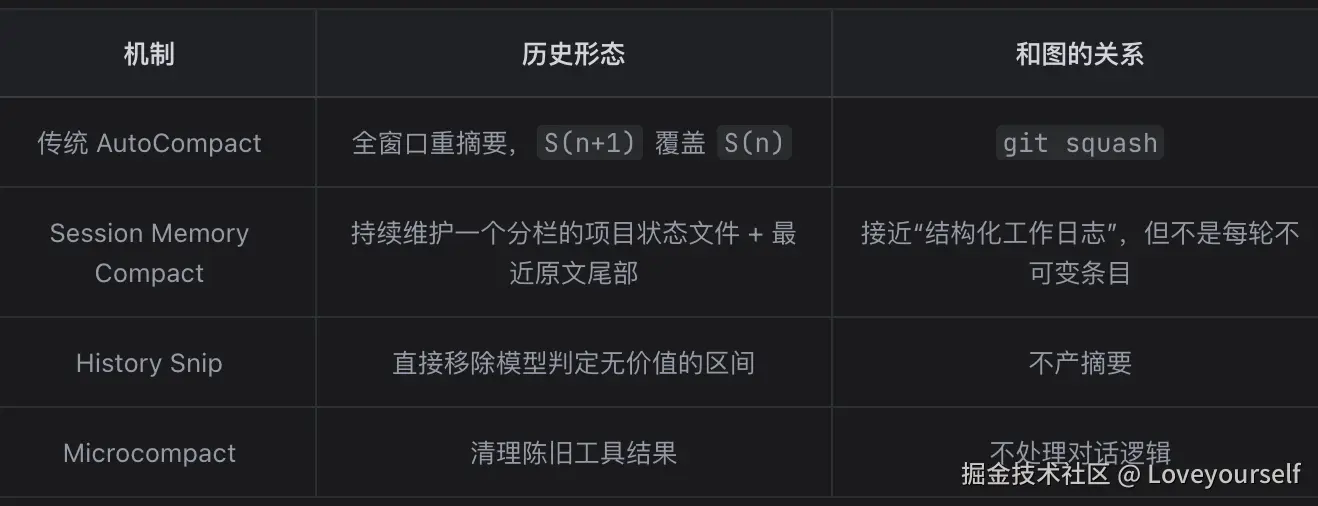
一个关键纠正
图中"每轮独立记录、保留对话逻辑脉络"可以作为你希望的架构目标,但当前 CC 的实现并不严格保证"每轮独立"。Session Memory 的 Worklog 会被持续编辑和压缩,超过每节约 2K token或全局约 12K token 时,旧信息会被合并/删减,见 prompts.ts:L161-L195 。
一个具体的demo
我用一个具体的消息数组 demo 走一遍默认(传统)AutoCompact 的全过程。为保持可读性,token 数是示意值,模型用 Sonnet(200K 窗口)。
阶段 0:压缩前的上下文
假设第 N 轮开始时 messagesForQuery 是这样(已经过 Snip/Microcompact,没帮上忙):
阶段 1:阈值判定
shouldAutoCompact 用最后一条 assistant 的 usage 估算当前 token,减去 snip 释放量后跟阈值比较:
对应 autoCompact.ts:L72-L90 (你光标停的那行 return autocompactThreshold 就是返回这个 167K)和 autoCompact.ts:L225-L238 。
阶段 2:fork 一个「只会写字」的摘要 Agent
compactConversation 把 上面整段 messages + 一条摘要指令喂给一个分叉 Agent。这条指令消息长这样(节选自真实 prompt):
关键点:
- 这个 fork 复用主对话的 prompt cache 前缀(省钱),见 compact.ts:L431-L443 。
- canUseTool 硬性拒绝任何工具调用,逼它只吐文本。
- 如果摘要请求本身又 prompt-too-long,会砍最旧的消息重试( truncateHeadForPTLRetry ),见 compact.ts:L450-L491 。
阶段 3:摘要 Agent 的回复
formatCompactSummary 会剥掉 、把
换成可读标题,见 prompt.ts:L311-L335 。
阶段 4:重建 messages(核心变身)
buildPostCompactMessages 按固定顺序拼出新数组,见 compact.ts:L330-L339 :
sql
postCompactMessages = [
  // ① 边界标记(系统消息,切断点)
  { uuid: "B1", type: "system", subtype: "compact_boundary",
    compactMetadata: { trigger: "auto", preTokens: 187000 },
    logicalParentUuid: "a40" },

  // ② 摘要(伪装成一条 user 消息喂回模型)
  { uuid: "S1", type: "user", isCompactSummary: true,
    content: `This session is being continued from a previous conversation
              that ran out of context. The summary below covers...
              Summary:
              1. Primary Request and Intent: 重构 src/auth.ts...
              ...
              9. ...
              If you need specific details...read the full transcript at: /path/xxx.jsonl
              Continue the conversation from where it left off without asking...` },

  // ③ 恢复附件:把摘要里提到的文件重新读回来(最多 5 个 / 各 5K token)
  { uuid: "att1", type: "user", isMeta: true, content: "[src/auth.ts 最新内容]" },

  // ④ SessionStart hook 结果(如 CLAUDE.md 重新注入)
  { uuid: "h1", type: "user", isMeta: true, content: "[project memory]" }
]
之后主循环用这个新数组继续本轮请求( query.ts:L470-L535 )。原来的 40 轮消息在 模型侧 消失了。
阶段 5:下一轮模型看到什么
getMessagesAfterCompactBoundary 只取最后一个 compact_boundary 之后的内容,见 messages.ts:L4643-L4656 。所以模型的实际输入变成:
css
[S1 摘要] + [att1 文件] + [h1 memory] + 新用户消息
≈ 8K token,而不是 187K
一句话对照你要的「demo 结论」
css
压缩前:u1,a1,t1,...,a40           (187K, 40+ 条真实消息)
        │  fork 出「只写字」Agent,喂全量 + 摘要指令
        ▼
摘要:   <summary> 9 段结构化文本 </summary>
        │  buildPostCompactMessages 重排
        ▼
压缩后:[compact_boundary] + [summary(user)] + [文件附件] + [hook]   (~8K)
要注意的一点:这是 默认路径 。如果启用了实验性的 Session Memory 开关, autoCompactIfNeeded 会先走 trySessionMemoryCompaction ,用一份持续维护的结构化 session-memory.md 当摘要、并额外保留最近 10K--40K 的原始消息尾部( autoCompact.ts:L287-L310 ),那才更接近你上一轮图里「结构化归档」的形态。