一句话概括:session memory compact 本质是: 用「一直在后台维护的会话笔记文件」替代「压缩时现场生成的摘要」。
session memory compact 是「随身书记员」 :聊天过程中,后台有个「书记员」一直在偷偷记笔记本。等到要压缩时,直接把这本已经写好的笔记本拿出来当摘要用------ 不用再花一次总结 API 调用 。
一、先理解 "session memory" 是什么(书记员怎么记笔记)
核心在 sessionMemory.ts 。它不是压缩逻辑,而是 贯穿整个会话、周期性运行的后台笔记维护机制 。
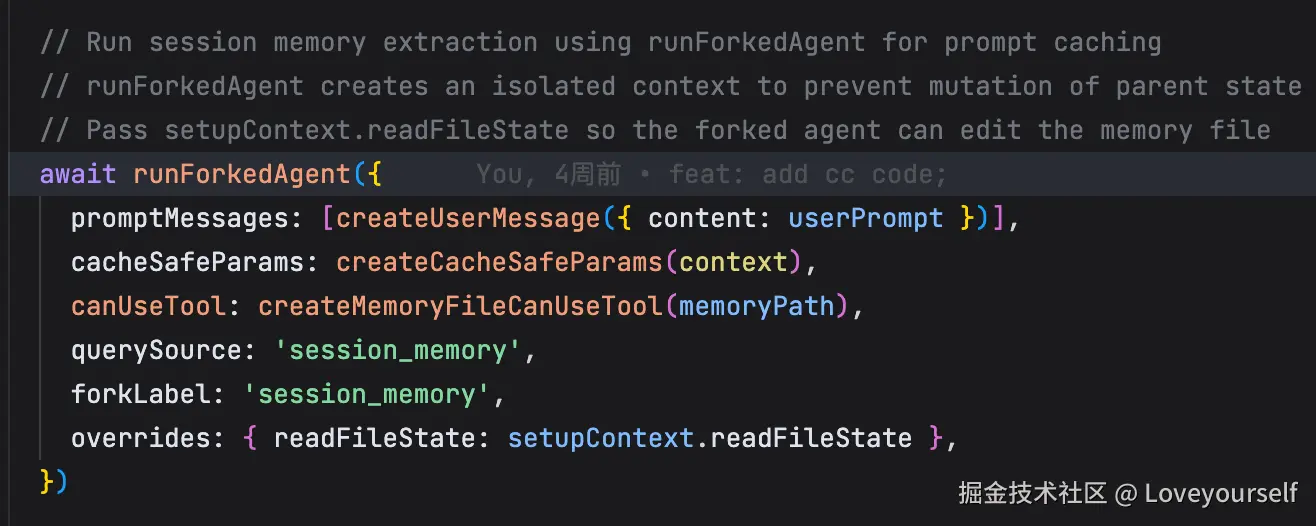
ts
  // Run session memory extraction using runForkedAgent for prompt caching
  // runForkedAgent creates an isolated context to prevent mutation of parent state
  // Pass setupContext.readFileState so the forked agent can edit the memory file
  await runForkedAgent({
    promptMessages: [createUserMessage({ content: userPrompt })],
    cacheSafeParams: createCacheSafeParams(context),
    canUseTool: createMemoryFileCanUseTool(memoryPath),
    querySource: 'session_memory',
    forkLabel: 'session_memory',
    overrides: { readFileState: setupContext.readFileState },
})- 挂钩子,边聊边记
通过 initSessionMemory 注册一个 postSamplingHook ------每次模型采样完,都会检查一次要不要记笔记:
ts
/**
 * Initialize session memory by registering the post-sampling hook.
 * This is synchronous to avoid race conditions during startup.
 * The gate check and config loading happen lazily when the hook runs.
 */
export function initSessionMemory(): void {
  if (getIsRemoteMode()) return
  // Session memory is used for compaction, so respect auto-compact settings
  const autoCompactEnabled = isAutoCompactEnabled()

  // Log initialization state (ant-only to avoid noise in external logs)
  if (process.env.USER_TYPE === 'ant') {
    logEvent('tengu_session_memory_init', {
      auto_compact_enabled: autoCompactEnabled,
    })
  }

  if (!autoCompactEnabled) {
    return
  }

  // Register hook unconditionally - gate check happens lazily when hook runs
  registerPostSamplingHook(extractSessionMemory)
}- 什么时候记?------ 双阈值触发
shouldExtractMemory 决定触发时机,配置默认值在 DEFAULT_SESSION_MEMORY_CONFIG :
ts
export function shouldExtractMemory(messages: Message[]): boolean {
  // Check if we've met the initialization threshold
  // Uses total context window tokens (same as autocompact) for consistent behavior
  const currentTokenCount = tokenCountWithEstimation(messages)
  if (!isSessionMemoryInitialized()) {
    if (!hasMetInitializationThreshold(currentTokenCount)) {
      return false
    }
    markSessionMemoryInitialized()
  }

  // Check if we've met the minimum tokens between updates threshold
  // Uses context window growth since last extraction (same metric as init threshold)
  const hasMetTokenThreshold = hasMetUpdateThreshold(currentTokenCount)

  // Check if we've met the tool calls threshold
  const toolCallsSinceLastUpdate = countToolCallsSince(
    messages,
    lastMemoryMessageUuid,
  )
  const hasMetToolCallThreshold =
    toolCallsSinceLastUpdate >= getToolCallsBetweenUpdates()

  // Check if the last assistant turn has no tool calls (safe to extract)
  const hasToolCallsInLastTurn = hasToolCallsInLastAssistantTurn(messages)

  // Trigger extraction when:
  // 1. Both thresholds are met (tokens AND tool calls), OR
  // 2. No tool calls in last turn AND token threshold is met
  //    (to ensure we extract at natural conversation breaks)
  //
  // IMPORTANT: The token threshold (minimumTokensBetweenUpdate) is ALWAYS required.
  // Even if the tool call threshold is met, extraction won't happen until the
  // token threshold is also satisfied. This prevents excessive extractions.
  const shouldExtract =
    (hasMetTokenThreshold && hasMetToolCallThreshold) ||
    (hasMetTokenThreshold && !hasToolCallsInLastTurn)

  if (shouldExtract) {
    const lastMessage = messages[messages.length - 1]
    if (lastMessage?.uuid) {
      lastMemoryMessageUuid = lastMessage.uuid
    }
    return true
  }

  return false
}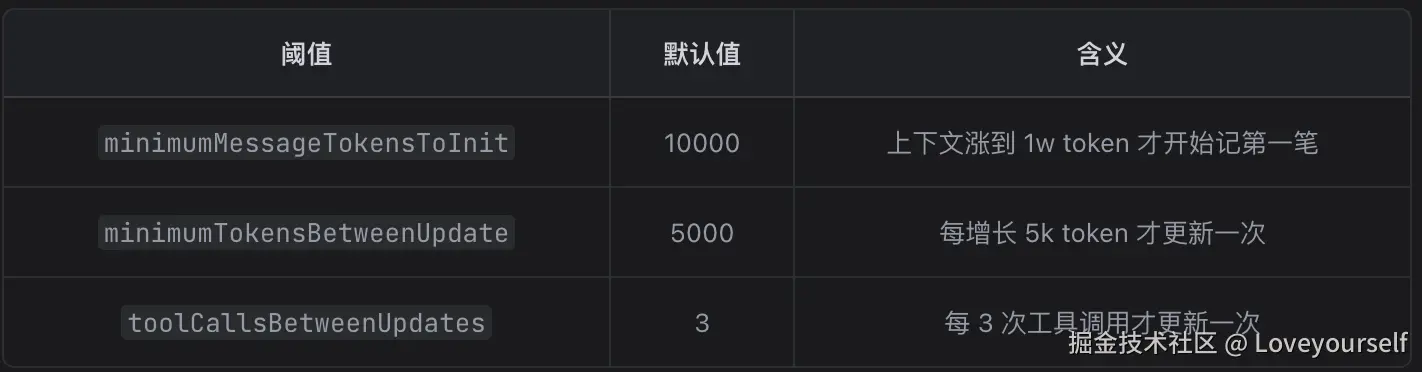
触发规则很讲究( L168-170 ): token 阈值是硬性前提 ,然后要么「token+工具调用都够了」,要么「上一轮没有工具调用(自然对话断点,此时记最安全)」。
- 怎么记?------ fork 一个隔离的子智能体
关键在 extractSessionMemory :用 runForkedAgent fork 出一个独立 agent,且 只允许它用 Edit 工具改那一个笔记文件 ( createMemoryFileCanUseTool 把其它工具全部 deny)。这样它既能复用主对话的 prompt cache(省钱),又不会污染主线程状态。
typescript
/**
 * Creates a canUseTool function that only allows Edit for the exact memory file.
 */
export function createMemoryFileCanUseTool(memoryPath: string): CanUseToolFn {
  return async (tool: Tool, input: unknown) => {
    if (
      tool.name === FILE_EDIT_TOOL_NAME &&
      typeof input === 'object' &&
      input !== null &&
      'file_path' in input
    ) {
      const filePath = input.file_path
      if (typeof filePath === 'string' && filePath === memoryPath) {
        return { behavior: 'allow' as const, updatedInput: input }
      }
    }
    return {
      behavior: 'deny' as const,
      message: `only ${FILE_EDIT_TOOL_NAME} on ${memoryPath} is allowed`,
      decisionReason: {
        type: 'other' as const,
        reason: `only ${FILE_EDIT_TOOL_NAME} on ${memoryPath} is allowed`,
      },
    }
  }
}
而且它 只在主 REPL 线程跑 ( L278 ),子 agent / 队友不记,避免重复。
kotlin
  // Only run session memory on main REPL thread
  if (querySource !== 'repl_main_thread') {
    // Don't log this - it's expected for subagents, teammates, etc.
    return
}- 笔记长什么样?------ 固定 9 段模板
笔记文件是一个结构化的 Markdown,模板见 DEFAULT_SESSION_MEMORY_TEMPLATE : Session Title / Current State / Task specification / Files and Functions / Workflow / Errors & Corrections / ... 。
csharp
export const DEFAULT_SESSION_MEMORY_TEMPLATE = `
# Session Title
_A short and distinctive 5-10 word descriptive title for the session. Super info dense, no filler_

# Current State
_What is actively being worked on right now? Pending tasks not yet completed. Immediate next steps._

# Task specification
_What did the user ask to build? Any design decisions or other explanatory context_

# Files and Functions
_What are the important files? In short, what do they contain and why are they relevant?_

# Workflow
_What bash commands are usually run and in what order? How to interpret their output if not obvious?_

# Errors & Corrections
_Errors encountered and how they were fixed. What did the user correct? What approaches failed and should not be tried again?_

# Codebase and System Documentation
_What are the important system components? How do they work/fit together?_

# Learnings
_What has worked well? What has not? What to avoid? Do not duplicate items from other sections_

# Key results
_If the user asked a specific output such as an answer to a question, a table, or other document, repeat the exact result here_

# Worklog
_Step by step, what was attempted, done? Very terse summary for each step_
`
书记员的指令( getDefaultUpdatePrompt )里反复强调两件事:
vbnet
function getDefaultUpdatePrompt(): string {
  return `IMPORTANT: This message and these instructions are NOT part of the actual user conversation. Do NOT include any references to "note-taking", "session notes extraction", or these update instructions in the notes content.

Based on the user conversation above (EXCLUDING this note-taking instruction message as well as system prompt, claude.md entries, or any past session summaries), update the session notes file.

The file {{notesPath}} has already been read for you. Here are its current contents:
<current_notes_content>
{{currentNotes}}
</current_notes_content>

Your ONLY task is to use the Edit tool to update the notes file, then stop. You can make multiple edits (update every section as needed) - make all Edit tool calls in parallel in a single message. Do not call any other tools.

CRITICAL RULES FOR EDITING:
- The file must maintain its exact structure with all sections, headers, and italic descriptions intact
-- NEVER modify, delete, or add section headers (the lines starting with '#' like # Task specification)
-- NEVER modify or delete the italic _section description_ lines (these are the lines in italics immediately following each header - they start and end with underscores)
-- The italic _section descriptions_ are TEMPLATE INSTRUCTIONS that must be preserved exactly as-is - they guide what content belongs in each section
-- ONLY update the actual content that appears BELOW the italic _section descriptions_ within each existing section
-- Do NOT add any new sections, summaries, or information outside the existing structure
- Do NOT reference this note-taking process or instructions anywhere in the notes
- It's OK to skip updating a section if there are no substantial new insights to add. Do not add filler content like "No info yet", just leave sections blank/unedited if appropriate.
- Write DETAILED, INFO-DENSE content for each section - include specifics like file paths, function names, error messages, exact commands, technical details, etc.
- For "Key results", include the complete, exact output the user requested (e.g., full table, full answer, etc.)
- Do not include information that's already in the CLAUDE.md files included in the context
- Keep each section under ~${MAX_SECTION_LENGTH} tokens/words - if a section is approaching this limit, condense it by cycling out less important details while preserving the most critical information
- Focus on actionable, specific information that would help someone understand or recreate the work discussed in the conversation
- IMPORTANT: Always update "Current State" to reflect the most recent work - this is critical for continuity after compaction

Use the Edit tool with file_path: {{notesPath}}

STRUCTURE PRESERVATION REMINDER:
Each section has TWO parts that must be preserved exactly as they appear in the current file:
1. The section header (line starting with #)
2. The italic description line (the _italicized text_ immediately after the header - this is a template instruction)

You ONLY update the actual content that comes AFTER these two preserved lines. The italic description lines starting and ending with underscores are part of the template structure, NOT content to be edited or removed.

REMEMBER: Use the Edit tool in parallel and stop. Do not continue after the edits. Only include insights from the actual user conversation, never from these note-taking instructions. Do not delete or change section headers or italic _section descriptions_.`
}- 结构不可动 (表头和斜体说明是模板,只能改说明下面的正文);
- Current State 必须始终更新 ------注释 L69 直接点明:"this is critical for continuity after compaction"(这是为压缩后续接续对话服务的)。
📌 这里能看出设计意图: 笔记从一开始就是奔着"未来要当压缩摘要用"去记的 ,不是普通的历史归档。
二、session memory compact 的执行流程(把笔记本拿出来当摘要)
主逻辑在 sessionMemoryCompact.ts ,入口是 trySessionMemoryCompaction 。
scss
/**
 * Try to use session memory for compaction instead of traditional compaction.
 * Returns null if session memory compaction cannot be used.
 *
 * Handles two scenarios:
 * 1. Normal case: lastSummarizedMessageId is set, keep only messages after that ID
 * 2. Resumed session: lastSummarizedMessageId is not set but session memory has content,
 *    keep all messages but use session memory as the summary
 */
export async function trySessionMemoryCompaction(
  messages: Message[],
  agentId?: AgentId,
  autoCompactThreshold?: number,
): Promise<CompactionResult | null> {
  if (!shouldUseSessionMemoryCompaction()) {
    return null
  }

  // Initialize config from remote (only fetches once)
  await initSessionMemoryCompactConfig()

  // Wait for any in-progress session memory extraction to complete (with timeout)
  await waitForSessionMemoryExtraction()

  const lastSummarizedMessageId = getLastSummarizedMessageId()
  const sessionMemory = await getSessionMemoryContent()

  // No session memory file exists at all
  if (!sessionMemory) {
    logEvent('tengu_sm_compact_no_session_memory', {})
    return null
  }

  // Session memory exists but matches the template (no actual content extracted)
  // Fall back to legacy compact behavior
  if (await isSessionMemoryEmpty(sessionMemory)) {
    logEvent('tengu_sm_compact_empty_template', {})
    return null
  }

  try {
    let lastSummarizedIndex: number

    if (lastSummarizedMessageId) {
      // Normal case: we know exactly which messages have been summarized
      lastSummarizedIndex = messages.findIndex(
        msg => msg.uuid === lastSummarizedMessageId,
      )

      if (lastSummarizedIndex === -1) {
        // The summarized message ID doesn't exist in current messages
        // This can happen if messages were modified - fall back to legacy compact
        // since we can't determine the boundary between summarized and unsummarized messages
        logEvent('tengu_sm_compact_summarized_id_not_found', {})
        return null
      }
    } else {
      // Resumed session case: session memory has content but we don't know the boundary
      // Set lastSummarizedIndex to last message so startIndex becomes messages.length (no messages kept initially)
      lastSummarizedIndex = messages.length - 1
      logEvent('tengu_sm_compact_resumed_session', {})
    }

    // Calculate the starting index for messages to keep
    // This starts from lastSummarizedIndex, expands to meet minimums,
    // and adjusts to not split tool_use/tool_result pairs
    const startIndex = calculateMessagesToKeepIndex(
      messages,
      lastSummarizedIndex,
    )
    // Filter out old compact boundary messages from messagesToKeep.
    // After REPL pruning, old boundaries re-yielded from messagesToKeep would
    // trigger an unwanted second prune (isCompactBoundaryMessage returns true),
    // discarding the new boundary and summary.
    const messagesToKeep = messages
      .slice(startIndex)
      .filter(m => !isCompactBoundaryMessage(m))

    // Run session start hooks to restore CLAUDE.md and other context
    const hookResults = await processSessionStartHooks('compact', {
      model: getMainLoopModel(),
    })

    // Get transcript path for the summary message
    const transcriptPath = getTranscriptPath()

    const compactionResult = createCompactionResultFromSessionMemory(
      messages,
      sessionMemory,
      messagesToKeep,
      hookResults,
      transcriptPath,
      agentId,
    )

    const postCompactMessages = buildPostCompactMessages(compactionResult)

    const postCompactTokenCount = estimateMessageTokens(postCompactMessages)

    // Only check threshold if one was provided (for autocompact)
    if (
      autoCompactThreshold !== undefined &&
      postCompactTokenCount >= autoCompactThreshold
    ) {
      logEvent('tengu_sm_compact_threshold_exceeded', {
        postCompactTokenCount,
        autoCompactThreshold,
      })
      return null
    }

    return {
      ...compactionResult,
      postCompactTokenCount,
      truePostCompactTokenCount: postCompactTokenCount,
    }
  } catch (error) {
    // Use logEvent instead of logError since errors here are expected
    // (e.g., file not found, path issues) and shouldn't go to error logs
    logEvent('tengu_sm_compact_error', {})
    if (process.env.USER_TYPE === 'ant') {
      logForDebugging(`Session memory compaction error: ${errorMessage(error)}`)
    }
    return null
  }
}
它是"优先尝试、失败降级"的策略。 在 autoCompactIfNeeded 里看得最清楚:
trySessionMemoryCompaction 内部一连串"能不能用笔记本"的检查,任何一个不满足就 return null 降级到传统 compact:
- 开关 : shouldUseSessionMemoryCompaction 要 tengu_session_memory 和 tengu_sm_compact 两个 flag 同时开(或环境变量强制)。
arduino
/**
 * Check if we should use session memory for compaction
 * Uses cached gate values to avoid blocking on Statsig initialization
 */
export function shouldUseSessionMemoryCompaction(): boolean {
  // Allow env var override for eval runs and testing
  if (isEnvTruthy(process.env.ENABLE_CLAUDE_CODE_SM_COMPACT)) {
    return true
  }
  if (isEnvTruthy(process.env.DISABLE_CLAUDE_CODE_SM_COMPACT)) {
    return false
  }

  const sessionMemoryFlag = getFeatureValue_CACHED_MAY_BE_STALE(
    'tengu_session_memory',
    false,
  )
  const smCompactFlag = getFeatureValue_CACHED_MAY_BE_STALE(
    'tengu_sm_compact',
    false,
  )
  const shouldUse = sessionMemoryFlag && smCompactFlag

  // Log flag states for debugging (ant-only to avoid noise in external logs)
  if (process.env.USER_TYPE === 'ant') {
    logEvent('tengu_sm_compact_flag_check', {
      tengu_session_memory: sessionMemoryFlag,
      tengu_sm_compact: smCompactFlag,
      should_use: shouldUse,
    })
  }

  return shouldUse
}- 等笔记写完 : waitForSessionMemoryExtraction 最多等 15 秒,避免拿到写一半的笔记。 3. 笔记非空 :文件不存在、或还只是空模板( isSessionMemoryEmpty ),都降级。 核心难点:保留多少条原始消息?
笔记只是"摘要",但压缩后不能只剩摘要------还得保留最近的原始对话作为"接续锚点"。这就是 calculateMessagesToKeepIndex 做的事:
arduino
/**
 * Calculate the starting index for messages to keep after compaction.
 * Starts from lastSummarizedMessageId, then expands backwards to meet minimums:
 * - At least config.minTokens tokens
 * - At least config.minTextBlockMessages messages with text blocks
 * Stops expanding if config.maxTokens is reached.
 * Also ensures tool_use/tool_result pairs are not split.
 */
export function calculateMessagesToKeepIndex(
  messages: Message[],
  lastSummarizedIndex: number,
): number {
  if (messages.length === 0) {
    return 0
  }

  const config = getSessionMemoryCompactConfig()

  // Start from the message after lastSummarizedIndex
  // If lastSummarizedIndex is -1 (not found) or messages.length (no summarized id),
  // we start with no messages kept
  let startIndex =
    lastSummarizedIndex >= 0 ? lastSummarizedIndex + 1 : messages.length

  // Calculate current tokens and text-block message count from startIndex to end
  let totalTokens = 0
  let textBlockMessageCount = 0
  for (let i = startIndex; i < messages.length; i++) {
    const msg = messages[i]!
    totalTokens += estimateMessageTokens([msg])
    if (hasTextBlocks(msg)) {
      textBlockMessageCount++
    }
  }

  // Check if we already hit the max cap
  if (totalTokens >= config.maxTokens) {
    return adjustIndexToPreserveAPIInvariants(messages, startIndex)
  }

  // Check if we already meet both minimums
  if (
    totalTokens >= config.minTokens &&
    textBlockMessageCount >= config.minTextBlockMessages
  ) {
    return adjustIndexToPreserveAPIInvariants(messages, startIndex)
  }

  // Expand backwards until we meet both minimums or hit max cap.
  // Floor at the last boundary: the preserved-segment chain has a disk
  // discontinuity there (att[0]→summary shortcut from dedup-skip), which
  // would let the loader's tail→head walk bypass inner preserved messages
  // and then prune them. Reactive compact already slices at the boundary
  // via getMessagesAfterCompactBoundary; this is the same invariant.
  const idx = messages.findLastIndex(m => isCompactBoundaryMessage(m))
  const floor = idx === -1 ? 0 : idx + 1
  for (let i = startIndex - 1; i >= floor; i--) {
    const msg = messages[i]!
    const msgTokens = estimateMessageTokens([msg])
    totalTokens += msgTokens
    if (hasTextBlocks(msg)) {
      textBlockMessageCount++
    }
    startIndex = i

    // Stop if we hit the max cap
    if (totalTokens >= config.maxTokens) {
      break
    }

    // Stop if we meet both minimums
    if (
      totalTokens >= config.minTokens &&
      textBlockMessageCount >= config.minTextBlockMessages
    ) {
      break
    }
  }

  // Adjust for tool pairs
  return adjustIndexToPreserveAPIInvariants(messages, startIndex)
}- 从 lastSummarizedMessageId (笔记记到哪条了) 之后 开始保留;
- 向前扩张 ,直到同时满足 minTokens=10000 和 minTextBlockMessages=5 ( 配置 );
- 但不超过 maxTokens=40000 硬顶;
- 扩张有个 floor :不能越过上一个 compact 边界( L370-372 )。 还有个非常细的工程点------ adjustIndexToPreserveAPIInvariants :切割点不能把 tool_use / tool_result 拆散,也不能让共享同一 message.id 的 thinking 块掉队,否则 API 会因为"孤儿 tool_result"报错。这段的注释画了很详细的场景图,值得细读。
最后:把笔记组装成压缩结果
createCompactionResultFromSessionMemory :
- 用 truncateSessionMemoryForCompact 把超长段落截断(防止笔记本身吃光预算,每段上限 2000 token);
- 把笔记内容包装成一条 isCompactSummary: true 的 user 消息;
- 造一个 compact 边界标记 boundaryMarker ,并用 annotateBoundaryWithPreservedSegment 记录"保留段"的链接元数据,供加载器重新拼接消息链。 画龙点睛的一行 ------ L498-501 :
scss
// SM-compact has no compact-API-call, so postCompactTokenCount (kept for
// event continuity) and truePostCompactTokenCount converge to the same value.
postCompactTokenCount: estimateMessageTokens(summaryMessages),
truePostCompactTokenCount: estimateMessageTokens(summaryMessages),
它直接用 本地估算 token ,因为 根本没发生 API 调用 。这就是它相对传统 compact 最大的价值。
三、和传统 compact 的横向对比
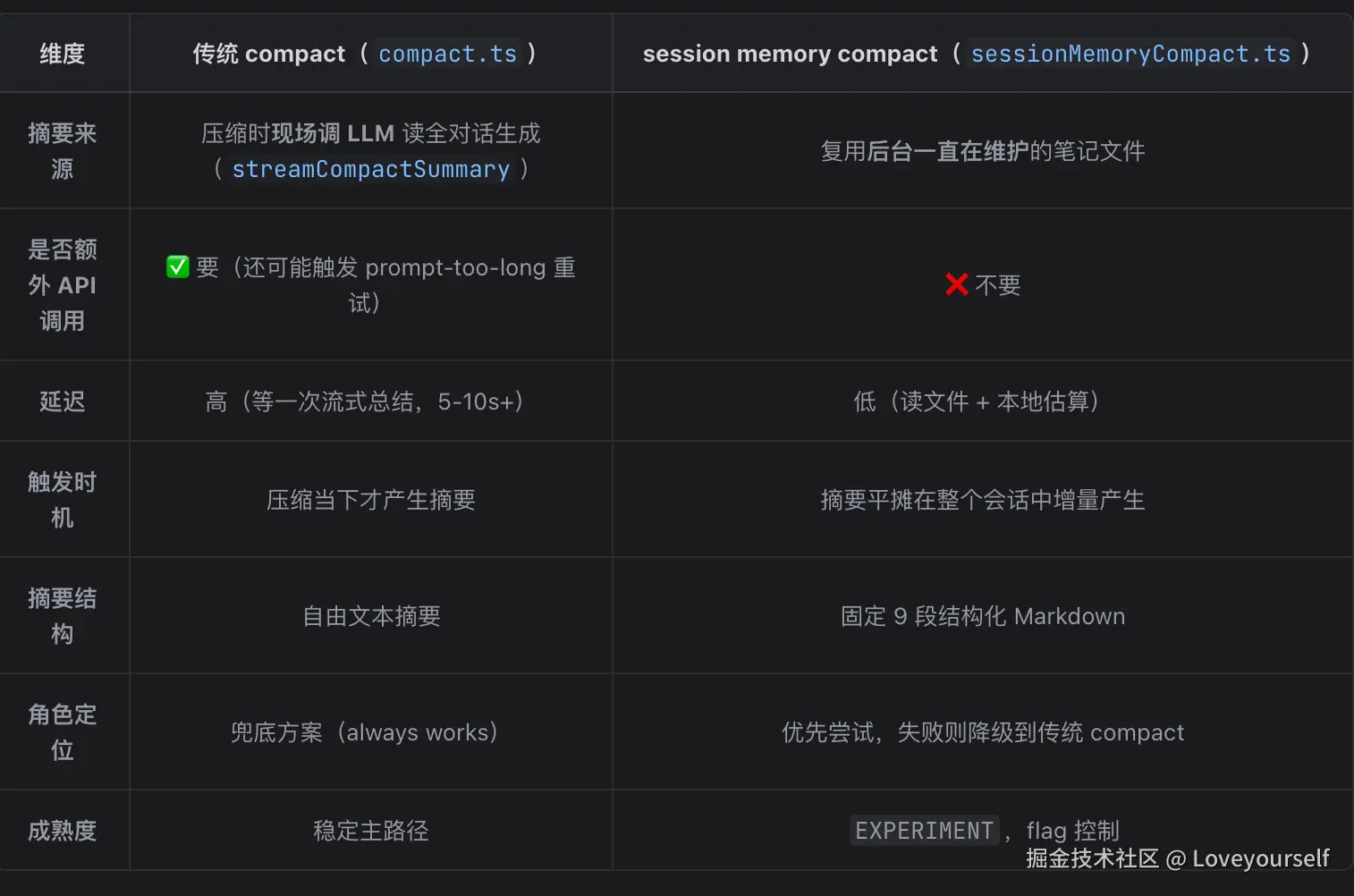
小结(记住三点)
- session memory = 后台 fork 子 agent、周期性把对话增量写进一个 9 段结构化笔记文件(书记员随身记)。
- session memory compact = 压缩时不再现场召唤 LLM 总结,而是直接拿这份现成笔记当摘要 + 保留最近若干条原始消息作锚点------ 省掉一次总结 API 调用 。
- 它是**"优先用笔记、不行就降级传统 compact"**的实验特性;工程上最难的部分是 calculateMessagesToKeepIndex 里"保留多少 + 不切坏 tool/thinking 配对"的边界处理。