前言:
在使用 Cesium 做三维可视化开发时,经常需要给场景增加天气氛围。但 Cesium 本身并没有内置阴天、降雨这类天气效果,想要实现就需要使用后处理 PostProcessStage,对已经渲染完成的画面,再跑一遍自定义片元着色器做二次处理。
本文实现两个独立可开关的效果:
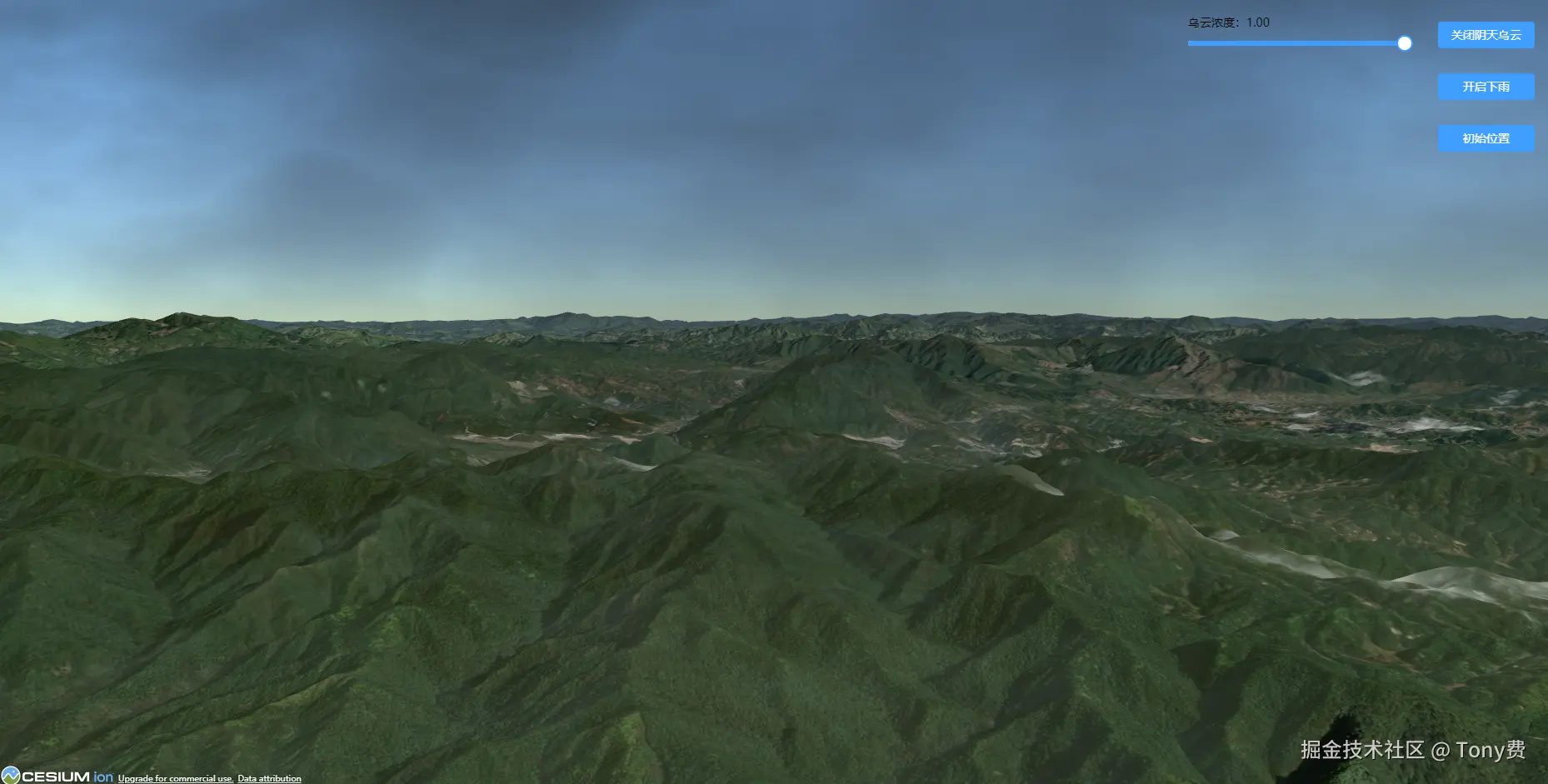
- 动态流动乌云:多层 FBM 噪声模拟云层,支持 0‑1 浓度调节。
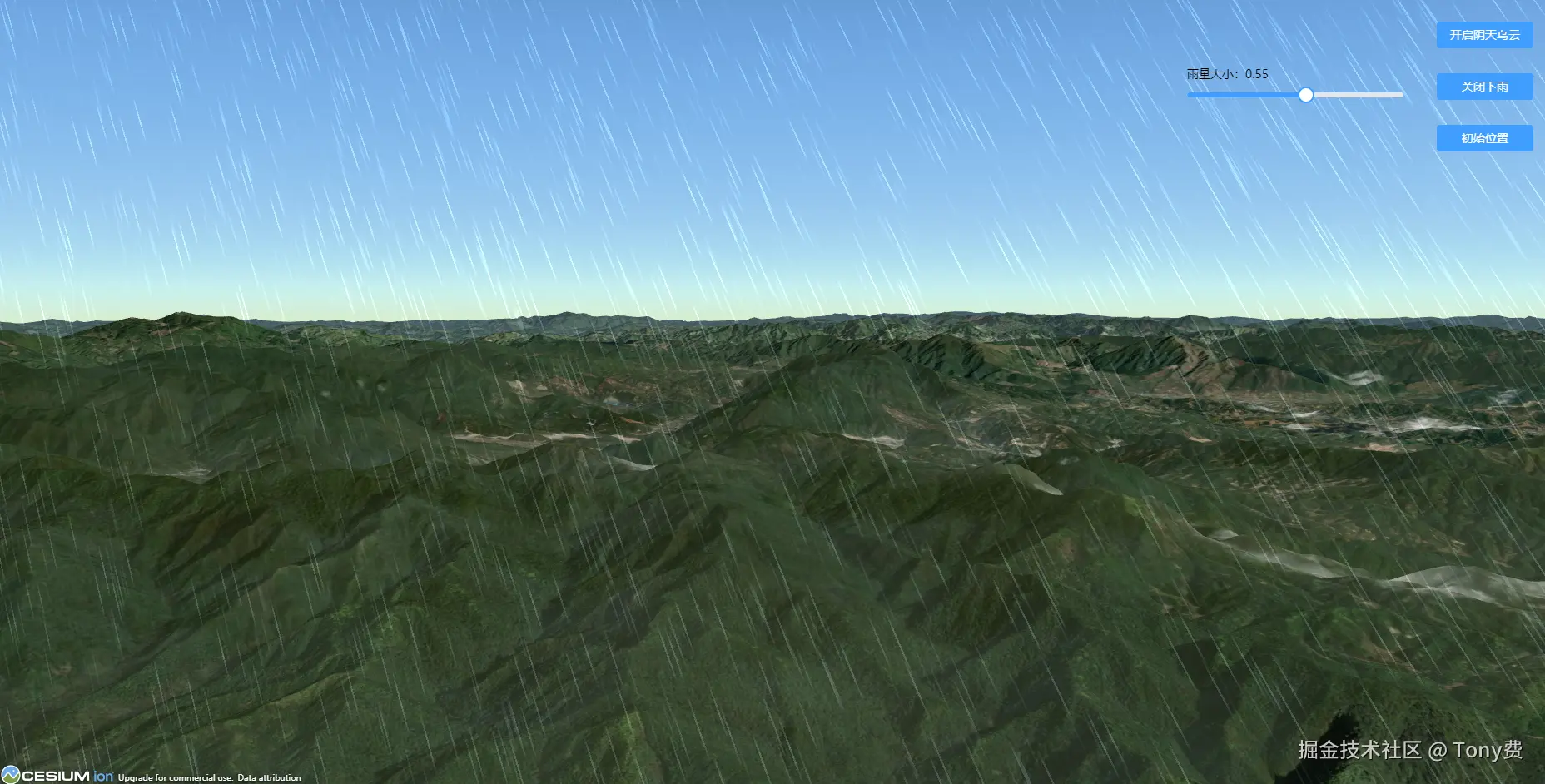
- 下雨雨丝特效:随机生成下落雨丝动画,滑块控制雨量大小。
本案例中Cesium版本为1.141.0

演示动态图效果如下:
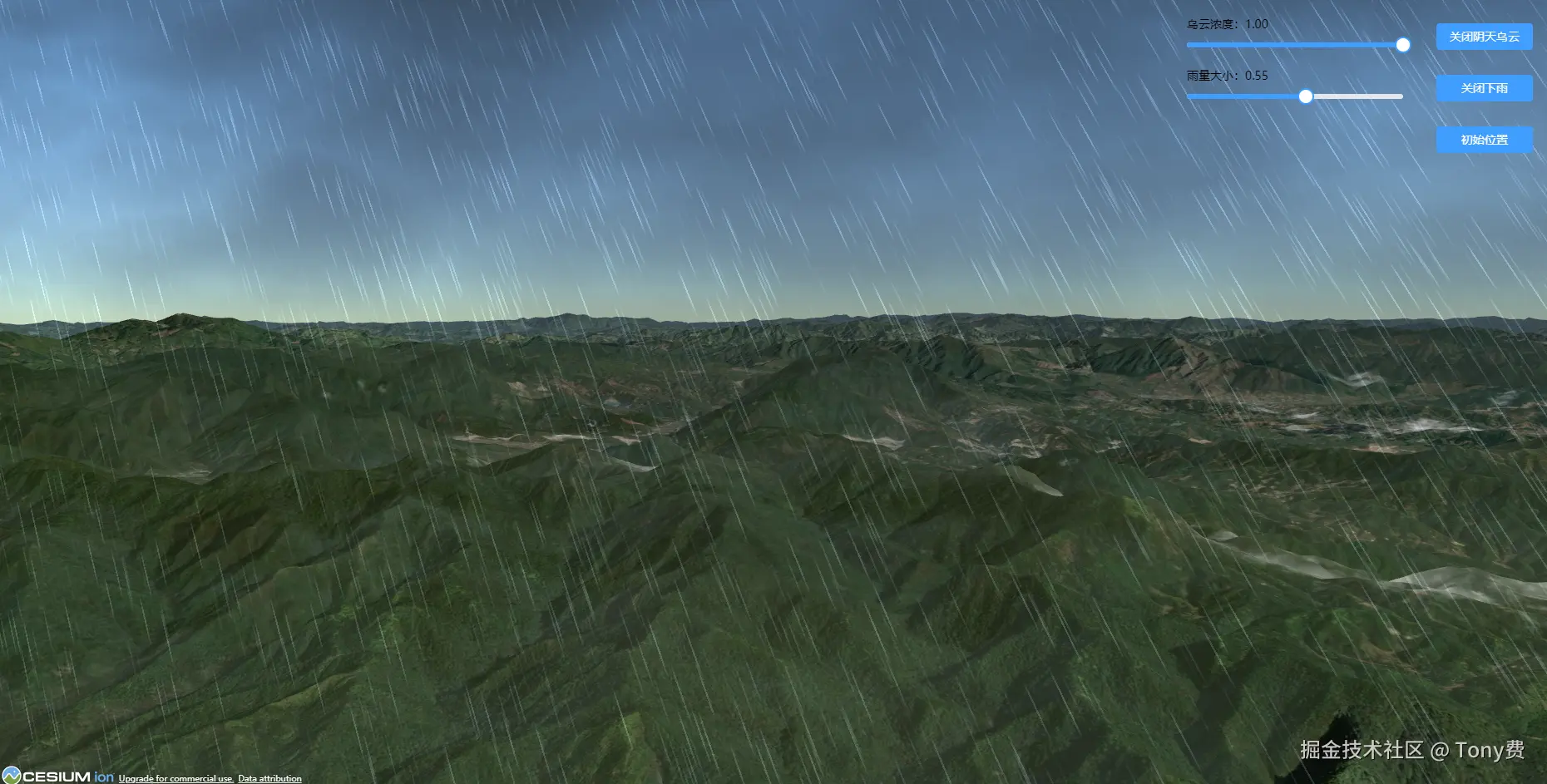
演示静态图效果如下:
1. 乌云效果
2. 下雨效果
3. 下雨时有乌云效果
技术原理详解:
1. Cesium 后处理执行流程
Cesium 场景渲染顺序:场景渲染 → 得到屏幕纹理 colorTexture → 执行自定义片元着色器 → 输出最终画面
我们所有的乌云、下雨效果,都是对最终屏幕图像做二次像素重绘。
2. 乌云效果实现思路
- 使用 FBM 分形噪声 多层叠加,模拟真实云层纹理。
- 通过
time动态偏移 UV 坐标,实现云层缓慢流动。 - 使用
skyMask像素掩码,只渲染天空乌云,地面完全不受影响。 - 通过
uniform外部传入浓度,支持动态变浓 / 变淡。
3. 下雨效果实现思路
- 利用 Hash 随机算法生成屏幕随机雨丝位置。
- 利用时间变量驱动雨丝下落动画。
- 通过雨量系数混合画面,实现小雨 → 暴雨过渡。
- 兼容 GLSL300-ES 标准,适配新版 Cesium。
完整代码
1. template 结构:
xml
<template>
    <div class="main">

    <!-- Cesium地球渲染容器 -->
    <div class="content" ref="content" id="earth"></div>

    <div class="btn-border-column" v-if="isLoading">

        <!-- 乌云控制行:滑块 + 开关按钮 -->
        <div class="btn-row">
            <div class="slider-border" v-if="isCloud">
                <div class="slider-label">乌云浓度:{{ Number(cloudStrength).toFixed(2) }}</div>
                <el-slider
                    class="cloud-slider"
                    v-model.number="cloudStrength"
                    :min="0"
                    :max="1.0"
                    :step="0.01"
                    @input="updateCloudStrength"
                />
            </div>
            <el-button type="primary" size="default" class="btn-control" @click="cloudControl">
                {{ isCloud ? '关闭阴天乌云' : '开启阴天乌云' }}
            </el-button>
          </div>

          <!-- 下雨控制行:滑块 + 开关按钮 -->
          <div class="btn-row">
            <div class="slider-border" v-if="isRain">
                <div class="slider-label">雨量大小:{{ Number(rainStrength).toFixed(2) }}</div>
                <el-slider
                    class="rain-slider"
                    v-model.number="rainStrength"
                    :min="0"
                    :max="1.0"
                    :step="0.01"
                    @input="updateRainStrength"
                />
            </div>
            <el-button type="primary" size="default" class="btn-control" @click="rainControl">{{ isRain ? '关闭下雨' : '开启下雨' }}</el-button>
            </div>

            <!-- 镜头复位按钮 -->
            <div class="btn-row">
               <el-button type="primary" size="default" class="btn-control" @click="flyTo">初始位置</el-button>
            </div>

        </div>

        <!-- 地图加载提示,初始化未完成显示 -->
        <div class="loading" v-if="!isLoading">Loading...</div>

    </div>
</template>
2. script 代码:
ini
<script setup>
import { onMounted, nextTick, ref, onUnmounted } from 'vue';
import { token } from '../../utils/common.js';

// 地图是否加载完成
let isLoading = ref(false);
// 乌云效果开关状态
let isCloud = ref(false);
// 下雨效果开关状态
let isRain = ref(false);
// 乌云浓度 0~1
let cloudStrength = ref(1);
// 雨量大小 0~1
let rainStrength = ref(0.55);

let myMar = null;

/**
 * 组件销毁生命周期:统一销毁Cesium实例、后处理效果,防止内存泄漏
 */
onUnmounted(() => {
    // 销毁乌云后处理
    if (isCloud.value && window.cloudStage) {
        window.viewer.scene.postProcessStages.remove(window.cloudStage);
        window.cloudStage = null;
        isCloud.value = false;
    }
    // 销毁下雨后处理
    if (isRain.value && window.rain) {
        window.viewer.scene.postProcessStages.remove(window.rain);
        window.rain = null;
        isRain.value = false;
    }
    // 销毁Cesium实例
    if (window.viewer) {
        window.viewer.destroy();
        window.viewer = null;
    }

    if (myMar) {
        clearTimeout(myMar);
        myMar = null;
    }
});

/**
 * DOM挂载完成,等待DOM渲染完毕初始化地图
 */
onMounted(() => {
    nextTick(() => {
        initMap();
    });
});

/**
 * 初始化Cesium Viewer实例
 */
const initMap = async () => {
    Cesium.Ion.defaultAccessToken = token;

    // 设置相机默认视口范围
    Cesium.Camera.DEFAULT_VIEW_RECTANGLE = Cesium.Rectangle.fromDegrees(89.5, 20.4, 110.4, 61.2);

    // 加载世界地形,开启水面蒙版、地形法线
    const terrainProvider = await Cesium.createWorldTerrainAsync({
        requestWaterMask: true,
        requestVertexNormals: true
    });

    // 创建Viewer实例,关闭多余UI控件
    window.viewer = new Cesium.Viewer('earth', {
        terrainProvider: terrainProvider,
        animation: false,
        timeline: false,
        infoBox: false,
        geocoder: false,
        homeButton: false,
        sceneModePicker: false,
        baseLayerPicker: false,
        navigationHelpButton: false,
        fullscreenButton: false,
        selectionIndicator: false,
        shouldAnimate: false,
        contextOptions: {
            webgl: {
                powerPreference: "high-performance",
                preserveDrawingBuffer: false
            }
        }
    });

    Cesium.JulianDate.fromDate(new Date('2026/05/02 23:00:00'));

    // 延时3秒,标记地图加载完成,显示操作按钮,并且飞到预设初始视角
    myMar = setTimeout(() => {
        isLoading.value = true;
        flyTo();
    }, 3000);
};

// 飞到预设初始视角的方法
const flyTo = () => {
    window.viewer.camera.flyTo({
        destination: Cesium.Cartesian3.fromDegrees(117.66293312354773, 26.00085216052459, 1796.8781247739746),
        orientation: {
            heading: Cesium.Math.toRadians(38.280907385928664),
            pitch: Cesium.Math.toRadians(-4.0671391165843245),
            roll: Cesium.Math.toRadians(0.0009439239381974838)
        },
        duration: 6
    });
};

// 更新雨量uniform,滑块拖动实时生效,雨量值 0‑1
const updateRainStrength = (val) => {
    if (window.rain) {
        window.rain.uniforms.rainStrength = Number(val);
    }
};

/**
 * 下雨效果开关:开启/关闭后处理
 */
const rainControl = () => {
    if (isRain.value) {
        // 关闭下雨,移除后处理阶段
        window.viewer.scene.postProcessStages.remove(window.rain);
        window.rain = null;
        isRain.value = false;
    } else {
        // GLSL300‑ES 片元着色器,Cesium PostProcessStage专用语法
        const Rain = `
            uniform sampler2D colorTexture;
            uniform float rainStrength;
            uniform float time;
            in vec2 v_textureCoordinates;
            out vec4 fragColor;

            float hash(float x) {
                return fract(sin(x * 133.3) * 13.13);
            }

            void main(void) {
                vec4 sceneColor = texture(colorTexture, v_textureCoordinates);
                float t = time;
                vec2 uv = gl_FragCoord.xy;

                float a = -0.4;
                float si = sin(a);
                float co = cos(a);

                vec2 res = czm_viewport.zw;
                uv = (uv * 2.0 - res.xy) / min(res.x, res.y);
                uv *= mat2(co, -si, si, co);
                uv *= length(uv + vec2(0.0,4.9)) * 0.3 + 1.0;

                float v = 1.0 - sin(hash(floor(uv.x * 100.0)) * 2.0);
                float b = clamp(abs(sin(20.0 * t * v + uv.y * (5.0 / (2.0 + v)))) - 0.95, 0.0, 1.0) * 20.0;
                vec3 rainCol = vec3(0.6,0.7,0.8) * v * b;

                float rainMix = clamp(rainStrength,0.0,1.0);
                vec3 finalRGB = mix(sceneColor.rgb, sceneColor.rgb * (1.0 - rainMix*0.2) + rainCol, rainMix*0.45);

                fragColor = vec4(finalRGB, sceneColor.a);
            }
        `;

        // 创建下雨后处理
        window.rain = new Cesium.PostProcessStage({
            name: 'czm_rain',
            fragmentShader: Rain,
            uniforms:{
                rainStrength: rainStrength.value,
                time:0.0
            }
        });
        // requestAnimationFrame驱动时间,实现雨滴下落动画
        const tickRain = ()=>{
            if(window.rain){
                window.rain.uniforms.time += 0.016;
                requestAnimationFrame(tickRain);
            }
        };
        tickRain();

        // 添加到场景后处理管线
        window.viewer.scene.postProcessStages.add(window.rain);
        isRain.value = true;
    }
};

// 更新乌云浓度,滑块拖动实时修改uniform,乌云浓度 0‑1
const updateCloudStrength = (val) => {
    if(window.cloudStage){
        window.cloudStage.uniforms.cloudStrength = Number(val);
    }
};

// 乌云阴天效果开关
const cloudControl = () => {
    if(isCloud.value){
        // // 关闭乌云,移除后处理
        window.viewer.scene.postProcessStages.remove(window.cloudStage);
        window.cloudStage = null;
        isCloud.value = false;
    }else{
        const CloudShader = `
            uniform sampler2D colorTexture;
            uniform float cloudStrength;
            uniform float time;
            in vec2 v_textureCoordinates;
            out vec4 fragColor;

            float noise(vec2 uv){
                return fract(sin(dot(uv,vec2(12.9898,78.233)))*43758.5453);
            }

            float smoothNoise(vec2 uv){
                vec2 i = floor(uv);
                vec2 f = fract(uv);
                float a = noise(i);
                float b = noise(i + vec2(1.,0.));
                float c = noise(i + vec2(0.,1.));
                float d = noise(i + vec2(1.,1.));
                vec2 u = f * f * (3.0 - 2.0 * f);
                return mix(mix(a,b,u.x), mix(c,d,u.x), u.y);
            }

            float fbm(vec2 uv){
                float total = 0.0;
                float amp = 0.52;
                for(int i = 0; i < 6; i++){
                    total += smoothNoise(uv) * amp;
                    uv *= 2.2;
                    amp *= 0.46;
                }
                return total;
            }

            void main(void){
                vec4 origin = texture(colorTexture, v_textureCoordinates);
                vec3 originRGB = origin.rgb;

                float skyMask = smoothstep(0.12, 0.98, v_textureCoordinates.y);

                vec2 cloudUV = v_textureCoordinates * 1.6 + vec2(time * 0.00045, time * 0.00018);
                float cloudNoise = fbm(cloudUV);
                float cloudDensity = smoothstep(0.04, 0.94, cloudNoise);

                vec2 cloudUV2 = v_textureCoordinates * 2.9 + vec2(time * 0.0008, time * -0.0003);
                float cloudNoise2 = fbm(cloudUV2);
                float cloudDensity2 = smoothstep(0.06, 0.93, cloudNoise2);

                vec2 cloudUV3 = v_textureCoordinates * 4.2 + vec2(time * 0.0010, time * 0.00022);
                float cloudNoise3 = fbm(cloudUV3);
                float cloudDensity3 = smoothstep(0.07, 0.91, cloudNoise3);

                vec2 cloudUV4 = v_textureCoordinates * 6.0 + vec2(time * 0.0013, time * -0.0004);
                float cloudNoise4 = fbm(cloudUV4);
                float cloudDensity4 = smoothstep(0.09, 0.88, cloudNoise4);

                float finalCloudDensity = max(cloudDensity, max(cloudDensity2*0.75, max(cloudDensity3*0.60, cloudDensity4*0.45)));

                vec3 cloudGray = vec3(0.17, 0.19, 0.22);

                float cloudAlpha = finalCloudDensity * skyMask * cloudStrength;

                vec3 finalColor = mix(originRGB, cloudGray, cloudAlpha);

                fragColor = vec4(finalColor, origin.a);
            }
        `;

        // 创建乌云后处理阶段
        window.cloudStage = new Cesium.PostProcessStage({
            name:'overcast_cloud',
            fragmentShader:CloudShader,
            uniforms:{
                cloudStrength: cloudStrength.value,
                time:0.0
            }
        });

        // 驱动云层流动动画
        const tick = ()=>{
            if(window.cloudStage){
                window.cloudStage.uniforms.time +=0.016;
                requestAnimationFrame(tick);
            }
        };
        tick();

        window.viewer.scene.postProcessStages.add(window.cloudStage);
        isCloud.value = true;
    }
};
</script>
3. css样式代码:
css
* {
    margin: 0;
    padding: 0;
}

.main {
    width: 100%;
    height: 100vh;
    position: relative;
}

.content {
    width: 100%;
    height: 100%;
    position: relative;
    z-index: 1;
}

.btn-border-column {
    position: absolute;
    right: 24px;
    top: 24px;
    z-index: 2;
}

.btn-row {
    margin-top: 10px;
    height: 52px;
    display: flex;
    justify-content: end;
    align-items: stretch;
}

.slider-border {
    width: 260px;
    margin-right: 20px;
    position: relative;
    top: -9px;
}

.slider-label {
    font-size: 14px;
}

.btn-control {
    width: 116px;
    margin-left: 20px;
    cursor: pointer;
}

.loading {
    width: 100%;
    height: 100%;
    position: absolute;
    left: 0;
    top: 0;
    z-index: 3;
    display: flex;
    justify-content: center;
    align-items: center;
    font-size: 34px;
    display: flex;
    justify-content: center;
    align-items: center;
    font-size: 50px;
    color: #000000;
}