一直在开发Kotlin Multiplatform+ Compose Multiplatform的应用,缺乏简单熟悉又好用的数据库,androidx.room3正式发布3.0.0,我给案例使用。
1.1 kts语法依赖引入
kotlin
// gradle.properties文件对应的版本设置
kotlin_version=2.2.21
ksp_version=2.3.3
agp_version=8.13.1
koin_version=4.0.0
compose_version=2026.03.00
room3_version=3.0.0
kotlin
//项目顶级 Gradle build 文件
plugins {
    id("com.android.application") version (property("agp_version") as String) apply false
    id("com.android.library") version (property("agp_version") as String) apply false
    id("org.jetbrains.kotlin.android") version (property("kotlin_version") as String) apply false
    id("org.jetbrains.kotlin.plugin.compose") version (property("kotlin_version") as String) apply false
    id("org.jetbrains.kotlin.plugin.serialization") version (property("kotlin_version") as String) apply false
    id("com.google.devtools.ksp") version (property("ksp_version") as String) apply false
    id("androidx.room3") version (property("room3_version") as String) apply false
}
kotlin
import org.jetbrains.kotlin.gradle.dsl.JvmTarget

plugins {
    id("org.jetbrains.kotlin.android")
    id("org.jetbrains.kotlin.plugin.compose")
    id("org.jetbrains.kotlin.plugin.serialization")
    id("com.google.devtools.ksp")
    id("androidx.room3")
}

val composeVersion = property("compose_version") as String
val koogVersion = property("koog_version") as String
val koogBetaVersion = property("koogbeta_version") as String
val room3Version = property("room3_version") as String

room3 {
    schemaDirectory("$projectDir/schemas")
}

configurations.configureEach {
    exclude(group = "com.tencent", module = "mmkv")
    exclude(group = "com.squareup.okhttp3", module = "okhttp")
    exclude(module = "okhttp")
    exclude(module = "okio")
}

android {
    namespace = "com.hwj.agent"
    compileSdk = BuildManager.compileSdkVersion

    defaultConfig {
        minSdk = BuildManager.minSdkVersion
        targetSdk = BuildManager.targetSdkVersion
        versionCode = BuildManager.versionCode
        versionName = BuildManager.versionName
        testInstrumentationRunner = "androidx.test.runner.AndroidJUnitRunner"
    }

    buildTypes {
        getByName("release") {
            isMinifyEnabled = false
            proguardFiles(
                getDefaultProguardFile("proguard-android-optimize.txt"),
                "proguard-rules.pro"
            )

            buildConfigField("boolean", "IS_DEBUG", "false")
        }
        getByName("debug") {
            isMinifyEnabled = false

            proguardFiles(
                getDefaultProguardFile("proguard-android-optimize.txt"),
                "proguard-rules.pro"
            )
            buildConfigField("boolean", "IS_DEBUG", "true")
        }
    }

    compileOptions {
        sourceCompatibility = JavaVersion.VERSION_17
        targetCompatibility = JavaVersion.VERSION_17
    }

    sourceSets {
        getByName("main") {
            if (DepManager.isDebug) {
                manifest.srcFile("../agent/src/main/module/AndroidManifest.xml")
            } else {
                manifest.srcFile("../agent/src/main/AndroidManifest.xml")

            }
        }
    }

    buildFeatures {
        viewBinding = true
        buildConfig = true
        compose = true
    }
}

kotlin {
    compilerOptions {
        jvmTarget.set(JvmTarget.JVM_17)
    }
}

dependencies {
    implementation(fileTree(mapOf("dir" to "libs", "include" to listOf("*.jar","*.aar"))))
    testImplementation(TestManager.junit)
    androidTestImplementation(TestManager.junitX)
    androidTestImplementation(TestManager.espresso)

    implementation(platform("androidx.compose:compose-bom:$composeVersion"))
    implementation("androidx.activity:activity-compose:1.12.1")
    implementation("androidx.compose.foundation:foundation-layout")
    implementation("androidx.compose.foundation:foundation")
    implementation("androidx.compose.ui:ui")
    implementation("androidx.compose.ui:ui-graphics")
    implementation("androidx.compose.ui:ui-tooling")
    implementation("androidx.compose.ui:ui-tooling-preview")
    implementation("androidx.compose.material3:material3")
    implementation("androidx.compose.material:material-icons-extended")
    implementation("androidx.compose.runtime:runtime")


		val room3_version = "3.0.0"
    implementation("androidx.room3:room3-runtime:$room3Version")
    ksp("androidx.room3:room3-compiler:$room3Version")
}
1.2 Groovy语法,build.gradle文件配置
groovy
plugins {
    id 'org.jetbrains.kotlin.android'
    id 'org.jetbrains.kotlin.plugin.compose'
    id 'org.jetbrains.kotlin.plugin.serialization'
    id 'com.google.devtools.ksp'
    id 'androidx.room3'
}

room3 {
    schemaDirectory "$projectDir/schemas"
}

import org.jetbrains.kotlin.gradle.dsl.JvmTarget

//  注意插件会报无引
configurations {
    all*.exclude group: 'com.tencent', module: 'mmkv' //exclude排除某项库
    all*.exclude group: 'com.squareup.okhttp3', module: 'okhttp'
    all*.exclude module: 'okhttp'
    all*.exclude module: 'okio'
}
android {
    namespace "com.hwj.agent"
    compileSdk BuildManager.compileSdkVersion
    defaultConfig {
        minSdk BuildManager.minSdkVersion
        targetSdk BuildManager.targetSdkVersion
        versionCode BuildManager.versionCode
        versionName BuildManager.versionName

        testInstrumentationRunner "androidx.test.runner.AndroidJUnitRunner"
    }


    buildTypes {
        release {
            minifyEnabled false     //是否开启混淆,移除未使用代码
            debuggable false         //true代表日志输出
            proguardFiles getDefaultProguardFile('proguard-android-optimize.txt'), 'proguard-rules.pro'
        }
        debug {
            minifyEnabled false
            debuggable true
            proguardFiles getDefaultProguardFile('proguard-android-optimize.txt'), 'proguard-rules.pro'
        }
    }
    compileOptions {
        sourceCompatibility JavaVersion.VERSION_17
        targetCompatibility JavaVersion.VERSION_17
    }

    sourceSets {
        main {
            if (DepManager.isDebug) {
                manifest.srcFile '../agent/src/main/module/AndroidManifest.xml'
            } else {
                manifest.srcFile '../agent/src/main/AndroidManifest.xml'
                //集成开发模式下排除debug文件夹的所有文件
                java {
                    exclude 'debug/**'
                }
                kotlin {
                    exclude 'debug/**'
                }
            }
        }
    }
    buildFeatures {
        viewBinding true
        buildConfig true
        compose true
    }
}

kotlin {
    compilerOptions {
        jvmTarget.set(JvmTarget.JVM_17)
    }
}

dependencies {
    implementation fileTree(dir: 'libs', include: ['*.jar'])
    testImplementation TestManager.junit
    androidTestImplementation TestManager.junitX
    androidTestImplementation TestManager.espresso

    // Compose
    implementation platform("androidx.compose:compose-bom:$compose_version")
    implementation 'androidx.activity:activity-compose:1.12.1'
    implementation 'androidx.compose.foundation:foundation-layout'
    implementation 'androidx.compose.foundation:foundation'
    implementation 'androidx.compose.ui:ui'
    implementation 'androidx.compose.ui:ui-graphics'
    implementation 'androidx.compose.ui:ui-tooling'
    implementation 'androidx.compose.ui:ui-tooling-preview'
    implementation 'androidx.compose.material3:material3'
    implementation "androidx.compose.material:material-icons-extended"
    implementation 'androidx.compose.runtime:runtime'


    //数据库     room3_version="3.0.0"
      def room3_version = "3.0.0"
    implementation "androidx.room3:room3-runtime:$room3_version"
    ksp "androidx.room3:room3-compiler:$room3_version"
}
2.1 数据表设计
kotlin
package com.hwj.agent.data.room3

import androidx.room3.Entity
import androidx.room3.Index

/**
 * @author by jason-何伟杰,2026/7/3
 * des: 长期记忆记录实体,持久化 MemoryRecord 到 Room3
 *
 * 使用复合主键 (id, namespace) 实现命名空间隔离,
 * 同一 id 可存在于不同 namespace 中。
 */
@Entity(
    tableName = "memory_record",
    primaryKeys = ["id", "namespace"],
    indices = [
        Index("namespace"),
        Index("createdAt")
    ]
)
data class MemoryRecordEntity(
    val id: String,
    val namespace: String,
    val content: String,
    val category: String?,//进行分类搜索过滤
    val metadataJson: String?,
    val createdAt: Long,
    val updatedAt: Long
)
2.2 表操作对象
kotlin
package com.hwj.agent.data.room3


import androidx.room3.Dao
import androidx.room3.Query
import androidx.room3.Upsert

/**
 * @author by jason-何伟杰,2026/7/3
 * des: 长期记忆记录 Dao,只负责SQL
 */
@Dao
interface MemoryRecordDao {

    /**
     * 插入或更新(基于复合主键 id+namespace)
     */
    @Upsert
    suspend fun upsert(records: List<MemoryRecordEntity>)

    /**
     * 按 id 列表 + namespace 查询
     */
    @Query(
        """
        SELECT *
        FROM memory_record
        WHERE namespace=:namespace
          AND id IN (:ids)
        """
    )
    suspend fun getByIds(ids: List<String>, namespace: String): List<MemoryRecordEntity>

    /**
     * 查询指定 namespace 下全部记录(用于相似度搜索)
     */
    @Query(
        """
        SELECT *
        FROM memory_record
        WHERE namespace=:namespace
        """
    )
    suspend fun getByNamespace(namespace: String): List<MemoryRecordEntity>

    /**
     * 关键词搜索:大小写不敏感的子串匹配
     */
    @Query(
        """
        SELECT *
        FROM memory_record
        WHERE namespace=:namespace
          AND LOWER(content) LIKE '%' || LOWER(:query) || '%'
        LIMIT :limit
        """
    )
    suspend fun searchByKeyword(
        query: String,
        namespace: String,
        limit: Int
    ): List<MemoryRecordEntity>

    /**
     * 按 id 列表 + namespace 删除
     */
    @Query(
        """
        DELETE
        FROM memory_record
        WHERE namespace=:namespace
          AND id IN (:ids)
        """
    )
    suspend fun deleteByIds(ids: List<String>, namespace: String): Int

    /**
     * 判断记录是否存在
     */
    @Query(
        """
        SELECT EXISTS(
            SELECT 1
            FROM memory_record
            WHERE id=:id AND namespace=:namespace
            LIMIT 1
        )
        """
    )
    suspend fun exists(id: String, namespace: String): Boolean

    /**
     * 统计指定 namespace 下的记录数
     */
    @Query(
        """
        SELECT COUNT(*)
        FROM memory_record
        WHERE namespace=:namespace
        """
    )
    suspend fun count(namespace: String): Int

    @Query(
        """
        DELETE
        FROM memory_record
    """
    )
    suspend fun clearAll()
}
2.3数据表数据映射存取 Demo
kotlin
package com.hwj.agent.data.room3

import ai.koog.agents.longtermmemory.model.MemoryRecord
import ai.koog.rag.base.TextDocument
import com.lyentech.agent.global.JsonApi
import com.lyentech.agent.settings.AgentConfigs
import io.ktor.util.date.getTimeMillis
import kotlinx.serialization.json.JsonArray
import kotlinx.serialization.json.JsonElement
import kotlinx.serialization.json.JsonNull
import kotlinx.serialization.json.JsonObject
import kotlinx.serialization.json.JsonPrimitive
import kotlinx.serialization.json.buildJsonArray
import kotlinx.serialization.json.buildJsonObject

/**
 * @author by jason-何伟杰,2026/7/3
 * des: TextDocument/MemoryRecord 与 MemoryRecordEntity 互转
 *
 * metadata 是 Map<String, Any>,Room 无法直接存储,
 * 通过 MetadataJson 序列化为 JSON 字符串。
 */
object MemoryRecordMapper {

    fun toEntity(
        id: String,
        document: TextDocument,
        namespace: String= AgentConfigs.DATA_NAMESPACE,
        category:String?
    ): MemoryRecordEntity {
        val now = getTimeMillis()
        return MemoryRecordEntity(
            id = id,
            namespace = namespace,
            content = document.content,
            category = category,
            metadataJson = MetadataJson.encode(document.metadata),
            createdAt = now,
            updatedAt = now
        )
    }

    fun toDocument(entity: MemoryRecordEntity): TextDocument {
        return MemoryRecord(
            content = entity.content,
            id = entity.id,
            metadata = MetadataJson.decode(entity.metadataJson)
        )
    }
}

/**
 * metadata 序列化工具
 * Map<String, Any> <-> JSON String
 */
private object MetadataJson {

    fun encode(metadata: Map<String, Any>): String {
        if (metadata.isEmpty()) return "{}"
        val jsonObject = buildJsonObject {
            metadata.forEach { (key, value) ->
                put(key, value.toJsonElement())
            }
        }
        return JsonApi.encodeToString(JsonObject.serializer(), jsonObject)
    }

    fun decode(json: String?): Map<String, Any> {
        if (json.isNullOrBlank()) return emptyMap()
        return JsonApi.decodeFromString(JsonObject.serializer(), json)
            .mapValues { it.value.toAny() }
    }

    private fun Any?.toJsonElement(): JsonElement = when (this) {
        null -> JsonNull
        is String -> JsonPrimitive(this)
        is Number -> JsonPrimitive(this)
        is Boolean -> JsonPrimitive(this)
        is Map<*, *> -> buildJsonObject {
            this@toJsonElement.forEach { (k, v) -> put(k.toString(), v.toJsonElement()) }
        }
        is List<*> -> buildJsonArray {
            this@toJsonElement.forEach { add(it.toJsonElement()) }
        }
        else -> JsonPrimitive(this.toString())
    }

    private fun JsonElement.toAny(): Any = when (this) {
        is JsonNull -> ""
        is JsonPrimitive -> {
            content.toIntOrNull()
                ?: content.toLongOrNull()
                ?: content.toDoubleOrNull()
                ?: content.toBooleanStrictOrNull()
                ?: content
        }
        is JsonObject -> mapValues { it.value.toAny() }
        is JsonArray -> map { it.toAny() }
    }
}
2.4数据库设计
kotlin
package com.hwj.agent.data.room3

import androidx.room3.Database
import androidx.room3.RoomDatabase

/**
 * @author by jason-何伟杰,2026/7/2
 * des: 单例Database
 */
@Database(
    entities = [
        ConversationEntity::class,
        ChatEntity::class,
        MemoryRecordEntity::class
    ], version = 1
)
abstract class AppDatabase : RoomDatabase() {

    abstract fun memoryRecordDao(): MemoryRecordDao
}
2.5 依赖注入,单例初始化
kotlin
//在Application调用 initKoin()

package com.hwj.agent.di
import org.koin.android.ext.koin.androidContext
import org.koin.android.ext.koin.androidLogger
import org.koin.core.context.startKoin
import org.koin.core.qualifier.named
import org.koin.dsl.module

fun initKoin() = startKoin {
    androidLogger()
    androidContext(CoreApplicationProvider.appContext)

    modules(sdkModule, appModule)
}

val sdkModule = module {
 //数据库存储单例
    single<AppDatabase> {

//        androidContext().deleteDatabase("chat.db") //删数据库 测试阶段
        Room.databaseBuilder<AppDatabase>(name = "chat.db", context = androidContext())
            .build()

    single { get<AppDatabase>().memoryRecordDao() }
    }
2.6 Repository调用数据库 Demo
kotlin
class RoomChatRepository(
    private val db: AppDatabase
) : ChatRepository {
 private val dao get() = db.memoryRecordDao()

 suspend fun add(...){
	val e1=  MemoryRecordMapper.toEntity(...)
  db.useWriterConnection {
            dao.upsert(entities)
        }
   }
}
3.1 无线调试ADB
Android11后无需usb授权直接调试安装apk,局域网,开发者模式页面:
1.点击手机调试页的无线调试-》点击使用配对码配对
2.adb pair 192.168.9.118:36045
3.输入code,手机上显示新的ip
4.终端 adb connect ip
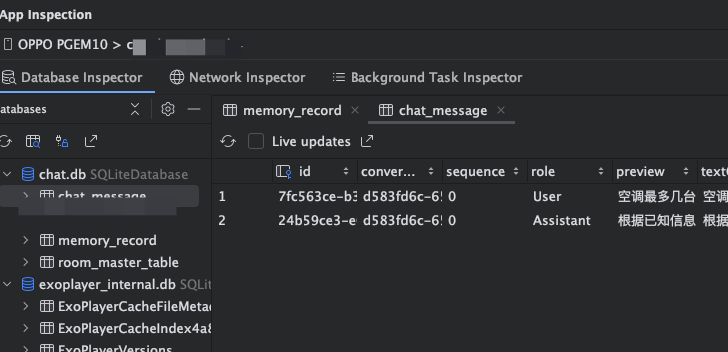
3.2 可视化数据库数据
Android Studio 左侧边栏找 App Inspection,没有就找三个点隐藏在里面。
只要测试应用打开就可以同步视图,数据不是实时更新,需要手动点击刷新。
总结:整体使用跟早期room数据库无太大差别,这版是在原生Android使用的,后续放在kotlin multiplatform上就简单了,这里完成依赖引入、开发设计、调试排查全流程,希望对大家有用!
手机煲饭 2026.8.6