文章目录
多路径访问
服务端准备
节点规划
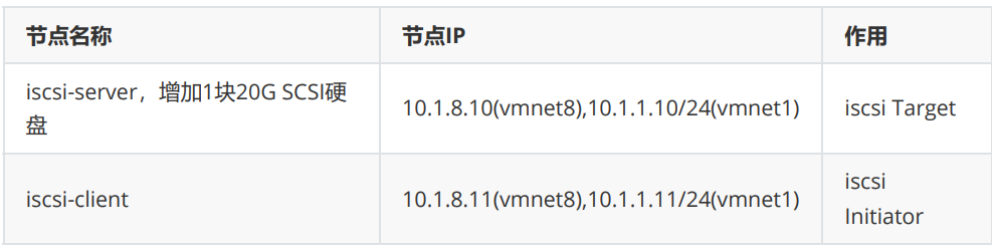
使用centos7模板 克隆2台,iscsi-server,iscsi-client按规划修改主机名 IP
iscsi-server增加硬盘
开机后,给iscsi-server,iscsi-client各自添加一块网卡
bash
#iscsi-server:
[root@localhost ~]# hostnamectl set-hostname iscsi-server
[root@localhost ~]# nmcli connection modify ens33 ipv4.method manual
ipv4.addresses 10.1.8.10/24 ipv4.gateway 10.1.8.2 ipv4.dns 10.1.8.2 autoconnect
yes
[root@localhost ~]# nmcli connection up ens33
[root@localhost ~]# nmcli connection add type ethernet con-name ens36 ifname
ens36 ipv4.method manual ipv4.addresses 10.1.1.10/24 autoconnect yes
[root@localhost ~]# nmcli connection up ens36

#iscsi-client:
[root@localhost ~]# hostnamectl set-hostname iscsi-client
[root@localhost ~]# nmcli connection modify ens33 ipv4.method manual
ipv4.addresses 10.1.8.11/24 ipv4.gateway 10.1.8.2 ipv4.dns 10.1.8.2 autoconnect
yes
[root@localhost ~]# nmcli connection up ens33
[root@localhost ~]# nmcli connection add type ethernet con-name ens36 ifname
ens36 ipv4.method manual ipv4.addresses 10.1.1.11/24 autoconnect yes
[root@localhost ~]# nmcli connection up ens36

# 验证连通性
[root@iscsi-client ~]# ping -c2 10.1.1.10
PING 10.1.1.10 (10.1.1.10) 56(84) bytes of data.
64 bytes from 10.1.1.10: icmp_seq=1 ttl=64 time=0.435 ms
64 bytes from 10.1.1.10: icmp_seq=2 ttl=64 time=0.319 ms
--- 10.1.1.10 ping statistics ---
2 packets transmitted, 2 received, 0% packet loss, time 1000ms
rtt min/avg/max/mdev = 0.319/0.377/0.435/0.058 ms
[root@iscsi-client ~]# ping -c2 10.1.8.10
PING 10.1.8.10 (10.1.8.10) 56(84) bytes of data.
64 bytes from 10.1.8.10: icmp_seq=1 ttl=64 time=0.502 ms
64 bytes from 10.1.8.10: icmp_seq=2 ttl=64 time=0.258 ms
--- 10.1.8.10 ping statistics ---
2 packets transmitted, 2 received, 0% packet loss, time 1000ms
rtt min/avg/max/mdev = 0.258/0.380/0.502/0.122 ms
iscsi环境准备:
bash
#iscsi-server:
[root@iscsi-server ~]# yum install -y targetd targetcli
[root@iscsi-server ~]# systemctl enable target --now
[root@iscsi-server ~]# firewall-cmd --add-service=iscsi-target
[root@iscsi-server ~]# firewall-cmd --add-service=iscsi-target --permanent
[root@iscsi-server ~]# setenforce 0
[root@iscsi-server ~]# targetcli /backstores/block create myblock1 /dev/sdb
[root@iscsi-server ~]# targetcli /iscsi create iqn.2026-04.cloud.laogao.iscsiserver:disk1
[root@iscsi-server ~]# targetcli /iscsi/iqn.2026-04.cloud.laogao.iscsiserver:disk1/tpg1/luns create /backstores/block/myblock1
[root@iscsi-server ~]# targetcli /iscsi/iqn.2026-04.cloud.laogao.iscsiserver:disk1/tpg1/acls create iqn.2026-04.cloud.laogao.iscsi-client
[root@iscsi-server ~]# targetcli /iscsi/iqn.2026-04.cloud.laogao.iscsiserver:disk1/tpg1/portals delete 0.0.0.0 3260
[root@iscsi-server ~]# targetcli /iscsi/iqn.2026-04.cloud.laogao.iscsiserver:disk1/tpg1/portals create 10.1.8.10 3260
[root@iscsi-server ~]# targetcli /iscsi/iqn.2026-04.cloud.laogao.iscsiserver:disk1/tpg1/portals create 10.1.1.10 3260
[root@iscsi-server ~]# targetcli saveconfig

# 验证
[root@iscsi-server ~]# targetcli
targetcli shell version 2.1.53
Copyright 2011-2013 by Datera, Inc and others.
For help on commands, type 'help'.

/> ls
o- / ........................................................... [...]
o- backstores ................................................ [...]
| o- block .................................... [Storage Objects: 1]
| | o- myblock1 .......... [/dev/sdb (20.0GiB) write-thru activated]
| | o- alua ..................................... [ALUA Groups: 1]
| | o- default_tg_pt_gp ......... [ALUA state: Active/optimized]
| o- fileio ................................... [Storage Objects: 0]
| o- pscsi .................................... [Storage Objects: 0]
| o- ramdisk .................................. [Storage Objects: 0]
o- iscsi .............................................. [Targets: 1]
| o- iqn.2026-04.cloud.laogao.iscsi-server:disk1 ......... [TPGs: 1]
| o- tpg1 ................................. [no-gen-acls, no-auth]
| o- acls ............................................ [ACLs: 1]
| | o- iqn.2026-04.cloud.laogao.iscsi-client .. [Mapped LUNs: 1]
| | o- mapped_lun0 ................ [lun0 block/myblock1 (rw)]
| o- luns ............................................ [LUNs: 1]
| | o- lun0 ..... [block/myblock1 (/dev/sdb) (default_tg_pt_gp)]
| o- portals ...................................... [Portals: 2]
| o- 10.1.1.10:3260 ..................................... [OK]
| o- 10.1.8.10:3260 ..................................... [OK]
o- loopback ........................................... [Targets: 0]
/>
什么是多路径
多路径是指服务器和存储阵列存在多个物理连接方式使用虚拟设备,这种方式可以提供更加弹性的存储 连接(一个路径down掉不会影响连接性),也可以聚合存储带宽提供性能。
多路径由dm-multipath子系统提供,使用内核device mapper系统获得虚拟设备,有multipathd进程和 multipath命令行工具管理。
重要:多路径提供存储访问路径down情况的保护。如果存储本身不可用,访问访问存储也会不可用。
配置多路径
安装软件包
bash
[root@iscsi-client ~]# yum install -y device-mapper-multipath启用多路径
创建配置文件 /etc/multipath.conf 最简单的方法是使用mpathconf工具:
bash
[root@iscsi-client ~]# mpathconf --enable
#启动
[root@iscsi-client ~]# systemctl enable multipathd --now
发现设备
bash
[root@iscsi-client ~]# vim /etc/iscsi/initiatorname.iscsi
InitiatorName=iqn.2026-08.cloud.myz.iscsi-client

[root@iscsi-client ~]# iscsiadm -m discovery -t st -p 10.1.8.10
10.1.8.10:3260,1 iqn.2026-08.cloud.myz.iscsi-server:disk1
10.1.1.10:3260,1 iqn.2026-08.cloud.myz.iscsi-server:disk1

[root@iscsi-client ~]# iscsiadm -m node -L all
Logging in to [iface: default, target: iqn.2026-08.cloud.myz.iscsiserver:disk1, portal: 10.1.8.10,3260] (multiple)
Logging in to [iface: default, target: iqn.2026-08.cloud.myz.iscsiserver:disk1, portal: 10.1.1.10,3260] (multiple)
Login to [iface: default, target: iqn.2026-08.cloud.myz.iscsi-server:disk1,
portal: 10.1.8.10,3260] successful.
Login to [iface: default, target: iqn.2026-08.cloud.myz.iscsi-server:disk1,
portal: 10.1.1.10,3260] successful.

[root@iscsi-client ~]# lsblk
NAME MAJ:MIN RM SIZE RO TYPE MOUNTPOINT
sda 8:0 0 200G 0 disk
├─sda1 8:1 0 1G 0 part /boot
└─sda2 8:2 0 199G 0 part
├─centos-root 253:0 0 50G 0 lvm /
├─centos-swap 253:1 0 7.9G 0 lvm [SWAP]
└─centos-home 253:2 0 141.1G 0 lvm /home
sdb 8:16 0 20G 0 disk
└─mpatha 253:3 0 20G 0 mpath
sdc 8:32 0 20G 0 disk
└─mpatha 253:3 0 20G 0 mpath
确定设备是同一设备
WWN(World Wide Name),全球唯一名称,是由 IEEE 标准化的全球唯一标识符,用于标识存储设 备(如硬盘、RAID 阵列、光纤交换机等),每个设备具有全球唯一名称。
WWN 是判断多路径设备是否指向同一存储设备的 核心依据:所有属于同一多路径设备的物理路径(如 sdb 、 sdc ),其对应的存储设备 WWN 必然相同。
scsi_id 命令
bash
[root@iscsi-client ~]# /usr/lib/udev/scsi_id -g -u /dev/sdb
360014052fc732600aa0433fae1758a1a
[root@iscsi-client ~]# /usr/lib/udev/scsi_id -g -u /dev/sdc
360014052fc732600aa0433fae1758a1a
udevadm 命令
bash
[root@iscsi-client ~]# udevadm info --query=property --name=/dev/sdb | grep
ID_WWN_W
ID_WWN_WITH_EXTENSION=0x60014052fc732600aa0433fae1758a1a
[root@iscsi-client ~]# udevadm info --query=property --name=/dev/sdc | grep
ID_WWN_W
ID_WWN_WITH_EXTENSION=0x60014052fc732600aa0433fae1758a1a
通过 UUID 或其他标识符辅助判断
bash
[root@iscsi-client ~]# blkid /dev/sdb
[root@iscsi-client ~]# blkid /dev/sdc
监控多路径
multipath命令也可用于多路径状态监控。
- -l 选项,磁盘缓存文件(bindings),不扫描硬件,执行速度快;信息可能滞后、过时。
- -ll 选项,实时扫描所有 scsi 设备、重新计算路径优先级,排错、日常检查链路推荐使用!
bash
[root@iscsi-client ~]# multipath -ll
mpatha (360014052fc732600aa0433fae1758a1a) dm-3 LIO-ORG ,myblock1
size=20G features='0' hwhandler='0' wp=rw
|-+- policy='service-time 0' prio=1 status=active #status=active->当前活动路径,主路径
| `- 3:0:0:0 sdb 8:16 active ready running` #sdb是主路径(当前I/O走这条)
`-+- policy='service-time 0' prio=1 status=enabled` #status=enabled->备用可用路径,从路径
`- 4:0:0:0 sdc 8:32 active ready running` #sdc是备路径(冗余备用)
默认策略 service-time 0 ,属于:主备模式(Active-Passive)
- 同一时间只走一条主路径
- 主路径断了,自动切到sdc
- 平时sdc闲着,不跑流量
使用设备
多路径设备名称为 /dev/mapper/mpatha,识别到设备后就可以正常使用。
示例:划分分区,格式化,挂载。
bash
[root@iscsi-client ~]# parted /dev/mapper/mpatha mklabel gpt
[root@iscsi-client ~]# parted /dev/mapper/mpatha unit MiB mkpart webapp 1 10241
Warning: The resulting partition is not properly aligned for best performance.
Ignore/Cancel? Ignore
[root@iscsi-client ~]# mkdir /mpatha1
[root@iscsi-client ~]# mkfs.xfs /dev/mapper/mpatha1
[root@iscsi-client ~]# mount /dev/mapper/mpatha1 /mpatha1
[root@iscsi-client ~]# df -h /mpatha1/
Filesystem Size Used Avail Use% Mounted on
/dev/mapper/mpatha1 10G 33M 10G 1% /mpatha1

#持久化挂载
[root@iscsi-client ~]# vim /etc/fstab
# 最后增加一条
/dev/mapper/mpatha1 /mpatha1 xfs _netdev 0 0
[root@iscsi-client ~]# umount /mpatha1
[root@iscsi-client ~]# mount -a
[root@iscsi-client ~]# df -h /mpatha1/
Filesystem Size Used Avail Use% Mounted on
/dev/mapper/mpatha1 10G 33M 10G 1% /mpatha1
高可用性测试
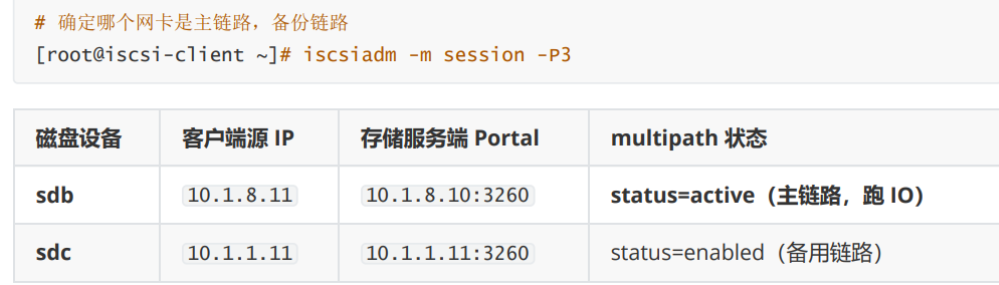
测试1:断开iscsi-server端第二块网卡(备份路径)
bash
[root@iscsi-server ~]# nmcli device disconnect ens35

[root@iscsi-client ~]# multipath -ll
mpatha (360014052fc732600aa0433fae1758a1a) dm-3 LIO-ORG ,myblock1
size=20G features='0' hwhandler='0' wp=rw
|-+- policy='service-time 0' prio=1 status=active
| `- 3:0:0:0 sdb 8:16 active ready running
`-+- policy='service-time 0' prio=0 status=enabled
`- 4:0:0:0 sdc 8:32 failed faulty running` #failed faulty = 多路径检测发现这条链路异常,已经标记为故障路径,不再下发 IO现在业务只跑 sdb 这条链路,冗余丢失!
测试2:恢复iscsi-server端第二块网卡,sdc再次成为备份路径
bash
# 检测故障原因
[root@iscsi-client ~]# nc -zv 10.1.8.10 3260
Ncat: Version 7.50 ( https://nmap.org/ncat )
Ncat: Connected to 10.1.8.10:3260.
Ncat: 0 bytes sent, 0 bytes received in 0.01 seconds.
[root@iscsi-client ~]# nc -zv 10.1.1.10 3260 #发现备用路径网络不通
Ncat: Version 7.50 ( https://nmap.org/ncat )
Ncat: No route to host

# 恢复路径
[root@iscsi-server ~]# nmcli device connect ens36

# 再次查看
[root@iscsi-client ~]# multipath -ll
mpatha (360014052fc732600aa0433fae1758a1a) dm-3 LIO-ORG ,myblock1
size=20G features='0' hwhandler='0' wp=rw
|-+- policy='service-time 0' prio=1 status=active
| `- 3:0:0:0 sdb 8:16 active ready running
`-+- policy='service-time 0' prio=1 status=enabled
`- 4:0:0:0 sdc 8:32 active ready running
测试3:断开iscsi-server端第一块网卡(主路径)
bash
[root@iscsi-server ~]# nmcli device disconnect ens33
#以下显示了active状态的path group发生了故障。active状态的path group变更为failed faultyrunning,同时状态由active变更为enabled。passive状态的path group变更为active ready running,同时状态由enabled变更为active。

[root@iscsi-client ~]# multipath -ll
mpatha (360014052fc732600aa0433fae1758a1a) dm-3 LIO-ORG ,myblock1
size=20G features='0' hwhandler='0' wp=rw
|-+- policy='service-time 0' prio=0 status=enabled
| `- 3:0:0:0 sdb 8:16 failed faulty running
`-+- policy='service-time 0' prio=1 status=active` #主链路故障,备链路切换为主链路
`- 4:0:0:0 sdc 8:32 active ready running
测试4:恢复iscsi-server端第一块网卡
bash
[root@iscsi-server ~]# nmcli device connect ens33
#重要:故障路径恢复后,当前的active path保持不变,即使恢复的路径之前是active path,可以通过手动切换回来。

[root@iscsi-client ~]# multipath -ll
mpatha (360014052fc732600aa0433fae1758a1a) dm-3 LIO-ORG ,myblock1
size=20G features='0' hwhandler='0' wp=rw
|-+- policy='service-time 0' prio=1 status=enabled
| `- 3:0:0:0 sdb 8:16 active ready running
`-+- policy='service-time 0' prio=1 status=active
`- 4:0:0:0 sdc 8:32 active ready running
配置文件
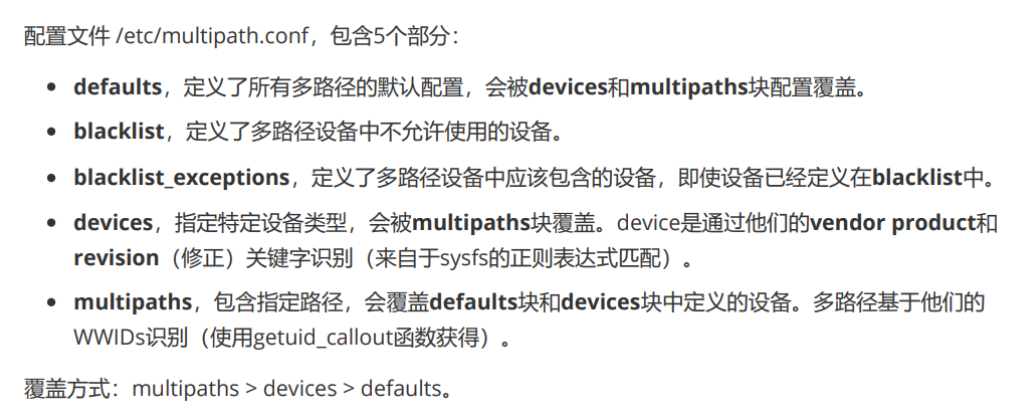
Defaults
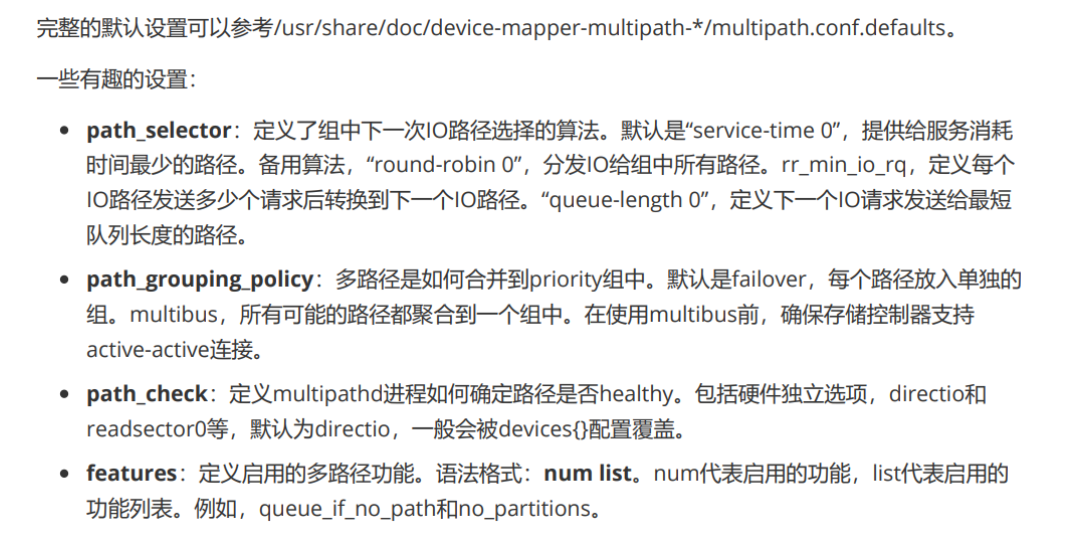
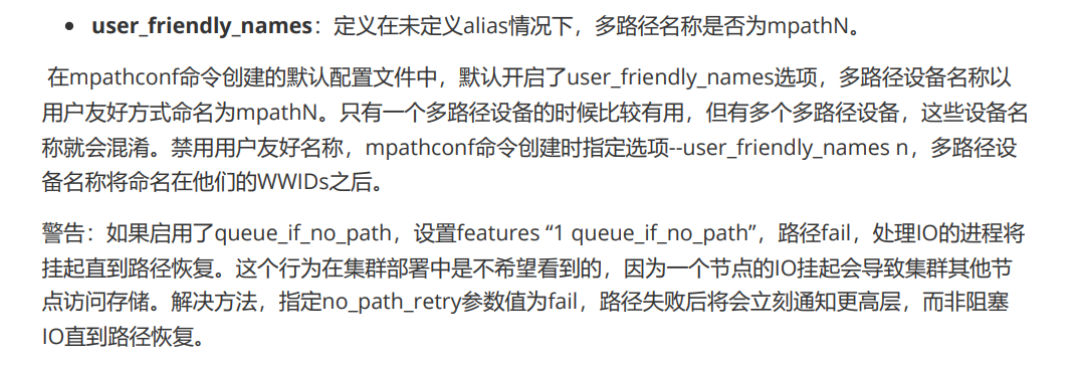
multipaths
用于为特定多路径设定不同的path_grouping策略,设定多路径alias。
bash
[root@iscsi-client ~]# vim /etc/multipath.conf
# 最下面加或者改都可以
multipaths {
multipath {
wwid 360014052fc732600aa0433fae1758a1a #写自己的wwid
alias ClusterStorage
path_grouping_policy failover
     }
}
[root@iscsi-client ~]# systemctl reload multipathd.service
[root@iscsi-client ~]# multipath -ll
ClusterStorage (360014052fc732600aa0433fae1758a1a) dm-3 LIO-ORG ,myblock1
size=20G features='0' hwhandler='0' wp=rw
|-+- policy='service-time 0' prio=1 status=active
| `- 3:0:0:0 sdb 8:16 active ready running
`-+- policy='service-time 0' prio=1 status=enabled
`- 4:0:0:0 sdc 8:32 active ready running
当path group配置了multibus策略时,多路径设备将所有路径组合到一个 group 中。
bash
[root@iscsi-client ~]# vim /etc/multipath.conf
# 最下面加或者改都可以
multipaths {
multipath {
wwid 360014052fc732600aa0433fae1758a1a
alias xiyangyang
path_grouping_policy multibus #模式:多条路径同时可用、负载分发
}
}
[root@iscsi-client ~]# systemctl reload multipathd.service
[root@iscsi-client ~]# multipath -ll
xiyangyang (360014052fc732600aa0433fae1758a1a) dm-3 LIO-ORG ,myblock1
size=20G features='0' hwhandler='0' wp=rw
`-+- policy='service-time 0' prio=1 status=active
|- 3:0:0:0 sdb 8:16 active ready running
`- 4:0:0:0 sdc 8:32 active ready running
devices
devices 块定义了每个独立的设备。
作用:根据 厂商 (vendor)+ 型号 (product) 匹配一类存储设备,批量统一配置多路径参数
Blacklist
Blacklist 提供设备黑名单,通过WWID和device node指定设备,支持使用通配符。
作用:告诉 multipath:忽略某些磁盘,不要做多路径聚合!避免本地硬盘、光驱、U 盘被 multipath 错误识别。
blacklist_exceptions
blacklist_exceptions 提供设备黑名单。
作用:黑名单全局生效的前提下,单独放行某一类存储设备,比如大部分磁盘我不要做多路径,唯独 IBM S/390 系列存储,允许启用 multipath