和 don't worry 相比:
-
Don't worry.= 別擔心。 -
Rest assured.= 可以放心/可以確定。 -
You can be sure that...= 可以確定...... -
Rest easy.= 放寬心,偏情緒上的安心。
貼花 Pass 在重新寫/混合「原本那套 GBuffer attachments」中的若干張,所以作者把同一組結果又截了一遍。
所以圖上才會出現:
overflow-visible!
繪製不透明物體 GBuffer
[圖1][圖2][圖3][圖4][圖5][圖6]

        ↓ decal

繪製延遲貼花
[圖1][圖2][圖3][圖4][圖5][圖6]
例如牆上打一個泥漬 decal,它可能只改這個螢幕區域:
overflow-visible!
BaseColor   old → blend decal color
Normal      old → blend decal normal
Roughness   old → blend decal roughness
Metallic    old → 不改
Velocity    old → 不改
Depth       old → 通常不改
DBuffer Decal。
傳統 Deferred GBuffer Decal Base Pass ↓ GBuffer ↓ Decal └─ 直接修改 GBuffer ↓ Lighting
而 UE5 預設更常見的是:
overflow-visible!
DBuffer Decal

Depth PrePass
↓
Decal Pass
↓
DBuffer
├─ BaseColor decal data
├─ Normal decal data
└─ Roughness decal data
↓
Base Pass
├─ 讀 DBuffer
└─ 生成最終 GBuffer
↓
Lighting
先把 decal 的 Base Color、Normal、Roughness 累積到 DBuffer,再由 Base Pass 使用。另一種路徑才是 Base Pass 後直接寫 GBuffer。
目前 UE5 預設啟用的是 DBuffer decals;
上下兩排 GBuffer 結構完全一致,我會先把它理解成:
overflow-visible!
不是:
GBuffer × 6
+
Decal Buffer × 6

而是:
同一套 GBuffer × 6
       ↑
Decal Pass 修改其中內容
這也回答了一個更底層的問題:
一個 Pass 顯示「六張圖」,不代表它創建了六張新 Texture。
硬體實際執行是高度 pipeline / parallel 的,不是嚴格「Triangle 0 完全做完再 Triangle 1」。
但如果你在 UE 5.8 的 Desktop Deferred Renderer,這不是 UE 通常使用的抗鋸齒路徑。Epic 現在官方表格裡:
overflow-visible!
Deferred Desktop
├─ TSR       ✓
├─ TAAU      ✓
├─ FXAA      ✓
└─ MSAA      ✗

Forward Desktop
└─ MSAA      ✓
所以 UE Deferred 裡更典型的是:
overflow-visible!
Geometry / Base Pass
↓
GBuffer
↓
Lighting
↓
SceneColor
↓
Post Processing
↓
TSR / TAA / FXAA 類抗鋸齒
其中 TSR/TAA 雖然最後在後處理階段工作,但它們會使用前面產生的 Depth、Velocity,而且相機 projection 本身每幀還會 jitter。TSR 在 UE 5.8 是 temporal post-process/upscaler,Epic 明確說它使用 current/previous frames,而且 Depth、Velocity 是重要輸入。
要問是哪種 AA:
overflow-visible!
MSAA
└─ 非常接近 Rasterization / coverage

FXAA
└─ 已經有 SceneColor 後再找邊

TAA / TSR
├─ Geometry 階段就受到 jitter 影響
├─ 使用 Depth / Velocity
└─ 真正 reconstruction 在後面的 temporal pass
targets 尺寸/sample count 相同,但 format 可以不同。
Lighting Shader「讀取同一 pixel 的所有 GBuffer 欄位」:
overflow-visible!
x,y
│
├─ GBufferA[x,y] → BaseColor
├─ GBufferB[x,y] → Normal
├─ GBufferC[x,y] → Roughness / Metallic
├─ Depth[x,y]
└─ Light data

        ↓

BRDF / BSDF calculation

        ↓

SceneColor[x,y]
是:
overflow-visible!
某個 Mesh 的 BasePass Draw
└─ 一個 BasePass Pixel Shader
   ├─ 算 BaseColor
   ├─ 算 Normal
   ├─ 算 Roughness
   ├─ 算 Metallic
   └─ 一次輸出
      ├─ SV_Target0 → GBufferA
      ├─ SV_Target1 → GBufferB
└─ SV_Target2 → GBufferC真正的協同性在於:所有參與 deferred Base Pass 的材質 shader,都遵守同一套 GBuffer encoding/layout contract。
Emissive 本來就不必等 Deferred Lighting Pass 算。
概念上是:
overflow-visible!
Base Pass

Default Lit pixel
├─ GBuffer ← surface properties
└─ SceneColor ← emissive / 某些已知項
2025 年 Epic Developer Community 上正好有人改 UE GBuffer 時撞到了你現在問的同一件事:他想強迫 Unlit 寫自定義 GBuffer data,結果失敗。Epic 支援人員指出,stock UE 的 BasePassPixelShader.usf 對 legacy Unlit 有顯式特殊路徑:EncodeGBufferToMRT 之後會把大部分 MRT 輸出清零,只保留 Unlit 所需的特殊 encoding,目的之一就是讓 shader compiler 把不必要的 GBuffer 工作優化掉。编辑Epic Developer Community Forums
也就是類似:
overflow-visible!
Default Lit:

MRT0 → SceneColor / Emissive...
MRT1 → Normal...
MRT2 → Roughness / ShadingModel...
MRT3 → BaseColor...
MRT4 → CustomData...
...


Unlit:

MRT0 → Emissive
MRT1 → 0
MRT2 → minimal Unlit marker / encoding
MRT3 → 0
MRT4 → 0
...
具體 MRT index 會隨 GBuffer configuration、Velocity、Substrate 等變化,所以不要死記 MRT2 這種編號;真正重要的是:
Unlit 仍然參與 Base Pass,但編譯器和 GBuffer encoder 知道它不需要完整的 lit payload。
UE 官方對 mobile deferred 的描述也明確指出:即使主 renderer 是 deferred,translucency passes 仍採用 forward shading。
這些都只是 shader 當前正在算的值。Epic 5.8 的官方 shader 文檔也明確描述了這個過程:Material Shader 先建立 FMaterialPixelParameters,再通過 CalcMaterialParameters 和 GetMaterial...() 之類的函數取得 Material Inputs,之後 pass shader 才決定如何使用、輸出它們。编辑Epic Games Developers
真正跑在 GPU 上的 shader source 是:
overflow-visible!
CharacterDot.usfEpic 5.8 官方也是這樣定義:Unreal 的 shader source 放在 .usf,而 C++ 類只是讓 Unreal 能夠「認識、編譯、綁定、調度」這個 shader。IMPLEMENT_SHADER_TYPE / IMPLEMENT_GLOBAL_SHADER 會把 C++ 類對應到某個 .usf、entry point 和 shader stage。编辑Epic Games Developers
SHADER_PARAMETER_RDG_TEXTURE_UAV(RWTexture2D<float>, OutTexture)
只是先聲明:
「以後
OutTexture這個參數必須是一個 RDG 能追蹤的 Texture UAV,而且這個 shader 會對它進行寫入。」
Epic 官方對這個宏的描述就是:
declares write access to an
FRDGTextureUAV*
並映射到 HLSL 的 UAV。编辑Epic Games Developers
所以人話版應該改成:
overflow-visible!
這個 Shader 有一個叫 OutTexture 的輸出入口

    Shader 會往裡面寫

    這個入口要求收到的東西
    必須是一個已經登記在 RDG 裡的 Texture UAV

// SHADER_PARAMETER_RDG_TEXTURE_UAV(RWTexture2D<float>, OutTexture)
注意:
這裡只是定義接口。
真正的流程一般後面才是:
overflow-visible!
先有一張 Texture
↓
讓 GraphBuilder 認識它
↓
給這張 Texture 建一個 UAV view
↓
把這個 UAV 填進 OutTexture
↓
把整個 Parameters 交給 AddPass
↓
RDG 才知道:
「這個 Pass 要寫這張 Texture」
CreateTexture() 官方定義就是「create graph tracked texture」,而 CreateUAV() 則是建立一個 graph-tracked UAV。编辑Epic Games Developers+1
FSD 是 Full Self-Driving 的縮寫,指的是特斯拉(Tesla)研發的全自動輔助駕駛(受駕駛監督) 系統。它利用車上的鏡頭和人工智慧,幫駕駛看路、轉彎、變換車道和停車。
Epic 5.8 官方甚至特別說,pass parameters 和 shader parameters 被耦合在同一套 struct 裡是故意的 ,因為大部分 pass parameters 本來也同時是 shader parameters,可以減少重複描述。编辑Epic Games Developers+1
PassParameters 這個詞比單純叫 ShaderParameters 多強調了一層:
overflow-visible!
ShaderParameters
└ GPU 程式需要什麼資料?

PassParameters
└ 這一次 RDG Pass 使用什麼資料和資源?
   └ 其中大部分同時又會成為 ShaderParameters
RDG 看它:
一個 float,我不需要管。
Shader 看它:
我要用這個數。
但:
overflow-visible!
C++
SHADER_PARAMETER_RDG_TEXTURE_UAV(RWTexture2D<float>, OutTexture)就同時對兩邊有意義:
overflow-visible!
Shader 看:
└ 我得到一張可以寫的 Texture

RDG 看:
└ 這個 Pass WRITE 這張 Texture
   └ 我要管理 dependency
   └ 我要管理 lifetime
   └ 我要安排 barrier
Epic 官方例子直接註明:普通 float 會被 FRDGBuilder::AddPass 忽略,而 RDG texture / SRV / UAV 會被 AddPass 消費;真正執行 shader 時,SetShaderParameters 又會使用這整包參數。编辑Epic Games Developers
UAV = Unordered Access View
在這裡最重要的特徵:
Shader 可以寫。
overflow-visible!
SHADER_PARAMETER_RDG_TEXTURE_SRV(
    Texture2D<float>,
    OutTexture
)
人話:
overflow-visible!
這一次 Pass 只需要讀這張 Texture

不要給 Shader 寫入權限

RDG:
把它記作 READ
// SHADER_PARAMETER_RDG_TEXTURE_SRV(...)
SRV = Shader Resource View
在這裡最重要的特徵:
Shader 用它來讀資源。
Epic 5.8 官方就是這樣描述:
overflow-visible!
SHADER_PARAMETER_RDG_TEXTURE_SRV
└ declares read access
   └ FRDGTextureSRV*

SHADER_PARAMETER_RDG_TEXTURE_UAV
└ declares write access
└ FRDGTextureUAV*所以不只是「語法上 UAV 換成 SRV」。
它其實是在向 RDG 改口:
overflow-visible!
原來:

Pass A
└ 我要 WRITE Texture X
   // UAV


現在:

Pass A
└ 我要 READ Texture X
   // SRV
然後 RDG 得到的信息會直接不同。
Epic 官方對 FRDGBuilder 的描述也正是:resource barriers 和 lifetimes 是從傳給每個 AddPass 的 RDG pass parameters 推導出來的。 编辑Epic Games Developers
還有一個細節:只讀不一定非得顯式建 SRV。
UE 還有:
overflow-visible!
C++
SHADER_PARAMETER_RDG_TEXTURE(Texture2D, MyTexture)它同樣表示對 FRDGTexture* 的 read access。
區別可以先壓成:
overflow-visible!
RDG_TEXTURE
└ 我要讀「這張 Texture」

RDG_TEXTURE_SRV
└ 我要讀「這張 Texture 的某個 Shader Resource View」
   └ 可以明確描述 view / mip / subresource 等
Microsoft 對 UAV 的描述就是 "temporally unordered read/write access from multiple threads" 。重點是 temporally unordered------時間先後沒有被隱式規定。编辑Microsoft Learn+1
先給結論:
overflow-visible!
Base Pass
不是:讀 GBuffer → 算材質

而是:算材質 → 寫 GBuffer
Lighting Pass 才是:
overflow-visible!
讀 GBuffer → 算光populate 的核心不是抽象的「生成」,而是:
把原本空著/缺少成員的某個容器、區域、集合,填上它應有的東西。
它直接來自拉丁語 populus 「people / 人民」,早期意思就是「讓一個地方有人居住、使其有人口」。英語大約 16--17 世紀開始這樣使用。编辑Etymology Online+1
所以語義擴展非常直:
overflow-visible!
populate a country
= 往一個國家裡「放入居民」
= 使這個國家有人居住

↓ 把 people 抽象成 members / items

populate a list
= 往 list 裡填入項目

populate a database
= 往 database 裡填入資料

populate a menu
= 把 menu 的選項建立/填進去

populate a scene
= 往場景裡放入 actors / objects
Merriam-Webster 現代定義裡仍保留這個結構:occupy / inhabit,以及「provide with inhabitants / members」。也就是技術語義並不是突然發明的,而是把「居民」泛化成了「集合成員」。编辑merriam-webster.com
最值得保留的不是「populate = 填充」這個中文翻譯,而是:
population → 一群存在於某個範圍內的成員
populate → 讓這群成員出現在那個範圍裡。
| Option | Description |
|---|---|
| Viewport ID | Displays the ID of which viewport the Pixel Inspector is drawing from. |
| Coordinate | Displays the X/Y coordinates from the current inspection (can be manually set). |
| Context Colors | Displays the Context Colors associated with the current inspection. |
| Final Color | Final RGBA 8bits Color after tone mapping (default value is black). |
| Scene Color | The RGB Scene Color applied from the current inspection. |
| Pre-Exposure | Defines the upper bounds for the brightness range of the generated histogram. It remaps the range of SceneColor around camera exposure, limiting the render target required to support HDR lighting values. You must enable the Project Setting Apply Pre-Exposure before writing to the scene color under Rendering for this value to become available. |
| Luminance | HDR Luminance value for current inspection. |
| HDR Color | The HDR RGB Color value being applied. |
| Normal | The Normal applied from the GBufferA channel. |
| Per Object GBuffer Data | The amount of per object data from the GBufferA Channel. |
| Metallic | The Metallic value applied from the GBufferB R Channel. |
| Specular | The Specular value applied from the GBufferB G Channel. |
| Roughness | The amount of Roughness applied from the GBufferB B Channel. |
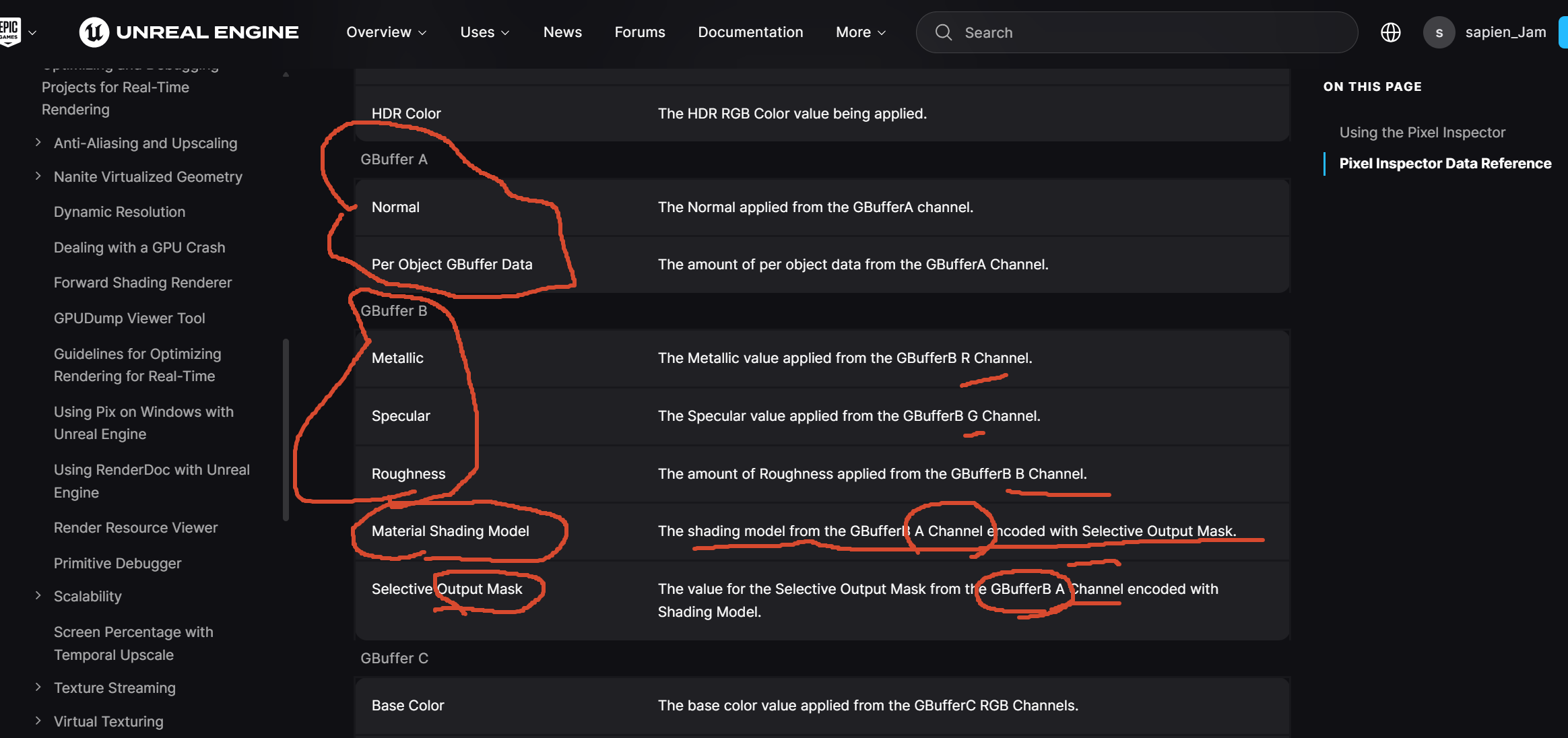
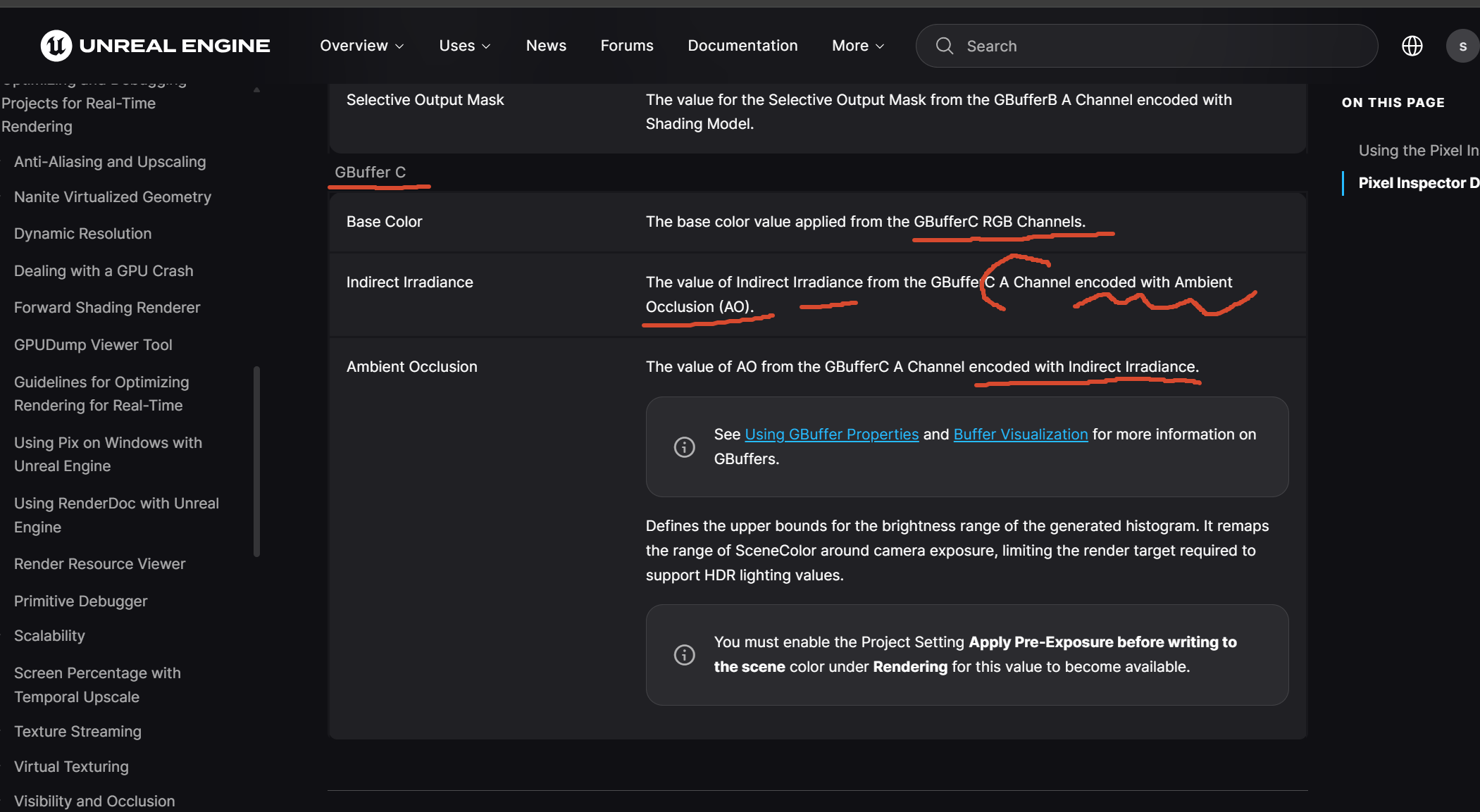
這兩句確實寫得很差,而且 UE 5.8 官方文件仍然沿用了這種會讓人誤解的表述。官方現在就是:
Indirect Irradiance ... encoded with Ambient Occlusion
Ambient Occlusion ... encoded with Indirect Irradiance
這裡的 with 想表達的是:
和另一份資訊一起佔用/組合進同一個儲存表示。
也就是:
overflow-visible!
encode X with Y

不是:
X ──encode──> Y

而是:
X ─┐
   ├── 某種組合/壓縮表示 ──> storage
Y ─┘
最容易看懂的是它上面的 GBufferB.A。
官方也寫:
overflow-visible!
Shading Model
└ encoded with Selective Output Mask

Selective Output Mask
└ encoded with Shading Model
這不是兩者互相編碼。
實際思路是:
overflow-visible!
GBufferB.A   一個 8-bit channel
│
├─ 低 4 bit:ShadingModelID
└─ 高 4 bit:SelectiveOutputMask
相關 GBuffer 生成程式碼可以直接看到兩份資料被塞到同一個 byte 的不同 bit:
overflow-visible!
C++
ShadingModelID       → bits 0..3
SelectiveOutputMask  → bits 4..7
也就是:
overflow-visible!
[ SelectiveMask ][ ShadingModel ]
      4 bit             4 bit
              ↓
         GBufferB.A
Shading Model and Selective Output Mask are encoded together in GBufferB.A.
而不是現在這種兩行互相 encoded with。可檢索到的 GBuffer 生成程式碼也能看到這個 bit packing。UnrealEngineのGBuffer構造を変更してみる。またはPBRパラメーターにそんな精度いらないんじゃ疑惑 #Rendering - Qiita
也就是:
lockstep保證「大家一起執行這條 store 指令」。
不保證:
「這 32 個 store 如果撞到同一地址,按照某個 lane 順序完成。」
這才是 unordered 的一部分含義。
UAV barrier 的作用就是要求「之前的 UAV accesses 全部完成,之後的 UAV accesses 才能開始」。如果本來天然有這個順序,就根本不需要 UAV barrier。编辑Microsoft Learn+1
甚至 Microsoft 明確說,如果兩次 dispatch 都寫同一 UAV,但演算法允許它們「以任意順序執行」,就不需要 UAV barrier。编辑Microsoft Learn
第二個更大的範圍問題:
overflow-visible!
Wave A
└ 32 lanes lockstep

Wave B
└ 32 lanes lockstep
並沒有:
overflow-visible!
Wave A 和 Wave B 也 lockstep不同 waves 可以完全獨立被 scheduler 安排。
真正的寫入端在 BasePassPixelShader.usf。UE 5.8 現在是:
overflow-visible!
C++
#if GBUFFER_HAS_DIFFUSE_SAMPLE_OCCLUSION
    GBuffer.GenericAO =
        float(GBuffer.DiffuseIndirectSampleOcclusion) * (1.0f / 255.0f);

#elif ALLOW_STATIC_LIGHTING
    // No space for AO. Multiply IndirectIrradiance by AO instead of storing.
    GBuffer.GenericAO =
        EncodeIndirectIrradiance(
            GBuffer.IndirectIrradiance * GBuffer.GBufferAO
        )
        + QuantizationBias * (1.0 / 255.0);

#else
    GBuffer.GenericAO = GBuffer.GBufferAO;
#endif
這個註釋已經把答案說死了:
No space for AO. Multiply IndirectIrradiance by AO instead of storing.
也就是靜態光照路徑下:
overflow-visible!
Indirect Irradiance ─┐
                     ×
AO ──────────────────┘
                     │
                     ▼
          IndirectIrradiance × AO
                     │
                     ▼
        EncodeIndirectIrradiance()
                     │
                     ▼
                GenericAO
所以回到截圖裡官方那兩句:
overflow-visible!
Indirect Irradiance
The value ... encoded with Ambient Occlusion.

Ambient Occlusion
The value ... encoded with Indirect Irradiance.
UE 5.8 官方文檔現在確實還是這樣寫。编辑Epic Games Developers
但按源碼來翻,應該改成:
overflow-visible!
GBuffer C
└─ A:一個被復用的 GenericAO channel
   │
   ├─ Static Lighting
   │  └─ 保存 Encode(Indirect Irradiance × AO)
   │
   ├─ No Static Lighting
   │  └─ 保存 AO
   │
   └─ Diffuse Sample Occlusion
      └─ 保存 DiffuseIndirectSampleOcclusion
甚至連我上一條說的「兩份資料一起塞進同一表示」都還不夠精確,因為那容易讓人想到:
overflow-visible!
[ Irradiance bits ][ AO bits ]源碼證明不是這樣。
靜態光照情況是:
overflow-visible!
Irradiance × AO
      ↓
先合成成一個數
      ↓
再做 EncodeIndirectIrradiance
      ↓
塞進 C.A
DirectX 自己後來做的 ROV = Rasterizer Ordered View 幾乎把這個命名意圖暴露得最清楚。ROV 的規格直接說:它是在 UAV 的基礎上額外增加 ordering guarantee,讓 overlapping Pixel Shader invocations 的 access 按 rasterization/geometry submission 順序發生。编辑Microsoft GitHub
所以:
overflow-visible!
UAV
Unordered Access View
└ shader 可以直接產生有副作用的 memory access
  └ 不套用 rasterizer 的固定 output ordering


ROV
Rasterizer Ordered View
└ 也是這類可寫 access
  └ 但額外要求 rasterizer order
SRV → Shader 可以看這個 resource RTV → 把這個 resource 當 graphics pipeline 的 render target UAV → 不走傳統 ordered output 那套限制, shader 可以直接對 resource 做任意位置的有副作用存取
uffer Visualization 說它可以顯示 Roughness、Metallic、BaseColor 等 material inputs;同時 Pixel Inspector 卻明確告訴你這些值實際分佈在 GBufferA/B/C 的不同 channel 中。编辑Epic Games Developers+1
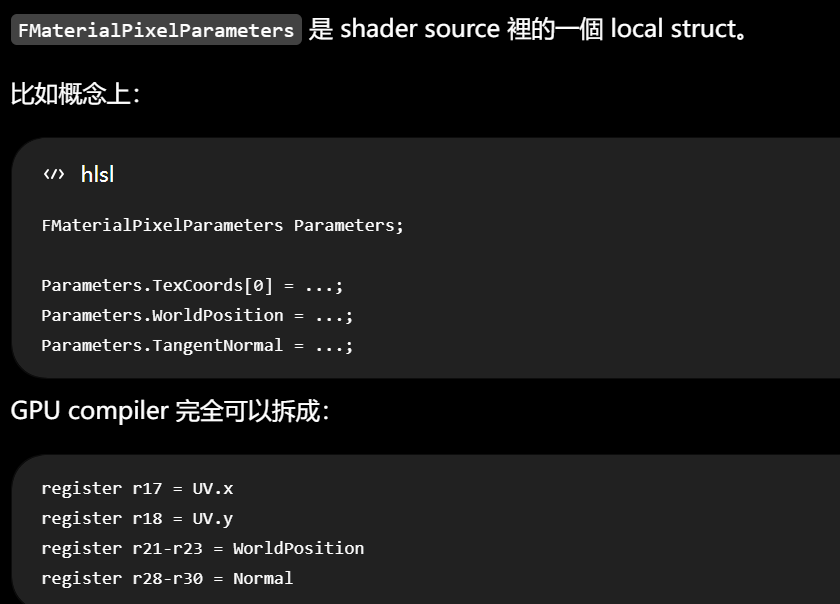
Epic 官方對它的說法也正好支持這個理解:GetMaterialPixelParameters 在 pixel shader 中被調用,把 Vertex Factory 的 interpolants 轉成 FMaterialPixelParameters,之後 CalcMaterialParameters 補完它,然後 pass shader 使用 Material inputs。编辑Epic Games Developers
Microsoft 對 OM 的定義就是:Pixel Shader 產生 pixel data,OM 再結合 render target 既有內容、depth/stencil、blend state,產生最終 pixel。编辑Microsoft Learn
RTV / 傳統 Pixel Shader output 1. 寫哪裡基本由 rasterization 決定 └ 目前正在處理 (x, y, sample) 不能自己說: 「我要去寫 Texture371, 82」 2. 不能像普通 memory 那樣任意 read-modify-write 不能自然地: old = Targetx; Targetx = f(old);
overflow-visible!
RTV
└ 「產生這個 rasterized pixel 的輸出」
   ├ 地址受 rasterization 約束
   ├ 最終處理走 Output Merger
   ├ blending/depth/stencil 有固定 pipeline 語義
   └ 最終 output 有 rasterization ordering guarantees


UAV
└ 「把這個 resource 當 shader-addressable storage」
   ├ shader 自己選地址
   ├ 可以讀
   ├ 可以寫
   ├ 可以 atomic
   └ 不自動套用 rasterizer output 的 ordering guarantee
這才是 Unordered 最值得注意的歷史對比。
Pixel Shader 的普通輸出從一開始就不是「一次 memory write」。它輸出的只是:
「對 rasterizer 剛剛產生的這個 pixel/sample,我算出了一個候選顏色/深度。」
它甚至沒有提供「我要寫哪個 texture coordinate」這種地址資訊。Direct3D 規格裡,Pixel Shader 的普通輸出就是當前 pixel/sample 的一組 output values;真正是否寫入、如何和舊值合併,是後面的 Output Merger 決定。编辑Microsoft GitHub+1
Rasterizer: 這個 triangle 覆蓋了 (523, 241) 這個 sample ↓ 叫一個 Pixel Shader invocation 來算它 Pixel Shader: 這個 sample 的候選顏色是 (0.8, 0.2, 0.1, 0.5) 我不負責決定: 它最後能不能留下 它跟舊顏色怎麼混 它是不是被前面的東西擋住 ↓ Output Merger: depth test 過不過? stencil 過不過? sample mask 允不允許? blending 怎麼算? write mask 寫哪些 channel? 最後才: RenderTarget523,241 = 最終結果
OM 官方的職責正是把 Pixel Shader output、Render Target 原值、depth/stencil 和 pipeline state 合起來,得到最終 pixel。编辑Microsoft Learn
操作極度固定而且高頻,所以 historically 被做成 dedicated fixed-function hardware。
例如:
overflow-visible!
depth test
stencil
blend
MSAA write
color write mask
不是 Direct3D 無緣無故規定「Pixel Shader 不准直接寫 Texture」。
Pixel Shader invocation 本身甚至可以亂序執行;DirectX 真正要求保持某些順序的是最終 RenderTarget/depth/stencil access,而不是要求 shader invocation 一個接一個跑。编辑Microsoft GitHub
OM 這個「名字和明確 pipeline stage」是 Direct3D 10 才正式形成的;它做的事情不是 D3D10 才發明。
Direct3D 9 已經有:
overflow-visible!
Z buffering
Alpha blending
Stencil
Render Target
Color write
只是它們大量以 render state 的形式散布在 device state 裡。例如 D3D9 已經有 D3DRS_ZENABLE / ZWRITEENABLE / ZFUNC 做 depth buffering,也有 D3DRS_ALPHABLENDENABLE 和 source/destination blend states。编辑Microsoft Learn+1
到了 Direct3D 10,Microsoft 重構了整個 API:
overflow-visible!
D3D9
└ 大量 device render states
   ├ Z state
   ├ blend state
   ├ stencil state
   └ ...

D3D10
└ 明確 pipeline stages
   ├ Input Assembler
   ├ Rasterizer
   ├ Pixel Shader
   └ Output Merger
       ├ Depth-Stencil State
       └ Blend State
Microsoft 的 D3D10 文件就直接把 D3D10_DEPTH_STENCIL_DESC 和 D3D10_BLEND_DESC 歸到 Output Merger。编辑Microsoft Learn+1
Direct3D 10 是隨 Windows Vista 這一代引入的。Microsoft 自己說 D3D10 是為 Vista 的新 driver model 和下一代硬體重新設計的 API,目的之一就是消除舊 Direct3D API 的設計瓶頸、把大量 capability bits 和散亂 state 整理掉。编辑Microsoft Learn
所以截至 2026,可以這樣算:
overflow-visible!
「Output Merger」這個正式 D3D pipeline stage
└ 約 19 年

它裡面的核心工作
├ depth test
├ framebuffer blending
└ stencil
   └ 比這個名字老得多
甚至如果追到算法思想本身,會更老。Porter--Duff 的經典 alpha compositing 論文是 1984 年;Z-buffer 更早就是 1970 年代圖形學裡的核心 hidden-surface 方法。编辑Pixar Animation Studios+1
所以「OM 最開始為什麼存在」有兩種答案。
如果問的是:
為什麼要有這一類硬體功能?
最初問題其實非常樸素:
overflow-visible!
Rasterizer 產生一個 fragment

但是 framebuffer 那個位置
可能已經有東西了

現在必須回答:

這個新的東西能不能留下?
└ depth / stencil

如果能留下:
怎麼跟原來的東西結合?
└ blend

最後哪些值真的更新?
└ write mask / sample
這些操作有一個共同特點:
都同時需要「新 fragment」和「當前 framebuffer/depth 的舊狀態」。
因此自然聚集在 rasterization 的尾端。
它們非常高頻、規則非常固定:
overflow-visible!
compare depth
compare stencil
src * factor + dst * factor
write selected channels
所以長期做成 fixed-function hardware 很合理。
如果問的是:
為什麼 D3D10 特別弄一個叫 OM 的 stage?
答案反而沒有那麼「物理必然」。
它主要是在做 API architecture 整理:
把「所有決定 rasterized output 最後如何落到 framebuffer 的 state 和操作」歸到一個明確的 pipeline stage。
也就是 Output + Merger 這個名字本身:
overflow-visible!
Pixel Shader output
        +
已有 Render Target / Depth-Stencil
        ↓
      merge
        ↓
最終 framebuffer state
而 command list 還直接有:
overflow-visible!
C++
OMSetRenderTargets(...)编辑Microsoft Learn+2编辑Microsoft Learn+2
甚至 Mesh Shader 把傳統 Vertex/Geometry 前半段改掉之後,只要最後還要 rasterization,DirectX 規格仍然談 rasterization ordering;也就是:
overflow-visible!
Mesh Shader
↓
primitive
↓
Rasterizer
↓
Pixel Shader
↓
OM
後半截沒有因為 Mesh Shader 消失。编辑Microsoft GitHub
真正發生的變化是:
overflow-visible!
以前 GPU graphics
幾乎都必須經典 raster pipeline

現在
├ Raster graphics
│  └ 仍然有 OM
│
├ Compute Shader
│  └ UAV / storage
│
├ Ray Tracing
│  └ 自己寫 output resource
│
└ Work Graphs
   └ GPU 自己生成和調度工作
所以目前沒有官方跡象說 OM 要被淘汰;更準確是:
它從「GPU 最主要的唯一出口」逐漸變成「raster graphics 這條路的專用尾端」。
Work Graphs 之類的新模型本來就不是 raster pipeline,所以不需要經過 OM。编辑Microsoft GitHub
Pixel Inspector in Unreal Engine | Unreal Engine 5.8 Documentation | Epic Developer Community
https://www.youtube.com/watch?v=_ejbVbCMlWQ
wc,2022.3也倒下了,
"Actors and Blueprints will be in early versions of UE6. Eventually, these will be deprecated when the new framework is sufficiently mature."
UE6 ├ Blueprint + Actor 還存在 └ Verse + Scene Graph 新框架逐步成熟 ↓ 未來某個時間 └ Blueprint + Actor deprecated └ Epic 承諾提供 conversion tools
於是才有:
overflow-visible!
A depth = 0.3
B depth = 0.7

Depth test
└ A 更近
這才是最乾淨的 OM/depth-test 例子。
-
ur cute=you're cute,非常口語的「挺可愛的」。 -
did you go to therapy yet...= 「治療做完了沒?」這裡的 therapy 不是字面心理治療,而是在說 Unity 經過 Runtime Fee 風波後「有沒有改好」。Unity 2023 的 Runtime Fee 引發很大反彈,後來 2024 年正式取消,所以影片一直把這件事擬人成「Unity 去做 therapy、改掉有毒行為」。Unity 官方也確認 Runtime Fee 已取消。编辑Unity Activation+1 -
u miss 100% of the shots you don't take= 「不出手,就百分之百不可能命中。」這裡take a shot有雙關:本來是「投籃 / 射門」,口語裡也可以是「試一把、向某人出手搭訕」。所以 Unity 被問「治療好了沒」,沒有正面回答,反而繼續撩:「不試著追,肯定追不到嘛。」這句還因《The Office》裡 Michael Scott 引述 Wayne Gretzky 而成為常見 meme。编辑YouTube -
字幕
who we're going to potentially DM裡的DM= direct message,私訊某人。在 dating 語境就是「接下來看看應該去私訊 / 撩哪一個」。
而且這不是孤立的一個梗。影片從開頭就設定:
overflow-visible!
Unity
└ 長期女友 / 曖昧對象

Unreal
└ 偷吃的另一個對象 / side piece

Runtime Fee
└ Unity 一次嚴重的感情危機

取消 Runtime Fee + Unity 6/7 改進
└ 去 therapy 之後開始改好

UE6 roadmap
└ Unreal 突然說自己未來會大改造

比較兩個引擎
└ speed dating / 選對象
最好不要說「同一 pixel」,而說「同一 sample location」。
View 是「這一次 pipeline 要把那塊資料的哪一部分、以什麼格式、以什麼身份來使用」。
Resource 是那塊資料本身;
Texture Resource └ 真正存在的 GPU 資料 ├ mip 0 ├ mip 1 ├ mip 2 ├ array slice 0 └ array slice 1 View └ 這次怎麼呈現這份資料給 pipeline ├ 看哪些 mip / slice ├ 按什麼 format 解釋 bits └ 以什麼使用角色接入 pipeline
所以同一份 resource 可以:
overflow-visible!
Texture X

├ SRV A
│  └ 把 mip 0~4 當 Texture2D<float4> 給 shader 讀
│
├ SRV B
│  └ 只看 mip 3
│
├ RTV
│  └ 把 mip 0 當 Render Target
│
└ UAV
   └ 把某個 mip 當可讀寫 storage
Direct3D 9 時代,大體上是:
overflow-visible!
Resource
↓
直接 bind 到 pipeline
Direct3D 10 改成:
overflow-visible!
Resource
↓
先建立 View
↓
bind View 到 pipeline
Microsoft 官方在 D3D10 文件裡專門寫了 D3D9 → D3D10 的差異:
D3D10 不再直接把 resource 綁到 pipeline,而是先建立 resource 的 view,再綁 view;這使 runtime / driver 可以在建立 view 時完成 validation 和 mapping,減少 bind-time 的 type checking。
但這不是純粹多餘的歷史手續,因為 D3D10 同時開始大幅強化這些能力:
overflow-visible!
同一 Resource
├ 不同 mip
├ 不同 array slice
├ 不同 pipeline stage
├ 不同 typed interpretation
└ 不同使用身份
尤其 typeless resource 讓 view 的存在變得非常實質。
假設底層 resource 是:
overflow-visible!
R32_TYPELESS

記憶體裡:
32 bits
32 bits
32 bits
...
Resource 本身沒有說:
這 32 bits 到底是 float、uint 還是別的 compatible representation。
可以建立不同 compatible view:
overflow-visible!
同一批 bits

View A
└ R32_FLOAT
   → 當 float 解釋

View B
└ R32_UINT
   → 當 uint 解釋
Microsoft 因此直接把 resource view 類比成:
對 resource data 做一次 cast。 编辑Microsoft Learn
這時 view 這個詞就非常準確了:
overflow-visible!
Resource:
「東西就在這裡。」

View:
「這一次,以這種方式看它。」
到 D3D12,View 背後進一步變成 descriptor。
Microsoft 對 descriptor 的定義是:
一個相對很小的資料塊,用 GPU-specific 的格式完整描述一個 object;SRV、UAV、RTV、DSV 等都是 descriptor 類型。Descriptor 會包含 resource、mip 等資訊。 编辑Microsoft Learn
也就是現在更接近硬體:
overflow-visible!
Resource
└ 大塊 GPU memory / texture allocation


Descriptor / View
└ 一小段描述資料:
   ├ resource 在哪
   ├ 看哪幾個 mip
   ├ 看哪些 array slices
   ├ format 是什麼
   └ 以 SRV / UAV / RTV / DSV 哪種方式接入
而且還要再和另外兩件事分開:
overflow-visible!
View
└ 怎麼看 / 哪部分 / 什麼角色

Resource State
└ 現在允許它處於什麼 GPU 使用狀態

Shader / Rasterizer
└ 最終具體讀哪個 coordinate、寫哪個 sample
所以例如 RTV 本身並沒有決定「寫哪個 pixel」。它只是說「這個 resource/subresource 現在作為 Render Target 被 pipeline 看待」;真正哪個 sample 被寫,仍然是 rasterization coverage + OM 那一套。
overflow-visible!
.ush / .usf
└─ HLSL 類 shader source
   ↓
UE Shader Compiler / ShaderCompileWorker
   ↓
平台 shader compiler
例如 Windows D3D12 → DXC
   ↓
DXIL shader bytecode
   ↓
UE Renderer / RHI
   └─ 把這個已編譯 shader 放進 PSO
      └─ 通過 D3D12 建立/綁定 pipeline
         └─ Draw / Dispatch
            └─ GPU 執行 shader
Epic 5.8 官方對文件區分也很明確:
overflow-visible!
.USH
└─ shader header
   └─ 主要被其他 USH / USF include

.USF
└─ shader source
   └─ 通常包含 shader entry point
它們基於 HLSL。编辑Epic Games Developers+1
RHI 做的是另一層事情:
overflow-visible!
Renderer C++
↓
RHI abstraction
↓
D3D12 / Vulkan / Metal implementation
↓
建立 resource / PSO
綁 shader
綁 RT
Draw / Dispatch
Epic 把 RHI 定義成 rendering APIs 的 interface;它是 runtime abstraction。编辑Epic Games Developers+1
因為 D3D12 的 Resource State 這個名字本身就是一個歷史上壓縮過度的概念 。Microsoft 現在的 Enhanced Barriers 規格甚至明說:舊 Resource State 把多件不同的事包在了一起;嚴格講,真正具有持續「state」性質的主要是 texture layout,access 和 synchronization 更像當前 command stream 的暫時關係。编辑Microsoft GitHub
UE 官方提供 shader debug dump。Shader Development 文檔推薦開:
overflow-visible!
r.ShaderDevelopmentMode=1並且可以使用 shader recompilation;Material Shader 在你點 Material Editor 的 Apply 時也會重新生成和編譯。编辑Epic Games Developers
UE 5.8 源碼:
overflow-visible!
C++
class FGlobalShader : public FShader所以至少這部分是真正的 C++ inheritance:
overflow-visible!
FShader
└─ FGlobalShader
   └─ FCharacterDotCS
但這不是說 HLSL shader 在 GPU 裡有一套 OO inheritance。
FCharacterDotCS 是 Unreal 用來描述、管理、綁定那個 GPU shader 的 C++ 類型。
另一邊才是真正 shader:
overflow-visible!
CharacterDot.usf
└─ MainCS(...)
兩邊最後通過:
overflow-visible!
C++
IMPLEMENT_GLOBAL_SHADER(
    FCharacterDotCS,
    "/.../CharacterDot.usf",
    "MainCS",
    SF_Compute
);
建立映射。
UE 5.8 官方文件也直接說,這個 macro 把:
overflow-visible!
C++ shader type
     ↕
.usf
entry point
shader stageUE 自己在 GlobalShader.h 裡寫得很明確:
global shader = 不與 material 或 vertex factory linked 的 shader 類型。
源碼:
overflow-visible!
C++
/**
 * A shader meta type for the simplest shaders;
 * shaders which are not material or vertex factory linked.
 */
class FGlobalShaderType : public FShaderType
官方文檔則說:
FGlobalShadersubclass 會進入 Global Shader Map ,因此不需要 material 才能找到和使用它。编辑Epic Games Developers
how this all feeds into ... 是這句最重要的一塊。
feed into X
└ 原始空間感:東西被送進某個系統
└ 資訊/因素層:成為 X 的輸入
└ 因果層:對 X 產生貢獻、推動 X
例如:
This data feeds into the model.
因此:
how this all feeds into making life multiplanetary
不是單純:
「這些事情和多行星生命有什麼關係」
而更接近:
「前面所有這些工作,分別怎樣成為『讓生命走向多行星化』這個更大目標的輸入/組成部分。」
Um these are very objective and measurable numbers.
這些其實都是非常客觀、可以量化的數字。
harness energy
= 「把能量收集、控制並利用起來」
不是單純的 use。
例如太陽一直都在放能量,但太陽發出的能量中絕大部分並沒有被人類 harness。只有被太陽能板捕獲、轉換並進入可用能源系統的那部分,才比較符合這個詞。
the deferrals program
就是一套專門處理「今年本來該發生,但因特殊原因延後」的制度。
345 papers to be presented 指的是:SIGGRAPH 2026 這一屆 Technical Papers program 裡,安排在會議中呈現的論文總量 。SIGGRAPH 官方把 Technical Papers 定義成電腦圖形與互動技術領域的一個頂級研究發表論壇;2026 年又分成 Journal track 和 Conference track。编辑SIGGRAPH 2026
所以層級應該這樣看:
全世界 2026 年的 graphics research papers
└ 各種期刊、會議、arXiv、workshop 等,數量遠大於 345
└ SIGGRAPH 2026 收到的投稿
└ 經審稿後被 SIGGRAPH Technical Papers 接受
└ 約 300 多篇在這屆會議呈現
官方資料也明確說,SIGGRAPH 的接受率歷年大約在 20--30% ,而且沒有固定「一定只能收多少篇」的 quota。编辑SIGGRAPH 2026
這段字幕裡:
transactions on graphics ending in a total of 345 papers to be presented
Transactions on Graphics 很可能是在講 ACM Transactions on Graphics(TOG)
SIGGRAPH Technical Papers
├ Journal Papers
│ └ 發表在 ACM Transactions on Graphics (TOG) 的 SIGGRAPH special issue
└ Conference Papers
└ 發表在 SIGGRAPH Conference Proceedings
兩類都會在 SIGGRAPH 會議中 presentation。编辑SIGGRAPH 2026
所以說話者大概是在統計幾個來源/track,最後:
ending in a total of 345 papers to be presented
真正有學術效力的是前面的論文審稿;這個投票更接近「哪個 20 秒 presentation 最吸引觀眾」。
甚至官方對 Papers Fast Forward 的定位本來就不是再次審論文,而是讓作者用非常短的時間:
summarize the paper and entice attendees to attend their paper presentation
也就是「概括自己的 paper,吸引觀眾之後去聽正式 presentation」。编辑SIGGRAPH 2026
所以一件 T-shirt 並不奇怪。它不是在說:
「SIGGRAPH 年度最佳研究獎 = 一件 T-shirt」
而比較像:
「今晚 Fast Forward 人氣投票,投得好會上官網,順便拿件紀念 T-shirt。」
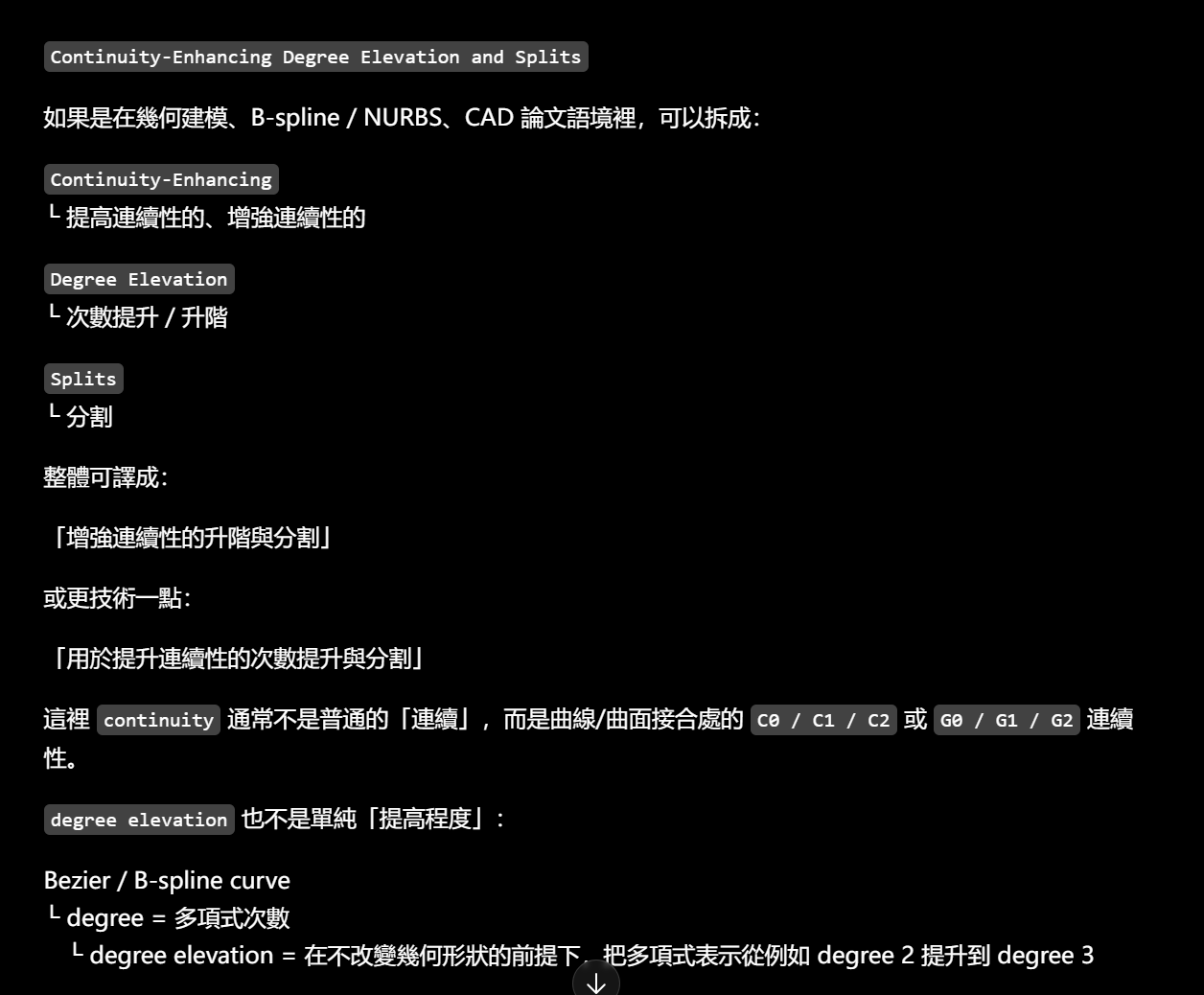
winding number,它不是「纏繞次數」這麼日常的意思,而是一個幾何/拓撲量。這篇 SIGGRAPH 2026 論文處理的是 3D generalized winding number ,用途之一是判斷一個點相對於 triangle mesh 是「inside 還是 outside」,而且即使 mesh 有破洞、自交、open boundary,也還能工作。编辑ISTA Research Explorer+1
可以先建立一個直覺:
封閉 triangle mesh
└ 選一個空間中的 query point
├ 如果點在物體外面
│ └ winding number 通常接近 0
└ 如果點在物體裡面
└ winding number 通常接近 1
bound 不是一般「限制」,而是數學/拓撲裡的:
X bounds Y
└ X 構成 Y 的邊界
└ Y 以 X 為 boundary
所以:
every closed curve bounds a region
不是「每條閉合曲線限制一個區域」,而是:
「在平面上,每一條閉合曲線都圍出/作為某個區域的邊界。」
最典型就是圓:
circle
└ 是 disk 的 boundary
所以可以說:
The circle bounds a disk.
≈「這個圓圍出一個圓盤區域。」
這裡 bound 是動詞,和名詞 boundary 是同一家族:
bound
└ 作為邊界、圍住
boundary
└ 邊界本身
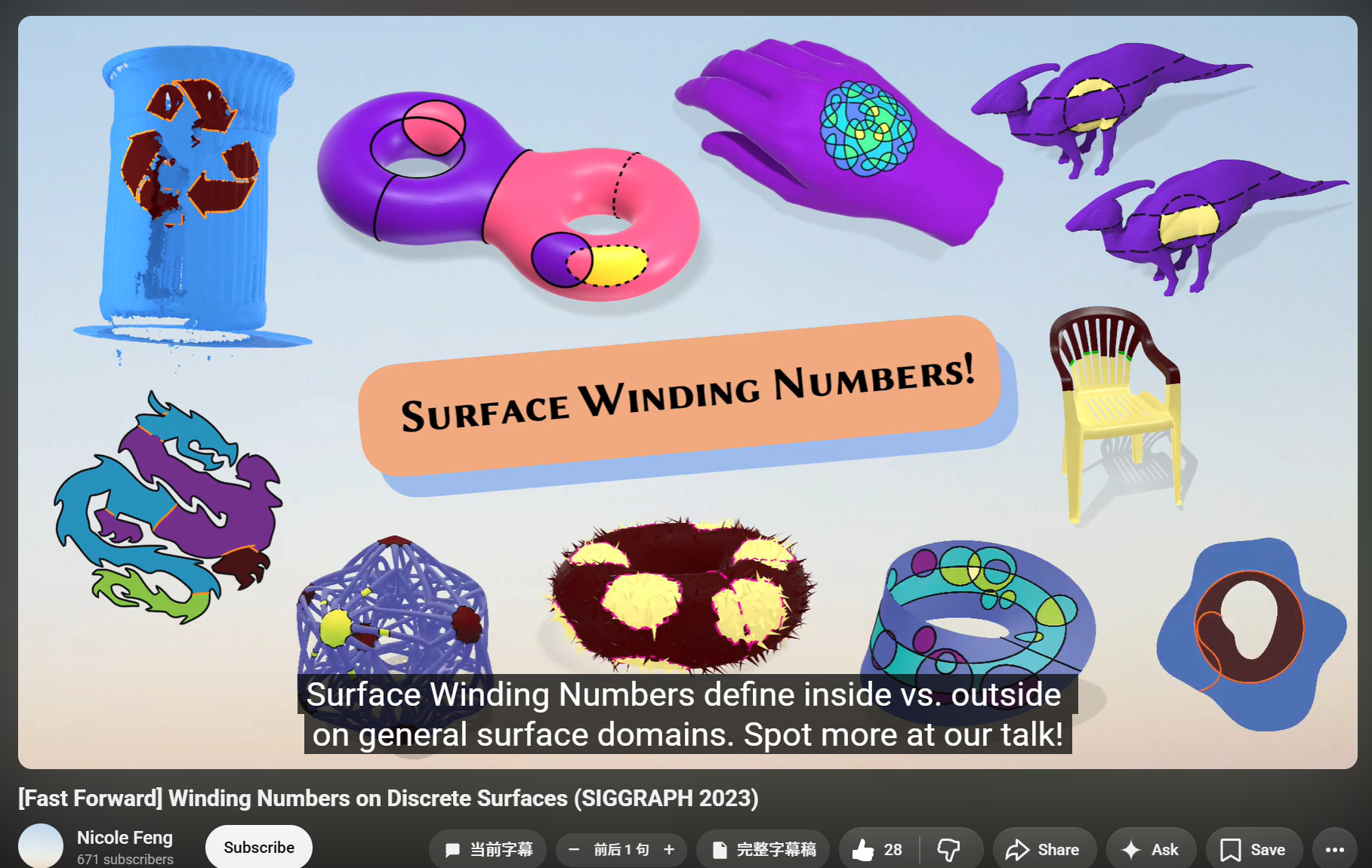
the celebrated generalized winding number
= 「著名的 generalized winding number 方法」
celebrated
這裡就是:
「很知名、很受認可的」
真正關鍵是 Euclidean domains。
Euclidean
└ 歐幾里得空間
├ 2D 平面 R2
└ 3D 普通空間 R3
domain
這裡不是「領域」那種泛義,而是:
「算法/函數所作用的空間區域」。
closed
≠
bounds a region
這就是 non-bounding loop。
UE 還有另一套「shader meta type」繼承:
overflow-visible!
FShaderType
└─ FGlobalShaderType
所以 UE shader system 的確比「一個 .usf 文件」大很多。
RDG 是一個 immediate-mode API,把 rendering commands 記錄進 graph,之後 compile and execute。编辑Epic Games Developers
關鍵是「記錄」。
例如作者最後可能會寫:
overflow-visible!
C++
FComputeShaderUtils::AddPass(
    GraphBuilder,
    ...,
    ComputeShader,
    Parameters,
    GroupCount
);
看 UE 5.8 源碼,它沒有立刻:
overflow-visible!
C++
DispatchComputeShader(...)而是先:
overflow-visible!
C++
return GraphBuilder.AddPass(
    ...,
    [ ... ](FRDGAsyncTask, FRHIComputeCommandList& RHICmdList)
    {
        FComputeShaderUtils::Dispatch(...);
    }
);
注意這個結構:
overflow-visible!
現在:
FComputeShaderUtils::AddPass(...)
        │
        ▼
GraphBuilder.AddPass(...)
        │
        └─ 記住一個 lambda
           「以後執行這個 pass 時,
             才 Dispatch」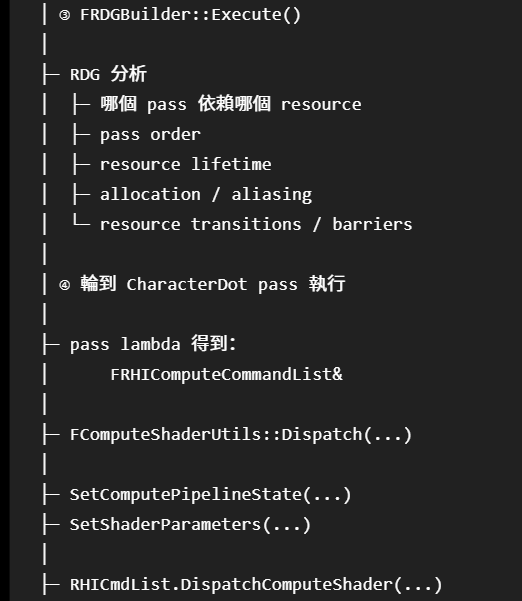
輪到 CharacterDot pass 執行 │ ├─ pass lambda 得到: │ FRHIComputeCommandList& │ ├─ FComputeShaderUtils::Dispatch(...) │ ├─ SetComputePipelineState(...) ├─ SetShaderParameters(...) │ ├─ RHICmdList.DispatchComputeShader(...) │
│ ⑤ platform RHI │ ├─ D3D12 RHI │ 或 ├─ Vulkan RHI │
│ ⑥ graphics API / driver command │
▼ GPU │ └─ 執行編譯後的 MainCS ├─ thread 0 ├─ thread 1 ├─ thread 2 └─ ... └─ 寫 UAV
PrepareDispatch() 又是:
overflow-visible!
C++
FRHIComputeShader* ShaderRHI =
    ComputeShader.GetComputeShader();

SetComputePipelineState(
    RHICmdList,
    { ShaderRHI, ... }
);

SetShaderParameters(
    RHICmdList,
    ComputeShader,
    ShaderRHI,
    ParametersMetadata,
    Parameters
);
所以這裡第一次可以看到一個很實在的「界面」:
overflow-visible!
RDG 世界
GraphBuilder.AddPass
        │
        ▼
pass execution lambda
        │
        ▼
FRHIComputeCommandList
        │
        ▼
RHI dispatch
──────── CPU / GPU execution boundary ──────── GPU └─ CharacterDot.usf └─ MainCS └─ GPU threads └─ UAV writes
RDG resource dependency / barrier / lifetime 不應該畫成 Dispatch 下面。
它們是 RDG 在 dispatch 周圍替這個 pass 管理的資訊和工作:
overflow-visible!
                RDG
                 │
       ┌─────────┼──────────┐
       │         │          │
 dependency   lifetime    barriers
       │         │          │
       └─────────┼──────────┘
                 │
              Pass
                 │
              Dispatch
這才符合 UE 5.8 官方對 RDG 的描述:它會管理 pass dependency、transient resource lifetime、subresource transitions、parallel command recording 等。编辑Epic Games Developers
parts of the curve
正常就是:
parts that constitute the curve
曲線本身的組成部分
如果要說「曲線圍出的 region 的部分」,英文必須把 region 說出來,例如:
parts of the region bounded by the curve
甚至:
regions bounded by the curve
不能直接省成 parts of the curve。
這不是 D3D 憑空發明的需求。沒有這些資訊,UV=(0.5,0.5) 根本無法唯一推出「去哪幾個 memory addresses 取哪些 bits,再怎麼解碼」。
DirectX 12 規格直接把這件事寫得很露骨:
SRV 會選擇 underlying resource、哪些 mipmaps / array slices,以及以什麼 format 解釋 memory;API 的這些設定會被 driver 翻譯成 device-specific、opaque 的 hardware descriptor。编辑Microsoft GitHub
Direct3D 選擇把「某次 binding 怎麼看 resource」抽成 View/descriptor。這是 API architecture。
而現代硬體確實又很適合 descriptor 這種方式。D3D12 官方說 descriptor 是一小塊「完整描述 object 給 GPU」的資料,而且其大小依硬體而異。编辑Microsoft Learn+1
D3D12 建立 Resource 時存在:
overflow-visible!
D3D12_RESOURCE_FLAGS

ALLOW_RENDER_TARGET
ALLOW_DEPTH_STENCIL
ALLOW_UNORDERED_ACCESS
DENY_SHADER_RESOURCE
...
例如 Microsoft 明確說 ALLOW_RENDER_TARGET 允許為該 resource 建立 RTV;ALLOW_UNORDERED_ACCESS 允許建立 UAV。
在 Unreal 5.8 裡,上面又被 RHI 包了一層:
overflow-visible!
ETextureCreateFlags

RenderTargetable
└ Texture 可以當 render target

ShaderResource
└ Texture 可以作為 shader resource

UAV
└ 可建立 UAV

DepthStencilTargetable
└ 可當 depth-stencil target
Epic 5.8 官方 API 就是這樣定義。编辑Epic Games Developers
在 UE 裡確實會看到:
overflow-visible!
引擎 code
└ ETextureCreateFlags::ShaderResource
   | ETextureCreateFlags::RenderTargetable

        ↓ RHI

D3D12 backend
└ 轉成適當的 D3D12 resource desc / flags

        ↓

driver / GPU resource
但不是 Unreal 自己隨便立了一個規則。
Unreal 是把底下 D3D/Vulkan/Metal 所要求的 resource capability 描述抽象成自己的 RHI flags。
建立 D3D12 resource 時,會傳一個 D3D12_RESOURCE_DESC:
overflow-visible!
C++
Dimension
Alignment
Width
Height
DepthOrArraySize
MipLevels
Format
SampleDesc
Layout
Flags
Microsoft 官方結構就是這九組資訊。编辑Microsoft Learn
因此例如建立:
overflow-visible!
Texture X

Dimension
└ Texture2D

Width
└ 4096

Height
└ 4096

ArraySize
└ 6

MipLevels
└ 12

Format
└ R8G8B8A8_TYPELESS

SampleCount
└ 1

Layout
└ 某種 texture layout

Flags
└ ALLOW_RENDER_TARGET
這些不是 View 提供的。
是 Resource 建立時就確定的基本描述。
ID3D12Resource::GetDesc() 之後可以再把這份 description 取回來。也就是「固有資訊」有非常具體的 API 證據。编辑Microsoft Learn
Unreal 也一樣有 FRHITextureDesc,裡面有 Format、NumMips、NumSamples、Flags、GPUMask 等。编辑Epic Games Developers
SRV 還可以說:
overflow-visible!
這一次只看:

format
└ R8G8B8A8_UNORM_SRGB

dimension
└ Texture2DArray

mips
└ mip 3 ~ mip 6

array slices
└ slice 2 ~ slice 4

component mapping
└ memory 裡哪些 component
   回傳到 shader 的 rgba
D3D12 的 D3D12_SHADER_RESOURCE_VIEW_DESC 官方欄位就包括:
Format
ViewDimension
Shader4ComponentMapping
以及 Texture/Buffer-specific 的子結構。编辑Microsoft Learn+1
D3D12 的 D3D12_SHADER_RESOURCE_VIEW_DESC 官方欄位就包括:
Format
ViewDimension
Shader4ComponentMapping
以及 Texture/Buffer-specific 的子結構。编辑Microsoft Learn+1
對 Texture2D SRV,那個子結構又明確有:
overflow-visible!
MostDetailedMip
MipLevels
PlaneSlice
ResourceMinLODClamp而且有一個很好的反證,可以防止把 View 神秘化。
D3D12 建 SRV 時:
overflow-visible!
C++
CreateShaderResourceView(Resource, nullptr, ...)pDesc 可以直接給 nullptr。
這時 Direct3D 會嘗試自己產生一個 default view:
overflow-visible!
format
└ 繼承 resource

dimension
└ 繼承 resource

mips
└ 全部

array slices
└ 全部
Microsoft 官方就是這麼規定的。编辑Microsoft Learn
RTV 也一樣可以使用 default descriptor,例如繼承 resource 的 format/dimension,指向第一個 mip。编辑Microsoft Learn
這和 D3D10 的歷史也完全對上。Microsoft 自己說,D3D9 是直接 bind resource;D3D10 改成先建立 view 再 bind,讓 runtime/driver 可以在 view creation 時提前完成 validation 和 mapping,減少 bind-time type checking。编辑Microsoft Learn
底層不可避免: GPU 要訪問 Texture └ 必須知道一批 metadata ├ memory/resource ├ format ├ dimensions ├ subresource range └ access interpretation Direct3D 的選擇: 把其中「某次使用的解釋」 做成 View / Descriptor Resource: 保存建立時確定的整體事實與 capability View: 補上這一次 binding 特有的解釋
View 不太應該叫「類型轉換」。
R32_TYPELESS → R32_FLOAT 的確有 cast/interpretation 味道;但普通:
overflow-visible!
RGBA8 Texture
→ SRV 看全部 mips
根本沒有發生資料類型轉換。
View 更廣泛地是在做:
resource access description。
format reinterpretation 只是它能做的一件事,不是它存在的全部原因。
Cook 在論文裡專門講了一個例子:light oak 和 dark oak 是兩套不同材質,各有自己的 color、shininess 等;wood grain texture 不是只混兩個顏色,而是決定「這裡使用哪整套材質結果」。编辑CMU School of Computer Science
overflow-visible!
Normal ───────┐
              ↓
LightDir → Dot
              ↓
            Diffuse ───┐
                        ↓
Color ─────────────── Multiply
                        ↓
                     FinalColor
這裡根本不是因為「Tree」這種資料結構本身有什麼神聖性。
而是因為:
overflow-visible!
B 的輸入依賴 A
C 的輸入依賴 B
你一把「計算依賴」畫出來,自然就成了一棵 tree / DAG。
pack 是因為:
Deferred shading 要跨 Pass 保存很多 surface attributes,但 GPU render-target bandwidth / storage / MRT 數量有限。
為什麼要 pack? └─ 顯存 / bandwidth / MRT 數量有限
誰 pack? └─ Base Pass Pixel Shader 在 GPU 上
誰決定 pack 規則? └─ Renderer / shader code 的作者 最後誰真正寫 Texture? └─ GPU graphics pipeline / Output Merger