环境: VS2022+.Net Framework4.8+HelixToolkit3.12
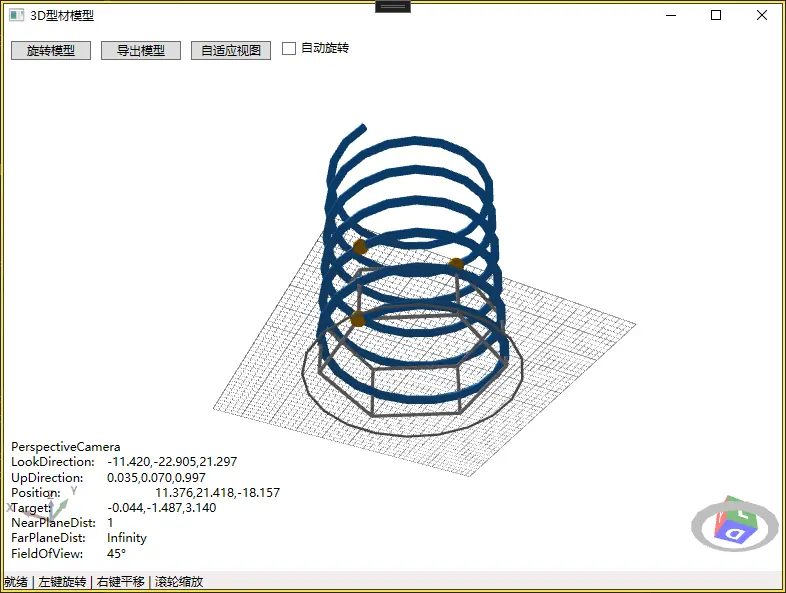
这是一个 使用TubeVisual3D构建的3D型材的主体结构
一、HelixToolkit包安装
- 通过NuGet包管理器搜索并安装 HelixToolkit 相关的包。
二、结构组成:
-
主螺旋管道:使用TubeVisual3D构建,形成型材的主体结构
-
节点球体:在关键路径点使用SphereVisual3D增强视觉效果
-
交叉支撑:六边形支撑结构,增加模型的工程感
-
底座:六边形底座,提供稳定的视觉基础
三、功能特性:
-
旋转功能:手动点击按钮旋转30度,或勾选"自动旋转"持续旋转
-
导出模型:支持多种格式(3DS、STL、OBJ等)
-
自适应视图:一键调整视图到最佳显示位置
-
交互操作:左键旋转、右键平移、滚轮缩放
四、MainWindow.xaml
<Window x:Class="WpfA_TubeModel.MainWindow"
        xmlns="http://schemas.microsoft.com/winfx/2006/xaml/presentation"
        xmlns:x="http://schemas.microsoft.com/winfx/2006/xaml"
        xmlns:d="http://schemas.microsoft.com/expression/blend/2008"
        xmlns:mc="http://schemas.openxmlformats.org/markup-compatibility/2006"
        xmlns:local="clr-namespace:WpfA_TubeModel"
        mc:Ignorable="d"
        xmlns:helix="http://helix-toolkit.org/wpf"
        Title="3D型材模型" Height="600" Width="800">
    <Grid>
        <Grid.RowDefinitions>
            <RowDefinition Height="Auto"/>
            <RowDefinition Height="*"/>
            <RowDefinition Height="Auto"/>
        </Grid.RowDefinitions>

        <!-- 顶部工具栏 -->
        <StackPanel Grid.Row="0" Orientation="Horizontal" Margin="5">
            <Button x:Name="BtnRotate" Content="旋转模型" Click="BtnRotate_Click" Margin="5" Width="80"/>
            <Button x:Name="BtnExport" Content="导出模型" Click="BtnExport_Click" Margin="5" Width="80"/>
            <Button x:Name="BtnZoomExtents" Content="自适应视图" Click="BtnZoomExtents_Click" Margin="5" Width="80"/>
            <CheckBox x:Name="ChkAutoRotate" Content="自动旋转" Margin="5"/>
        </StackPanel>

        <!-- 3D视图 -->
        <helix:HelixViewport3D x:Name="Viewport3D" Grid.Row="1"
                               ShowCoordinateSystem="True"
                               PanGesture="RightClick"
                               RotateGesture="LeftClick"
                               ZoomExtentsWhenLoaded="True"
                               ShowCameraInfo="True"
                               ZoomAroundMouseDownPoint="True"
                               RotateAroundMouseDownPoint="True">

            <!-- 默认相机设置 -->
            <helix:HelixViewport3D.DefaultCamera>
                <PerspectiveCamera LookDirection="-5 -5 5"
                                   UpDirection="0 0 1"
                                   FieldOfView="45"
                                   NearPlaneDistance="1"/>
            </helix:HelixViewport3D.DefaultCamera>

            <!-- 光源 -->
            <helix:SunLight/>

            <!-- 模型容器 -->
            <ModelVisual3D x:Name="ModelContainer"/>

            <!-- 网格线 -->
            <helix:GridLinesVisual3D Width="10" Length="10"
                                     MajorDistance="1" MinorDistance="0.2"
                                     Thickness="0.01"/>
        </helix:HelixViewport3D>

        <!-- 底部状态栏 -->
        <StatusBar Grid.Row="2">
            <StatusBarItem>
                <TextBlock Text="就绪 | 左键旋转 | 右键平移 | 滚轮缩放"/>
            </StatusBarItem>
        </StatusBar>
    </Grid>
</Window>
五、MainWindow.xaml.cs
using HelixToolkit.Wpf;
using System;
using System.Collections.Generic;
using System.Linq;
using System.Windows;
using System.Windows.Media;
using System.Windows.Media.Media3D;
using Microsoft.Win32;
using System.Xml.Serialization;


namespace WpfA_TubeModel
{
    /// <summary>
    /// MainWindow.xaml 的交互逻辑
    /// </summary>
    public partial class MainWindow : Window
    {
        private Model3DGroup _modelGroup;
        private System.Windows.Threading.DispatcherTimer _rotationTimer;
        private double _rotationAngle = 0;
        private const double ROTATION_SPEED = 0.5; // 旋转速度(度/帧)

        public MainWindow()
        {
            InitializeComponent();
            Loaded += MainWindow_Loaded;
        }

        private void MainWindow_Loaded(object sender, RoutedEventArgs e)
        {
            // 构建3D型材模型
            BuildProfileModel();

            // 设置自动旋转定时器
            SetupRotationTimer();
        }

        /// <summary>
        /// 构建3D型材模型 - 使用SphereVisual3D和TubeVisual3D
        /// </summary>
        private void BuildProfileModel()
        {
            _modelGroup = new Model3DGroup();

            // 1. 构建主路径 - 螺旋型材
            var pathPoints = GenerateHelixPath(3.0, 1.5, 6, 20);

            // 2. 创建管道(型材主体)
            var tube = new TubeVisual3D
            {
                Path = pathPoints,
                Diameter = 0.3,
                ThetaDiv = 24,
                Fill = new SolidColorBrush(Colors.DodgerBlue),
                Material = MaterialHelper.CreateMaterial(new SolidColorBrush(Colors.DodgerBlue))
            };
            _modelGroup.Children.Add(tube.Content);

            // 3. 在路径关键节点添加球体(节点强化效果)
            var spherePositions = new[]
            {
                new Point3D(0, 0, 0),
                new Point3D(3, 0, 0),
                new Point3D(4.5, 2.598, 0),
                new Point3D(3, 5.196, 0),
                new Point3D(0, 5.196, 0),
                new Point3D(-1.5, 2.598, 0),
                // 添加一些Z轴方向的节点
                new Point3D(1.5, 2.598, 2),
                new Point3D(1.5, 2.598, 4),
                new Point3D(3, 0, 3),
            };

            foreach (var pos in spherePositions)
            {
                // 只添加在路径上的节点(通过路径点检测)
                if (IsPointOnPath(pos, pathPoints, 0.5))
                {
                    var sphere = new SphereVisual3D
                    {
                        Center = pos,
                        Radius = 0.25,
                        Fill = new SolidColorBrush(Colors.Orange),
                        Material = MaterialHelper.CreateMaterial(new SolidColorBrush(Colors.Orange))
                    };
                    _modelGroup.Children.Add(sphere.Content);
                }
            }

            // 4. 添加一些额外的装饰管(交叉支撑结构)
            AddCrossSupports();

            // 5. 添加底座
            AddBasePlate();

            // 将模型添加到视口
            ModelContainer.Content = _modelGroup;
        }

        /// <summary>
        /// 生成螺旋路径点
        /// </summary>
        private Point3DCollection GenerateHelixPath(double radius, double pitch, double turns, int pointsPerTurn)
        {
            var path = new Point3DCollection();
            int totalPoints = (int)(turns * pointsPerTurn) + 1;

            for (int i = 0; i < totalPoints; i++)
            {
                double t = (double)i / pointsPerTurn;
                double angle = t * 2 * Math.PI;
                double x = radius * Math.Cos(angle);
                double y = radius * Math.Sin(angle);
                double z = t * pitch;
                path.Add(new Point3D(x, y, z));
            }

            return path;
        }

        /// <summary>
        /// 检查点是否在路径上(用于节点定位)
        /// </summary>
        private bool IsPointOnPath(Point3D point, Point3DCollection path, double tolerance)
        {
            foreach (var p in path)
            {
                double dx = p.X - point.X;
                double dy = p.Y - point.Y;
                double dz = p.Z - point.Z;
                if (Math.Sqrt(dx * dx + dy * dy + dz * dz) < tolerance)
                    return true;
            }
            return false;
        }

        /// <summary>
        /// 添加交叉支撑结构
        /// </summary>
        private void AddCrossSupports()
        {
            // 创建6个支撑管,形成六边形结构
            double radius = 3.0;
            double height = 2.0;

            for (int i = 0; i < 6; i++)
            {
                double angle1 = i * Math.PI / 3;
                double angle2 = (i + 1) * Math.PI / 3;

                // 底部节点
                var p1 = new Point3D(radius * Math.Cos(angle1), radius * Math.Sin(angle1), 0);
                var p2 = new Point3D(radius * Math.Cos(angle2), radius * Math.Sin(angle2), 0);

                // 顶部节点(高度偏移)
                var p3 = new Point3D(radius * Math.Cos(angle1), radius * Math.Sin(angle1), height);
                var p4 = new Point3D(radius * Math.Cos(angle2), radius * Math.Sin(angle2), height);

                // 底部支撑管
                var bottomTube = new TubeVisual3D
                {
                    Path = new Point3DCollection { p1, p2 },
                    Diameter = 0.12,
                    ThetaDiv = 16,
                    Fill = new SolidColorBrush(Colors.LightGray),
                    Material = MaterialHelper.CreateMaterial(new SolidColorBrush(Colors.LightGray))
                };
                _modelGroup.Children.Add(bottomTube.Content);

                // 顶部支撑管
                var topTube = new TubeVisual3D
                {
                    Path = new Point3DCollection { p3, p4 },
                    Diameter = 0.12,
                    ThetaDiv = 16,
                    Fill = new SolidColorBrush(Colors.LightGray),
                    Material = MaterialHelper.CreateMaterial(new SolidColorBrush(Colors.LightGray))
                };
                _modelGroup.Children.Add(topTube.Content);

                // 垂直支撑管
                var verticalTube = new TubeVisual3D
                {
                    Path = new Point3DCollection { p1, p3 },
                    Diameter = 0.12,
                    ThetaDiv = 16,
                    Fill = new SolidColorBrush(Colors.LightGray),
                    Material = MaterialHelper.CreateMaterial(new SolidColorBrush(Colors.LightGray))
                };
                _modelGroup.Children.Add(verticalTube.Content);
            }
        }

        /// <summary>
        /// 添加底座
        /// </summary>
        private void AddBasePlate()
        {
            // 创建六边形底座轮廓
            var basePoints = new Point3DCollection();
            double radius = 3.5;
            int segments = 20;

            for (int i = 0; i <= segments; i++)
            {
                double angle = i * 2 * Math.PI / segments;
                double x = radius * Math.Cos(angle);
                double y = radius * Math.Sin(angle);
                basePoints.Add(new Point3D(x, y, -0.3));
            }

            // 添加底座管
            var baseTube = new TubeVisual3D
            {
                Path = basePoints,
                Diameter = 0.08,
                ThetaDiv = 12,
                Fill = new SolidColorBrush(Colors.DarkGray),
                Material = MaterialHelper.CreateMaterial(new SolidColorBrush(Colors.DarkGray))
            };
            _modelGroup.Children.Add(baseTube.Content);
        }

        /// <summary>
        /// 设置自动旋转定时器
        /// </summary>
        private void SetupRotationTimer()
        {
            _rotationTimer = new System.Windows.Threading.DispatcherTimer
            {
                Interval = TimeSpan.FromMilliseconds(30)
            };
            _rotationTimer.Tick += (s, e) =>
            {
                if (ChkAutoRotate.IsChecked == true)
                {
                    RotateModel(new Vector3D(0, 0, 1), ROTATION_SPEED);
                }
            };
            _rotationTimer.Start();
        }

        /// <summary>
        /// 旋转模型
        /// </summary>
        private void RotateModel(Vector3D axis, double angle)
        {
            if (_modelGroup == null) return;

            var transform = _modelGroup.Transform as RotateTransform3D;
            if (transform == null)
            {
                transform = new RotateTransform3D(new AxisAngleRotation3D(axis, angle));
                _modelGroup.Transform = transform;
            }
            else
            {
                var rotation = transform.Rotation as AxisAngleRotation3D;
                if (rotation != null)
                {
                    rotation.Axis = axis;
                    rotation.Angle = (rotation.Angle + angle) % 360;
                }
            }
        }

        /// <summary>
        /// 旋转按钮点击事件
        /// </summary>
        private void BtnRotate_Click(object sender, RoutedEventArgs e)
        {
            RotateModel(new Vector3D(0, 0, 1), 30);
        }

        /// <summary>
        /// 导出模型按钮点击事件
        /// </summary>
        private void BtnExport_Click(object sender, RoutedEventArgs e)
        {
            var dialog = new SaveFileDialog
            {
                Title = "导出模型",
                Filter = "3D模型文件 (*.3ds)|*.3ds|STL文件 (*.stl)|*.stl|OBJ文件 (*.obj)|*.obj|XAML文件 (*.xaml)|*.xaml|所有文件 (*.*)|*.*",
                InitialDirectory = Environment.GetFolderPath(Environment.SpecialFolder.MyDocuments),
                RestoreDirectory = true
            };

            if (dialog.ShowDialog() == true)
            {
                try
                {
                    // 使用 HelixViewport3D 自带的 Export 方法
                    Viewport3D.Export(dialog.FileName);
                    MessageBox.Show($"模型已成功导出到:\n{dialog.FileName}", "导出成功",
                                  MessageBoxButton.OK, MessageBoxImage.Information);
                }
                catch (Exception ex)
                {
                    MessageBox.Show($"导出失败:\n{ex.Message}", "错误",
                                  MessageBoxButton.OK, MessageBoxImage.Error);
                }
            }
        }
        /// <summary>
        /// 自适应视图按钮点击事件
        /// </summary>
        private void BtnZoomExtents_Click(object sender, RoutedEventArgs e)
        {
            Viewport3D.ZoomExtents(100);
        }

        /// <summary>
        /// 窗口关闭时清理资源
        /// </summary>
        protected override void OnClosed(EventArgs e)
        {
            _rotationTimer?.Stop();
            base.OnClosed(e);
        }
    }
}
六、资料
[【1.9 HelixToolkit学习案例】WPF案例代码解析 - 知乎]
(https://zhuanlan.zhihu.com/p/538932951#1)