作者:来自 Elastic Kathleen DeRusso, Matt Nowzari, Apostolos Matsagkas, Peter Pisljar
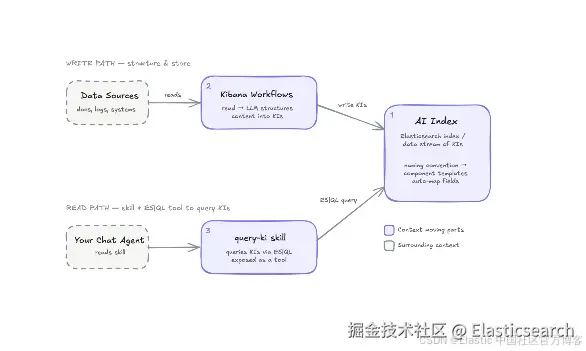
将 AI agent 上下文存储在 AI Index 中,使用更少的 tokens 为更智能的 agent 提供支持。包含使用 ES|QL 和 Kibana Workflows 的分步演练。
Agent 在回答任何问题之前,都会消耗 tokens 来探索你的数据,包括检查 mappings、采样文档、探查应该使用哪个 index。Elasticsearch AI Indices 让你可以预先计算这些工作一次,并将其存储为 Knowledge Indicator(KI):一种结构化、可搜索的记录,agent 可以直接检索,而不必每次都从头重新发现这些信息。
本演练将向你展示如何构建完整的 pipeline:创建 AI Index,使用 Kibana Workflow 生成用于路由的 KI,并通过可移植的 ES|QL skill 将它们连接到任意 agent harness。如果你希望在阅读本文示例的同时端到端地运行这些内容,我们还提供了一个 notebook。
这是博客系列的第 1 部分,将通过 KI 和 AI indices 对上下文进行管理提供技术演练。
虽然 AI indices 将包含在未来的 Stack 版本中,但目前我们建议使用 Serverless。
工作原理:AI Index、Kibana Workflows 和 query-ki skill
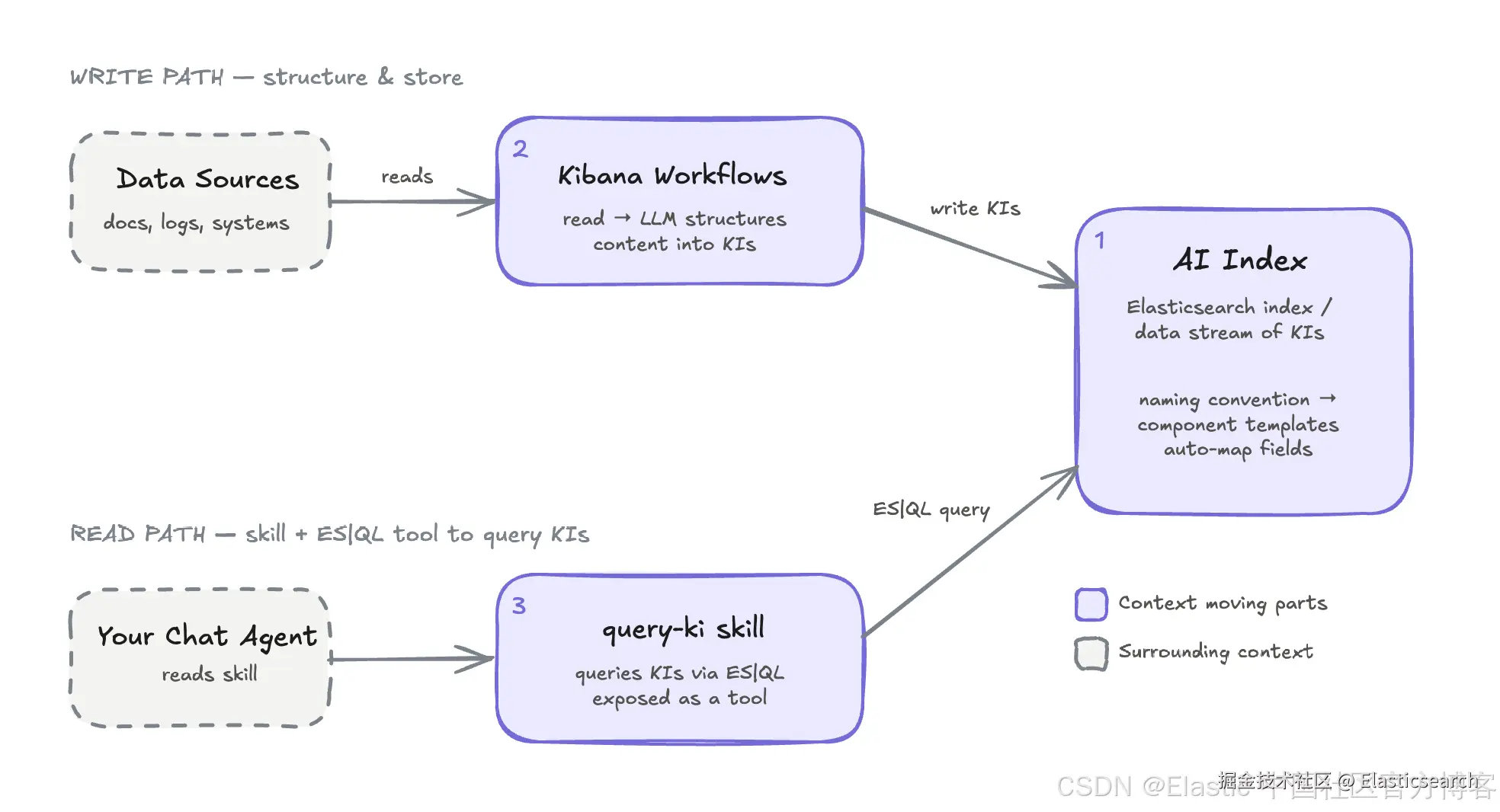
在本演练中构建上下文包含三个部分:
-
一个 AI Index,KI 存储在其中。它是一个常规的 Elasticsearch index 或 data stream,通过特定的命名约定触发 component templates,从而自动配置正确的 mappings。
-
Kibana Workflows,它们从你的数据源读取数据,运行 LLM 将内容结构化为 KI,并将这些 KI 写入 AI Index。
-
query-kiskill,一个使用 ES|QL 直接从 AI Index 查询 KI 的 skill,chat agent 可以将其作为工具调用。
前置条件
本教程假设你已经具备:
-
一个 Elasticsearch Serverless 项目。如果你还没有,可以注册试用版。
-
一个用于访问 Elasticsearch 项目的 API key。
创建用于 agent 路由的示例 indices
首先,我们需要一些数据源。数据源可以是已经存在于 Elasticsearch indices 中的数据,也可以是通过 connectors 或 ES|QL data sources 访问的外部数据。
在本文中,我们将创建一些包含示例数据的 indices。首先,我们使用三个数据集作为示例:BEIR/fiqa(金融)、beir-nfcorpus(生物医学 / 营养)和 beir-scifact(科学事实核查)。每个 index 都包含其自身的 _meta.description。
以下是我们为这些 indices 定义的 mappings:
bash
`
1. {
2. "beir-fiqa": {
3. "mappings": {
4. "_meta": {
5. "description": "FiQA: financial question answering corpus from StackExchange Finance community posts and web crawls. Covers investments, banking, taxes, and market analysis. BM25-only index."
6. },
7. "properties": {
8. "text": {
9. "type": "text",
10. "meta": {
11. "description": "Full document body text."
12. }
13. },
14. "title": {
15. "type": "text",
16. "meta": {
17. "description": "Document or article title."
18. }
19. }
20. }
21. }
22. }
23. }
26. {
27. "beir-nfcorpus": {
28. "mappings": {
29. "_meta": {
30. "description": "NFCorpus: biomedical information retrieval corpus from NutritionFacts.org. Contains nutrition science and medical research documents on diet, disease, and health interventions. BM25-only index."
31. },
32. "properties": {
33. "text": {
34. "type": "text",
35. "meta": {
36. "description": "Full document body text."
37. }
38. },
39. "title": {
40. "type": "text",
41. "meta": {
42. "description": "Document or article title."
43. }
44. }
45. }
46. }
47. }
48. }
51. {
52. "beir-scifact": {
53. "mappings": {
54. "_meta": {
55. "description": "SciFact: scientific fact-checking corpus of biomedical research abstracts used to verify factual claims in peer-reviewed literature. BM25-only index."
56. },
57. "properties": {
58. "text": {
59. "type": "text",
60. "meta": {
61. "description": "Full document body text."
62. }
63. },
64. "title": {
65. "type": "text",
66. "meta": {
67. "description": "Document or article title."
68. }
69. }
70. }
71. }
72. }
73. }
`AI写代码收起代码块然后,使用上面的便捷脚本,通过 _bulk API 向每个 index 中加载一些文档。
现在,假设一个 agent 面对一个问题,以及我们刚刚创建的这些 indices。agent 在开始时完全不知道哪个 index 与问题相关。如果没有预先计算好的上下文,它要么执行探索性查询(mappings、测试搜索)来确定应该使用哪个数据源,要么搜索全部三个 indices,并希望合并后的结果中能找到有用的信息。无论采用哪种方式,都会消耗 tokens;如果把这种低效累积到 agent 执行的每一次查询中,成本就会越来越高。
创建你的 AI Index
在生成任何 KI 之前,你需要一个用于存储它们的 index。我们称之为 AI Index。
命名约定会触发自动配置。任何名称以 ai-index-idx- 开头的 index 都是常规 index;以 ai-index-ds- 开头的则是 data stream。对于 observability 用例、时间序列数据以及对数据新鲜度要求较高的场景,你应该选择 data stream。相反,对于会长期存在的静态数据,数据新鲜度并不是特别重要,并且可能偶尔需要按需更新的场景,标准 index 是不错的选择。AI indices 必须使用这种命名约定。
当 Elasticsearch 看到 ai-index- 前缀时,会自动应用 component templates,从而配置正确的 mappings 和 settings。
创建 AI Index 只需要一次调用:
go
`PUT ai-index-idx-my-corpus` AI写代码要准确查看应用了哪些 component templates,可以检查 mappings:
bash
`GET ai-index-idx-my-corpus/_mapping` AI写代码响应会显示每个 AI Index 开箱即用就具有的字段:
markdown
`
1. {
2. "ai-index-idx-my-corpus": {
3. "mappings": {
4. "properties": {
5. "@timestamp": {
6. "type": "date"
7. },
8. "attributes": {
9. "type": "flattened"
10. },
11. "content": {
12. "type": "text",
13. "fields": {
14. "semantic": {
15. "type": "semantic_text",
16. "inference_id": ".jina-embeddings-v5-text-small"
17. }
18. }
19. },
20. "description": {
21. "type": "text",
22. "fields": {
23. "semantic": {
24. "type": "semantic_text",
25. "inference_id": ".jina-embeddings-v5-text-small"
26. }
27. }
28. },
29. "references": {
30. "properties": {
31. "uri": {
32. "type": "keyword"
33. }
34. }
35. },
36. "tags": {
37. "type": "keyword"
38. },
39. "title": {
40. "type": "text",
41. "fields": {
42. "semantic": {
43. "type": "semantic_text",
44. "inference_id": ".jina-embeddings-v5-text-small"
45. }
46. }
47. },
48. "type": {
49. "type": "keyword"
50. }
51. }
52. }
53. }
54. }
`AI写代码收起代码块title、description 和 content 都是 text 字段,并带有一个类型为 semantic_text 的 .semantic 子字段,支持混合检索。
Data stream indices(ai-index-ds-*)还默认具有 90 天的数据保留策略。本文使用标准 index(ai-index-idx-*)。
将 Index 元数据作为 Knowledge Indicator
这个示例的目标用例是展示 query-index-metadata-ki skill 如何将 agent 路由到正确的 Elasticsearch index,即使 index 或字段名称比较模糊。这样可以减少因选择错误的 index,或者基于不完整的 schema 探索来构造查询而导致的错误。
由于我们正在为自己的 indices 创建 KI,因此可以给 LLM 一个良好的起点:使用人工编写的 _meta.description 内容为 index mappings 添加注释。这样,workflow 就能利用更多上下文生成更好的 KI。
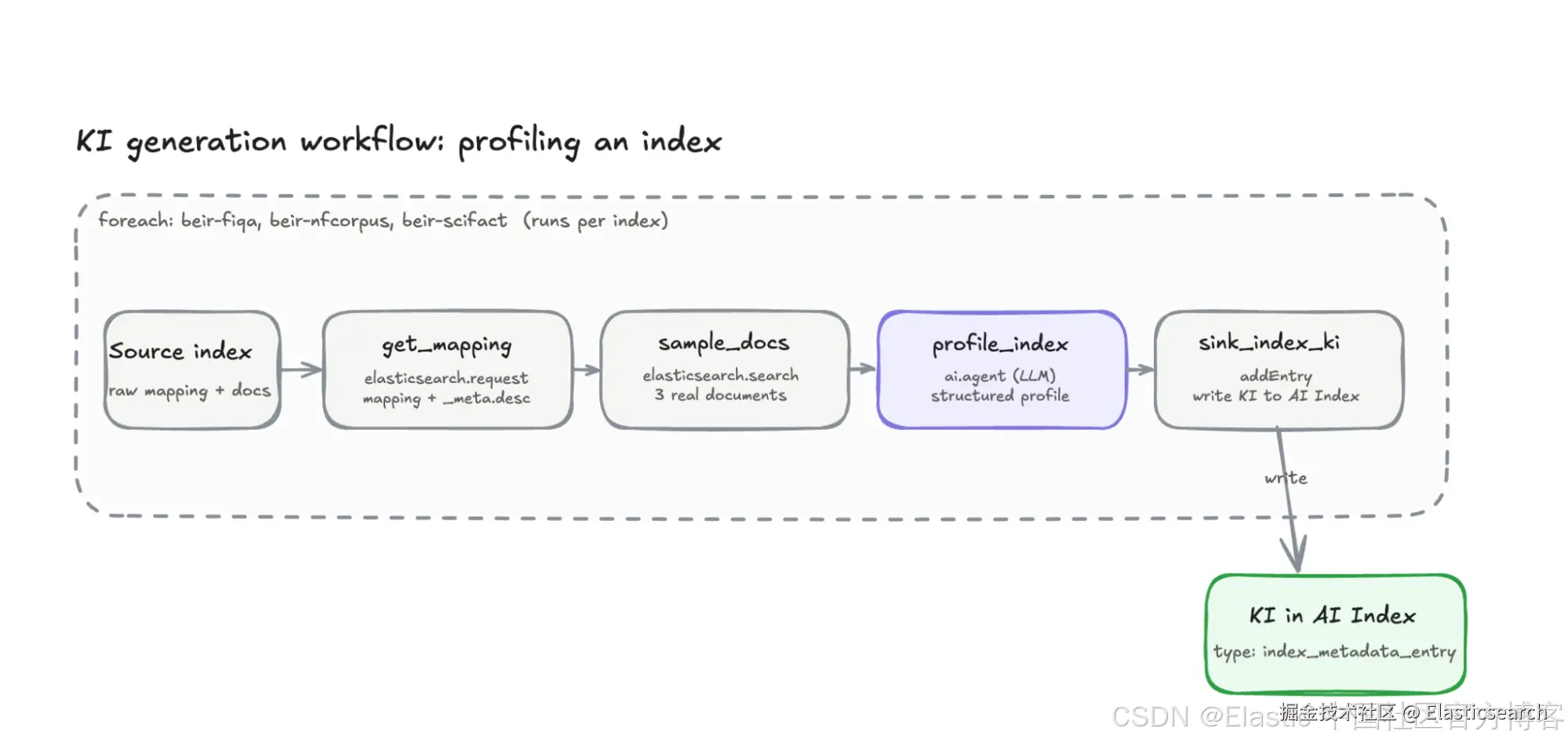
为了解决这个问题,我们将手动创建一个 Kibana Workflow,对每个 index 进行分析,并将用于路由的 KI 写入 AI Index。该 workflow 串联了四个步骤:
| 步骤 | 类型 | 功能 |
|---|---|---|
get_mapping |
elasticsearch.request |
读取 mapping,包括 _meta.description 和每个字段的描述。 |
sample_docs |
elasticsearch.search |
获取一些真实文档,使 profile 能够反映实际的数据值结构。 |
profile_index |
ai.agent |
将 index profile 生成为结构化输出。 |
sink_index_ki |
elasticsearch.bulk |
将 profile 作为 KI 写入 AI Index。 |
将以下 YAML 粘贴到 Workflows 编辑器中:
yaml
``
1. version: '1'
2. name: beir-index-profile-ki
3. description: Profile an index into an index-selection Knowledge Indicator.
4. enabled: true
5. tags:
6. - context-management
7. - index-selection
9. triggers:
10. - type: manual
12. consts:
13. indices:
14. - beir-fiqa
15. - beir-nfcorpus
16. - beir-scifact
18. steps:
19. - name: loop_indices
20. type: foreach
21. foreach: '{{ consts.indices | json }}'
22. iteration-on-failure:
23. continue: true
24. steps:
25. - name: get_mapping
26. type: elasticsearch.request
27. with:
28. method: GET
29. path: '/{{ foreach.item }}/_mapping'
31. - name: sample_docs
32. type: elasticsearch.search
33. with:
34. index: '{{ foreach.item }}'
35. size: 3
36. query:
37. match_all: {}
39. - name: profile_index
40. type: ai.agent
41. timeout: 120s
42. with:
43. message: >
44. You are a data steward building an INDEX PROFILE for an enterprise
45. data catalog. Downstream, an AI agent uses these profiles to decide
46. WHICH Elasticsearch index to query for a given user question -- this
47. is an index-SELECTION aid, not a place to answer the question itself.
49. You are given (a) the index name, (b) its Elasticsearch mapping
50. including human-written descriptions in `_meta.description` and each
51. field's `meta.description`, and (c) a few sample documents. Produce a
52. faithful, decision-useful profile. Rules:
53. - Ground everything in the provided mapping + samples. Never invent
54. fields, values, or purpose. If unknown, use an empty string/array.
55. - Optimize for routing: make it obvious what kinds of questions this
56. index can authoritatively answer, and what it canNOT.
57. - Prefer concrete field names and real example values from the
58. samples over vague phrasing.
59. - For joins, surface shared keys (e.g. *_id fields) that link this
60. index to sibling indices, since cross-index questions hinge on them.
62. Index name: {{ foreach.item }}
64. Elasticsearch mapping (JSON):
65. {{ steps.get_mapping.output | json }}
67. Sample documents (JSON):
68. {{ steps.sample_docs.output.hits.hits | map: '_source' | json }}
69. schema:
70. type: object
71. properties:
72. display_name:
73. type: string
74. description: A concise human-readable name for what this index represents (<= 8 words).
75. purpose:
76. type: string
77. description: 2-4 sentences describing what this index stores and its role. PRIMARY semantic surface for matching a question to this index.
78. answers_questions:
79. type: array
80. items:
81. type: string
82. description: 3-7 representative natural-language questions this index can authoritatively answer.
83. does_not_contain:
84. type: array
85. items:
86. type: string
87. description: 1-4 things a searcher might wrongly expect here but that live elsewhere, to prevent mis-routing.
88. key_fields:
89. type: array
90. items:
91. type: string
92. description: 3-10 of the most query-relevant fields as "field_name - what it is".
93. when_to_use:
94. type: string
95. description: A single crisp routing heuristic - when should an agent pick THIS index? (<= 30 words).
96. example_esql:
97. type: string
98. description: One realistic, runnable ES|QL query against this index answering one of answers_questions.
99. required:
100. - display_name
101. - purpose
102. - answers_questions
103. - key_fields
104. - when_to_use
106. - name: sink_index_ki
107. type: elasticsearch.request
108. with:
109. method: PUT
110. path: '/ai-index-idx-my-corpus/_doc/{{ foreach.item | url_encode }}'
111. body:
112. '@timestamp': '{{ "now" | date: "%Y-%m-%dT%H:%M:%S.%LZ" }}'
113. type: index_metadata_entry
114. title: '{{ steps.profile_index.output.structured_output.display_name | default: foreach.item }}'
115. tags:
116. - index-profile
117. - '{{ foreach.item }}'
118. attributes:
119. display_name: '{{ steps.profile_index.output.structured_output.display_name }}'
120. purpose: '{{ steps.profile_index.output.structured_output.purpose }}'
121. when_to_use: '{{ steps.profile_index.output.structured_output.when_to_use }}'
122. answers_questions: '{{ steps.profile_index.output.structured_output.answers_questions | json }}'
123. does_not_contain: '{{ steps.profile_index.output.structured_output.does_not_contain | json }}'
124. key_fields: '{{ steps.profile_index.output.structured_output.key_fields | json }}'
125. example_esql: '{{ steps.profile_index.output.structured_output.example_esql }}'
126. source_index: '{{ foreach.item }}'
127. content: >
128. === SOURCE / PROVENANCE ===
129. This is an INDEX PROFILE for routing/index-selection.
130. Backing Elasticsearch index: {{ foreach.item }}
131. Inspect it directly with ES|QL:
132. FROM {{ foreach.item }} | LIMIT 10
133. === WHAT THIS INDEX IS ===
134. {{ steps.profile_index.output.structured_output.purpose }}
135. Questions this index can answer: {{ steps.profile_index.output.structured_output.answers_questions | join: " | " }}
136. When to use this index: {{ steps.profile_index.output.structured_output.when_to_use }}
137. Example query:
138. {{ steps.profile_index.output.structured_output.example_esql }}
139. description: >
140. Index profile: {{ steps.profile_index.output.structured_output.display_name }}.
141. Does NOT contain: {{ steps.profile_index.output.structured_output.does_not_contain | join: "; " }}.
142. Key fields: {{ steps.profile_index.output.structured_output.key_fields | join: "; " }}.
``AI写代码让我们逐步了解这个 workflow 的工作方式。我们通过 foreach 循环遍历三个指定的 indices。对于每一个 index:
-
get_mapping获取 Elasticsearch index mappings,包括我们之前添加的_meta.description注释。 -
sample_docs获取 3 个真实文档。与单独依赖 schema 相比,具体示例能够为 LLM 提供更好的信息。 -
profile_index使用 index 名称、mappings 和示例文档调用ai.agent。LLM 返回结构化输出,其中描述了该 index 的用途、关键字段,以及一个展示如何使用该 index 的示例 ES|QL 查询。 -
sink_index_ki将结果作为index_metadata_entry类型的 KI 写入 AI Index,并以 index 名称作为 key,从而确保重复运行时具有幂等性。
需要注意以下几点:
-
这个 workflow 将一组特定的 indices 硬编码了。在实际应用中,你可以从 index pattern 或动态数据源中获取这个列表。
-
foreach循环还会按顺序执行各个迭代,这对于本指南来说没问题,但在生产环境中会比较慢,因为每次迭代都需要调用一次 LLM。对于大规模场景,可以使用 workflow.executeAsync 或原生并行支持。cheat sheet 中介绍了这两种方式的使用技巧。 -
在
profile_index步骤中,agent prompt 是关键所在。它决定了 KI 的准确性和实用性。 -
如果你不需要加载其他工具,使用 ai.prompt 可以提高 workflow 的效率,同时降低成本。
-
成本可以通过多种方式进行控制。更丰富的 prompt 和结构化输出通常会带来更高的 token 使用量,当然,你选择的模型也会显著影响总成本。Elastic Inference Service(EIS)可以作为一个很好的测试环境,你可以针对
profile_index的ai.agent步骤测试不同的模型,从而比较不同模型在生成 KI 时的表现。
查询你的 AI Index 以验证 Knowledge Indicators
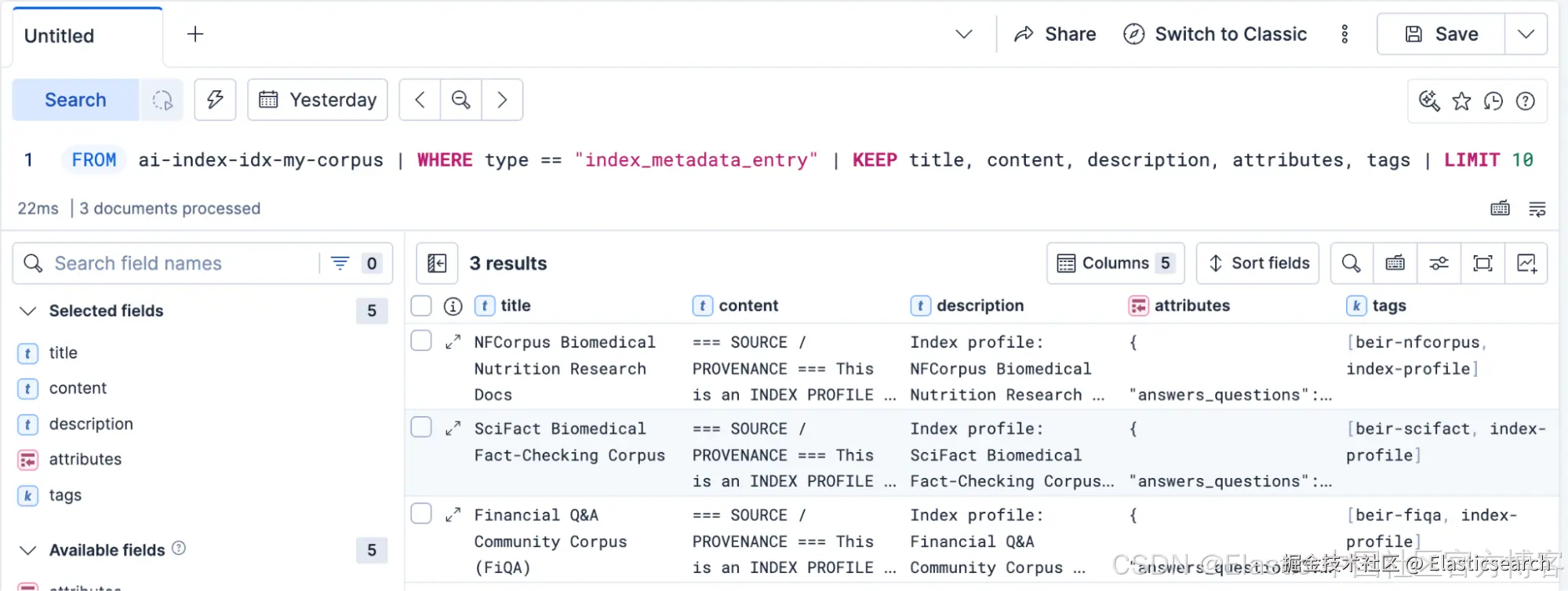
beir-index-profile-ki workflow 运行后,使用以下 ES|QL 查询直接在 Discover 标签页中查询 AI Index,以确认写入了哪些内容:
markdown
`

1.  FROM ai-index-idx-my-corpus
2.      | WHERE type == "index_metadata_entry"
3.      | KEEP title, content, description, attributes, tags
4.      | LIMIT 10

`AI写代码
这将得到以下输出:
构建一个可移植的 skill 来检索 AI agent 上下文
检索是 AI Index 中的关键组件。KI 是 AI Index 中的一个文档,而查找一个 KI 只需要执行一次 ES|QL 查询。我们将这个查询封装成一个小型、可移植的 skill,这样任何 agent 都可以调用它,而不受其运行的 harness 影响。
我们将这个 skill 编写为一个 SKILL.md:包含 name 和 description 的 YAML header,后面跟着 markdown instructions。这与许多 harness 使用的 Agent Skills 格式相同,包括 Claude Code、LangChain 的 Deep Agents 以及其他 harness,它们都可以直接加载这种格式。
harness 会预先读取 header 内容,只有当问题与 description 匹配时,才会加载完整的 instructions。这个 skill 对 harness 唯一的要求,就是提供一种针对 Elasticsearch 运行 ES|QL 的方式。
以下是一个 query-index-metadata-ki skill 示例:
vbnet
``
1. ---
2. name: query-index-metadata-ki
3. description: >-
4. Retrieve Knowledge Indicators (pre-computed context) from the Elasticsearch AI
5. Index before answering. Use it to find which index to search (routing profiles).
6. Trigger on any question that depends on choosing a data source.
7. allowed-tools: esql_query
8. ---
10. # Retrieving Knowledge Indicators
12. Knowledge Indicators (KIs) live in Elasticsearch indices named `ai-index-*`.
13. Retrieve them by calling the `esql_query` tool with the query below. Substitute
14. the user's question for `<query>`, and `index_metadata_entry` as the `<ki_type>` for routing profiles.
16. ```esql
17. FROM ai-index-idx-* METADATA _id, _index, _score
18. | WHERE type == "<ki_type>"
19. | FORK
20. (WHERE MATCH(content, "<query>") OR MATCH(description, "<query>")
21. | SORT _score DESC | LIMIT 20)
22. (WHERE MATCH(content.semantic, "<query>") OR MATCH(description.semantic, "<query>")
23. | SORT _score DESC | LIMIT 20)
24. | FUSE
25. | SORT _score DESC
26. | KEEP title, content, description, tags
27. | LIMIT 5
28. ```
30. Ground your answer in what the query returns, and cite the KI titles you used. If
31. nothing relevant comes back, say so rather than guessing.
``AI写代码让我们拆解一下这个 skill 的工作方式:
-
我们将
index-metadata-entry定义为一种 KI 类型 / 用例。 -
我们在 AI indices 上执行混合 ES|QL 搜索,并使用合适的
type进行过滤,同时使用 RRF 作为融合结果的默认方法。 -
当确定哪些 indices 与查询相关时,KI 结果将直接为 agent 的回答提供依据。
由于这个 skill 只是 instructions 加上一个查询,因此无论你的 agent 在哪里运行,它都可以随之使用。你可以将同一个文件用于 Kibana Workflow agent、Claude Code、LangChain Deep Agents 或任何其他 harness,而无需修改其中任何一行。
将你的 AI Index 连接到 agent harness
我们希望展示如何使用 AI indices,通过任意 harness 查询你的数据。在这些示例中,我们将使用 LangChain Deep Agents 和一个兼容 OpenAI 的 key,但也可以轻松替换为其他 agent harness,包括 Elastic Agent Builder。
首先,让我们创建一个基线,看看 agent 在不使用 KI 的情况下会有怎样的表现:
python
`
1. # Example question: Is there scientific evidence that vitamin D supplementation prevents cancer?
2. import os
3. import sys
4. import time
5. from elasticsearch import Elasticsearch
6. from langchain_core.messages import AIMessage
7. from langchain_core.tools import tool
8. from langchain_openai import ChatOpenAI
9. from deepagents import create_deep_agent
11. if len(sys.argv) < 2:
12. sys.exit(f'Usage: python {sys.argv[0]} "your question"')
14. es = Elasticsearch(os.environ["ES_URL"], api_key=os.environ["ES_API_KEY"])
17. @tool
18. def esql_query(query: str) -> list[dict] | str:
19. """Execute an ES|QL query against Elasticsearch and return the matching rows.
21. Args:
22. query: A complete ES|QL query string, e.g. 'FROM beir-fiqa | LIMIT 5'.
23. Full-text search syntax: WHERE MATCH(field, "value") --- not field MATCH "value".
24. """
25. try:
26. resp = es.esql.query(query=query, format="json")
27. cols = [c["name"] for c in resp["columns"]]
28. return [dict(zip(cols, row)) for row in resp["values"]]
29. except Exception as e:
30. return f"ES|QL error: {e}"
33. @tool
34. def get_mapping(index: str) -> dict:
35. """Return the field mapping for an Elasticsearch index or pattern."""
36. return es.indices.get_mapping(index=index).body
39. baseline_agent = create_deep_agent(
40. model=ChatOpenAI( # any OpenAI-compatible endpoint; configure via LLM_* env vars
41. base_url=os.environ.get("LLM_BASE_URL", "https://openrouter.ai/api/v1"),
42. model=os.environ.get("LLM_MODEL", "anthropic/claude-sonnet-4.5"),
43. api_key=os.environ["LLM_API_KEY"],
44. ),
45. tools=[esql_query, get_mapping],
46. system_prompt=(
47. "You are a research assistant with access to three Elasticsearch indices: "
48. "beir-fiqa, beir-nfcorpus, and beir-scifact. "
49. "You do NOT know which index is relevant for a given question. "
50. "Use get_mapping to inspect an index's description and fields, "
51. "then query the most relevant one with esql_query. "
52. "Ground your answer strictly in what the queries return."
53. ),
54. )
56. start = time.perf_counter()
57. result = baseline_agent.invoke(
58. {
59. "messages": [
60. {
61. "role": "user",
62. "content": sys.argv[1],
63. }
64. ]
65. }
66. )
67. latency = time.perf_counter() - start
69. print("\n--- Tool calls ---")
70. for m in result["messages"]:
71. if isinstance(m, AIMessage) and m.tool_calls:
72. for tc in m.tool_calls:
73. print(f" [{tc['name']}] {str(tc['args'])[:120]}")
74. total = sum(
75. len(m.tool_calls)
76. for m in result["messages"]
77. if isinstance(m, AIMessage) and m.tool_calls
78. )
79. print(f"Total: {total}\n")
81. print("--- Usage ---")
82. input_tokens = sum(
83. (m.usage_metadata or {}).get("input_tokens", 0)
84. for m in result["messages"]
85. if isinstance(m, AIMessage) and m.usage_metadata
86. )
87. output_tokens = sum(
88. (m.usage_metadata or {}).get("output_tokens", 0)
89. for m in result["messages"]
90. if isinstance(m, AIMessage) and m.usage_metadata
91. )
92. print(f"Tokens: {input_tokens + output_tokens} (input {input_tokens}, output {output_tokens})")
93. print(f"Latency: {latency:.2f}s\n")
95. print("--- Answer ---")
96. print(result["messages"][-1].content)
`AI写代码收起代码块以下是一个修改后的示例,可以运行相同的 agent,但现在具备搜索 AI indices 并返回 KI 的能力:
python
`
1. # Example question: Is there scientific evidence that vitamin D supplementation prevents cancer?
2. import os
3. import sys
4. import time
5. from elasticsearch import Elasticsearch
6. from langchain_core.messages import AIMessage
7. from langchain_core.tools import tool
8. from langchain_openai import ChatOpenAI
9. from deepagents import create_deep_agent
10. from deepagents.backends.filesystem import FilesystemBackend
12. if len(sys.argv) < 2:
13. sys.exit(f'Usage: python {sys.argv[0]} "your question"')
15. es = Elasticsearch(os.environ["ES_URL"], api_key=os.environ["ES_API_KEY"])
18. @tool
19. def esql_query(query: str) -> list[dict] | str:
20. """Execute an ES|QL query against Elasticsearch and return the matching rows.
22. Args:
23. query: A complete ES|QL query string, e.g. 'FROM beir-fiqa | LIMIT 5'.
24. Full-text search syntax: WHERE MATCH(field, "value") --- not field MATCH "value".
25. """
26. try:
27. resp = es.esql.query(query=query, format="json")
28. cols = [c["name"] for c in resp["columns"]]
29. return [dict(zip(cols, row)) for row in resp["values"]]
30. except Exception as e:
31. return f"ES|QL error: {e}"
34. backend = FilesystemBackend(root_dir=".", virtual_mode=False)
36. agent = create_deep_agent(
37. model=ChatOpenAI( # any OpenAI-compatible endpoint; configure via LLM_* env vars
38. base_url=os.environ.get("LLM_BASE_URL", "https://openrouter.ai/api/v1"),
39. model=os.environ.get("LLM_MODEL", "anthropic/claude-sonnet-4.5"),
40. api_key=os.environ["LLM_API_KEY"],
41. ),
42. tools=[esql_query],
43. skills=["skills"],
44. backend=backend,
45. system_prompt=(
46. "You are a research assistant with access to several Elasticsearch indices. "
47. "You do NOT know which index is relevant for a given question. "
48. "Before searching, always use the query-ki skill with type 'index_metadata_entry' "
49. "to retrieve the routing profile for the right index, then query that index directly. "
50. "Ground your answer strictly in what the queries return and cite the KI you used for routing."
51. ),
52. )
54. start = time.perf_counter()
55. result = agent.invoke(
56. {
57. "messages": [
58. {
59. "role": "user",
60. "content": sys.argv[1],
61. }
62. ]
63. }
64. )
65. latency = time.perf_counter() - start
67. print("\n--- Tool calls ---")
68. for m in result["messages"]:
69. if isinstance(m, AIMessage) and m.tool_calls:
70. for tc in m.tool_calls:
71. print(f" [{tc['name']}] {str(tc['args'])[:120]}")
72. total = sum(
73. len(m.tool_calls)
74. for m in result["messages"]
75. if isinstance(m, AIMessage) and m.tool_calls
76. )
77. print(f"Total: {total}\n")
79. print("--- Usage ---")
80. input_tokens = sum(
81. (m.usage_metadata or {}).get("input_tokens", 0)
82. for m in result["messages"]
83. if isinstance(m, AIMessage) and m.usage_metadata
84. )
85. output_tokens = sum(
86. (m.usage_metadata or {}).get("output_tokens", 0)
87. for m in result["messages"]
88. if isinstance(m, AIMessage) and m.usage_metadata
89. )
90. print(f"Tokens: {input_tokens + output_tokens} (input {input_tokens}, output {output_tokens})")
91. print(f"Latency: {latency:.2f}s\n")
93. print("--- Answer ---")
94. print(result["messages"][-1].content)
`AI写代码收起代码块这个 agent 将始终查询 KI indices 来获取答案。
Knowledge Indicators 能减少多少 agent token 使用量?
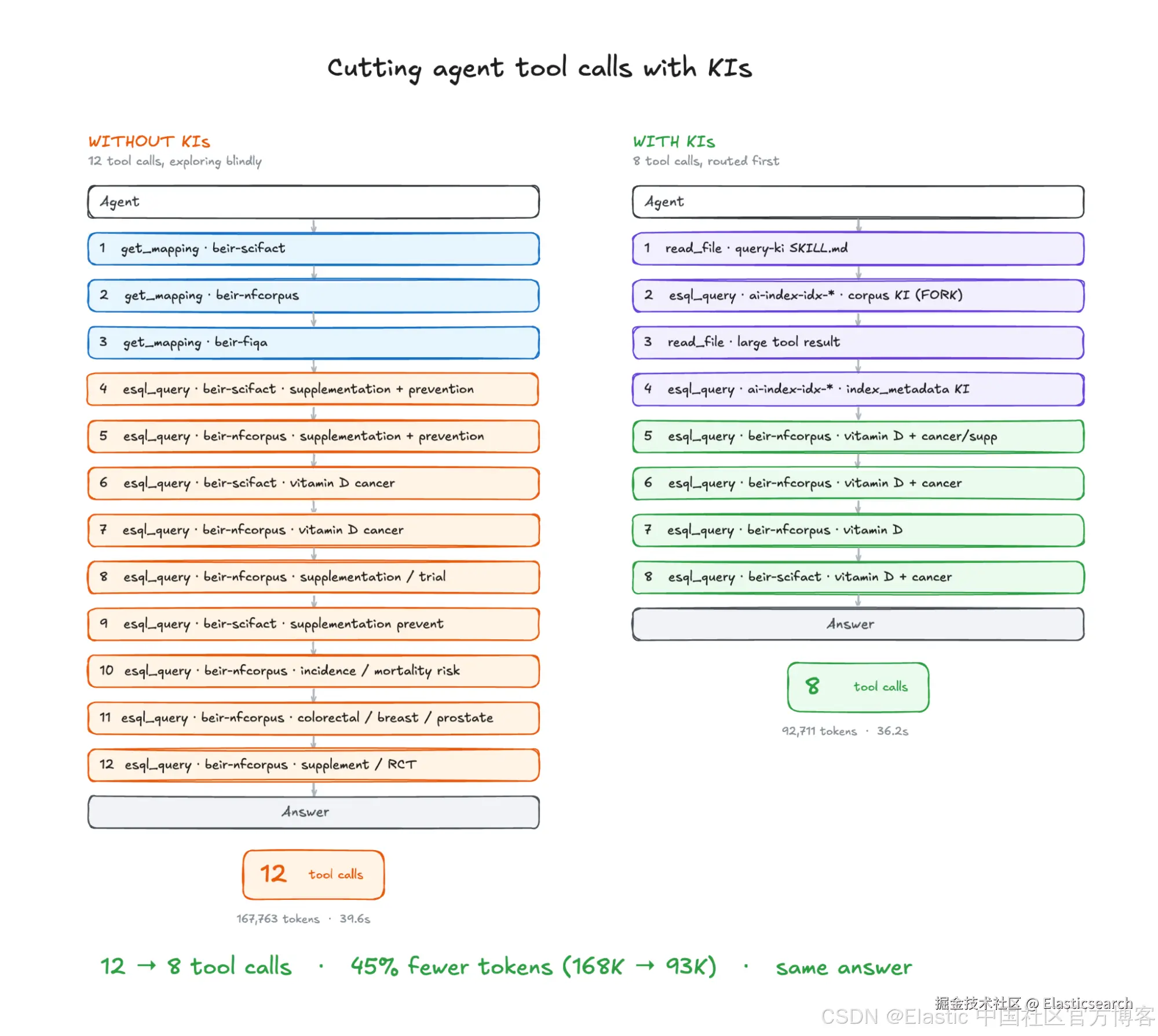
由于我们使用的是 agents,这些脚本的结果具有非确定性。不过,当我使用查询 Is there scientific evidence that vitamin D supplementation prevents cancer? 运行这些结果时,两个 agents 得出了相同的结论,但它们采用了不同的路径来得到这个结论:
| 指标 | 基线(无 AI Index) | 使用 AI Index |
|---|---|---|
| 总工具调用次数 | 12 | 8 |
read_file 调用次数 |
0 | 2 |
get_mapping 调用次数 |
3 | 0 |
esql_query 调用次数 |
9 | 6 |
| 查询的 indices 总数 | 2(在 beir-scifact 和 beir-nfcorpus 之间反复查询) |
1(beir-nfcorpus) |
| 消耗的 tokens | 167,763 | 92,711 |
| 延迟 | 39.58 秒 | 36.15 秒 |
| 答案 | 有依据、正确 | 有依据、正确 |
KI 得出的答案既有依据又正确,但一个有趣的数据点是,使用 KI 时,整体工具使用量和 token 使用量都更少(延迟大致相当)。以下是两条路径的并排对比:
在 Serverless 中运行完整的 AI Index pipeline
本演练深入介绍了自行构建 AI indices 和 KI 的方式。在生产环境中,你不会手动编写这些 workflows;setup agent 会生成它们,而反馈循环则会根据 agent 自身的 traces 不断优化 KI。但其核心组件正是你刚刚使用的这些:通过 workflow 提取 KI,将它们存储在 AI Index 中,然后通过 skill 检索它们。
管理上下文对于构建相关且高效的 agentic search 系统至关重要,而 AI indices 提供了一种利用 Elastic stack 的完整能力来管理这些上下文的方式。在 Serverless 中试用一下,并在我们的 Discuss forums 或 Community Slack 中的 #stack-kibana channel 告诉我们你的想法!
原文:Elasticsearch AI Indices: building context for agents | Elasticsearch Labs