手写 SQL 被一次 mvn generate 抹掉之后:我用一个 extension/ 子目录躲开 MyBatis 两个坑
本文基于我自己跟着机构写的一个 Spring Boot 论坛项目(Spring Boot 3.2.5 + mybatis-spring-boot-starter 3.0.3 + MyBatis Generator 1.4.2),以一次真实事故为线索讲透两个机制:overwrite=true 如何无声抹掉手写 SQL,以及 classpath:mapper/**/*.xml 为什么能把子目录里的 XML 一个不漏地扫进来。文中所有配置和代码片段均来自项目真实文件,关键结论附 spring-core 6.1.6 源码行号验证,顺带辟谣一个流传很广的"classpath: 自动升级"误区。(图片由AI生成)
引子:一次"能编译、能启动、运行期才炸"的事故
故事发生在迁移之前。那时 increaseArticleCount、decreaseArticleCount 这些手写 SQL 还躺在 BoardMapper.xml 的下半部分,和 MBG 生成的 CRUD 住在一个文件里。某次改表结构后跑了一遍 mvn mybatis-generator:generate,重新生成的 BoardMapper.xml 干干净净------手写 SQL 整段消失,没有警告,没有提示。
最阴的地方在后面:代码照样能编译 (DAO 接口没变),应用照样能启动 (XML 还在、namespace 还在),直到运行期调用到那个 statement,才抛 Invalid bound statement (not found)。编译期零信号、启动期零信号、运行期才炸,排查成本极高。
这次事故的根因是 pom.xml 里的一行配置,而解决方案是一个子目录:extension/。本文就沿着这条链讲下去:坑的根因 → 隔离方案 → 验证方案可行性 → 为新方案付出的新代价。
上篇:坑的根因------overwrite=true 与生成器领地
1.1 配置原文
pom.xml 第 168--184 行:
xml
<plugin>
    <groupId>org.mybatis.generator</groupId>
    <artifactId>mybatis-generator-maven-plugin</artifactId>
    <version>1.4.2</version>
    <configuration>
        <configurationFile>src/main/resources/mybatis/generatorConfig.xml</configurationFile>
        <verbose>true</verbose>
        <overwrite>true</overwrite>
    </configuration>
    <dependencies>
        <dependency>
            <groupId>com.mysql</groupId>
            <artifactId>mysql-connector-j</artifactId>
            <version>${mysql-connector.version}</version>
        </dependency>
    </dependencies>
</plugin>
第 175 行的 <overwrite>true</overwrite> 就是事故的题眼。
1.2 overwrite=true 到底意味着什么
一句话:每次执行 mvn mybatis-generator:generate,生成目标里已存在的同名文件会被整文件覆盖重写,你在里面写的每一行手写内容都会被抹掉,不做任何保留。
对照 overwrite=false(默认值)的行为是"尝试合并":MBG 用 XmlFileMergerJAXP 把新生成的 XML 与已有文件做 DOM 合并,尽量保留用户手工添加的节点。听起来很体贴,但这个合并机制对 XML 并不可靠------节点顺序、重复片段、手工修改的格式化都可能被搅乱,社区里"合并后文件面目全非"的抱怨并不少见。overwrite=true 则是另一种哲学:不跟你谈合并,全盘重写,行为完全可预测。代价很明确------生成文件里不许住手写代码。
1.3 生成器领地:generatorConfig.xml 划定的范围
MBG 的 XML 生成目标由 generatorConfig.xml 第 37--40 行指定:
xml
<!-- mapper.xml生成位置 -->
<sqlMapGenerator targetPackage="mapper"
                 targetProject="src/main/resources">
    <property name="enableSubPackages" value="true"/>
</sqlMapGenerator>
表清单在第 50--94 行,生成器只认这 5 张表:
xml
<!-- 配置生成表与实例(generatorConfig.xml 第 50--94 行) -->
<table tableName="t_article" domainObjectName="Article">
    <property name="useActualColumnNames" value="true"/>
</table>

<table tableName="t_article_reply" domainObjectName="ArticleReply">
    <property name="useActualColumnNames" value="true"/>
</table>

<table tableName="t_board" domainObjectName="Board">
    <property name="useActualColumnNames" value="true"/>
</table>

<table tableName="t_message" domainObjectName="Message">
    <property name="useActualColumnNames" value="true"/>
</table>

<table tableName="t_user" domainObjectName="User">
    <property name="useActualColumnNames" value="true"/>
</table>注意:t_article_like 和 t_notice 根本不在配置里 。两个事实合起来就是事故的完整解释:BoardMapper.xml 在生成器领地内,而 overwrite=true 让每次 generate 都是整文件重写------手写 SQL 住在里面,等于把心血放在随时会被推土机推平的地方。
事故时间线与隔离方案的完整对照见图
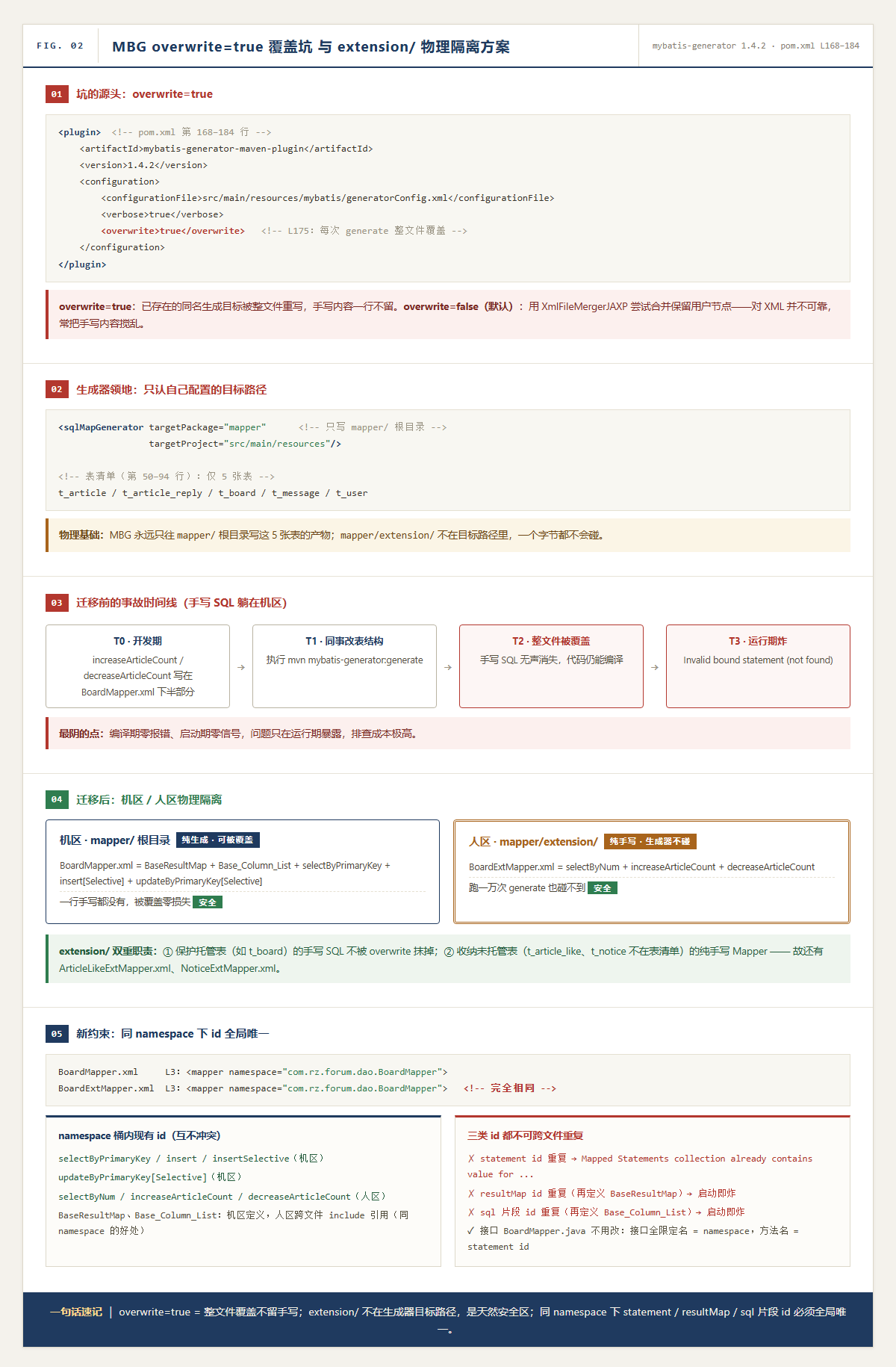
上篇一句话速记 :
overwrite=true= generate 时整文件覆盖、不留手写内容;生成器只认sqlMapGenerator配置的目标路径,领地内的文件永远处于"可能被推平"状态。
中篇:解决方案------机区 / 人区物理隔离
2.1 迁移后的现状:一块地划成两区
躲坑的思路不是"求生成器手下留情",而是物理隔离。迁移后的目录结构:
text
resources/
└── mapper/
    ├── extension/                  ← "人区":7 个纯手写 XML
    │   ├── ArticleExtMapper.xml
    │   ├── ArticleLikeExtMapper.xml
    │   ├── ArticleReplyExtMapper.xml
    │   ├── BoardExtMapper.xml
    │   ├── MessageExtMapper.xml
    │   ├── NoticeExtMapper.xml
    │   └── UserExtMapper.xml
    ├── ArticleMapper.xml           ← "机区":5 个 MBG 生成
    ├── ArticleReplyMapper.xml
    ├── BoardMapper.xml
    ├── MessageMapper.xml
    ├── NoticeMapper.xml            ← 特例:t_notice 未托管,手写但不会被覆盖
    └── UserMapper.xml
机区 mapper/ 根目录 = 生成器领地 。对 5 张托管表而言,根目录文件就是纯生成:看迁移后的 BoardMapper.xml,全部内容就是 MBG 的标准产物------全文如下,一个字的手写都没有:
xml
<?xml version="1.0" encoding="UTF-8"?>
<!DOCTYPE mapper PUBLIC "-//mybatis.org//DTD Mapper 3.0//EN" "http://mybatis.org/dtd/mybatis-3-mapper.dtd">
<mapper namespace="com.rz.forum.dao.BoardMapper">
  <resultMap id="BaseResultMap" type="com.rz.forum.model.Board">
    <id column="id" jdbcType="BIGINT" property="id" />
    <result column="name" jdbcType="VARCHAR" property="name" />
    <result column="articleCount" jdbcType="INTEGER" property="articleCount" />
    <result column="sort" jdbcType="INTEGER" property="sort" />
    <result column="state" jdbcType="TINYINT" property="state" />
    <result column="deleteState" jdbcType="TINYINT" property="deleteState" />
    <result column="createTime" jdbcType="TIMESTAMP" property="createTime" />
    <result column="updateTime" jdbcType="TIMESTAMP" property="updateTime" />
  </resultMap>
  <sql id="Base_Column_List">
    id, name, articleCount, sort, state, deleteState, createTime, updateTime
  </sql>
  <select id="selectByPrimaryKey" parameterType="java.lang.Long" resultMap="BaseResultMap">
    select
    <include refid="Base_Column_List" />
    from t_board
    where id = #{id,jdbcType=BIGINT}
  </select>
  <insert id="insert" parameterType="com.rz.forum.model.Board" useGeneratedKeys="true" keyProperty="id">
    insert into t_board (id, name, articleCount, sort, state, deleteState, createTime, updateTime)
    values (#{id,jdbcType=BIGINT}, #{name,jdbcType=VARCHAR}, #{articleCount,jdbcType=INTEGER}, ...)
  </insert>
  <!-- ... insertSelective ... updateByPrimaryKeySelective ... updateByPrimaryKey ... -->
</mapper>
只有 BaseResultMap、Base_Column_List、selectByPrimaryKey、insert、insertSelective、updateByPrimaryKeySelective、updateByPrimaryKey 这 7 个节点,被覆盖一万次也是零损失。
人区 mapper/extension/ = 纯手写 。BoardExtMapper.xml 全文如下,三个 statement 全是业务手写 SQL:
xml
<?xml version="1.0" encoding="UTF-8"?>
<!DOCTYPE mapper PUBLIC "-//mybatis.org//DTD Mapper 3.0//EN" "http://mybatis.org/dtd/mybatis-3-mapper.dtd">
<mapper namespace="com.rz.forum.dao.BoardMapper">
  <!-- 查询前 n 条有效板块记录 -->
  <select id="selectByNum" resultMap="BaseResultMap" parameterType="java.lang.Integer">
    SELECT
    <include refid="Base_Column_List"/>
    FROM t_board
    WHERE state = 0 AND deleteState = 0
    ORDER BY sort ASC
    LIMIT #{num,javaType=INTEGER};
    <!-- 根据板块 id 查询所有未被删除的帖子。不包含 content -->
  </select>

  <!-- 板块文章数自增 -->
  <update id="increaseArticleCount">
    update t_board
    set articleCount = articleCount + 1
    where id = #{id,jdbcType=BIGINT}
  </update>

  <!-- 板块文章数自减(不低于 0) -->
  <update id="decreaseArticleCount">
    update t_board
    set articleCount = case when articleCount > 0 then articleCount - 1 else 0 end
    where id = #{id,jdbcType=BIGINT}
  </update>
</mapper>
2.2 为什么 extension/ 绝对安全
因为 sqlMapGenerator 只声明了 targetPackage="mapper",MBG 永远只往自己配置里写的目标路径写东西,mapper/extension/ 不在其中------生成器不认识这个目录。于是形成稳定分工:生成器管根目录,人管 extension ,跑一万次 generate 也碰不到手写 SQL。这招的本质是"不依赖工具的自觉,靠物理隔离保证安全",比指望 MBG 的 merge 机制可靠一个数量级。
顺带解释目录树里埋的两个细节。其一,extension/ 里还有 ArticleLikeExtMapper.xml 和 NoticeExtMapper.xml,而 t_article_like、t_notice 根本不在 generatorConfig 的 5 张表清单里,所以 extension/ 实际承担双重职责:一是保护"被生成器托管的表"的手写 SQL 不被 overwrite 抹掉;二是收纳"生成器未托管的表"的纯手写 Mapper。一个目录,两种身份。
其二,根目录并不 100% 是机区 。NoticeMapper.xml 就躺在根目录、却是手写的------全文对比如下:
xml
<?xml version="1.0" encoding="UTF-8"?>
<!DOCTYPE mapper PUBLIC "-//mybatis.org//DTD Mapper 3.0//EN" "http://mybatis.org/dtd/mybatis-3-mapper.dtd">
<mapper namespace="com.rz.forum.dao.NoticeMapper">
  <resultMap id="BaseResultMap" type="com.rz.forum.model.Notice">
    <id column="id" jdbcType="BIGINT" property="id" />
    <result column="user_id" jdbcType="BIGINT" property="userId" />
    <result column="notice_type" jdbcType="INTEGER" property="noticeType" />
    <!-- ↑ notice_type 这种手写注释说明这是手写文件 -->
    <result column="content" jdbcType="VARCHAR" property="content" />
    <result column="is_read" jdbcType="TINYINT" property="isRead" />
    <result column="create_time" jdbcType="TIMESTAMP" property="createTime" />
  </resultMap>

  <insert id="insert" parameterType="com.rz.forum.model.Notice" useGeneratedKeys="true" keyProperty="id">
    insert into t_notice (user_id, notice_type, content, is_read, create_time)
    values (#{userId}, #{noticeType}, #{content}, #{isRead}, #{createTime})
    <!-- ← 只有这两个节点,明显不是 MBG 产物 -->
  </insert>
</mapper>
它敢躺在那儿,是因为 t_notice 本就不在 5 张表清单里------生成器永远不会产出同名文件,"被覆盖"无从谈起。这说明划界的真正判据不是目录,而是是否在生成器的表清单里:托管表的手写 SQL 必须进 extension/,未托管表的文件放哪里都安全;把未托管表的 Ext 文件也统一收进 extension/,只是让约定更整齐。
中篇一句话速记:机区纯生成、人区纯手写,靠目录隔离对抗工具覆盖;划界判据是"是否在生成器表清单里"而非目录本身。
下篇:验证方案可行性------子目录里的 XML 扫得到吗
隔离方案成立的前提是:MyBatis 必须能扫到 extension/ 子目录。如果 mapper-locations 只扫根目录,这方案就是自杀。所以下篇回答第二个问题------也才是这次事故的完整闭环。
3.1 配置原文
application.yml 第 29--35 行:
yaml
# MyBatis 配置
mybatis:
  mapper-locations: classpath:mapper/**/*.xml
  type-aliases-package: com.rz.forum.model
  configuration:
    map-underscore-to-camel-case: true
    log-impl: org.apache.ibatis.logging.stdout.StdOutImpl
第 31 行的信息量拆开看是三层:classpath: 是资源前缀,mapper/ 是目录前缀,**/*.xml 是 Ant 风格通配符模式。"能不能扫到子目录"的第一层答案藏在 ** 里。
3.2 第一层:* 和 ** 的语义差异
Spring 的资源模式用的是 Ant 风格通配符,三种符号语义完全不同:
| 写法 | 通配符语义 | 能否匹配 extension/ 下的 XML |
|---|---|---|
mapper/*.xml |
* 只匹配一个 路径片段,不能跨 / |
否。只命中 mapper/UserMapper.xml 这类根目录文件 |
mapper/**/*.xml |
** 匹配零个或多个目录层 |
是。根目录和 mapper/extension/BoardExtMapper.xml 都命中 |
mapper/**/*ExtMapper.xml |
** 管深度,* 管文件名 |
是。各层里 Ext 命名的文件都收(本项目恰好全在 extension/) |
这里有一个比"能跨目录"更重要的细节:** 匹配的是零层或多层,不是"恰好一层" 。所以 mapper/*.xml 匹配不到 mapper/extension/BoardExtMapper.xml(隔了两层),而 mapper/**/*.xml 既能匹配只隔零层的 mapper/BoardMapper.xml,也能匹配隔一层的 mapper/extension/BoardExtMapper.xml------甚至哪天你在 extension/ 下再建一个 deep/ 子目录,mapper/extension/deep/XxxMapper.xml 照样命中。"任意深度"四个字是理解整个配置的钥匙。
但通配符语义只回答了"模式写得对不对",没有回答"是谁、按什么流程把这个字符串变成一个个 Resource 的"。后者才是机制层。
3.3 第二层:源码解析链条
mapper-locations 的值最终由 MyBatis-Spring 的 SqlSessionFactoryBean 交给 Spring 的 PathMatchingResourcePatternResolver 解析成 Resource[]。完整源码请见码云项目 /spring-core-6.1.6-sources.jar,以下标注关键行号佐证(Spring Boot 3.2.5 对应 spring-core 6.1.6):
整个解析分四步:
第 1 步 · 入口分流(L324--356) 。classpath: + 通配符 → L349 findPathMatchingResources;无通配符 → L353 getResource 单资源查找。
java
// PathMatchingResourcePatternResolver.java L324-356 (见码云/spring-core)
public Resource[] getResources(String locationPattern) {
    if (isPattern(locationPattern.substring(prefixEnd))) {
        return findPathMatchingResources(locationPattern);  // L349
    } else {
        return new Resource[] {getResource(locationPattern)};  // L353
    }
}
第 2 步 · 截断根目录(L568) 。determineRootDir() 从尾部往前退直到不再是模式 → classpath:mapper/ + 子模式 **/*.xml。
java
// PathMatchingResourcePatternResolver.java L568, L608-618
String rootDirPath = determineRootDir(locationPattern);  // L568
return location.substring(0, rootDirEnd);  // 返回 classpath:mapper/
第 3 步 · 递归遍历(L570--590) 。getResources(rootDirPath) 递归解析根目录;文件系统 → L589 doFindPathMatchingFileResources 全量扫描。
java
// PathMatchingResourcePatternResolver.java L570, L589
Resource[] rootDirResources = getResources(rootDirPath);  // L570
result.addAll(doFindPathMatchingFileResources(...));  // L589 递归扫描 extension/
第 4 步 · Ant 匹配(L571) 。逐文件与 **/*.xml 匹配,收进 LinkedHashSet 去重。
java
// PathMatchingResourcePatternResolver.java L571
Set<Resource> result = new LinkedHashSet<>(64);
return result.toArray(new Resource[0]);**第 2 步 · 截断根目录(L568)**。`determineRootDir()` 从尾部往前退直到不再是模式 → `classpath:mapper/` + 子模式 `**/*.xml`。
```java
// PathMatchingResourcePatternResolver.java L568, L608-618 (见码云/spring-core)
String rootDirPath = determineRootDir(locationPattern); // L568
return location.substring(0, rootDirEnd); // 返回 classpath:mapper/第 3 步 · 递归遍历(L570--590) 。getResources(rootDirPath) 递归解析根目录;文件系统 → L589 doFindPathMatchingFileResources 全量扫描。
java
// PathMatchingResourcePatternResolver.java L570, L589 (见码云/spring-core)
Resource[] rootDirResources = getResources(rootDirPath);  // L570
result.addAll(doFindPathMatchingFileResources(...));  // L589 递归扫描 extension/
第 4 步 · Ant 匹配(L571) 。逐文件与 **/*.xml 匹配,收进 LinkedHashSet 去重。
java
// PathMatchingResourcePatternResolver.java L571 (见码云/spring-core)
Set<Resource> result = new LinkedHashSet<>(64);
return result.toArray(new Resource[0]);
实际验证:应用启动时的日志会打印解析到的 mapper...
[MyBatis] Loaded mapper: classpath:mapper/extension/BoardExtMapper.xml
[MyBatis] Loaded mapper: classpath:mapper/UserMapper.xml
[MyBatis] Loaded mapper: classpath:mapper/extension/UserExtMapper.xml
...
解析流程全景图如下
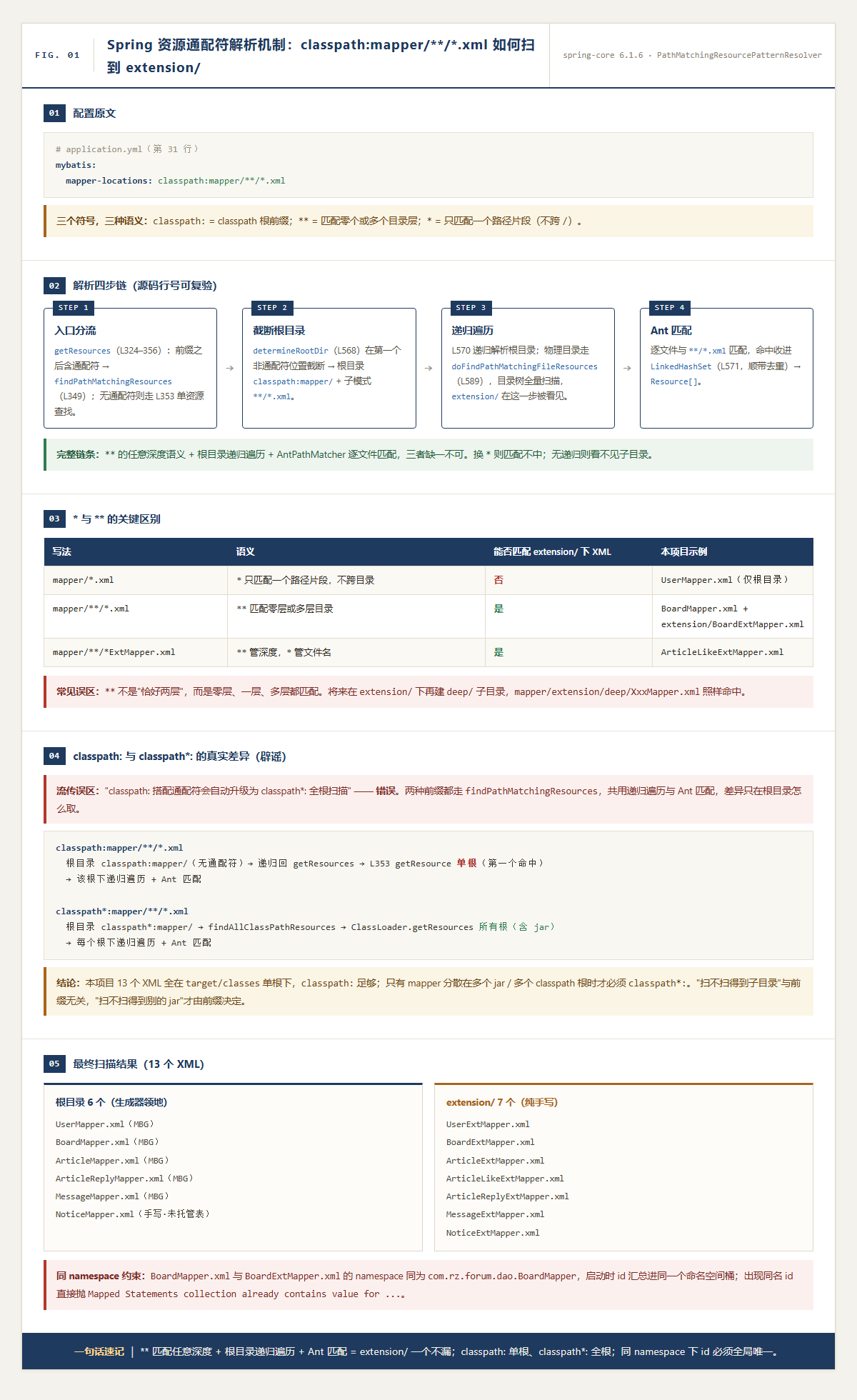
文字版流程:
text
classpath:mapper/**/*.xml
        │ ① getResources 入口:前缀后含通配符 → findPathMatchingResources
        ▼
② determineRootDir 截断 ──→ 根目录 classpath:mapper/  +  子模式 **/*.xml
        ▼
③ 定位根目录 → target/classes/mapper/(物理目录)
        ▼  doFindPathMatchingFileResources:目录树全量递归遍历
   mapper/UserMapper.xml ...... mapper/extension/BoardExtMapper.xml ......(全部看见)
        ▼
④ AntPathMatcher 逐文件匹配 **/*.xml → 命中的 13 个 XML 收进 Resource[]
        ▼
SqlSessionFactory 加载全部 statement所以"能扫到子目录"的完整链条是三个齿轮咬合的结果:** 通配符提供"任意深度"的匹配语义 + 解析器对根目录做递归目录遍历 + AntPathMatcher 逐文件匹配 。缺任何一个都不成立:把 ** 换成 *,遍历照样递归但匹配不中;没有递归遍历,** 写得再对也看不见子目录里的文件。隔离方案在这个机制下被验证为可行。
3.4 辟谣专场:classpath: 不会"自动升级"成 classpath*:
讲到这里必须插一段辟谣,因为网上流传着一个非常诱人的说法:"classpath: 一旦搭配通配符,解析器会自动升级为 classpath*: 的行为,扫描所有 classpath 根。"------这个说法是错的,而且错得很隐蔽。把源码摆出来:
两种前缀最终都汇进 findPathMatchingResources,递归遍历和 Ant 匹配是共用的,真正的差异只在第 570 行"根目录怎么取":
text
classpath:mapper/**/*.xml
  → 根目录 classpath:mapper/(不含通配符)
  → 递归回 getResources 的 else 分支 → 第 353 行 getResource 单资源查找
  → 单根:classpath 上第一个命中的 mapper/ 目录

classpath*:mapper/**/*.xml
  → 根目录 classpath*:mapper/(带 classpath*: 前缀)
  → 第 326 行 classpath*: 分支、无通配符 → findAllClassPathResources
→ ClassLoader.getResources("mapper/") → 所有根:每个 jar、每个 classes 目录里的 mapper/换句话说,classpath: 配通配符时,递归扫描的范围仍然只有一个根 ------classpath 上第一个解析到 mapper/ 的位置。它和 classpath*: 共享"递归遍历 + Ant 匹配"的能力,但不共享"全根发现"的能力。
那为什么本项目写 classpath: 完全没问题?因为本项目的 13 个 mapper XML 全部位于应用自身的 target/classes 这一个 classpath 根下,单根递归遍历就足以覆盖 extension/。classpath: 和 classpath*: 的分歧只在"mapper 分散在多个 jar / 多个 classpath 根"的场景才会暴露:比如你把 UserMapper.xml 打进了一个公共依赖 jar,应用自己的 target/classes 里也有 mapper/ 目录,那么 classpath: 只会扫到第一个根,另一个根里的 XML 静默丢失------不报错、不警告,调用时才有 Invalid bound statement。这种场景才必须写 classpath*:。
所以准确的记忆姿势是:"扫不扫得到子目录"由 ** + 递归遍历决定,与前缀无关;"扫不扫得到别的 jar"才由 classpath: / classpath*: 决定。 把这两件事分开记,就不会被"自动升级"这类顺口溜带偏。
并且,在源码注释直接描述了 classpath: 配 Ant 模式的边界:
"may exist in only one class path location, but when a location pattern such as classpath:com/example/**/service-context.xml is used to try to resolve it, the resolver will work off the (first) URL returned by getResource("com/example"). If the com/example base package node exists in multiple class path locations, the actual desired resource may not be present under the com/example base package in the first URL. Therefore, preferably, use classpath*: with the same Ant-style pattern in such a case, which will search all class path locations that contain the base package."
作者(Juergen Hoeller 团队)白纸黑字:classpath: + 通配符,是基于 getResource() 返回的"第一个 URL"在工作,多根场景必须 classpath*: 才能搜全。所谓"自动升级"在源码里不存在。
机制证据:getResources 的分支结构(第 323--356 行)
java
public Resource[] getResources(String locationPattern) {
    if (locationPattern.startsWith("classpath*:")) {
        ...
        if (isPattern(去前缀后的部分)) {
            return findPathMatchingResources(locationPattern);      // ① classpath*: + 通配符
        }
        return findAllClassPathResources(...);                       // ② classpath*: 无通配符(全根)
    }
    else {
        int prefixEnd = locationPattern.indexOf(':') + 1;
        if (isPattern(locationPattern.substring(prefixEnd))) {
            return findPathMatchingResources(locationPattern);      // ③ classpath: + 通配符
        }
        return new Resource[]{ getResourceLoader().getResource(locationPattern) };  // ④ 单资源
    }
}
①②③ 三个分支汇进同一个 findPathMatchingResources------所以"递归遍历 + Ant 匹配"确实是共用的(这就是误读的温床)。
分歧点:findPathMatchingResources 第 570 行的递归调用
java
protected Resource[] findPathMatchingResources(String locationPattern) {
    String rootDirPath = determineRootDir(locationPattern);   // 截到第一个通配符前
    String subPattern = locationPattern.substring(rootDirPath.length());
    Resource[] rootDirResources = getResources(rootDirPath);  // ← 关键!递归调用 getResources(rootDir)
    for (Resource rootDirResource : rootDirResources) {
        ... doFindPathMatchingFileResources / JarResources 递归遍历 + AntPathMatcher 匹配 ...
    }
}
注意第 570 行:根目录的发现方式又递归回了 getResources(rootDirPath),而 rootDirPath 此时不含通配符,于是再次命中分支判定:
| 原始写法 | determineRootDir 结果 | 递归 getResources(rootDirPath) 走的分支 |
根目录发现能力 |
|---|---|---|---|
classpath:mapper/**/*.xml |
classpath:mapper/ |
分支 ④ → getResourceLoader().getResource(...) → ClassLoader.getResource |
单根:第一个命中的根(源码第 353 行) |
classpath*:mapper/**/*.xml |
classpath*:mapper/ |
分支 ② → findAllClassPathResources → ClassLoader.getResources |
全根:所有 classpath 根(源码第 387 行) |
所以两种前缀共享"递归遍历 + Ant 匹配"(doFindPathMatchingFileResources / doFindPathMatchingJarResources ),不共享"全根发现"(getResource vs getResources)。分歧藏在 findPathMatchingResources 对根目录的递归解析里,不把 getResources 的分支结构看全,容易被"汇进同一个方法"误导。
3.5 交叉验证:实际扫到了什么
按上面的机制推演,本配置加载的 XML 清单应该是 6 + 7 = 13 个,与目录树逐一对照:
根目录 6 个:其中 UserMapper.xml、BoardMapper.xml、ArticleMapper.xml、ArticleReplyMapper.xml、MessageMapper.xml 是 MBG 生成;NoticeMapper.xml 是根目录里唯一的手写文件------t_notice 不在生成器的表清单里,generate 永远不会覆盖它,放根目录也安全(中篇 2.2 已展开)。
人区 7 个(手写):UserExtMapper.xml、BoardExtMapper.xml、ArticleExtMapper.xml、ArticleLikeExtMapper.xml、ArticleReplyExtMapper.xml、MessageExtMapper.xml、NoticeExtMapper.xml。
实际验证 :应用启动时的日志会打印解析到的 mapper(log-impl: StdOutImpl 生效了),你可以看到类似这样的输出:
==> Preparing: select * from t_board where id = ?
==> Parameters: 1(Long)
...
[MyBatis] Loaded mapper: classpath:mapper/extension/BoardExtMapper.xml
[MyBatis] Loaded mapper: classpath:mapper/UserMapper.xml
[MyBatis] Loaded mapper: classpath:mapper/extension/UserExtMapper.xml
...
只要 13 个 xml 都在列表里,隔离方案闭环成立。你也可以直接检查 target/classes/mapper/ 目录结构,确认 13 个文件确实存在。
下篇一句话速记 :
**匹配任意深度目录,PathMatchingResourcePatternResolver 截断出根目录后递归遍历 + AntPathMatcher 逐文件匹配,所以extension/一个不漏;classpath:只解析单根、classpath*:才全根,本项目单根足够。
尾篇:新代价------同 namespace 下 id 全局唯一
目录隔离解决了"被覆盖",扫描机制验证了"能加载",但这个故事还有最后一个代价。注意中篇 BoardExtMapper.xml 的第 3 行:
xml
<mapper namespace="com.rz.forum.dao.BoardMapper">和 BoardMapper.xml 第 3 行完全相同。MyBatis 启动解析时,会把同一 namespace 下所有文件的全部节点汇总进同一个"命名空间桶",桶内规则是 id 全局唯一,覆盖三类节点:
第一类是 statement id 。假设迁移时在 BoardMapper.xml 里忘了删 increaseArticleCount,Ext 文件里又写了一份,启动直接抛:
text
Mapped Statements collection already contains value for
com.rz.forum.dao.BoardMapper.increaseArticleCount
应用起不来。这是最直观的"同 namespace 限制",也是迁移操作的正确姿势检查项:搬过去之前,必须确认机区文件里没有同名 id 残留。
第二类是 resultMap id ,第三类是 <sql> 片段 id 。这两类反而体现了同 namespace 的好处:BoardExtMapper.xml 里的 selectByNum 直接写了 resultMap="BaseResultMap" 和 <include refid="Base_Column_List"/>,而这两个节点定义在 BoardMapper.xml 里------跨文件引用之所以成立,前提就是两个文件共享同一个命名空间 。好处和约束是一枚硬币的两面:既然共享,就不能在 Ext 文件里再定义一遍 BaseResultMap 或 Base_Column_List,否则同样启动即炸。
最后补一个让这次迁移显得优雅的点:DAO 接口一行不用改 。MyBatis 的绑定规则是"接口全限定名 = namespace,方法名 = statement id",只要这两个对应关系在,SQL 写在哪个 XML 文件里无所谓。所以这次手写 SQL 搬家是纯粹的配置文件迁移,BoardMapper.java 里的方法签名原封不动,Service 层调用也原封不动。
尾篇一句话速记 :多文件共享同一 namespace 后,statement id、resultMap id、
<sql>片段 id 都必须全局唯一,否则启动报 "already contains value" 直接挂;好处是跨文件引用免费,接口零改动。
结语:一个子目录,两个机制,三个收获
回看整个设计,会发现上篇和下篇其实是同一个故事的两半:下篇的 ** 保证了"人区无论藏在哪层子目录都能被加载",上篇的目录隔离保证了"人区永远不会被推土机推平"------加载机制和覆盖机制在 extension/ 这个目录上达成了和解:生成器不写它,解析器却扫得到它。而和解的代价是尾篇的 id 唯一性约束,写 Ext 文件时心里要始终装着那张"命名空间桶"的清单。
三个可以带走的收获。其一,事故复盘要追到配置语义层 :这次事故的根因不是"谁跑错了命令",而是 overwrite=true 的整文件覆盖语义与"手写 SQL 住在生成文件里"的布局冲突,改布局才能根治。其二,当两个工具会写同一块地时,最可靠的协调方式不是约定和自觉,而是划界 :MBG 与手写 SQL 的冲突用目录划界解决;同理,代码生成与手写逻辑在 Java 侧也可以用包划界(generated 包 vs custom 包),CI 里的自动格式化与人工精调可以用文件白名单划界。物理隔离之所以可靠,是因为它把"希望对方别碰"变成了"对方根本没有碰的入口"。其三,机制层的知识要敢用源码校准 :"** 任意深度 + 递归遍历 + Ant 匹配"和"classpath: 单根 / classpath*: 全根"这两条结论,都是对着 spring-core 源码一行行核出来的,比任何顺口溜都牢靠。
能够把这条链条完整说出来基本就到位了:事故的运行期特征 → overwrite=true 的整文件覆盖语义 → 目录隔离方案与划界判据 → ** 的任意深度语义与解析四步链 → classpath: / classpath*: 的真实差异(顺带辟谣"自动升级")→ 同 namespace 的 id 唯一性约束。事故、机制、方案、代价四层都齐了。
项目完整代码在 Gitee 链接,一个还在持续重构优化的学习阶段练手项目,代码里肯定还有没打磨到的地方(海量 bug 待修复 ing)。文中所有配置都可以在码云中找到;如果你对照代码发现问题,欢迎指出~