
个人主页:小则又沐风
个人专栏:<数据结构>
<竞赛专栏>
目录
前言
我们目前的项目知识简单的实现了代码的编译的功能,显而易见的是我们还需要代码的运行的功能.
今天我们的任务就是来实现一下项目中的代码运行的模块
代码与运行模块
在实现这个模块之前我们需要建立起来一个共识:
首先我们将用户提交的代码运行我们关心的是什么???
我们这个模块并不是关心用户的代码运行是否正确.我们关心的是用户的代码是否能够运行起来.
所以我们关心的就是代码运行的错误或者是正常.
至于代码运行的结果是否正确就是项目的另外的模块了.(需要对运行结果和我们提供的测试用例进行比对)
在确定我们运行模块的主要任务之后我们现在来编写一下我们的代码
代码思路
我们实现这个模块的思路还是通过创建子进程进行进程替换来完成的.
代码运行的我们需要知道的是代码运行的输出结果是什么,需要知道如果代码运行出错的话错误的原因是什么.
当然成熟的项目也需要提供给用户一个自测的功能.也就是需要提供一个输入的接口
所以我们需要产生三个文件
cpp
#pragma once
#include <iostream>
#include <string>
#include <stdio.h>
#include <unistd.h>
#include <fcntl.h>
#include <unistd.h>
#include <sys/stat.h>
#include <sys/wait.h>
#include "../comm/util.hpp"
#include "../comm/Log.hpp"
using namespace LogMoudle;
using namespace util;
class ns_run
{
public:
    ns_run()
    {
    }
    ~ns_run()
    {
    }

public:
    static int Run(const std::string &file_name)
    {
        std::string std_in = PathUtil::StdIn(file_name);
        std::string std_out = PathUtil::StdOut(file_name);
        std::string std_error = PathUtil::StdError(file_name);
        std::string _excute = PathUtil::Exe(file_name);
        umask(0);
        int std_infd = open(std_in.c_str(), O_CREAT | O_RDONLY, 0644);
        int std_outfd = open(std_out.c_str(), O_CREAT | O_WRONLY, 0644);
        int std_errorfd = open(std_error.c_str(), O_CREAT | O_WRONLY, 0644);
        int fd = fork();
        if (fd < 0)
        {
            LOG(LogLevel::ERROR) << "fork error";
            close(std_infd);
            close(std_outfd);
            close(std_errorfd);
            return -1;
        }
        else if (fd == 0)
        {
            dup2(std_infd, 0);
            dup2(std_outfd, 1);
            dup2(std_errorfd, 2);
            execl(_excute.c_str(), _excute.c_str(), nullptr);
            LOG(LogLevel::ERROR) << "execl error";
            exit(1);
        }
        else
        {
            int status;
            close(std_infd);
            close(std_outfd);
            close(std_errorfd);
            waitpid(fd, &status, 0);
            LOG(LogLevel::INFO) << "运行完毕 : " << (status & 0x7F);
            return status & 0x7f;
        }
    }
};
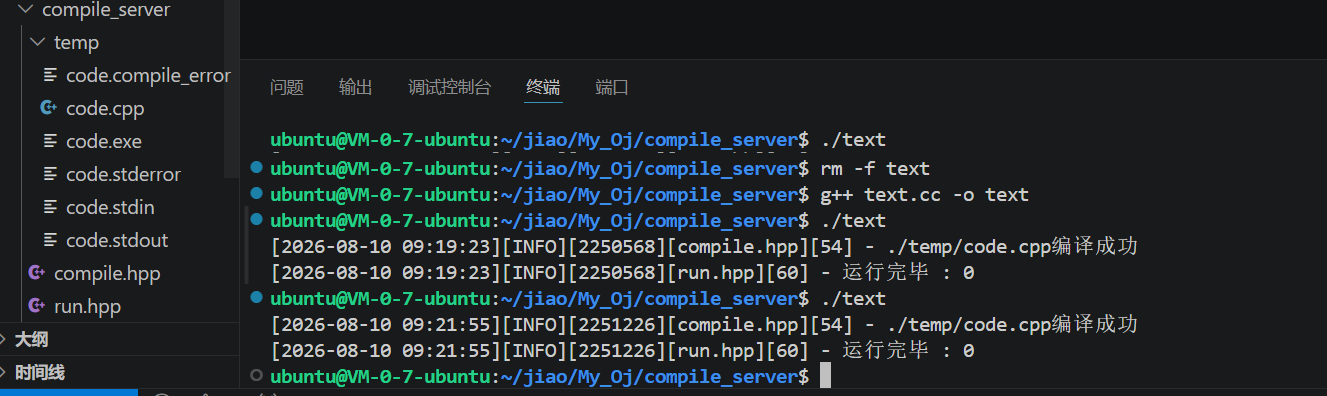
现在我们来测试一下我们的代码
cpp
#include<iostream>
using namespace std;
int main()
{
    cout<<"hello"<<endl;
    return 0;
}
cpp
#include "compile.hpp"
#include"run.hpp"
int main()
{

    Compile::my_compile("code");
    int n=ns_run::Run("code");
    return 0;
}

管理资源分配上限
现在我们的代码是可以做到对用户提供的代码进行编译和运行的,但是现在有一个问题就是如果有恶意的代码想要占用我们cpu的资源的代码我们的程序也会运行这个代码.
在我们使用成熟的OJ的时候我们会遇到代码超时和内存超出的问题,我们也需要类似的机制来保护我们的程序,所以我们需要对用户的代码进行时间和内存分配进行限制
cpp
static void SetProcLimit(int _cpu_limit, int _mem_limit)
    {
        // cpu 限制
        struct rlimit cpu_rlimit;
        cpu_rlimit.rlim_cur = _cpu_limit;
        cpu_rlimit.rlim_max = RLIM_INFINITY;
        setrlimit(RLIMIT_CPU, &cpu_rlimit);

        // 内存限制单位是kb
        struct rlimit mem_rlimit;
        mem_rlimit.rlim_max = RLIM_INFINITY;
        mem_rlimit.rlim_cur = _mem_limit * 1024;
        setrlimit(RLIMIT_AS, &mem_rlimit);
    }
    static int Run(const std::string &file_name, int _cpu_limit, int _mem_limit)
    {
        std::string std_in = PathUtil::StdIn(file_name);
        std::string std_out = PathUtil::StdOut(file_name);
        std::string std_error = PathUtil::StdError(file_name);
        std::string _excute = PathUtil::Exe(file_name);
        umask(0);
        int std_infd = open(std_in.c_str(), O_CREAT | O_RDONLY, 0644);
        int std_outfd = open(std_out.c_str(), O_CREAT | O_WRONLY, 0644);
        int std_errorfd = open(std_error.c_str(), O_CREAT | O_WRONLY, 0644);
        int fd = fork();
        if (fd < 0)
        {
            LOG(LogLevel::ERROR) << "fork error";
            close(std_infd);
            close(std_outfd);
            close(std_errorfd);
            return -1;
        }
        else if (fd == 0)
        {
            dup2(std_infd, 0);
            dup2(std_outfd, 1);
            dup2(std_errorfd, 2);
            SetProcLimit(_cpu_limit, _mem_limit);
            execl(_excute.c_str(), _excute.c_str(), nullptr);
            LOG(LogLevel::ERROR) << "execl error";
            exit(1);
        }
        else
        {
            int status;
            close(std_infd);
            close(std_outfd);
            close(std_errorfd);
            waitpid(fd, &status, 0);
            LOG(LogLevel::INFO) << "运行完毕 : " << (status & 0x7F);
            return status & 0x7f;
        }
    }
下面我们来介绍一个库,这个库中的方法可以帮助我们轻松实现序列化和反序列化
这个库怎么使用呢?
我来演示一下
cpp
#include "compile.hpp"
#include <jsoncpp/json/json.h>
#include"run.hpp"
int main()
{

    // Compile::my_compile("code");
    // //int n=ns_run::Run("code");
   Json::Value in_value;
   in_value["code"]="zhangsan";
   in_value["age"]=18;
    Json::StyledWriter writer;
    std::string out=writer.write(in_value);
    std::cout<<out;
    Json::Value out_value;
    Json::Reader read;
    read.parse(out,out_value);
    std::string code=out_value["code"].asCString();
    int age=out_value["age"].asInt();
    std::cout<<code<<"\n"<<age<<std::endl;
    return 0;
}
具体上是怎么使用的呢?
首先我们需要定义出一个Json::value
假设我们需要进行序列化,我们就将我们需要序列话的数据进行填写
然后定义出一个 Json::StyledWriter 对象将我们的value值写入到字符串中
读取的话就是类似的步骤,
首先定义出一个value对象和一个Reader对象,调用相关的读函数
将我们需要读的json字符串读取到我们的value中
然后读取value中的数据
合并代码(编译和运行--引入json库)
cpp
#include <jsoncpp/json/json.h>
#include "run.hpp"
#include "compile.hpp"
#include "../comm/util.hpp"
#include "../comm/Log.hpp"
using namespace LogMoudle;
using namespace util;
class com_run
{
public:
    com_run()
    {
    }
    ~com_run()
    {
    }

public:
    static std::string StuToCode(int stu_code, const std::string &file_name)
    {
        std::string out;
        switch (stu_code)
        {
        case 0:
            out = "编译运行成功";
            break;
        case -1:
            out = "代码为空";
            break;
        case -2:
            out = "未知错误";
            break;
        case -3:
            FileUtil::ReadFile(file_name, &out, true);
            break;
        case SIGABRT:
            out = "内存超出限制";
            break;
        case SIGXCPU:
            out = "cpu运行时间超限";
            break;
        case SIGFPE:
            out = "浮点数溢出";
            break;
        default:
            break;
        }
        return out;
    }
    // code
    // input
    // cpulimit
    // memlimit
    static void Start(const std::string &in_json, std::string *out_json)
    {
        Json::Value in_value;
        Json::Reader read;
        read.parse(in_json, in_value);
        std::string code = in_value["code"].asCString();
        std::string input = in_value["input"].asCString();
        int cpulimit = in_value["cpulimt"].asInt();
        int memlimit = in_value["memlimt"].asInt();
        int stu_code = 0;
        int run_code = 0;
        std::string file_name;
        Json::Value out_value;
        if (code.size() == 0)
        {
            // 代码为空
            stu_code = -1;
            goto END;
        }
        file_name = FileUtil::MakeUniqueFileName();
        if (!FileUtil::WriteFile(PathUtil::Src(file_name), code))
        {
            stu_code = -2; // 未知错误
            goto END;
        }
        if (!Compile::my_compile(file_name))
        {
            stu_code = -3; // 编译错误
            goto END;
        }
        run_code = ns_run::Run(file_name, cpulimit, memlimit);
        if (run_code < 0)
        {
            stu_code = -2;
            goto END;
        }
        else if (run_code > 0)
        {
            stu_code = run_code;
            goto END;
        }
        else
        {
            stu_code = 0;
        }
    END:
        out_value["stu"] = stu_code;
        out_value["reason"] = StuToCode(stu_code, file_name);
        if (stu_code == 0)
        {
            std::string out_put;
            FileUtil::ReadFile(PathUtil::StdOut(file_name), &out_put, true);
            out_value["output"] = out_put;
            std::string _stderror;
            FileUtil::ReadFile(PathUtil::StdError(file_name), &_stderror, true);
            out_value["stderror"] = _stderror;
        }
        Json::StyledWriter writer;
        *out_json=writer.write(out_value);
    }
};
现在我们的代码完成了合并的工作现在我们就可以对传来的json串进行编译和运行了,但是我们每次工作都会生成许许多多的临时文件,我们需要在工作的收尾部分对这些产生的临时文件进行删除
删除临时文件
cpp
static void RvTempFile(const std::string file_name)
    {
        std::string SRC=PathUtil::Src(file_name);
        if(FileUtil::IsFileExists(SRC))
        {
            unlink(SRC.c_str());
        }

        std::string STDERROR=PathUtil::StdError(file_name);
        if(FileUtil::IsFileExists(STDERROR))
        {
            unlink(STDERROR.c_str());
        }

        std::string _compile_error=PathUtil::CompilerError(file_name);
        if(FileUtil::IsFileExists(_compile_error))
        {
            unlink(_compile_error.c_str());
        }

        std::string _exe=PathUtil::Exe(file_name);
        if(FileUtil::IsFileExists(_exe))
        {
            unlink(_exe.c_str());
        }

        std::string _stdin=PathUtil::StdIn(file_name);
        if(FileUtil::IsFileExists(_stdin))
        {
            unlink(_stdin.c_str());
        }

        std::string _stdout=PathUtil::StdOut(file_name);
        if(FileUtil::IsFileExists(_stdout))
        {
            unlink(_stdout.c_str());
        }
    }
现在我们的项目中的编译和运行的模块基本完成