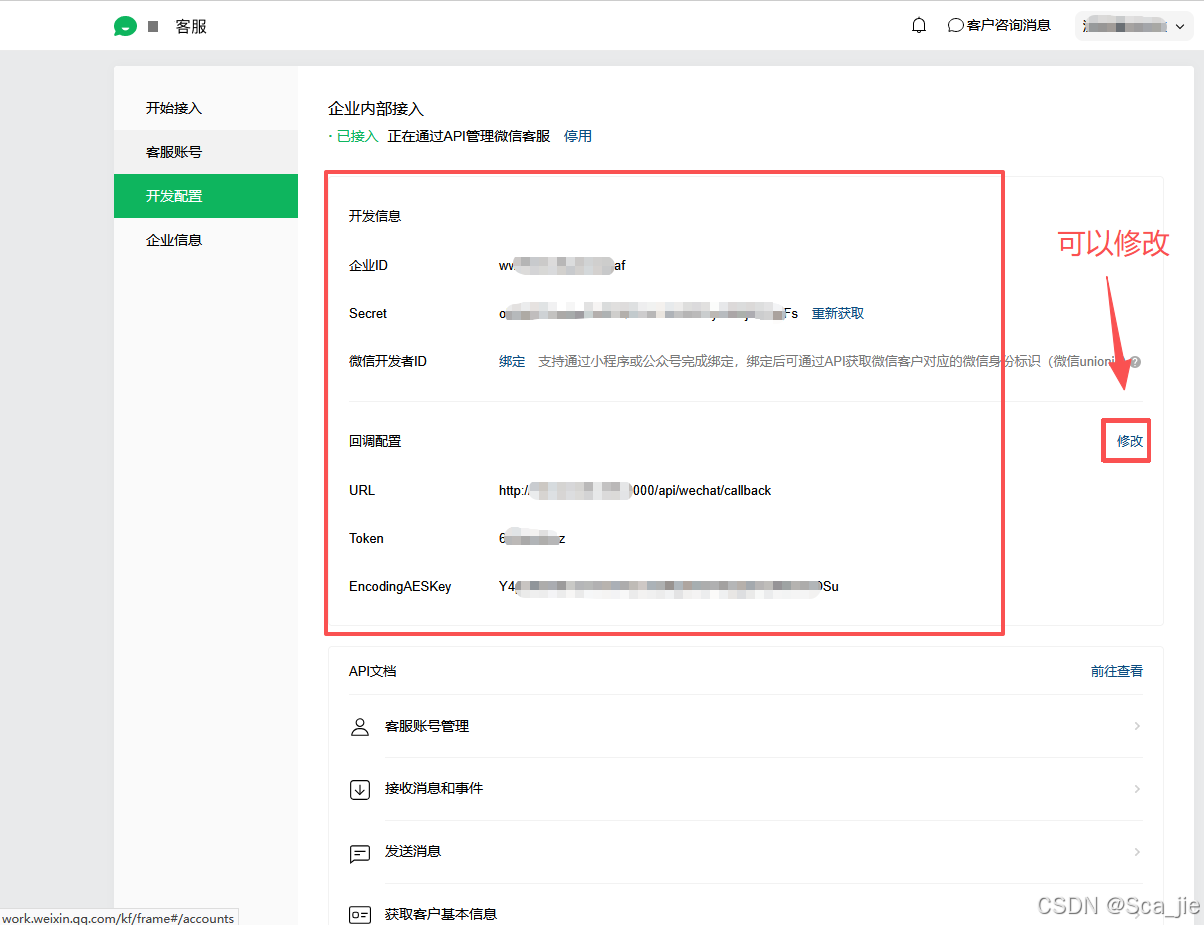
一、启用API接入
1、开启使用
在【开发配置】页面顶部,点击【开始使用】API接入。
javascript
// 后台链接
url='https://kf.weixin.qq.com/kf/frame#/config'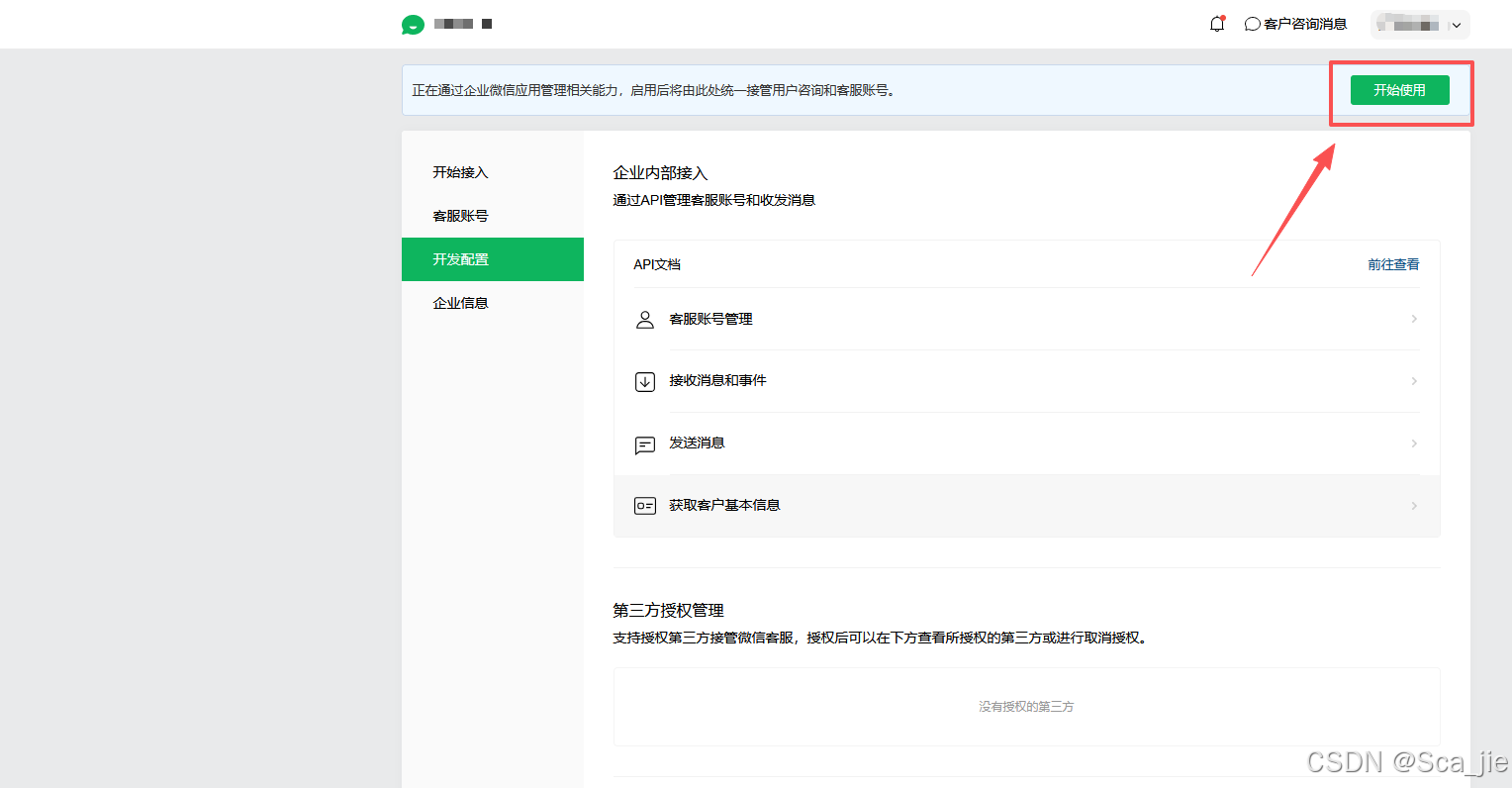
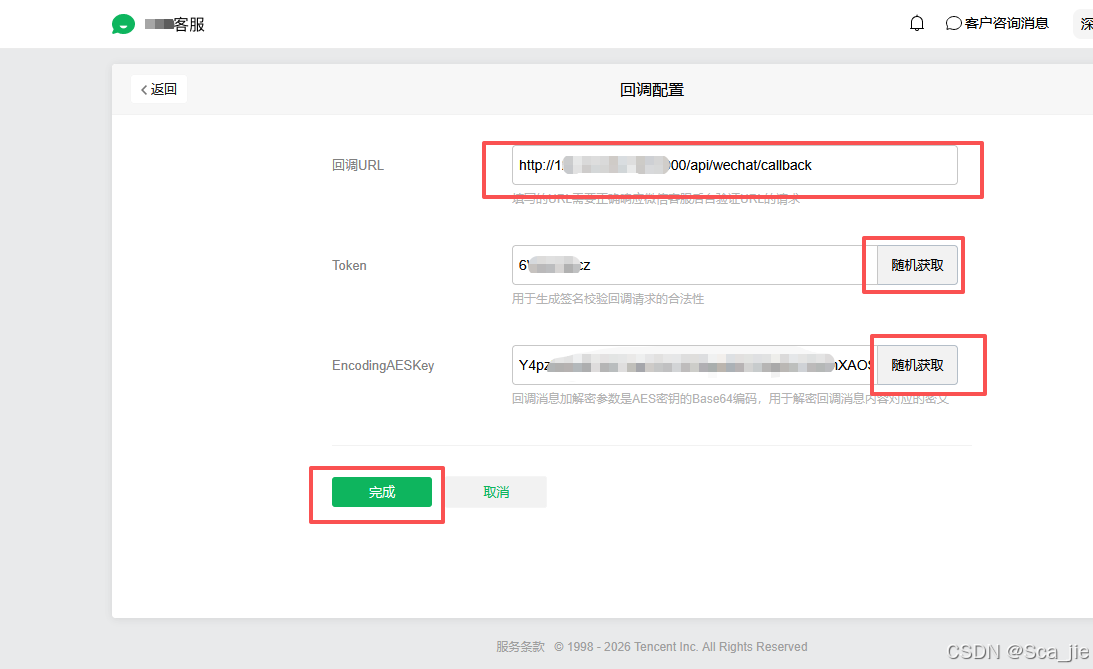
2、填写回调地址,并设置秘钥
回调地址我测试了,不用https域名,直接用【ip地址+端口】的回调也可以通过(反正速通测试而已),秘钥和token随机生成就好了,自己保存下就可以了。
3、代码验证
1)、新建\.env文件存储参数配置
前两个参数就是前面随机生成的token和秘钥,第三个参数在【企业信息】页面,如下图:
bash
# 配置
# 从官方后台获取

# 回调 URL 验证 Token
WECHAT_TOKEN=6********cz

# 消息加解密密钥 (43位字符)
WECHAT_ENCODING_AES_KEY=Y4************************************XAOSu

# 企业 ID
WECHAT_CORP_ID=w***********8af

# 服务器配置
PORT=3000

# 日志配置
LOG_LEVEL=debug
LOG_DIR=
NODE_ENV=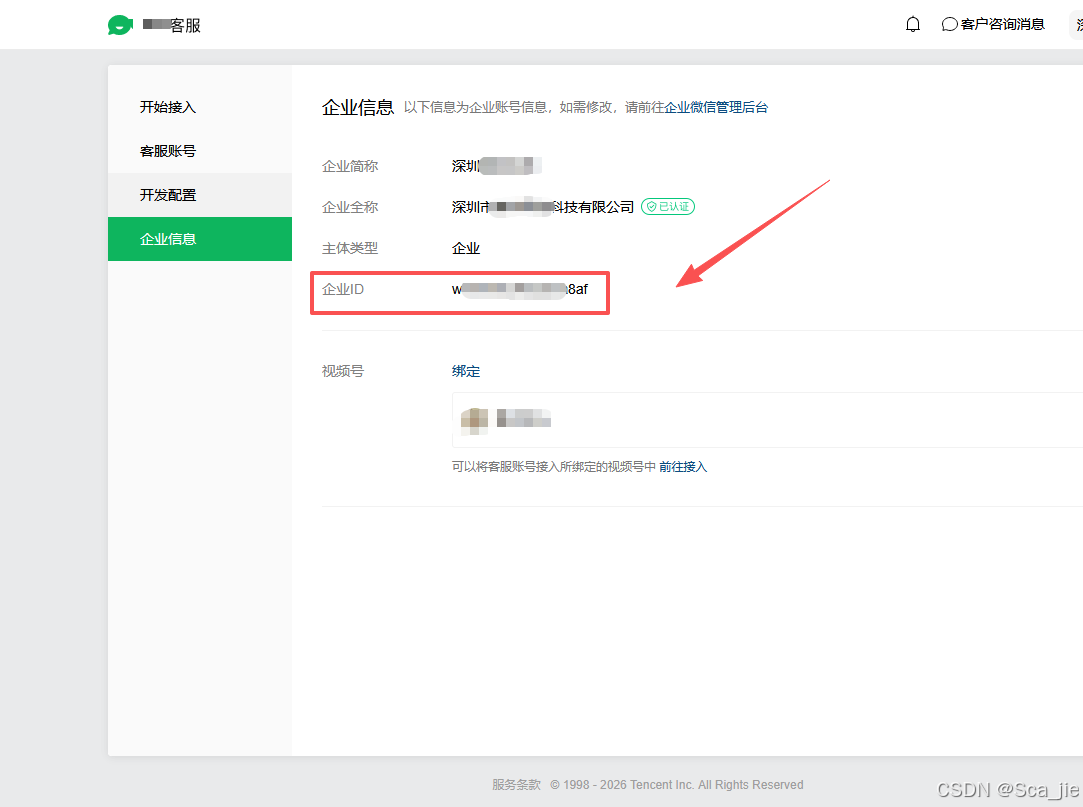
2)、核心验证文件\src\utils\wxCrypt.js
javascript
const crypto = require('crypto');
const { parseString } = require('xml2js');

/**
 * 错误码定义
 */
const ErrorCode = {
    ValidateSignatureError: -40001,
    ParseXmlError: -40002,
    ComputeSignatureError: -40003,
    IllegalAesKey: -40004,
    ValidateCorpidError: -40005,
    EncryptAESError: -40006,
    DecryptAESError: -40007,
    IllegalBuffer: -40008,
    EncodeBase64Error: -40009,
    DecodeBase64Error: -40010,
};

/**
 * 微信消息加解密核心类
 * 基于微信官方 WXBizMsgCrypt 逻辑实现
 */
class WXBizMsgCrypt {
    /**
     * 构造函数
     * @param {string} token - 微信后台配置的 Token
     * @param {string} encodingAesKey - 微信后台配置的 EncodingAESKey
     * @param {string} receiverId - 企业 CorpID
     */
    constructor(token, encodingAesKey, receiverId) {
        this.token = token;
        // 微信 EncodingAESKey 为43位字符,补齐'='后进行Base64解码,取前32字节作为AES密钥
        this.encodingAesKey = encodingAesKey + '=';
        const aesKeyBuffer = Buffer.from(this.encodingAesKey, 'base64');
        this.aesKey = aesKeyBuffer.slice(0, 32);
        this.receiverId = receiverId;
    }

    /**
     * 计算签名
     * @param {string} timestamp - 时间戳
     * @param {string} nonce - 随机数
     * @param {string} data - 待签名数据
     * @returns {string} SHA1 签名
     */
    calSignature(timestamp, nonce, data) {
        const sortArr = [this.token, timestamp, nonce, data].sort();
        const sha1 = crypto.createHash('sha1');
        sha1.update(sortArr.join(''));
        return sha1.digest('hex');
    }

    /**
     * PKCS#7 填充
     * @param {string} plaintext - 明文
     * @param {number} blockSize - 块大小
     * @returns {Buffer} 填充后的明文
     */
    pkcs7Padding(plaintext, blockSize) {
        const padding = blockSize - (Buffer.byteLength(plaintext) % blockSize);
        const padText = Buffer.alloc(padding, padding);
        return Buffer.concat([Buffer.from(plaintext, 'utf8'), padText]);
    }

    /**
     * PKCS#7 去填充
     * @param {Buffer} plaintext - 填充后的明文
     * @param {number} blockSize - 块大小
     * @returns {Buffer} 去填充后的明文
     */
    pkcs7Unpadding(plaintext, blockSize) {
        const plaintextLen = plaintext.length;
        if (plaintextLen === 0 || plaintextLen % blockSize !== 0) {
            throw { code: ErrorCode.DecryptAESError, msg: 'Invalid padding' };
        }
        const paddingLen = plaintext[plaintextLen - 1];
        if (paddingLen < 1 || paddingLen > blockSize) {
            throw { code: ErrorCode.DecryptAESError, msg: 'Invalid padding length' };
        }
        return plaintext.slice(0, plaintextLen - paddingLen);
    }

    /**
     * AES-CBC 加密
     * @param {string} plaintext - 明文
     * @returns {string} Base64 编码的密文
     */
    cbcEncrypt(plaintext) {
        try {
            const aesKey = Buffer.from(this.encodingAesKey, 'base64');
            // 确保密钥为32字节 (AES-256)
            const key = aesKey.slice(0, 32);
            const blockSize = 32;
            const padMsg = this.pkcs7Padding(plaintext, blockSize);

            // 使用密钥的前16字节作为IV,这是微信官方的实现
            const iv = key.slice(0, 16);
            const cipher = crypto.createCipheriv('aes-256-cbc', key, iv);
            cipher.setAutoPadding(false);

            const ciphertext = Buffer.concat([cipher.update(padMsg), cipher.final()]);
            return ciphertext.toString('base64');
        } catch (err) {
            throw { code: ErrorCode.EncryptAESError, msg: err.message };
        }
    }

    /**
     * AES-CBC 解密
     * @param {string} base64EncryptMsg - Base64 编码的密文
     * @returns {Buffer} 解密后的明文
     */
    cbcDecrypt(base64EncryptMsg) {
        try {
            const aesKey = Buffer.from(this.encodingAesKey, 'base64');
            // 确保密钥为32字节 (AES-256)
            const key = aesKey.slice(0, 32);
            const encryptMsg = Buffer.from(base64EncryptMsg, 'base64');

            if (encryptMsg.length < 16) {
                throw { code: ErrorCode.DecryptAESError, msg: 'Encrypted message too short' };
            }

            // 使用密钥的前16字节作为IV
            const iv = key.slice(0, 16);
            const decipher = crypto.createDecipheriv('aes-256-cbc', key, iv);
            decipher.setAutoPadding(false);

            const decrypted = Buffer.concat([decipher.update(encryptMsg), decipher.final()]);
            // 返回原始解密数据,包含 padding
            return decrypted;
        } catch (err) {
            if (err.code) throw err;
            throw { code: ErrorCode.DecryptAESError, msg: err.message };
        }
    }

    /**
     * 解析解密后的明文结构
     * @param {Buffer} plaintext - 解密后的明文
     * @returns {object} 包含 random, msgLen, msg, receiverId
     */
    parsePlainText(plaintext) {
        const blockSize = 32;
        const unpadded = this.pkcs7Unpadding(plaintext, blockSize);

        if (unpadded.length < 20) {
            throw { code: ErrorCode.IllegalBuffer, msg: 'Plaintext too short' };
        }

        const random = unpadded.slice(0, 16);
        const msgLen = unpadded.readUInt32BE(16);

        if (unpadded.length < 20 + msgLen) {
            throw { code: ErrorCode.IllegalBuffer, msg: 'Plaintext invalid length' };
        }

        const msg = unpadded.slice(20, 20 + msgLen).toString('utf8');
        const receiverId = unpadded.slice(20 + msgLen).toString('utf8');

        return { random, msgLen, msg, receiverId };
    }

    /**
     * 验证 URL 签名并解密 echostr
     * @param {string} msgSignature - 消息签名
     * @param {string} timestamp - 时间戳
     * @param {string} nonce - 随机数
     * @param {string} echostr - 加密的 echo 字符串
     * @returns {string} 解密后的 echostr
     */
    verifyURL(msgSignature, timestamp, nonce, echostr) {
        const signature = this.calSignature(timestamp, nonce, echostr);

        if (signature !== msgSignature) {
            throw {
                code: ErrorCode.ValidateSignatureError,
                msg: `签名验证失败: 计算值=${signature}, 期望值=${msgSignature}`
            };
        }

        const plaintext = this.cbcDecrypt(echostr);
        const parsed = this.parsePlainText(plaintext);

        if (this.receiverId && parsed.receiverId !== this.receiverId) {
            throw {
                code: ErrorCode.ValidateCorpidError,
                msg: `CorpID不匹配: 配置=${this.receiverId}, 实际=${parsed.receiverId}`
            };
        }

        return parsed.msg;
    }

    /**
     * 解密消息
     * @param {string} msgSignature - 消息签名
     * @param {string} timestamp - 时间戳
     * @param {string} nonce - 随机数
     * @param {string} postData - XML 请求体
     * @returns {object} 解密后的消息内容
     */
    decryptMsg(msgSignature, timestamp, nonce, postData) {
        return new Promise((resolve, reject) => {
            parseString(postData, (err, parsed) => {
                if (err) {
                    reject({ code: ErrorCode.ParseXmlError, msg: 'XML解析失败' });
                    return;
                }

                try {
                    const encrypt = parsed.xml.Encrypt[0];
                    const signature = this.calSignature(timestamp, nonce, encrypt);

                    if (signature !== msgSignature) {
                        reject({
                            code: ErrorCode.ValidateSignatureError,
                            msg: `签名验证失败: 计算值=${signature}, 期望值=${msgSignature}`
                        });
                        return;
                    }

                    const plaintext = this.cbcDecrypt(encrypt);
                    const parsedText = this.parsePlainText(plaintext);

                    if (this.receiverId && parsedText.receiverId !== this.receiverId) {
                        reject({ code: ErrorCode.ValidateCorpidError, msg: 'Receiver ID mismatch' });
                        return;
                    }

                    resolve(JSON.parse(parsedText.msg));
                } catch (innerErr) {
                    reject(innerErr);
                }
            });
        });
    }

    /**
     * 加密消息 (用于回复微信)
     * @param {string} replyMsg - 回复消息内容
     * @param {string} timestamp - 时间戳
     * @param {string} nonce - 随机数
     * @returns {string} 加密后的 XML 字符串
     */
    encryptMsg(replyMsg, timestamp, nonce) {
        const xml2js = require('xml2js');
        const randomStr = crypto.randomBytes(16).toString('binary');
        const msgBuffer = Buffer.from(replyMsg, 'utf8');
        const msgLenBuffer = Buffer.alloc(4);
        msgLenBuffer.writeUInt32BE(msgBuffer.length, 0);

        const plaintext = Buffer.concat([
            Buffer.from(randomStr, 'binary'),
            msgLenBuffer,
            msgBuffer,
            Buffer.from(this.receiverId, 'utf8')
        ]);

        const ciphertext = this.cbcEncrypt(plaintext.toString('binary'));
        const signature = this.calSignature(timestamp, nonce, ciphertext);

        const msg4Send = {
            xml: {
                Encrypt: { _: ciphertext },
                MsgSignature: signature,
                TimeStamp: timestamp,
                Nonce: { _: nonce }
            }
        };

        const builder = new xml2js.Builder({ cdata: true });
        return builder.buildObject(msg4Send);
    }
}

module.exports = { WXBizMsgCrypt, ErrorCode };
3)、其他相关文件
主启动文件\src\app.js
javascript
require('dotenv').config();
const express = require('express');
const wechatRoutes = require('./routes/wechat');
const logger = require('./utils/logger');

const app = express();
const PORT = process.env.PORT || 3000;

/**
 * 中间件配置
 */
app.use(express.json({ limit: '2mb' }));
app.use(express.urlencoded({ extended: true, limit: '2mb' }));

/**
 * HTTP 请求日志中间件
 */
app.use((req, res, next) => {
    const start = Date.now();
    res.on('finish', () => {
        const duration = Date.now() - start;
        logger.info(`${req.method} ${req.originalUrl} ${res.statusCode} ${duration}ms`, {
            method: req.method,
            url: req.originalUrl,
            status: res.statusCode,
            duration,
            ip: req.ip
        });
    });
    next();
});

/**
 * 路由配置
 */
app.use('/api/wechat', wechatRoutes);

/**
 * 健康检查接口
 */
app.get('/health', (req, res) => {
    res.json({ status: 'ok', timestamp: new Date().toISOString() });
});

/**
 * 错误处理中间件
 */
app.use((err, req, res, next) => {
    logger.error('未处理的错误', { error: err.message, stack: err.stack, url: req.originalUrl });
    res.status(500).json({ error: 'Internal Server Error' });
});

/**
 * 启动服务器
 */
app.listen(PORT, () => {
    logger.info(`微信客服 API 服务已启动: http://localhost:${PORT}`);
    logger.info(`回调URL: http://localhost:${PORT}/api/wechat/callback`);
});

module.exports = app;
路由文件\src\routes\wechat.js
javascript
const express = require('express');
const { WXBizMsgCrypt, ErrorCode } = require('../utils/wxCrypt');
const logger = require('../utils/logger');

/**
 * 获取错误码对应的提示信息
 * @param {number} code - 错误码
 * @returns {string} 错误提示
 */
function getErrorHint(code) {
    const hints = {
        [-40001]: '签名验证失败: 检查Token是否正确',
        [-40002]: 'XML解析失败: 检查请求体格式',
        [-40004]: '非法AES密钥: 检查EncodingAESKey是否正确',
        [-40005]: 'CorpID不匹配: 检查CorpID是否与微信后台一致',
        [-40007]: 'AES解密失败: 检查EncodingAESKey是否正确',
        [-40008]: '非法缓冲区: 解密数据格式异常'
    };
    return hints[code] || '未知错误';
}

const router = express.Router();

/**
 * 获取微信加解密实例
 * @returns {WXBizMsgCrypt}
 */
function getWXBizMsgCrypt() {
    return new WXBizMsgCrypt(
        process.env.WECHAT_TOKEN,
        process.env.WECHAT_ENCODING_AES_KEY,
        process.env.WECHAT_CORP_ID
    );
}

/**
 * GET 请求 - URL 验证接口
 * 微信客服后台配置回调URL时,微信会发送GET请求进行验证
 */
router.get('/callback', (req, res) => {
    const { msg_signature, timestamp, nonce, echostr } = req.query;

    logger.info('收到URL验证请求', { timestamp, nonce });

    if (!msg_signature || !timestamp || !nonce || !echostr) {
        logger.warn('URL验证参数缺失', { msg_signature: !!msg_signature, timestamp: !!timestamp, nonce: !!nonce, echostr: !!echostr });
        return res.status(400).send('Missing required parameters');
    }

    try {
        const wxcpt = getWXBizMsgCrypt();
        const echostr_decrypted = wxcpt.verifyURL(msg_signature, timestamp, nonce, echostr);

        logger.info('URL验证成功', { timestamp, nonce });
        // 必须原样返回解密后的 echostr
        res.send(echostr_decrypted);
    } catch (err) {
        const errorMsg = err.msg || err.message || err;
        logger.error('URL验证失败', {
            error: errorMsg,
            code: err.code,
            timestamp,
            nonce,
            hint: getErrorHint(err.code)
        });
        res.status(500).send('Verification failed');
    }
});

/**
 * POST 请求 - 接收消息接口
 * 微信客服发送消息事件时,会通过POST请求推送数据
 */
router.post('/callback', express.text({ type: '*/xml' }), async (req, res) => {
    const { msg_signature, timestamp, nonce } = req.query;

    logger.info('收到消息回调请求', { timestamp, nonce });

    if (!msg_signature || !timestamp || !nonce) {
        logger.warn('消息回调参数缺失', { msg_signature: !!msg_signature, timestamp: !!timestamp, nonce: !!nonce });
        return res.status(400).send('Missing required parameters');
    }

    try {
        const wxcpt = getWXBizMsgCrypt();
        const msg = await wxcpt.decryptMsg(msg_signature, timestamp, nonce, req.body);

        logger.info('消息解密成功', { eventType: msg.EventType, msgId: msg.MsgId, timestamp, nonce });

        // 根据 msg.EventType 判断事件类型 (kf_msg_or_event, enter_tempsession 等)
        switch (msg.EventType) {
            case 'kf_msg_or_event':
                logger.info('客户消息事件', { msg });
                break;
            case 'enter_tempsession':
                logger.info('用户进入会话事件', { msg });
                break;
            default:
                logger.warn('未知事件类型', { eventType: msg.EventType, msg });
        }

        // 必须返回success表示接收成功
        res.send('success');
    } catch (err) {
        const errorMsg = err.msg || err.message || err;
        logger.error('消息处理失败', {
            error: errorMsg,
            code: err.code,
            timestamp,
            nonce,
            hint: getErrorHint(err.code)
        });
        res.status(500).send('Processing failed');
    }
});

module.exports = router;
日志文件\src\utils\logger.js
javascript
const winston = require('winston');
const DailyRotateFile = require('winston-daily-rotate-file');
const path = require('path');

const LOG_DIR = process.env.LOG_DIR || path.join(__dirname, '../../logs');

/**
 * 日志格式定义
 */
const logFormat = winston.format.combine(
    winston.format.timestamp({ format: 'YYYY-MM-DD HH:mm:ss' }),
    winston.format.errors({ stack: true }),
    winston.format.printf(({ timestamp, level, message, stack, ...meta }) => {
        const metaStr = Object.keys(meta).length ? ` ${JSON.stringify(meta)}` : '';
        if (stack) {
            return `[${timestamp}] [${level.toUpperCase()}] ${message}\n${stack}${metaStr}`;
        }
        return `[${timestamp}] [${level.toUpperCase()}] ${message}${metaStr}`;
    })
);

/**
 * 控制台输出格式(带颜色)
 */
const consoleFormat = winston.format.combine(
    winston.format.timestamp({ format: 'YYYY-MM-DD HH:mm:ss' }),
    winston.format.colorize(),
    winston.format.printf(({ timestamp, level, message, stack }) => {
        if (stack) {
            return `[${timestamp}] ${level}: ${message}\n${stack}`;
        }
        return `[${timestamp}] ${level}: ${message}`;
    })
);

/**
 * 按日期轮转的文件传输配置
 */
const fileTransport = new DailyRotateFile({
    dirname: LOG_DIR,
    filename: 'app-%DATE%.log',
    datePattern: 'YYYY-MM-DD',
    maxSize: '20m',
    maxFiles: '14d',
    format: logFormat
});

/**
 * 错误日志单独文件
 */
const errorFileTransport = new DailyRotateFile({
    dirname: LOG_DIR,
    filename: 'error-%DATE%.log',
    datePattern: 'YYYY-MM-DD',
    level: 'error',
    maxSize: '20m',
    maxFiles: '30d',
    format: logFormat
});

/**
 * 创建 logger 实例
 */
const logger = winston.createLogger({
    level: process.env.LOG_LEVEL || 'info',
    transports: [
        fileTransport,
        errorFileTransport
    ]
});

// 非生产环境同时输出到控制台
if (process.env.NODE_ENV !== 'production') {
    logger.add(new winston.transports.Console({
        format: consoleFormat
    }));
}

module.exports = logger;
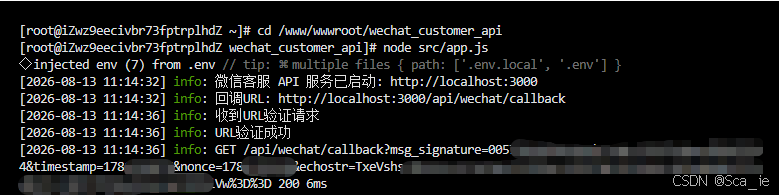
4、验证通过效果
1)、后台效果:
2)、官方效果