为什么要配置子 Agent?
两个现实痛点。
痛点一:GPT-5.6 Sol 太贵了。
用过 Codex 的人都知道,GPT-5.6(Sol)推理确实强,但账单也真的顶不住。一个稍微复杂点的开发任务跑下来,额度肉眼可见地往下掉。虽然 ChatGPT 套餐会有额度重置,但在面对大量任务开发的时候,Sol 的额度根本不够用------还没干到一半,额度就见了底。
如果所有活都让 Sol 一个模型干,那就像让一个高级架构师亲自去搬砖------不是不行,是太贵了。
而便宜的模型真的不能打吗?
看一组数据。在 DeepSWE(软件工程能力评测)排行榜上,gpt-5.6-luna 以 $0.61 的单任务成本打出了最高分,而 Claude Opus 5、GPT-5.6 等更贵的模型花了数倍的成本,得分反而不如 Luna。换句话说,在大量执行类任务上,Luna 的性价比碾压所有对手------花着十分之一的钱,干着一样甚至更好的活。
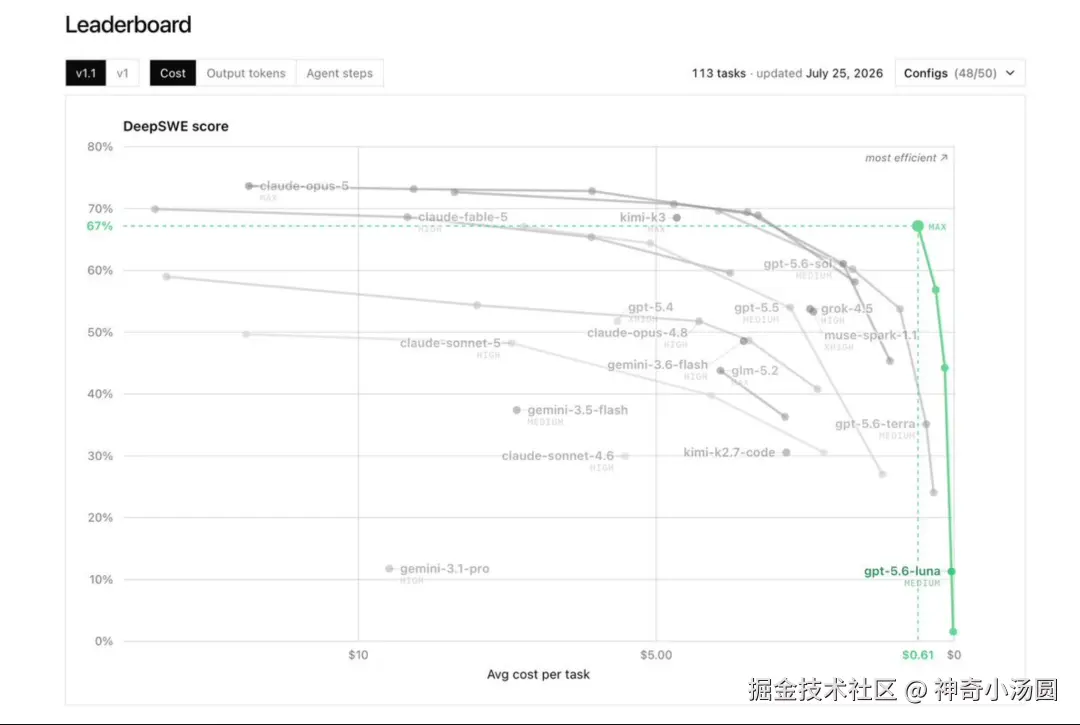
这就是为什么大家突然开始研究怎么把 Luna 配置成子 Agent:不是因为它"凑合能用",而是因为它在执行类任务上又便宜又强。
痛点二:好模型应该专注规划,而不是被脏活淹没。
当你把所有东西都塞进一个对话------需求讨论、代码探索、测试日志、报错堆栈------模型的有效注意力会被逐渐稀释。它开始忘记之前的约定、重复犯错、幻觉越来越严重。
OpenAI 官方把这种现象称为**Context Rot(上下文腐烂)** :
Context pollution : useful information gets buried under noisy intermediate output.Context rot: performance degrades as the chat fills up with less relevant details.
你在一个越来越乱的桌子上办公,重要文件被埋在废纸下面。
所以正确的做法是------让贵的大模型只做规划和决策,把执行类的脏活扔给便宜的小模型。 这就是子 Agent 工作流。
核心思路:Sol + Luna 分工模式
这几天 Twitter 上大家疯传的方案,本质就一句话:
让 Sol(GPT-5.6)留在主线程当军师负责方案设计,把 Luna(GPT-5.6-luna)配置成子 Agent 当搬砖工负责并行执行。
为什么这么配?
有人算过一笔账:ChatGPT Plus 套餐用这个方案,能跑出 Pro 套餐 20 倍的效果。这就是为什么那篇帖子叫「如何让你的 Codex 拥有无限子弹」。
配置教程:三步搞定
第一步:打开 Max 推理强度
进入 Codex 的:
Settings → Configuration → Available reasoning efforts勾选Max。
如果不打开这个选项,后面配置model_reasoning_effort = "max"不会生效。
第二步:创建子 Agent 配置文件
在 Codex 对话中直接输入以下提示词(推荐用这个优化版,来自 @Lonely__MH 的完善):
ini
请在 ~/.codex/agents/luna-worker.toml 创建一个全局自定义子代理。

配置要求:
- 代理名称:luna_worker
- 模型:gpt-5.6-luna
- 推理强度:max
- 定位:快速完成边界明确、可重复的小型任务
- 工作方式:严格遵守任务范围,独立执行,在可行时验证结果,并简洁汇报结果、相关文件路径和注意事项

请写入以下完整 TOML 配置:

name = "luna_worker"
description = "Fast worker for clear, narrowly scoped, and repeatable tasks."
developer_instructions = """
Handle the assigned task strictly within its stated scope.
Work independently and use appropriate tools when needed.
Verify the result when practical.
Do not make unrelated changes.
Return a concise summary containing the result, relevant file paths, verification performed, and any important caveats.
"""
model = "gpt-5.6-luna"
model_reasoning_effort = "max"

执行要求:
1. 如果 ~/.codex/agents 目录不存在,请创建它。
2. 如果目标文件已经存在,先显示现有内容,不要直接覆盖;确认内容是否需要更新。
3. 创建或更新后,读取文件并验证最终配置。
4. 确保 TOML 语法有效。
5. 最后告诉我文件位置、完整配置内容以及如何在提示词中调用 luna_worker。
Codex 会自动帮你创建配置文件。执行后你会看到类似这样的文件:
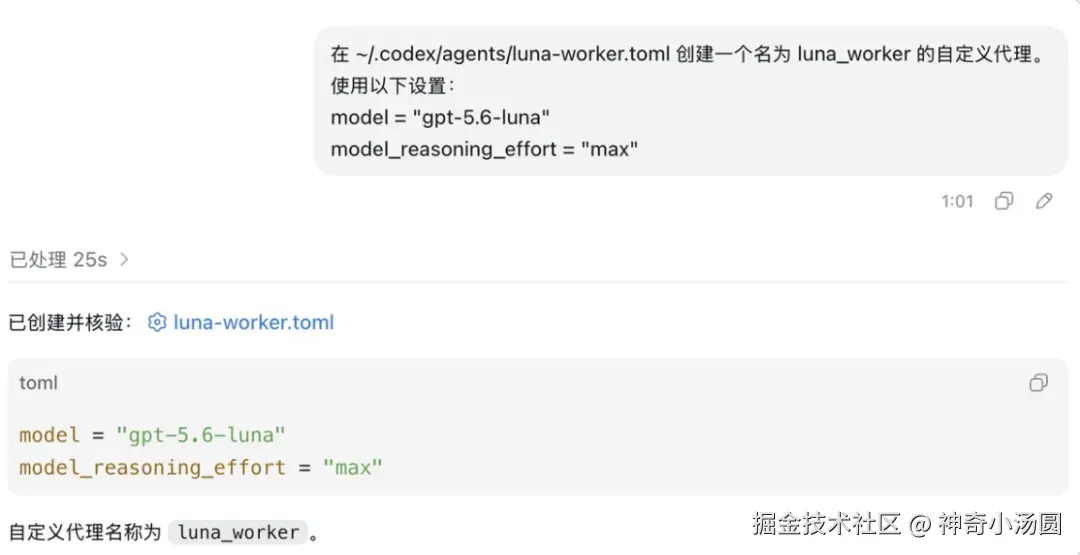
文件路径 :~/.codex/agents/luna-worker.toml
ini
name="luna_worker"
description="Fast worker for clear, narrowly scoped, and repeatable tasks."
developer_instructions="""
Handle the assigned task strictly within its stated scope.
Work independently and use appropriate tools when needed.
Verify the result when practical.
Do not make unrelated changes.
Return a concise summary containing the result, relevant file paths, verification performed, and any important caveats.
"""
model="gpt-5.6-luna"
model_reasoning_effort="max"
第三步:开始使用
以后在 Codex 对话中,这样调用你的子 Agent:
css
请使用 luna_worker 子代理完成以下任务:[填写你的具体任务]。等待子代理完成后,检查并汇总它的结果。比如:
arduino
请使用 luna_worker 子代理完成以下任务:检查 src/ 目录下所有 TypeScript 文件的 import 是否有循环依赖。等待子代理完成后,汇总结果。Sol 会收到指令,派 Luna 去干活,Luna 干完回来汇报,Sol 整合后给你最终答案。
进阶:不止一个子 Agent
OpenAI 官方文档里给了更硬核的玩法------你可以配置多个不同职责的子 Agent,像团队一样协作。
场景一:代码审查三人组
来自官方文档的示例,三个子 Agent 各司其职:
Agent 1 --- 代码探索者(pr_explorer)
ini
name="pr_explorer"
description="Read-only codebase explorer for gathering evidence before changes are proposed."
model="gpt-5.6-luna"
model_reasoning_effort="medium"
sandbox_mode="read-only"
developer_instructions="""
Stay in exploration mode.
Trace the real execution path, cite files and symbols, and avoid proposing fixes unless the parent agent asks for them.
Prefer fast search and targeted file reads over broad scans.
"""
Agent 2 --- 代码审查员(reviewer)
ini
name="reviewer"
description="PR reviewer focused on correctness, security, and missing tests."
model="gpt-5.6-terra"
model_reasoning_effort="high"
sandbox_mode="read-only"
developer_instructions="""
Review code like an owner.
Prioritize correctness, security, behavior regressions, and missing test coverage.
Lead with concrete findings, include reproduction steps when possible, and avoid style-only comments unless they hide a real bug.
"""
Agent 3 --- 文档研究员(docs_researcher)
ini
name="docs_researcher"
description="Documentation specialist that uses the docs MCP server to verify APIs and framework behavior."
model="gpt-5.6-luna"
model_reasoning_effort="medium"
sandbox_mode="read-only"
developer_instructions="""
Use the docs MCP server to confirm APIs, options, and version-specific behavior.
Return concise answers with links or exact references when available.
Do not make code changes.
"""
然后在 Codex 里这样用:
arduino
Review this branch against main. Have pr_explorer map the affected code paths, reviewer find real risks, and docs_researcher verify the framework APIs that the patch relies on.三个 Agent 并行工作,各自独立上下文,互不干扰,最后主 Agent 汇总结果。
场景二:前端调试三人组
官方文档还给了一个前端调试场景------一个 Agent 操作浏览器复现 bug,一个 Agent 追踪代码路径,最后一个 Agent 只负责修复:
- •browser_debugger:用浏览器工具复现问题,截图 + 控制台日志
- •code_mapper:只读模式追踪代码路径
- •ui_fixer:问题明确后,做最小改动修复
这个模式特别适合排查 UI 回归、跨组件交互 bug。
OpenAI 模型选择速查
配置子 Agent 时最纠结的就是选哪个模型。官方文档给了明确建议:
推理强度(model_reasoning_effort)选择:
省钱技巧 :子 Agent 大部分场景用gpt-5.6-luna+medium就够了。只有需要深度推理的审查类任务才上high或max。
全局配置参考
在项目的.codex/config.toml里,你可以设全局子 Agent 参数:
ini
[agents]
# 开关子 Agent 功能(默认开启)
enabled=true

# 同时最多开几个子 Agent 线程
max_concurrent_threads_per_session=8

# 子 Agent 默认模型(不指定时用这个)
default_subagent_model="gpt-5.6-luna"

# 子 Agent 默认推理强度
default_subagent_reasoning_effort="medium"
内置 Agent 说明
Codex 其实自带了三个内置 Agent,不配置也能用:
如果你创建的自定义 Agent 名字和内置的冲突(比如也叫explorer),你的配置优先级更高。
几个实操建议
1. 子 Agent 适合"读多写少"
官方明确说了:并行子 Agent 最适合探索、测试、总结这类只读任务。多个 Agent 同时改代码容易冲突。
2. 好的子 Agent 是"窄而偏执"的
每个子 Agent 只做一件事,指令写得越具体越好。别让它"顺便看看其他地方有没有问题"------这会让它跑偏。
3. 子 Agent 消耗更多 Token
每个子 Agent 有独立的上下文和工具调用,token 消耗比单 Agent 高。但对于复杂任务,质量提升值得这个成本。
4. 沙箱权限控制
只读的子 Agent 记得设sandbox_mode = "read-only",防止误操作。只有明确需要写权限的 Agent 才给workspace-write。
5. CLI 中用 管理线程
在 Codex CLI 里,用/agent命令可以查看和切换活跃的子 Agent 线程,实时查看它们的工作进展。
手动触发 vs 自动触发
目前 Codex 需要你主动要求才会启动子 Agent。比如:
- • "spawn two agents..."
- • "delegate this work in parallel..."
- • "use one agent per point..."
- • "请使用 luna_worker 子代理完成..."
如果项目AGENTS.md或 Skill 指令里有委托规则,Codex 也会自动遵守。
总结
核心心智模型:主 Agent 是大脑,子 Agent 是手脚。大脑不要干体力活。