第 4 讲 · 组合与装载:runProfile → boot()
系列 :我在Deepseek harness中增加了桌面版,将逐行代码解析我是怎么增加的,希望你也能创建属于自己的桌面版Agent 本讲目标 :逐段吃透从
runProfile到boot()的装载链路------四层 patch 如何合并、boot()如何创建 Context 并装载整棵插件树、以及"config-only HMR"如何让cordis.patch.yml的编辑热生效。 逐行文件 :apps/cli/src/profile-boot.ts(301 行,关键段)+packages/boot/app-boot/src/index.ts(boot 函数,约 46 行全行)
代码仓库 :github.com/tslcarmack/...Desktop App 运行效果图
🎯 本讲地图
scss
runProfile({ profile: 'desktop', ... })         [profile-boot.ts]
  ├─► composeProfile('desktop', patches)
  │      ├─► prepareProfile()       → 修复模块回退 + 加载 profile + 重写空根
  │      ├─► bundlePatches          → dsh-base + dsh-desktop-app 的 patch 层
  │      ├─► profile.patches        → ~/.dsh/profiles/desktop/cordis.patch.yml
  │      ├─► homePatches            → ~/.dsh/cordis.patch.yml
  │      └─► overlays               → --patch + telemetry 开关
  ├─► boot(NAME, rootConfig, allPatches, prepare)   [app-boot/index.ts]
  │      ├─► new Context()
  │      ├─► ctx.plugin(Loader)     → 安装 Loader 插件
  │      ├─► prepare?.(ctx)         → 注入环境/命令行快照
  │      ├─► mountRootInclude()     → 装载插件树(核心!)
  │      ├─► loader.await()         → 等所有 entry 启动
  │      └─► assertEntriesActivated → 审计:有 entry 没启动就报错
  └─► watchUserPatches()            → config-only HMR(编辑即热生效)
📁 1. composeProfile:四层 patch 合并(profile-boot.ts 第 142-171 行)
ts
142  function composeProfile(
143    name: string,
144    patchFiles: readonly string[],
145  ): ComposedProfile {
146    const profile = prepareProfile(name)
147    const homePatches = loadOptionalPatches(NAME, homePatchPath()) ?? []
148    const overlays = patchFiles.flatMap(file => loadOverlayPatches(NAME, resolve(file)))
149    const bundlePatches = profile.layers.flatMap(layer => layer.patches)
150    const rows = new Map()
151    for (const row of composeEntries([bundlePatches, profile.patches, homePatches, overlays])) {
152      if (typeof row.id === 'string') rows.set(row.id, row)
153    }
154    const composedOverlays = [...overlays]
...
168    const telemetryPatch = resolveTelemetryPatch(process.env.DSH_TELEMETRY_DISABLED, rows.has(TELEMETRY_ROW_ID))
169    if (telemetryPatch !== undefined) composedOverlays.push(telemetryPatch)
170    return { profile, bundlePatches, homePatches, overlays: composedOverlays, rows }
171  }
逐段讲解:
| 行 | 内容 | 说明 |
|---|---|---|
| 146 | prepareProfile(name) |
修复模块回退 + 加载 profile 元数据 + 重写空根 cordis.yml |
| 147 | homePatches |
机器级 ~/.dsh/cordis.patch.yml(跨 profile 生效,优先级高于 profile 层) |
| 148 | overlays |
--patch 参数指向的文件(可重复) |
| 149 | bundlePatches |
desktop = dsh-base, dsh-desktop-app 两个 bundle 的 patch 拼接 |
| 151 | composeEntries([...]) |
核心合并函数:按序应用四组 patch,同 id 后层胜出 |
| 152-153 | rows |
建 id → 行的索引,供后面的"telemetry 开关"检查该行是否存在 |
| 168-169 | telemetry 开关 | DSH_TELEMETRY_DISABLED 非空即禁用遥测行(隐私开关:宁错关不误开) |
1.1 prepareProfile(第 98-103 行)
ts
export function prepareProfile(name: string, userLayer = true): Profile {
  healProfilesModuleFallback(INSTALL_ANCHOR)
  const profile = loadProfile(NAME, name, INSTALL_ANCHOR, undefined, { userLayer })
  writeFileSync(join(profile.dir, PROFILE_ROOT_FILENAME), PROFILE_ROOT_CONFIG)
  return profile
}healProfilesModuleFallback:修复 profile 目录下的符号链接 (你之前遇到过的.dsh\profiles\node_modules损坏问题就是这里处理的)。loadProfile:读取~/.dsh/profiles/desktop/package.json的dsh.profile.bundles。- 重写
cordis.yml为空根[]------因为整棵树都是 patch 层,根必须保持空(防止 Loader 写回导致 bundle 行重复)。
📁 2. boot():装载整棵树(app-boot/index.ts 第 760-805 行,全行)
ts
760  export async function boot(
761    binName: string,
762    absoluteConfigPath: string,
763    patches?: PatchOptions[],
764    prepare?: (ctx: Context) => Promise | void,
765    bareModuleBaseUrl?: string,
766  ): Promise {
767    const ctx = new Context()
768    let stage = 'host preparation failed'
769    try {
770      ctx.baseUrl = pathToFileURL(dirname(absoluteConfigPath)).href + '/'
771      ctx.provide('dshHomePath', dshHomePath)
772      await ctx.plugin(Loader)
773      await prepare?.(ctx)
774      stage = 'plugin tree failed to load'
775      await mountRootInclude(ctx, absoluteConfigPath, patches, bareModuleBaseUrl)
776      await ctx.get('loader')?.await()
777      if (ctx.get('loader') === undefined) return ctx
778      await assertEntriesActivated(ctx, binName)
779      return ctx
780    } catch (cause) {
781      await ctx.fiber.dispose()
782      const detail = cause instanceof Error ? cause.message : String(cause)
783      let deepest: unknown = cause
784      while (deepest instanceof Error && deepest.cause !== undefined) deepest = deepest.cause
785      const stack = deepest instanceof Error && deepest !== cause ? `\n${deepest.stack ?? deepest.message}` : ''
786      throw new Error(`${binName}: ${stage}: ${detail}${stack}`, { cause })
787    }
788  }
逐行讲解:
| 行 | 内容 | 说明 |
|---|---|---|
| 767 | new Context() |
创建 Cordis 根上下文------一切插件的宿主 |
| 768 | stage = 'host preparation failed' |
失败标签:prepare 失败 = 宿主问题,不是插件树问题(两个阶段两种诊断) |
| 770 | ctx.baseUrl = ... |
以 config 文件目录为基准,供相对路径解析 |
| 771 | ctx.provide('dshHomePath', dshHomePath) |
注入 dshHomePath 工具函数(供 !!js dshHomePath('storages') 这类表达式使用) |
| 772 | await ctx.plugin(Loader) |
安装 Loader 插件------装载器的装载器 |
| 773 | await prepare?.(ctx) |
第 3 讲 main.ts 传入的 prepare:provideCmdline + env 快照(在任何插件挂载前,保证插件解析环境值时来源一致) |
| 774 | stage = 'plugin tree failed to load' |
切换失败标签 |
| 775 | mountRootInclude(...) |
装载插件树(下一节详解) |
| 776 | loader.await() |
等待所有 entry 启动/失败 |
| 777 | 二次检查 | 若树已被 dispose(surface 提前退出),直接返回 |
| 778 | assertEntriesActivated |
最终审计:有 entry 从未激活(pending/failed)就抛错,列出等待的服务名 |
| 780-786 | 失败处理 | 先 dispose 部分 Context(清理半棵树)→ 剥离最深 cause 的 stack 附到诊断上(保留真实失败点) |
📁 3. mountRootInclude:装载的最后一公里
mountRootInclude 内部大致流程(函数在 index.ts 前文,这里讲机制):
scss
mountRootInclude(ctx, configPath, patches)
  ├─► include 插件解析 cordis.yml(空根 [])
  ├─► 应用 patches(bundle 层 → profile 层 → home 层 → overlays)
  ├─► 每个 entry 按 id 插入/覆写
  └─► Loader 逐个 entry:解析插件包 → apply(ctx) → 挂载服务
核心机制(为什么能"一切皆插件"):
include(cordis-plugin-include)负责配置行的解析与合并。Loader(cordis-plugin-loader)负责代码 的装载------按 entry 的plugin字段解析包,调用其apply(ctx),所有注册都是 effect(卸载自动撤销)。- 两者是 Cordis 生态的"配置层 + 运行时层",dsh 在它们之上叠了 profile/patch 组合语义。
📁 4. config-only HMR(profile-boot.ts 第 268-298 行)
ts
268    if (!signalShutdown.signal.aborted
269      && ctx.fiber.state === FiberState.ACTIVE
270      && ctx.get('loader') !== undefined) {
271      try {
279        if (ctx.get('hmr') === undefined) {
280          if (ctx.get('timer') === undefined) {
281            await ctx.loader.create({ name: '@deepseek-ai/cordis-plugin-timer' })
282          }
283          await ctx.loader.create({ name: '@deepseek-ai/cordis-plugin-hmr', config: { root: [] } })
284        }
285        await watchUserPatches(ctx, {
286          binName: NAME,
287          filename: composed.profile.patchPath,
288          compose: composeLive,
289        })
290        await watchUserPatches(ctx, {
291          binName: NAME,
292          filename: homePatchPath(),
293          compose: composeLive,
294        })
295      } catch (error) {
296        suppressShutdownError(ctx, signalShutdown.signal, error)
297      }
298    }
逐段讲解:
- 第 268-270 行:三个前提------未收到退出信号、树还活着、Loader 在。
- 第 279-284 行 :如果组合里没有 HMR 服务(desktop-app 明确禁用了共享的
hmr行,见第 5 讲),就挂一个 watch-only 的 hmr 实例(root: []无模块根,只 watch 配置)。 - 第 285-294 行 :监听两个用户 patch 文件(profile 层 + home 层)------编辑即热生效,不用重启(bundle 层不可被用户编辑,所以不 watch)。
composeLive(第 240-245 行):每次重组都structuredClone全量 patch------注释解释得很清楚:include 的 insert 是按引用推进树的,复用同一个解析对象会把用户覆盖烤进 bundle 默认行,导致撤销失效。
🖼️ 第 4 讲流程图
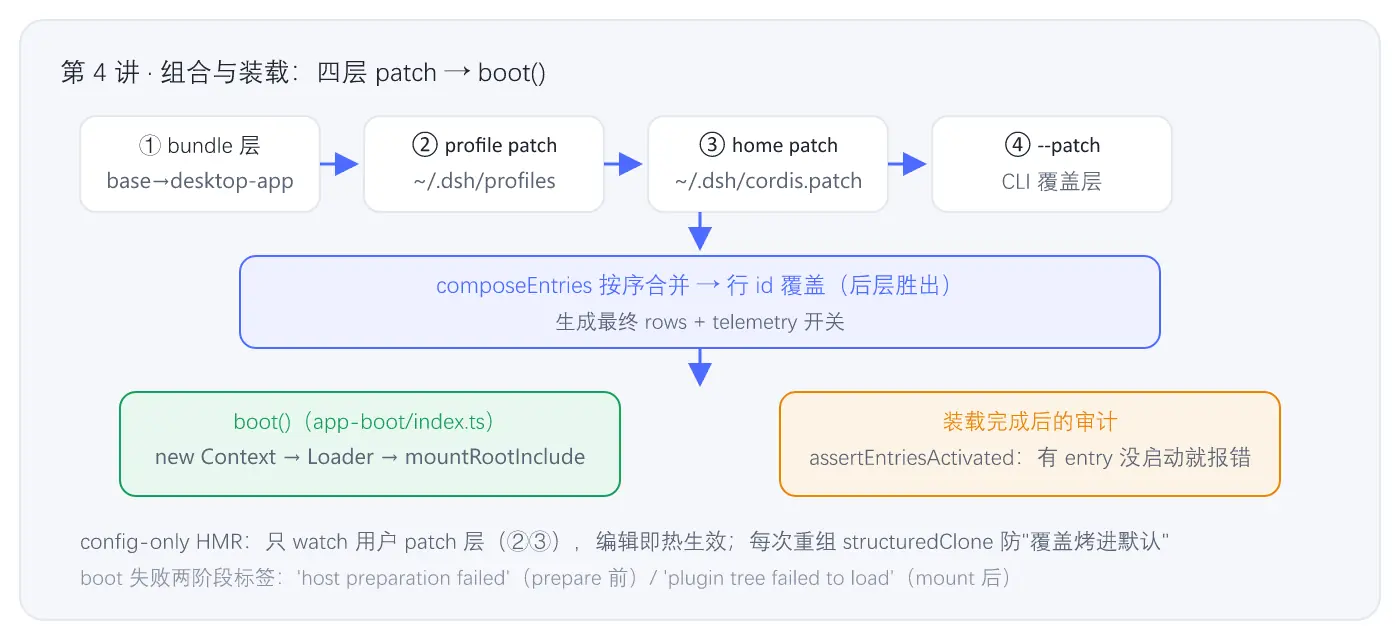
图 4-1 · 从 composeProfile 到 boot 的完整装载链
⚙️ 机制小结
- 四层 patch :bundle(base+desktop-app)→ profile 层 → home 层 → overlays,同 id 后层胜出,根永远是空
[]。 - boot() 三段式:创建 Context → 安装 Loader + prepare → mountRootInclude 装载 → 审计激活。两阶段失败标签让诊断精准。
- 可逆注册的落地 :所有插件通过 effect 注册,
ctx.fiber.dispose()一处调用即可拆掉整棵树(第 3 讲窗口关闭就是这么做的)。 - config-only HMR:只 watch 用户 patch 层,bundle 层不动;每次重组全量 clone 防止"覆盖烤进默认"。
- telemetry 隐私开关 :
DSH_TELEMETRY_DISABLED任何非空值都禁用(宁错关不误开)。
🧪 动手验证
sh
# 1) 看 desktop 组合树的层级注释(每个 bundle 的标记行)
cd D:\code\deepseek-harness
node apps/cli/lib/bin.js --profile desktop --dump-config | grep "^# =="

# 2) 数一下 desktop 树总行数
node apps/cli/lib/bin.js --profile desktop --dump-config | wc -l

# 3) 验证 config-only HMR:改 ~/.dsh/profiles/desktop/cordis.patch.yml 加一行
#    然后看桌面窗口是否热生效(无需重启)
📚 深入指引
| 文件 | 作用 |
|---|---|
apps/cli/src/profile-boot.ts |
组合 + boot + HMR(本讲关键段) |
packages/boot/app-boot/src/index.ts |
boot / mountRootInclude / assertEntriesActivated |
packages/boot/app-boot/src/profile.ts |
loadProfile:bundle 名 → patch 文件解析 |
vendor/cordis/ |
Loader / Include 的 vendored 源码 |
下一讲预告 :desktop-app bundle 如何"改造"dsh------387 行的 cordis.patch.yml 里藏着什么(desktopRuntime 服务从哪来、为什么禁用了 HMR、浏览器端插件怎么组织)。→ 第 5 讲:desktop-app bundle